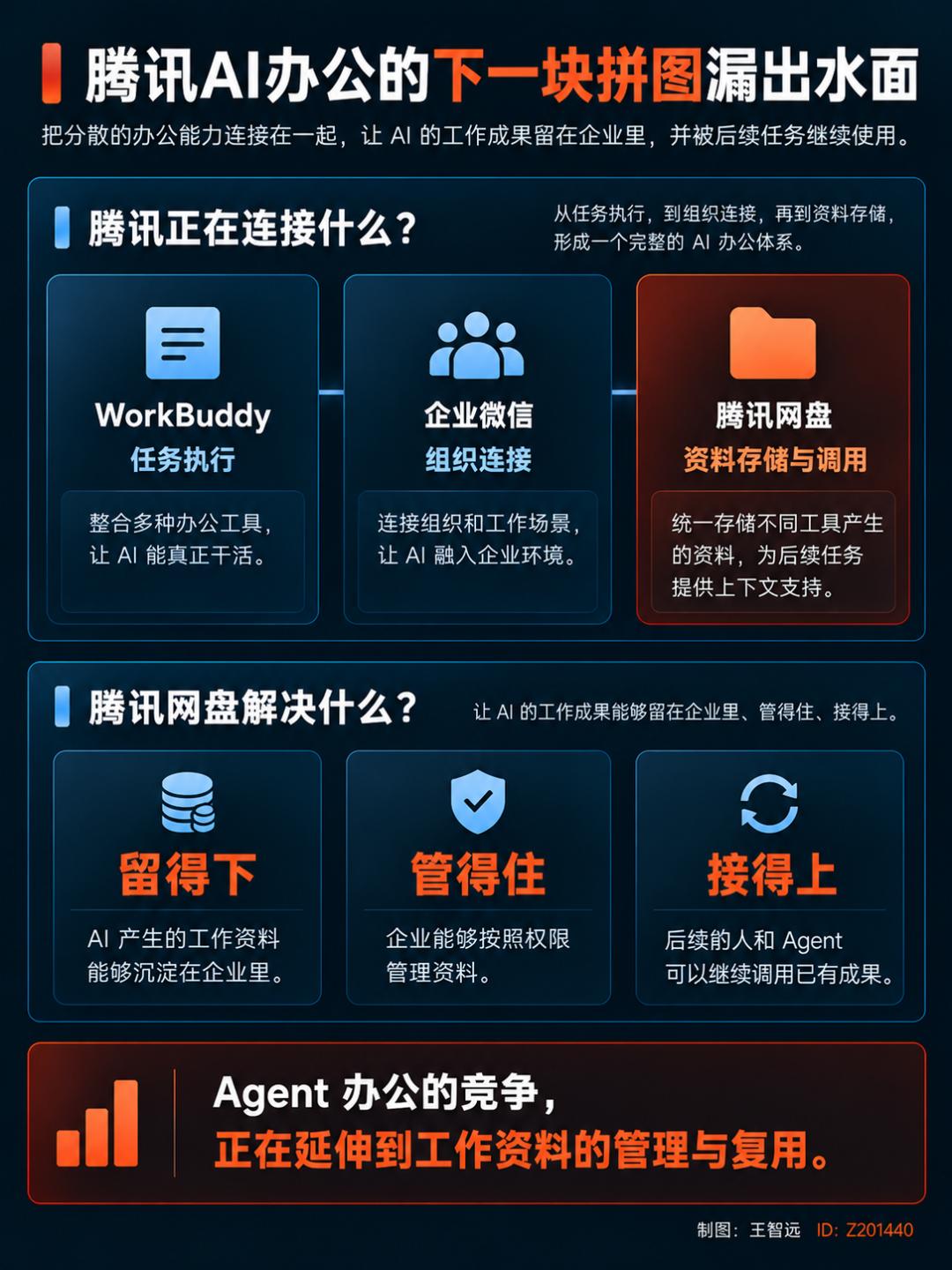
The next piece of Tencent's AI office puzzle has surfaced.
At today's Tencent Global Digital Ecosystem Conference, Tencent Cloud Drive was officially launched. In my opinion, this move carries far more weight than just launching an additional cloud storage product.
In the past, cloud drives were mainly used to store files for users; this time, Tencent also aims to preserve the data and processes generated when AI performs tasks, enabling enterprises to manage them in a unified manner and allowing subsequent Agents to continue the unfinished work.
I tested the product and connected several of my tools to it one after another: WorkBuddy, Tencent Docs, ima, Tencent Meeting, including Lark and Notion.
After the connection is completed, there is an AI assistant on the right side of the interface. You don't need to switch back and forth between multiple software, and you can directly ask it any questions you have.
After using it, my biggest feeling is that Tencent Cloud Drive is more like a central hub. Data from different tools are aggregated together, laying a foundation for the follow-up work to move forward.
Well, Tencent is building a foundational infrastructure for Agent-powered office work.
01
I wonder if you have ever thought about this question: Tencent already has Weiyun, and cloud drive is a mature category that has developed for more than a decade, so why did Tencent go out of its way to launch another Tencent Cloud Drive?
To answer this question, we first need to look at the changes in what is stored in cloud drives.
In the past, people used cloud drives mainly to store files such as proposals, photos and videos, so that they could retrieve them when needed. Weiyun is no exception, which mostly serves personal storage needs.
However, the situation is completely different after Agents begin to participate in actual work.
For example:
When AI helps people draft a proposal, it may read a large number of materials, rule out several ideas, make repeated revisions in the middle, and finally confirm the final version. These processes are not necessarily written into the final file, and may remain in chat records or scattered in the dialog boxes of different tools.
When the next Agent takes over the task, it may not know what happened before.
A scenario of Tencent Cloud Drive can well illustrate this point: after a meeting ends, the meeting minutes are directly synchronized to the WorkBuddy's database, which can be called by subsequent tasks, without the need to manually download, convert formats and re-upload.
It sounds like it only saves a few steps of operation, but in essence, it solves the problem of how work data can be smoothly handed over to the next task.
A final proposal may only have a few pages, but the discussions and confirmations behind it are not all written in the file. If this information is not preserved, the person or Agent taking over the task may repeat the previous work.
Looking at Tencent's recent series of moves, you can also find some internal connections.
In late September, the enterprise version of WorkBuddy completed the suite transformation, integrating a variety of office tools into one subscription.
In mid-October, WorkBuddy was connected with WeCom to further link work information within the organization. On October 29, Tencent launched its new cloud drive.
In just over a month, Tencent took three consecutive steps.
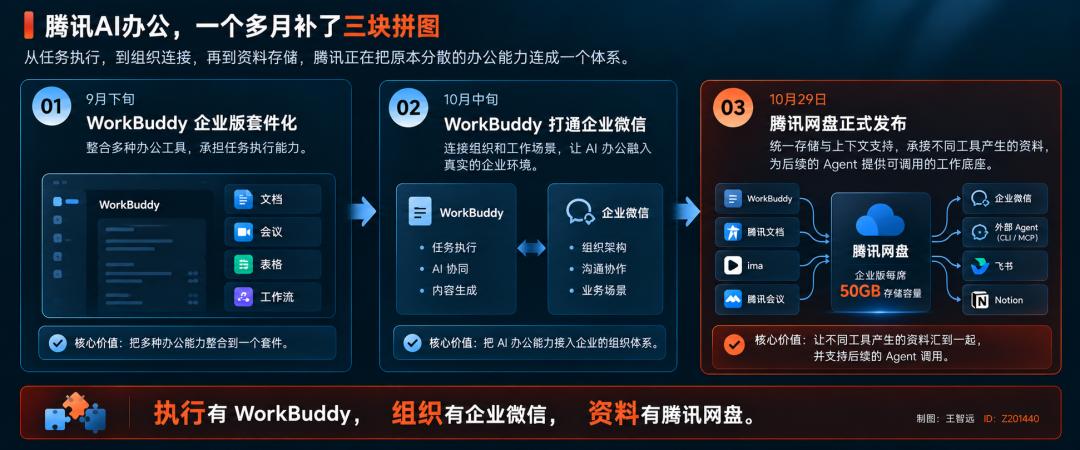
Putting these moves together, Tencent is connecting the originally scattered office capabilities: WorkBuddy is responsible for task execution, WeCom connects organizational scenarios, and Tencent Cloud Drive is in charge of unified storage and invocation of work data.
In this way, the position of cloud drive in the entire system is completely different.
Looking at the bigger picture, the cloud drive category is also evolving. In previous years, Dropbox launched Dash, and Google integrated Gemini into Drive, mainly to solve the problem that people find it increasingly difficult to locate the required content as the number of files keeps growing.
With AI starting to help people search, organize and understand files, cloud drives have gained an additional layer of intelligent retrieval capability.
After Agents gradually participate in actual work, new demands have emerged. In addition to being read by humans, files can also be read and modified by Agents, and become materials for subsequent tasks.
I think there is a core change here: cloud drives are evolving from personal file cabinets to shared workbenches for both humans and Agents.
Tencent Cloud Drive can also be understood against this background. It targets Agent work scenarios, aiming to provide a unified storage location for materials and processes generated by different tools, and support subsequent invocation.
So why did Tencent launch another new cloud drive?
Because when Agents start to work, the content that enterprises need to preserve and manage has gone far beyond the main usage scenarios of traditional personal cloud drives. Tencent hopes to integrate these contents into its AI office system through this new product.
02
Okay, preserving the data is only the first step. When more and more Agents work for enterprises, who will be in charge of these work results?
Let's look at a statistic first. IDC once counted that knowledge workers spend about 2.5 hours every day searching for and organizing materials. This problem has existed for many years.
For individuals, scattered data mainly wastes time.
When you are halfway through writing a proposal and switch to another tool, you may have to re-explain the background and the rejected ideas that have been mentioned before. It is troublesome, but you can always make up for it.
But when it comes to the enterprise level, things get much more complicated. In my opinion, there are at least three unavoidable problems.
First, after the work is completed, where are the data scattered?
The marketing department uses AI for research, the R&D department uses Agents to modify codes, the finance department uses AI to make reports, and the administrative department organizes meeting minutes. Every department feels that the efficiency has improved, but after a year, the company may have used more than a dozen different tools.
The work is indeed completed, but the data is scattered in personal accounts, chat records and local folders.
If departments want to reuse the data, they have to find the relevant person first, then ask where the data is and which version is available; sometimes, a cross-departmental project takes a lot of effort just to collect all the materials.
What's more troublesome is the version problem: the same material has three different versions in three different places, and in the end no one can tell which version is the correct one.
This is only the situation when all employees are still in the company. What should we do when employees leave the job?
In the past, when handing over work, people would make a list of computers, files and unfinished tasks, so that they at least know what needs to be handed over. Nowadays, it may also involve the conversations, task records in personal AI accounts, and the accumulated working methods.
How to hand over these things? The company may not even know what is stored in these accounts.
Just think about it: enterprises pay for employees to use AI, which is originally intended to improve efficiency. But if the work results always stay in personal accounts, the efficiency is improved, but the organization may not accumulate much valuable assets.
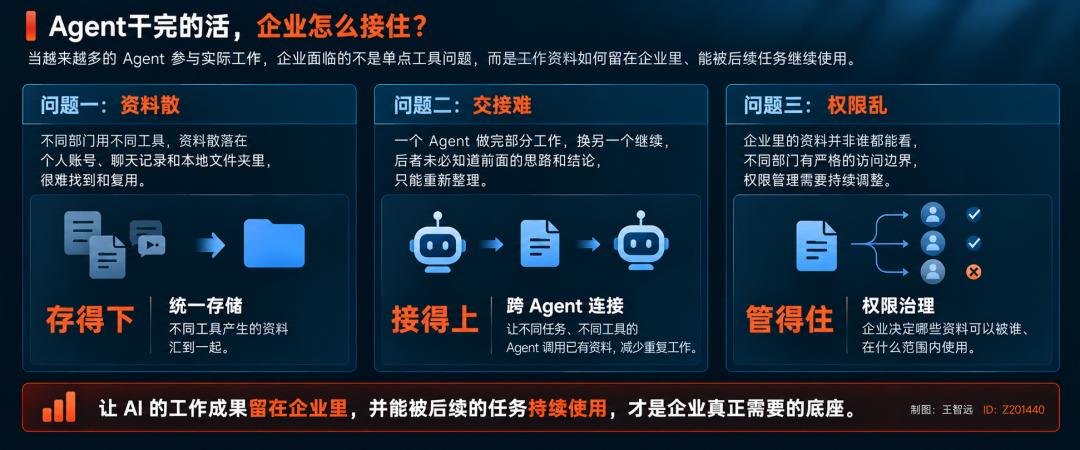
Second, after the data is preserved, who can access it?
Agents need to read data to work, but not everyone in the enterprise can view all the information, especially in data-sensitive industries such as banking, where there are strict boundaries on the content that different departments can access.
IBM's data breach report this year mentioned that 92% of AI-related data breaches did not deploy appropriate access control.
This figure only shows one thing: the permission management cannot keep up. This is an unavoidable hurdle when AI is introduced into the enterprise's workflow.
Moreover, permission management is not a one-time setting. Employee job changes and project adjustments may all change the access scope of materials. The more work Agents participate in, the more complex the permission relationships that need to be managed will be.
Third, when all the data is available, how can the next Agent take over the task?
For example: after one Agent completes part of the work, another Agent takes over to continue, but the latter may not know which materials the former referred to and what conclusions have been confirmed. Users may have to re-explain all the context again.
This is not necessarily a problem with a certain tool.
Codes are stored in code repositories, documents are stored in knowledge bases, and communication records are stored in instant messaging tools. Each system has its own purpose and solves many problems.
The problem is that a task often needs to go through several systems. Although the data is preserved, the relevant context may be scattered in different places. When the next Agent wants to take over, someone has to help it reorganize all the information.
I think this is exactly the part that enterprises tend to ignore when using Agents.
Everyone is trying to make AI do more work, but it is equally important that enterprises can manage the work that AI has done, and that subsequent people and Agents can continue to use the results.
If the results cannot be managed, enterprises will hardly feel relieved to let Agents handle more tasks. If the handover cannot be realized, many efficiency improvements can only stay at the level of single tasks.
So who will connect the scattered work data everywhere? How does Tencent deal with this part?
03
In my opinion, to understand Tencent Cloud Drive, the sequence is the key: internal first, then external.
First, let's look at Tencent's own office system.
As mentioned earlier, the suite transformation turns the originally separately provided office tools into a subscription-integrated suite.
Putting all tools together makes it more convenient to use, but it also brings new problems: how to uniformly manage the content generated by different tools?
Tencent Cloud Drive is the supplementary layer built for this purpose.
Tencent also launched a cross-application AI collaboration system called Buddy One, and Tencent Cloud Drive acts as a unified base to provide storage and context support for cross-application office scenarios such as WorkBuddy, ima, Tencent Meeting and Tencent Docs.
Previously, the database capability launched by WorkBuddy is supported by Tencent Cloud Drive.
The storage capacity per seat of the enterprise version is expanded to 50GB, which is ten times the original capacity. Tencent's personal-oriented office products will also use this set of storage base.
50GB sounds like a capacity parameter, but in my opinion, what is more important is that these materials finally have the opportunity to be aggregated together.
The most troublesome situation in enterprises is often that each department has its own data, but it is difficult to know what other departments have accumulated; after unified storage, different tools and Agents can at least find and call existing content within the scope permitted by permissions.
The data accumulated by one department can be continuously used by another department. When employees hand over their work, they do not have to completely rely on the records in personal accounts.
Okay, this is the internal part.
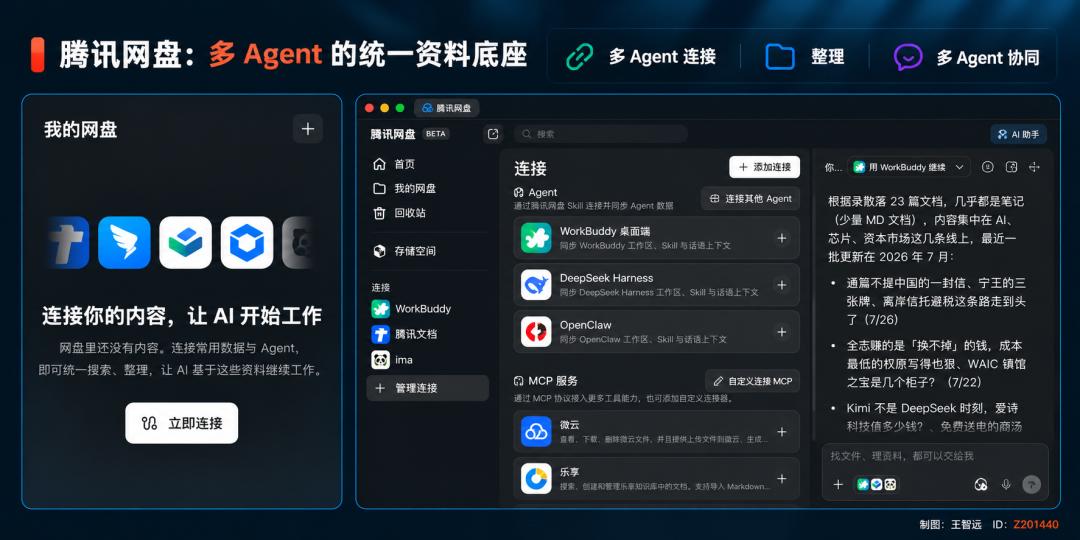
Then for the external part, Tencent Cloud Drive also provides connection methods such as CLI and MCP, so that files and data generated by external Agents can also be connected to the unified storage, and then called by WorkBuddy or other authorized Agents.
For example:
After you complete part of the work in one Agent and save the relevant files to Tencent Cloud Drive, the files can be handed over to another Agent for reading and processing later, reducing the trouble of manually transferring materials.
There is a detail here: Tencent first connects its own office suite, and then tries to access external Agents.
This sequence makes sense: the data generated by internal tools can be aggregated first, so that the cloud drive has stable usage scenarios. Only by opening up connections to the outside world can it undertake work content from more sources.
Specifically for product capabilities, Tencent Cloud Drive is mainly built around four core functions this time: unified storage, cross-Agent connection, intelligent material preparation and permission governance.
Unified storage solves the problem of scattered data, cross-Agent connection allows different tools to call relevant files. Intelligent material preparation helps retrieve, collect and organize required materials before Agents execute tasks, reducing redundant preparation work.
For example:
For a meeting, the pre-meeting materials, mid-meeting records and post-meeting to-dos can be organized into directly usable content first, and then handed over to Agents for follow-up work.
As for permission governance, the core is to let enterprises decide which data can be used by whom and within what scope, and manage data with corresponding security and deployment capabilities.
Combining the four capabilities together, they all point to the two problems mentioned earlier: how to keep work results within the enterprise, and how subsequent tasks can continue to use them.
Therefore, I prefer to regard Tencent Cloud Drive as a key supplementary part of Tencent's Agent office system.
If Tencent only wanted to launch an additional storage product, it would not need to promote the suite transformation of WorkBuddy first, and then connect with WeCom. Putting these steps together, Tencent wants to form a closer connection between office tools, organizational information and work data.
Looking along Tencent's recent product moves, the logic is quite clear. WorkBuddy takes charge of task execution, WeCom connects the organization and people, and now Tencent Cloud Drive covers the data layer.
For Tencent, this means that another important capability has been added to the Agent office ecosystem. For enterprises, it provides an additional way to keep AI work results within the organization for subsequent tasks.
04
Of course, the product launch is just the beginning.
Tencent Cloud Drive can provide unified storage and connection capabilities, but what enterprises really care about is whether the work done by AI can be continuously preserved, not lost due to personnel changes, and not need to be redone repeatedly due to tool switching.
The value of this matter is not only reflected in the storage capacity, which is the obvious benefit. Whether the work results can be preserved and whether the next person can continue to use them is the implicit core value.
Looking forward, when more and more Agents are integrated into enterprise workflows, the competition between office products will gradually extend to the management and reuse capabilities of work data.
Whoever can manage these data well and enable different people and Agents to use them continuously will have a better chance to occupy an irreplaceable position in the enterprise AI office system.
Well, this is the position Tencent is aiming at with this move.