Claiming the top spot in the open-source image generation field, Qwen-Image-2.1 has raised the bar for the entire image generation industry to a brand new level.
The ability of AI to write code often allows developers to "take their hands off the keyboard", but for designers, AI-generated images are still several steps away from being ready for final delivery.
In the workflow of graphic design, subjects need to be cut out, text on materials needs to be modified, and the placement of various products needs to be adjusted from time to time, while the text on the package and the shape of the bottle body must not change accordingly. If the requirements are constantly adjusted, local modifications still need to be made to keep the entire image coordinated.
These details determine whether AI image generation can be integrated into the real creative process. For designers, e-commerce operators and content creators, the current bottleneck of image models lies in whether each proposed modification instruction can be completed accurately.
This Sunday, Alibaba's Qwenofficially open-sourced the image generation model Qwen-Image-2.1, which solves most productivity challenges with the size of a small model: it realizes the integration of text-to-image and image editing, natively supports transparent image generation, can receive up to 10 reference images, and further enhances local editing, portrait and product fidelity.
It has become the most balanced and cost-effective open-source image generation model in the Qwen image series. Public evaluation results show that Qwen-Image-2.1 ranks first among open-source models, with a score even exceeding Nano Banana 2.0. It is worth noting that the visual generation part of this model has only 7B parameters.
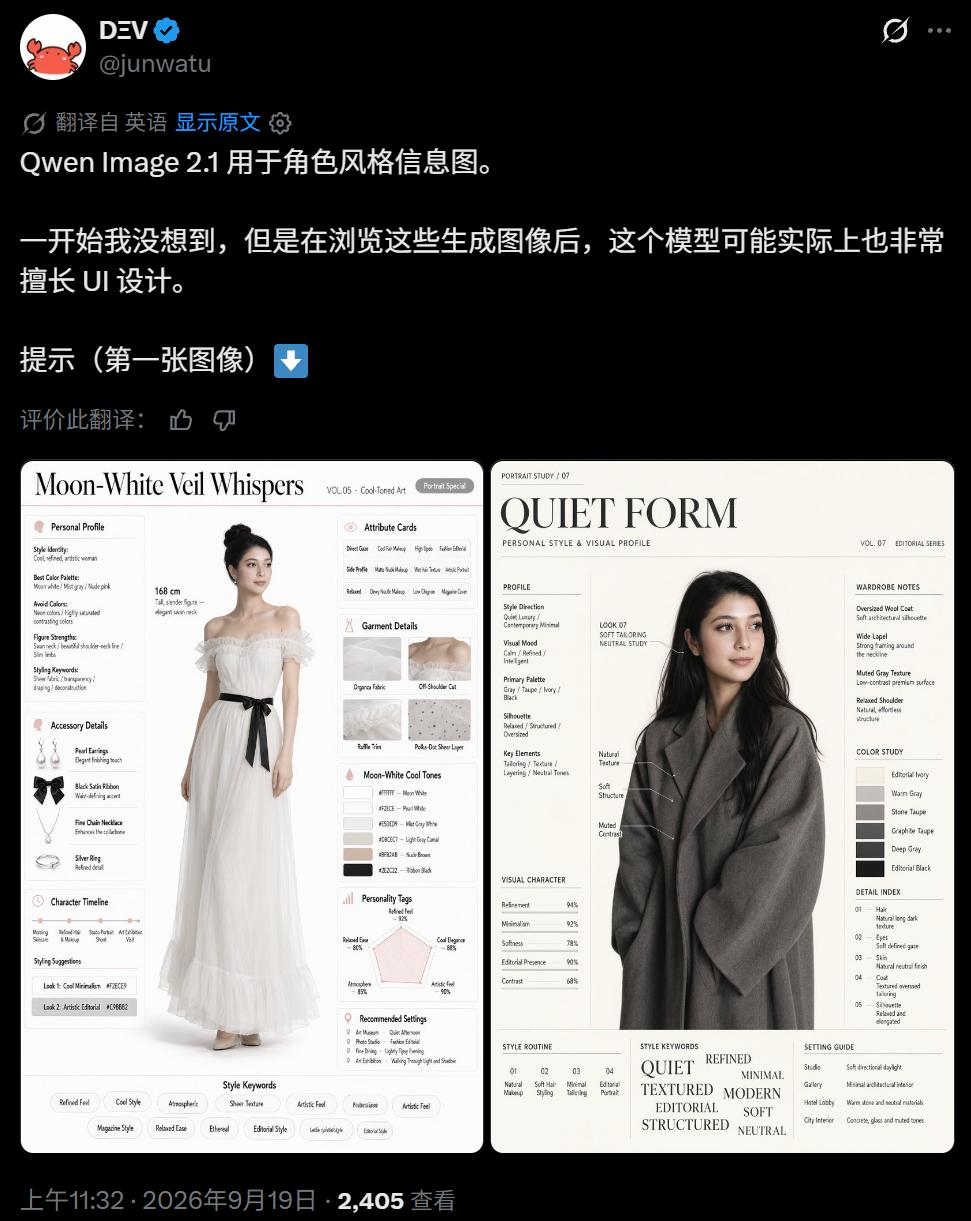
On platforms such as X, users who have obtained early access qualifications have released generation results, and they have received a lot of praise. There are renderings containing a large amount of text content:
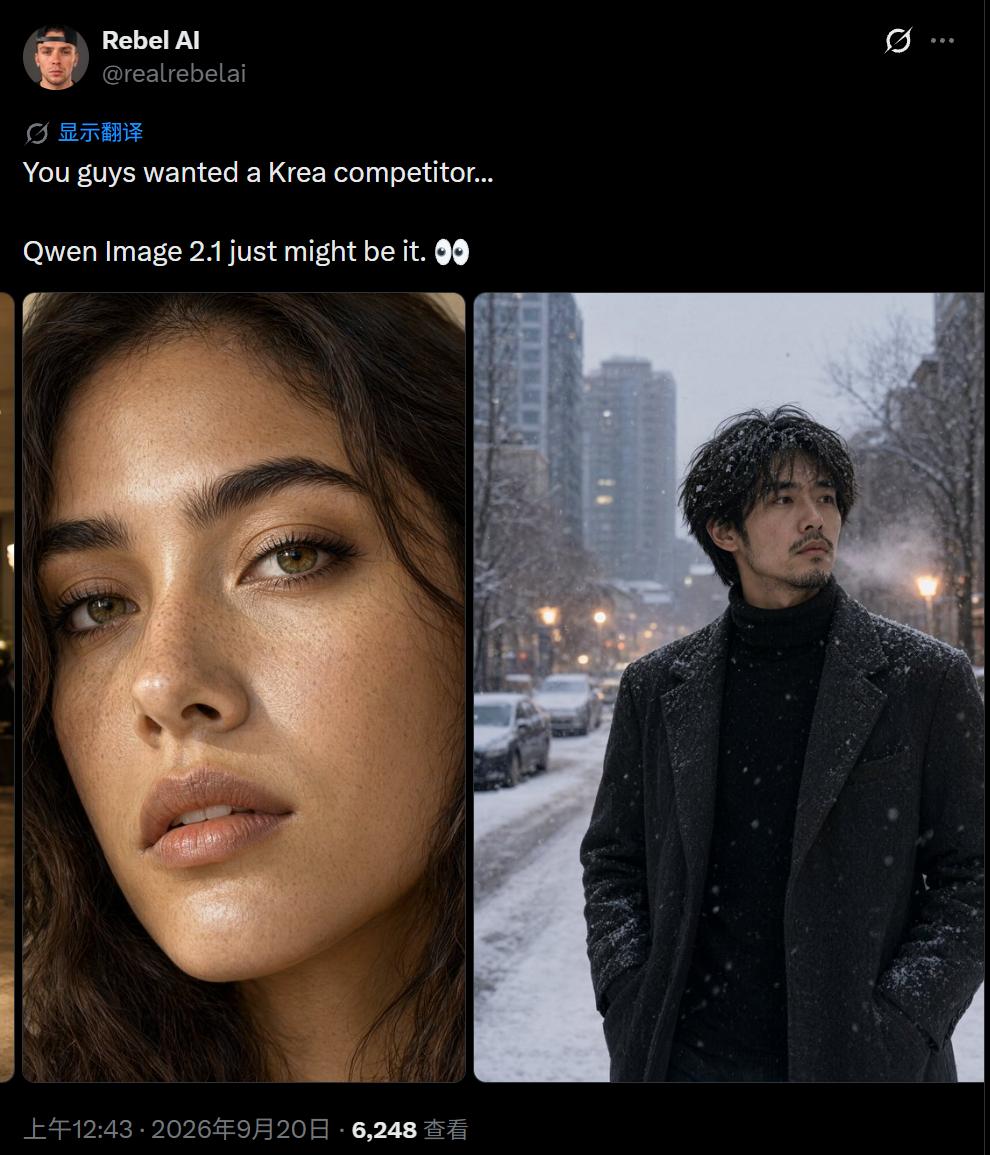
Images generated with real photo texture:
There are also attempts of various filters and lighting styles:
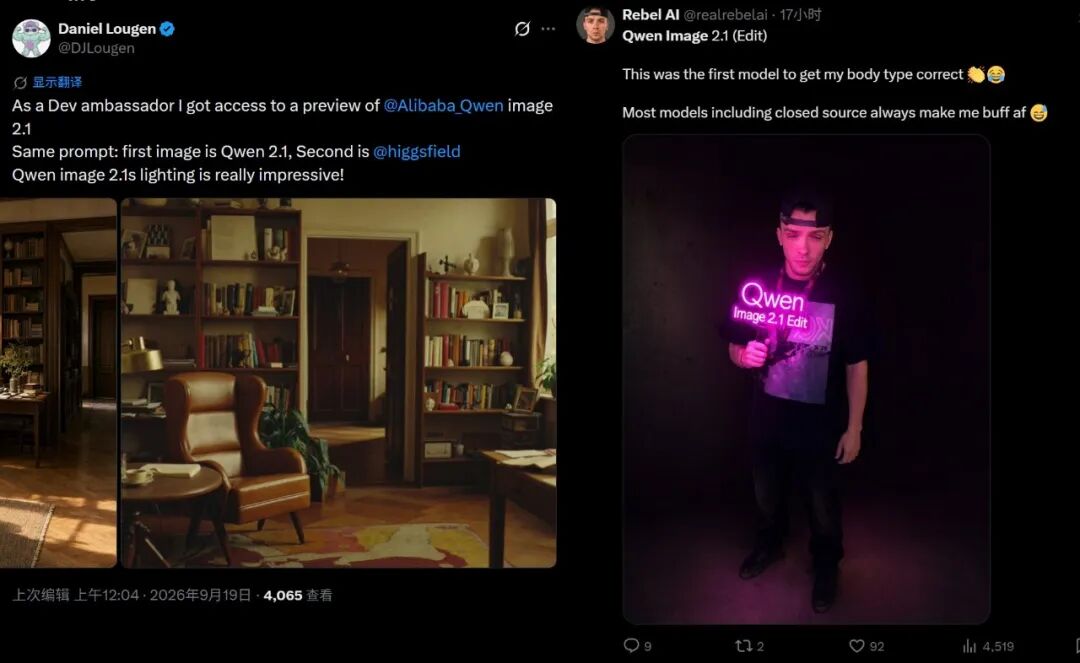
People think that Qwen-Image-2.1 is impressive in instruction following, generation success rate and actual effect. Based on the capabilities of the new model, we can already connect the workflow of material generation, combination and modification, and use AI to solve many complex image editing problems.
Capabilities and Efficiency
According to the introduction, the visual generation part of Qwen-Image-2.1 adopts a 20-layer Single-Stream DiT with 7B parameters and natively supports 2K resolution. This model has achieved a level beyond its size in the evaluation benchmark: the total score of Qwen-Image-2.1 is 60.28. In comparison, Nano Banana 2.0 scores 59.82, and GPT Image 1.5 scores 59.65. It is already able to compete with many closed-source image models.
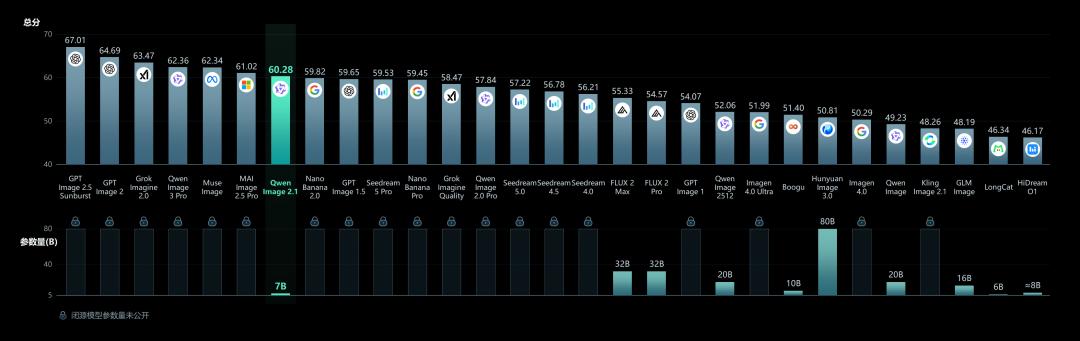
Qwen-Image-Bench evaluation chart.
With only 7B parameters in the visual generation part, this level of capability is even more noteworthy: it integrates image generation, transparent material generation and multi-image editing capabilities (unified pipeline for generation and editing) in a small generation module, providing a lighter starting point for developers to deploy and customize image tools.
While delivering good performance, Qwen-Image-2.1 also optimizes the model's inference process, with the core idea of reducing unnecessary repeated calculations.
In one image editing session, the input reference image and editing instructions do not change with each generation step. Therefore, the new model uses a mixed granularity attention structure: the text part (system prefix, editing instructions) follows the traditional token-level causal mask, performing strict sequence calculations word by word to ensure the coherence of semantic logic understanding, while the image generation part adopts a chunk-level mask, and caches these static contexts after the first step of calculation through the KV Cache mechanism for reuse in subsequent generation steps.
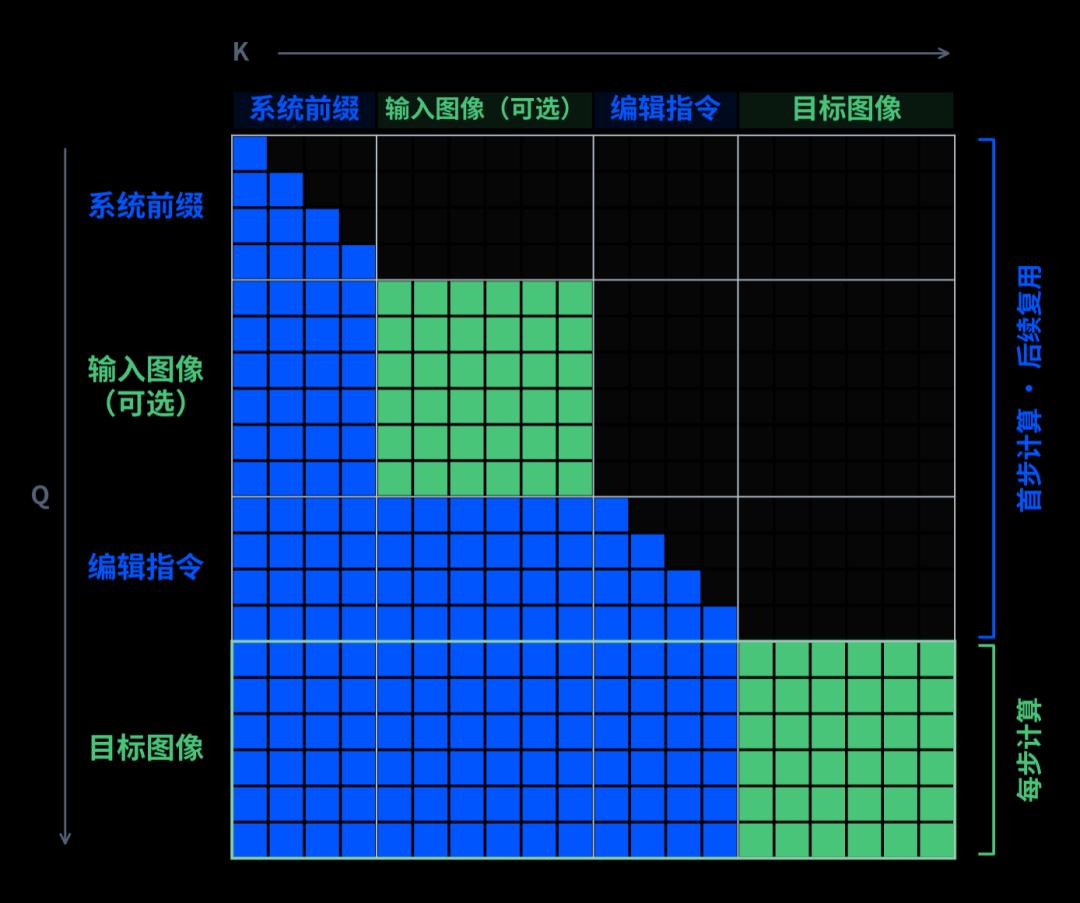
This means that AI will now process the reference materials first, and reuse the existing results when gradually generating the target image. This optimization is more obvious when multiple images are input, helping to improve inference efficiency and reduce video memory overhead.
Since Qwen-Image-2.1 now supports up to 10 reference images, this optimization is crucial. The richer the input content, the more attention needs to be paid to how to process reference information and control repeated calculations. As for how much time and video memory can be saved specifically, it needs to be judged in combination with hardware, precision, resolution and the number of inputs.
Generate Usable Transparent Materials Directly
If we talk about the capability of the new Qwen-Image version that best meets the design requirements, it is transparent image generation.
Conventional image materials usually come with a complete background. To use the main subject in a poster, product detail page or another image, it is often necessary to cut out the image first, processing the outline, gaps and edges. Transparent images contain additional transparency information, which allows the background to show through around or part of the subject, facilitating subsequent overlay and combination.
Qwen-Image-2.1 natively supports transparent image generation, which can automatically determine whether to generate an ordinary image or a transparent image according to the prompt, and users can put forward the requirement of a transparent background when describing the material. The samples currently displayed include festival illustrations, character materials, decorative elements, and complex combinations composed of multiple objects, all of which correspond to common material requirements in design work. We also tried it out:
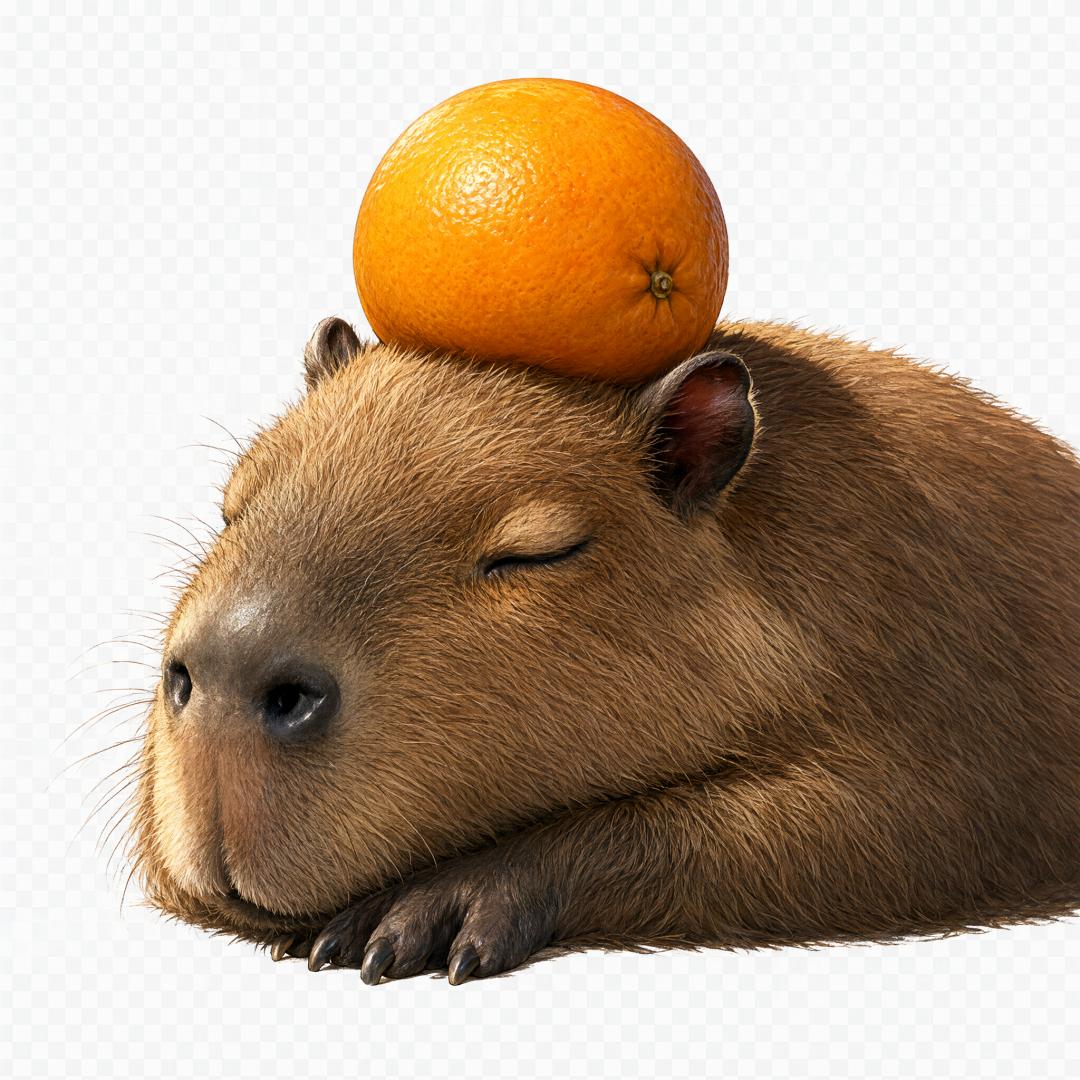
This is good news for creators. Now we can get directly usable materials, which saves several working procedures.
Of course, these transparent materials can also be modified after generation. For example, the expression of the same illustrated character can be adjusted, and the text in the image can be modified. The editing object can be either the visual details of the character or the text in the material.
This is very close to the real modification requirements during design: when the event name is changed, the pattern still needs to be retained; when the expression needs to be more relaxed, the character should still be recognizable as the same role. After generation and editing are integrated into the same model, these subsequent requirements also have a unified processing entry.
Of course, Qwen-Image-2.1 supports processing existing photos.
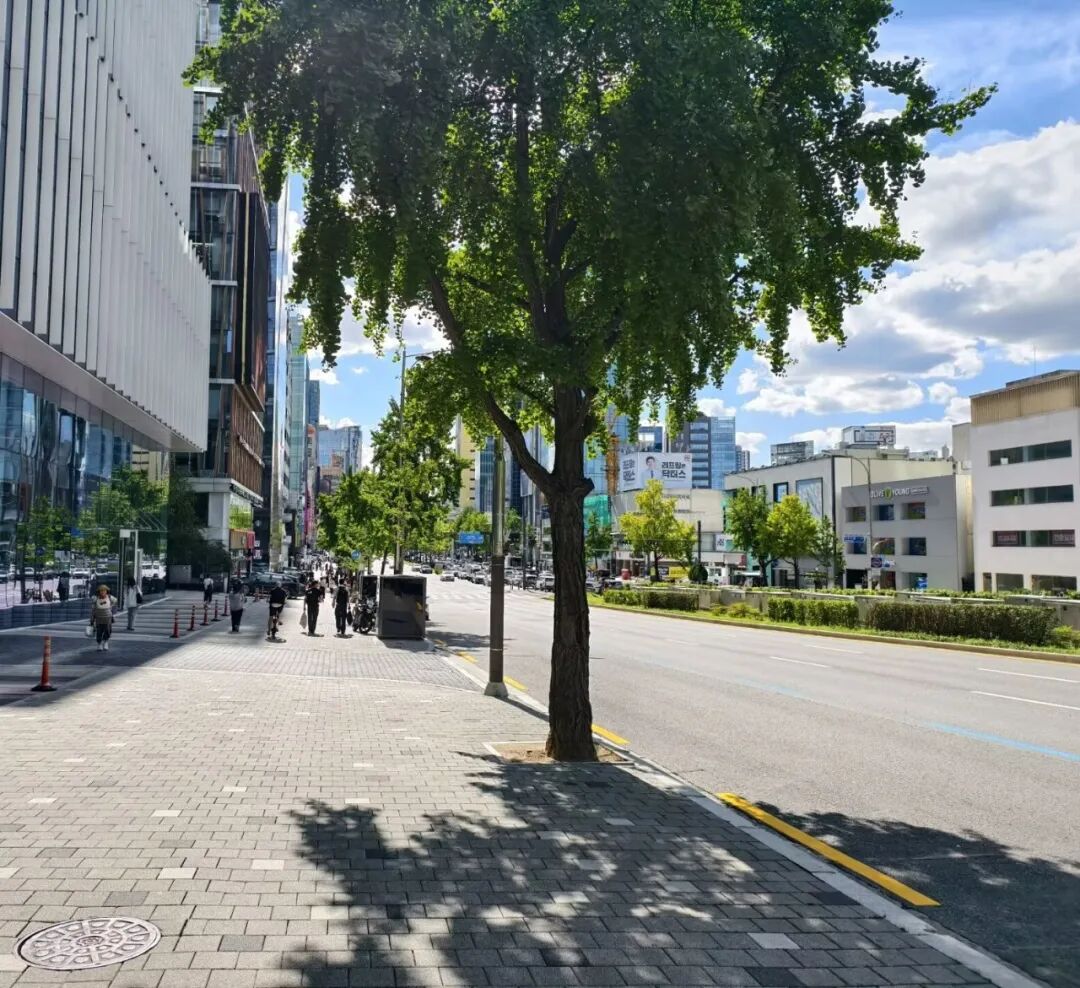
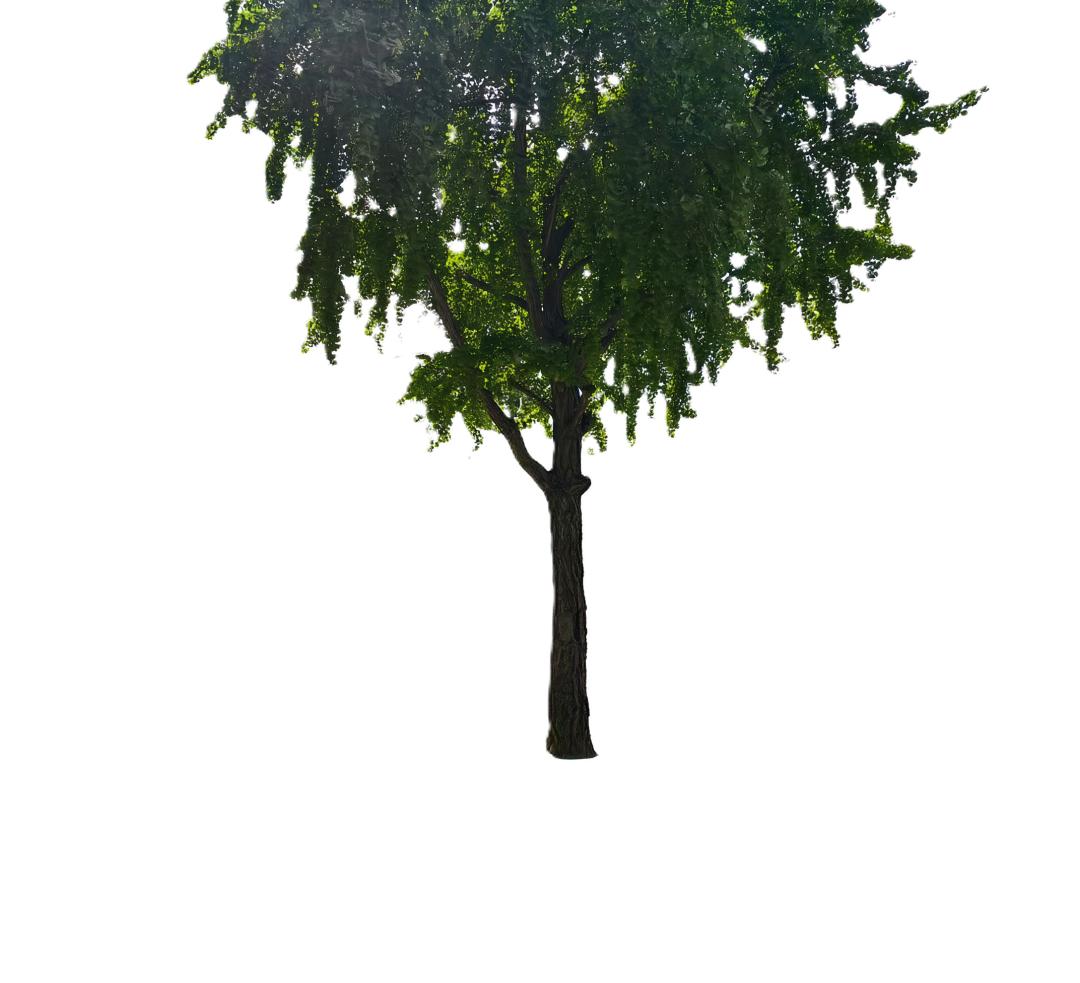
The official provides a case of extracting the required content from a real photo to get an RGBA transparent image. The A here represents the alpha channel, which is used to describe the transparency of each part of the image.
It can be seen that this capability not only serves generation from scratch, but also covers the reuse of existing images. Creators can provide photos first, and then ask the model to extract the required subjects as materials for subsequent design.
The Qwen-Image series previously launched the independent Qwen-Image-Layered to explore capabilities related to transparent images. This time, Qwen-Image-2.1 integrates native transparent image generation and editing into the general image model, further improving convenience.
Open-source AI Models Now Also Have the Accuracy Required for Multi-Image Editing
When the requirements for an image come from multiple objects, the editing task will become more complex.
For example, if you want to put specified clothes, shoes, bags and hats on the same model, each reference image has a different role. The model needs to distinguish between characters and products, place them in reasonable positions, and retain their respective features as much as possible.
Qwen-Image-2.1 supports up to 10 reference images as input. We tried it, asking Ultraman and Dario to sit down and talk. We used 7 images: a photo of two people facing each other (change the expression), the background room, a single sofa, a coffee cup (fill it with coffee), a floor lamp, an electric fireplace, and a low table, and finally generated a complete rendering.
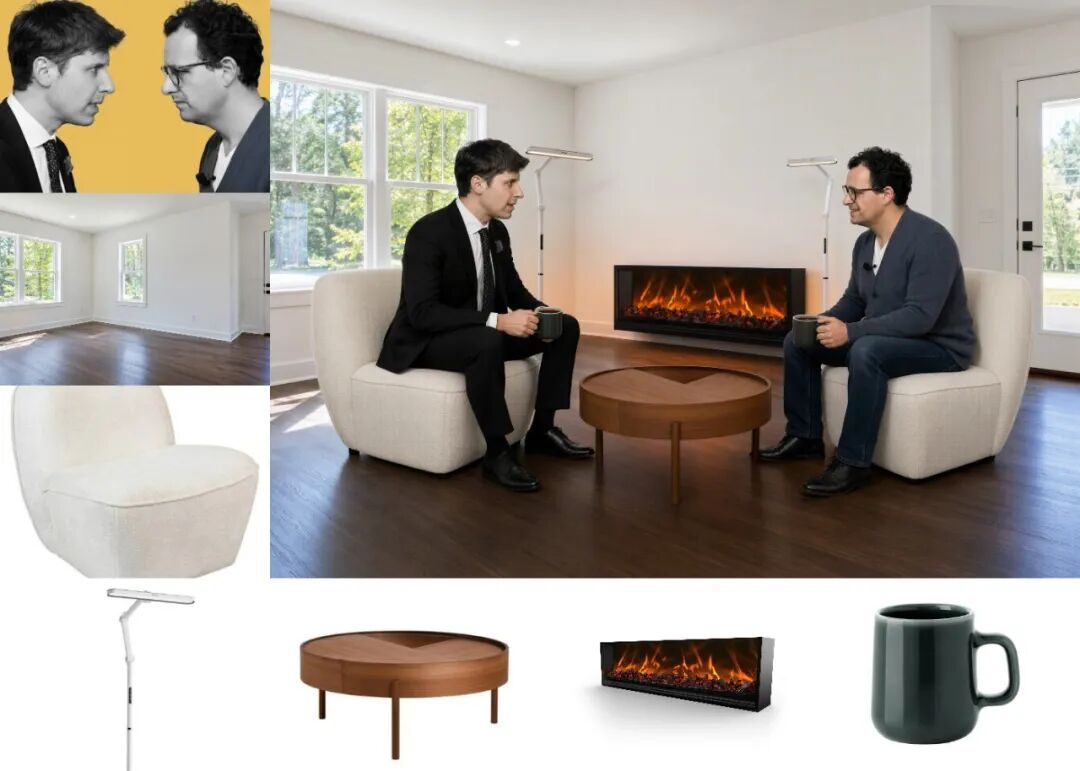
Different clothing and accessories can now be quickly matched on one person to see the effect, and you can also combine different single-person photos into a group photo.
Technically, they test not only how many images the AI model can receive as input, but also whether the reference objects can be in their proper positions in the final picture, and whether the proportions, positions and overall style are coordinated.
After the overall picture is combined, local adjustments are usually required next.
Qwen-Image-2.1 provides methods such as selection, smearing and independent masks, allowing users to express the editing position more clearly. For example, you can mark different areas with several colors, and ask to modify the image at one go to remove part of the character's wear and change the hair color.
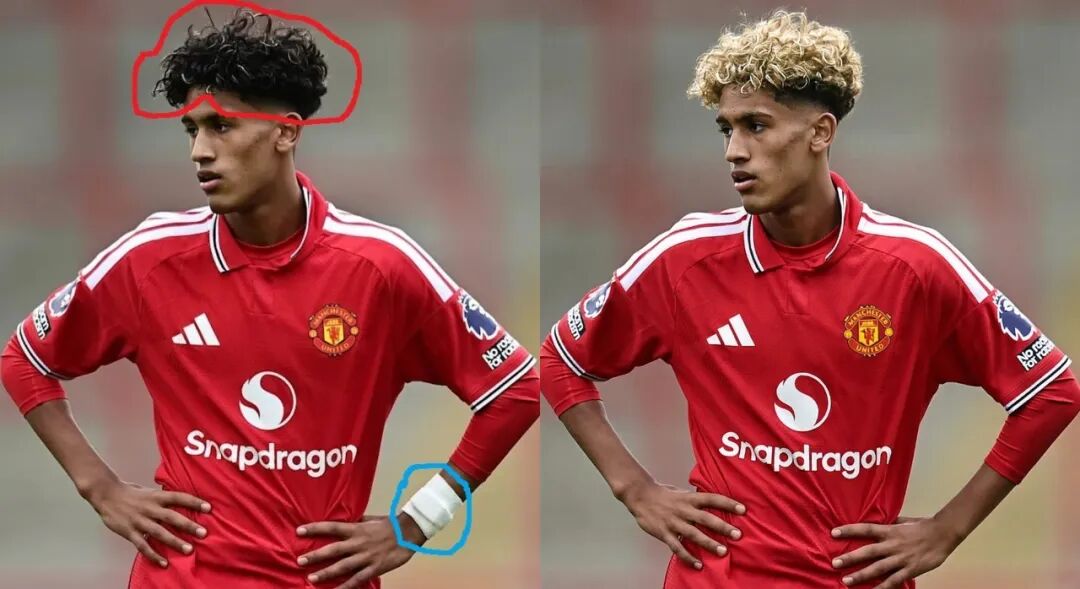
This kind of interaction establishes a corresponding relationship between the spatial position and the text requirements. For editing involving multiple areas, users can respectively indicate where to delete, where to replace, and what they want to change to.
The smearing method is suitable for directly marking the position of the newly added object, but selecting or smearing directly on the original image will also cover part of the picture. To this end, the model also supports specifying the editing area through an additional mask image, which allows the original image information to be completely input into the model. For designs containing characters and products, this retention capability is particularly critical.
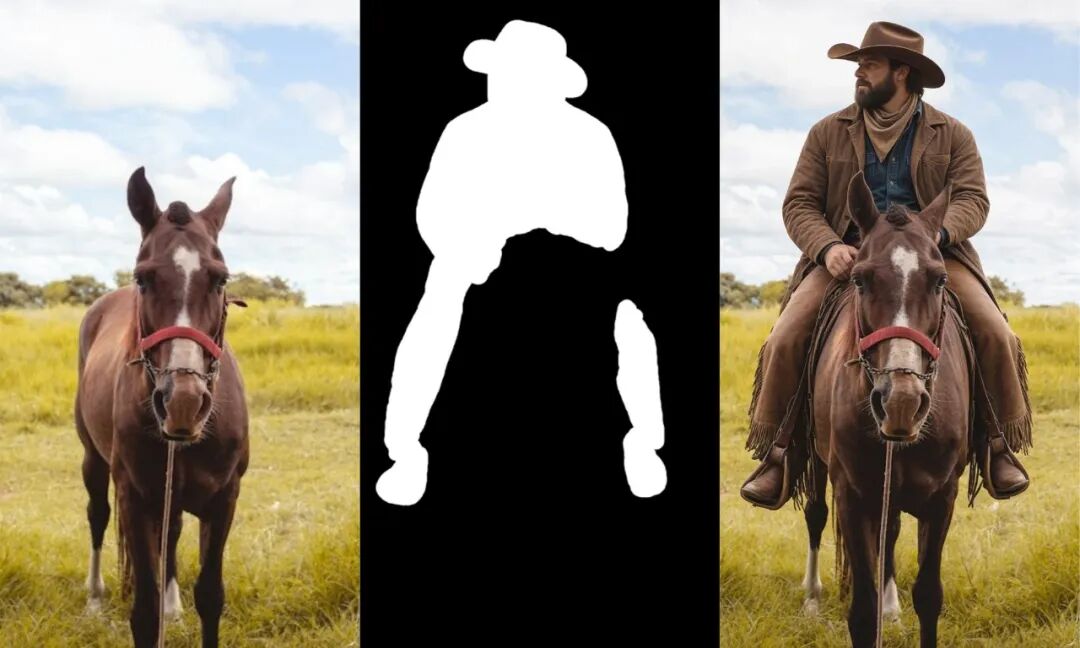
Text Accuracy and Picture Texture
After changing the hairstyle or scene, the portrait should still retain the original identity features; after the product is placed in a different environment, the packaging text, texture and shape also need to be as consistent as possible. Otherwise, even if the picture looks good, it may not be used for the original display task. Qwen-Image-2.1 focuses on introducing the editing fidelity capabilities of portrait and product scenarios, and the effect looks quite good.
We tried it, for example, asking it to modify the DeepSeek welcome message "I am DeepSeek, nice to meet you!" on this page of the primary school textbook *Information Technology, Grade 3 Volume 1* to "Hello, what can I do for you?", then change the DeepSeek (R1) to the latest version of the DeepSeek button, and light it up:
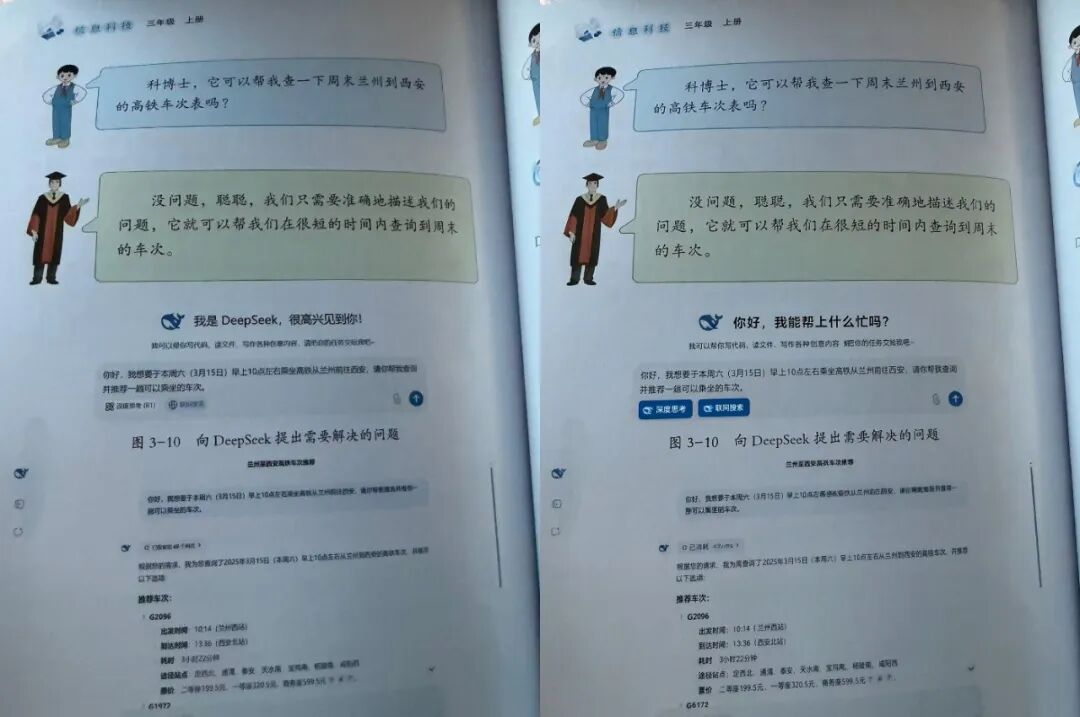
In addition to generation and editing, Qwen-Image-2.1 also continues to improve its performance in text and portraits. Whether it is text-dense graphic pages, infographics, or paper illustrations, the content accuracy and typesetting aesthetics have been improved to a considerable level.
