Five years have passed since the age-friendly accessibility regulations were promulgated, yet why are the senior-friendly modes across most products still far from meeting the expected standards?
I came across a video these two days that really made Shi Chao fume.
An old man took out his phone to take a photo, but as soon as he unlocked it, the app started popping up ads and automatically downloading apps. He pressed back twice, only to be flooded with all kinds of red envelope ads. Even though the old man was quick-fingered and dodged all the disguised ads, nothing worked...
After dozens of seconds, the old man still couldn't open the camera.
To be fair, this app is so rogue. Let alone the elderly, even young people have to tap through two or three rounds of pop-ups to get out of it.
It's not just a few rogue apps, the design of mainstream apps is getting more and more complicated these days.
Lifestyle apps always try to lend you money, e-commerce platforms keep pushing short dramas to you, and the homepages of almost all apps are packed with TABs, buttons and various activity ads, which are completely unnavigable for the elderly.
I don't even need to show a screenshot, you can all picture the scene clearly with your eyes closed.
Maybe you will say, isn't there an Elderly Mode?
It does exist, but the problem is that the Elderly Mode of most apps is unqualified, the aging-friendly adaptation is poorly done, and the elderly still can't use it properly.
Last month, there was a Weibo post where everyone was complaining about the Elderly Mode of apps.
Some people said that many apps have Elderly Mode, but it is not user-friendly at all.
Some bloggers said that the Elderly Mode they set for their family members would automatically switch back to normal mode after a while, because the apps are full of traps that make the elderly accidentally tap to exit.

Some others said that even if you don't touch anything, the Elderly Mode will be turned off automatically after the app updates.

To be honest, I haven't encountered the situation where the app exits Elderly Mode automatically after updating, which probably depends on the specific app version and phone model.
But after careful research, Shi Chao has to admit that it is true that Elderly Mode is not friendly to the elderly and easy to be accidentally turned off.
The most common problem is: in the Elderly Mode of many apps, the elderly can't even turn it on, they can only turn it off by mistake.
Because the entrance to the mode is hidden too deep with very poor classification.
For example, the Elderly Mode of WeChat can only be found in "Me - Settings - More", while that of Amap is in "Me - Settings - General" and you have to scroll all the way to the bottom to see it.

I think product managers of large tech companies should be able to figure out that people who need this mode are usually not good at using smartphones, and it is very difficult for them to find the switch buried in different settings categories. So shouldn't they put the Elderly Mode on the homepage of Settings according to "the demand and urgency of user groups"?
What Shi Chao finds even more confusing is:
Why 90% of the "Exit Elderly Mode" buttons in apps are placed in positions that are easy to be accidentally tapped, with no secondary confirmation prompt at all.
For example, the exit buttons of Cainiao, Amap and Didi are all on the homepage. Amap even has two exit buttons to "kick the elderly out", and the exit button of Cainiao is placed in the lower half of the screen where fingers touch most easily.
It's like making the entrance a hidden level that's hard to find, but the exit a one-click surrender button.

Apart from the fact that turning on the mode is far more difficult than turning it off, the Elderly Mode of many apps is also very perfunctory. Usually they only enlarge the font and simplify the UI, without making any targeted function adaptation for this group of users.
What do I mean by targeted function adaptation? Shi Chao will give some examples.
The Elderly Mode of Didi guides the elderly to use voice input on the homepage, allows them to contact customer service directly, and has independent functions of "Call a Taxi via Phone" and "Learn How to Take a Taxi", with simplified and optimized options during the ride-hailing process.

Amap directly displays the most frequently navigated locations for the elderly on the homepage, and tapping any of them will show all related places nearby.

But most apps only simplify a few functions, and some of them even do nothing more than enlarge the UI and font.
The Elderly Mode of Cainiao, for example, only has a cleaner homepage, but there is still a "Points Bar" at the bottom.
If you tap that points bar, it will directly pop up a mini-game of feeding birds to get gifts, which requires you to complete 5 tasks to unlock a 1-yuan free-shipping product, plus all kinds of activities to get free gifts.
As someone who has been surfing the Internet for years, Shi Chao can tell this is far from a harmless design.
If this is not a bug, but a design that takes the commercial operation system into consideration even under Elderly Mode, I think it's totally inappropriate, because everyone knows that the elderly can't resist these temptations.

That's acceptable and I can put up with it, at least the app can still work normally. But during the test, Shi Chao found that the Elderly Mode of some apps can't even be used properly.
Take Amap for example, which I thought did a good job earlier...
Let's try to navigate to a public toilet. After tapping the public toilet icon on the map, two route options will pop up at the bottom: walking and public transport.
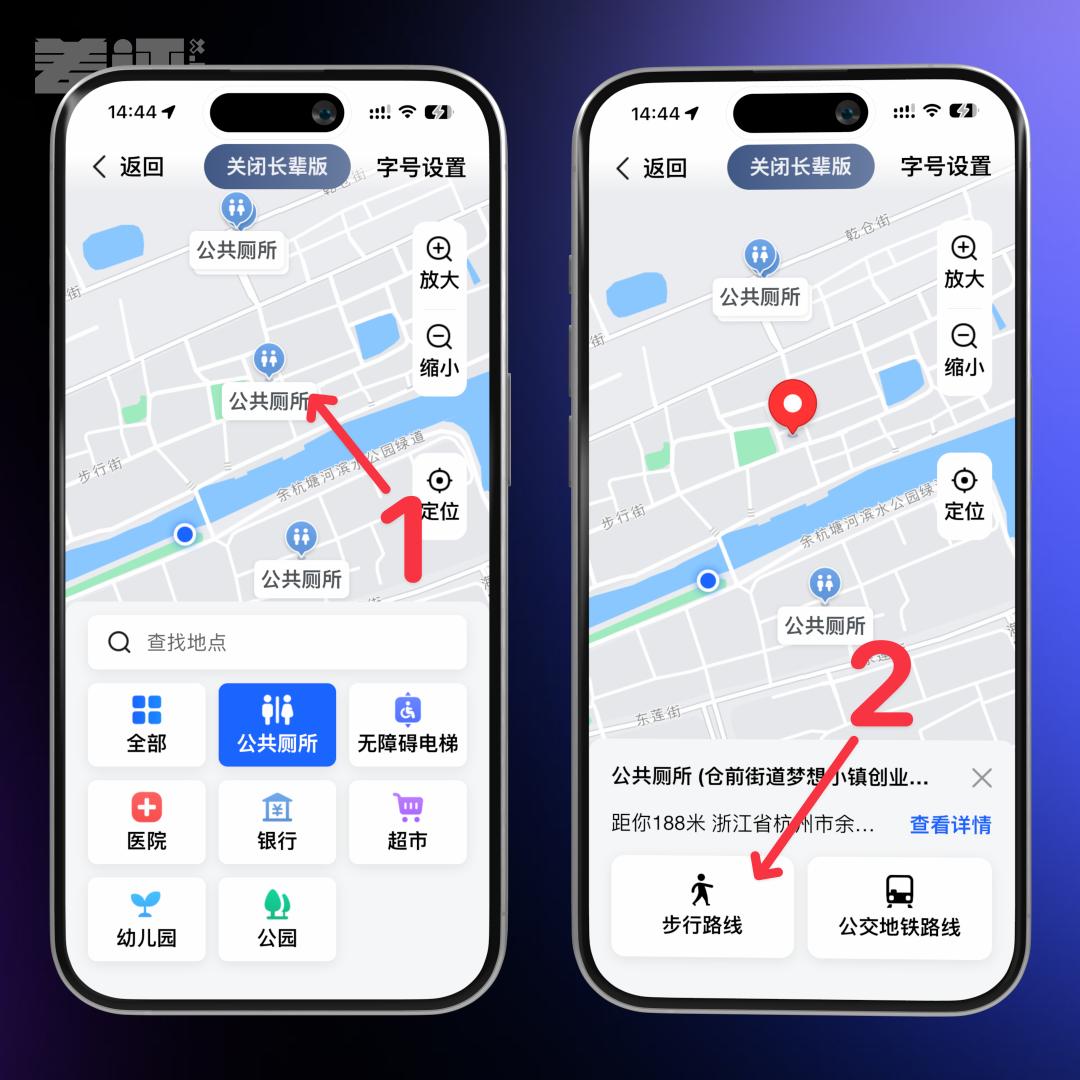
It looks normal, right? Let's choose the walking option, and look at the following screenshot ⬇️
Tell me, how many people can understand this kind of navigation?

You have to translate the text description into a map in your mind, rotate it 180 degrees and overlay it on the street scene in front of you, then use the place cells in your hippocampus and grid cells in your entorhinal cortex to combine the instructions of "turn left after 36 meters northeast, turn right after walking 50 meters" into a real-time cognitive map.
But later, Shi Chao figured out a way to make the navigation work under Elderly Mode.
That is, don't choose either of the two routes, tap the "View Details" button on the right, which will jump to a page that doesn't belong to Elderly Mode, then tap the navigation button there.
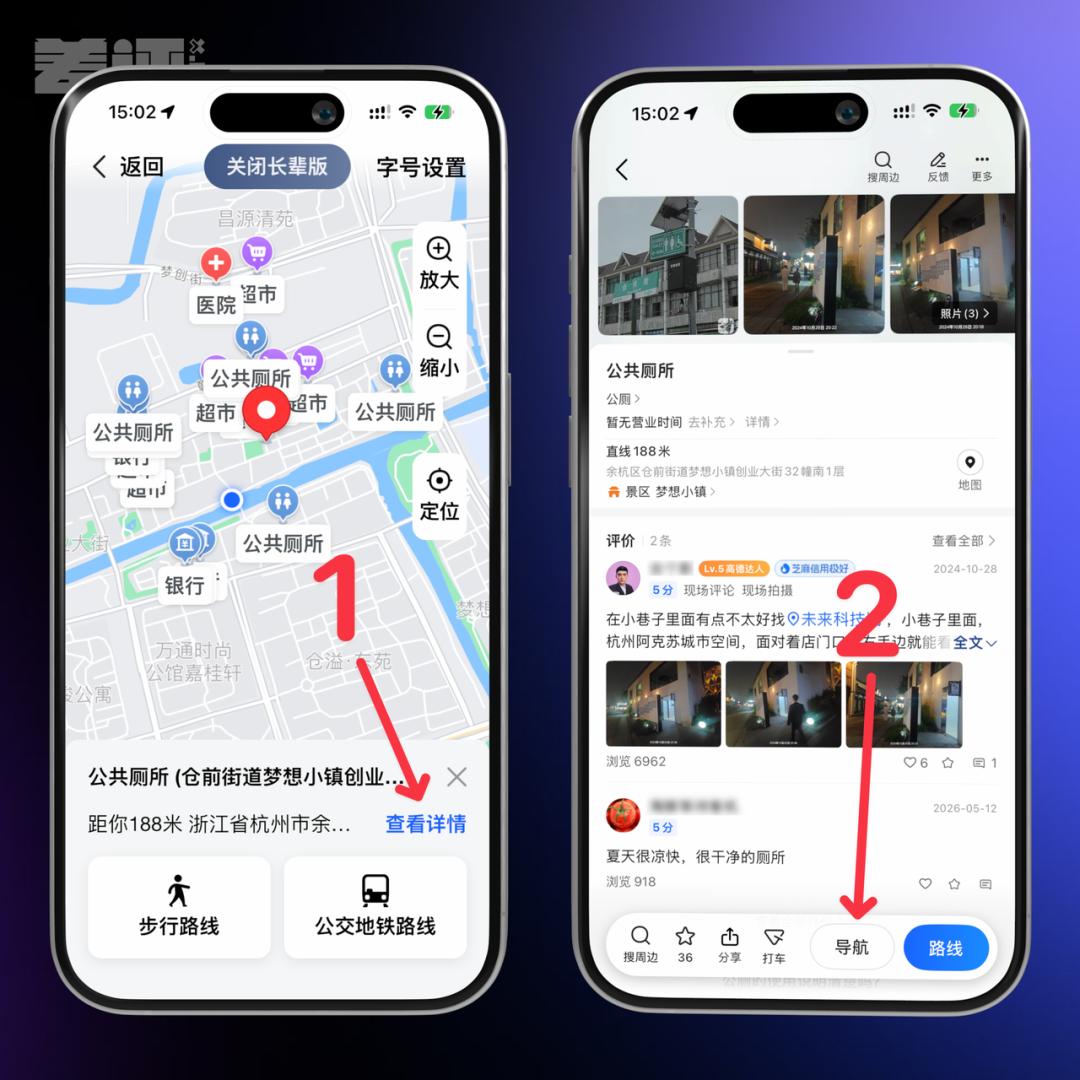
That's not even the worst part.
As long as you zoom the map or even just move it a little when checking a location under Elderly Mode, the location will disappear immediately, the page will go back to the initial state, and all the content you just searched will be lost.
I don't know how long this bug has existed. I once suspected that I didn't upgrade the app, but after updating to the latest version, the problem remains the same.
In other words, the Elderly Mode of Amap is actually in a state that can't be used normally...
As a national-level app that provides basic services for hundreds of millions of users, this is really inappropriate, right?

This is just a simple experience based on the apps I usually use. You know, articles about the poor quality of Elderly Mode on various apps come out from time to time, and there are constant complaints from netizens...
But nothing seems to have changed over the years.
You may wonder why the quality of Elderly Mode varies so much across different apps, and why few apps can make a perfect Elderly Mode.
The reason is that there is often not enough internal motivation in large tech companies to do this well.
Every function on the app of a large company is tied to a KPI. E-commerce teams need to see if the function can boost transaction volume, growth teams need to see if it can increase daily active users, and commercialization teams need to see if it can generate revenue.
But what about Elderly Mode? It can't contribute to any of these. It only requires you to retain the most basic services, with no ads allowed.
In April 2021, the Ministry of Industry and Information Technology of China issued the "General Design Specifications for Aging-Friendly Mobile Internet Applications (APP)", which clearly stipulated that no ad content or plug-ins are allowed on the aging-friendly interface, no random ads or temporary ad pop-ups can appear, and there should be no inducement buttons for inducing download or inducing payment in mobile apps.
Besides, every time the app has a major update, theoretically the Elderly Mode needs to be re-adapted, which is a long-term investment of resources.

At this point, the problems mentioned at the beginning of the article "Elderly Mode is not user-friendly", "Elderly Mode is turned off automatically after app updates", "There are all kinds of traps in Elderly Mode that make you accidentally exit" all make sense now.
Because even if you make a perfect Elderly Mode, it will not improve the department's KPI, but may even reduce the KPI and lower the overall efficiency of the team.
Who would be willing to put in real effort on this "unrewarding task"? When the superior puts policy pressure on them, the team just makes a perfunctory version that can pass the inspection.
What's worse, some teams even "not only do a bad job, but also add small tricks to prevent users from staying in Elderly Mode for a long time~"
What do you mean by "hiding the entrance in the fourth layer of settings"? That's to keep the interface clean, don't you get it?
Putting the exit button in the most accessible place is to respect the elderly's right to choose. What if they want to switch back to normal mode? We can't let the elderly take one more unnecessary step~
Exiting Elderly Mode automatically after app updates is to help the elderly keep up with the times. Staying in the large-font mode all the time will make them out of touch with the world.
Hmm...
