An actual test of Google's new AI "paywall": It's friendly to "free riders", but those unaccustomed to luxury can't enjoy the finer things.
Every May, Mountain View in Silicon Valley becomes lively.
Google I/O is Google's annual developer conference. However, in recent years, it has long ceased to be just for developers. Ordinary users, tech media, and competitors all keep a close eye on this stage, waiting for Google to reveal its cards for this year. This year's I/O 2026 kicked off on May 20th. CEO Sundar Pichai stood on the stage for nearly two hours, presenting Google's achievements from the past year and its future plans in one go.
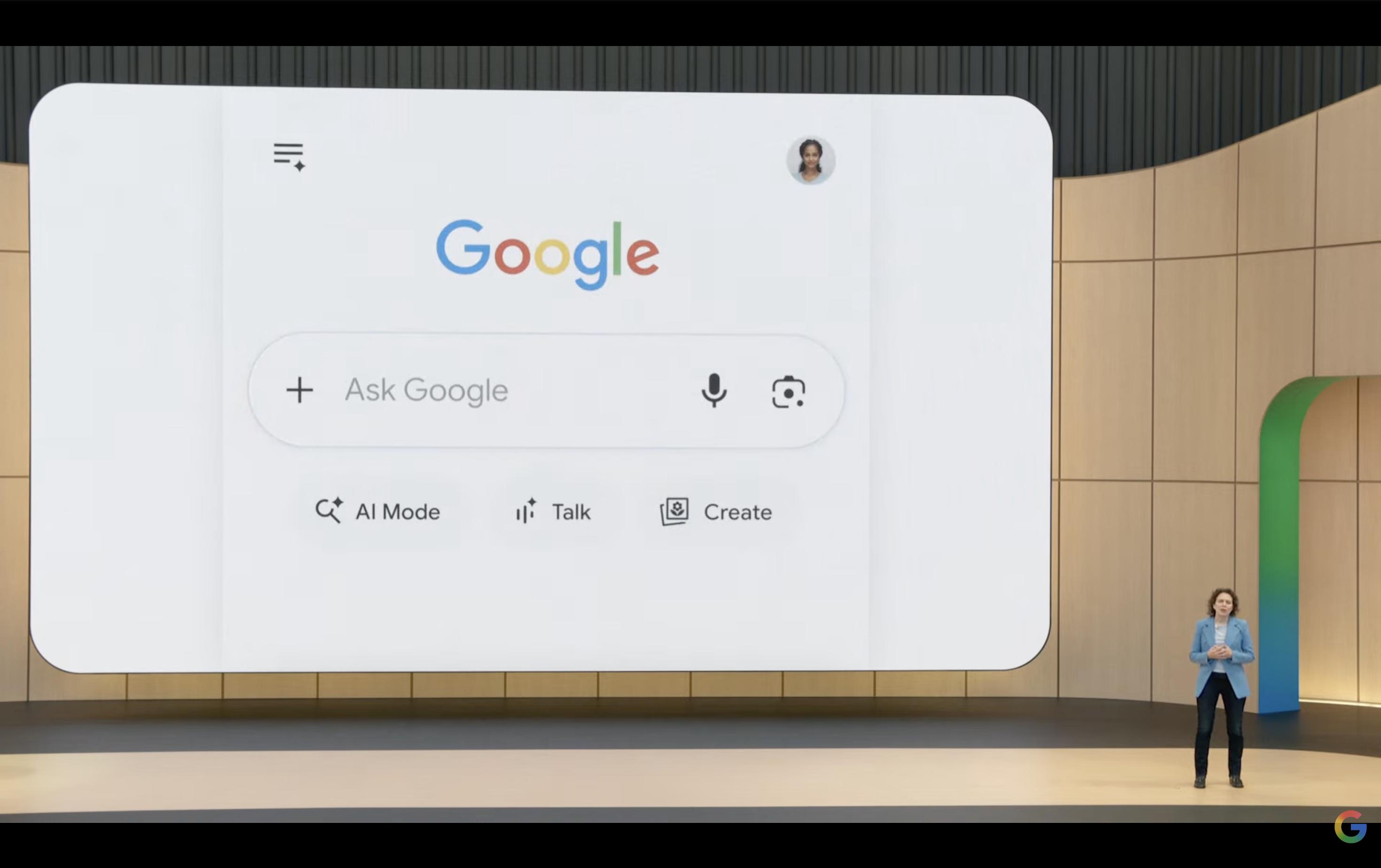
(Image source: Google)
Then came the new stuff. Gemini Omni, a new-generation multimodal model, can generate content directly from any input of video, images, or text. The effects in the press conference demo looked quite impressive. Gemini 3.5 Flash, an Agent model focusing on "cutting-edge intelligence + action ability," can help you with tasks, not just answer questions. Antigravity 2.0, Google's own AI programming platform, claims that "everyone can create apps." On stage, they rewrote a Doom game using natural language. Google Flow, an AI video creation tool, is now integrated with Gemini Omni, offering a one-stop service from script to final production, and so on.
It all sounds amazing, right? But if you watched the press conference carefully, you'll find that almost all these features are followed by the same small print: Information agents "Pro & Ultra subscribers will be the first to experience this summer"; Antigravity's advanced Agent features are "preferentially available to paying users"; and the video generation ability of Gemini Omni also has a subscription mark. By the way, Google also launched a new AI Ultra package this year, costing $100 per month, which bundles all the most powerful features. You have to pay to experience them.
So, the question is, with all the hype at this press conference, if you don't want to pay and only use a free account, what new features can you actually access?
Which Google AI new features are friendly to free users?
At the Google I/O 2026 press conference, Google also reorganized the subscription prices for Google AI. The lowest-tier Plus plan costs 54 yuan per month, the Pro plan costs 136 yuan per month, and the highest-tier Ultra 20x plan costs 1362 yuan per month. The cheaper plans are indeed affordable, but the truly useful tiers are quite expensive.
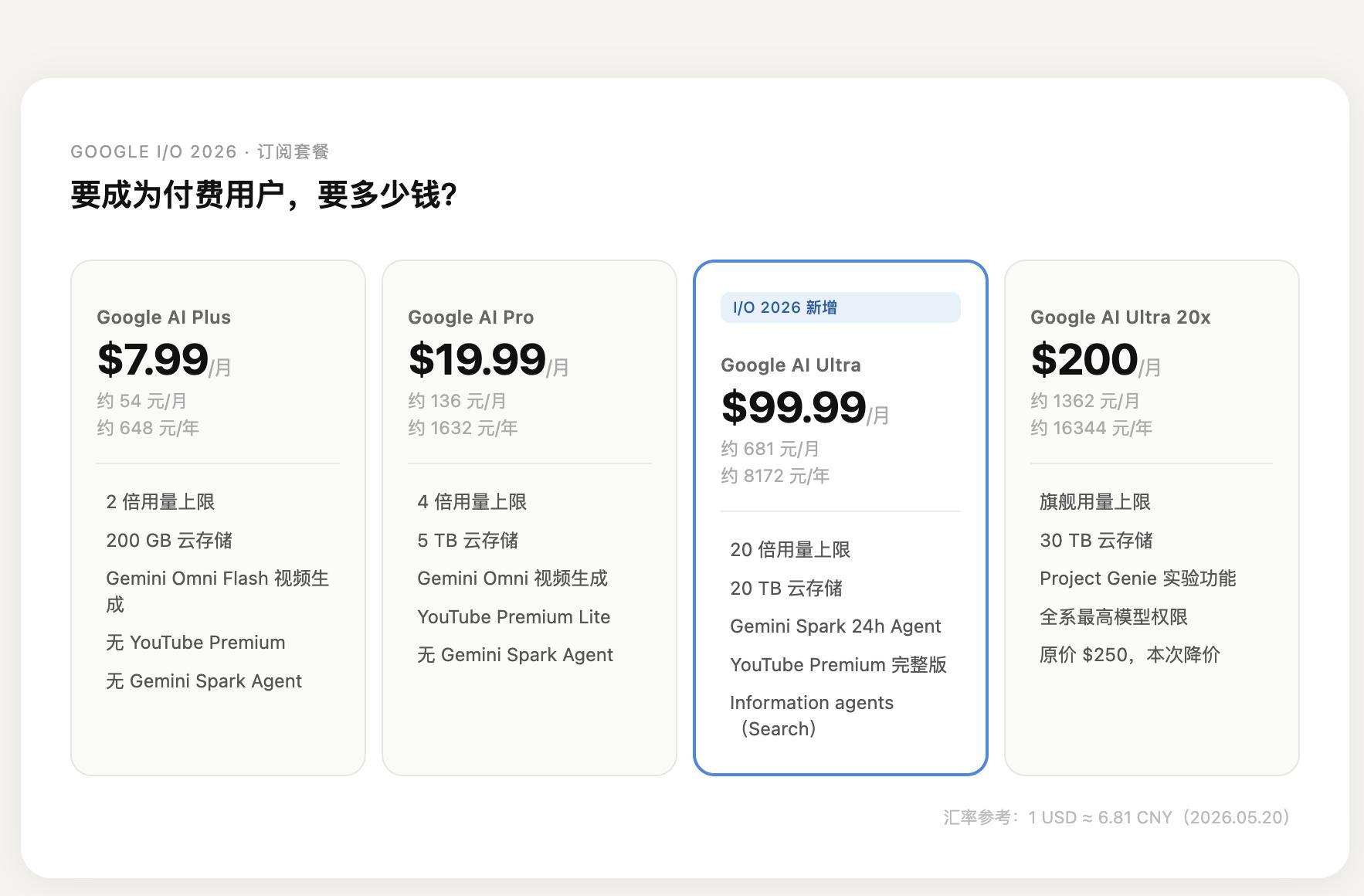
(Image source: Lei Technology)
For most ordinary people, there's no need to subscribe just to try out these new features. But how much can you experience with the free version?
1. Gemini Flash: Free for all, Google leads the way in AI accessibility.
The biggest highlight of Google's conference was undoubtedly Gemini 3.5 Flash. As for why they released Flash first instead of Pro, Google made it clear that they wanted to lay a foundation with a faster model that uses the least amount of tokens.
We used a fictional mobile phone release material and asked it to revise a long article 10 times in a row. Starting from an 800-word draft, it adjusted the beginning, added analysis, compressed the word count, checked for inconsistent expressions, and finally output the final version. Throughout the process, there were no hard limits or upgrade prompts. The waiting time for each round was mostly between 14 and 23 seconds. It was a bit slower for long-article revisions, but it didn't become unresponsive as the conversation went on. The problem was obvious: it was good at making the article look like a media piece, but sometimes it added information that wasn't in the original material, such as price, material, and specific hardware details.
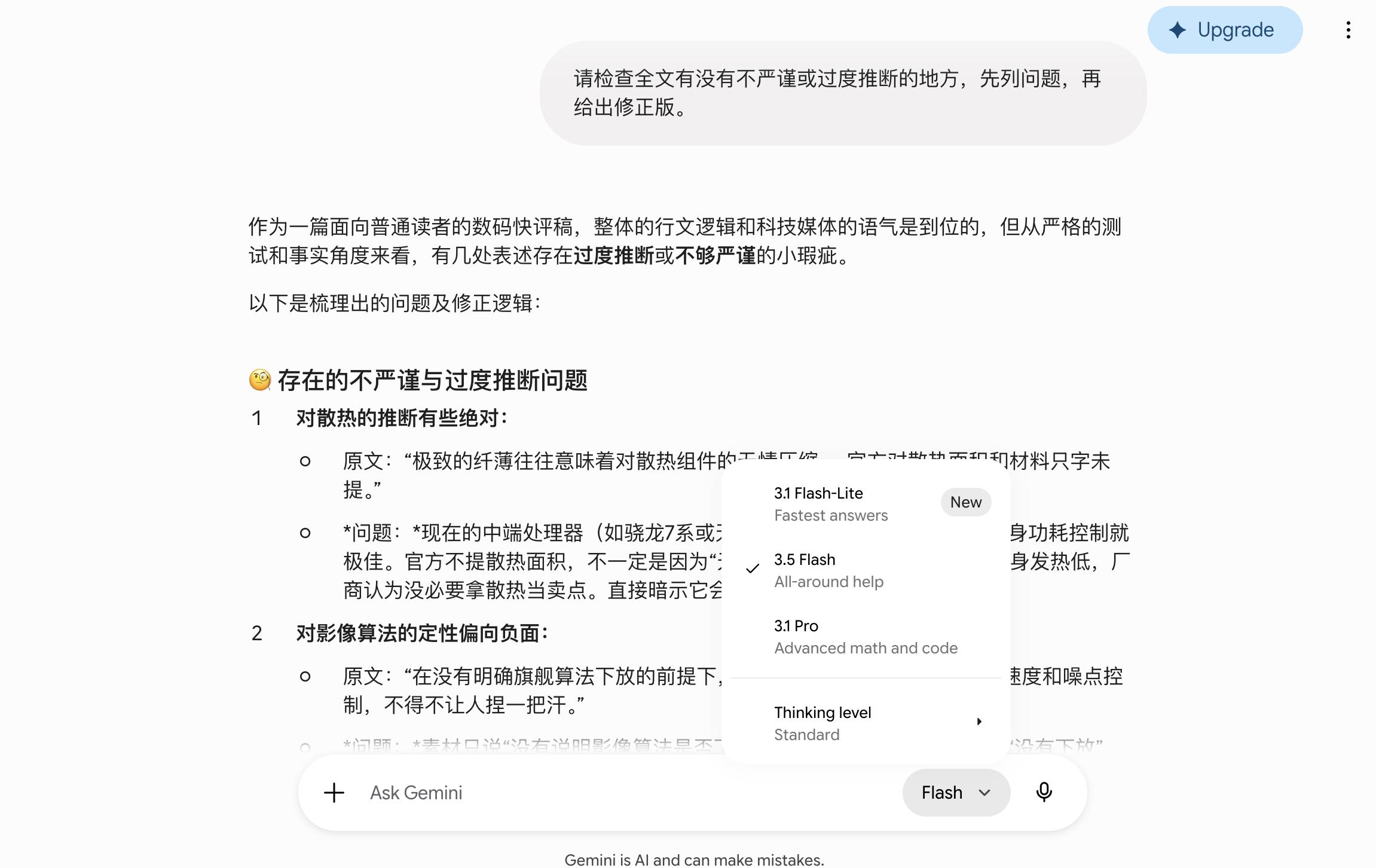
(Image source: Lei Technology)
Flash is free, and there are no overall restrictions. There's no hidden reduction in speed, usage, or context memory just because we're using it for free. Google truly lives up to its reputation.
2. Google AI Studio: Finally, a working demo tool.
We asked AI Studio to use the latest Gemini 3.5 Flash to create a small "content scoring" web tool. The requirement was to score news topics in terms of news value, reader interest, media style, and practical feasibility.
The first generation process seemed complete, and the file was generated. However, after running for about 160 seconds, an internal error occurred, and the preview failed. When we retested and asked it to fix the issue, it ran for about 182 seconds, and finally, a complete interface appeared in the right preview window, with the status showing READY. We clicked on a preset case, and it automatically filled in the title and background. After clicking "Diagnose," it gave an 80-point score, four individual scores, a recommended title, and revision suggestions. It could also save the record in the History. The problem was that the process wasn't smooth, and the failure records and debugging errors were still on the page.
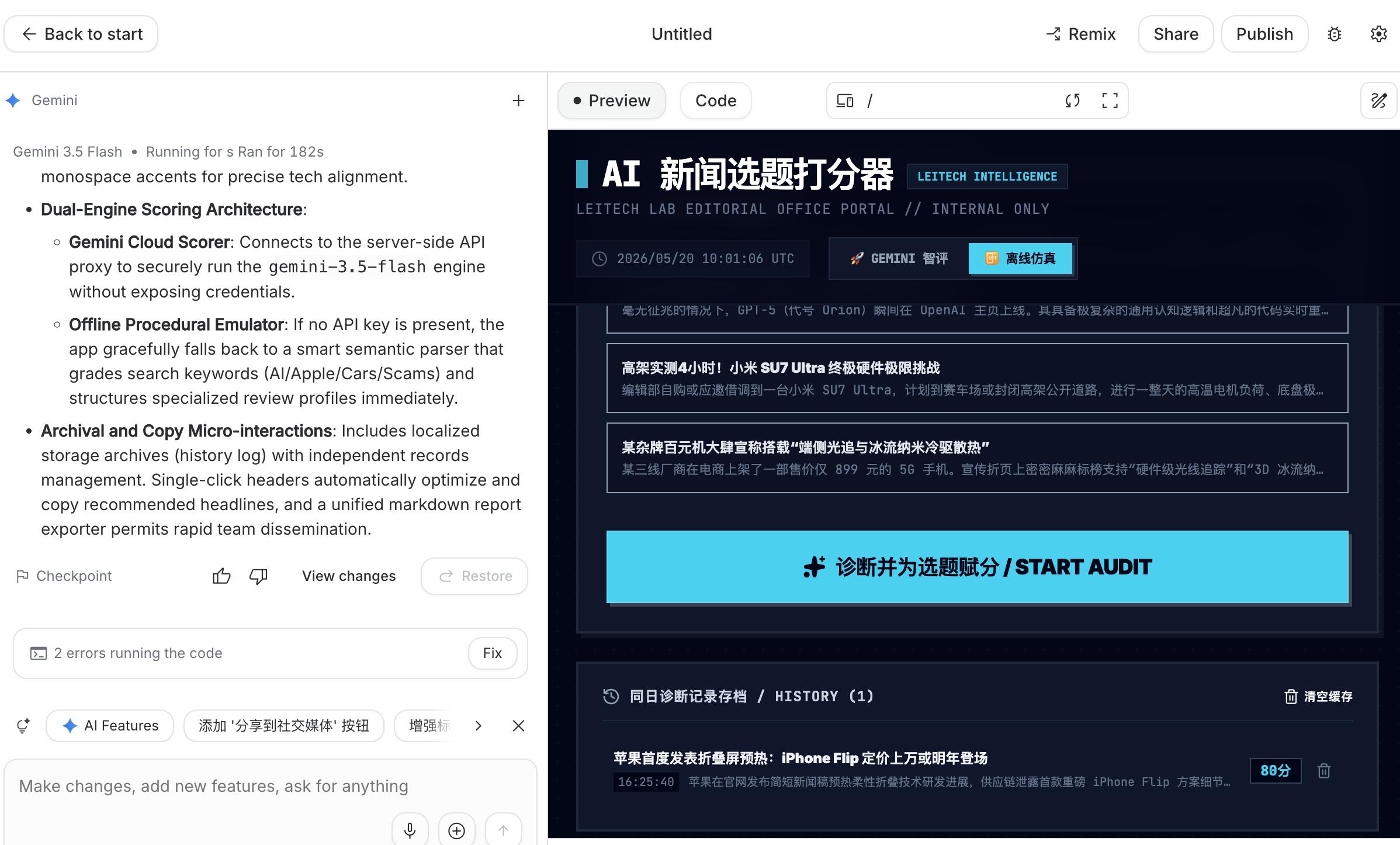
(Image source: Lei Technology)
After the experience, it seems that AI Studio has no problems in terms of capabilities. There are no usage limits or upgrade prompts. However, there might be too many users trying to experience it, and since it's free, the previous tasks took a long time to complete.
3. Search AI Mode: The ceiling of AI search accuracy, but still not accurate enough.
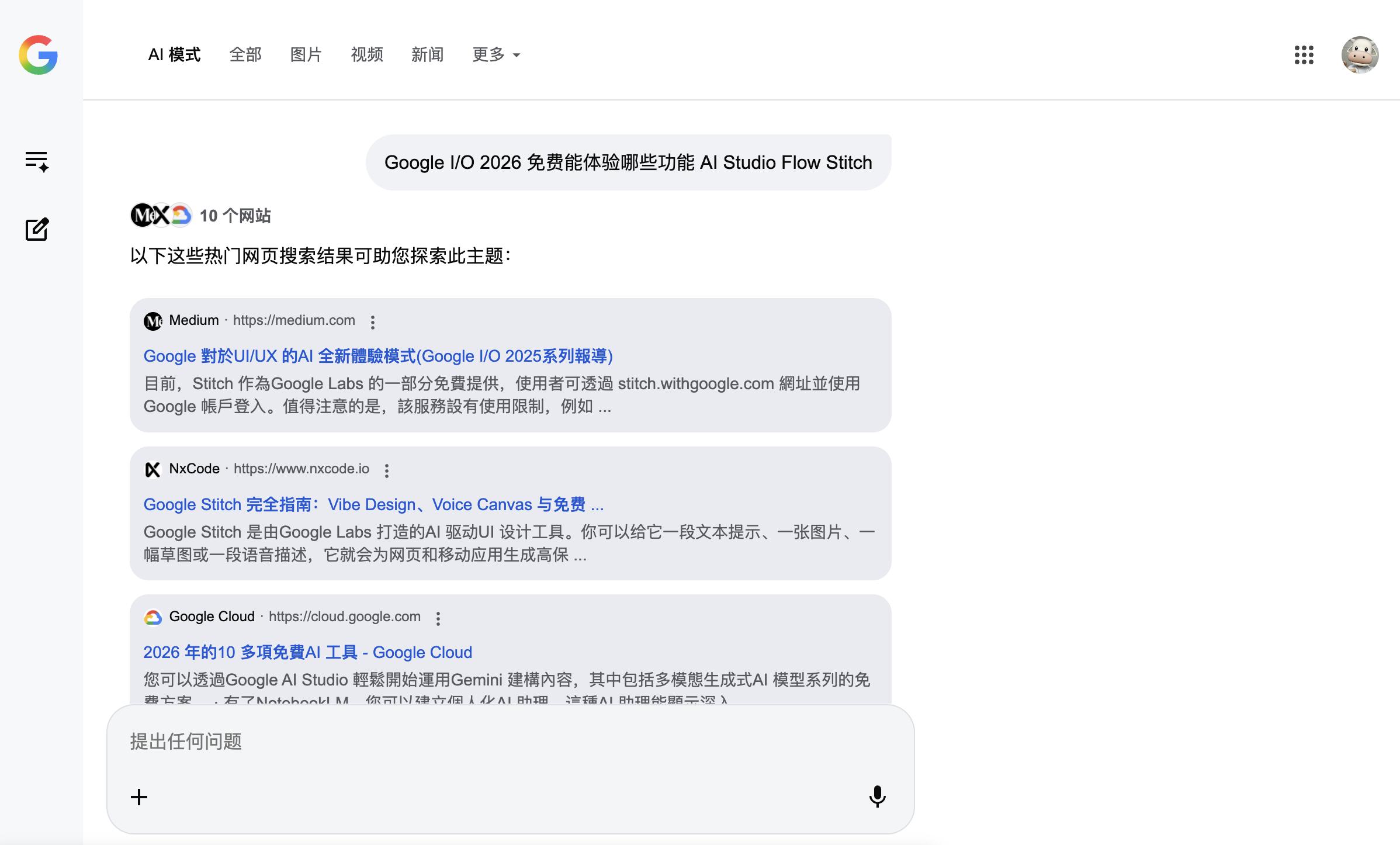
Search AI Mode is a relatively easy-to-use feature on the web. After entering Google Search and switching to AI mode, it will organize the search results into a more "research note"-like answer, and you can continue to ask follow-up questions. In our actual test, the initial organization took about a dozen seconds, and subsequent follow-up questions could still be output in a point-by-point format in Chinese. There was no paywall.
(Image source: Lei Technology)
Its advantage is that it saves users the time of clicking through multiple web pages and organizing information, especially suitable for preliminary understanding. However, the problem is that it tends to overstate the availability of some features, making people think that "everything is available." So, it's more suitable as an upgraded version of the search entry rather than the final source of truth. If you plan to use the content from AI search for writing, you still need to double-check on the official website, help documents, or the actual pages when you start writing.
This is not Google's fault. It's a common problem with AI search. On the one hand, AI itself has hallucinations; on the other hand, the content used by AI from the entire web is "a mix of true and false." Gemini is already at the ceiling level of intelligent search, with an officially announced accuracy rate of about 91%. It's barely sufficient for daily use, but for tasks like identifying mushrooms, making investment decisions, or seeking medical advice, users still need to take responsibility for their own life and property safety.
4. Stitch: A beautiful entry, but difficult to generate.
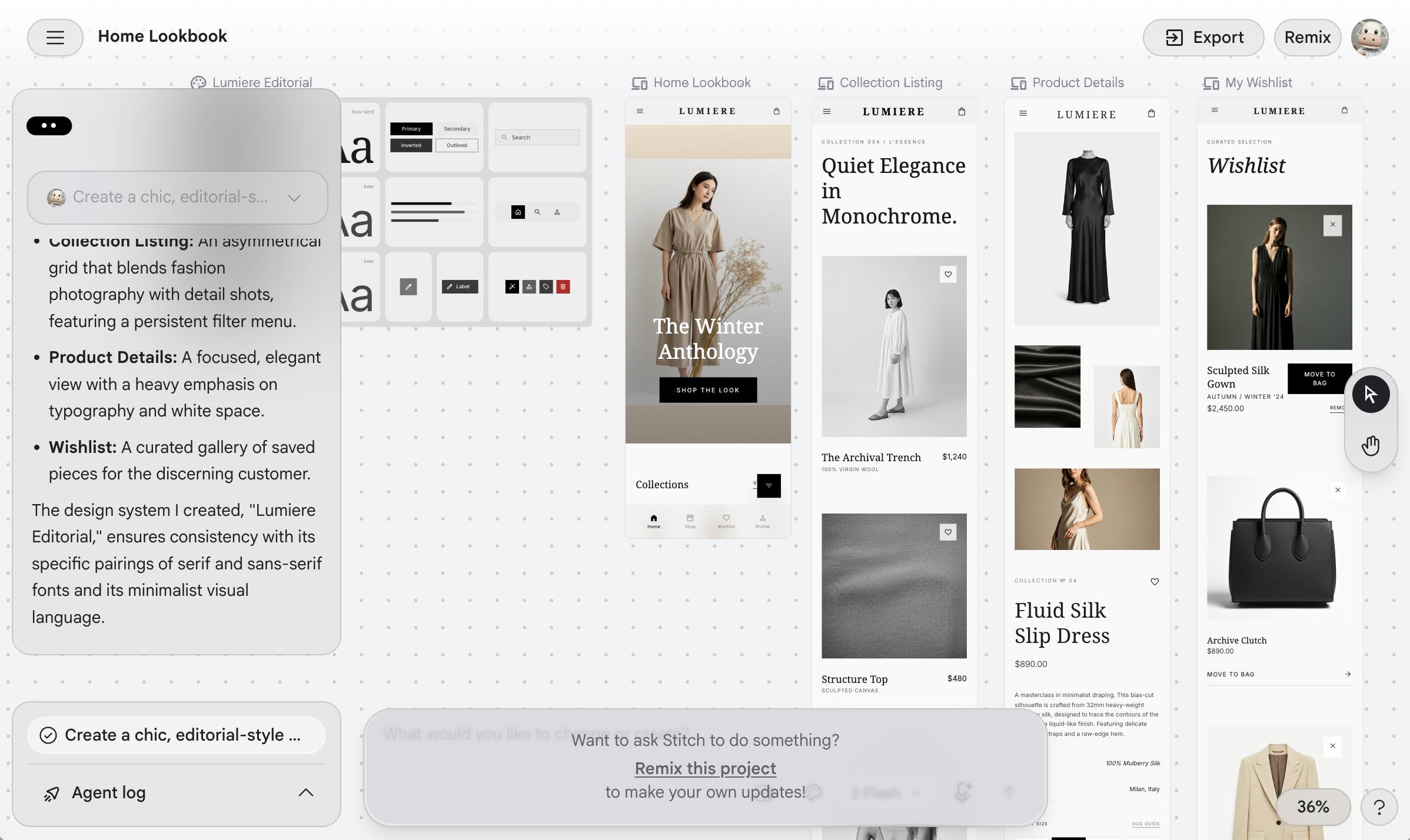
Stitch gives a good first impression. The page is clean, the entry is clear, and you can choose the Web option or input your requirements. We first asked it to create a web design project, but it immediately prompted "Failed to create project." When we retested with a simpler and more neutral "Weekend travel packing list page," there was no immediate error, but the generate button kept spinning. After waiting for more than 4 minutes, it still didn't enter the project page, and there was no clear reason for the failure.
(Image source: Lei Technology)
Most likely, it's because there are too many users currently. This is the only project that took more than half an hour to complete.
5. Omni: No free trial available.
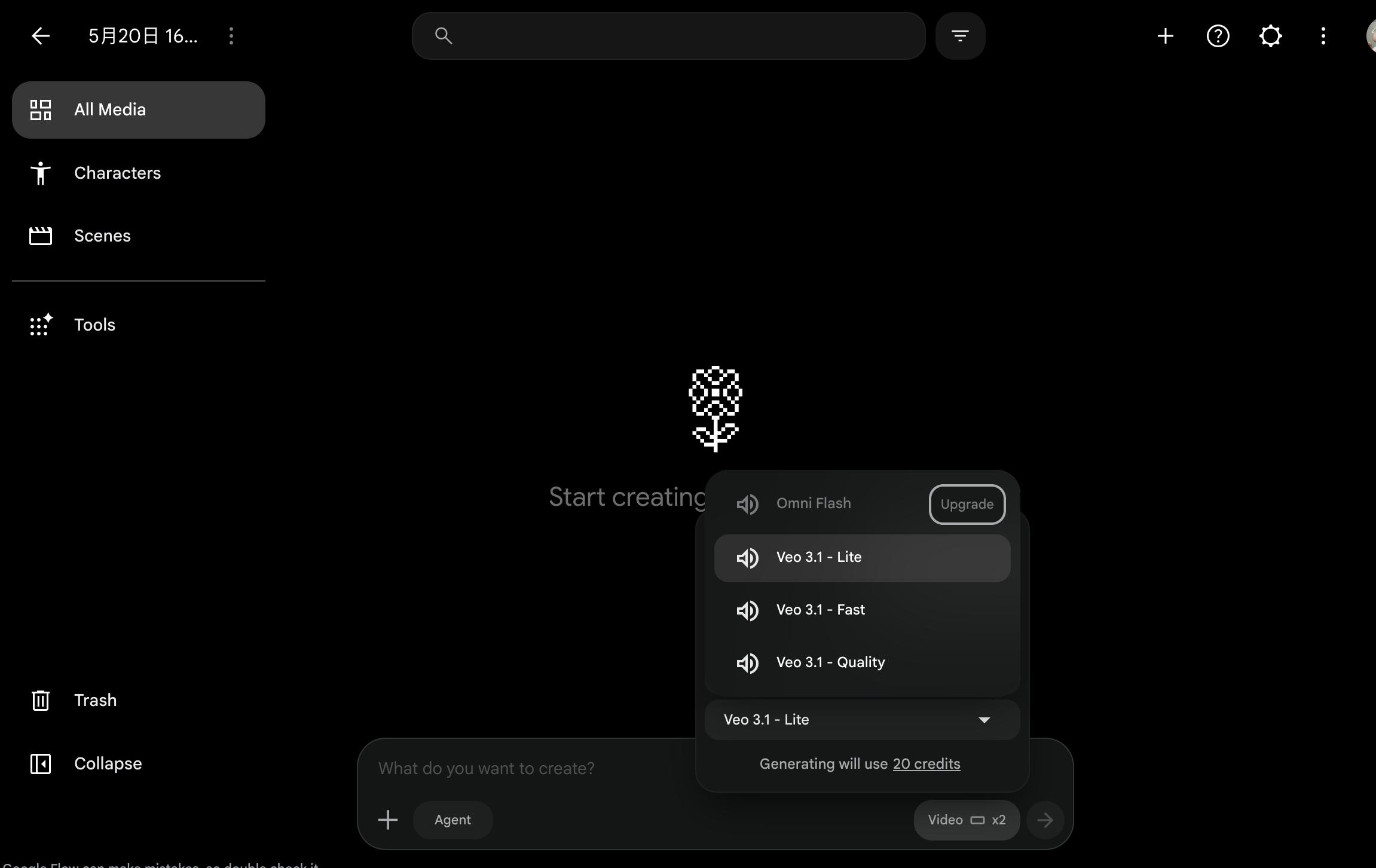
One of the highlights of Google's event was the world model Omni. According to the official statement, it's not just about generating a few seconds of footage based on a single sentence. It aims to understand objects, actions, sounds, camera movements, and scene changes in the real world, enabling AI to more stably simulate "how things happen." Given its capabilities, Google naturally won't let you use it for free.
(Image source: Lei Technology)
After searching, we found that the relevant capabilities of Gemini can be seen on the web, but the generation permission is restricted to Plus subscribers and above. Moreover, Plus subscribers don't have unlimited usage. After trying three times, it will prompt you to wait for the reset time. On YouTube Shorts, we couldn't find a stable entry on either the desktop web or the mobile app. The desktop creation menu still only has options for uploading, live streaming, and posting. Although Google Flow can enter the page, it prompts you to upgrade your subscription when it comes to Omni-related generation.
In general, Google did unveil many powerful features this time. However, if you expect a great experience without paying, you're being a bit unrealistic. Especially for the world model Omni, even though the official claims that it can be freely experienced on Youtube Shrot, there's currently no available entry. The only thing you can use for free might be Gemini 3.5 Flash.
(Image source: Lei Technology)
What Google offers for free isn't the best
The results of our actual test were as expected.
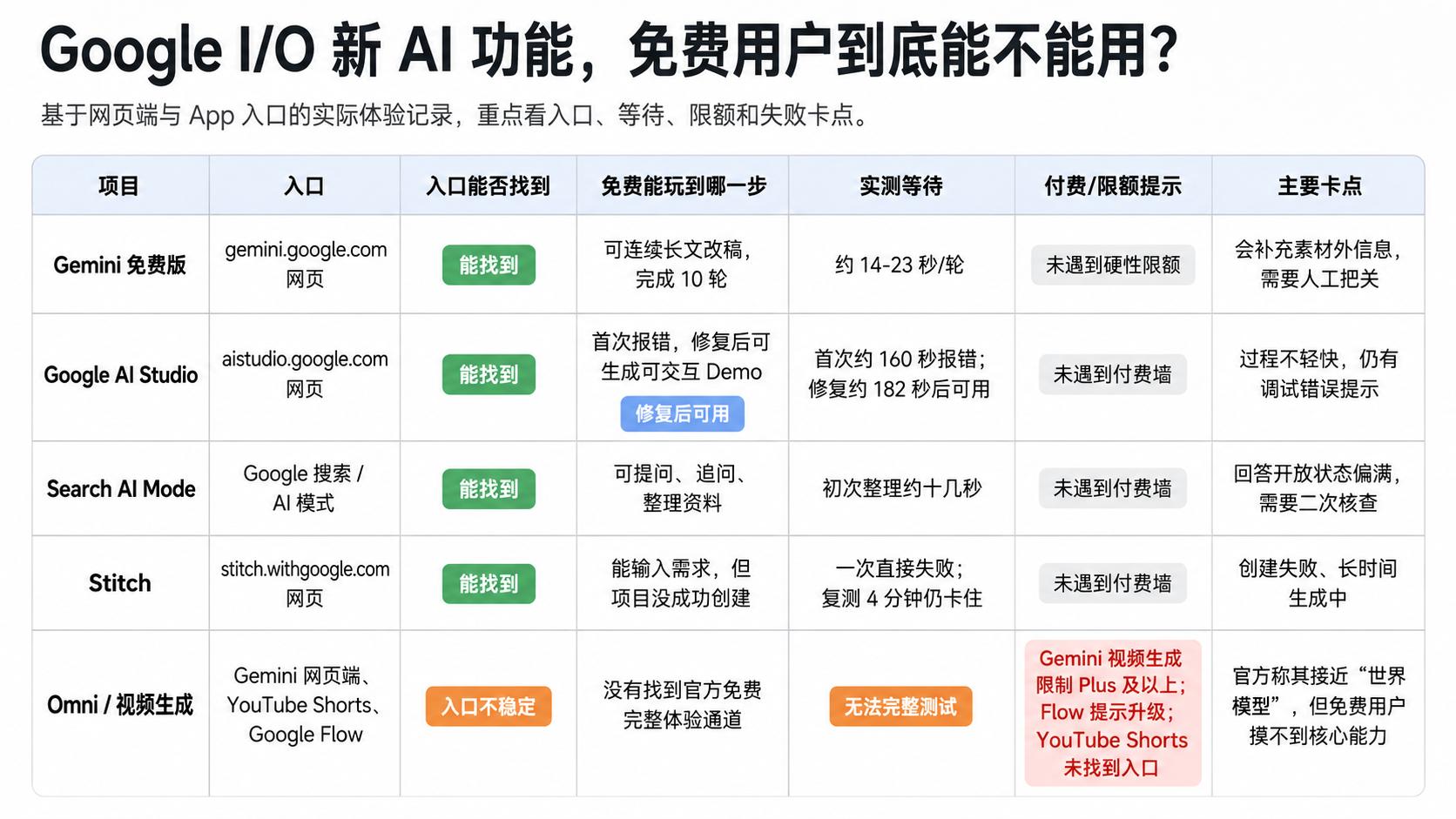
Let's start with the relatively pleasant surprises. The free version of Gemini performed unexpectedly well. When used for long-article revisions, it ran 10 consecutive rounds without hitting any hard limits. The response time was between 14 and 23 seconds, a bit slow but still usable. Google AI Studio also didn't have a paywall. Although the first generation had an error, after fixing it, it produced an interactive demo in about 182 seconds. The process wasn't smooth, but it still worked. Search AI Mode was the simplest to use in this experience. The entry was straightforward, and the follow-up question logic was clear. The initial data organization took about a dozen seconds, and free users hardly felt any restrictions.
However, the problem is that these features aren't the stars of this press conference.
What were the key demonstrations at the press conference? It was the video generation ability of Gemini Omni, the "create an app with one sentence" feature of Antigravity 2.0, the real-time UI design of Stitch, the creation process from script to final production in Google Flow, and Gemini Spark acting as a 24/7 personal agent to handle your digital life. These are the features that received the most applause from the audience. But for free users, the reality is as follows: They can find the entry for Stitch and input their requirements, but the project creation fails directly. Even after a 4-minute retest, it's still stuck in the "generating" state. For Omni's video generation, the Gemini web restricts it to Plus subscribers and above. Google Flow prompts you to upgrade as soon as you enter, and there's no stable entry on YouTube Shorts. Free users don't even have a chance to access the core capabilities of what the official press conference called "close to the world model."
Of course, Google did this intentionally.
Google's tiered strategy is very clear. It reserves the free usage for basic tools that are "good enough." All the amazing features demonstrated at the press conference are locked behind the Plus and higher subscription tiers. The problem is that Sundar Pichai said on stage that it's "AI for everyone" and "you can use it now," but in reality, it becomes "you need to become a paying user first."
So, if this press conference had launched Gemini 3.5 Pro instead, would Google be as generous? The answer is simple: of course not.
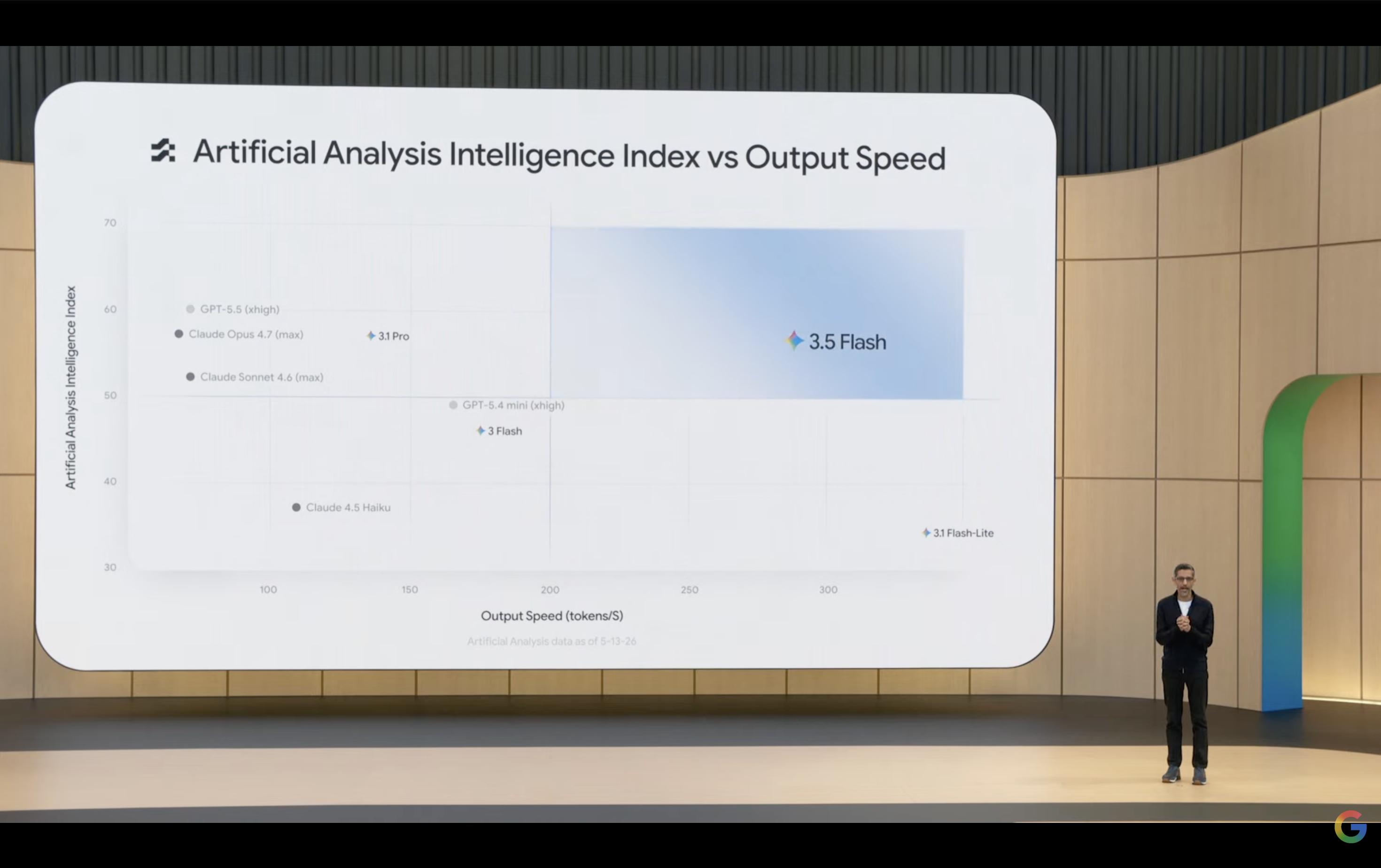
(Image source: Google)
The computing power cost of Pro is much higher than that of Flash. The cost behind each call is different. Flash is cheap, so Google can afford to make it available to free users. Although Flash is hyped up, can ordinary users really feel that it's significantly better than Gemini 3? At least under the premise of "free," it doesn't seem so. If it were Pro, with the same open strategy, the cost would multiply, and the "free" option would no longer exist.
The logic for Omni is exactly the same. Video generation is one of the most computationally intensive tasks in AI. Generating a