The one-click shutdown of AI feature is launched. Firefox is really bold. Does the AI browser rely on small models on the edge side?
Nowadays, when we open any mainstream software, there's a high probability of seeing a newly added "AI" function button. Moreover, many software programs have directly integrated AI into their core functions, seemingly telling you with facts that if you don't use AI, you're out of date.
However, not everyone has a need for AI. In many online communities, you can see netizens complaining that the newly added AI functions are not as good as the original versions. On one hand, there are still many issues with AI, such as hallucinations. On the other hand, many software vendors are limited by costs and restrict computing power, which actually leads to a poor user experience.
Surprisingly, when most software vendors are embracing AI, the well - known open - source browser Firefox announced an unexpected decision - to add a function to block all AI with one click. This decision was quickly welcomed by community users and many technology enthusiasts, even more so than when Firefox first launched its AI functions.
To use AI or not? Firefox returns the choice to users
According to the latest news released by Mozilla and the update logs of subsequent Firefox versions, the development team is further refining users' control over the AI functions in the browser. In the latest Firefox version, Mozilla has already added an "AI control" option in the settings, clearly defining users' right to "turn off AI".
As a former Firefox user, Xiaolei reinstalled the browser. Sure enough, there are no traces of "AI" on the homepage, and all related functions are concentrated in a sidebar area in the upper - left corner. Users need to manually turn them on and can choose different large AI models.
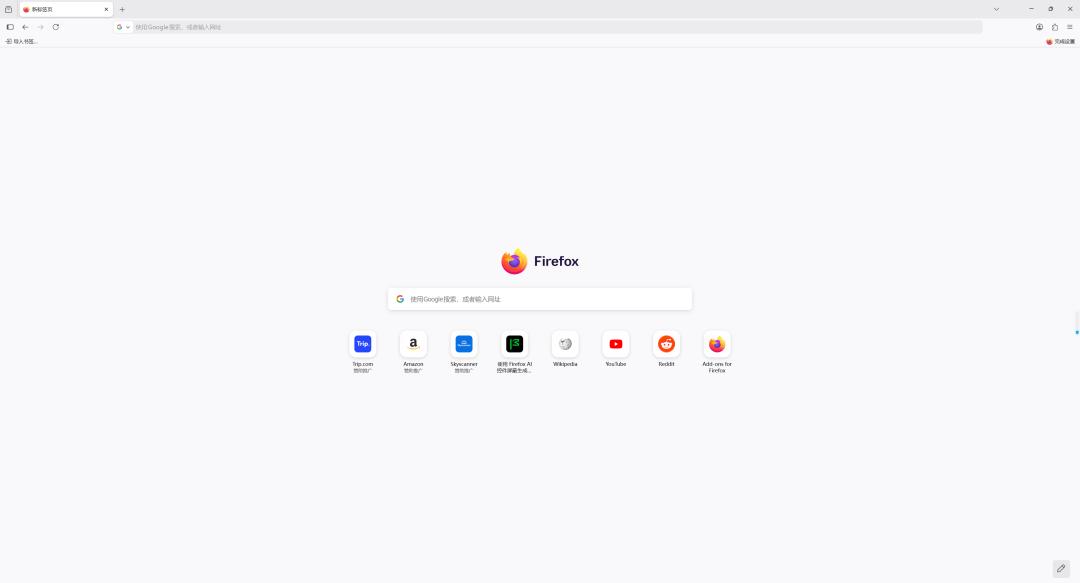
Image source: Lei Technology
In the "AI control" section of the settings, you can see a newly added option to "block AI enhancement functions". Once enabled, Firefox will no longer display any AI enhancement functions and will not pop up prompts. If you don't need AI, then Firefox remains a pure and quiet web - browsing tool.
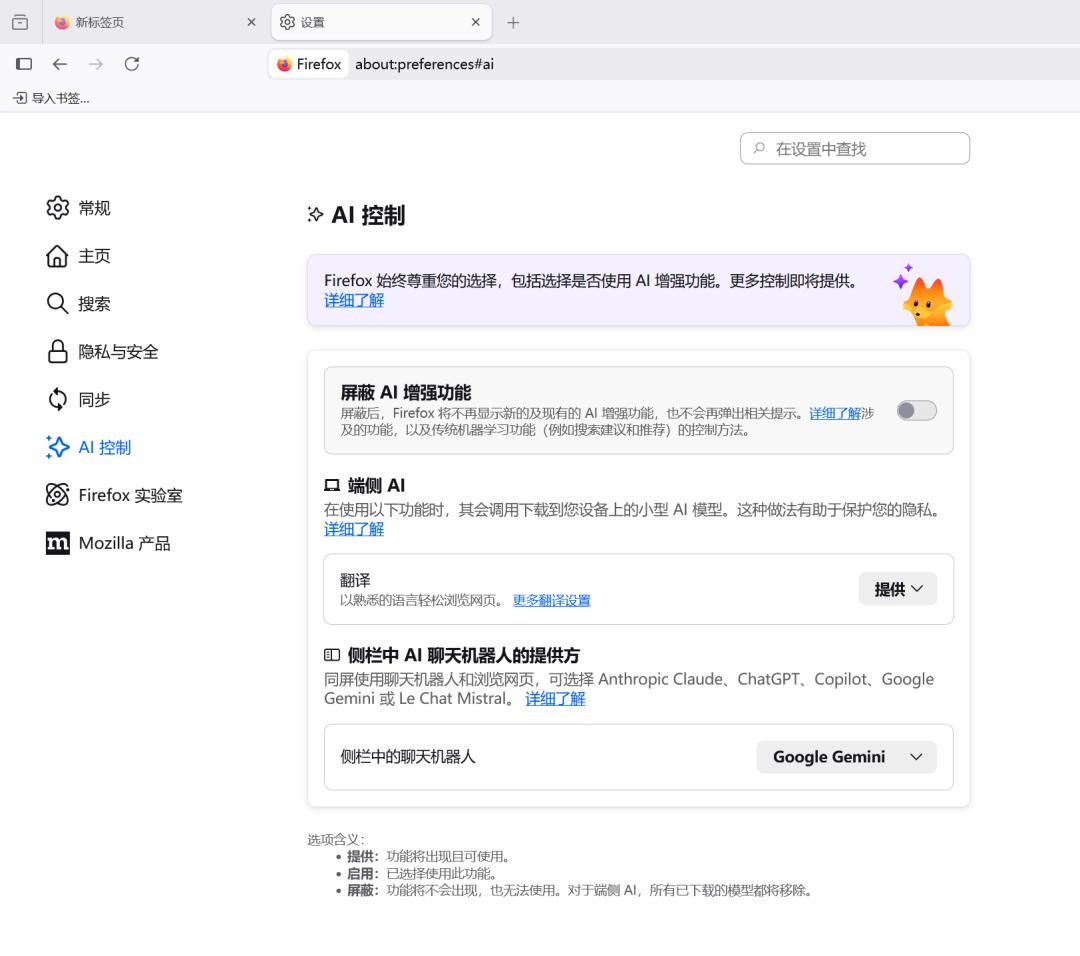
Image source: Lei Technology
At the same time, Firefox also provides a function for deploying AI models on the edge side. Currently, users can use it for "translation" to avoid having privacy data stored in the cloud. It also allows users to independently set the provider of the AI chatbot model in the sidebar. Firefox also reminds users that more detailed control settings will be launched in the future to help users better control AI functions.

Image source: Lei Technology
Seeing this, you may think that Firefox doesn't have many AI functions. In fact, that's not the case. As an open - source browser, the official AI functions of Firefox are launched at a faster speed and are more diverse than those of Chrome.
In addition to the translation mentioned above, it also provides functions such as "AI illustrations for PDFs", "AI summarization of tab bars", and "preview summaries of web links". Different from some software that only uses AI as a search entry, Firefox tends to make AI functions "localized" to improve users' practical experience.
Interestingly, when Xiaolei was looking through Mozilla's official blog, he found that they repeatedly emphasized the core concept of "User Agency". In their view, the browser should be an extension of users' will, rather than a tool for tech giants to control the ecosystem. This is also the core reason why they finally chose to return all permissions to users.
Xiaolei noticed that when this news spread on overseas forums, netizens' reactions were surprisingly consistent - finally, someone realized that they should ask for users' opinions. Why does a simple "turn off" function trigger such a strong reaction? To put it simply, it's actually users' long - standing resentment towards the "bloat" of software and "passive acceptance". Users are not fed up with AI itself, but rather dissatisfied with the loss of their right to choose.
Take Windows Copilot as an example. Why are users repelled by it? The core reason is not that it's not useful, but that Microsoft forces everyone to use it. Even if you don't want to use it, you'll see it popping up everywhere. Moreover, Microsoft bundles it with official software and raises the subscription price without providing users with more choices.

Image source: Lei Technology
The result of force - pushing AI functions is that some users are averse and start looking for alternatives. Of course, changing the operating system is still troublesome, and the cost of relearning and adapting is too high. However, browsers are different. As the most commonly used software in daily life, mainstream browsers are quite similar. If you make users unhappy, they will really vote with their feet.
Therefore, Firefox has undoubtedly made the right choice. On one hand, it continuously absorbs "good ideas" about AI functions from the open - source community. On the other hand, it provides users with more freedom to make decisions. This way, the browser's experience can "keep up with the times" without seriously interfering with users' experience.
As the saying goes, for users, we don't dislike AI technology itself. On the contrary, when we need it, we're happy to use AI tools to improve efficiency. What we really dislike is the "forced implantation" without consent, which is hard to refuse.
Another way for browser evolution: Do subtraction instead of addition
Many users actually have another concern about the "all - pervasive" nature of AI - privacy and security.
When a browser has an AI model that can analyze the content of the current page, users have to start worrying: Will the private files I'm browsing, my personal account information, and my private information be fed as data to the large model in the cloud?
Although major vendors vow to ensure data security, in today's era where "training data is the future", many people are skeptical of the promises made by large companies. Therefore, when Firefox provides a clear "turn off" option, it's actually telling users: You still have control over where your data goes, and that's enough of a reason for users to choose it.

Image source: Lei Technology
In Xiaolei's view, Firefox's approach is also an inevitable choice for an open - source software. After all, in the browser market arena, Google's Chrome has a huge ecological advantage, and Microsoft has a large amount of computing power support. So they can engage in the AI competition without considering costs.
In contrast, Mozilla, the developer of Firefox, is a non - profit organization. If it chooses to compete head - on and try to compete in terms of the cost and experience of large models, it's obviously no match for these large companies. Therefore, Firefox's core competitiveness must return to the fundamentals, namely "independence", "privacy", and "highly customizable".
When all browsers are doing addition and trying to fit the operating system into the browser, Firefox chooses to do "subtraction" and provides a "pure version" experience. This will actually become its advantage. To be honest, in this era of information explosion, simplicity itself is a luxury because it means that developers have to give up easily obtainable benefits to embrace the user experience.
On the other hand, this strategy is actually maintaining Firefox's most valuable asset - trust. For the open - source community, developers, and privacy - conscious geeks, Firefox is the last line of defense among mainstream browsers.
By returning control to users, Firefox is actually strengthening its brand image as a "defender of user interests". For the open - source community, only when users trust and support them can they continue to exist. After all, countless past experiences have taught us that an open - source community that loses users' trust has only one outcome - shutdown.
Is the future of AI browsers in "edge - side small models"?
At this point, Xiaolei also wants to discuss a topic with you: Should a browser be a transparent "tool" or an actively - intervening "intelligent agent"? In the traditional software definition, a browser is more like a transfer station. Its existence is to allow users to browse various websites. Before Chrome released its plugin function, the functions of the browser itself were very limited.
However, current tech giants seem eager to transform browsers into "intelligent agents" that can predict your needs and take over your operations. But do users really need this? Or rather, where should the boundary of this "proxy operation" be set?
Should AI be a plugin that can be summoned and dismissed at will, or should it become an inseparable part of the system's underlying layer? In Xiaolei's view, the best approach might be "real - time silence + instant perception". In short, it relies on the local edge - side model to monitor users' needs in real - time and then decides whether to respond and whether to call cloud computing power.

Image source: Lei Technology
For example, when I want to buy something and compare prices on different websites, the AI detects the relevant operations and automatically wakes up, then asks if it can help search for price comparisons. Or when we accidentally open a "fraudulent website", the AI uses its code retrieval function to quickly identify the malicious scripts hidden behind the phishing page and then actively alerts that the website is abnormal and marks it.
When the edge - side AI detects that we're browsing sensitive information, it will actively help us close the data upload channel and desensitize the relevant information to avoid it being retained by other websites or software, and ensure users' privacy and security as much as possible.
This might be the best way for an AI browser to interact with users. It doesn't replace you to do everything, but rather monitors in real - time (on the edge side), responds according to the situation, and at the same time gives users more autonomy, allowing users to set which functions need to respond and which are absolute "no - go zones".
To achieve this, there must be strong local computing power or more efficient small - parameter models (convenient for edge - side deployment). The most powerful model in this regard is actually the domestic Qwen. Some time ago, Qwen open - sourced small - parameter models below 9B, and then was praised by Elon Musk, who said it was the first time he'd seen such a high "intelligence density".

Image source: Qianwen
In Xiaolei's view, Qwen's open - source model + small - parameter model is exactly the most suitable choice for edge - side AI deployment in browsers. On one hand, the open - source model has high security (no need to worry about the model provider doing something shady). On the other hand, the deployment cost is low. These features meet the needs of browser users (you don't want to pay token fees just to open a browser, do you?).
In November last year, Quark, an ecological software under Alibaba, cooperated with Qwen to launch a new - generation AI browser. In terms of functions, it's actually quite perfect. With the support of Qwen's model, Xiaolei thinks Quark has the opportunity to become the first browser in China that integrates "edge - side deployment and cloud collaboration", and he's quite looking forward to the experience.
To be honest, AI is changing everything around us. The tide of this era is irresistible for individuals. However, we should at least have the right to choose. We also hope that large companies will leave us the "right to choose". As the saying goes, in the relationship between humans and AI, humans are always the key to achieving goals, and AI is just a means.
This article is from the WeChat public account "Intelligent Pro", author: TSknight. Republished by 36Kr with authorization.