Is Cursor No Longer Appealing? A Top 0.01% Expert Switches to Claude, and a Ten-Thousand-Word Defection Note Goes Viral
If you follow the AI programming circle, you must have been bombarded with Claude Code recently.
However, amidst the numerous noisy discussions, Silen Naihin's voice is particularly thought-provoking.
He is not an ordinary developer but one of the top 0.01% users of Cursor globally and was once the most loyal advocate of this ecosystem.
However, after the release of Claude Code 2.0, he made a decision that shocked everyone: Abandon Cursor and fully migrate to Claude Code.
In a popular blog post, he documented this entire thought process.
This is a comprehensive practical guide from an "old hand" who has been exploring AI programming since 2021 and has read all the Claude Code guides. It includes:
- Five years of experience in AI programming
- Practical insights from using Claude Code
- More than 10 carefully selected articles and numerous tweets about Claude Code
- Exclusive configurations
- Advanced techniques
After reading this, you'll truly get the hang of it, and the only limit will be your imagination.
For the full and detailed content, please refer to the original address of the author's blog: https://blog.silennai.com/claude-code
From GPT-4 to Cursor
A Disillusioned Journey
The story begins in March 2023.
At that time, Github Copilot was still at the forefront of AI programming, and ChatGPT was still a novelty. The continuous improvement of models was not a given at that time.
Shortly after, GPT-4 was released. Clearly, this was a moment of paradigm shift.
Silen Naihin recalled that it was the first time he began to fantasize about creating an "AI thinking loop" - allowing AI not only to write code but also to cooperate with tools and search the web to form a closed loop.
Later, people gave this loop a resounding name: AI Agents.
Silen Naihin was very lucky. He participated in building the first truly popular AI agent - AutoGPT.
This project quickly exploded globally and remains the legendary repository on GitHub that reached 100,000 stars the fastest to this day.
But to be honest, it wasn't very user-friendly.
Silen Naihin admitted that AutoGPT at that time was actually not perfect.
On a really lucky day, it could create a barely functional Tic-Tac-Toe game for you. But if you wanted something more complex, it was simply out of the question.
It wasn't until Cursor emerged out of nowhere in 2023.
Initially, Silen Naihin was also skeptical about it.
He tried to get into it twice in October 2023 and May 2024 but quit twice.
In his opinion, at that time, the old - fashioned "copy - paste from ChatGPT" was still more reliable than these half - baked tools.
It wasn't until September 2024 that Cursor Composer arrived.
At that moment, quantitative change led to qualitative change.
Silen Naihin found that 90% of his code began to be taken over by generative AI. He was so obsessed that he "lived" in the editor, frantically exploring the limits of this tool.
He wrote an unpublished internal best - practice guide and figured out every tiny technique:
How to place the cursor surgically, how to finely manage the context window, how to write Cursor rules, how to probe the boundaries of the model's capabilities...
He thought he had found the "silver bullet". He even received an email from the Cursor team, congratulating him on becoming one of the top 0.01% users.
Earlier this year, Silen Naihin actually tried Claude Code, but the result was - another abandonment.
At that time, he thought that the workflow of Claude Code was a step backward.
The model wasn't smart enough. Most of the time, humans still needed to clearly know what was going on in the code.
In that case, why use a command - line tool with barely acceptable functionality and a user experience that was 10 times worse?
The Counter - attack of Claude Code 2.0
Why Has the Abstraction Level Changed?
Claude Code 2.0 made its debut.
On the surface, its user experience has evolved, the shell framework is more flexible and robust, and many bugs have been fixed. But in Silen Naihin's view, these are just the tip of the iceberg.
The truth is that no matter what RLHF (Reinforcement Learning from Human Feedback) Anthropic did to the underlying Opus 4.5 model, they completely changed the rules of the game.
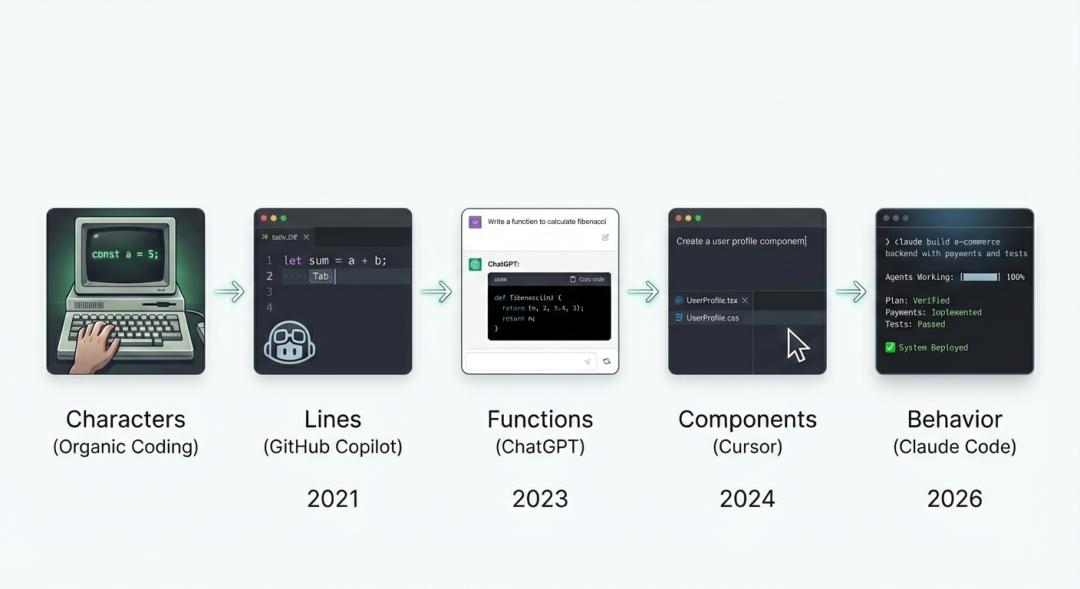
We have evolved to the next "abstraction level".
In the past, you needed to review the code and instruct the model at the file and function levels.
Now, Silen Naihin has found that you no longer need to stare at every line of code. You can directly test the "behavior".
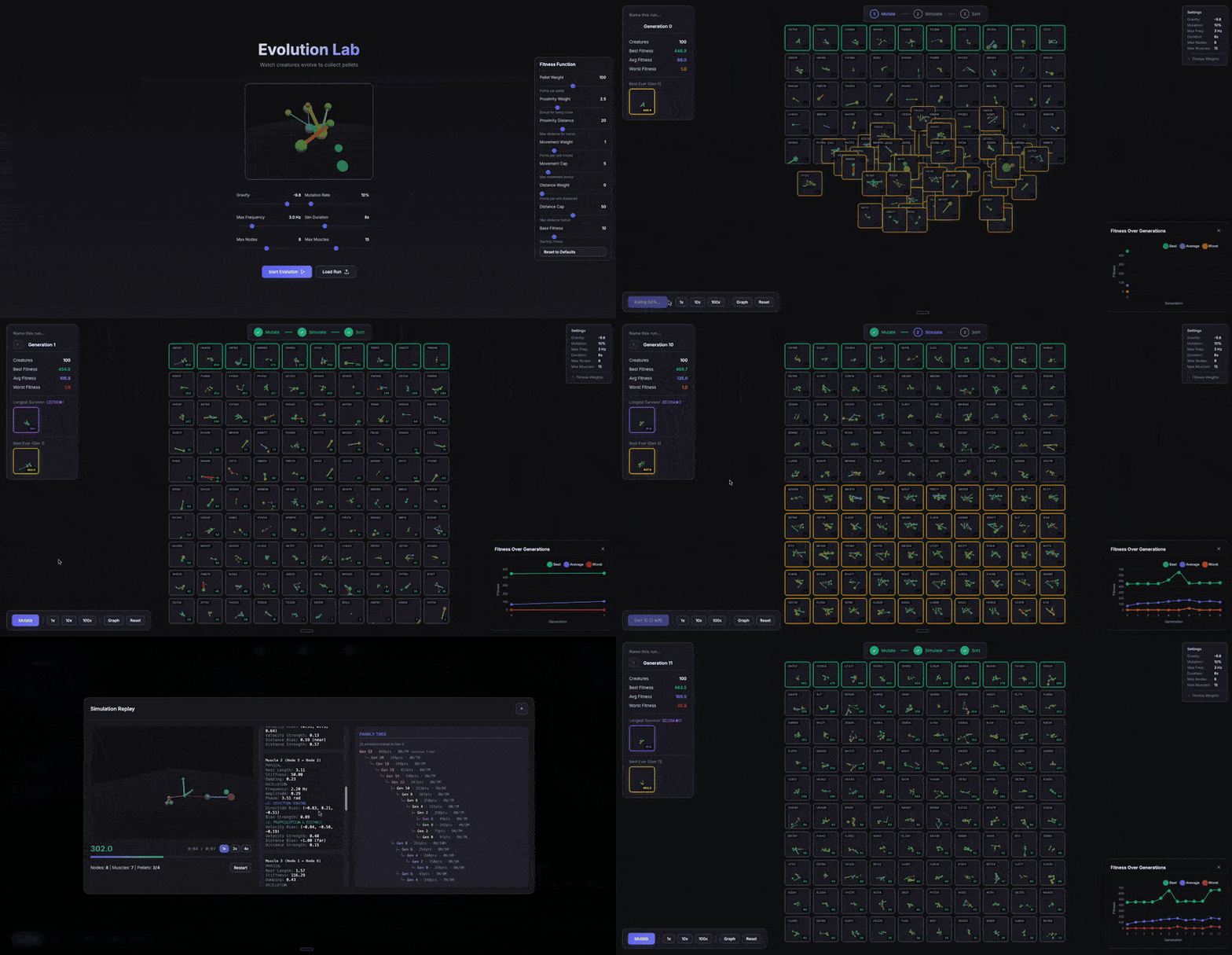
To prove this, Silen Naihin built a genetic algorithm simulator in just one day.
This simulator has an interactive visualization interface that shows real - time evolution and includes advanced functions such as complex fitness functions, selection pressure, and mutation rate adjustment.
The key point is: He didn't write a single line of code by hand.
Not only him, but others are also creating miracles with this "magic wand":
Some people have made a plugin for visualizing office work, some have made a complex bionic beast simulator, and some have even made a $30 smart bird feeder camera.
Silen Naihin himself is also on a roll, successively building a Wright brothers flight simulator, a personal website, and the kind of interactive blog post you're reading now.
The magic wand is in everyone's hands. Now the question is: How should you wave it?
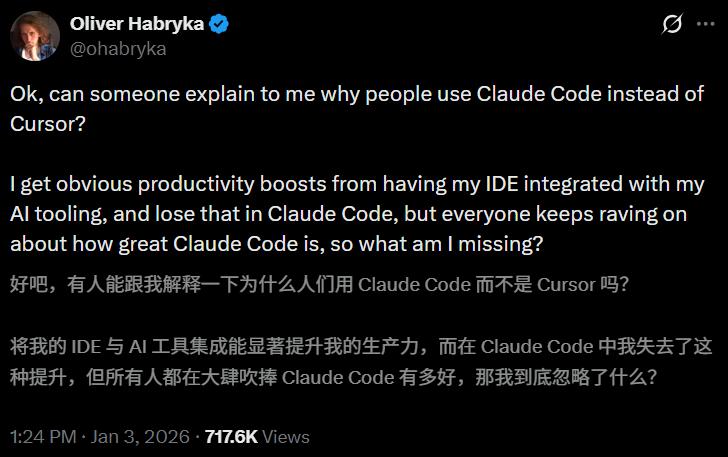
There was a skeptic on Twitter who asked, "Can someone explain why use Claude Code instead of Cursor?"
Until a month ago, Silen Naihin had the same question. But now, he has a definite answer:
First, Asynchronous first.
When staying in the IDE (Integrated Development Environment), humans instinctively conduct code reviews and get entangled in those perfect details, but this is a low - level kind of diligence.
Claude Code elevates the workflow to the next abstraction level, and the terminal - native workflow is the key to forcing you to take this step.
Second, RLHF has been done for its own scaffolding.
The Claude model (especially Opus 4.5+) performs significantly better in the Claude Code environment.
File search, tool usage - everything has been optimized for this interface. It's like playing on its home court, feeling at ease.
Third, Cost - efficiency and customizability.
It is more cost - effective, and DIY is native, with built - in combinability. It is not a closed black box but an open Lego world.
Of course, Silen Naihin also objectively points out that Cursor still has its place.
If you pursue pixel - perfect front - end details or you're programming for the sake of learning, Cursor's tight feedback loop is still the best.
But if you only care about output and, like Silen Naihin, you're an "abstraction maximilist", then Claude Code is your final destination.
Ultimate Configuration and the Secret Recipe for "One - Click Mastery"
Before delving into specific tactics, Silen Naihin generously shows off his arsenal:
Claude Code with Opus 4.5: Responsible for "heavy - duty" tasks such as planning, code generation, and architectural decisions;
Cursor with GPT 5.2/Sonnet 4.5: Used for fine - tuning the UI and making small - scale changes;
ChatGPT: Serves as a "second opinion" advisor, providing different perspectives;
Ghostty: An ultra - fast terminal;
Wisp: A voice input tool, saying goodbye to "mouse hand".
To make it easy for everyone to get started, Silen Naihin did something very geeky:
He encoded all the Alpha (core secrets) of this article into two commands:
/setup - claude - code (global) and /setup - repo (project - level).
They will understand your needs like an interviewer and automatically configure everything.
Download these commands to ~/.claude/commands/:
- /setup - claude - code (run once per machine):
- https://gist.github.com/SilenNaihin/3f6b6ccdc1f24911cfdec78dbc334547
- /setup - repo (run once per project):
- https://gist.github.com/SilenNaihin/e402188c89aab94de61df3da1c10d6ca
Practical AI Agent Programming
Five Pillars and High - Efficiency Techniques
To truly master Claude Code, Silen Naihin has summarized five pillars that you must master.
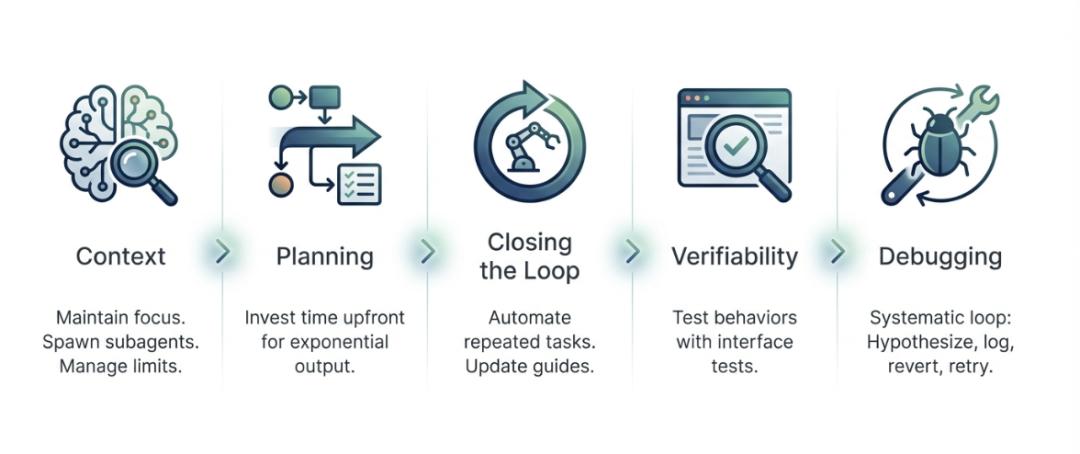
1. Context Management: Don't Let It "Forget"
Although Claude Code is powerful, it has a 200k context limit and is more likely to "hit the wall" compared to other tools.
Silen Naihin reminds us that staying focused is the key. It's best for one chat (session) to correspond to only one task.
Learn to use the /compact command. Although there will be some loss, it's usually worth it to stay in the same chat context. If the context is really insufficient, use /transfer - context to gracefully transfer the position.
/transfer - context: https://gist.github.com/SilenNaihin/e4be0e8750343d9cbafdaab88366115c
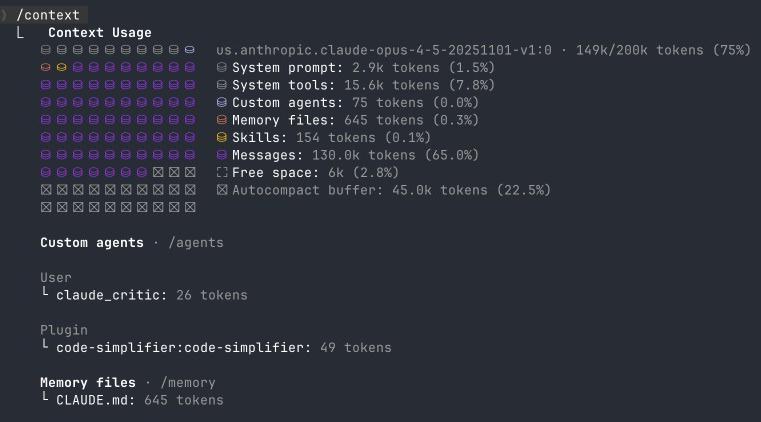

Silen Naihin also has an exclusive insight: Generating documentation or tests in a chat with an existing context always yields the best results.
2. Planning: A Stitch in Time Saves Nine
For every minute spent on planning, you can save three minutes later.
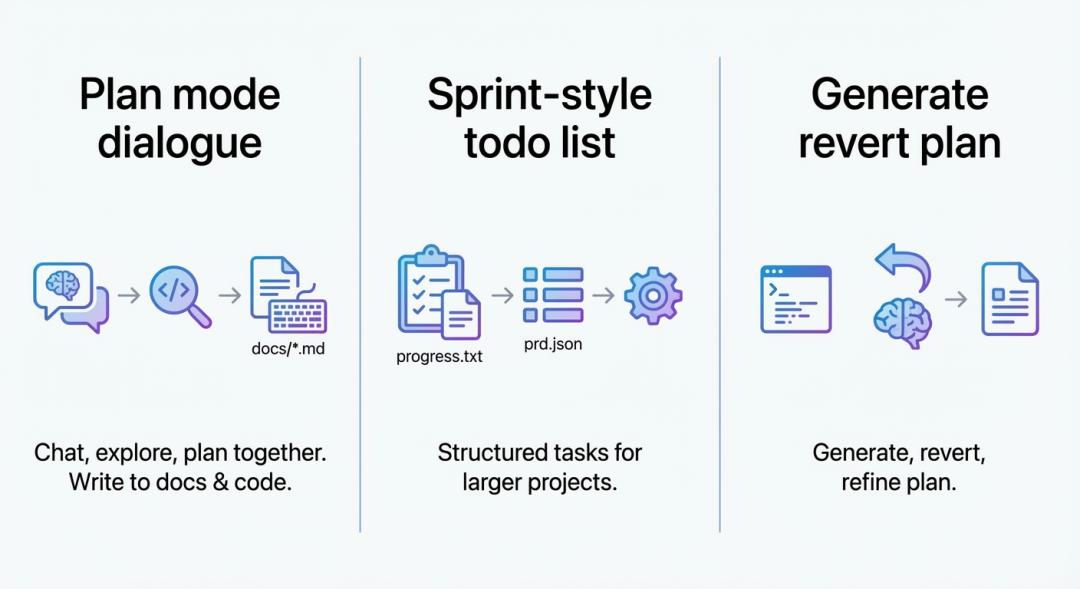
For large tasks, press Shift + Tab twice to enter the planning mode, or directly formulate a plan through dialogue in the chat.
After creating a plan, use the /interview - me - planmd command. Let Claude act as a strict product manager and conduct an in - depth interview with you to ensure everything is foolproof.
Silen Naihin especially mentions that Opus 4.5 is particularly good at explaining logic and drawing ASCII charts.
/interview - me - planmd: https://gist.github.com/SilenNaihin/0733adf5e8deea4242878938c3bdc9fb
Also, remember to clearly tell it: Don't be overly cautious to maintain backward compatibility (the current models are sometimes too "obedient"), and be wary of over - engineering - we only want the simplest changes, and code readability is the king.
3. Closed - Loop: The Art of Automation
The old programmer joke about "spending a week automating a five - minute task" is outdated. In Silen Naihin's view, it's almost always worth completing the closed - loop now.
If you find yourself repeating something, automate it through commands, agents, or by updating the configuration file.
Don't even let trivial things like modifying tsconfig slip through.
