Claude can now join video conferences, drafting plans while listening and drawing on the whiteboard in real time.
The most dreaded scenario in a meeting is that a whole room of people chat enthusiastically, yet two hours pass and no one still knows who is supposed to do what.
The meeting minutes look complete, but when it's time to actually get work done after the meeting, someone still has to recreate documents, supplement materials, and confirm with colleagues.
Now, Claude wants to move this post-meeting work into the meeting in advance.
On November 12, Anthropic announced that Claude Meetings has entered the testing phase.
Teams can directly add Claude to Google Meet, and ask it to write documents and draw whiteboards while the discussion is ongoing.
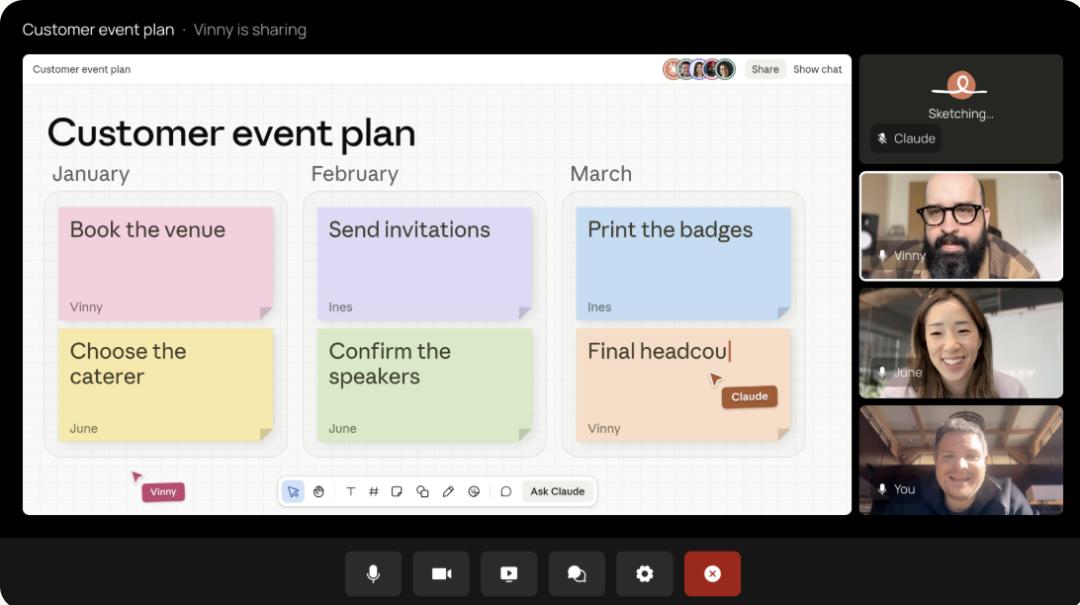
Claude joins the video conference themed "Customer Event Preparation" and attends the meeting together with the team.
Before the meeting even adjourns, Claude can already put the first draft of the discussion on the table.
Where there are disputes and where points are not yet clarified, all participants can gather around this draft, make decisions and revisions on the spot.
Call Claude
to draft the solution first
Take the "preparing for a customer event" demonstration by Anthropic as an example, the whole meeting progresses in a completely different rhythm from the past.
As soon as the team gets a clear idea of the discussion, someone can directly ask Claude to draft the plan.
It sorts out the chaotic discussions in the first half of the meeting into a structured document, and everyone can continue chatting while revising along the document.
Midway through the discussion, the meeting gets stuck on a budget issue: how much did we spend on this event last year?
In the past, someone would have to look through the financial spreadsheets, or leave a message saying "I'll check it after the meeting and send it to the group".
Now, after being authorized, Claude can look up last year's expenses in the connected tools, paste them into the chat area, and compare them with this year's plan on the spot.
When the discussion moves to the schedule, you can ask it to draw a whiteboard and list the timeline on site, so everyone can revise it while reviewing.
According to the official description, participants can either speak directly to Claude to ask questions during the meeting, or type in the chat area to assign tasks.
There is also a user-friendly design: Claude responds in text by default, works silently in the background, and does not turn on the microphone to interrupt the conversation.
After the whole meeting, the ideas that might have previously only existed in verbal discussions will turn into a draft that is visible and ready for direct editing.
Write down the unclear points in the meeting
clearly on the spot
Why do many meetings go smoothly and harmoniously during the discussion, but end up in a mess when it comes to execution after the meeting?
Because some details are easily blurred in verbal discussions.
When you say "hand it in next week" verbally, you have to clarify the details when writing it into the schedule: which day, what time, who will do it, and to what standard can it be counted as completed?
Everyone says they are "aligned" verbally, but only by writing down and checking item by item can you confirm whether everyone is on the same page.
In Claude Meetings, members of the same organization who receive the meeting invitation can directly edit the draft generated by Claude.
Everyone edits around the same document, you can directly revise the parts that deviate from the topic, and continue to discuss the undecided matters.
More importantly, colleagues from all relevant departments are present, so issues like whether the budget is sufficient and whether the construction period can be met can be clarified on the spot.
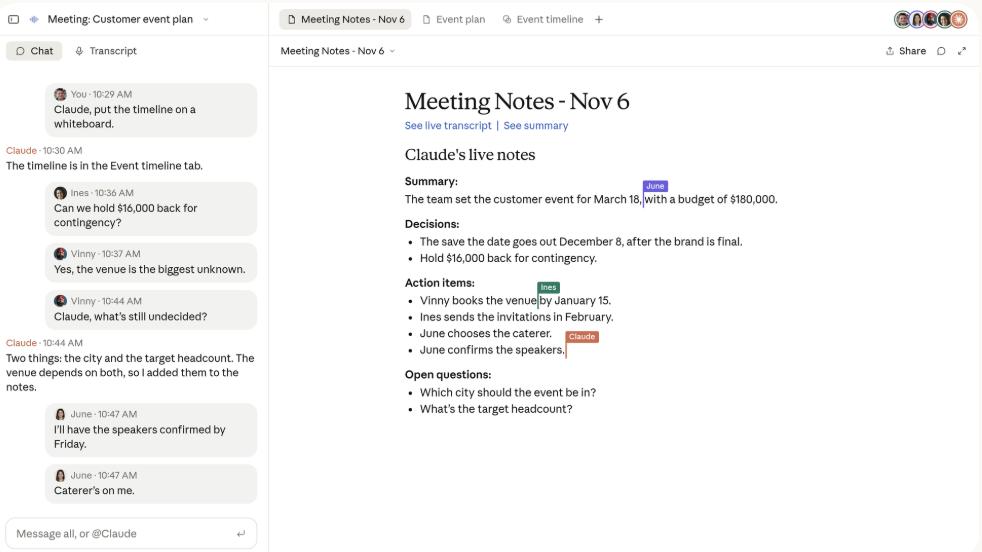
Claude drafts the event plan based on the discussion, and invited members within the organization can continue editing.
If you find inconsistent understandings only after the meeting, you will have to send messages, wait for replies, and explain back and forth. In the end, you will still end up with the familiar sentence: "Shall we hold another meeting to align on this?"
Although getting the first draft on the table does not mean the work is done, Claude has completed a very practical task: pulling the wrangling and calibration sessions from "after the meeting" back to "during the meeting".
Clarifying everything on the spot is always better than reworking afterwards.
If the budget is revised
can it make the corresponding changes correctly?
Of course, real-world meetings never go as smoothly as in demonstration videos.
More often, situations like this may arise: the budget that was just finalized in the first half is suddenly cut by half in the second half; the schedule is revised over and over again, and the person in charge is temporarily replaced; the discussion topic and direction keep changing, etc. At this time, what tests Claude most is not its "typing speed", but its judgment.
Which version should be kept in the document? Which points are just casual mentions and should be listed as pending items? Transcribing every single word is just the basic skill. Distinguishing which sentence counts and which task should be done first is the real capability.
If an undecided proposal is directly written into the team resolution, the AI will become an efficient "oops maker", which is even worse than missing a few notes.
Before actually adding Claude to a work meeting, you need to figure out two things first: what data it can access, and who can view the meeting content.
First of all, Claude needs your permission to look up information using the tools you connected.
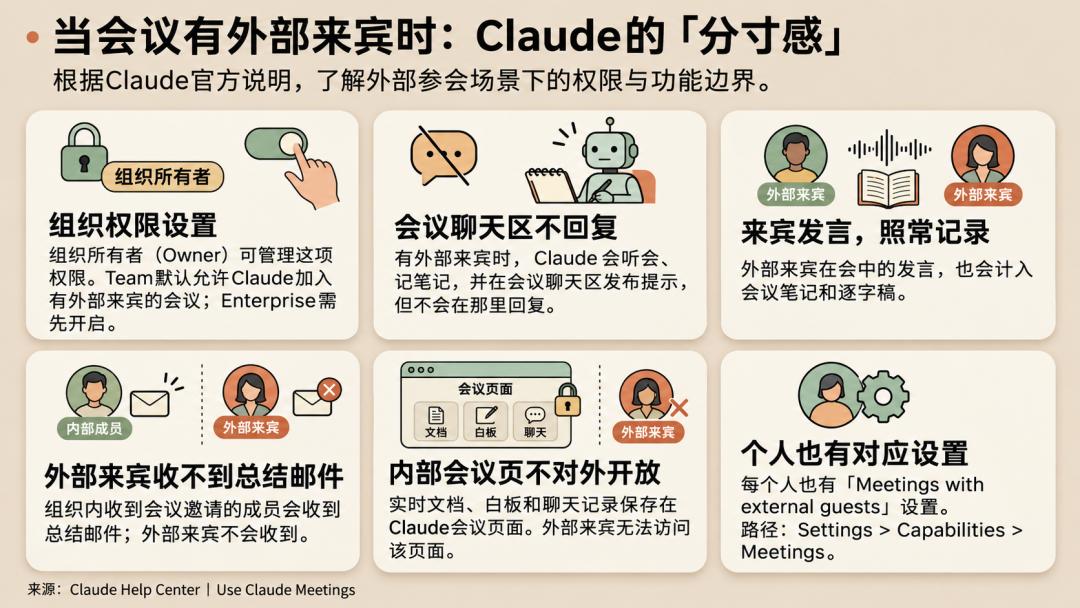
Second, when people outside the company attend the meeting, the default settings vary for different plans.
The Team plan allows Claude to join by default, and administrators can turn off this permission; the Enterprise plan requires administrators to enable this function first.
When this permission is not enabled, Claude will not join meetings that invite external participants; if external participants join midway, Claude will also exit the meeting.
After being approved to join, Claude will post a notification in the meeting chat area, but will not reply there. The remarks of external participants will still be recorded in the minutes and verbatim transcript, but they cannot open the internal pages in Claude that store meeting records and documents.
These rules govern access permissions and meeting participation methods.
After the meeting
the deliverables should be reusable
According to the official design, the meeting minutes, to-do list, verbatim transcript, together with the documents and whiteboards generated during the temporary discussions in the meeting, will all be packaged and stored in Claude's meeting page.
Authorized members can ask for details in the conversation at any time afterwards, without having to rummage through the chat history to find relevant information.
This point is very important for people who take over the execution task halfway.
People who take over the task are most afraid of getting a to-do item that lacks context and has no clear beginning or end, so retaining the "meeting context" is very important.
Of course, Anthropic is not the only company targeting this market.
Facilitator in Microsoft Teams also supports responding to instructions at any time during the meeting, and directly generates Word documents by combining discussions, chat records and shared files.
These big tech companies have clearly realized that "post-meeting transcription" alone can no longer bring new value, and "getting work done while the meeting is ongoing" is becoming the new standard.
At present, Claude Meetings is gradually opening up to Team and Enterprise users, with Google Meet as the first supported platform.
As for the cost, during the testing period, minutes, verbatim transcripts, and responses that do not call connected tools are all included in the Team and Enterprise plans with no additional fees.
Once you call a connected tool, this part of usage will be counted to your account, consume your normal usage quota, and may bring additional costs to your organization.
Whether this "AI meeting buddy" is really useful ultimately depends on two things: after the meeting, can people hold fewer "alignment meetings", and do they have a ready-to-use solution in hand.
References:
https://claude.com/resources/articles/claude-meetings
This article is from the WeChat official account "Xinzhiyuan" (ID: AI_era), written by ASI Revelation, edited by Yuan Yu, and published with authorization from 36Kr.