Hands-on Experience of Tencent Chatterfly: Is the Next Stop for Voice Input Coming?
Over the past year, AI voice input products such as Typeless and Wispr Flow have gradually gained popularity, leading many people to try to put down their keyboards and complete text input simply by speaking. What attracts me most about this type of product is that we finally no longer need to struggle with verbal tics, redundant expressions and confusing word orders while speaking.
Even if you speak as ideas come to you, the AI can eventually organize them into a clear, smooth text.
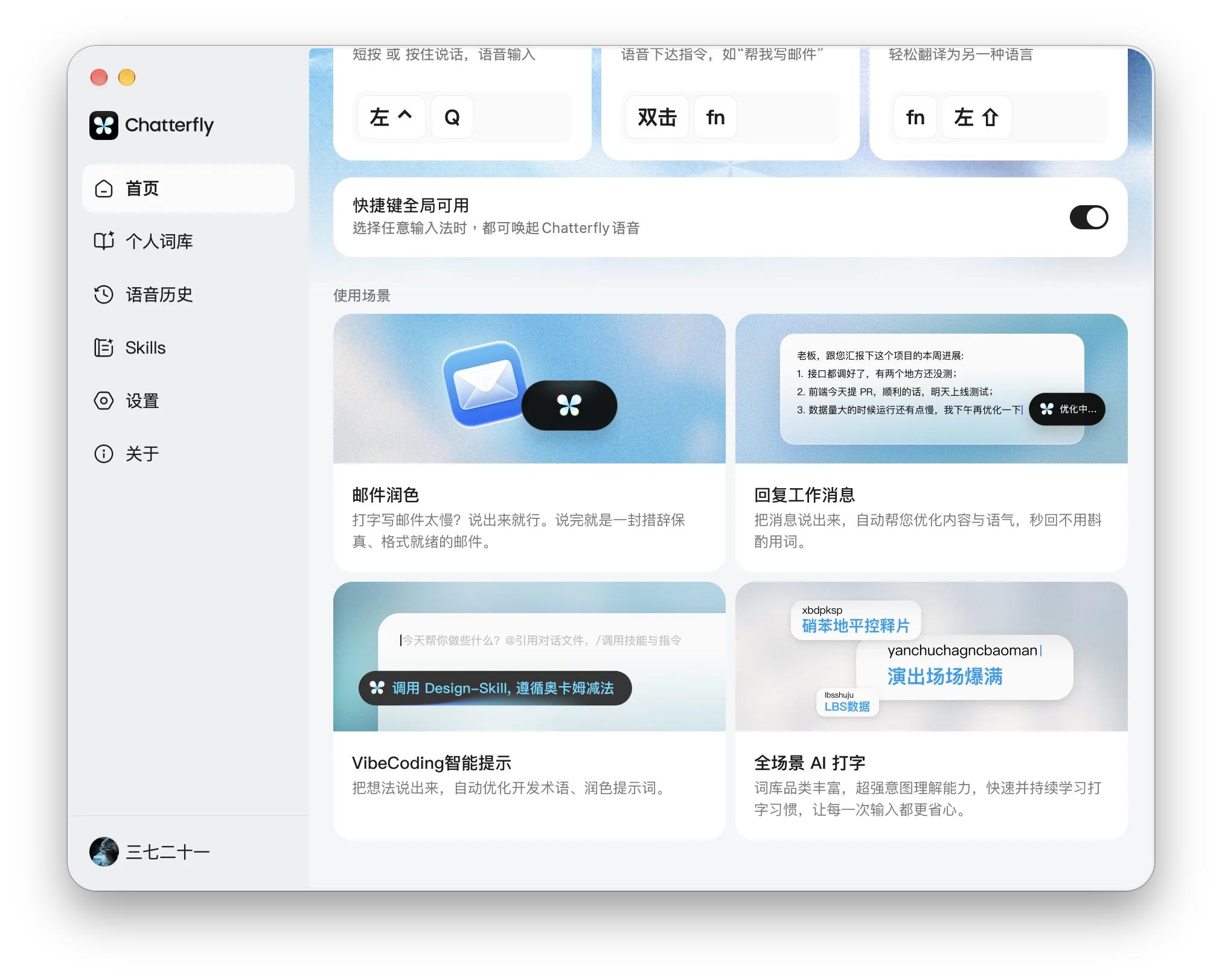
But recently, I experienced Tencent's Chatterfly through internal beta testing, which gave me different thoughts and feelings about voice input products in the AI era. When you first learn about Chatterfly, you may easily associate it with Typeless: both of them can polish voice input via AI, and directly rewrite and translate selected text.
However, after in-depth experience, I found that Chatterfly has made some interesting attempts. Especially after the introduction of Skills, it can carry out targeted content optimization for tasks such as work reports and Vibe Coding, and at the same time take into account the pinyin input and thesaurus habits that domestic users are more familiar with, bringing a brand new AI voice assistant experience.
But for tech editors who write reports, research products and frequently interact with AI every day, how much practical help can these designs actually bring?
From Speech-to-Text to Finished Drafts Right After You Speak
First of all, Chatterfly is currently in the invitation-only testing phase, with macOS and Windows versions available, while iOS and Android versions have not been launched yet. The following only represents our experience using the current version (1.0.10.13541).
Frankly speaking, I did not have very high expectations when I first started experiencing Chatterfly. After all, today's speech recognition technology, whether from Sogou Input Method, WeChat Input Method or Typeless, is already mature enough. What really affects the user experience is the work after accurate recognition.
Oral expressions in real scenarios are usually not that rigorous, with a large number of repetitions and verbal tics. Sometimes you may suddenly think of information that needs to be supplemented halfway through speaking, and sometimes you may overturn the previous idea. If you just record everything verbatim, you still need to reorganize all the content yourself in the end.
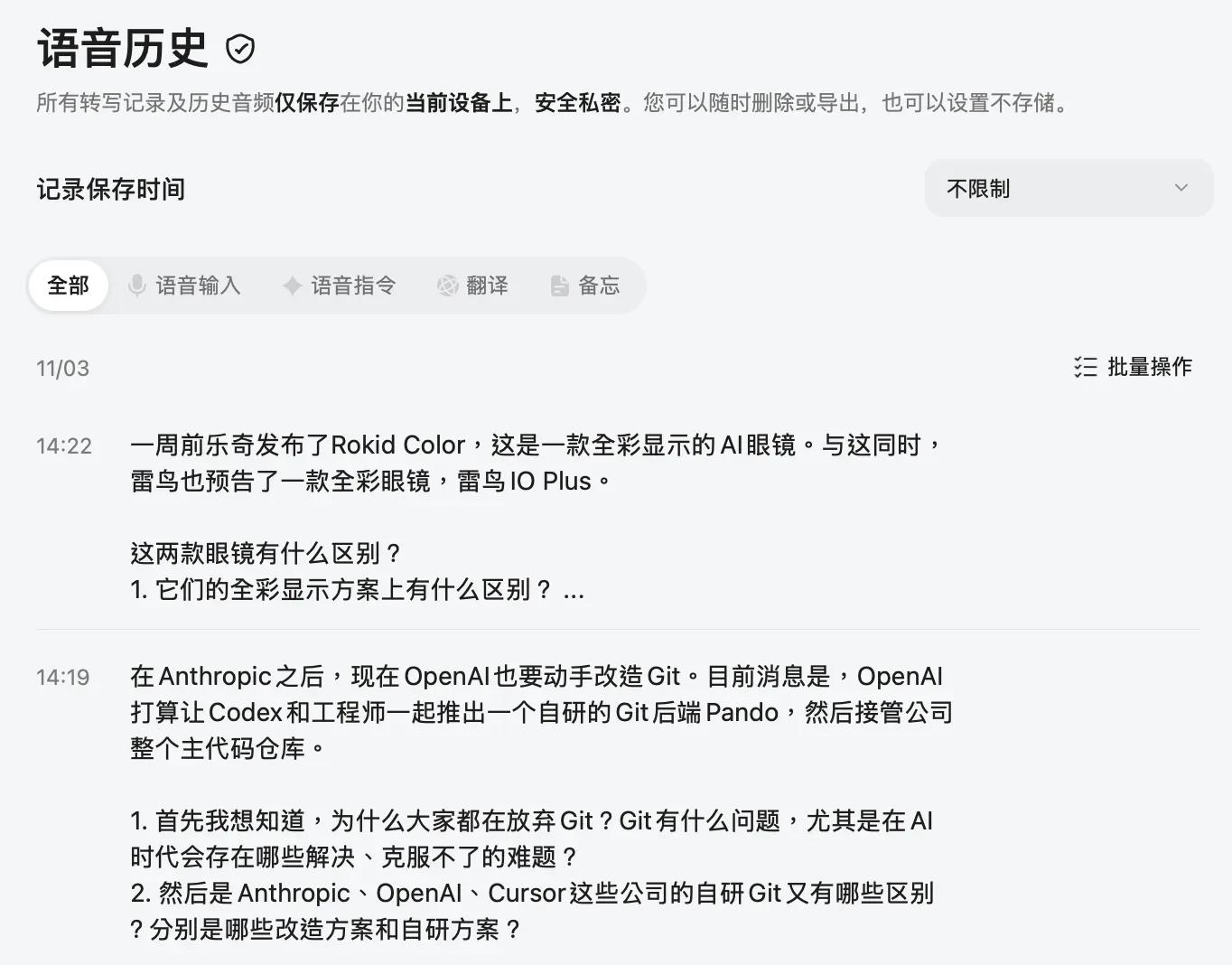
One of the core experiences of Chatterfly is to eliminate these extra tasks. For example, in daily work, when I see a noteworthy development in the technology industry, I may first come up with several scattered questions: Why did this company launch this product all of a sudden? What is the difference compared with its competitors? Does it reflect a certain industry change behind the scene?
In the past, I used to sort these questions into relatively complete texts first, and then hand them over to AI for preliminary research. Now I can directly speak out the ideas in my mind and let Chatterfly help organize them.
Another interesting point of Chatterfly is that it provides dedicated Skills for different usage scenarios.
In the currently experienced internal beta version, Chatterfly has provided a variety of Skills including prompt optimization, project promotion, marketing copywriting, work report, and meeting minutes. After enabling the corresponding Skills according to your own needs, Chatterfly will combine the current input scenario to intelligently select the appropriate Skills for polishing and organization.
Especially the "Prompt Optimization" feature. Nowadays, using AI to retrieve information, analyze problems, and even do Vibe Coding for small daily-use tools has become a normal part of my work. The problem is that to make AI complete tasks accurately, you often need to state a lot of background information, constraints and specific requirements.
For example, recently I was trying to develop a small tool based on the image hosting service in the background of Leikeji. Vibe Coding has made coding much easier, but to make AI accurately understand the development requirements, I still need to clarify the functions, interactions and various constraints. Especially for some complex requirements, it takes a lot of time to write the Prompt by myself.
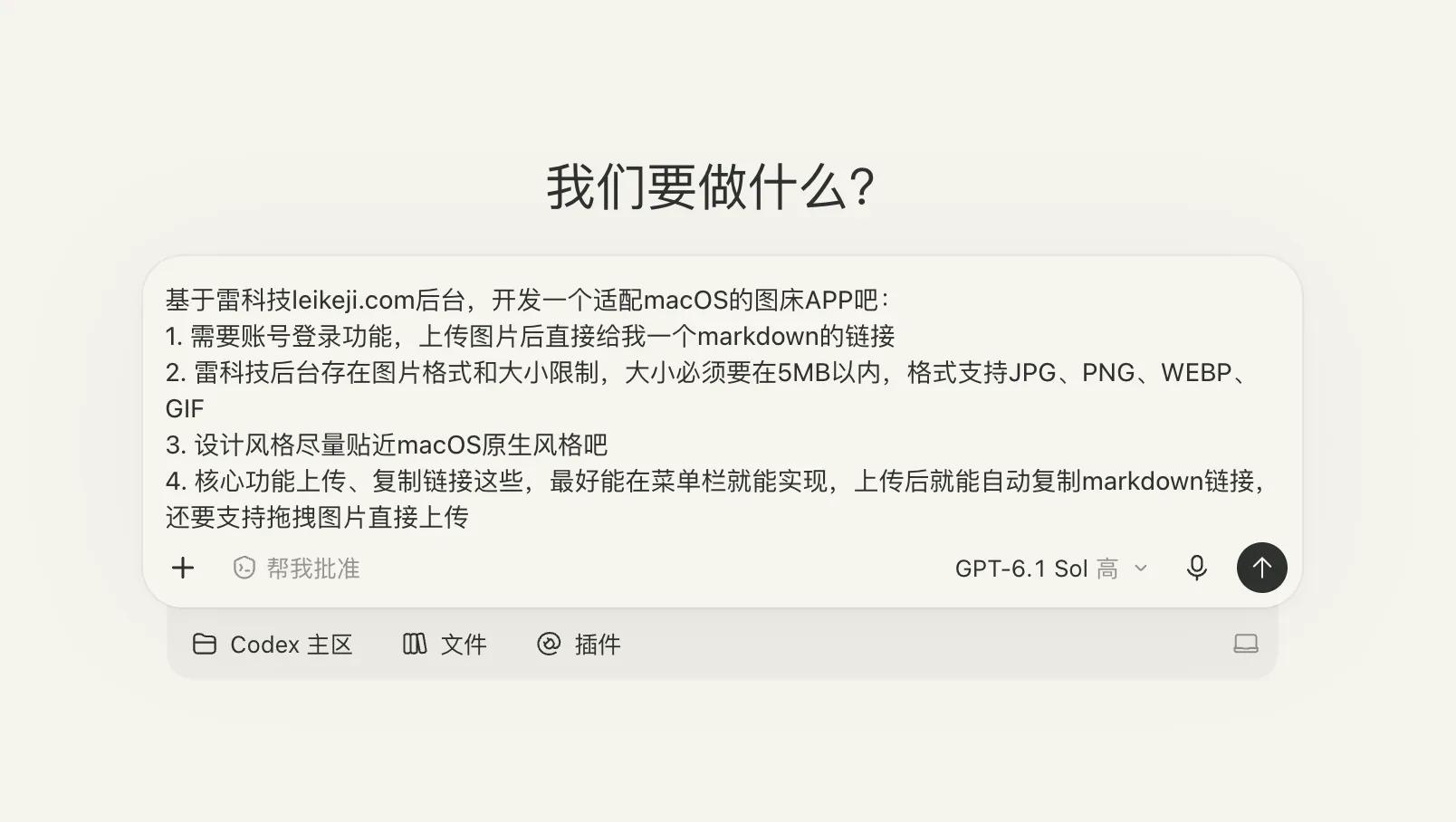
Chatterfly provides a more relaxed way of Vibe Coding. I can directly state the requirements in spoken language, speak as ideas come to me, without worrying about various verbal tics and pauses, and I can also supplement and modify the requirements at any time. In the end, Chatterfly can organize them into a Prompt with clearer structure that is easier for AI to understand and execute via Skills.
Including in work communication, when synchronizing work progress to colleagues or superiors, simply clarify what you have done, what problems you have found, and how you plan to move forward next, without spending much time on specific expressions. Chatterfly can combine the work scenario to organize the content into a logically clear message.
Of course, for tech editors, voice input cannot avoid a large number of professional terms. For example, for the Fujifilm X-T5, we may directly call it "Cha T5" in Chinese, and Chatterfly can standardize it to "X-T5" by combining the context. In addition, it also supports personal thesaurus, which can not only import the local Sogou Input Method thesaurus, but also automatically learn words based on the modification results after usual voice input.
For example, recently I have been focusing on full-color AI glasses, including the released Rokid Color and the upcoming Thunderbird iO+. Chatterfly may make mistakes in the first voice input, but it can automatically memorize and learn after I correct it.
From Input to Execution, Chatterfly Can Do More
If voice input and intelligent polishing only make expression easier, then several recent updates of Chatterfly have made me try another way of using AI.
Through voice commands, Chatterfly can now perform operations such as online Q&A, continuous follow-up questions, and modifying existing content. Users do not need to input text first and then copy it to other AI chat windows for processing, they can directly say what they want to complete.
Let's take a more life-oriented example first. On weekends, the whole family takes the kid for a trip, departs from Shenzhen North Railway Station, does not drive by themselves, and wants to control the total budget of the whole family within 300 yuan. Simply state these needs and conditions to Chatterfly, and you can ask Chatterfly to help find and compare suitable destinations.
Add more requirements such as entering the museum at 10 a.m., ending at 1 p.m., and needing to arrange lunch, and Chatterfly can further improve the travel plan, and give more specific transportation routes, nearby catering options and itinerary arrangements.
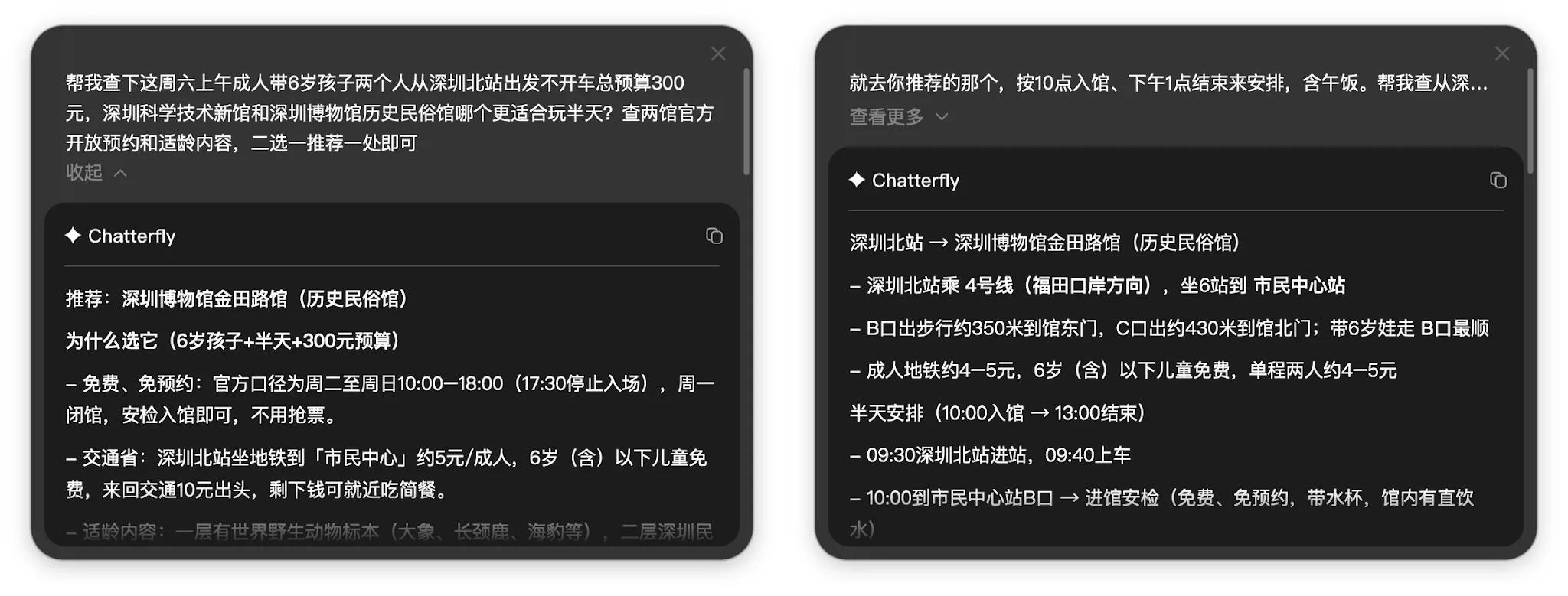
The whole process can continuously supplement requirements like chatting, eliminating the trouble of repeated searching and information sorting, and there is no need to switch back and forth between search engines, maps and AI chat windows.
This is fundamentally different from traditional voice input tools. The task of traditional voice input tools is basically to convert speech into text, and real information retrieval and task processing often need to be completed by other products. But Chatterfly combines the two, allowing a single voice input to naturally extend to a continuous task processing process:
Start working the moment you speak.
However, compared with online Q&A, I am more interested in Chatterfly's ability to directly modify existing text. In daily writing, I often encounter a situation: a certain paragraph of text is basically finished, but it does not read smoothly, there may be redundant expressions, or the order of several sentences needs to be adjusted.
The old way was that I either modified it repeatedly by myself, or copied this paragraph of text to the AI chat window, attached specific requirements, and copied it back after the AI output the result. But with Chatterfly, I can directly select the existing content, tell the AI specific opinions and ideas through voice, and complete the modification directly.
For example, if a work report has a lot of redundant expressions, you can ask to delete duplicate content, adjust the structure and unify the terms at the same time. For some paragraphs in the manuscript, you can retain the facts and key judgments, only process the word order, redundant expressions and unnatural wording, and you can also explicitly ask to supplement arguments and logic.
As the saying goes, "A straight line is the shortest distance between two points." Modifying one or two sentences or several paragraphs, letting AI complete the work in the original working interface instead of opening another separate AI assistant, is undoubtedly a more natural and convenient interaction method.
Chatterfly also adds a translation mode, which allows users to speak Chinese directly and get English output. For example, when you need to send an email to an overseas manufacturer to inquire about the technical specifications, launch schedule of a new product or the possibility of an interview, you can directly state your requirements in Chinese, and then convert it into expressions that conform to the habits of English emails.
There is another easily overlooked feature that directly affects the usage frequency of Chatterfly, which is global invocation.
In the recent version update, Chatterfly supports invoking voice input through a global shortcut key. Even if you are using another input method, you do not need to switch to Chatterfly specially, and you can directly activate the voice capability.
I quite recognize this point. For users who are already accustomed to a certain set of input methods and shortcut keys, rashly changing the main input tool actually has a non-negligible migration cost. Especially for people who need to input a large amount of text every day, the use of pinyin input and candidate words has formed muscle memory, and so do the quick operations.
Instead of forcing users to change their habits, Chatterfly chooses to make AI voice capabilities available at any time in the original workflow, which makes it easier for people to start trying.
Faster and More Natural, Another Way to Use AI
After experiencing it for this period of time, the biggest feeling Chatterfly brings to me is that AI can be more naturally integrated into daily work. Especially in scenarios such as writing Prompts, sorting work messages and modifying texts, many tasks that originally required repeated operations can now be completed just by speaking.
Looking at it separately, each time you may only save a few minutes, but for people who need to process a large amount of information and use AI frequently every day, this improvement in experience is quite obvious.
I am also deeply impressed by the iteration speed of the Chatterfly product team. Judging from the version update records, Chatterfly in the internal beta stage basically maintains a weekly iteration pace. From voice commands, global invocation, translation mode, to professional term recognition, automatic word learning and voice history management, many functions are being continuously improved.
And this is far from the "full version" of Chatterfly. In addition to input on the desktop side, we actually have a large number of voice input demands on the mobile side, so I am looking forward to the Chatterfly team launching iOS and Android versions as soon as possible. Not only because I think mobile phones also need input products with AI-native ideas like Chatterfly, but also because the completion of the mobile side can allow the product to iterate quickly in more complex but real actual scenarios.
Of course, I also look forward to seeing Chatterfly continue to make more explorations around Skills, provide more detailed optimizations for different occupations and different work scenarios, and let AI truly understand what users want to accomplish.
At least now, Chatterfly has made me get used to putting down the keyboard in some scenarios and communicating with AI directly through voice. As the product continues to improve, maybe it can further integrate into my daily work and become an AI assistant that I can talk to at any time and is easy to use.
This article is from "Leikeji", and is published by 36Kr with authorization.