In-depth review of China-version Apple smart devices: The AI functions are just so-so, and its privacy protection totally outperforms Android?
After long anticipation, the AI features of iPhone have finally been launched.
Starting from November 4, Apple users with developer access can receive the push of the developer Beta version of iOS 27.3, then download a 12GB update package to complete the upgrade.
However, those AI features that everyone saw at WWDC this year are still not available this time. The first batch of launched features are mainly AI writing, real-time translation, image processing, intelligent notifications, and Siri. Most of these features are powered by the Qwen model, a few are supported by Baidu, and the features involving user privacy call Apple's own on-device model.
Below is a table sorted out by Lei Tech to help you quickly understand the newly launched AI features this time.
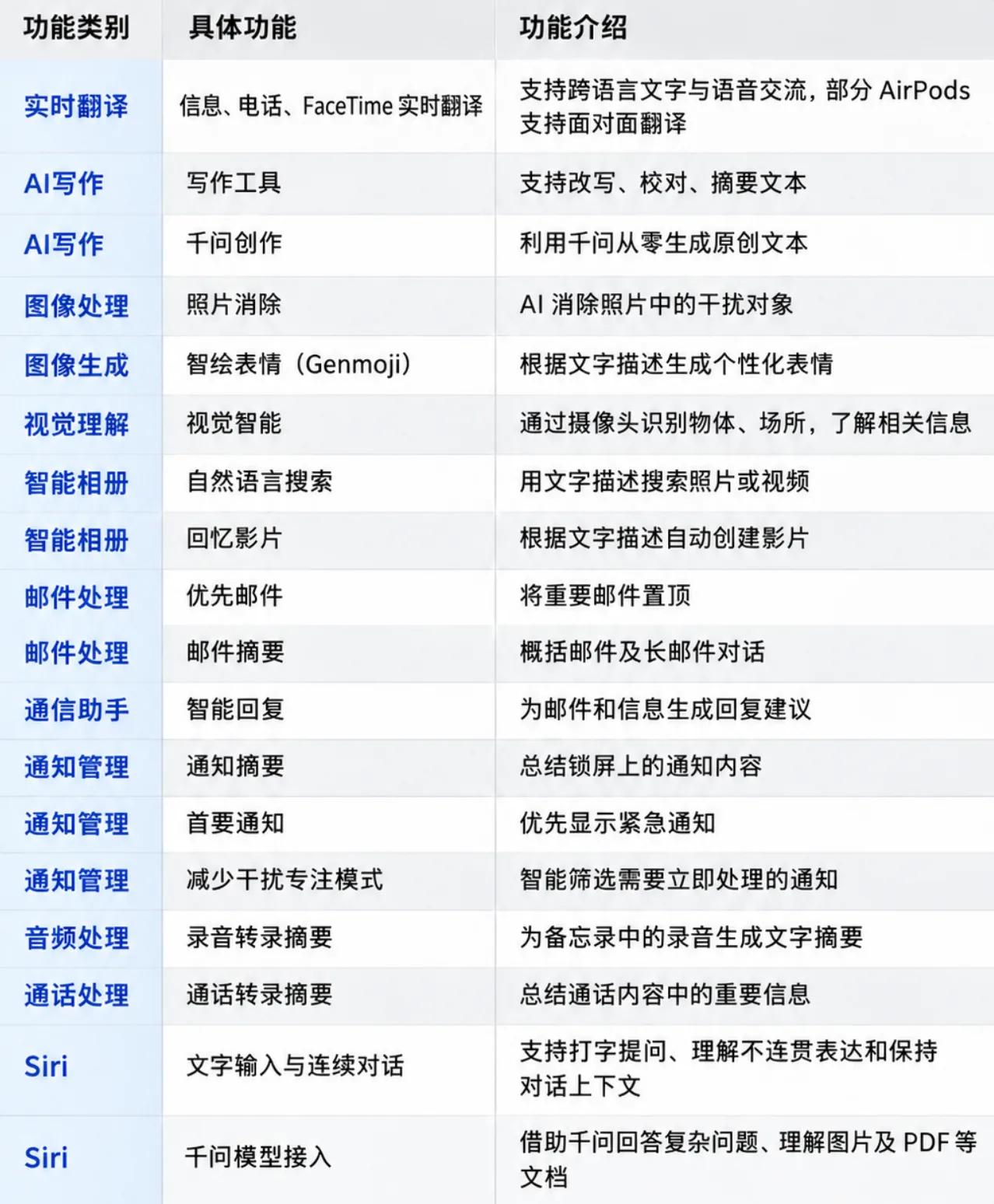
Of course, the Siri assistant has also received a major upgrade this time. It not only supports double-tapping the bottom of the screen to evoke the text input box (finally, it is no longer only supported for voice use), but also performs much better in features such as continuous conversation, information query, and note-taking.
So what is the actual experience of "Apple Intelligence" that everyone has been waiting for more than a year? Let's do a real test.
Photo Editing Real Test: Image Quality Lags Behind Android, But Has Advantages in Privacy
At present, the iPhone image processing feature launched in the Chinese mainland region only provides the AI Erase function, and does not offer advanced features such as magic matting, image expansion, and expression replacement that several Android brands provide.
However, the Erase function of Apple performs quite well in actual tests. For example, in the picture below, Apple AI can basically directly identify all the human outlines in the frame, and then you can select the person you need to erase by clicking or circling.

Source: Lei Tech
The effect after erasure is as follows.

Source: Lei Tech
The restoration effect of the floor is acceptable, but the details such as green belts, tables and chairs blocked by pedestrians are completely messed up, which looks like a blurry color block when zoomed in.

Source: Lei Tech
For comparison, I used a certain Android flagship to test the erasure effect of the same photo, and the result is as follows.

Source: Lei Tech
Although there are many clever tricks, for example, the tables, chairs and semicircular flower beds are directly "AI-generated" into a complete green belt, at least the integrity and clarity of the photo itself are better.
But here comes the "but" — the Erase function of iPhone can also be used without an internet connection. In other words, the whole process is completed on the device side, your photos will not be uploaded to the cloud for processing, and the protection of user privacy is much better than that of Android devices.
Moreover, when you finish a trip and are sorting out photos on the plane, this function can still be used. When the background is not complicated or has strong regularity, the erasure effect of iPhone is quite good.
In addition to people, I also tested its erasure effect on other sundries such as vehicles. Overall, it can independently identify the complete erasure subject, but the erasure effect is limited by the parameter volume of the on-device model, so it can only be described as average.

Source: Lei Tech
Although the experience of the Erase function is average, the experience of photo album search is much better. When logged in to the same account, I searched for the keyword "hamburger", the iPhone Air without AI search function only shows two results, while the AI search gives 14 results.
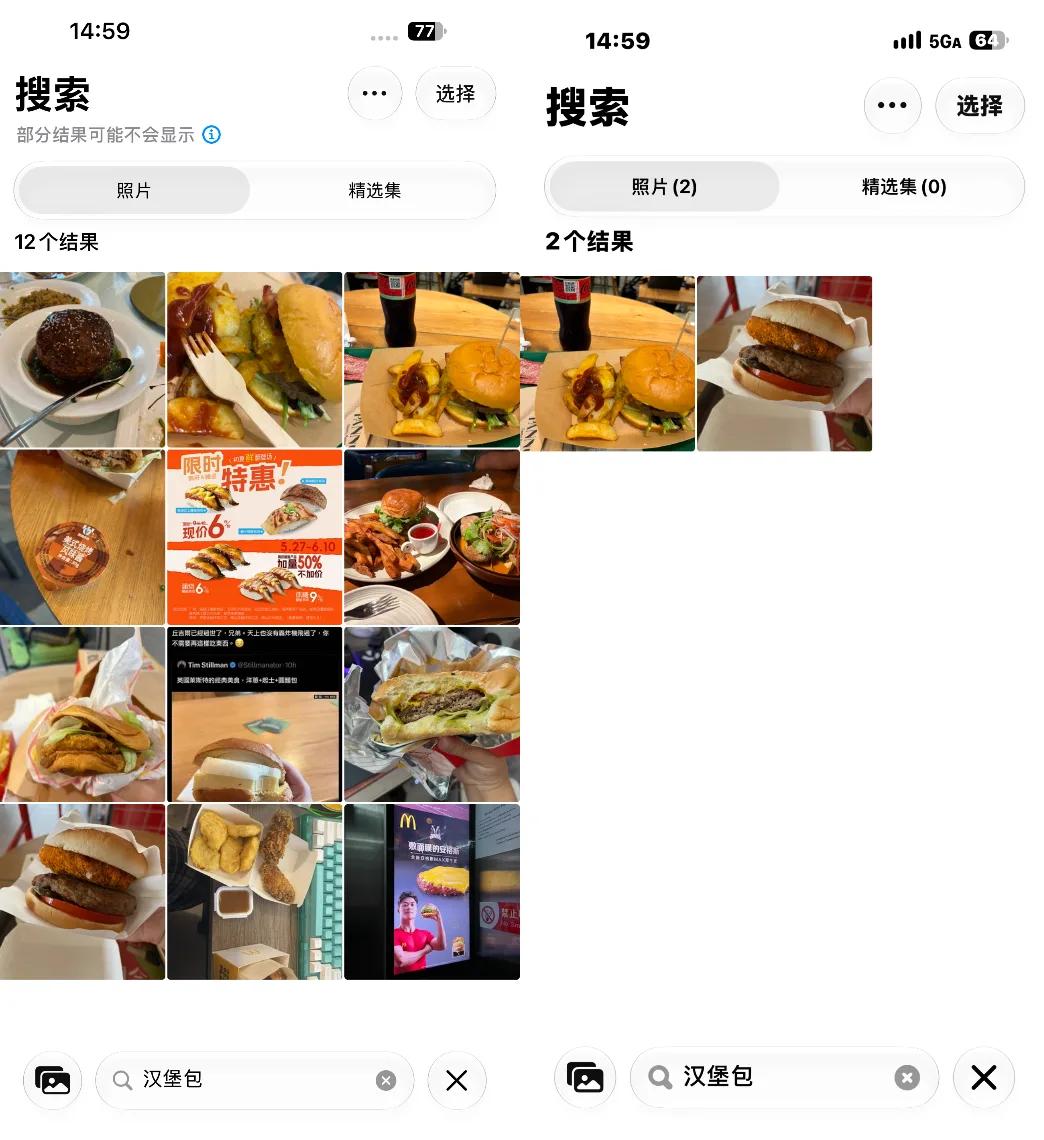
Source: Lei Tech
However, after multiple rounds of tests, there are still some problems with the recognition accuracy. Sometimes AI search will mistakenly regard some irrelevant photos as corresponding items. But the advantages far outweigh the disadvantages. Its retrieval effect for specific items is far better than previous versions, and it can even be searched through natural language, for example, searching for "person taking a photo in front of a mirror" can also get results.
Overall, the two major upgrades of the photo album are pretty good, at least it is a breakthrough from 0 to 1. It is a pity that the AI-generated memory video function can only be used after AI parses all photos, which takes at least one or two days, so it cannot be experienced in a hurry.
Qwen Gives iPhone Dual AI Vision Capabilities
Visual understanding is one of the features I am most looking forward to this time. You can enter it by long-pressing the camera control button. The interface is quite simple, with only three options: take photo, ask and search. Clicking "Ask" will connect to the Qwen model, and then you can let AI answer your questions based on the captured image.
For example, for these ingredients just taken out of the refrigerator, you can take a photo and ask directly to get a recipe. If you are not satisfied with this recipe, you can also follow up with AI to let it re-recommend according to your taste.

Source: Lei Tech
I walked around near the office and took a lot of photos. The overall recognition rate is quite good, and the Qwen model really performs well in visual recognition. In addition to identifying objects, it can also be used to translate text. I tested it with a menu: when it detects that the captured content is a foreign language, the word "Translate" will appear above the shutter button, click it to translate directly on the original image.
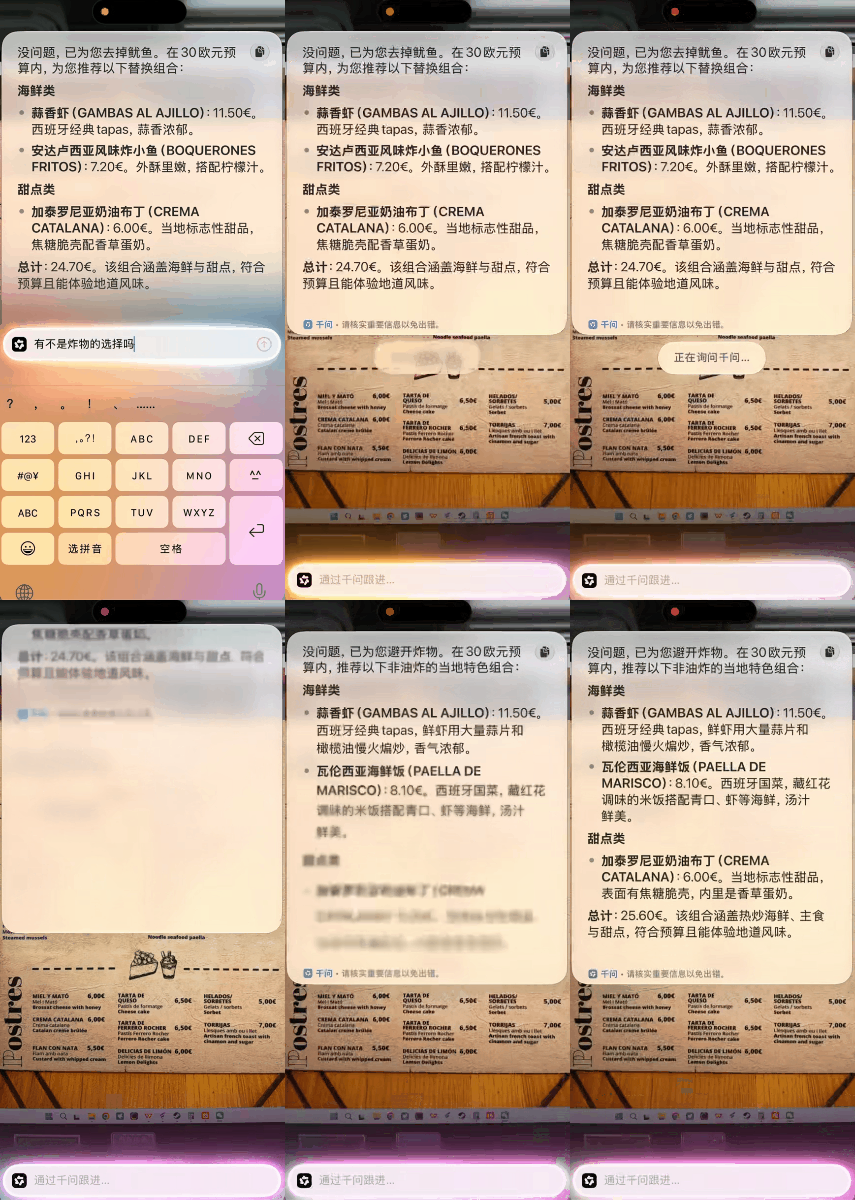
Source: Lei Tech
If you are not satisfied with the translation effect, you can also choose to use the Qwen model for translation, which will deliver better results. If you have difficulty making a decision, you can directly tell AI what you want to eat and let it help you choose, which is a good feature for people with decision-making difficulties.
As for the search, it is even simpler: AI will directly call Baidu's visual model, and then use Baidu's image search to find web content with similar items. Personally, I think it is barely useful. Without access to shopping apps such as Taobao and JD, it does not have many scenarios to apply. After all, if you just want to know what the thing in front of you is, using the "Ask" function directly can get more detailed interpretation.

Source: Lei Tech
The visual understanding feature paired with the camera control button is really convenient, but the current experience is not complete enough. I am still looking forward to the day when it can directly pull up various apps such as Taobao, which will definitely be much more convenient.
Qwen Takes Charge of Creation, On-device Model Takes Charge of Polishing
Let's take a look at AI writing. This feature is divided into two parts: one is that you put forward requirements and let the Qwen model create from scratch, and the other is to rewrite based on the currently selected text. The former needs to call the online model, so it must be connected to the internet to use, while the latter uses the on-device model.
Judging from the test results, the copy quality generated by directly calling Qwen is quite good, but there is still a certain gap compared with direct questioning in the Qwen App. It is estimated that the model level and thinking depth given by Apple by default are not very high, but this is understandable, after all, Tokens also cost money.
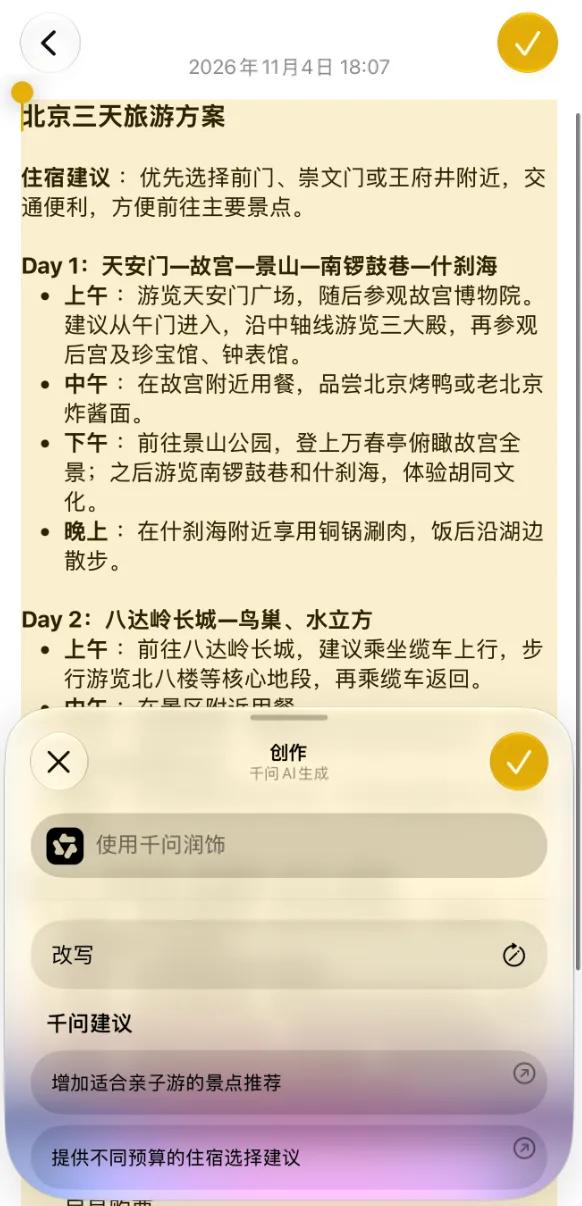
Source: Lei Tech
If you are not satisfied with the generated text content, you can continue to let Qwen polish it. It works well for writing Moments posts and other content in daily use. If you want to write some complex copy, you can try to increase the level of model call by continuous follow-up questions and adding prompts.
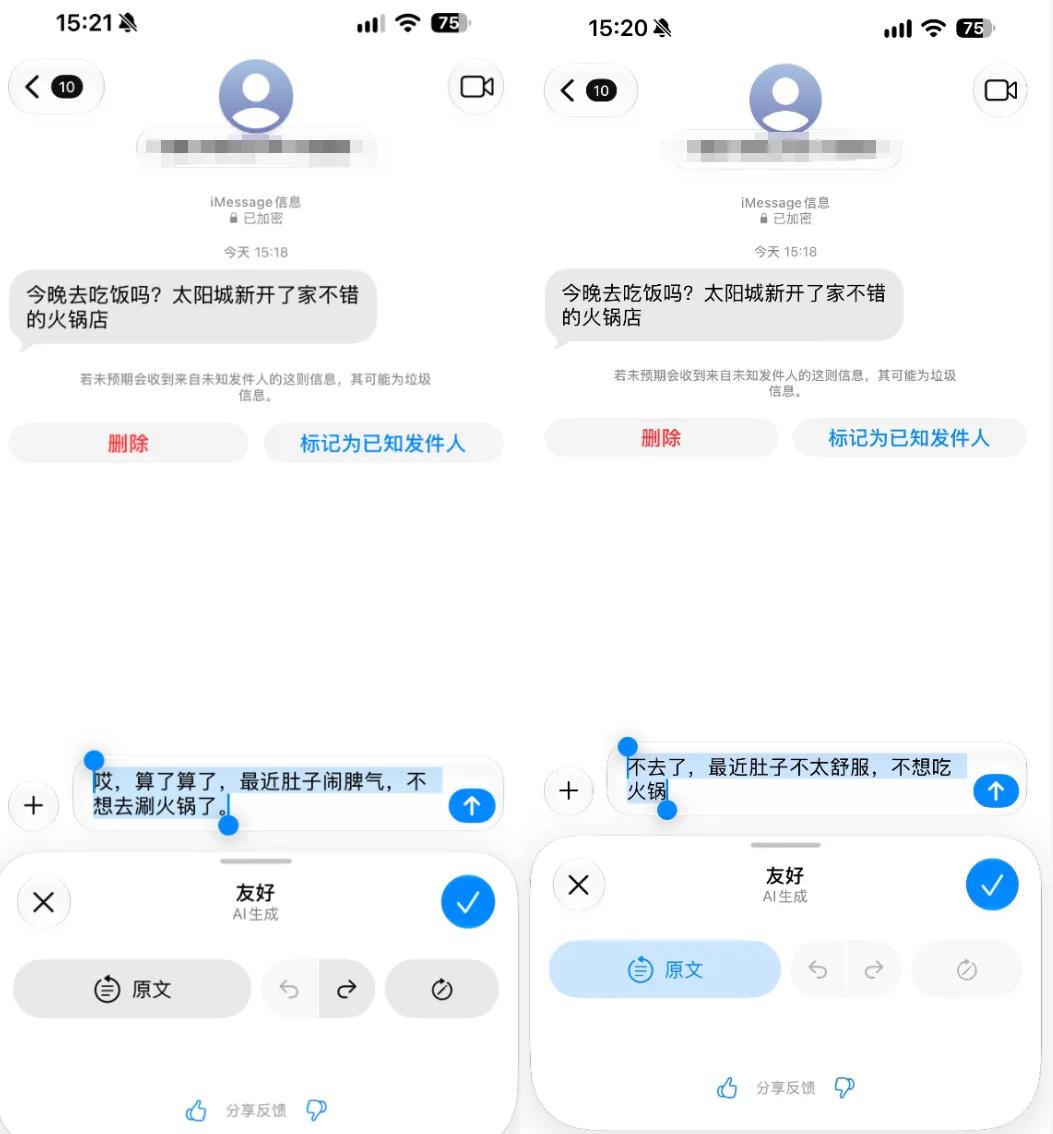
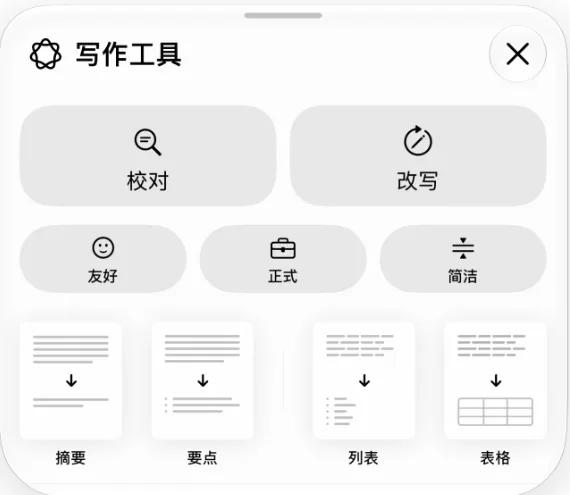
Compared with the creation feature, I pay more attention to the rewriting and summarization features, after all, they are more commonly used in daily life. According to the test results, you can long press to call up the AI writing page anywhere that allows text input, which provides two major options: Proofread and Rewrite. The Rewrite option also provides three optional styles: Friendly, Formal and Concise.
Source: Lei Tech
However, after testing, I personally feel that the template style is still a bit too strong. The following are test copies of several styles: the "Friendly" and "Concise" styles are quite natural, but the "Formal" style is really very AI-like. But to be honest, it is really hard to ask for more from an on-device model, especially a mobile phone on-device model.
In addition to direct rewriting, Apple also provides four modes: Summary, Key Points, List and Table, which will process the selected text accordingly, such as summarizing the key content, or organizing the content into a list or table according to the actual content. The first three features can be used offline, but the Table feature failed to call for some reason, which may be a bug of the beta version.
Source: Lei Tech
Although the effect is not very good, the advantage of Apple's rewriting feature is that it runs completely on the device side, which is very useful when processing some sensitive information, and can completely avoid the risk of privacy leakage.
Moreover, the capability of the on-device model is not static. With Apple's subsequent upgrades, its effect will get better and better. However, this also makes me realize that the subsequent adaptation of Apple's AI feature updates may remain at around three generations, that is, the three generations counting down from the latest generation can still be adapted, and older phones earlier than that will hardly get the latest model.
Because for phones of several older generations, there are obvious gaps in both memory capacity and chip performance, and the experience of the on-device model needs the support of both. It can be predicted that if Apple really makes achievements in the on-device model in the future, it may become another reason to promote users to replace their phones.
Finally, there is a very practical feature — real-time translation, which can be activated in features such as Live Listen and FaceTime, and the translation also runs completely based on the on-device model. Since it does not need to go through the cloud, the translation speed is very fast. Basically, as soon as the test voice finishes playing, the