Personal agents are now at the table, who will be the first to show their jitters?
Do ordinary people really need a personal Agent?
The daily life of the vast majority of people is not complex enough to require a dedicated assistant. There are work software for work, e-commerce platforms for shopping, and ticket booking apps for travel. Even if you occasionally handle a few trivial matters, it does not seem worth equipping a dedicated personal AI.
But developers obviously do not think so.
In their view, chatbots are only the first step. Future AI should not only give answers when users ask questions, but also understand users' habits, remember past events, and even proactively arrange some things properly before users speak.
In other words, AI is no longer only responsible for answering questions, but has begun to try to take over life.
Since Muse became popular, the personal Agent track has quickly become lively. Manus released Cue, an independent application for personal Agents, and OpenAI launched Dots, a personal agent that runs around the clock, both trying to make AI continuously understand users, connect applications, and promote tasks on behalf of people.
Domestic tech giants are not willing to lag behind. ByteDance launched a personal agent project codenamed "Spell" as early as April this year. Tencent Cloud's LightVela has now entered the developer experience stage. Alibaba took more direct action, upgrading its general AI assistant Lingguang to version 2.0, and repositioning the product as a personal agent.
Entrepreneurs are also continuously entering the market. Luo Xiaoshan, former WPS product director and PM of Delta Action, launched the personal Agent assistant Alice; Qi Junyuan, former head of ByteDance Doubao PC end, founded Today AI, and recently completed a round of over 200 million US dollars in Series A financing, with investors including IDG Capital, Tencent, 5Y Capital, Ant Group, HSG and others.
On the one hand, tech giants and entrepreneurs are rushing to enter the market; on the other hand, users have not yet figured out why they need to download another personal Agent in addition to general-purpose AI like Doubao.
To find out how capable these personal Agents are and how useful they are to ordinary people, we put Lingguang 2.0, Today AI and Alice together, use the same task instructions, and conduct experience tests from five dimensions: application connection, task execution, long-term memory, active service and interaction experience.
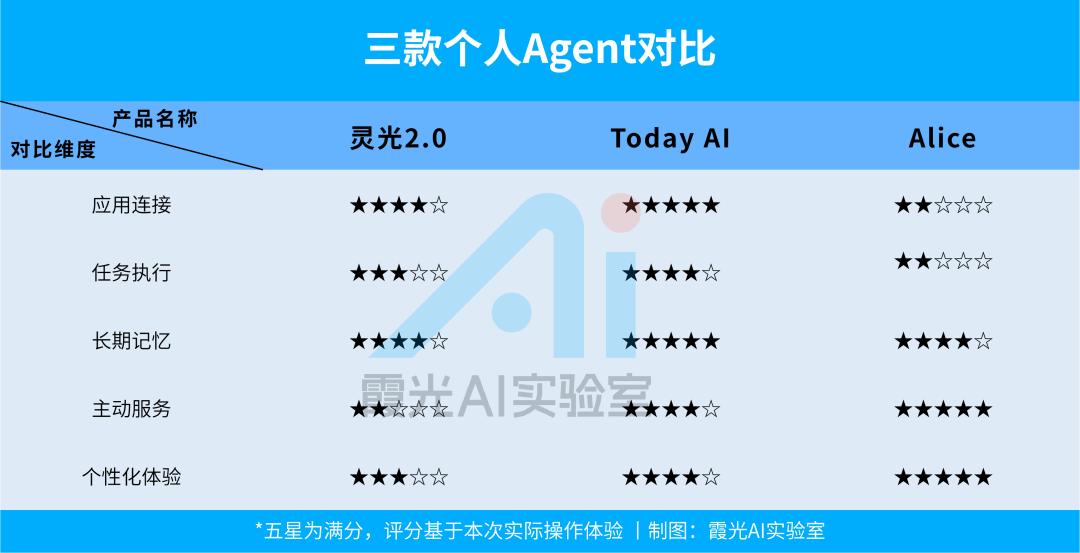
Lingguang 2.0: Semi-Automatic Worker
When you open Lingguang 2.0, the first thing you see is still a familiar chat box. At first glance, there is not much difference from Doubao.
What truly reflects the positioning of a personal Agent is the "My Services" section on the homepage.
Here you can authorize access to mobile system services, including calendar, location, alarm clock, SMS, contacts, etc., as well as third-party applications such as Alipay, DingTalk, Feishu, Baidu Netdisk and email.
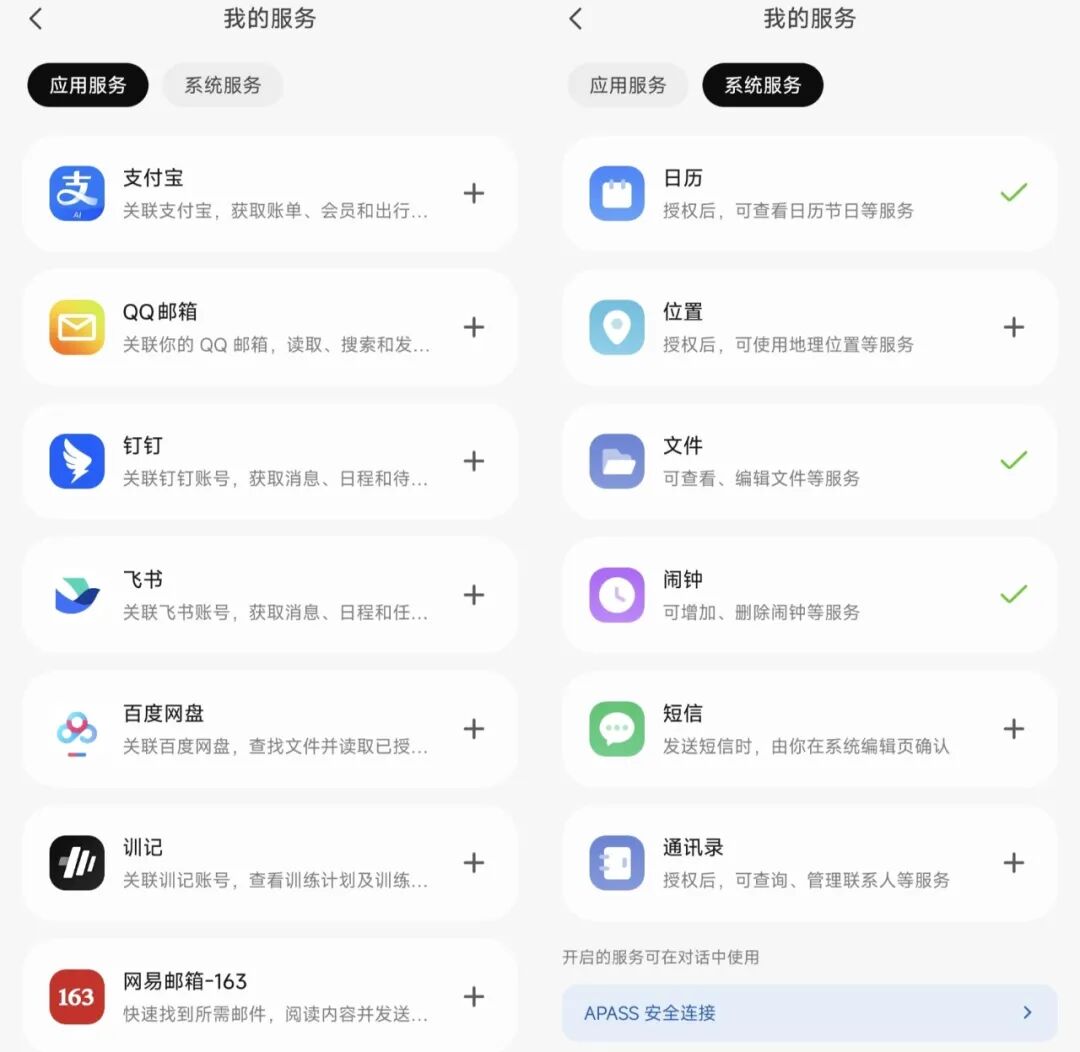
Application services and system services supported by Lingguang 2.0
It looks quite rich, but in actual operation, it is somewhat idealistic in design but limited in reality.
I originally wanted to connect to Weibo and let AI automatically complete the super topic check-in every day, but found that direct authorization is not possible, and a series of steps such as developer certification and service activation are required.
Looking through other commonly used applications such as WeChat, Douyin, Xiaohongshu, and Meituan, almost none of them have open authorization.
It seems that Lingguang currently prefers to be a work assistant rather than a life housekeeper who takes care of all aspects of daily life.
According to personal needs, I first authorized some system services and started testing from the simplest tasks.
"Help me set an alarm for 14:05 tomorrow to remind me to grab tickets."
After about 12 seconds of thinking, Lingguang popped up a confirmation prompt to open the alarm clock. Click to confirm, the alarm is successfully set, and the note "grab tickets" is thoughtfully added.
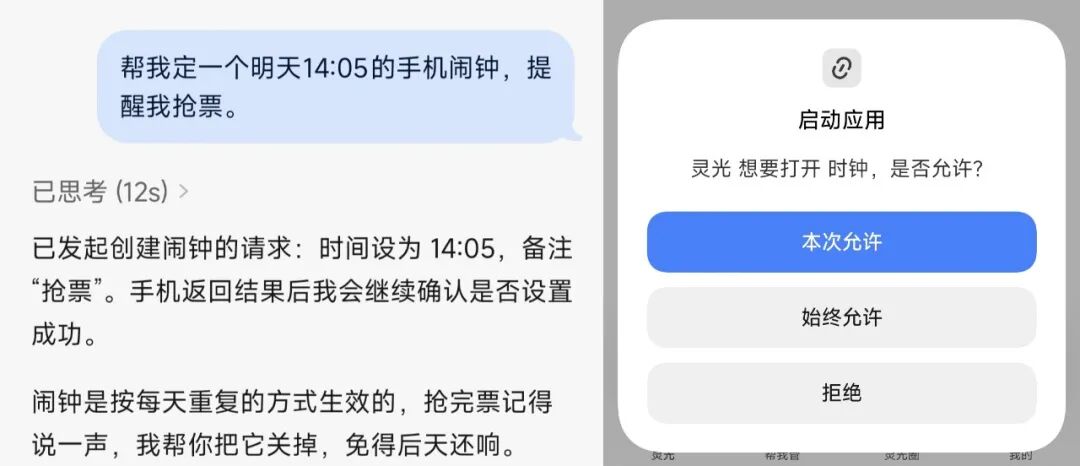
Lingguang 2.0 performs the alarm setting task
At first glance, the task is completed perfectly.
But on closer inspection, problems arise.
Since the mobile phone alarm cannot directly select the date, Lingguang sets a single ring. The current time is more than 24 hours away from 14:05 tomorrow, which means the alarm may ring today.
What's more troublesome is that the single alarm will automatically become invalid after ringing, and it will not ring again the next day.
In other words, AI understood "set an alarm clock", but did not understand that "you can't miss grabbing tickets tomorrow".
If you change your mind, it should set a recurring alarm, or set a single alarm when the time to the target is less than 24 hours.
But unfortunately, Lingguang did not take the initiative to think of this.
After raising the question, it gave Plan B: it can send a message reminder through the app at the set time tomorrow, or notify it to reset it again the next morning.
Then I tried to adjust the alarm time, turn off the alarm, delete the alarm and set a recurring alarm, but none of the tasks could be completed directly.
Instead, it can only help jump to the mobile phone alarm page, and the final editing operation still needs to be done manually. (Inner monologue at this moment: What's the use of you then?)
The greatest value of Agent is originally to reduce operation steps. Setting an alarm only takes a few seconds manually, but with AI, you have to input requirements, wait for thinking, confirm steps, and finally finish it yourself.
I originally hired an assistant, but the assistant arranged the work, and finally I had to do it myself.
However, Lingguang is not completely without highlights.
Compared with ordinary chatbots, its context memory is indeed better. After several rounds of adjustment, deletion and resetting of the alarm, it can remember every step of the operation, and continue to understand the needs based on the previous and subsequent conversations, without having to explain from scratch every time.
This shows that Lingguang already has a certain ability to understand continuous tasks, but there is still a barrier of application interfaces and operation permissions between understanding and actual execution.
Then turn to the work scenario.
Lingguang supports connecting to multiple mailboxes such as QQ, NetEase, and Sina. When asked what can be done after connection, it lists functions such as searching emails, extracting key information, saving attachments, sending and replying to emails, organizing mailboxes, and monitoring incoming emails from specific contacts.
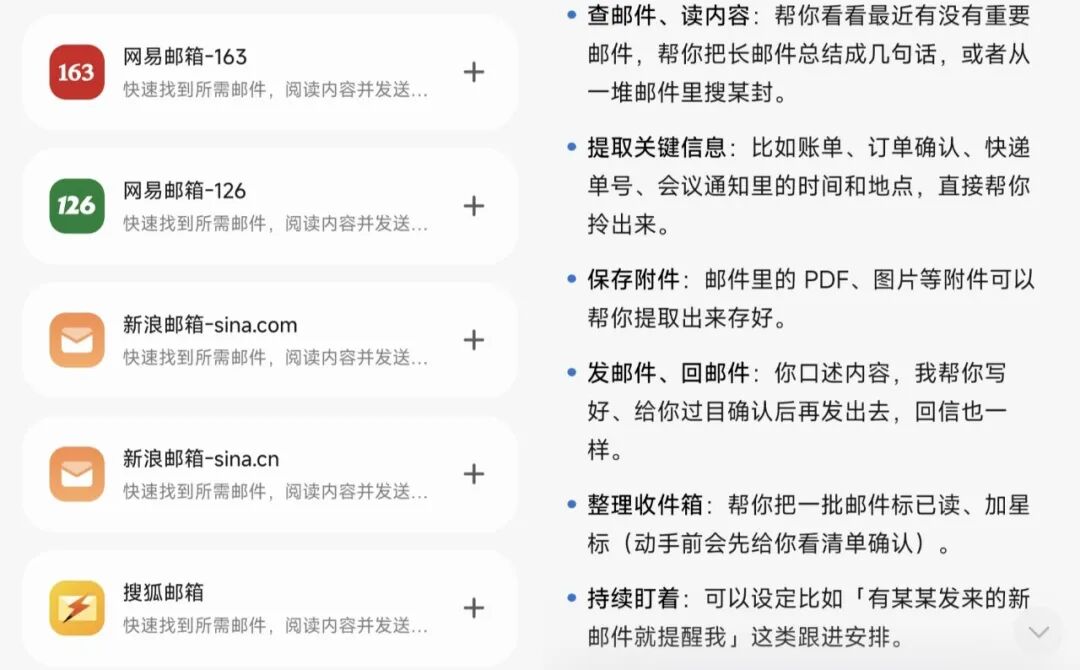
Mailboxes supported by Lingguang 2.0 and operations that can be performed after connection
It sounds quite comprehensive.
But after flipping through my mailbox, apart from a small amount of work information confirmation, the rest are basically after-sales for online shopping, verification codes and advertising emails.
For most office workers in China, work communication happens more on WeChat, DingTalk and Feishu, and email is not a core task that needs to be processed every day. It is still questionable how much role the connection to the mailbox can play.
Perhaps for foreign company employees who are used to email communication, or managers who need to process a large number of business emails every day, this function may be very valuable.
The situation is similar when connecting to Feishu.
Lingguang said it can search messages, view unread messages, assist in replying, and also process documents, summarize meeting minutes, and create schedules.
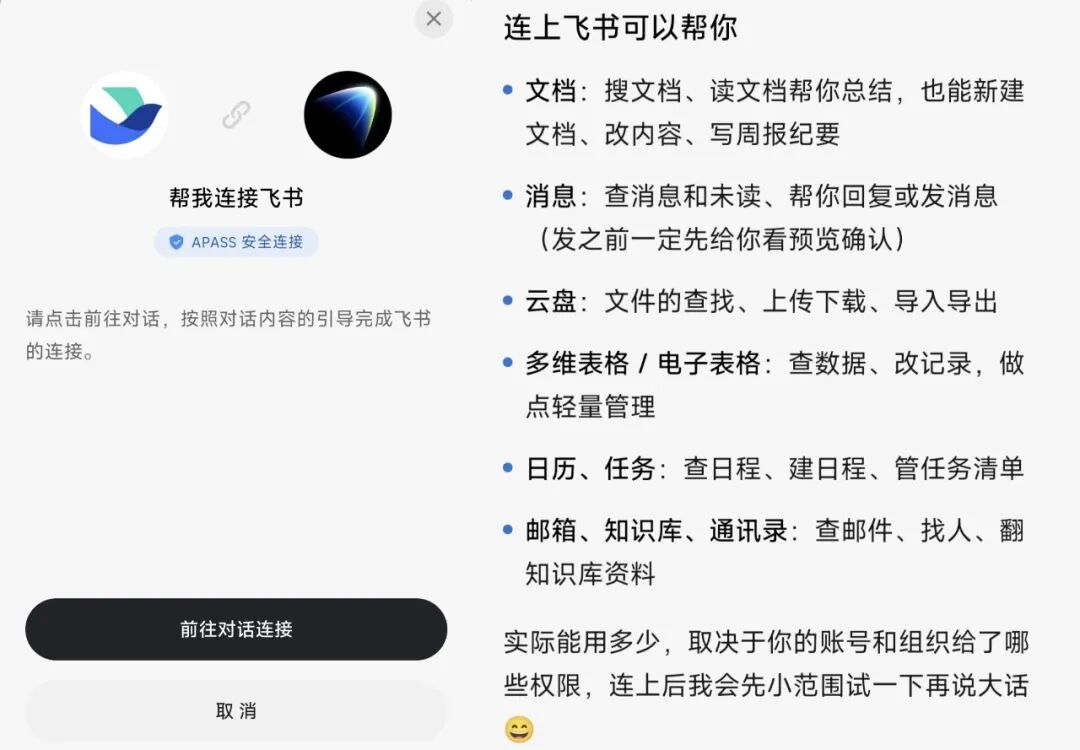
Operations that can be performed after Lingguang 2.0 connects to Feishu
But these functions are actually not very attractive.
Now that Feishu has accessed AI tools such as Doubao, it already has many similar capabilities, so there is no need to call an external Agent to execute.
Especially for message replies, although Lingguang can generate reply content, confirmation is still required before sending. If the generated reply is not satisfactory, you have to re-edit it yourself.
More importantly, office workers do not want every Feishu message to be marked as "read". (Those who understand understand)
After checking each function one by one, there seems to be no special reason to authorize it specially.
Of course, for managers who need to centrally approve, coordinate meeting time, and summarize team weekly reports, Lingguang may have more clear usage scenarios.
But these capabilities also depend on the actual permissions opened by the enterprise, and cannot be fully realized just by connecting to Feishu.
Overall, Lingguang 2.0 is more like a tool-based personal Agent that can understand continuous instructions and has a certain memory ability.
Its advantage is that it understands the context and is willing to provide Plan B when the task is blocked; its shortcoming is that the actual execution capability is not complete enough.
If you compare a personal Agent to an assistant, Lingguang can already understand the leader's arrangements and break down the tasks clearly, but when it comes to the execution link, there are always a few things that require the leader to finish in person.
Today AI: Life Needs Brief
From the first glance when you open Today AI, it already has the flavor of a personal Agent.
It does not directly enter the chat box, but first conducts a round of questionnaire surveys.
First, you need to select at least one connected application, then it will ask what to call you, and you also need to give the AI a unique name and select an avatar.
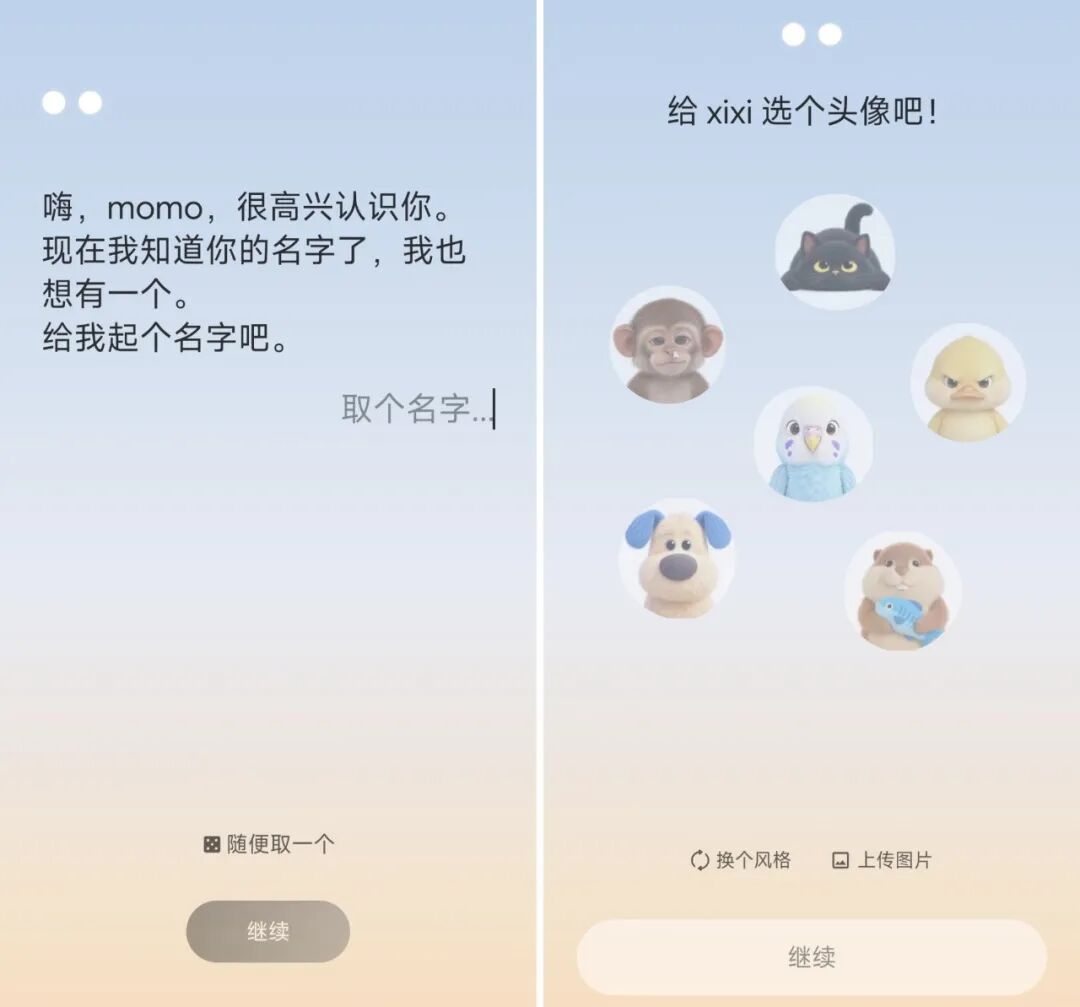
Initial personalized settings of Today AI
Compared with Lingguang, which requires entering the service list and actively finding the authorization entrance, Today AI starts to build an exclusive relationship as soon as it comes up.
After authorizing the calendar here, Today AI will read the historical information in it and try to understand the past activity arrangements.
For example, you once grabbed concert tickets, bought train tickets, etc., and then inferred interests and habits based on these records, and even took the initiative to ask: "I'm a little curious about whose performance you will go to see next."
This kind of interaction is really very pleasing.
After officially entering the application, you will also receive a "meeting gift" of 300 million Tokens.
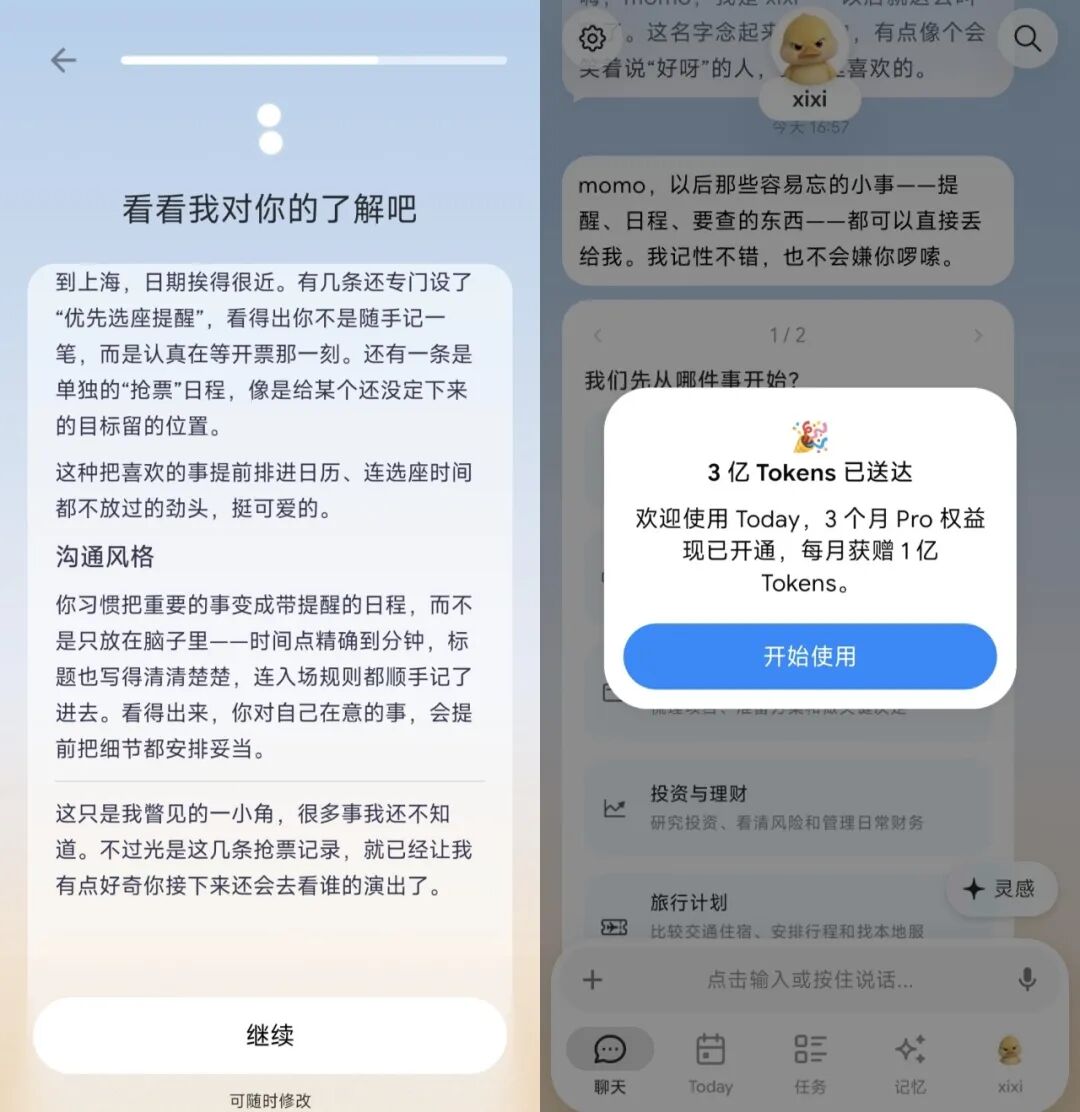
Today AI learns about users through the calendar and gives Tokens as gifts
The interface of Today AI is also much richer than Lingguang 2.0. In addition to the regular chat dialog box, there are modules such as tasks, memory, and diary. Even when the conversation is thinking, the previously set AI avatar will move, and different problems correspond to different dynamic pictures.
For example, when thinking, a cartoon character will appear holding a mobile phone and clicking nonstop...
Although the waiting time is a little longer, at least it won't make people feel like they are just talking to a cold input box.
The recent content generated by the chat will also be organized into a Brief form and placed in the Today module in the application. The conversation is no longer just a series of chat records, but rearranged for easier review.
Brief, a very internet term.
It is obvious that the founder's product experience from big tech companies is quite deep, even the chat records have to be organized into Brief, as if everyone needs a "briefing" every day.
However, this design also has practical value. Compared with searching through lengthy chat records, the organized content is easier to review, and it also makes the AI's memory traceable.
The real highlight is the "Tasks" module.
Today AI provides scheduled task templates such as today's email quick view, today's meeting preparation, subscription deduction check, and weekly health training. Compared with simply waiting for users to give orders, it hopes to gradually integrate into daily life through periodic tasks.
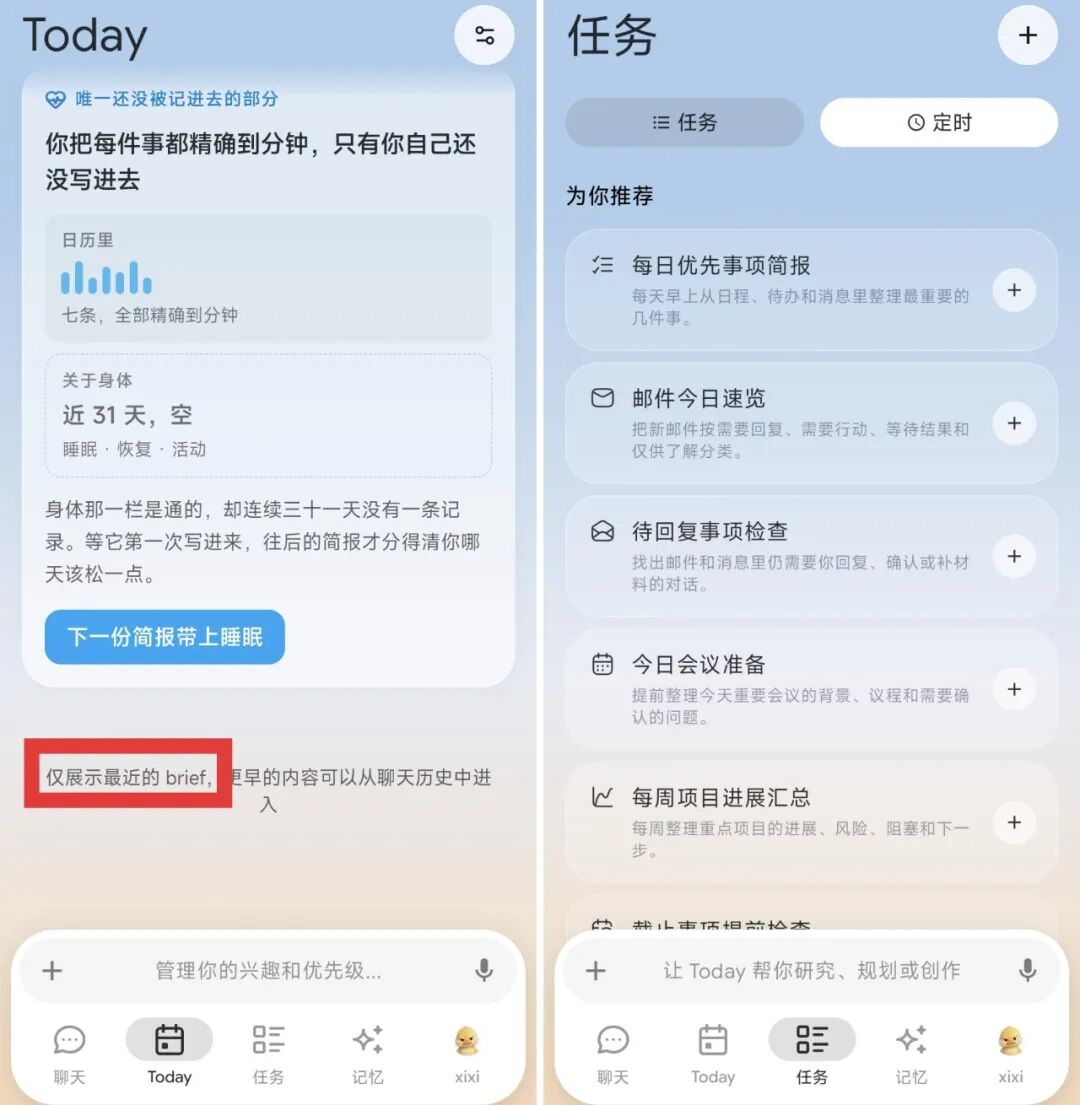
Brief and scheduled task settings of Today AI
In order to compare with Lingguang, I used the alarm setting instruction again, but adjusted the time to 17:20 24 hours later.
This time, the AI identified the Bug.
It took the initiative to remind that there is a time limit for the mobile phone alarm, and if it is set now, it may ring on the same day instead of the next day.
So instead of mechanically executing the original instruction, it created a calendar reminder and turned on the calendar alarm notification.
