Is the iPhone Duo adaptation a total flop? Actual tests comparing it with Xiaomi and Huawei yielded a rather unexpected result.
As Apple's first foldable smartphone, the iPhone Duo has been a hot topic among the public over the past few days.
However, with the official launch of the iPhone Duo, people's focus has gradually shifted from hardware specifications to software experience. In particular, various "jaw-dropping" app adaptation issues have sparked widespread online controversy: from black borders appearing on the WeChat interface, to some third-party apps failing to make full use of the large screen space, and even some system-built apps having adaptation problems. These issues have led many users to doubt whether Apple is fully prepared to enter the foldable phone market.
After all, app adaptation has always been an unavoidable problem for foldable smartphones. Compared with Apple, which has just entered this market, how much better can Huawei and Xiaomi, who have been exploring this field for many years, actually perform?
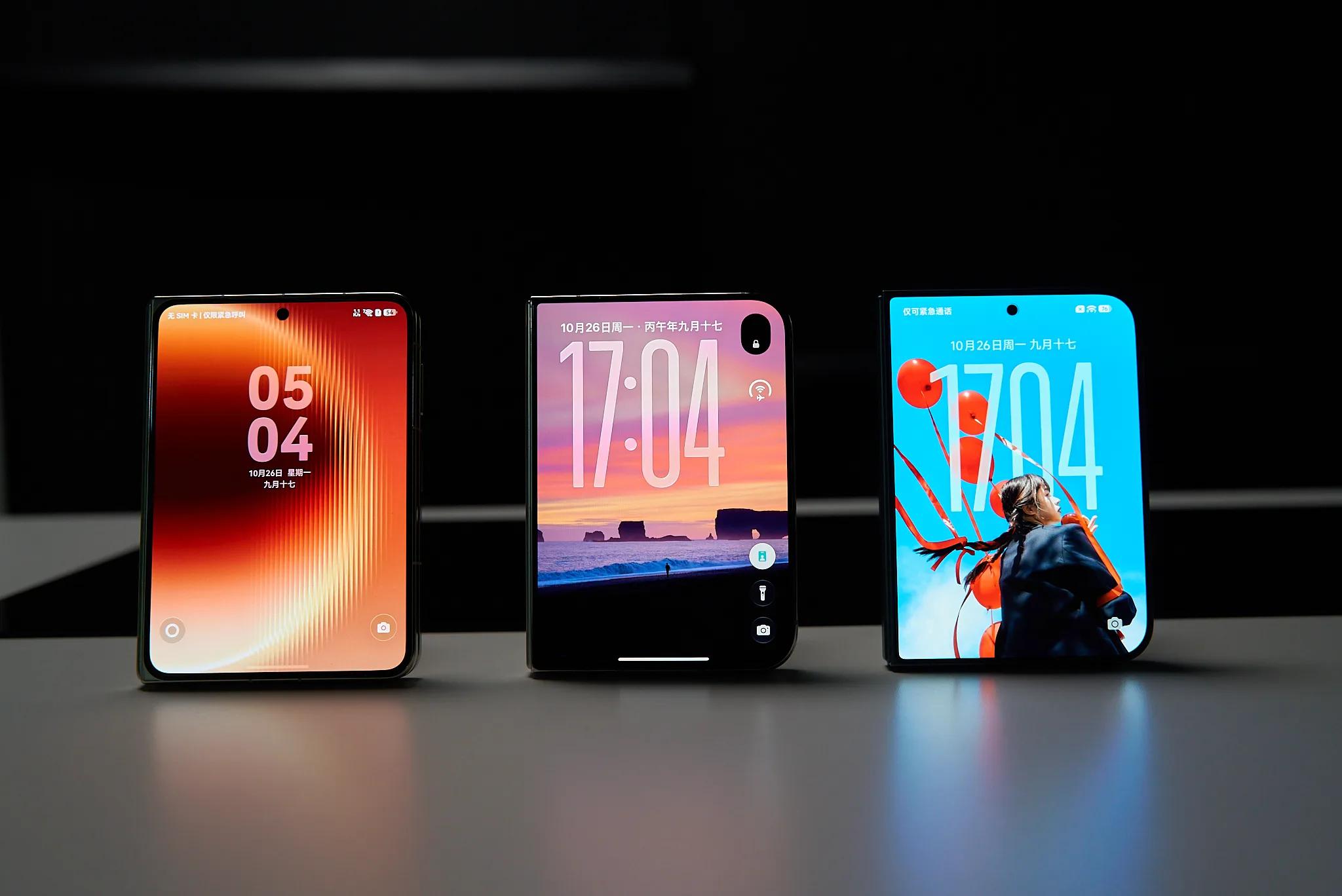
Image source: Lei Technology Photography
This time, we have collected three large foldable smartphones, the iPhone Duo, Xiaomi 18 Fold and Huawei Pura X Max, and compared them in terms of daily app adaptation, system interaction and multi-task operation, to see how big the gap in the large-screen experience is between the three devices.
All are large foldables, but Apple, Xiaomi and Huawei have completely different interaction logics
Although all three devices adopt a large foldable design with surprisingly similar proportions and appearance, you will find obvious differences in the understanding of large screens between Xiaomi, Huawei and Apple after actual hands-on use.
Let's start with the back gesture, which is the most basic and most experience-affecting operation.
On ordinary bar smartphones, the back operation is hardly a problem. Users only need to swipe inward from the edge of the screen to return to the previous page. But when the screen is unfolded, the originally simple operation may become a little troublesome, especially when the user holds the phone with one hand, it is often difficult to reach the buttons on the other side of the screen.
The Xiaomi 18 Fold inherits the mature full-screen gesture logic of the Android system, and users can swipe inward from the left and right edges of the screen to go back. For users who are used to Android phones, this set of operations hardly requires re-learning. Even after unfolding the inner screen, you can choose to return from the left or right side according to your holding position, without having to stretch your hand to click the button on the other side of the screen.
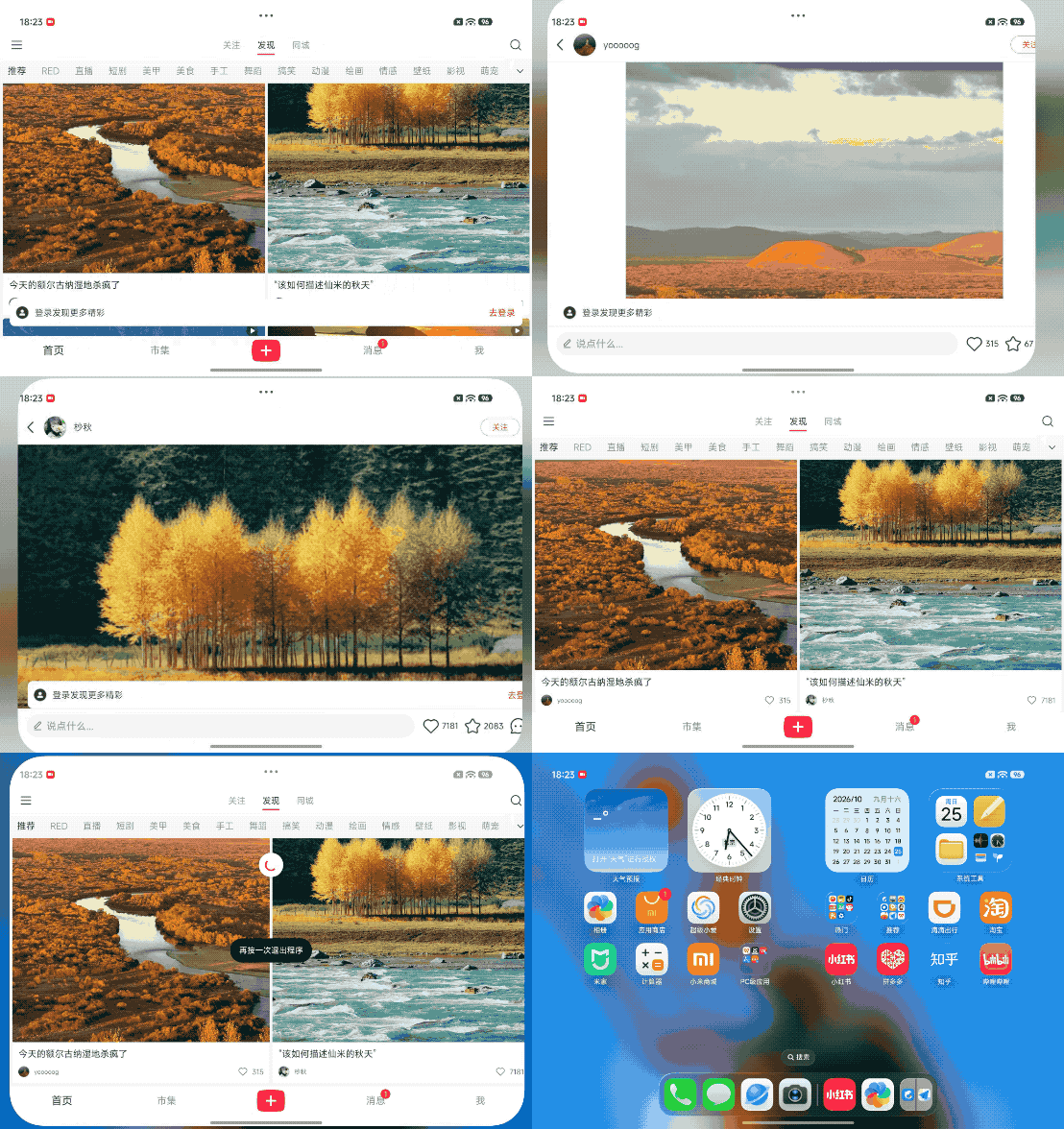
Image source: Lei Technology Illustration
The basic back logic of Huawei Pura X Max is relatively close to that of Xiaomi, and the operation can also be completed through screen edge gestures. However, the HarmonyOS also needs to consider which window is currently being operated in the multi-window state, so in actual use, the back gesture usually acts on the currently focused app first. For users who often use split screen, this logic is more intuitive, but if multiple windows are opened at the same time, you occasionally need to confirm which app you are operating on first.
In contrast, the situation of the iPhone Duo is a little "unreasonable".
The operation logic of iPhone only supporting left-side back has long been criticized, but on ordinary iPhones with small sizes, this problem is not impossible to "adapt to". After the screen is unfolded, if the user is holding the right side of the phone and wants to return to the previous page, they may need to stretch their hand to the left side of the screen, or directly click the back button provided by the app.
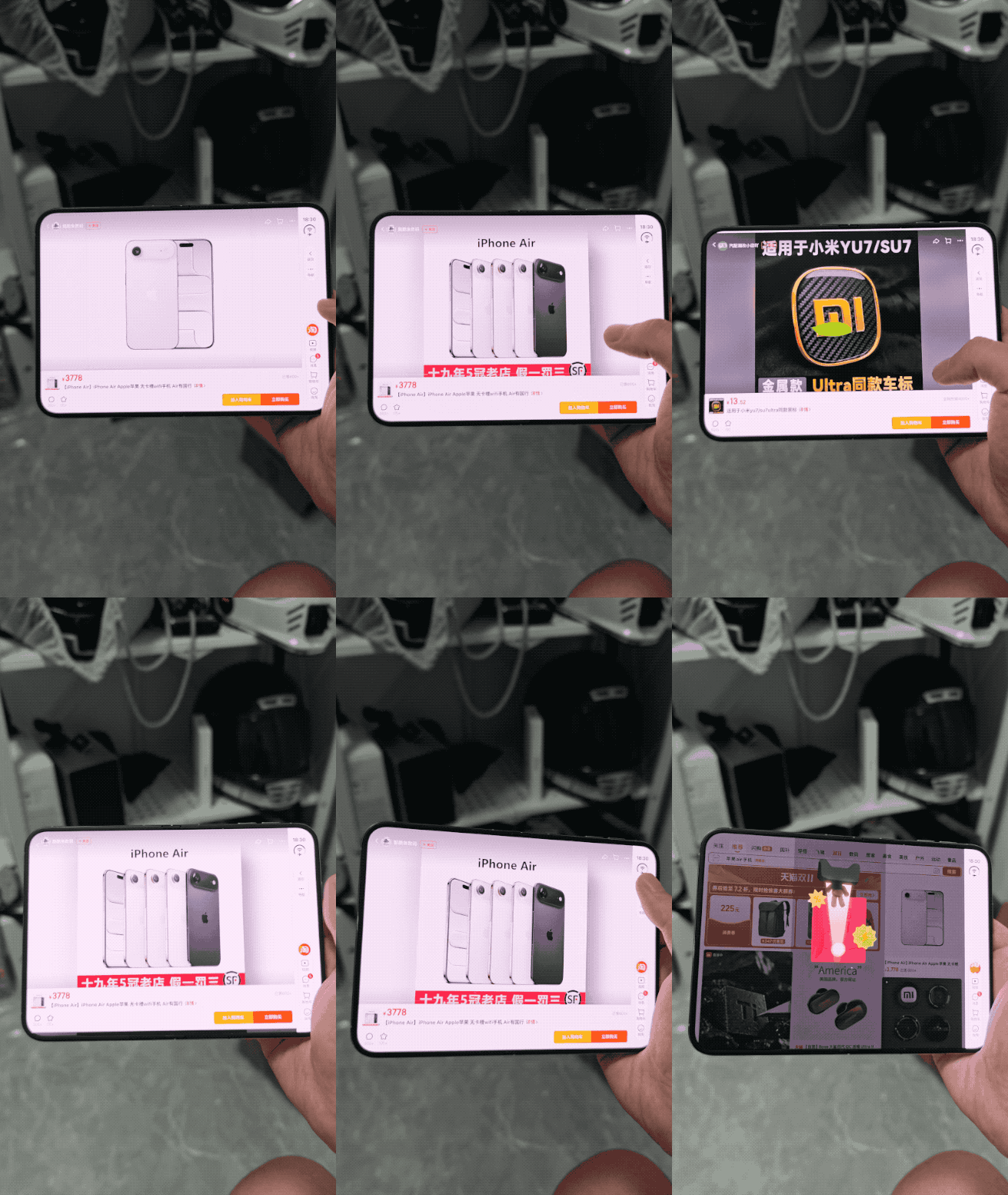
Image source: Lei Technology Illustration
Especially in some third-party apps that have not been optimized for the iPhone Duo, the position of the back button still follows the design of traditional phones. For a phone close to the size of a small tablet, this operation logic can be described as a disaster.
Of course, this does not mean that Apple's interaction logic is necessarily worse. For users who are already used to iOS, the operation methods of in-app navigation, bottom gestures and returning to the desktop from the system are very familiar. But the problem is that the foldable screen has changed the user's holding method, and the interaction design that was suitable for bar phones in the past may not be directly applicable to the wider inner screen.
Apart from the back gesture, the differences in daily operations between the three phones are actually not as big as imagined. Whether it is switching apps through bottom gestures, entering the background task interface, or pulling down to view notifications and control center, the three systems are already very mature, and there will basically be no obvious usage obstacles just because of switching to a foldable screen.
However, after entering the split-screen mode, the differences between the three systems become much more obvious. Especially in terms of the number of windows, operation methods and cross-app collaboration, Xiaomi, Huawei and Apple all have their own ideas.
The Xiaomi 18 Fold is equipped with HyperOS 4.0.26.0, which basically inherits the relatively mature operation mode of Android foldable screens. After unfolding the inner screen, users can directly use the full large-screen desktop, or open multiple apps at the same time through the split-screen function. What is special is that Xiaomi also provides the ability of three-window split screen and more apps to be displayed in parallel, and users can adjust the window combination according to their own needs.
For example, when traveling, we can open the map on one side, check the travel guide on the other side, and query hotel information through the third window. The three apps are displayed on the screen at the same time, which can indeed reduce the number of switching back and forth. In addition, Xiaomi can combine up to six apps, but only three windows can be displayed at the same time.
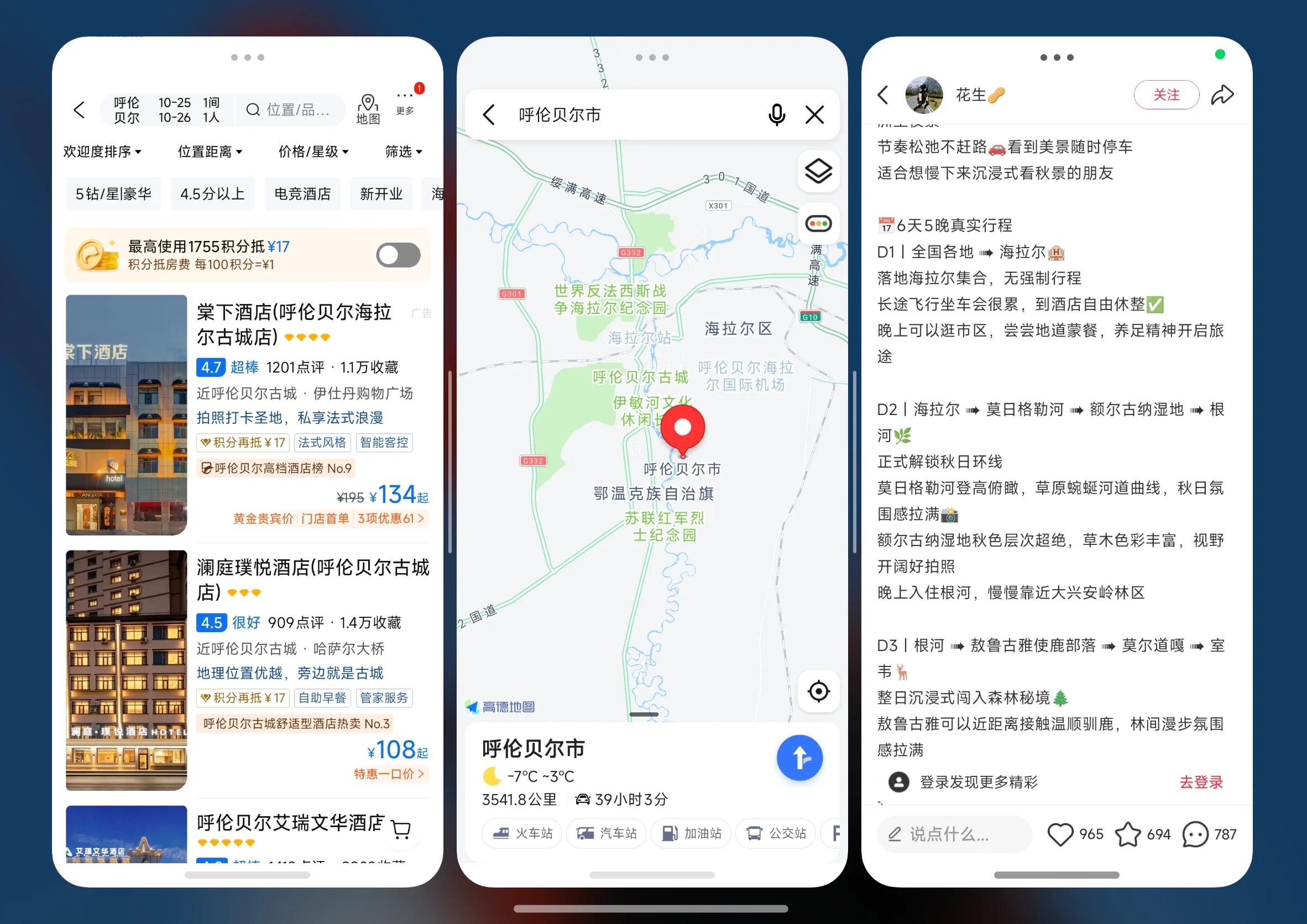
Image source: Lei Technology Illustration
But we think that the more windows are not always the better. After all, the inner screen size of Xiaomi 18 Fold is only 7.58 inches, which is not much larger than ordinary bar phones. So when three windows are displayed at the same time, the display area of each app is not large. If the virtual keyboard pops up again, the remaining display area will be further reduced. For users who need to input text frequently, operating with three windows is not as convenient as switching apps directly.
In contrast, the interaction idea of Huawei Pura X Max is more user-friendly.
The Pura X Max is equipped with HarmonyOS 6.1.135. Huawei provides a full-view multi-window function in the HarmonyOS, allowing users to quickly enter the multi-window mode through gestures, and adjust the window position and size according to their own needs. Compared with Xiaomi, Huawei pays more attention to the switching between different windows and the flow of app content.
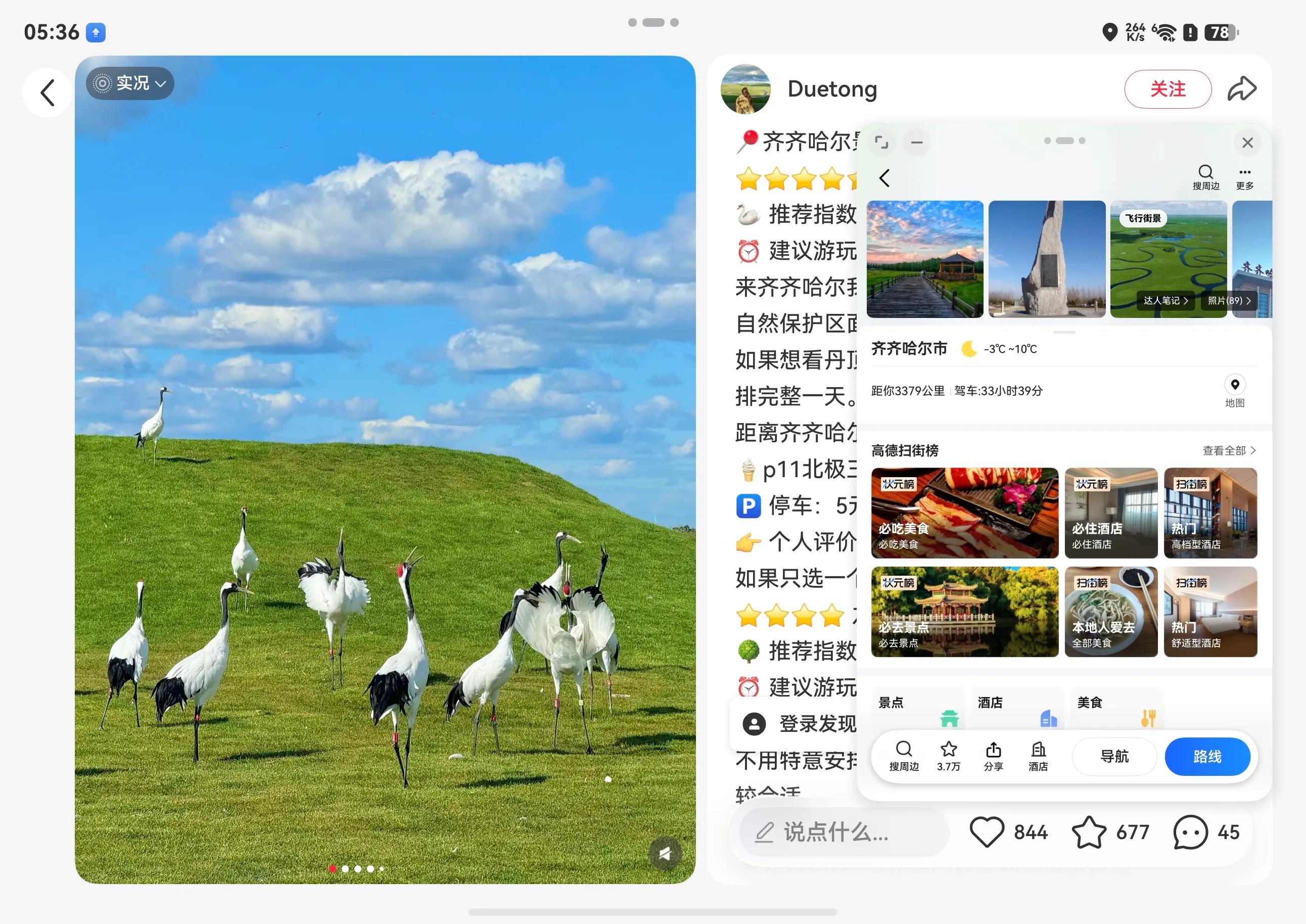
Image source: Lei Technology Illustration
For example, when we are checking travel guides on Xiaohongshu, we don't need to split the screen separately to find another app. Just long press the screen with two fingers, and we can directly open the corresponding app through split-screen navigation.

Image source: Lei Technology Illustration
This set of operations is more practical and convenient for users who often need to process documents and organize materials. But it also has a problem: the learning cost is relatively high. Especially for users who are new to HarmonyOS foldables, they need to spend some time getting familiar with different gestures and window operation methods. Moreover, some drag-and-drop functions require the cooperation of third-party apps, and not all software can achieve the same effect.
Finally, let's look at the iPhone Duo.
Although Apple did not launch its first foldable smartphone until this year, it did not directly copy the multi-window solution of Android manufacturers. The iPhone Duo currently mainly adopts the method of two-app split screen, allowing users to place two apps on the left and right sides of the screen to operate at the same time. Compared with Xiaomi and Huawei, Apple has far fewer window interaction modes, which basically revolve around the simultaneous use of two apps.
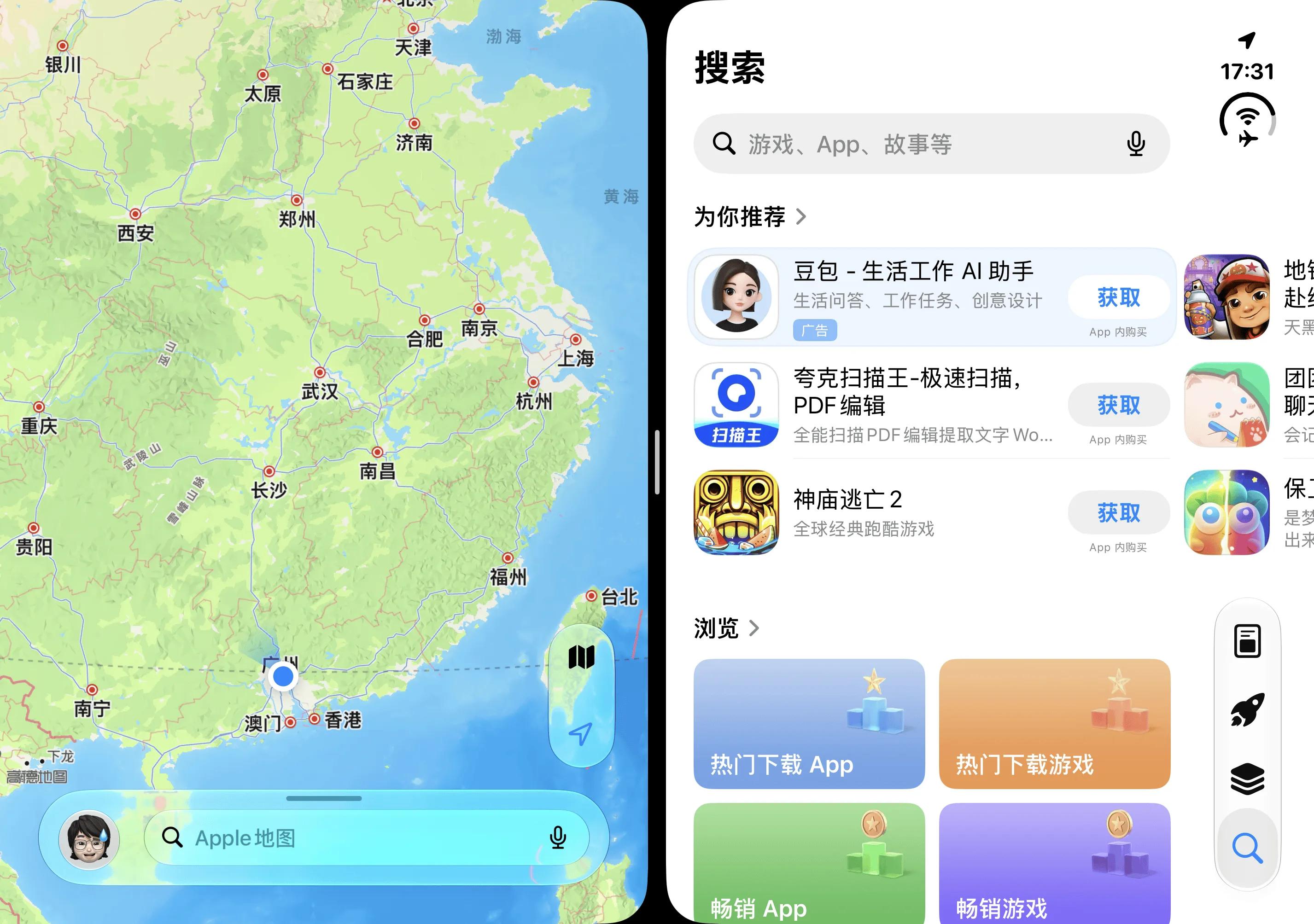
Image source: Lei Technology Illustration
However, Apple has also added a more practical feature - app pairing. Users can combine two frequently used apps, such as Safari and Notes, so that they don't need to reset the split screen the next time they open them. This design is convenient for fixed workflows, but if you need to open three apps at the same time or freely adjust the positions of multiple windows, the iPhone Duo is far less flexible than Xiaomi and Huawei.
The app adaptation is not a total mess, and the iPhone Duo also has its strengths
For Chinese consumers, WeChat is an unavoidable app when judging whether the software experience of a foldable phone is good or bad. After all, no matter how large the phone screen is, the software we use the most every day is still common apps such as WeChat, Weibo, Xiaohongshu and Douyin.
First, let's talk about the protagonist today, the iPhone Duo.
As Apple's first foldable smartphone, the performance of the iPhone Duo in terms of app adaptation is indeed somewhat unexpected. Especially some mainstream domestic apps, although they can be opened normally, there will still be problems such as black borders, abnormal interface proportions or unreasonable button positions after unfolding the inner screen. What is more unacceptable is that even if some apps can fill the screen, they only simply magnify the original mobile phone interface, without really redesigning the layout for the foldable screen.
After actual testing, the adaptation completion degree of Xiaohongshu is relatively high among a large number of third-party apps. After unfolding the iPhone Duo, the original two-column waterfall flow directly becomes four columns, which can display more notes on the same screen, and an independent navigation bar with liquid glass style is added on the right. For users who usually like to browse Xiaohongshu, this design can indeed reduce the number of swipes, especially when searching for travel guides, restaurant recommendations or digital products, they can browse content more efficiently.
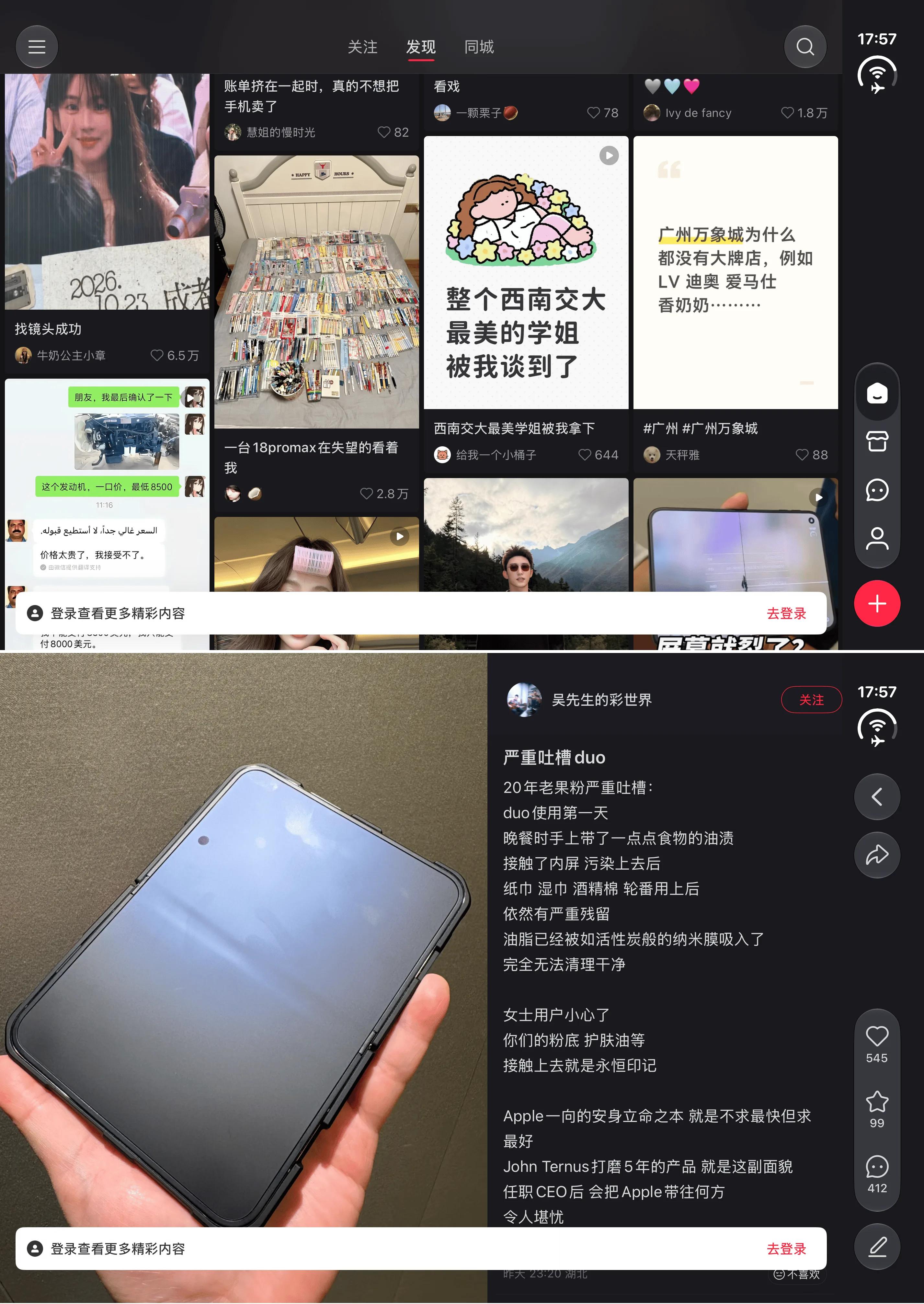
Image source: Lei Technology Illustration
Even after entering the note detail page, Xiaohongshu does not simply magnify the original mobile phone interface, but adopts a left-right split layout. The left side displays pictures or videos, and the right side displays the main text and comment area, so users can view the content while reading other people's comments. Compared with the operation method of ordinary bar phones that requires repeated up and down swipes, this layout is obviously more suitable for large screens.
However, we think there are still some areas for further optimization in Xiaohongshu's adaptation. For example, although the four-column waterfall flow can display more content, the area of each picture is also reduced accordingly, and some note titles even need to be displayed in several lines.
In addition, in the note detail page, the display ratio of the left picture and the right text is relatively fixed. If you encounter a note with little picture information but a very long main text, the reading area on the right will appear to put the cart before the horse. If users can adjust the proportion of the left and right areas according to their own needs, the experience should be even better.
Next, let's look at Weibo. Compared with Xiaohongshu, Weibo's adaptation performance is not so satisfactory.
On the Weibo main text page, the iPhone Duo also adopts a left-right split layout, with the Weibo content displayed on the left and the comment area directly displayed on the right. For apps like Weibo that often need to read the original text while viewing comments, this design is indeed very practical. Especially when watching videos or reading long Weibo posts, users can see both the main text and comments at the same time without repeatedly returning or swiping up and down.
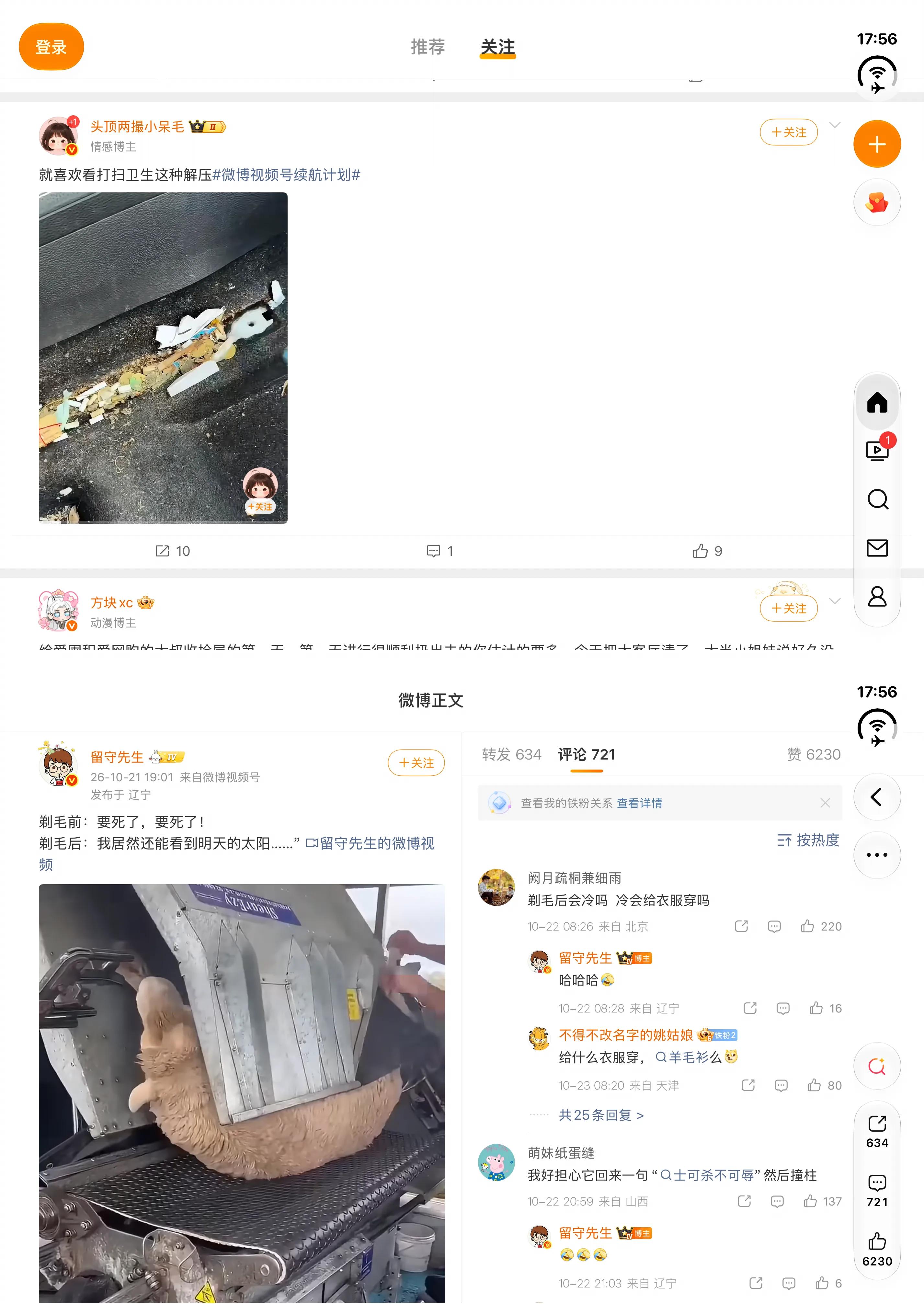
Image source: Lei Technology Illustration
But when we switch to the Weibo feed page, the situation "takes a sharp turn for the worse".
As can be seen from the pictures, although Weibo can already fill the screen normally, the feed still adopts a relatively traditional single-column layout. Especially when browsing vertical videos, the video only occupies a part of the left area of the screen, leaving a large blank space on the right. A larger screen has been unfolded, but the actual content that can be seen is reduced.
However, this problem cannot be entirely blamed on Apple. We compared the Xiaomi 18 Fold and Huawei Pura X Max, and found that the Weibo layout of the three phones in the horizontal holding state is basically the same, with a large amount of blank space, no one is better than the others.
