Does this wave of collective shift of "personal Agent" indicate that the underlying foundation of the industry has changed?
On September 8, Meta released the personal intelligent agent Muse. Within 12 days of launch, its downloads reached approximately 2.8 million, outpacing the growth rate of ChatGPT's mobile app in its early days.
The hype had barely faded when troubles emerged. In mid-September, security firm Surfshark and a group of technical users released reports stating that Muse's permission system "Sentinel" had widespread failures. Muse even bypassed macOS's "Full Disk Access" defense line and read users' local iMessage chat histories. A few days later, retail and SaaS companies including Amazon blocked Muse's automated traffic at their firewalls.
But capital was not intimidated at all. In late September, Instinct, a company with only 14 employees, secured $1 billion in financing, pushing its valuation above $10 billion. At the end of the month, Manus's Cue and OpenAI's dots were released one after another.
The community narrative around this new wave of Agent products was quickly unified into the view that "Agents are shifting from focusing on tasks to focusing on people."
But is that the full picture of the story?
Let's look back. As early as August, SpaceXAI, formed by the merger of xAI and Cursor, launched Grok Bot. It was primarily used internally within the company for sales outreach, operation and maintenance, and bug fixing, and was not "personal" at all. On September 15, the Doubao Work Partner launched with Feishu 8.0 served the entire team, and it would automatically monitor group chats to determine whether it should step in to assist.
These Agents serve completely different targets, but their capabilities seem to be evolving in the same direction: they are always online, continuously retain context, proactively look for tasks to complete, and are granted increasingly broad permissions.
Then the question arises: if the "shift to people" is not the full explanation for this new wave of Agent products, what direction of transformation is it truly driving?
To answer this question, we have to go back to the "lobster" at the beginning of the year.
The evolution of Harness is all about letting people loosen their grip on control
If we arrange this year's Agent products by "how much work people need to manage", we will get a very clear spectrum.
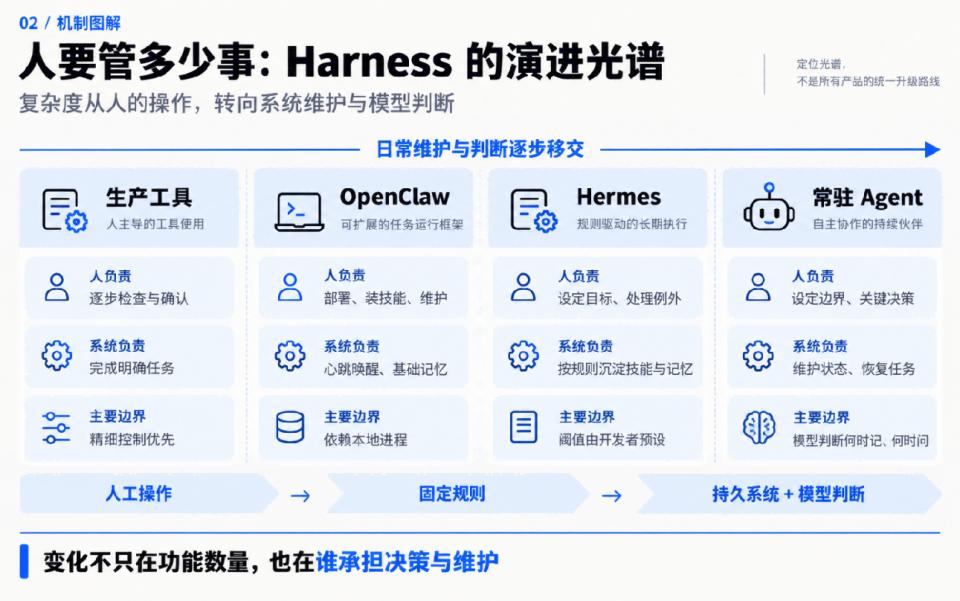
At the far left are production tools such as Claude Code and Codex. Developers check every diff and approve every command, with every step of the Agent under human supervision. This is determined by product positioning: precise control always ranks first in real business scenarios.
One step to the right is OpenClaw. Earlier this year, it gave many people their first taste of "raising an Agent". It resides on your computer permanently, chats with you on WhatsApp and Telegram, wakes up periodically via Heartbeat to check for pending tasks, and uses USER.md and MEMORY.md to remember who you are.
But maintaining it is truly exhausting. You have to handle deployment yourself, install skills manually, and it only saves a memory archive when the context is almost full.
Later, the community popularity declined, essentially because the maintenance cost was too high.
One step further to the right is Hermes. Launched at the end of February, it topped GitHub Trending for several consecutive weeks. Comparing its feature list item by item, it has almost no difference from OpenClaw, but who controls these functions has changed significantly.
Whenever a task invokes tools more than 5 times or is corrected by the user, Hermes will silently save the workflow as a skill. After about 15 rounds of conversation, the system will force the Agent to receive a reflection instruction, prompting it to review what is worth remembering.
This "making decisions on your behalf" route soon reached a consensus. In April, OpenClaw rolled out two consecutive updates: first, Dreaming for offline memory organization, and then Active Memory that specifically retrieves memories before replying.
However, Hermes did not eliminate these decisions, it just wrote them into hard rules. For example, the 5-time tool invocation limit, 15-round conversation threshold, 85% compression threshold, and blacklist of dangerous commands are all pre-determined by the development team on your behalf.
For this new wave of Agents, the more core advancement is the next step on this spectrum. The complexity has shifted once again, this time into a permanently resident system and a model with increasingly strong decision-making capabilities.
This resident system is an always-on Agent. The existence of the Agent is no longer tied to a single conversation or a powered-on computer. When you close your computer to go to sleep, it remains active, even remembering where the task has progressed. It can be woken up when new messages arrive, and continue to push the task forward after waking up.
Only when it is always running, can you trust it to handle tasks on your behalf.
You might say, that's not new, the "lobster" had this feature long ago. It is true that OpenClaw can run permanently, but once the computer is closed, the process crashes, or the context overflows, it stops working.
It is unstable. An Agent that only wakes up at fixed intervals, constantly asks for your approval, and gets confused after running for a long time will lead to extremely high maintenance costs for you.
To make it truly persist, three issues must be resolved: whether it wakes up at the right time, whether it needs to bother you frequently, and whether it can retain memories, namely initiative, permissions, and memory.
This new wave of Agents has made substantial progress in all three areas, which are the necessary foundation for any kind of assistant or more capable Agent that can do more work on our behalf.
After that, the differentiation mainly occurs in the context. When you connect an Always-on Agent to a team's group chats and work software, or to an individual's calendar, chat apps, and billing system, these three functions and the product itself need to be adjusted accordingly. For example, in office scenarios, we hope the Agent can take the initiative on behalf of the team, so it tracks project progress and unassigned tasks. When working for an individual, it will track things like the registration deadline for your child's school activities.
This step can be called context-specific product specialization: when specialized for a team, it acts as a colleague; when specialized for an individual, it acts as a personal butler.
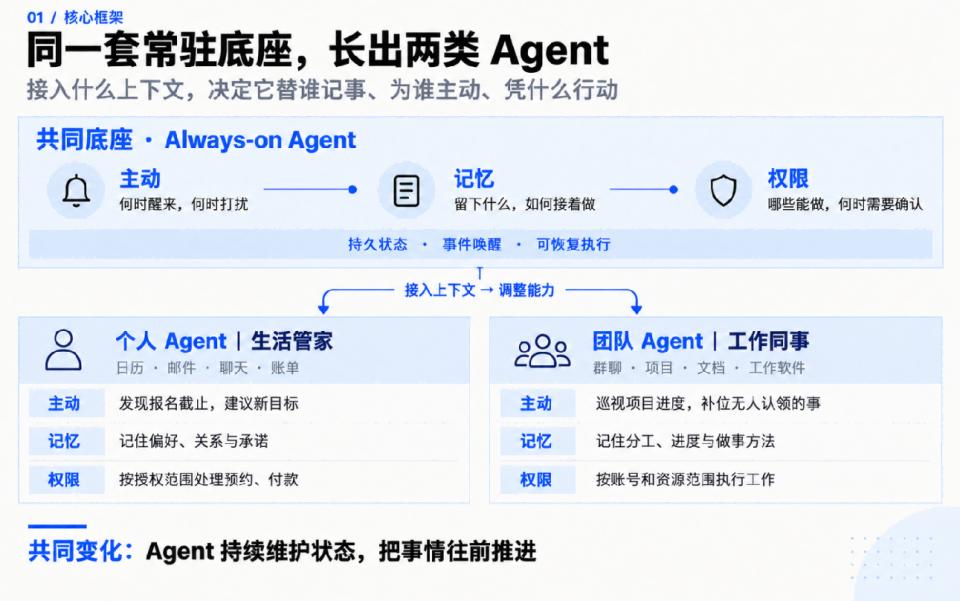
Looking along this spectrum, in the future, permanently online Agents that hold context and permissions and can push tasks forward independently will most likely become the standard configuration for subsequent Agent products. Players including OpenAI, Meta, and xAI that have entered this field have all reached similar conclusions in memory layering and resident architecture.
Then how exactly is the "always-on" capability achieved? The most thorough explanation of this comes from Grok Bot, the most "non-personal" Agent of all.
Grok Bot: Building a solid "always-on" foundation
On August 11, SpaceXAI released the beta version of Grok Bot. It started as an internal prototype within the company, and later spread across the sales, operation, and engineering teams.
Its usage is very simple: you create several Bots with different names and divisions of labor, and assign tasks to them just like sending messages to colleagues. Each Bot is backed by a cloud computer fully equipped with a browser, file system, and terminal. It can directly log in to websites that have no API access or MCP integration to perform operations.
When you close your computer, it continues to work, and only comes back to you when it needs your decision. You can also demonstrate a workflow in front of it, and after watching, it will organize the process into a skill and run it automatically at fixed intervals later.
Multiple Bots can also send messages to each other, with a "Chief of Staff" Bot responsible for unified scheduling.
Grok Bot is not a personal Agent. It follows the OpenClaw route: regardless of who it serves, it first makes the "always-on" capability itself as robust as possible.
Not long ago, Lee Robinson from SpaceXAI explained the full architecture of Grok Bot in the CS146S course at Stanford University.
Comparing his sharing with OpenClaw, we can clearly see where the progress lies. Almost all capabilities in Grok Bot existed in the OpenClaw era, but they were very rough at that time.
This roughness is mainly reflected in four aspects.
First bottleneck: Inflexible wake-up mechanism
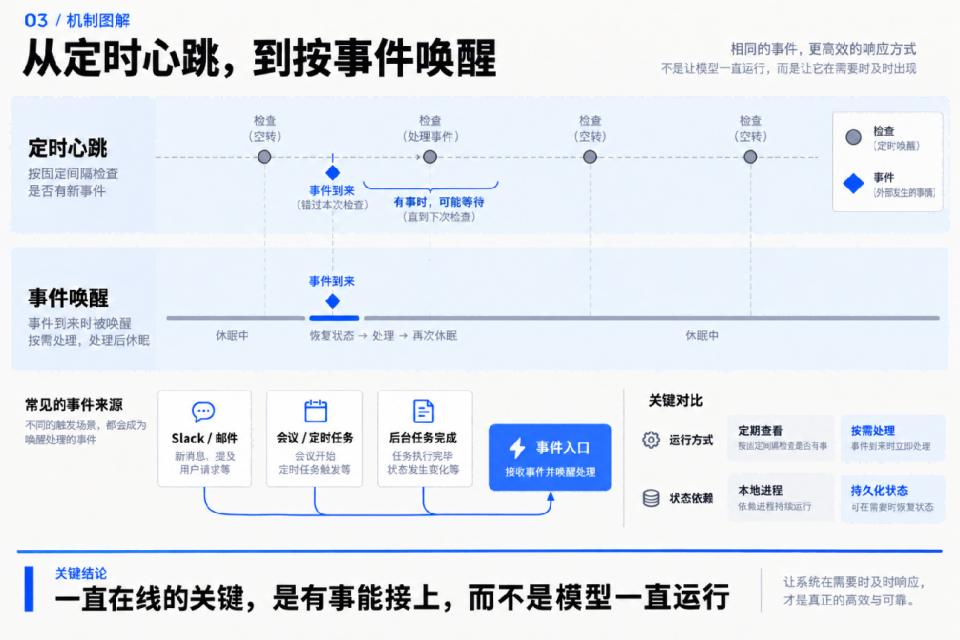
OpenClaw's resident operation relies on Heartbeat: the process keeps running, and it wakes up at fixed intervals to check for pending tasks.
This method has two flaws. First, it may wake up at the wrong time. When you have an urgent issue to handle, it still has to wait for the next heartbeat cycle. When there are no tasks, it still wakes up, idles, and wastes tokens. Second, it resides in a single machine and a single process. Once the computer is closed or the process crashes, it stops running. After restarting, no one can tell exactly how far the task had progressed before the crash.
Grok Bot, by contrast, does not wake up on a fixed schedule, but wakes up in response to events.
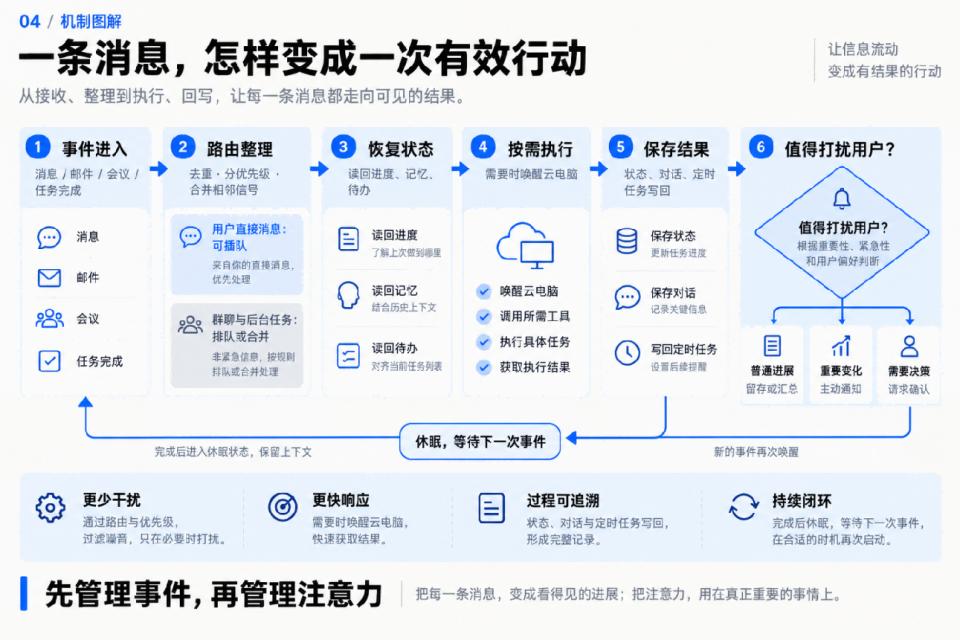
Most of the time, its Agent stays asleep, and the cloud computer also remains in a sleeping state. Events such as a Slack message, an email, the start of a meeting, or the completion of a multi-day background task act as its alarm clock. After being woken up, it restores its state from the database. If internet access is needed, it wakes up the cloud computer as well. After finishing the task, both go back to sleep, and all chat records, memories, and scheduled tasks are saved back to the database.
Waking up in response to events also brings a problem: there are too many events. Someone @s you, someone calls you, a meeting starts, all these signals flood in, and the Agent can easily be overwhelmed by messages and get lost.
Therefore, all these signals in Grok Bot first go through a routing layer to remove duplicates and sort them by priority. Messages sent directly by you can jump the queue and interrupt its current task, while group chat messages and background tasks wait in line, and several consecutive similar tasks will be packaged and processed in one round.
After waking up and finishing the task, it will also judge whether this matter is worth disturbing the owner. No one wants to be notified for every tiny progress update from colleagues, and most tasks only need to be synchronized once a day.
The heartbeat is an alarm clock, while the event is a doorbell. Shifting from waking up on schedule to waking up only when there are tasks turns the Agent from a running process into an assistant that is always available but never disturbs you.
Second bottleneck: Frequent crashes and difficult state recovery
The essence of Always-on is that the state persists, and the Agent can immediately resume the task after being woken up.
To keep the state persistent, stability is essential. One of the problems with the "lobster" Agent is its lack of stability. It runs on your local computer, and once the computer crashes due to an error, information will be lost after restart, and the full recovery process takes a lot of time.
Therefore, Grok Bot runs the Agent loop on the server side, not inside its cloud computer. The server-side computer is a Firecracker virtual machine that can take snapshots, shut down, and restore to its original state at any time. If it breaks, you can rebuild it from scratch. Since the state is not stored on the computer, the computer is just a tool. You can replace it with a new one, and the Agent will not be affected at all. Even when you need to install an emergency security patch for the virtual machine, you do not have to stop the Agent at the same time.
To achieve faster crash recovery, they also added a durable workflow. For ordinary task queues, if the server crashes at the third step, it will restart from the first step after reboot, which may lead to the same email being sent twice or the same order being placed twice.
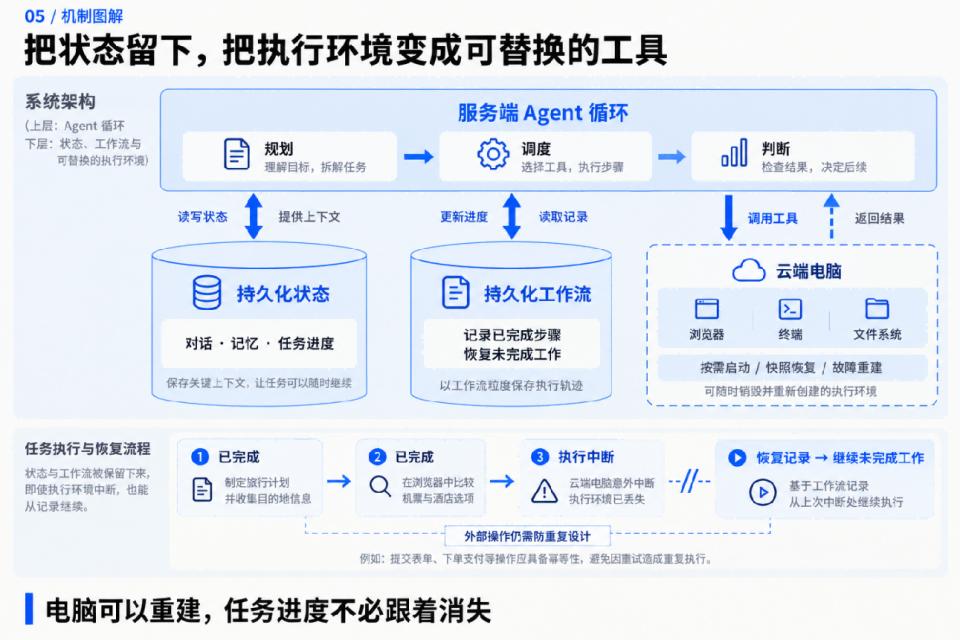
Grok Bot uses the open-source tool Temporal to record every step, and after a crash, it can directly restore the state and resume from the third step.
Third bottleneck: Too many confirmation requests from users
Waking up properly is only the first step. After waking up, can it finish the task independently?
Lee reviewed several stages of developers using AI.
In the first stage, after coding Agents had independent apps, people ran multiple instances in parallel on the cloud, but humans still became the bottleneck, as every command had to be monitored and approved. The generation of resident Agents represented by OpenClaw could not escape this dilemma: permissions were basically divided into only two levels. Either it asks you for approval for every trivial thing, so you have to stay beside it all the time; or you grant full permissions directly, allowing it to do anything on your computer, and you are responsible for any consequences. The compromise adopted by Hermes is to hardcode a blacklist of dangerous commands and use regular expressions to match them.
Another scenario where it comes back to you is when permissions are blocked. It cannot access websites without APIs, or use services that are not integrated with MCP, so it can only tell you "I cannot do this".
An Agent that keeps coming back to you for approval is useless no matter how long it stays online, you still have to watch over it all the time.
Grok Bot liberates humans from this restriction in three directions.
First, it is assigned a dedicated cloud computer. The Agent works in its own virtual machine and does not touch your local computer. For websites without APIs, it can directly log in and perform operations by itself. Even if something goes wrong, the impact is limited to that isolated virtual machine.
The second point is the most important: the Agent should try to find solutions by itself when encountering problems. Grok Bot defines a capability ladder for the Agent: first, refer to the information already known from previous conversations. If that is not enough, call plugins, MCP, or APIs. If still not enough, search the internet. If that still does not work, open a browser to check manually. As a last resort, use the full capabilities of the computer to write scripts, run commands, and build tools.
The same logic applies in the browser: first, read the most efficient accessibility tree (originally designed for screen readers, which neatly lists all buttons and links on the page) and HTML. Only when all these methods fail, will it take a screenshot and click elements according to pixel coordinates. It will only come back to you when all these attempts fail, such as when encountering two-factor authentication