Just now, all restrictions on Opus 5.5 Turbo Edition have been fully lifted.
Just now, the fastest model of Claude, the ultra-fast version, has been fully unblocked!
They officially announced that the "Fast Mode" of Claude Opus 5.5 has completely exited the research preview phase, all waiting lists are canceled, and it is fully open to all developers!
No performance degradation, no feature cuts, just one line of code can instantly make Claude run at top speed, with a 2.5x surge in response speed!

One developer excitedly said: I declare that Opus 5.5 is my god now.
For this ultra-fast version, one comment hits the nail on the head: "For Agent loops, p95 latency is more important than anything else."

Next, let's go through the official documentation carefully, covering price traps, network configurations, and how to prevent your wallet from being emptied, all explained clearly in one go!
How powerful is the Fast Mode exactly
Don't get me wrong, Fast Mode is not a "lightweight" model with cut parameters.
This time, we don't have to choose between speed and quality. The Fast Mode of Opus 5.5 delivers the best of both worlds!
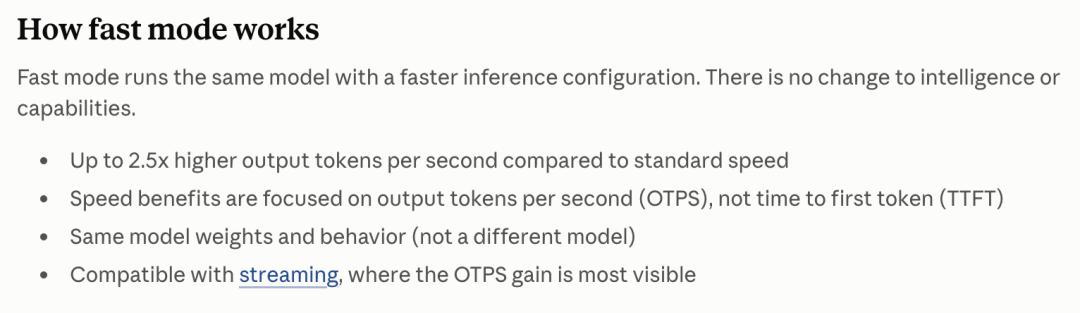
According to official disclosure from Anthropic, the Fast Mode uses exactly the same model weights and intelligence level as the standard version.
It is not a "low-intelligence" cut-down model, but purely concentrates resources on response speed by optimizing the underlying API and inference configuration.
The result is: The token output speed per second (OTPS) has surged up to 2.5 times!
Its applicable scenarios include rapid iterative development of popular code, real-time dynamic debugging, and high-intensity urgent tasks with tight schedules.
At present, Fast Mode only supports Opus 5.5, Opus 5 and Opus 4.8.
Note: Sonnet, Haiku and other models are not supported. The previous Opus 4.8 Fast Mode was deprecated in June 2026).
How to use it? The method is extremely simple.
You only need to add one line in the API request:
speed: "fast"
to instantly unlock the ultra-fast version.
If you are a Claude Code user, just enter /fast directly in the CLI to turn it on or off at any time; VS Code users can also switch with one click directly through the plugin.
Price cut and speed boost? The bill comparison is extremely pleasant
The speed is 2.5 times faster, so won't the price be sky-high?
On the contrary! This time, Anthropic even launched a wave of "speed increase and fee reduction"!
Let's take a look at the most core price comparison (per million tokens):
Opus 5 and Opus 4.8 (Fast Mode): $10 input / $50 output
Opus 5.5 (Fast Mode): $8 input / $40 output
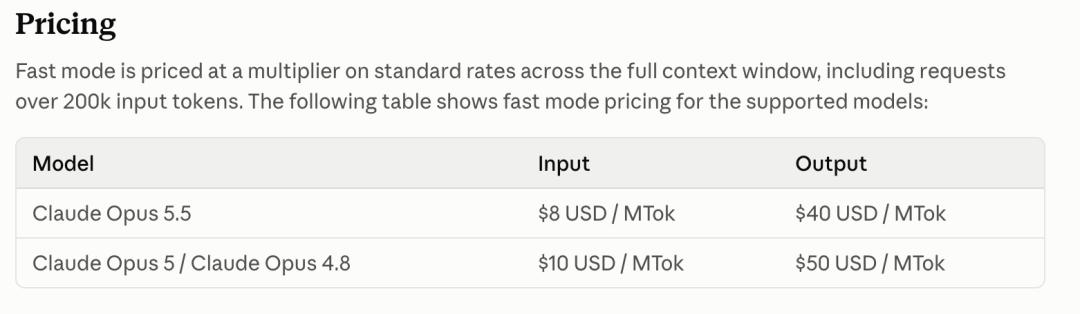
Yes, you read that right, the most powerful version is even cheaper!
Pit Avoidance Guide
Mark these points, you must pay attention to the following pit avoidance guidelines.
Independent rate limit, no resource contention: Fast Mode has an independent rate limit.
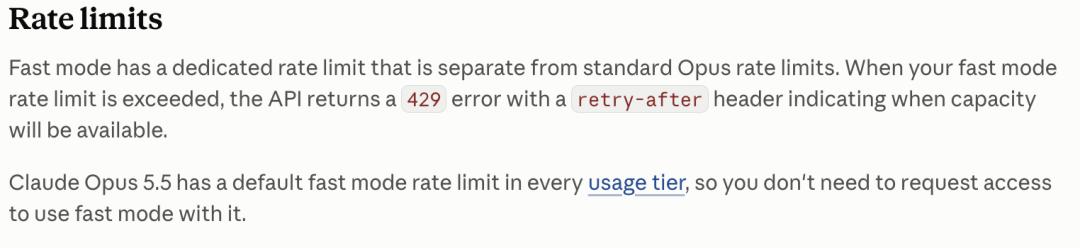
If you run too fast and hit the upper limit, it will automatically and smoothly fall back to standard speed, and automatically restore ultra-fast speed after the cooldown period, so you won't get stuck directly.
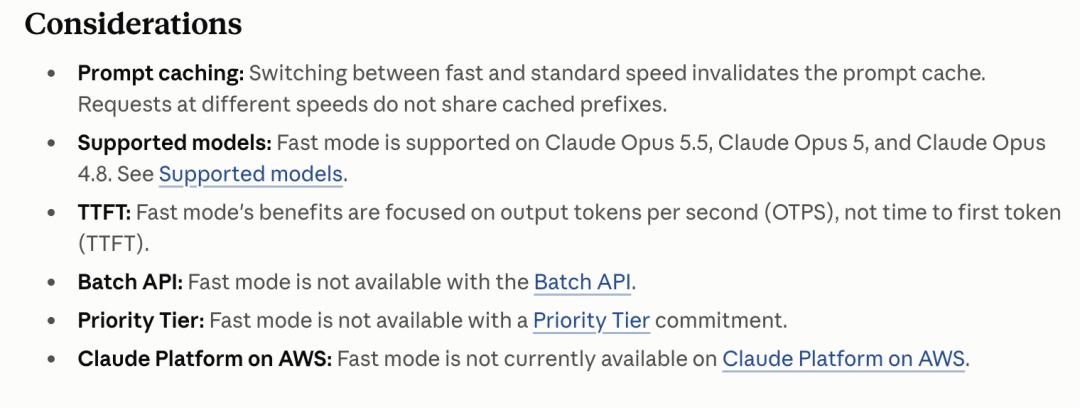
Prompt cache is not shared: Prompt Cache cannot be shared between Fast Mode and standard mode.
Therefore, the official strongly recommends turning on Fast Mode at the very beginning of the session, otherwise switching midway may make you pay a new input fee without cache.
This initial fee is only charged once in a conversation, and you will not be charged repeatedly even if you turn Fast Mode on and off repeatedly later.
Consume "usage quota"
For Pro/Max/Team/Enterprise subscription users, Fast Mode is billed against additional usage quota and is not included in the original subscription quota.
How to check the bill
Where did your money go? First use the /status command to check how you are logged in.

1. Pro/Max individual subscribers: Fast Mode is not included in your regular subscription limit, but consumes your "usage quota". You can check it in Settings > Usage at claude.ai.
2. Team/Enterprise enterprise users: The fee is deducted from the organization's quota. Ordinary users can use /usage to check their own expenses, and administrators check in the background.
3. Claude Console (API customers): On the Usage and Cost page in the background, select Speed (Research Preview) through the "Group by" menu, and you can view the expenses of Fast Mode separately. Free accounts in the evaluation period cannot be used and must be recharged.
How to turn on Fast Mode?
The biggest sincerity of this opening is that no application is required!
For API developers, no need to send emails, no need to fill in forms, just add a parameter in your API request — speed: "fast".
Note that API and Microsoft Azure Foundry are now online, Google Cloud will be launched soon. AWS Bedrock and other platforms do not support it for the time being.
For Claude Code (CLI) users, the interaction in the terminal is extremely smooth.
Type /fast, press the space bar to toggle on/off, press Enter to confirm.
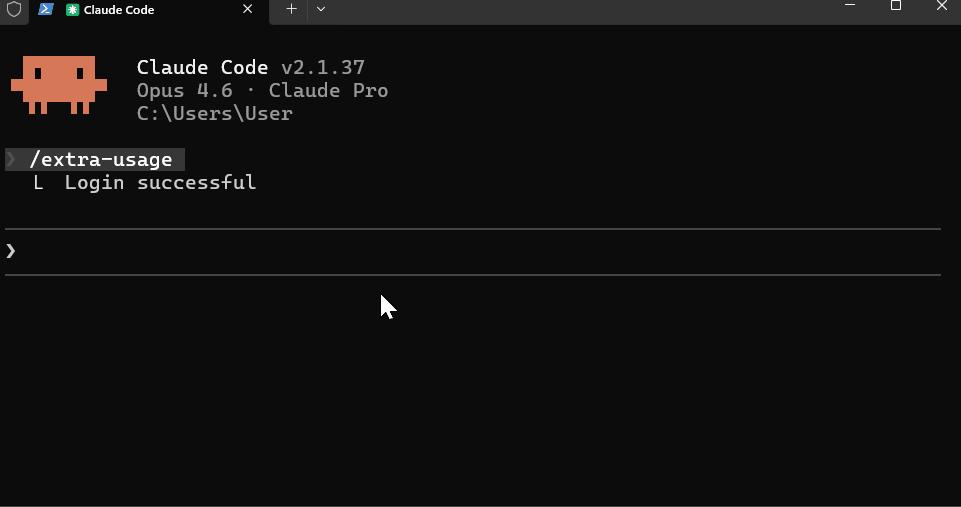
After turning on, the terminal will not only prompt "Fast mode ON", but a lightning icon ↯ will also appear next to your prompt.
You can even type /fast while Claude is thinking and outputting, it will finish the current round of response at standard speed, and automatically run at top speed in the next round.
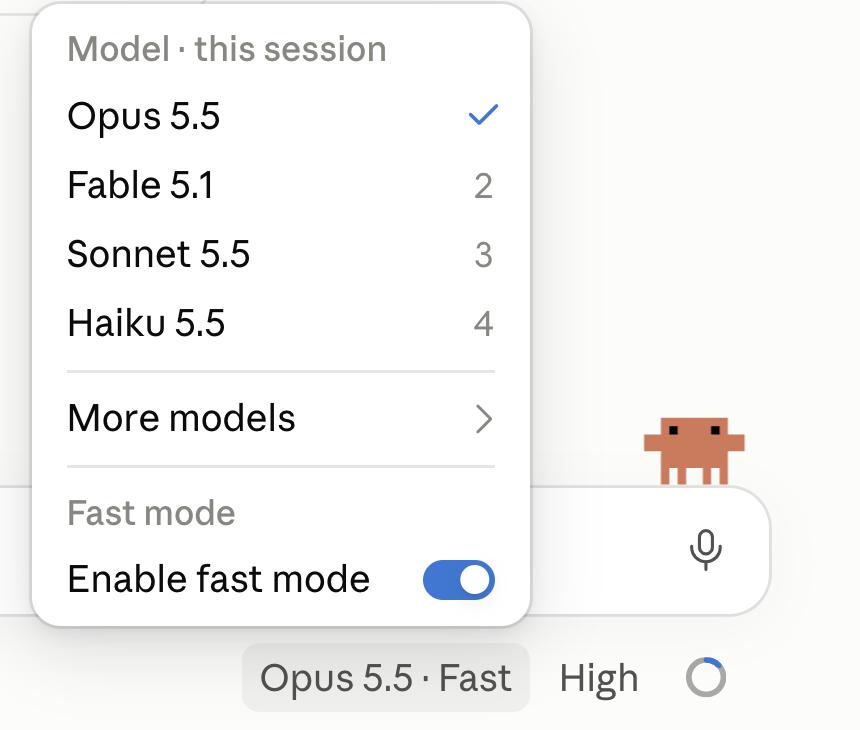
Note that in Claude Code v2.1.280 and above, Fast Mode uses Opus 5.5 by default.
In addition, you can also hardcode "fastMode": true directly in the user profile.
The linkage logic of model switching is as follows —
Switch away: If you turn on Fast Mode and then use /model to switch to a model that does not support Fast Mode (such as Sonnet), Fast Mode will automatically turn off.
Switch back: If you switch back to Opus 5.5, as long as your saved preference is turned on, it will automatically re-light the lightning icon ↯.
In the cloud session, enter /fast on to enable it, but it is only valid for the current session.
Enterprise-level control, how to prevent bankruptcy?
As soon as this news came out, many people in the comment area were worried: "The scariest thing is that it is turned on by default, half of us may burn $200 worth of tokens before we even notice."
In order to prevent employees from burning up all the company's money, Anthropic provides extremely detailed enterprise-level control solutions.
Force opt-in per session
Administrators can set in settings.json or server-level configuration: "fastModePerSessionOptIn": true.
In this way, every time a new session is opened, Fast Mode is turned off by default. Employees must manually type /fast to use it.
This can effectively control those "money-burning" employees who run tasks concurrently with more than a dozen terminals at the same time.
Rate limit and graceful degradation
Fast Mode has its own independent rate limit pool. If your requests are too intensive and hit the upper limit: Fast Mode will automatically fall back to standard speed instead of directly reporting an error and getting stuck.
The lightning icon will turn gray and enter the cooldown state. Once the cooldown time is over, the 2.5x speed will be automatically restored.
Fortunately, if your "usage quota" runs out in the middle of the session, it will also degrade to standard speed to continue running, and the terminal will prompt you that the quota is exhausted, so you won't work in vain.
One More Thing: A magic feature that helps you save money
Since we are talking about saving money, we must mention another popular feature recently launched by Claude: idle compaction.
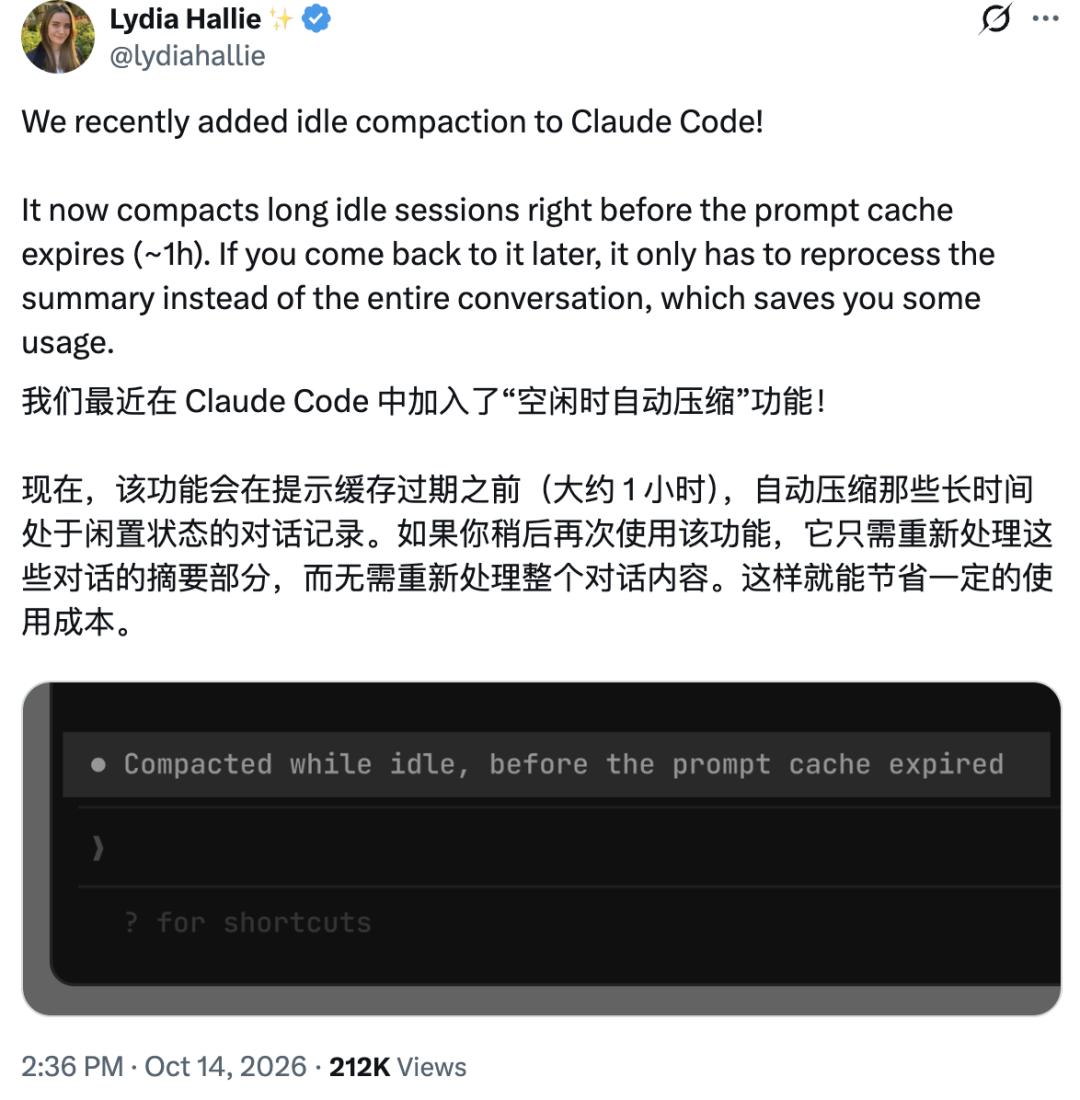
In the past, when you were working on a long session with 200,000 tokens, the prompt cache expired when you came back from a meeting.
If you casually ask the AI to write a line of code, it has to "read" all 200,000 tokens again, and several dollars are evaporated in an instant.
Now, Claude has learned to "automatically save files"!
Before the cache expires (about 54 minutes of continuous inactivity), it will automatically compress your long conversation into a refined summary. When you come back to continue working, it only needs to read the summary to pick up the train of thought, which greatly reduces the re-consumption of tokens.
Note that the following conditions need to be met:
1. The terminal session uses 1-hour prompt cache;
2. The context reaches 200,000 tokens;
3. The computer remains awake;
4. Stay idle for about 54 minutes (before the 1-hour cache expires).
Of course, saving money also has a price.
One developer complained on GitHub that 7 long sessions were automatically compressed overnight, and as a result, the AI forgot some details of the underlying technical decisions.

Don't panic, Anthropic is very responsive to feedback and immediately added a toggle switch.
You can modify settings.json: "idleCompaction": false. Or customize the trigger threshold through environment variables (the default is 200,000), everything is under control.
Even bigger boss: Is Fable 5.5 coming soon?
And just today, it is rumored that Fable 5.5 has entered the early access stage, and has been opened for gray release to some companies and individuals!
At present, Fable 5.5 only needs to complete the test finalization before public release.
It is widely speculated in the industry that this timing is very reasonable, which can give Anthropic more time to build momentum before its IPO.
However, some people pointed out: "Fable 5.5 must be really excellent to justify using it instead of Opus given how much usage it consumes."
For most ordinary subscribers, without API access, Fable 5.5 may be ridiculously expensive: after feeding in several long prompts, the 5-hour quota will be exhausted.
This means that in the initial stage, only those enterprise clients who are willing to pay more than 50 dollars per million tokens can really afford this "performance monster".
In any case, the 2.5x speed Opus 5.