Claude Forms Its Own Team to Hunt for Bugs! 66 Bugs Are Identified Across 116,000 Lines of Code, Whereas a Single Agent Can Only Find Up to 27 Bugs.
The best performance of a single Agent found 27 bugs.
When letting Claude form its own team, it ran three consecutive times and detected 66 bugs each time.
This is a set of test results just released by Anthropic: 70 bugs were pre-embedded in 116,000 lines of code, and the single Agent and dynamic workflow each ran three times.
The results showed that the single-agent mode at best found less than 40% of the bugs, while the team collaboration mode detected over 90% of the bugs in all three runs.
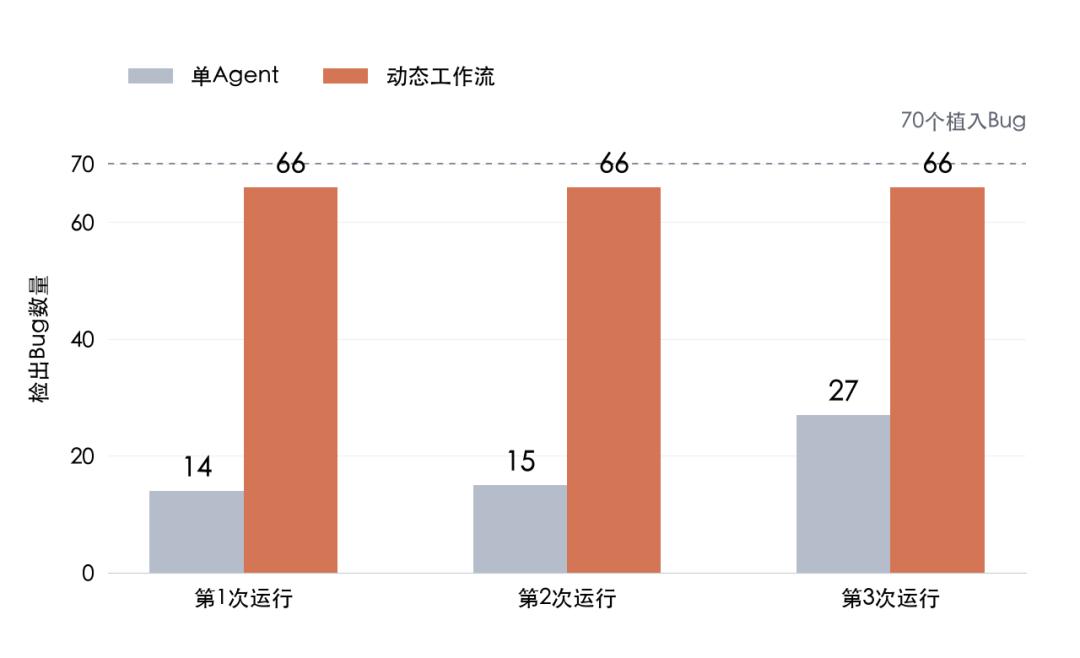
Comparison of bug detection results between single Agent and dynamic workflow released by Anthropic.
Behind this set of results is that Claude has begun to arrange the division of labor on its own and organize multiple Agents to collaborate.
On October 10, the Claude Managed Agents dynamic workflow launched public beta testing.
With this feature, after the main Agent receives a task, it can write its own division of labor program, arrange other Agents to complete the task in stages, and finally summarize the results.
On the same day, Claude Code Projects also expanded its public beta scope: all Pro and Max users who previously joined the waiting list now have access to the feature.
In Projects, you can continuously submit requirements around a project, and Claude is responsible for splitting tasks and coordinating multiple threads to advance in parallel.
One feature allows developers to integrate multi-Agent collaboration into their own applications, while the other allows users to directly assign work and track progress in project conversations.
Both updates point to the same change: in addition to executing tasks, Claude has also started to take over work that previously required human attention, such as dividing tasks, tracking progress, and handing over results.
You set the goals
Claude divides the tasks on its own
It is not difficult to open several AI windows at the same time.
The trouble is that you have to re-explain the background to each window, send the findings from one side to the other, and then follow up one by one: what have you done, where are you stuck, and what else is missing?
As more and more windows are opened, people end up being busy acting as messengers.
Projects is designed to take over this part of the work.
You can continuously submit requirements in the same project conversation, and Claude will decide whether to create a new task thread or assign the task to a thread that is already handling related work.
Each thread can be understood as an independent work conversation that advances the task separately.
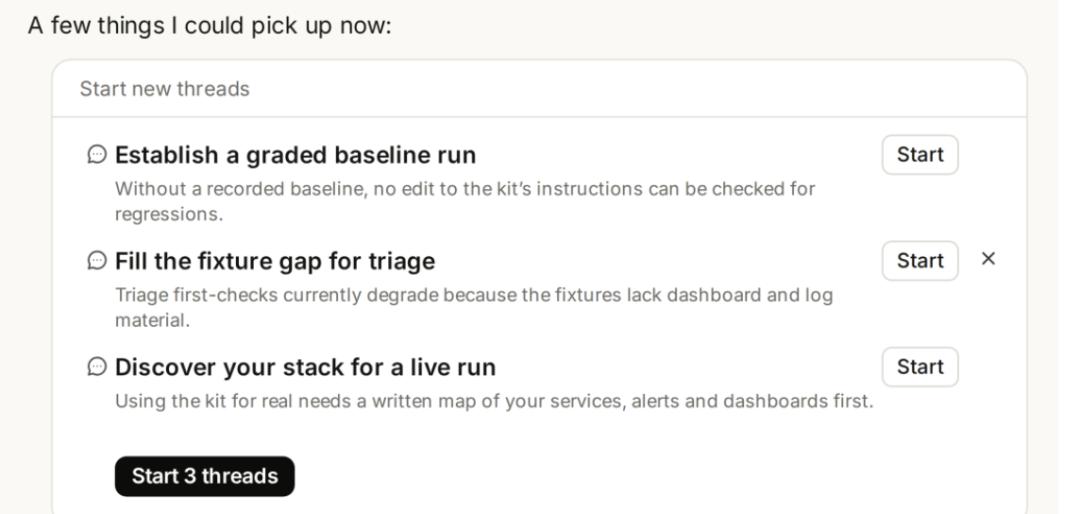
Projects coordinates an overview of conversations and tasks
Anthropic gave an example: deactivating old interfaces across API, web, and mobile terminals at the same time.
This involves multiple code repositories, and modifications in each place need to be coordinated with each other.
Claude can split tasks by code repository, perform modifications, run tests, submit code merge requests respectively, and then inform you which changes need to be merged first.
Each cloud thread has its own context and code copy, works on its own branch, and then reports the results back to the project conversation.
You can still enter a certain thread to view details and correct the direction. The project overview lists separately the tasks that are in progress, waiting for your response, and available for review.
If you step away for a while and come back, you don't have to check the progress in each window one by one, and you can pick up directly from the part that needs your processing.
To save the time of repeated communication, the previously assigned tasks must be remembered.
Projects accumulates project memory.
All information including what changes have been made to the requirements, what decisions have been made, and which places have had problems before can be recorded for subsequent cloud threads to read.
The official cited a daily work scenario: the release date is changed to Friday, why a certain feature was cut, and who to confirm with before modifying a certain service, all this information can be kept in the project memory.
The database will also save uploaded materials and files generated by Claude, so that subsequent tasks can continue based on existing results.

Requirements are assigned to the threads on the right, and relevant decisions and work results are gradually accumulated for use in subsequent tasks.
The new version of Projects launched phased public beta on September 17.
This expansion is for the access scope. The feature itself is still in the public beta stage, and users who have not yet signed up can still join the waiting list.
Cloud threads can continue to work after you close your computer. Tasks that require local tools or local databases can also run on your computer via Remote Control, but the computer must remain awake.
After the project has a coordinator, how should the work be divided within a complex task?
300 Contracts
Write the division of labor into a program
The Managed Agents dynamic workflow is designed to handle this type of problem.
The official gave a specific task example:
Check 300 contracts to find which ones contain change of control clauses, that is, the agreements on how the contract should be handled when the company's control changes.
Reading each contract thoroughly already takes a lot of effort, and it is necessary to ensure that every contract is checked, conclusions are supported by evidence, and missed contracts can be rechecked in time.
Claude will write a workflow program for the task, arrange which Agents read the materials, which steps process the results, and how to proceed afterwards.
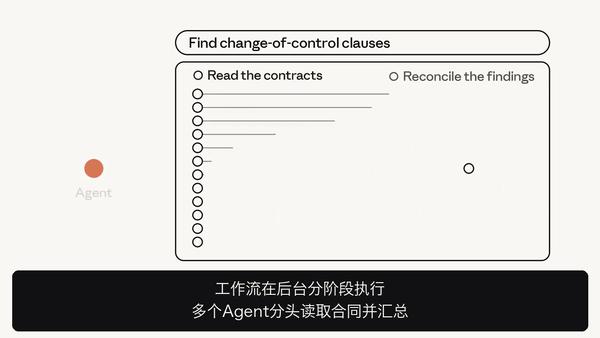
Contract reading tasks are launched in parallel, followed by verification and summarization
The division of labor and handover are all written into the program and can be run directly.
After one Agent finishes reading the material, the result is handed over to the program. The program then passes the result to the subsequent Agent, or decides which branch to take next based on the result.
For work that requires repeated modifications, loops can also be arranged into the workflow.
The example cited in the official document is manuscript review: continue to modify until the review is passed or the preset number of rounds is reached.
In ordinary sub-Agent delegation, the main Agent needs to read the report and then decide the next step. The dynamic workflow writes a large number of intermediate handovers into the program to advance in the background.
During the waiting period, the main Agent can still communicate with users and check the progress. After the operation is completed, it reads the results, replies to the user or initiates the next round of work.
However, after the threads in the workflow return the results, the main Agent cannot continue to ask follow-up questions to the same thread as when calling an ordinary sub-Agent. Therefore, verification and rework are best arranged in the process in advance.
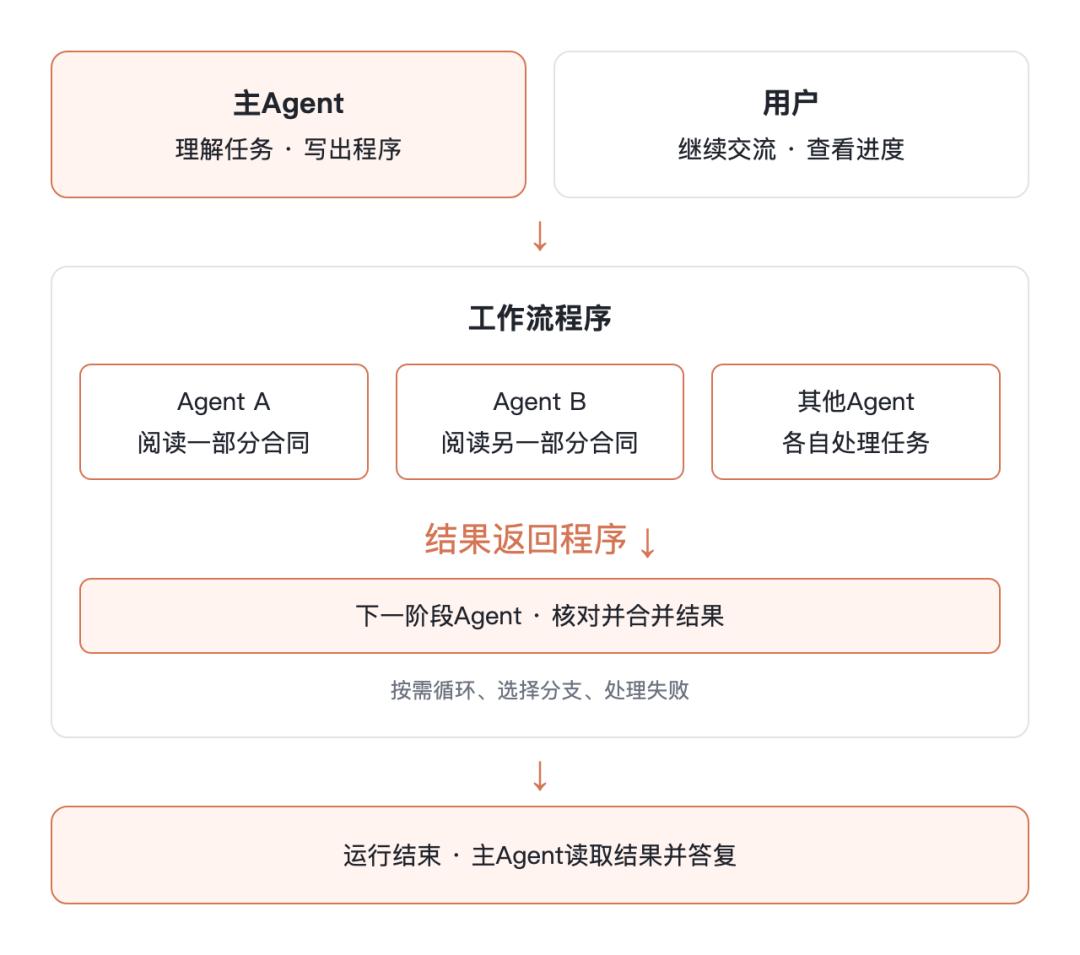
The official sample contract review instructions stipulate that:
In the first round, each contract is assigned to one Agent; in the second round, another Agent rechecks all contracts, including those that did not find the target clause in the first round, and the contracts that fail the recheck will be reworked and then rechecked again.
This gives the clauses missed in the first round one more chance to be found.
Of course, the contract case demonstrates the working method.
Anthropic did not disclose the specific division of labor in that bug test post, so it cannot be assumed that these 66 bugs were also found through the same process.
1000 Agents
Need to be queued properly
A maximum of 1000 Agents at a time is one of the most eye-catching figures in this public beta.

It means that a single workflow can start a maximum of 1000 Agents in total during the entire operation period.
The current document lists the upper limit of simultaneous working threads as 64, and the official also states that this concurrency number may be adjusted.
The workflow can be executed batch by batch, or wait for the previous stage to return results before arranging the next stage.
Each Agent has an independent conversation history, and shares the files and sandbox in the session, that is, the working environment for running code and processing materials.
Developers can configure dedicated Agents in advance, or let the workflow define them temporarily according to task requirements.
When accessing, set the type to multiagent_20261001 in the multiagent configuration, and then configure the model, tools and task requirements.
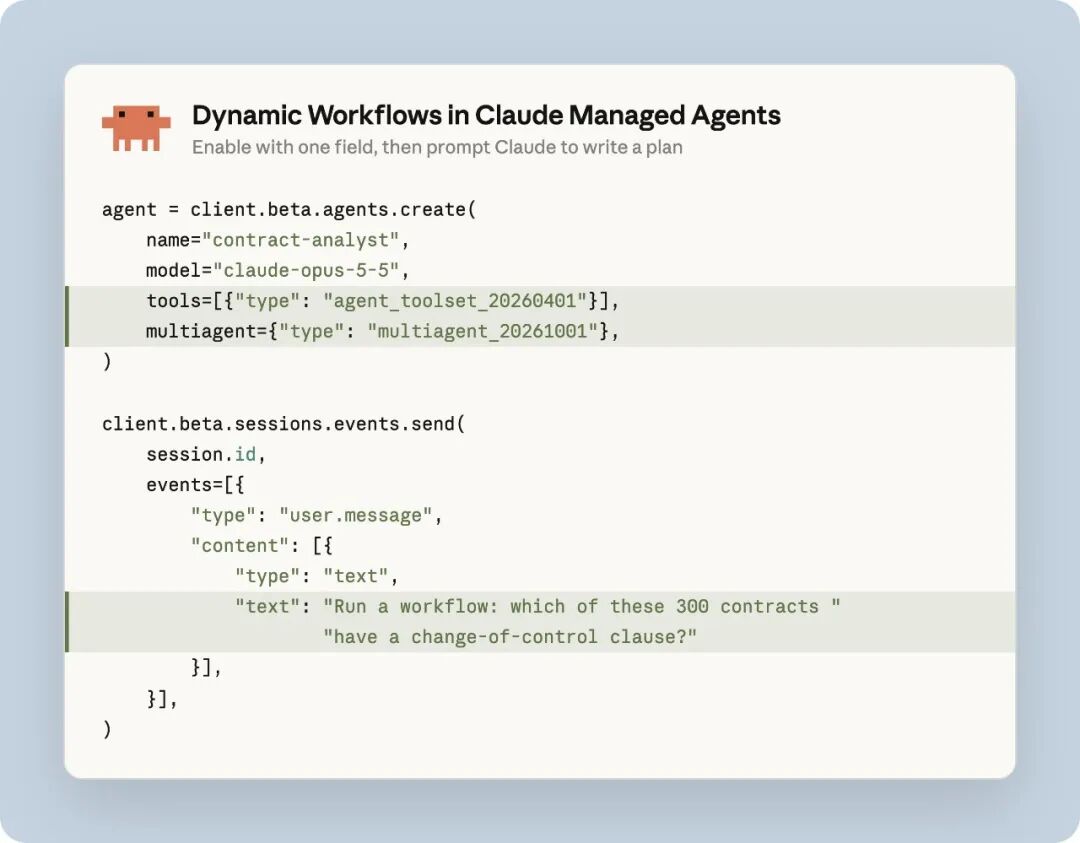
After enabling the dynamic workflow, you can assign tasks to Claude and let it write a division of labor plan. The example in the figure is to screen for change of control clauses in 300 contracts.
However, being able to divide labor is not enough, and it is also necessary to clearly indicate the unfinished parts.
One official sample instruction requires: if an Agent cannot read a contract, mark the contract as "uncovered", and the rest of the tasks will continue.
"No problems found" and "not checked at all" must be distinguished. Otherwise, a neat summary can easily hide the task gaps.
Developers can view the operation stages and records of each thread, and locate problems along the records.
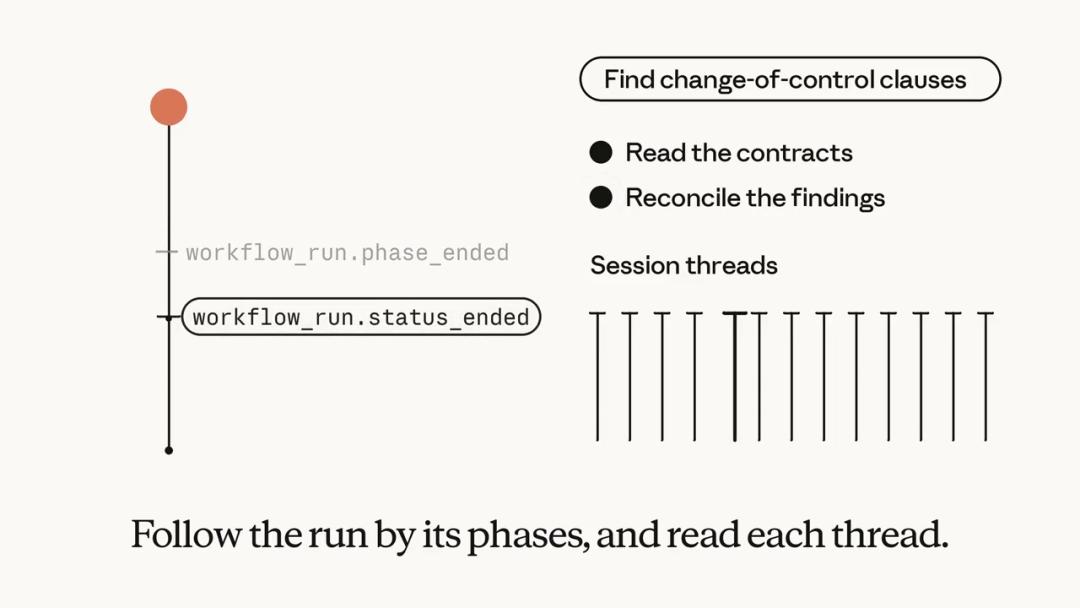
Taking contract review as an example, developers can track stages such as reading and verification, and view the execution records of each task thread.
With more Agents, it is necessary to not only arrange the execution order properly, but also clearly see which tasks are completed and which still have gaps.
It needs to be distinguished: the maximum of 1000 Agents started and 66 bugs detected in all three runs both refer to the Managed Agents dynamic workflow, not Projects.
Save Coordination Time
Billing Continues to Run
Back to the initial test: the single Agent found 14, 15 and 27 bugs in three runs respectively, while the dynamic workflow found 66 bugs in all three runs.
More bugs were detected, but it is not clear how much more time and cost were spent for this.
The official did not disclose the model used, the actual number of Agents, time consumption, token usage and false positive rate, so it is temporarily impossible to judge whether this workflow is faster and more cost-effective.
In actual use, the costs of the two features should also be viewed separately.
Projects uses the quota of the existing plan, and both the working threads and the coordination conversation will consume the quota. The more parallel tasks there are, the faster the quota will be used up.
Users can adjust the model and inference intensity, or let Claude open fewer threads. Usually, the working threads will pause after reaching the plan usage limit, and resume after the quota is reset.
Managed Agents are billed based on the model token usage. In addition, each session is charged an additional $0.08 per hour for operation, which only counts the time when the session is in running state.
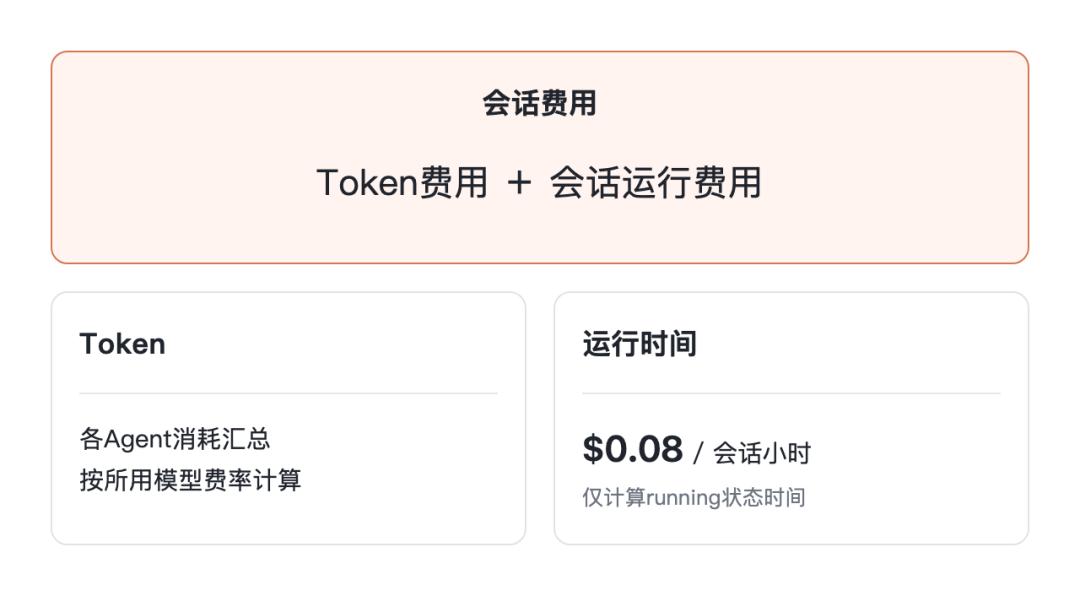
This $0.08 is only the operation fee, and the tokens consumed by multiple Agents reading materials and generating answers will be charged additionally.
Developers can set a session budget, and the model consumption of the workflow is also included in it. The operation will be suspended after the budget is reached, but the issued model requests will still be completed, and the final cost may exceed the budget.
