What exactly is the use of Jev, the product that Silicon Valley is raving about? We have tested it out firsthand for you.
An "oddball" in the AI circle has suddenly gone viral.
On September 15, TypeSafe released Jev. Just a few days later, it has been integrated into developer tools including Vercel, Cloudflare, LangChain and Langfuse. Vercel stated that within 24 hours after Jev was connected to AI Gateway, nearly 13% of its paid teams had put it into use.
While AI-related products seem incredibly powerful and many people are eager to try them out, most still do not know where to start when they actually want to get hands-on. What do they need to download? Do they have to configure the environment first? Can they use it without coding experience?
Therefore, while free trials are still available, we have tested it for everyone: we got hands-on experience with Jev, and will show you how to use Jev easily without complicated operations.
But before we start, it is worth mentioning that after testing, we found the first threshold for using Jev is lower than expected. Just like the previously introduced OpenClaw which was noted for its low configuration requirements and may even run on smart watches in the future.
The first experience with Jev is even more convenient: you do not even need to turn on your computer, you can use it directly on the web page.
On the other hand, the test case we selected this time is closely related to the real needs of most people when surfing the Internet. With the explosive development of AI, the information on social media has become mixed. Which pieces of information are true? Which are nonsense? Which are fabricated by AI?
The "information verification" step that people could not possibly complete for every piece of information before, we now plan to assign it to Jev.
Build a "sharp insight" tool with Jev
There are already many entry points to access Jev now. For this test, we found a third-party website Jev AI Dev, where you can try all its basic functions. Each account has 6 free trial credits per day, which is very suitable for new users to get familiar with the tool first.
The website link is here: https://jevai.dev/zh-Hans/playground/
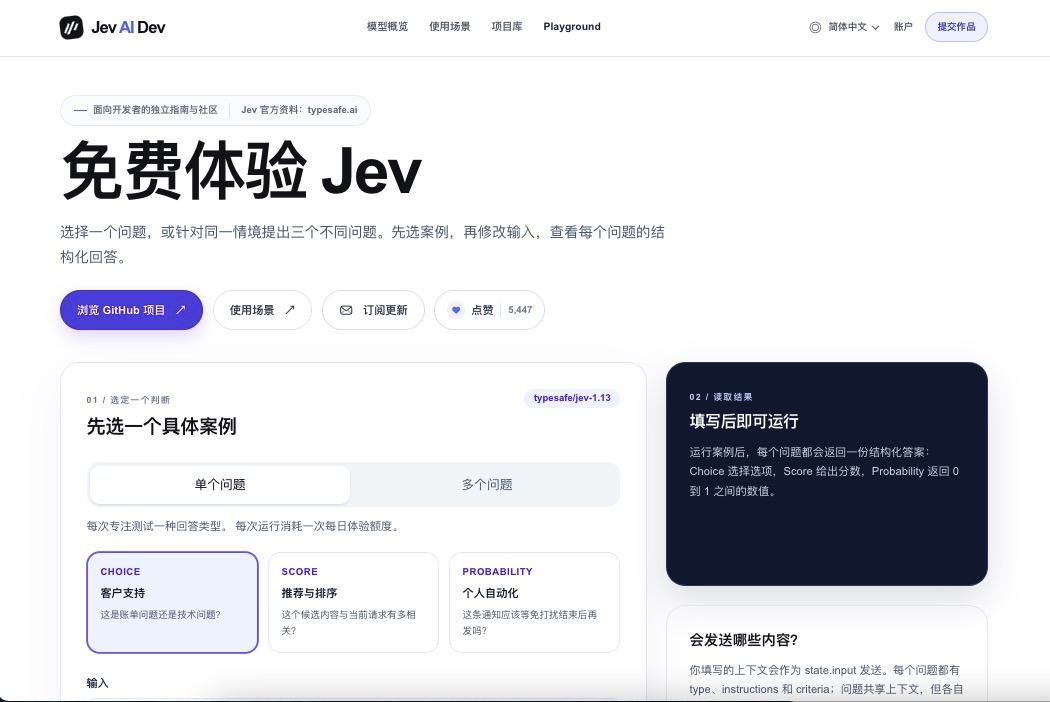
Click the link and you will enter the Chinese demo page. Click the "Login" button in the upper right corner, log in to your account as prompted, then scroll down to find the "Single Question" and "Multiple Questions" options.
These two options can be understood as: with the same material, you can ask one single question at a time, or ask multiple questions at once. For example, if you give Jev a tech news piece, you can only ask it to "classify what type of news this is", or you can also ask "how credible is this information" and "whether the statements in it have been verified".
Since we are building an information verification tool, we select the "Multiple Questions" option this time, so that we can ask multiple questions about one message at the same time.
Scroll down further, you will see that the page fills in a default sample of "AI Assistant Task Handover". You can directly modify this sample and replace the content with your own information.
First find the "Input" box, delete the original sample text, and fill in the following message.
"On September 23, an AI company released a new model, claiming that its coding capability is 30% higher than the previous generation, but currently only promotional materials have been released, and complete test data has not been made public."
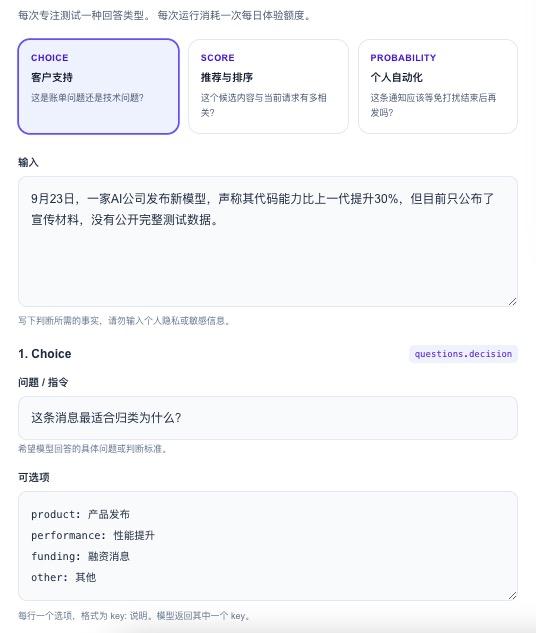
Then you can directly experience the three capabilities of Jev: Choice, Score and Noul. Although the names sound unfamiliar, they are very easy to understand after you start using them:
Choice means Jev selects one answer from several given options. For example, we set several options for it, and ask it to judge how to deal with a piece of content next. After submission, it will tell us which answer it selected, and give the probability of each answer at the same time.
For example, if we want to classify this news, we first need to tell it what categories are available. In the "Question / Instruction" field under Choice, fill in "What is the most appropriate classification for this message?"
At this point, replace the original content in the "Options" box with the following four lines:
- product: Product release
- performance: Performance improvement
- funding: Funding news
- other: Others
If Jev finally returns "product", it means it judges that the classification of this news is "Product release". In this way, we have finished setting up a multiple-choice question for Jev.
It will select one answer from the four options, and give the probability of each answer, so that we can see how much it tends to each option.
Score is the scoring function. Classification can only tell us what type of message it is, but cannot tell us how much we can trust it, so we need an additional scoring system for assistance.
In the "Question / Instruction" field under Score, fill in "How high is the credibility of this message?"
You need to set the "Scoring Levels" below by yourself. Fill in one level per line, arranged in ascending order:
- Very low
- Relatively low
- Medium
- Relatively high
- Very high
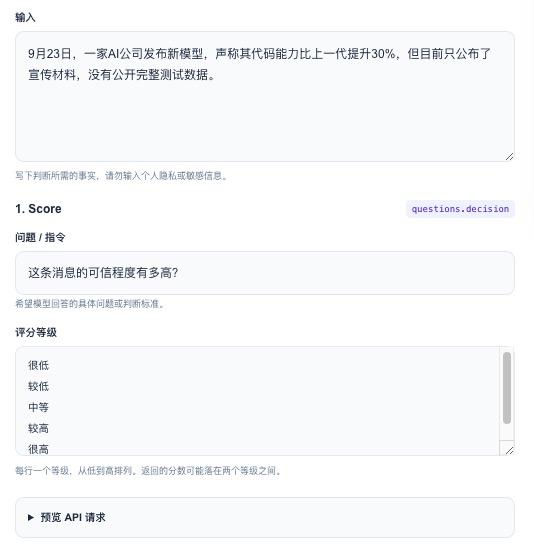
At this point, we have essentially given Jev a scoring ruler to judge how high the credibility of the input material is.
The last function is Noul, which can be simply understood as answering "Yes or No". This section on the web page is named "Probability (Noul)".
Sometimes, we may want to know more specific information beyond "how high the credibility is". Take the question we originally wanted to ask as an example, we may wonder: the company claims that the coding capability is improved by 30%, did they provide any evidence for that?
Then fill in "Has this company proved that the coding capability of its new model is 30% higher than the previous generation?" in the "Question / Instruction" field of this section, then modify the "Definition of 'No' and 'Yes'" below to the following two lines:
- false: Not proved
- true: Already proved
So far, all three questions have been set up. Let's review: Through this round of setup, we ask Jev to classify the same message, give it a credibility score, and judge whether the performance improvement statement in it has been verified; then click the "Experience Jev" button below to submit all three questions.
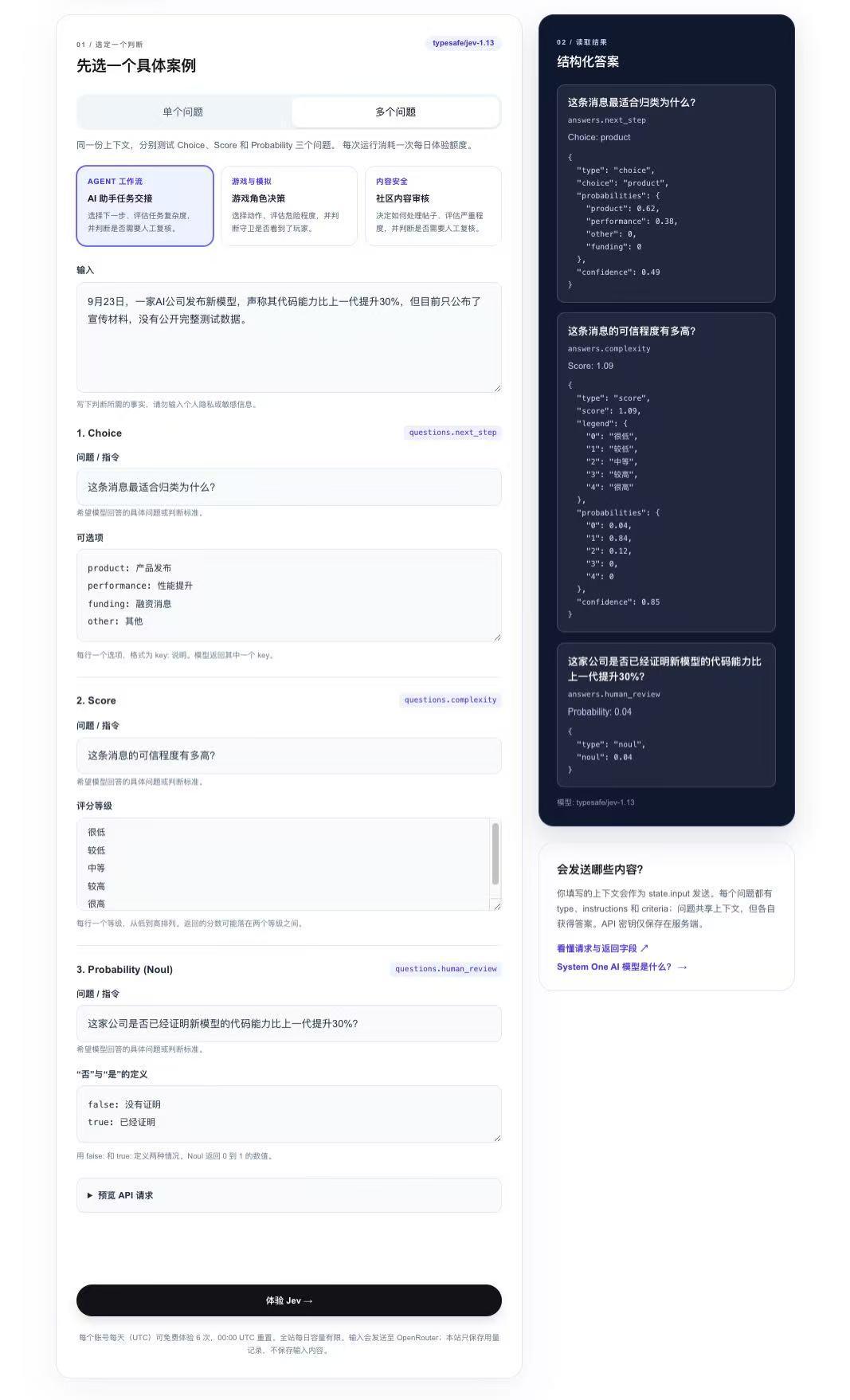
Since this test runs on the web end, you can view the results returned by Jev on both computers and mobile phones.
Finally, you can see that Choice selected "product", which means "Product release", with a corresponding probability of 0.62. The probability of "Performance improvement" is 0.38, so Jev judges this to be a product release event.
The Score function gives a score of 1.09. Comparing with the five levels we set earlier, this result is close to "Relatively low credibility".
The Noul result is 0.04, which means based on the material we provided, it tends to think that the statement has not been proved.
After this whole process, Jev has given its initial judgment: we get the classification of the message, its credibility score, and the judgment for the specific statement. But its judgment is only based on the text we entered, it does not automatically search the Internet for the complete test report for us.
Therefore, we continued to test further. To build a tool that can automatically verify the authenticity of information, we need to call Jev directly via Python, and build an automatic review process for tech news with it.
Build a fully automatic review tool from scratch
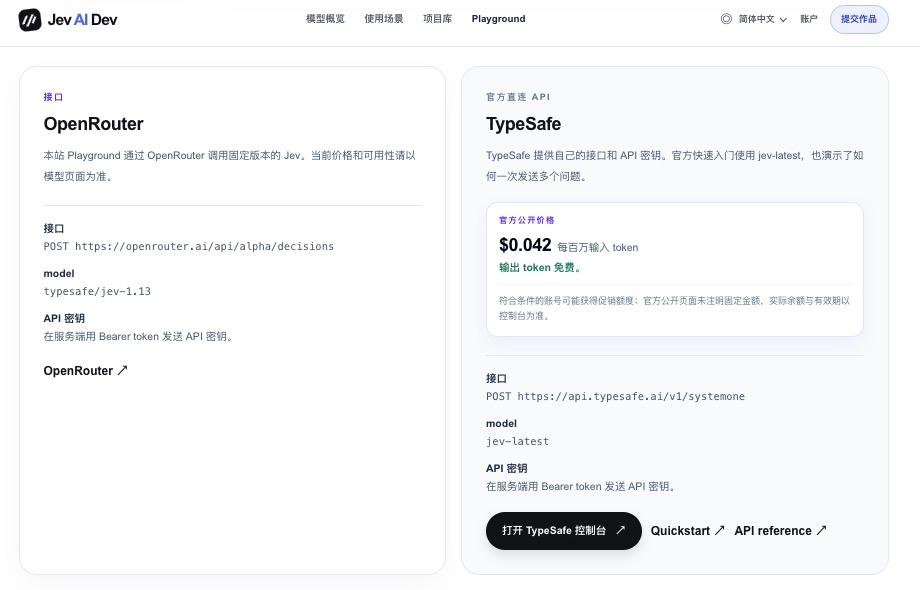
We found the AI model aggregation platform OpenRouter at the bottom of Jev's Playground homepage. After registering, logging in to the account and creating an API Key, you can call Jev in Python.
You only need to create a regular OpenRouter API Key here, no additional dedicated Jev API Key is required.
In addition, the 6 free trial credits per day on the third-party website earlier cannot be carried over to OpenRouter, so you need to confirm that there are available credits in your account before running the program.
Next, we need to fill in the news to be judged, the questions we want to ask, and the optional answers in the program. This is exactly the same as filling in the forms on the web page earlier, except that the work of submitting and receiving results is now completed by Python.
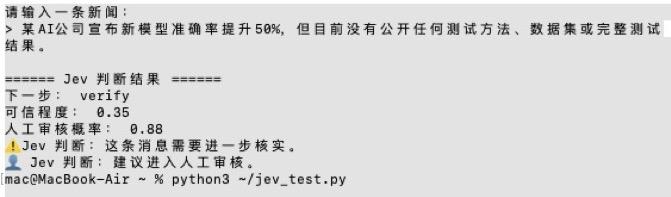
For the first test, we give Jev the following news piece:
"An AI company announced that the accuracy of its new model has increased by 50%, but no test methods, datasets or complete test results have been made public so far."
We tell Jev in advance that there are only three options available next: publish (release), verify (check), reject (block). At the same time, we ask it to judge the credibility of this message and whether manual review is required.
We still use the three capabilities mentioned earlier: Choice is responsible for selecting the next processing step, Score is responsible for giving the credibility score, and Noul is responsible for judging whether manual review is needed. The values of the latter two need to be used in combination with the scoring standards and review conditions set in the program.
The results are: Next step: verify; Credibility: 0.35; Manual review probability: 0.88.
That means Jev thinks this message cannot be released directly for now, it should be verified first, and it very likely needs to be checked manually. After getting this result, the Python program can automatically put it into the "to be verified" queue, and mark it as "needs manual review".
The whole process can be simply summarized as:
News input → Jev judgment → Program reads results → Automatically execute next step
However, we also want to test a more practical gameplay that is closer to real usage scenarios.
When we use AI to check information in daily life, we often encounter a problem: AI can give a seemingly reasonable answer, but we still need to judge by ourselves how much the answer is based on, and whether it can be used directly.
Therefore, this time we let a regular AI answer the question first, and then send its answer to Jev for inspection. We want to see if the program can filter the answers first, and keep the answers that need to be verified.
So we first input a question to the AI:
"Is the coding capability of OpenAI's latest model 30% higher than the previous generation?"
At this point, we can get both the answer from the regular AI and the result from Jev:
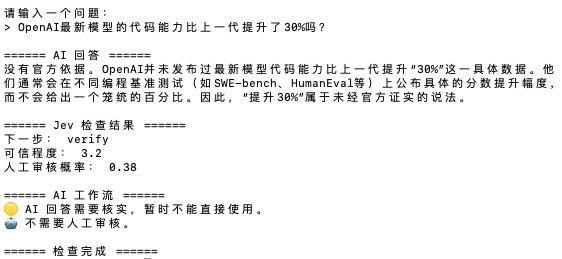
As we can see, based on the answer from the regular AI, Jev's judgment is: next step is "verify", credibility is 3.2, and manual review probability is 0.38.
According to the three options we set earlier, "publish" means the answer can be adopted, "verify" means the answer needs to be checked, and "reject" means the answer should be rejected. That means there are still some problems with the AI's answer.
Of course, Jev returning "verify" does not mean it confirms that the AI's answer is wrong.
And the manual review probability of 0.38 does not meet the manual review condition we set, so the program does not send it to human reviewers, but lets it enter the automatic verification process directly.
In this way, the simplest basic process of the "AI + Jev" combination is formed: User asks question → AI gives answer → Jev inspects → Program executes next step
At this point, we can apply this process to a more specific scenario:
We still let Jev judge how to process an AI news piece, but this time we explicitly divide the results into three categories: publish: release directly; verify: verify first; reject: block directly.
Then we write a very simple rule in Python: whatever Jev returns, the program executes the corresponding action.
The first test content: A company has released complete test data and technical reports, proving that the new model has clear performance improvement. Jev's judgment is "publish", release directly;
The second test content: A company announces that the performance of its new model has increased by 30%, but key test data has not been made public. This time, Jev returns "verify", to be verified;
Finally, we deliberately set a more extreme condition: A company claims that the performance of its new model has increased by 1000%, but there is no test data or reliable source at all. Jev