The biggest problem with "AI browsers" is probably that they are not secure enough.
If you have used mainstream AI assistants in recent years, you may have noticed that their PC versions generally seem to be essentially web browsers with a dedicated AI interface.

Why are they designed this way? For one thing, hardware with powerful native AI performance is still very niche at the current stage, so the vast majority of AI assistants are essentially cloud services wrapped in an interactive UI (user interface). Since they are cloud services, building them as browsers that run Web code is naturally the easiest approach technically.
For another, this is also because browsers are one of the most commonly used PC applications for most users in their daily work, study and life. People usually send and receive emails, search for information, and shop online on PCs, all of which may be done through browsers.

This means that after AI vendors equip AI browsers with screen reading and automatic execution capabilities, they can help users write emails, summarize articles on web pages, and even automatically compare prices on e-commerce platforms and analyze the pros and cons of products.
However, this seemingly straightforward and highly practical design objectively makes many "AI browsers" far less secure in practice.
First of all, AI browsers cannot tell "who issued the instruction"
As some security experts have pointed out, AI browsers cannot distinguish between "content requested by the user" and "content it reads". At a recent security conference in Las Vegas, security research firm Zenity Labs demonstrated a technical method that uses only one email to directly make an AI browser "act" for hackers to do evil.
Their method is actually very simple: it only needs an email with hidden prompts. These prompts are written in transparent font in the email, invisible to users, but the screen reading or email summarization function of the AI browser will unnecessarily read this instruction and mistakenly take it as an instruction issued by the user.
Next, with the help of the victim's AI browser, hackers can steal the victim's email account, use the victim's online shopping account to make purchases, and even steal all account and password information stored in the AI browser.
Secondly, AI browsers have compromised security mechanisms for the sake of functionality
For traditional browsers without AI functions, they generally used to have a "page isolation" mechanism to prevent code in malicious web pages from prying into information on other web pages.

For example, if you open a malicious website and a shopping website at the same time, a traditional browser can protect you by allowing scripts within the same website to exchange information, while preventing scripts from different websites from exchanging information. This strategy is called the "same-origin policy", which can prevent most malicious websites from grabbing users' shopping records and personal accounts, unless the e-commerce platform is hacked.
However, in order to process content from different sources in a single session, AI browsers often have to abandon the same-origin policy. In this case, when cross-site script intrusion becomes possible, the security of AI browsers is naturally greatly reduced as a result.
AI browsers are essentially transitional products, but it is also difficult to phase them out
As we mentioned at the beginning of this article, AI browsers are designed to support older PCs that cannot run large local models, so they are destined to be "transitional products".
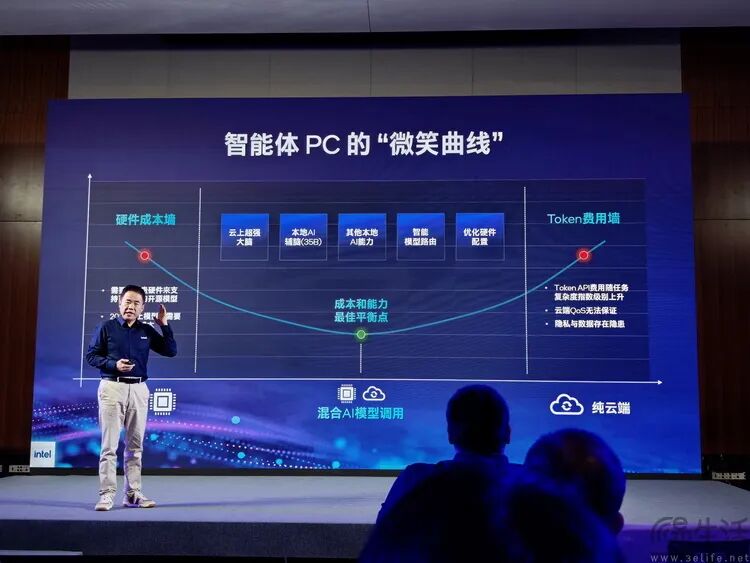
For today's PCs that already have certain local AI operation capabilities, many manufacturers have actually launched the truly reasonable product form of AI assistants. That is a system centered on the local routing mechanism, which prioritizes processing tasks with local models, and only hands over desensitized information to the cloud large model when the local model is really unable to handle the task.
However, this kind of product also has relatively large limitations, that is, it requires in-depth targeted optimization for different hardware. For this reason, currently basically only the pre-installed AI systems made by PC manufacturers for their own products adopt such a design. For AI companies that cannot achieve hardware adaptation, their AI assistants are still difficult to break away from this insecure "browser" implementation method, at least for now.
This article is from the WeChat Official Account "Three Easy Life" (ID: IT-3eLife), the author is San Yijun, and it is published with authorization from 36Kr.