In the fast-consumption era, do you still read books?
Since 2017, I have developed the habit of reading, and by the end of this year, I will have completed exactly a ten-year reading journey. Over the past decade, I have read more than 600 books in total. During the reading process, I have used a large number of applications and services to assist my reading, track book lists, organize notes and more.
In 2019, I published an article introducing my experience at that time. Now, these applications and services have undergone many new changes. Today I revisit this topic, sorting out and updating my full list of reading tools in this article. Although the content introduced here is related to book reading, some of the creative thinking and methodologies applied are also suitable for many other scenarios, hoping to bring new inspiration and help to readers.
▍Tools Used Before Reading
Douban Books: Chinese Online Book Database
Douban Books is an online service that I have been using all the time. It has a very comprehensive and systematic book database that is updated rapidly. There is a similar online service called Goodreads, but Douban Books outperforms it with better support for Chinese books, faster updates and more complete information for Chinese titles, which is also more in line with the habits of Chinese users. Therefore, all kinds of third-party book management tools in China will choose Douban as their book retrieval database.
For me personally, I use Douban Books mainly to look up books, record reading reviews, and add popular books to my lists. The first use case is to check the introduction of books. The books I want to read come from a wide range of sources: sometimes recommendations from Xiaohongshu, shares from Weibo bloggers, new book updates from Douban Books, monthly popular book rankings, all of which are potential sources of book lists. When I am interested in an unread book, I will search for it on Douban, check its introduction, learn about the author, publisher, and even the design of the book cover, before deciding whether to add it to my "Want to Read" list.
The second use case is to record reviews on Douban after finishing a book. The "I've Read" page on Douban Books records all the books I have read and want to read in my life. Behind these data are the ratings and comments I give to each book as I finish it. Douban's annual reading summary is also a content I really enjoy. In each year's annual summary, Douban's books, movies and music archive is a good companion to review the reading journey of the whole year; the annual book ranking is an authoritative list of popular books, and also a source list for the "Want to Read" collection.

Things: Track Book Lists and Completion Status
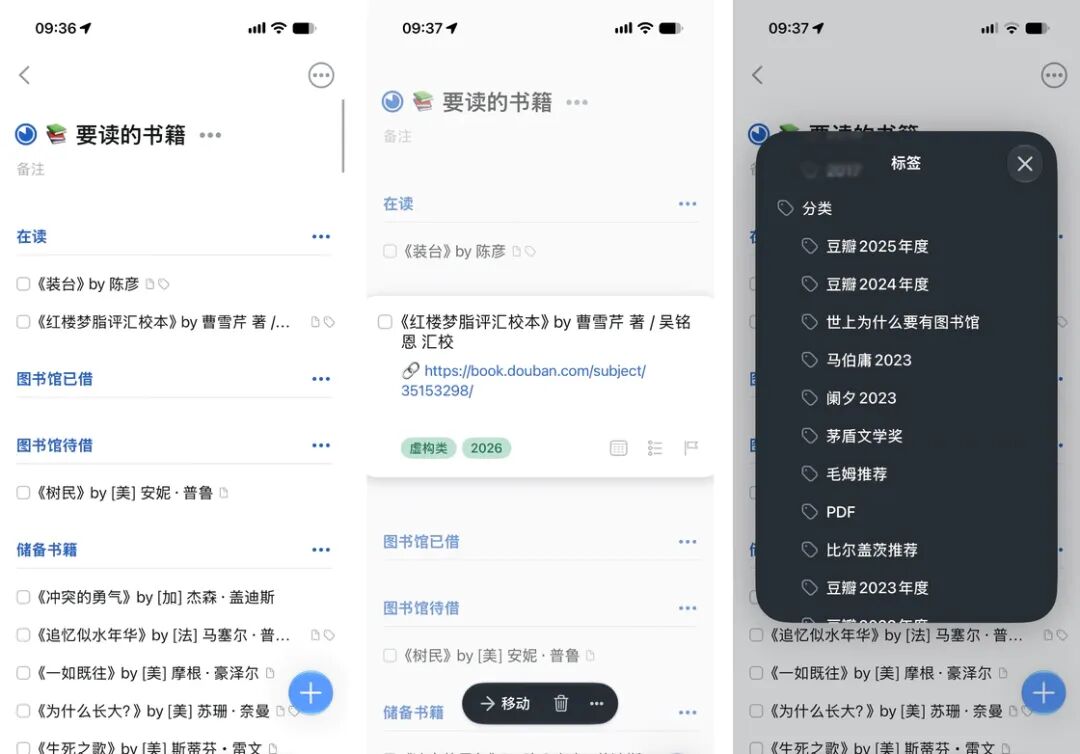
As the number of books I want to read and have read keeps growing, I need to simply record what books to read next, and use tags or file management systems to mark their sources, reading years, fiction / non-fiction categories and other information. The GTD application Things is the tool I have been using all the time. I created a project named "Books to Read" in Things, where I set up various titles to manage my book list according to different needs.
"Reading Now" and "Want to Read" are self-explanatory and easy to understand. "Borrowed from Library / To Borrow" is created to remind me to borrow / return books on time. For a period of time, I was fond of reading physical books, so I often went to the library near my home to borrow books. The task reminder function of Things made it very convenient to manage these schedules. But later I found that going back and forth to the library took too much energy, so my enthusiasm for physical books faded, and I returned to the world of e-books.
The tag function of Things allows me to add various types of customized information to book entries. The tags I use include:
Year: mainly to record the year when I finish reading the book, not the year of publication;
Book source: record where I learned about this book, such as from Douban's annual ranking, the recommendation by Ma Boyong, the recommended bibliography in other books, etc.;
Genre: mark whether the book is fiction or non-fiction. I have no intention of classifying books into detailed categories such as social sciences, economics and management, literature, detective stories and so on, and the classification by fiction / non-fiction is sufficient for me.
The to-do function, completion record, tags and grouping features of Things provide practical assistance for my daily management and tracking of reading completion status.
Shortcuts: Sync Douban Book List to Things
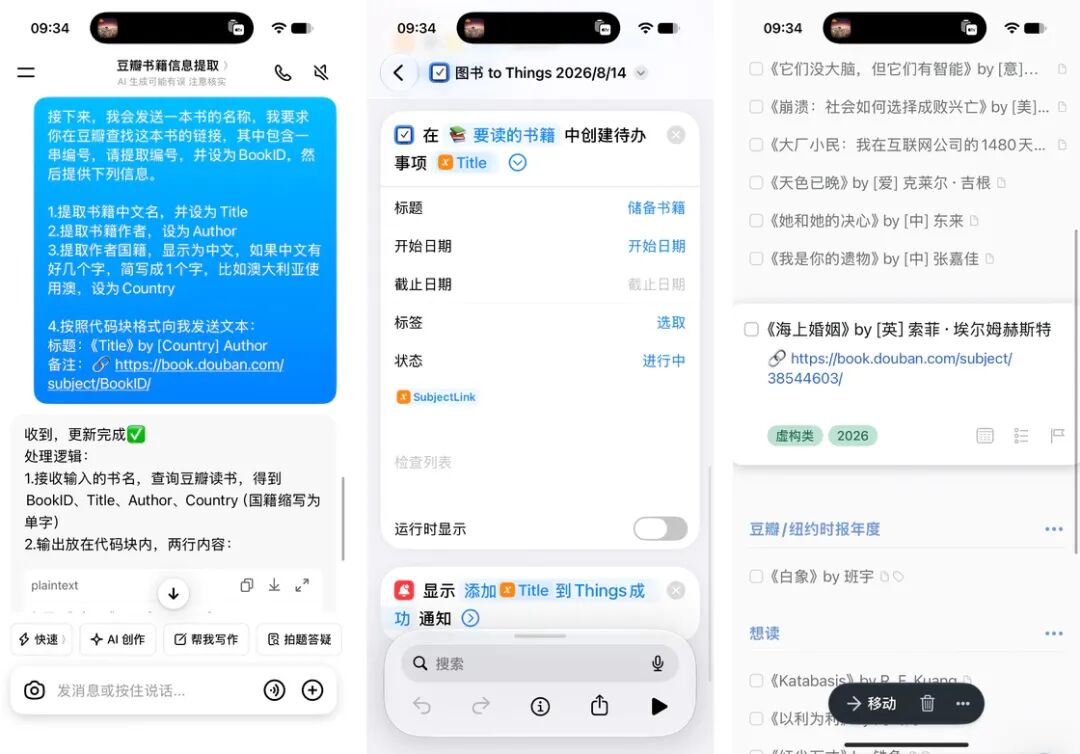
To manage the book list with Things, I naturally need to add the book entries to Things first. So, should I type every book manually, or copy and paste them from the web page to Things? Is there a faster and more automated way? For so many years, I have used Apple Shortcuts to complete this automated task.
In the early days, Douban opened its public API, and I could directly use Shortcuts to grab all kinds of book information such as title, author, and publisher through the API. Unfortunately, the API was no longer available later. I changed to use Shortcuts to extract information from HTML web content, but that method also failed for no apparent reason later. Now the method I use combines AI and Shortcuts.
When I get the name of a book I want to read, I first ask Doubao to search for the book on Douban and return the book information in the format I require, and then use Apple Shortcuts to add this book to Things. In this workflow, the reason for using Doubao is that AI is extremely good at information retrieval and text processing. Compared with ChatGPT, Doubao has stronger capabilities on the Chinese Internet and fewer hallucinations. I use Apple Shortcuts because Doubao cannot write data directly to Things yet, so Shortcuts can act as the bridge between them.
Calibre: Build Book Library and Perfect Book Covers
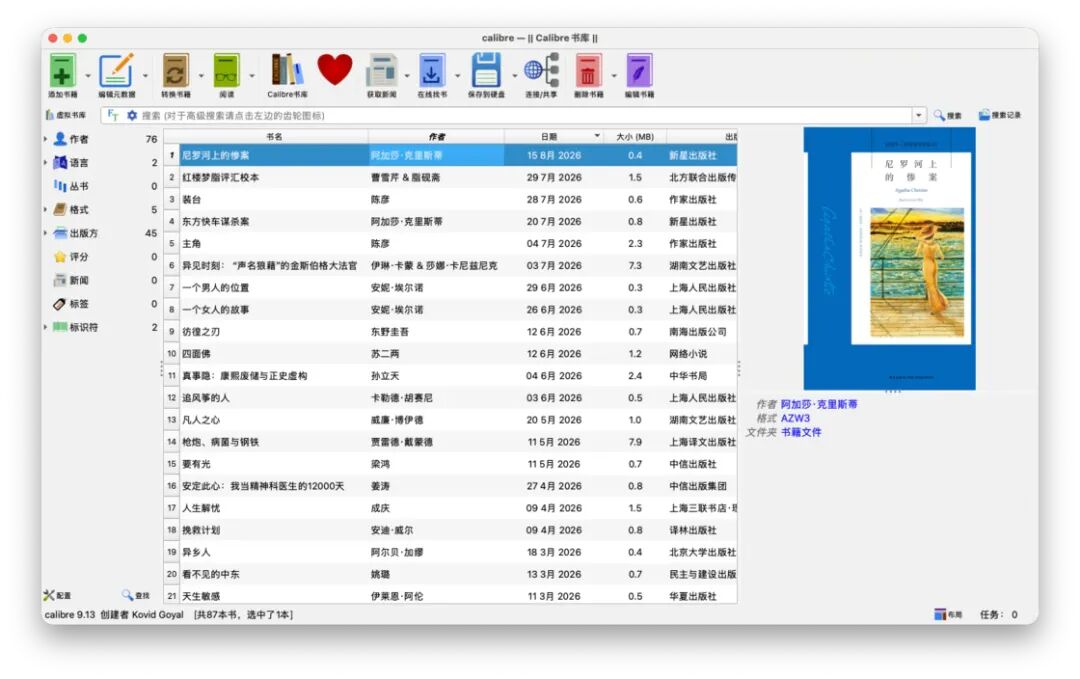
When reading with Kindle, Calibre is an indispensable and helpful tool. It is a powerful local e-book management tool that you can use as your private e-book library. With it, you can convert book formats, create e-books, import files to Kindle, and perfect the covers of Kindle books, etc. We have also introduced it in previous articles.
Related Reading:
Use Word typesetting skills cleverly to make Kindle e-books that fit your own reading habits
The most powerful local e-book management tool: Calibre usage guide
▍Tools Used During Reading
iHour: Track Reading Duration
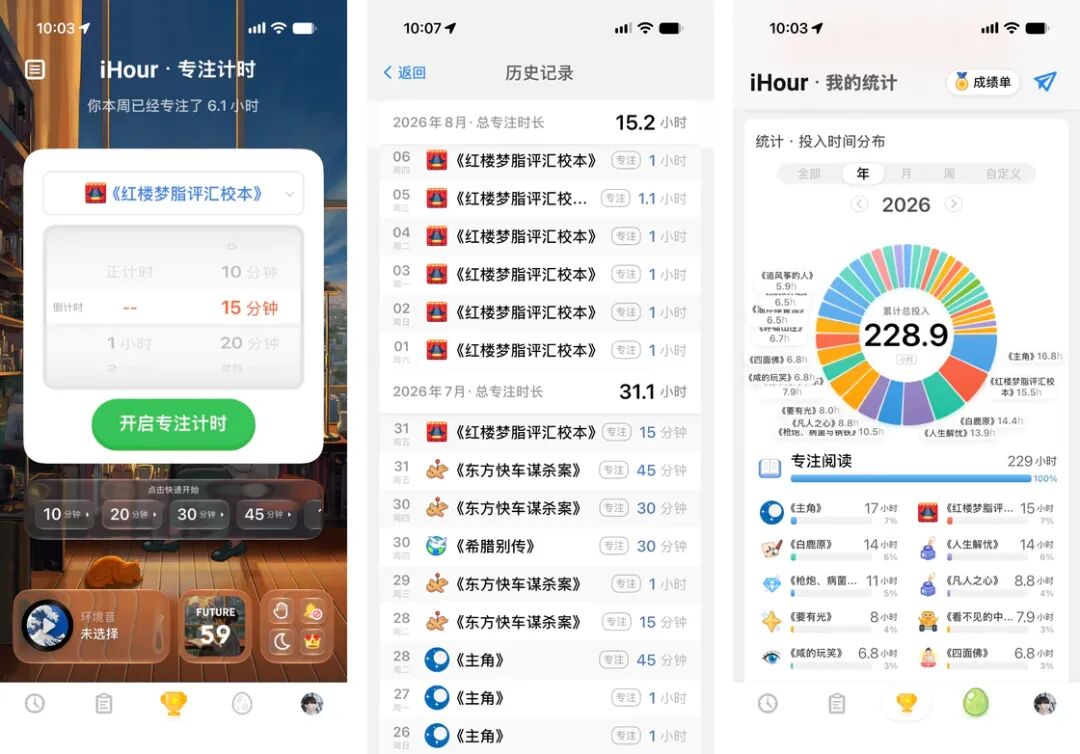
For so many years, completing 1 hour of reading every day has been my daily check-in task. However, work is busy, and there are so many interesting things in life, time is so precious, it is really not easy to have a continuous and complete 1 hour of immersive reading time in a day, so I can only use fragmented time to finish my reading.
Generally speaking, on workdays, my daily reading target is split into four 15-minute sessions: 15 minutes of reading before going to bed the previous night, 15 minutes of reading on the subway during my commute to work, 15 minutes of reading after arriving at the office early as I am used to, and 15 minutes of reading squeezed out whenever I have spare time during the day. Only on non-working days can I get a full continuous 1 hour of reading time. Therefore, I use a timer tool every day to help me complete these small reading goals.
Over the years, I have been using iHour. It is a minimalist application for task focus and timed check-in, which supports creating projects and sub-projects, supports statistics by day / week / month / year and other dimensions, supports countdown / count-up, and has advanced functions such as ambient sound, always-on display, do not disturb and more. It is a great helper for reading. It also supports iPhone, iPad, Mac and Apple Watch. When I am on the subway, I often use the Apple Watch version, so I do not need to take out my phone to start timing.
However, this application also has obvious shortcomings in the reading scenario. Especially when there are hundreds of sub-projects corresponding to hundreds of books, problems such as messy sorting, no search function, and only manual task adding have caused me a lot of trouble. So this year I am trying other reading tools that support timing functions.
Bookology: Track Reading Progress and Timing
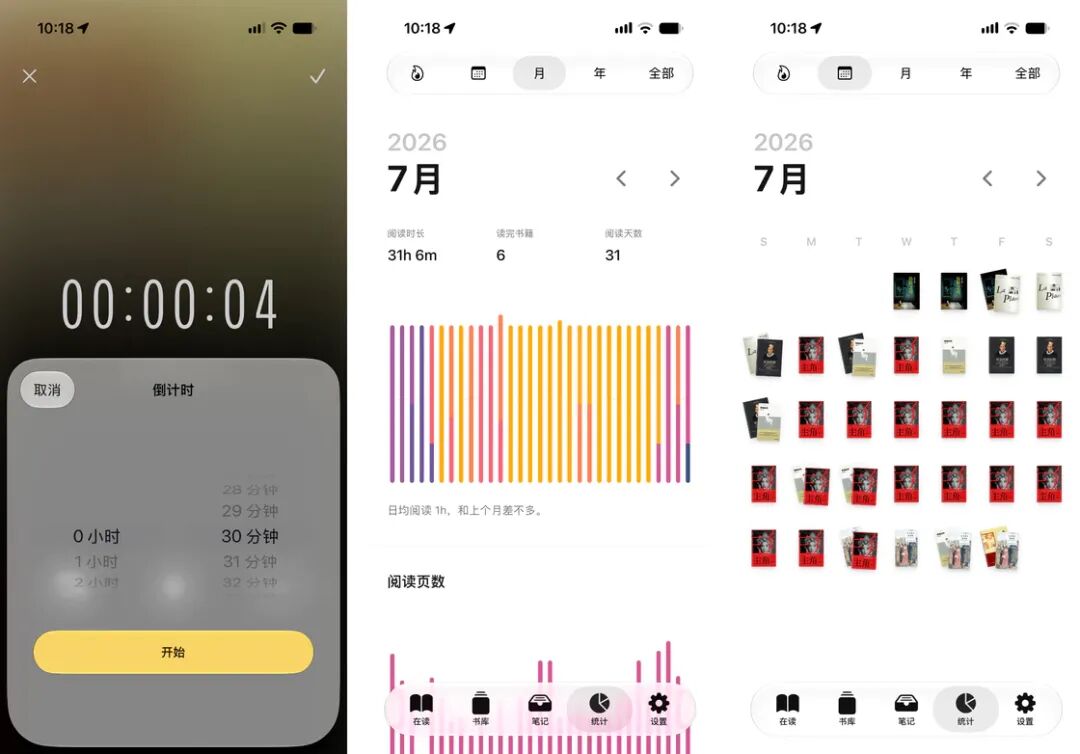
Bookology, a reading tool I discovered this year, is what I hope can replace iHour, although up to now, I have not yet fully made up my mind to abandon iHour.
Bookology supports adding books via online search, and can automatically add basic metadata such as cover, book title, author, ISBN, subtitle, publisher, publication year, number of printed pages, translator, etc. It has a built-in reading timer, and can also record reading pages and percentage to help me track my reading progress. It also supports multiple reading rounds, which makes it convenient for me to read books like Harry Potter and Dream of the Red Chamber for the second time.
Its reading statistics function is even more satisfactory to me, which can perform statistics by time dimensions such as streak / month / year / all time. The books I have read will show my monthly reading results with text and images including covers, book titles and reading duration. It uses a wealth of chart styles such as scatter plots and pie charts to present information like authors and publishers I read the most, publication years, book formats, ratings and more.
Related Reading: Bookology: From Book Collection to Notes, Build Your Private Reading Archive
MindNode: Record Character Relationships
When I read on Kindle, I seldom take reading notes. But when encountering complex fictional works, it is a common practice to record character relationships through mind maps to help me get familiar with the characters and plots.
It all started when I read One Hundred Years of Solitude in 2020. This magical realist work tells the story of 11 generations of the Buendía family in Macondo. The characters' names are repeated in cycles, jumping back and forth between Aureliano and José, making it hard to figure out who is who. The character relationships are complex and changeable, with twins swapping identities, uncle-niece love, illegitimate children and other messy plots, making it impossible to sort out the kinship. What's more troublesome is that foreign transliterated names have no recognition for Chinese readers, and the names of hundreds of characters are long and unfamiliar.
In this regard, Dream of the Red Chamber can be comparable to it, but fortunately there are a large number of character relationship diagrams of Dream of the Red Chamber on the Internet. So when reading, I made the character relationship diagram by myself while reading the book.
The mind mapping tool I use is MindNode. When using it, I use "nodes" to fill in the names of characters, with red and blue representing genders. Under the nodes, "sub-items" are used to record the characters' appearance features, personality traits, major life events, key information and more. The kinship between the "node" characters is recorded through "connections", and the information related to other characters in the "sub-items" is also indexed to each other through "connections".
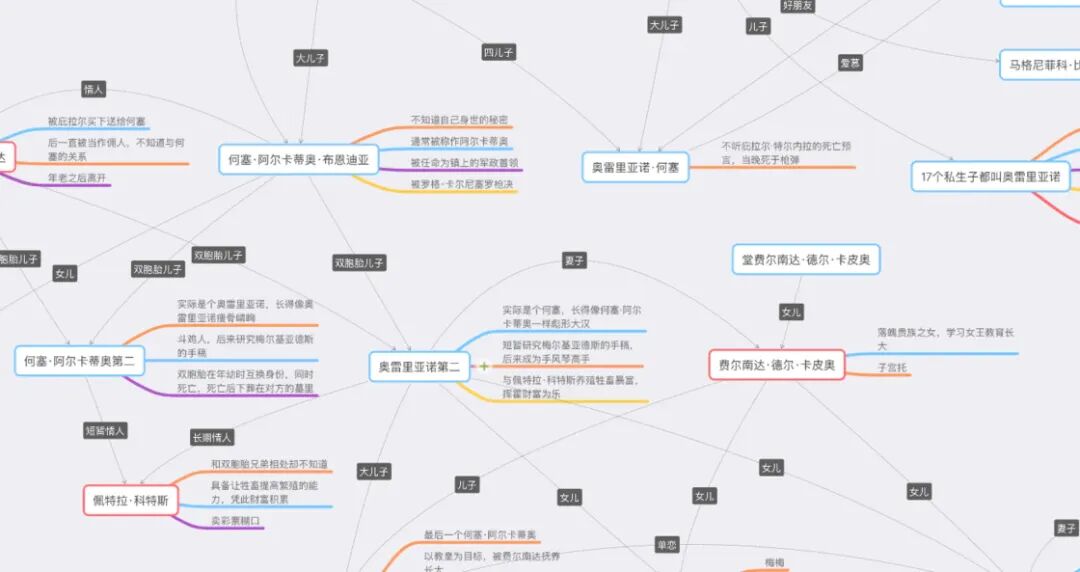
The TV series One Hundred Years of Solitude produced by Netflix launched its first season and second season in 2024 and this year respectively. The series is faithfully adapted from the plot of the original work and is truly an excellent production. Recently when I was watching the series, I found that I could hardly remember the plot of the novel, but as long as I open the character relationship diagram and watch against it, I can immediately recall the events of the characters, and I will no longer be confused by the faces of the characters when watching the show.
In addition to One Hundred Years of Solitude, I also used MindNode to record character relationships and finished reading these books:
The Brothers Karamazov: Russian names are even longer and more unfamiliar
Fried Green Tomatoes at the Whistle Stop Cafe: The plot is more complex, with cross-narratives across multiple locations, eras and characters
2666: The main plot is simple but there are extremely many and boring side plots, and the character names are particularly awkward to pronounce
Satan's Tango: The plot is not complicated, but it is narrated back and forth repeatedly
In Search of Lost Time: Sorry, I really can't get through it
▍Tools Used After Finishing Reading
Bookology: Export Reading Highlights
I read books on Kindle, so I mainly record my reading highlights on Kindle. I can export and organize the highlights during or after reading. In the early days, I used Knotes to complete this task, but in the past two years, this application has not been updated, and problems have occurred one after another with its existing functions. Bookology also supports exporting highlights from Kindle, which is one of the reasons why I like it.
Enter the note page of the book in Bookology, select import from Kindle, then connect Kindle to iPhone, the application can read the My Clippings text document, match the notes to the corresponding book according to the book title, and add them to the application. However, Bookology adopts a closed strategy for exporting notes: the exported notes are in application-specific format, and do not support formats such as Markdown and PDF. The trick is that you can open the exported note file by manually adding the .txt suffix to it.
Related Reading:
The newly upgraded Knotes 2.0 helps you put WeChat Read and Kindle notes together
Bookology: From Book Collection to Notes, Build Your Private Reading Archive
