Claude comes with a native built-in browser, can automatically fill out forms and pull data, and your AI worker now has its own dedicated workstation.
On August 26, Claude launched its own browser.
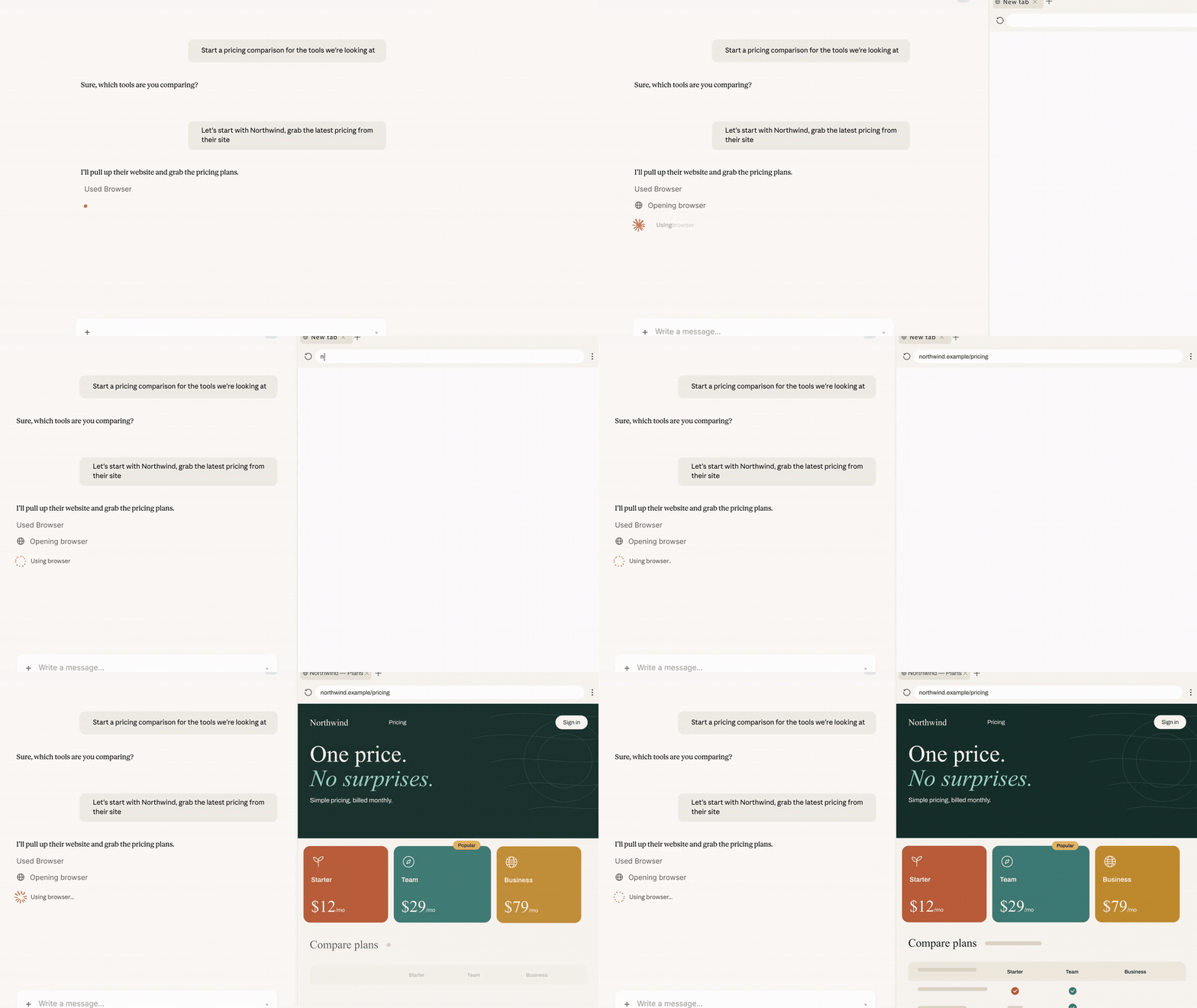
When you give a command in Cowork like "Pull this month's invoices from the supplier portal", Claude will determine that this task requires internet access, and a browser window will automatically open in the sidebar.
It browses web pages, clicks links, types in input boxes, and fills out each field of the form one by one. You can watch the whole process without switching windows at all.
The browser you use every day will not be touched by Claude at all.
Your open tabs, bookmarks and login status all remain where they are, and you can keep working on your original tasks in the original window.
The official statement says: This is Claude's browser, not yours.
On the same day, Claude in Chrome also exited the pilot phase and was officially opened to all paid plans.
Just 17 days before that, OpenAI had just shut down its own AI browser Atlas.
From launch to shutdown, that product only existed for 292 days.
OpenAI spent 292 days trying to integrate AI into the browser, and finally gave up.
Anthropic, on the other hand, integrated the browser into AI.
In the Sidebar
What Exactly Is It Doing
Once the task assigned to Claude involves a website, the sidebar will automatically open a browser.
Claude opens the site, reads the page, clicks, inputs, and fills out forms inside it, and you can see the whole process without switching back and forth between windows.
Links attached in the task records are also opened in the same sidebar, and you will not be redirected to other windows.
It takes over all the most annoying, mindless tasks in your daily work:
Collecting research materials for a report, pulling this month's invoices from the supplier portal, accessing a portal that has no dedicated connector at all.
Copying numbers one by one from more than a dozen pages, filling out the same form three times repeatedly, these tasks can now be entirely handed over to Claude.
In the Past
It Had to Borrow Your Browser First
Before this update, there was only one way for Cowork to access web pages: install the Claude in Chrome extension, and use your own browser to complete tasks.
This method has always worked for tasks that operate on the web page in front of you.
The trouble comes from other types of tasks: old systems with no connectors or APIs, which cannot be accessed through any means other than a browser.
For example: internal dashboards built ten years ago, supplier reimbursement portals, approval pages in administrative systems that require seven manual clicks...
The real daily operation of most companies runs on these old interfaces that no one wants to mention and no one dares to modify.
No matter how smart the agent is, it can only stop and ask for human help when it encounters these scenarios.
Anthropic broke through this bottleneck: many web tasks do not need your browser, what they need is a browser that can be used by AI.
Two Browsers
Handle Different Tasks Separately
The official release of Claude in Chrome this time not only expands its availability scope.
It also obtains the permission to perform actions autonomously, with each action verified by a security classifier before execution.
When it was launched in the pilot phase last year, Anthropic stated that the reason was to reinforce the defense against prompt injection in a small scope first. After a whole year of testing, it dared to open this access to all paid users.
This automatic approval mechanism is the same as the auto mode in Claude Code: the classifier compares the action Claude is going to perform with your original request, and blocks the action if they do not match.
Users who have concerns can turn off this function in the settings and switch back to manual approval for each action.
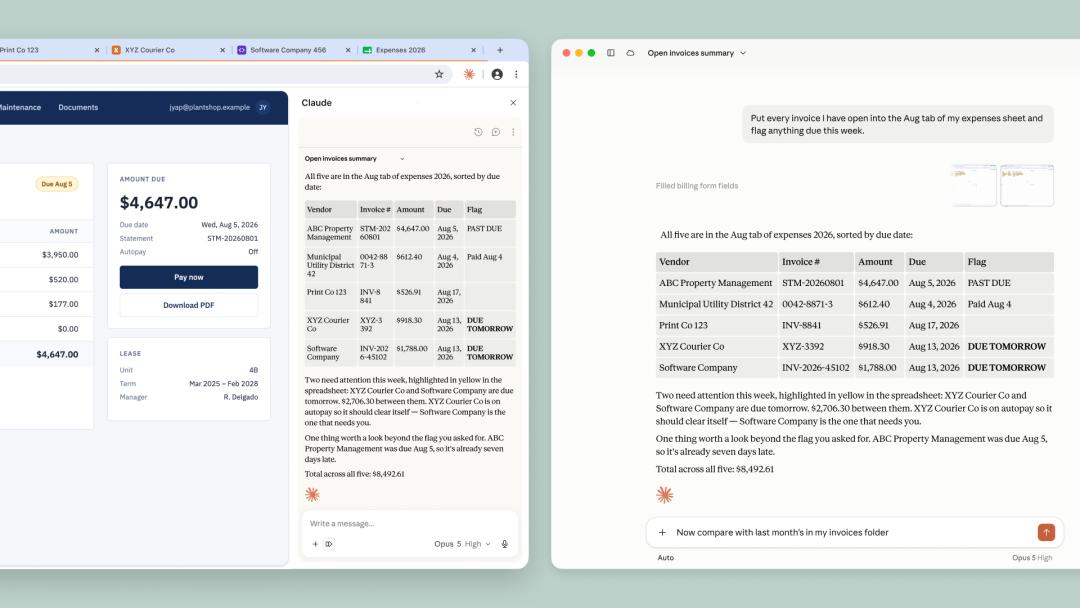
Claude in Chrome exited the pilot phase and was opened to all paid plans on the same day. Actions can be performed autonomously, with each action verified by the security classifier.
The two browser routes have the following division of labor:
The built-in browser is responsible for the tasks you fully hand over: research, invoice collection, form filling. You don't need to monitor the process and can continue working on other things;
Claude in Chrome is responsible for the web pages you are currently using: the logged-in CRM, the mailbox full of unread emails, the online document you are editing. It can use whatever you are logged into.
Users who have already installed the extension will still use Chrome by default; users who have not installed the extension will use the built-in browser by default.
You can change the preferred browser at any time in the Cowork section of the settings.
It Is Not Completely Isolated
By default, Claude cannot see your tabs, bookmarks and passwords. The built-in browser is a completely separate system from your own browser.
But it also reserves an optional access:
You can import cookies by site to transfer your login status to the built-in browser. macOS supports importing from Chrome, Edge and Firefox, while the Windows and Linux beta versions currently only support Firefox, and Safari is not supported.
Banking, email and SSO sites are not selected by default. This is not a total ban, you can still select them when you need to.
Another point to note: for accounts you have logged into in the built-in browser, Claude can continue to use them for subsequent Cowork tasks on this computer.
The backend you logged into conveniently today can still be accessed by Claude in a certain task next week.
Anthropic has three layers of prevention methods against prompt injection:
Probe scanning of web content, comparing actions with your original request before execution, and directly blocking high-risk sites.
The attack library that the probes use for comparison comes from Anthropic's internal automatic attacker, external red teams and real-world monitoring. Once a new attack is found to be effective, it will be added to the library and used to train the next generation of models.
The latest official evaluation gives a set of data:
For attacks constructed by professional red teams, the success rate against Opus 4.5 is 17.6% without additional protection, and drops to 3.8% against Opus 5; after adding probes and security classifiers, the attack success rate for Sonnet 5, Opus 5 and Mythos 5 is reduced to zero, and the success rate for Fable 5 is 0.3%, all of which are manually confirmed as low-risk scenarios.
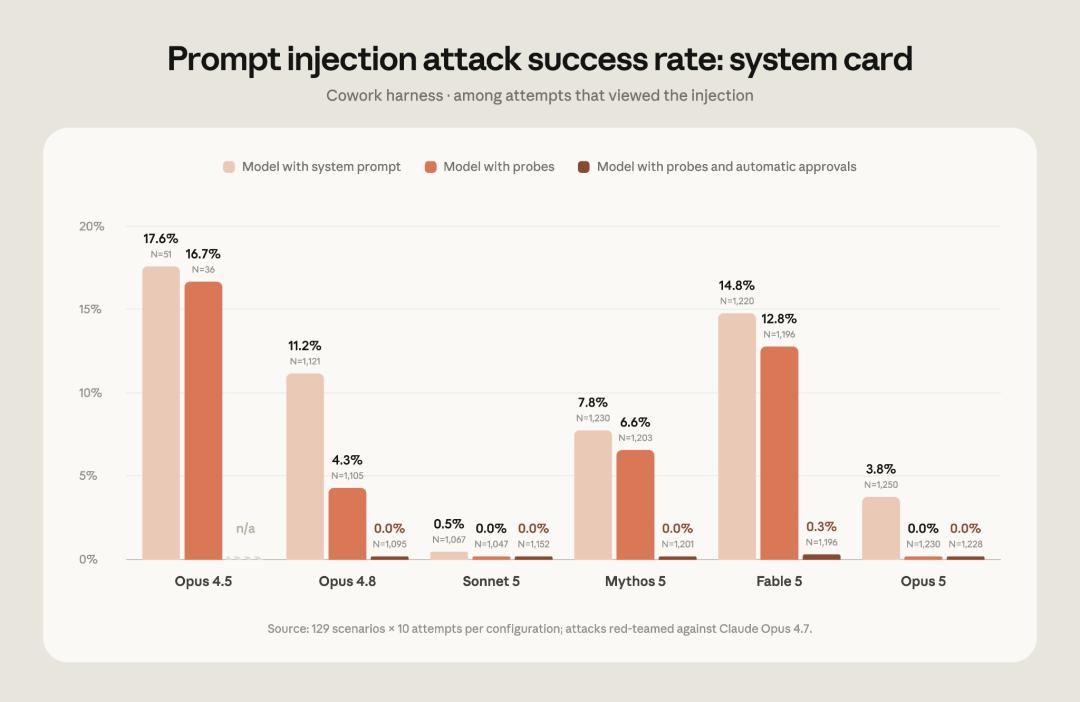
After adding probes and security classifiers, the attack success rate for Sonnet 5, Opus 5 and Mythos 5 is zero, and the success rate for Fable 5 is 0.3%.
Anthropic has also stated the risk clearly: these measures can significantly reduce risks but cannot eliminate them, and prompt injection is always a moving target.
Attacks that can be blocked today may not be blocked tomorrow.
The help documentation also warns: it is strongly not recommended to use the built-in browser or Claude in Chrome to process financial accounts, medical information and other people's personal data.
The official suggestion is to start with sites you trust, do not leave tasks involving money and personal information unattended, and stop the task immediately if you notice any abnormality.
The Browser Is Reduced to a Component
Atlas was launched on October 21, 2025, with a Chromium kernel and ChatGPT embedded in the sidebar. Its agent mode can book flights and run analysis for you.
The narrative at that time was very grand: the browser is the new entry, and whoever controls the browser will control the AI era.
Ten months later, it was shut down.
Atlas was launched on October 21, 2025, and shut down on August 9, 2026, with a total runtime of 292 days.
But OpenAI did not give up on agent browsing, it just moved the capability back to ChatGPT and Codex: what was shut down is the form of "independent AI browser", not the capability itself.
The reason is not hard to guess.
Asking a user to change their browser is equivalent to asking them to move their bookmarks, passwords, extensions, usage habits and entire work identity. This threshold is much higher than the model capability threshold.
Anthropic bypassed this obstacle and kept moving forward:
In July, Claude Code desktop version first launched a sandbox browser, which can be called up with the shortcut key Cmd+Shift+B. It has a clean configuration and does not inherit any cookies, and was only available for developers at first;
On August 12, the sidebar of Claude in Chrome was upgraded to a complete Cowork session, allowing tasks to be transferred seamlessly between desktop, web and mobile devices;
On August 26, the browser capability was pushed to ordinary office workers via Cowork.
Anthropic's help documentation has set a tool priority rule: use connectors when available, open the browser only when there is no connector, and screen operation is the last resort.
In its product logic, the browser has never been the core, it is only a fallback option when connectors cannot cover the scenarios.
That's exactly why it is indispensable: as long as web pages exist, the browser is the universal interface.
In the past two years, people have been asking whether AI browsers can replace Chrome.
Anthropic did not compete for this entry like OpenAI did, but turned the browser into a component of AI.
This question may have been asked wrong from the very beginning.
Agents Begin to Have Their Own Workstations
The built-in browser will be rolled out gradually within a week, available for Pro, Max and Team plans, covering macOS and Windows, with a Linux beta version.
The Enterprise plan can use this function on the same day, as long as the administrator turns it on in the organization settings.
There is also a physical constraint that is easily overlooked.
This browser runs inside Claude Desktop. You can remotely control it from the web or mobile end, but the desktop application must be running and online.
In the past two years, when evaluating a model, we focused on its answer accuracy, reasoning depth and benchmark score. From now on, we have to add a new criterion: whether it has a working environment that it can operate on its own.
The combination of browser, login status, and cross-task persistent memory is exactly the workstation of an AI employee.
In the past, if AI wanted to access web pages, it had to squeeze into your window, use your login status, and occupy your tabs.
Now that Claude has its own browser, it has its own workstation.
The division boundary between human and AI on the same computer is being redefined.
References:
https://x.com/claudeai/status/2092755571455758427
https://claude.com/blog/cowork-built-in-browser?utm_source=chatgpt.com
https://claude.com/blog/claude-in-chrome-generally-available?utm_source=chatgpt.com
https://support.claude.com/en/articles/16607400-use-the-built-in-browser-in-claude-cowork?utm_source=chatgpt.com
This article is from the WeChat official account "AI Era" (ID: AI_era), written by ASI Revelation, edited by Yuan Yu, and authorized for release by 36Kr.