Just now, Claude Code has evolved again, and it can draft feedback reports for users.
Claude Code has rolled out another pretty interesting small feature.
This time, it can help you draft feedback reports.
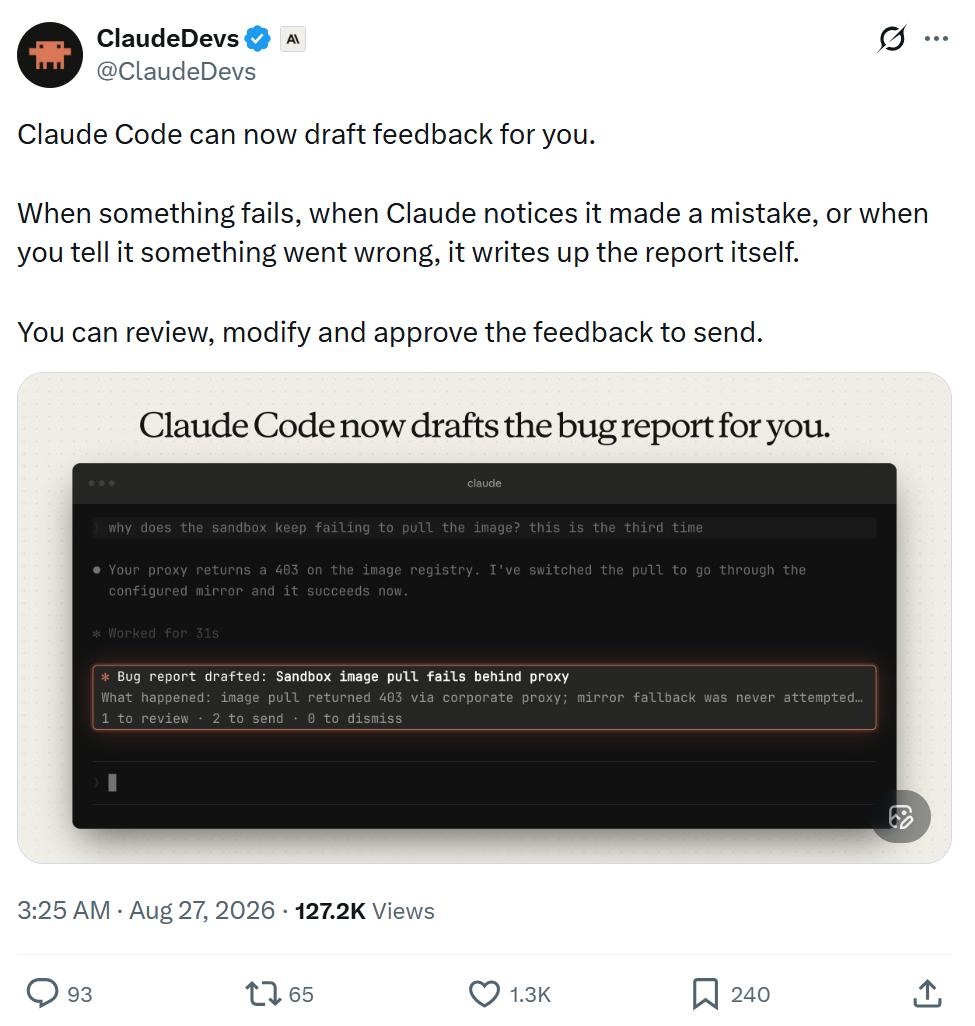
When a certain feature malfunctions, Claude finds itself making a mistake, or you tell it what went wrong, it will automatically organize the relevant situation into a report.
You can view, modify it before sending, and decide whether to approve the submission.
However, you can also disable this feature in /config, or modify its behavior settings.
The official team has also compiled a detailed document, let's take a look at the specific content.
Claude Code Starts "Writing Feedback Reports" for Itself
The feedback drafted by Claude is a feedback report about Claude Code written on your behalf by Claude. This feature requires Claude Code version 2.1.238 or higher.
Claude Code will save each feedback draft on your local device at the path: ~/.claude/feedback/drafts/. No content will be sent to Anthropic before you actively send it.
Specifically, in the following scenarios, Claude will automatically draft a piece of feedback through the SendFeedback tool:
- A certain tool or command keeps failing;
- Claude cannot complete a certain request you made;
- You point out that Claude made a mistake, or Claude itself realizes that an error has occurred;
- You ask Claude to submit feedback.
Document address:
https://code.claude.com/docs/en/tools-reference#sendfeedback-tool-behavior
What You Will See When Claude Drafts Feedback
After Claude adds a feedback draft to the queue, you will see a card above the input box showing the title of the draft. You can:
- Press 1 to view the draft;
- Press 2 twice in a row to send it directly as it is;
- Press 0 to dismiss this card.
Even if you dismiss the card, the draft will still remain in the feedback queue.
After you dismiss a feedback card, Claude Code will ask if you want to turn off Claude's automatic feedback drafting feature. If you choose not to turn it off twice in a row, it will not ask again later.
By default, a maximum of 3 feedback cards will be displayed per session.
After exceeding this limit, or when you set feedbackDrafts to quiet, only the number of pending feedback drafts in the queue will be displayed at the bottom of the input box, and no specific cards will pop up anymore.
View and Edit Feedback Drafts
Run /feedback without any parameters to open the feedback queue.
All unprocessed drafts across all your sessions will be listed here, including those drafts for which you have already closed the feedback card, or even never saw the card before.
After selecting a certain draft, you can review it and perform the following operations:
Edit the title, category it belongs to, and specific content;
Set the "Send transcript" option to yes or no. If the corresponding session record still exists when Claude creates this draft, this option will default to yes, which means the conversation will be submitted to Anthropic along with the feedback when you send it; if you choose no, only the feedback report itself will be sent;
Send the draft, delete the draft, or leave it in the queue temporarily for processing later.
If you want to write the feedback report manually by yourself, you can press w to open the standard feedback window.
The /feedback command with text content, as well as the /bug command, will also directly open this standard feedback window.
Send Feedback Drafts
When you send a draft, Claude Code will submit it in the same way as a /feedback report, and follow the same data retention policy. After the sending is completed, this draft will be deleted from your local device.
If you send directly from the feedback card, it will show: ✓ Sent. If you send from the feedback queue, a receipt ID will be displayed when the window closes.
It should be noted that when you send directly from the feedback card, no conversation record will be attached.
Claude Code will save your working directory information in the local draft to locate the corresponding conversation record, but it will not send this working directory out.
For organizations that have enabled Zero Data Retention (ZDR), Claude Code will not provide this tool, and /feedback is also unavailable.
Delete or Keep Feedback Drafts
When you delete a draft, Claude Code will directly remove it from your local device.
If you leave a draft in the feedback queue unprocessed, it will expire automatically after 30 days.
The feedback queue can save a maximum of 10 drafts across all sessions.
When Claude creates the 11th draft, Claude Code will automatically delete the oldest one.
Which Sessions Do Not Support Claude's Automatic Feedback Drafting
Claude Code will only provide this feature in the following scenarios:
Interactive terminal sessions running on the user's own computer, using the Claude API directly instead of calling through a cloud service provider.
This tool will not be provided in the following scenarios:
- Non-interactive -p operation mode, and Agent SDK sessions, because these scenarios do not have an interface for reviewing the feedback queue;
- Cloud sessions, such as Claude Code on the web, because it cannot write feedback drafts to your local device;
Sessions running through the following platforms:
- Amazon Bedrock
- Claude Platform on AWS
- Google Cloud Agent Platform
- Microsoft Foundry
Sessions with the following environment variables or related configurations set:
- CLAUDE_CODE_SEND_FEEDBACK=0
- DISABLE_FEEDBACK_COMMAND=1
- Set CLAUDE_CODE_DISABLE_NONESSENTIAL_TRAFFIC to any non-empty value
- Feature-flag fetching is disabled;
- Organizations that have turned off the product feedback feature;
- Organizations that have enabled Zero Data Retention.
This article is from the WeChat Official Account "Machine Heart", published by 36Kr with authorization.