ChatGPT can now "monitor" your computer. After testing this feature, I decided to let it keep a closer eye on things.
I came across a great article, but I did not bookmark it and accidentally closed the tab with a slip of my hand.
That document was still open last night, but this morning I have no idea which folder I dragged it into.
I have encountered this kind of thing several times recently.
OpenAI recently launched the new Computer History feature on GPT.
The name is quite abstract. If you want to understand it with a visual metaphor, it is like strapping a panoramic camera to your head that records your entire day. You can review where you went and where you left your earbuds, and get all the details clear at a glance.
Computer History is exactly that panoramic camera installed inside your computer.
Photo | OpenAI
Overtly "Monitoring" You
By accessing the accessibility permissions of macOS, Computer History records a sequence of your actions on the computer, such as what you clicked, what you typed, what shortcut keys you pressed, and which app you switched from and to.
It does not collect screenshots, screen recordings or audio, and does not require "screen recording" permission.
These actions are temporarily stored on your Mac first, and will be retained for a maximum of 48 hours. The system will organize them into text summaries regularly and save them as local memory. When you ask questions later, it will find relevant clues from these memories.
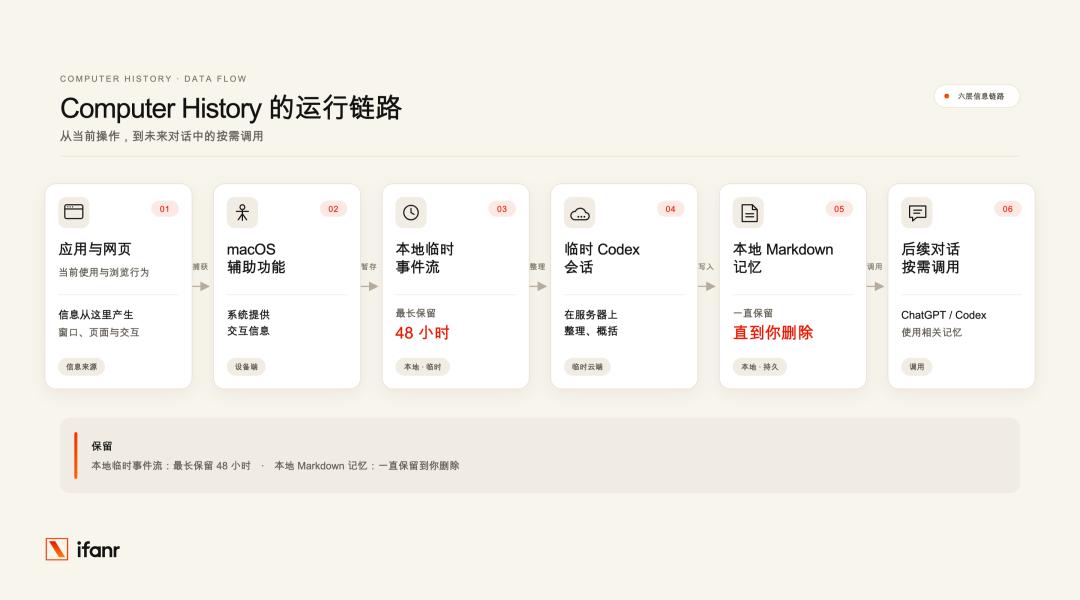
This feature is disabled by default. To use it, you need the macOS version of the ChatGPT desktop client, as well as a Pro, Business or Enterprise subscription. After meeting the requirements, you can enable it on the "Integrations" page in the settings.
After turning it on, I tested it with something that just happened.
This morning, I came across an interesting post on Xiaohongshu, I did not bookmark it and closed the window directly.
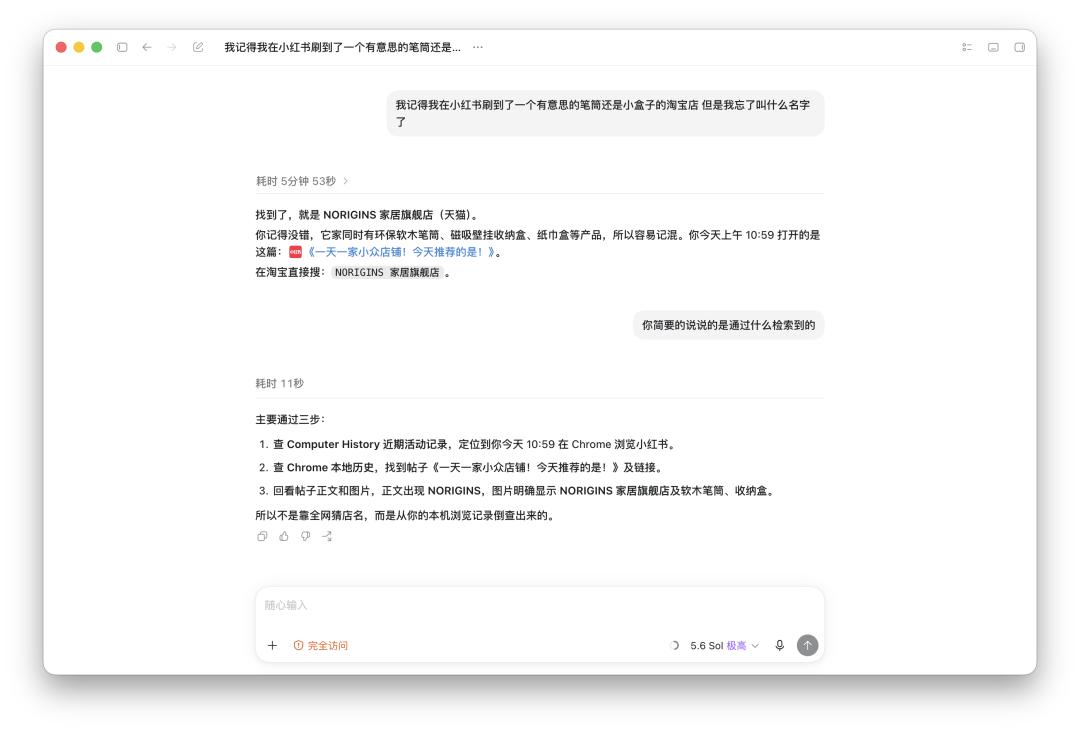
I said to GPT: "I remember I browsed an interesting Taobao store for pen holders or small boxes on Xiaohongshu, but I forgot its name."
How did GPT help me complete this task?
It first reads the recent activities in Computer History to find out roughly when I browsed Xiaohongshu. Then it locates the original post by looking up Chrome's local history, and finally reviews the page to confirm the vague store name.
In this process, Computer History does not save the post itself, nor does it use screenshots or screen recordings.
What it leaves behind is a string of "breadcrumbs" that lets Codex know which page to go back to for the answer.
Single pieces of information can be retrieved, what about the work done over a whole period of time?
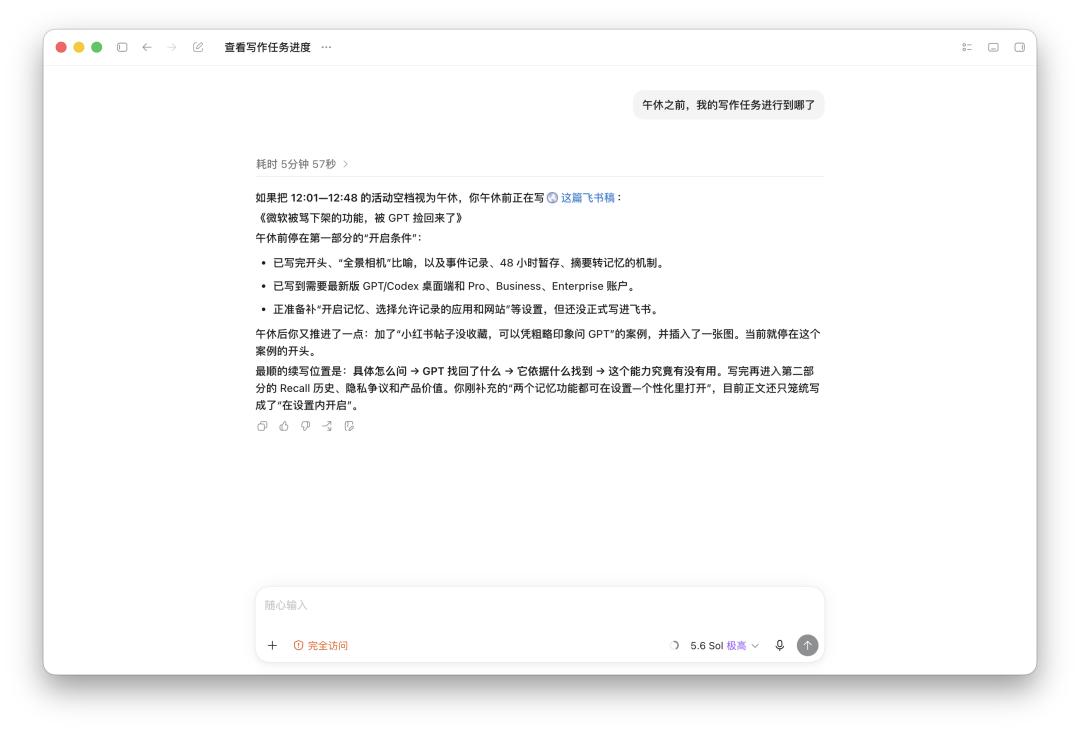
This time I asked: "What was I doing before lunch break?" What I wanted to know was where I left off on the draft before lunch, so that I could pick up right after I got back.
By the way, when I tested it, the draft I was working on was exactly this article.
I did not tell it when my lunch break started. Based on the records, it found that there were no observable activities after about 12:01, and I started editing Feishu again at 12:48, so it inferred that the gap in between was my lunch break.
Then it retrieved relevant memories, followed my switches between Feishu, web pages and several Agents, and restored what progress I had made on this article before the lunch break. By comparing the outline in another document, it judged which parts were completed, which parts were not written yet, and where I was going to proceed next.
To my surprise, it also compared the changes to the draft after the lunch break, pointed out what I added after I came back and where I stopped currently, and gave a position where I could continue writing directly.
What it gave was more like a thoughtful handover note. After reading it, I basically did not need to re-read the full text to know where to pick up the next paragraph.
This exactly hits one of my pain points. Documents, codes and web pages can all be saved, but after being interrupted by a phone call or a lunch break, I often have to rack my brain to remember why I opened this page and what I was going to do next.
Current applications can retain our work traces, but they cannot preserve the precious "state" when we are working or writing.
Computer History does not fully record every step of my thinking in my mind, but it can piece together enough context for me to continue working based on activity records, document changes and article outlines.
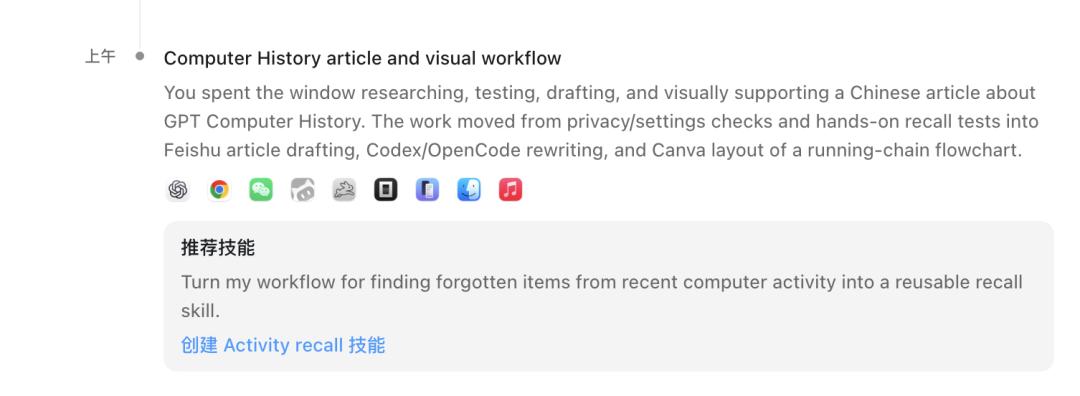
After the task was completed, a Skill suggestion called "Activity recall" popped up at the top of the ten-minute summary. It suggested saving the method of "finding things from recent activities" for easy reuse next time.
Many AIs now encourage users to turn their regular work into Skills. But when it comes to writing it themselves, many people cannot clearly describe the process.
Opening Feishu, pulling data, and replying to group messages every day has long been a habit, but when you try to list every step completely, you often miss a lot of details.
Computer History may be able to fill this gap. It first observes how you work, identifies repeated paths from every click you make, and when these operations appear repeatedly, it may remind you: do you want to hand over this process to an Agent.
However, after actual testing, its shortcomings are also obvious.
The action extraction is very accurate, but the retrieval time of five or six minutes is really frustrating — the few minutes it takes to spit out the answer is enough for me to forget what I was looking for again.
Another threshold is subscription. The free version and Plus version cannot use this feature for now, and only Pro and higher subscriptions can unlock it. In addition, according to the official description, events will be organized into a summary regularly. Compression may lose some details; the model may also make wrong inferences when organizing and calling memories.
Pioneers Hit the Pitfalls, Latecomers Adjust Their Paths
What OpenAI is doing now was already tried by someone two years ago.
In May 2024, Microsoft announced the new Recall feature alongside Copilot+ PC.
The official demo at that time was really attractive: it took a screenshot every few seconds, stored the snapshots in a local database, and organized them into a searchable timeline. If you forgot where you put a file or which page you were browsing, you could trace back through the records.
Then it quickly backfired.
Security researcher Alexander Hagenah wrote a tool called TotalRecall. It does not require administrator permissions, can automatically locate the Recall database and screenshots saved on the local machine, copy them in batches by date range, and perform keyword searches on the on-screen text extracted from screenshots via OCR.
In other words, your screen records from several weeks or even three months are stored in the database, and any local program can copy them secretly.
As a result, Recall was not widely launched as planned, and was criticized so badly that it had to be sent back for rework.
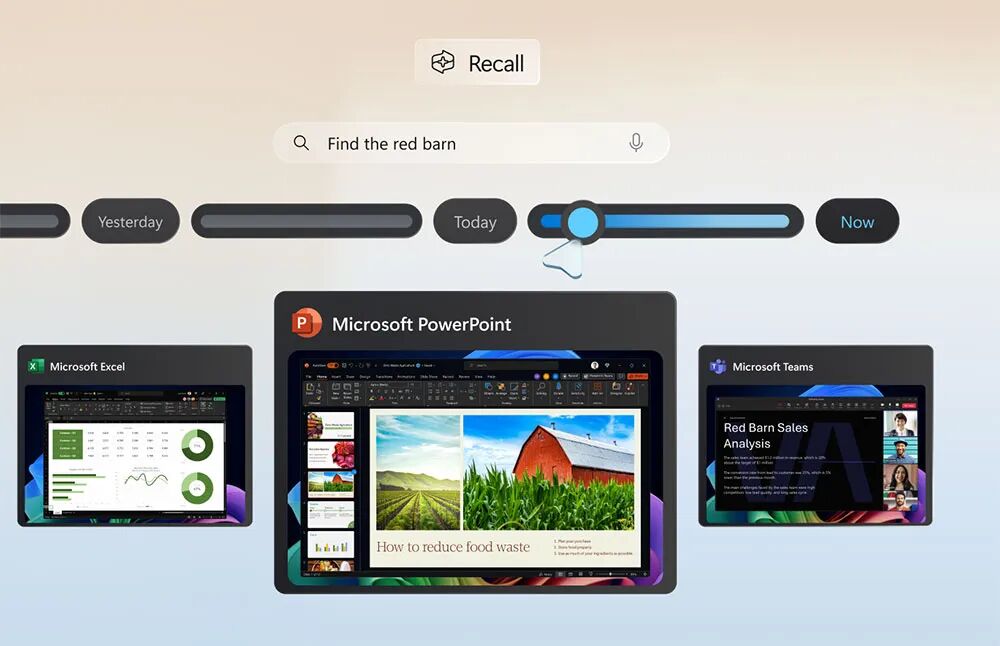
Photo | Inc. Magazine
The earlier product Rewind took the exact same path. It took a screenshot every few seconds, paired it with a beautiful timeline, and positioned itself as a "life rewinder". But it also used screenshots, and treated privacy as a sieve.
Even OpenAI's own Chronicle, which it experimented with in the first half of this year, also adopted the screenshot solution.
The launch of Computer History means that OpenAI itself has rejected the old path of continuous screenshots.
Going against privacy is destined to be a tough road.
From Recall, Rewind, Chronicle to Computer History, these products have different forms, but they are all trying to record users' usage processes.
These companies are not blind to the risks brought by privacy. Precisely because the risks are already so obvious, their willingness to continue working on it shows that there is something behind it that is worth taking the risk for.
The answer may lie in "process data".
For AI vendors, how users do things is as important as what users finally output.
Traditional chatbots usually can only see the prompts and final results. Which sources users checked, at which step they got stuck, and how they called tools, these intermediate processes are rarely fully included in the conversation.
What Computer History records is the process on the user's side: how they use tools, and where their work stops. For AI vendors, this is a value that is hard to ignore, and it may also be an important reason why major vendors are competing to promote Agent applications.
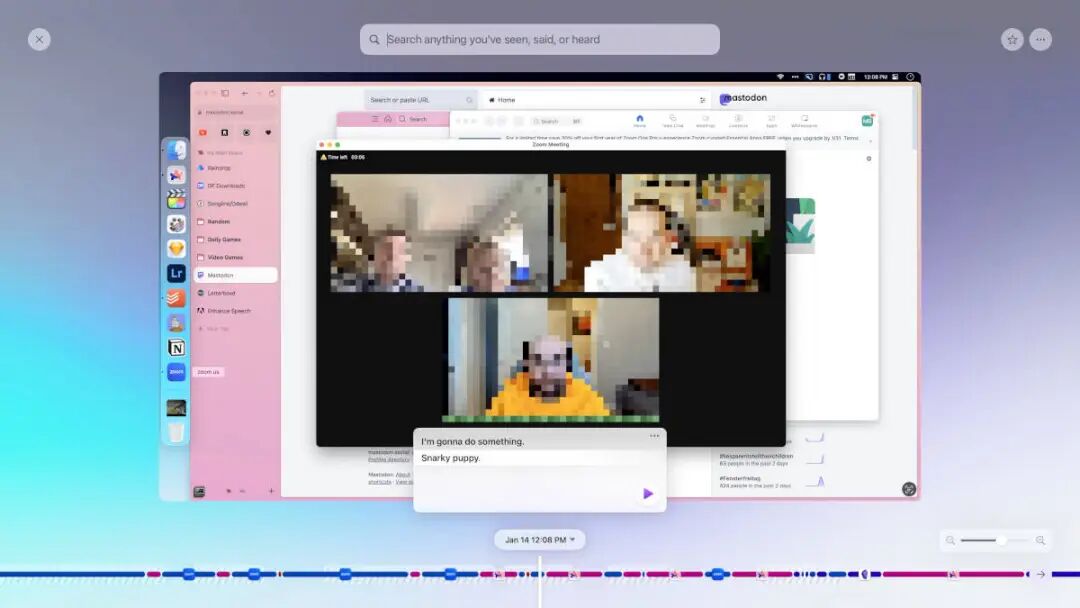
Photo | The Sweet Setup
Compared with previous products, Computer History avoids accessing users' screen content, and uses a relatively milder way to reduce the cost of obtaining process data to a range that users can accept.
The advantage is that this method will relatively reduce the original content that needs to be collected and saved, but it does not mean that it has no privacy risks. The privacy statement of Computer History writes down the real terms of this trade-off.
Events are collected locally, but when generating memories, a temporary Codex session will be started to send the event stream to OpenAI's server for processing. The official says that the batch of events will not be retained after processing, nor will it be used for training. However, when the memory is called in subsequent conversations, the relevant content will still enter the conversation context.
The official has also clearly stated another type of risk: memories will be saved locally as plain text Markdown files; malicious instructions embedded in web pages may also enter the memory with the event stream, leading to prompt injection. When it comes to chats and private information, the official even suggests pausing the collection directly.
If you ask me whether I will turn on this feature after a brief experience with Computer History.
My answer is yes.
But I will only grant access to necessary work apps and websites. When it comes to chats, accounts and private content, I will still pause the collection.
This does not eliminate the risk, but this experience makes me clear: under the premise that the risk is still controllable, the value of retrieving work state and discovering repeated processes is worth the cost.
After all, I really hope there is a "panoramic camera" that can record those memories and processes that I don't even realize I have forgotten.
When achievements can be saved everywhere but processes are constantly disappearing, this is a kind of value worth taking carefully calculated risks for.
This article is from the WeChat official account "ifanr" (ID: ifanr), written by Fang Junming, edited by Xiao Qinpeng, republished by 36Kr with authorization.