OpenAI has emptied Claude Code, users' entire assets can be migrated to Codex with one click, and the only thing that cannot be taken away is Claude
The AI programming battle has set its sights on the core assets of rival users.
When you switch to a new AI programming tool, the most expensive cost is never the subscription fee, but the CLAUDE.md you have modified for half a year, dozens of skills you have accumulated, the authorizations you clicked through one by one on the MCP server, and the string of slash commands you can type with your eyes closed.
None of these things cost money, but they are the instruction manual for Claude Code to work for you. When you switch to Codex, the manual becomes invalid and you have to rewrite everything from scratch.
What really makes developers reluctant to leave is exactly this set of assets that they have built up for half a year and stored on their own machines.
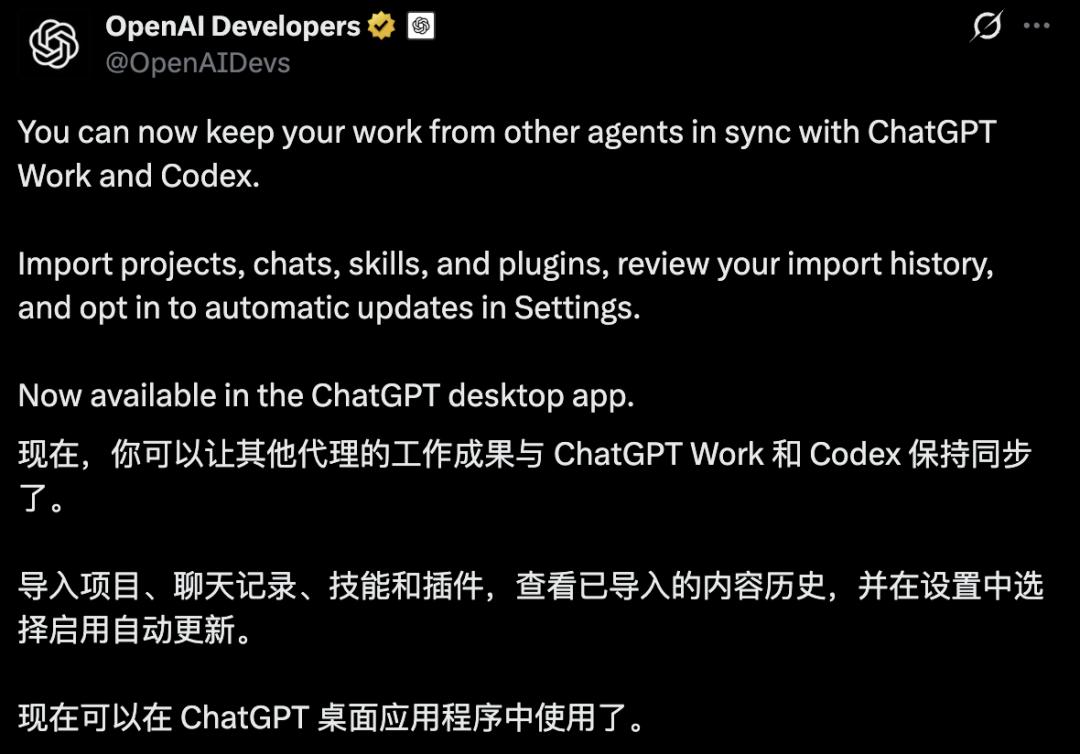
What OpenAI has done recently is to package all these assets and move them to its own ecosystem.
On August 11, OpenAI unified the documentation for importing external agents into a single document.
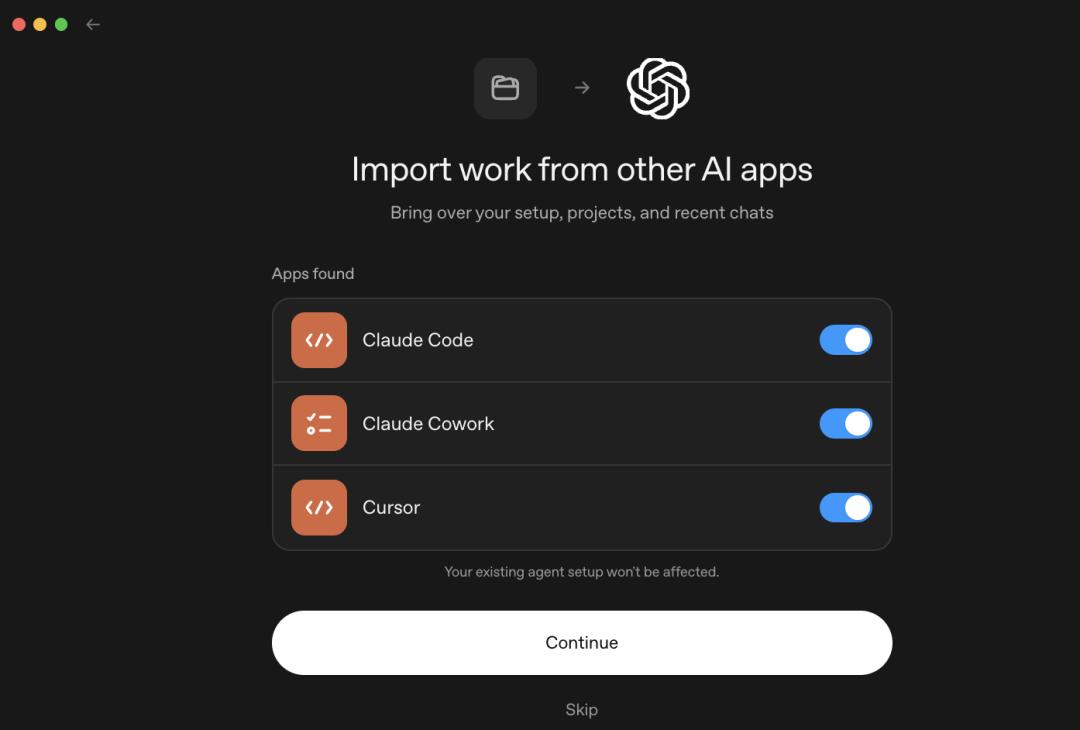
Open the ChatGPT desktop app, and there is a new Import option in the settings that can detect Claude Code, Claude Cowork and Cursor. Type /import in Codex CLI, and it will recognize Claude Code and Cursor.
With a few clicks, you can migrate all configurations, skills, plugins, projects and chats from the last 30 days left by these tools on your machine in one go.
What is migrated is a copy.
The official documentation clearly states that importing will not modify or delete your existing agent configurations.
It is equivalent to sending a free moving truck to rival users, packing up their belongings at their doorstep, and leaving the original room completely intact for them.
After going through all the documents of this process, you will find one word that never appears from start to finish — /export.
You can only move assets in, not move them out.
What You Migrate Is More Than You Think
First of all, let's talk about what this "moving truck" can carry. The official has released a "moving list comparison table":
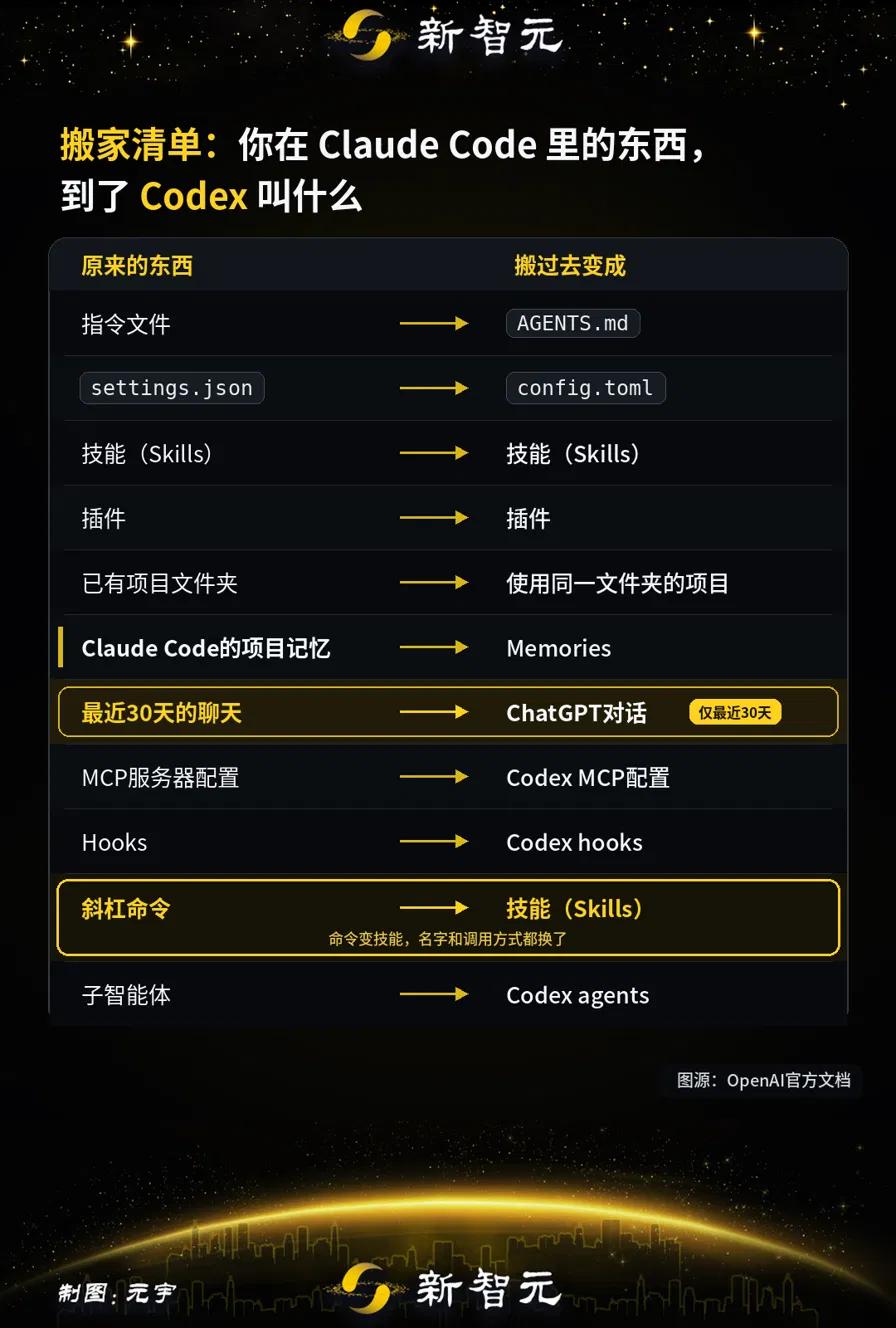
The instruction file (mainly CLAUDE.md for Claude Code) will be migrated to AGENTS.md;
settings.json becomes config.toml: the mix of JSON and Markdown used by Claude Code is all integrated into a single TOML file on Codex;
Skills remain as Skills, and plugins remain as plugins, but whether plugins can be used directly will be explained in the following content.
MCP server configurations are mapped to Codex's MCP configurations, Hooks are mapped to Codex hooks, and sub-agents are mapped to Codex agents.
For those slash commands you wrote yourself: a common process encapsulated as /xxx for team sharing, will not be called a command after migration, and all of them will be converted into skills.
The built-in commands in plugins follow the same rule, and will be converted on the spot during installation.
The name is changed, the calling method is changed, and the scope of use may also change accordingly. So strictly speaking, this part is not a simple migration, but a modification.
Claude Code's project memories become Memories. Chats from the last 30 days are imported into ChatGPT chats.
As for "project migration", the official statement is that the existing project folders will become "projects that use the same folder".
In short, Codex only takes over the local directory on your machine, instead of uploading or copying the entire repository to OpenAI's side.
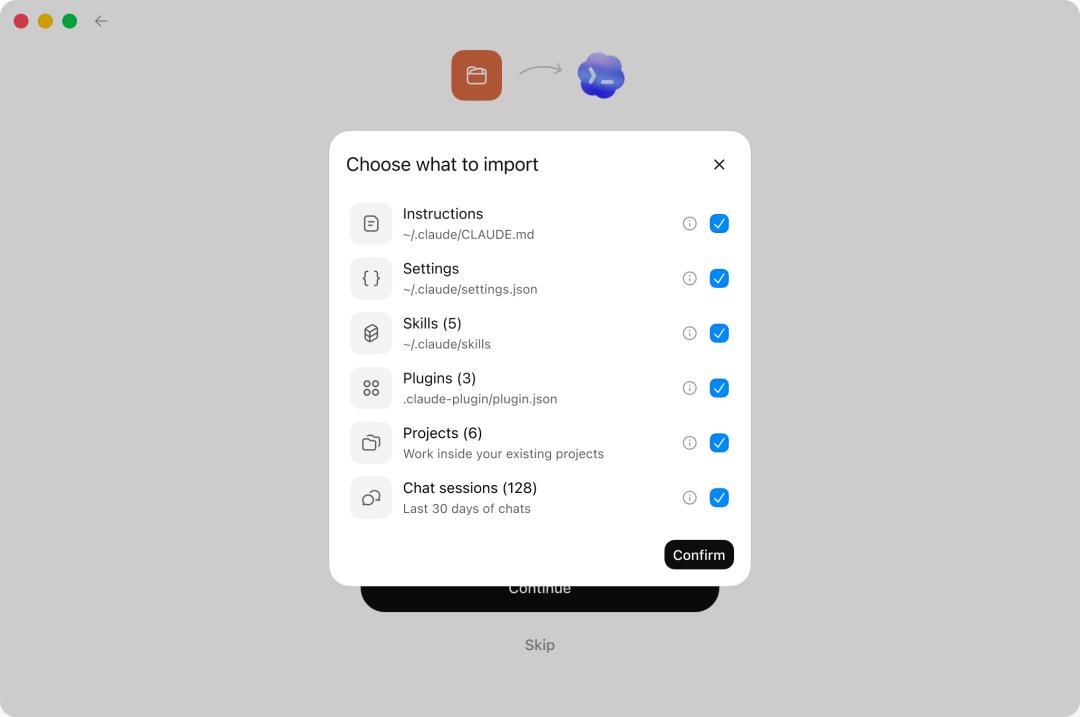
The checklist is detailed down to instructions, settings, skills, plugins, projects and chats, all of which are optional item by item.
There is a detail here that best shows how carefully this work is done.
Old sessions migrated from Claude Code are often too long for Codex to read all at once.
For most other tools, this situation usually triggers an error message, and you have to figure out the rest by yourself.
Codex's approach is very user-friendly: when the session is imported, it automatically records the length of the conversation and how much quota it occupies.
When you return to this old conversation and send your first message after migration, it will automatically compress the previous content to free up space before replying.
You don't need to do anything or delete any content, you can continue the conversation right after the migration.
This import feature of Codex did not pop up out of nowhere today.
/import first appeared in CLI 0.140.0, when it could only migrate Claude Code's settings, skills and chat history, and Cursor users had to copy the content manually.
On June 9, Codex app 26.608 brought the import process to the desktop app, and embedded it in the first-use guide.
The CLI 0.145.0 released on July 21 is the real expansion version, which covers six migration aspects at once: settings, MCP servers, plugins, sessions, commands, and project-level memories.
The 0.147.0 version released on August 7 further added Cursor skill import, and subsequent synchronization of imported sessions.
Three iterations in three months.
It seems that OpenAI can't wait to bring Claude Code's users over to its platform.
Only Allowed to Move In, Not Out
There is not a single command in the entire documentation for moving Codex's configurations out.
Changes you make in Codex will not be written back to Claude Code.
The desktop app does have an auto-update toggle in the settings, and you can also view the import history.
But pay attention to its synchronization direction: its function is to continuously synchronize new content from Claude Code and Cursor to ChatGPT.
The original tool continues to update, and the new tool continues to receive the updates.
The CLI side has even fewer export options.
The Codex CLI 0.147.0 released on August 7 added two features: importing skills hosted by Cursor, and synchronizing subsequent changes of imported Claude and Cursor sessions without generating duplicate content.
The entry you use to migrate determines how much connection you still have with the original tool.
You think you are just configuring the tool all the time, but in fact you are accumulating assets.
Now someone tells you that these assets can be packaged and moved away, and can even be updated continuously from the original tool.
Both companies have tried this "moving" trick, but in different ways.
In early March, Anthropic launched the memory migration tool Memory Import, which targets ChatGPT users, allowing them to import the preferences and context accumulated in ChatGPT and Gemini into Claude.
Its support document also states: You can also export Claude's memories for backup or migration.
Both directions are open.
On March 30, OpenAI released an Apache 2.0 open source plugin codex-plugin-cc, which allows Codex to run inside Claude Code, turning its code review and task hosting features into slash commands in the rival's terminal.
The plugin has a /codex:transfer command that converts the current Claude Code session into a persistent Codex thread. The plugin documentation states that it uses Codex's external agent session importer, which follows exactly the same conversion rules as the current import feature.
From "entering the rival's territory" to "bringing users over", OpenAI has upgraded its strategy in more than four months.
Four Types of Assets Cannot Be Migrated
Developers who have completed full migration in the community generally agree that 90% of the configurations can be automatically converted in format.
The remaining 10% that gets stuck is the critical part.
The first type is permissions.
The fine-grained whitelist you manually adjusted for half a year in Claude Code only matches three coarse permission levels in Codex's sandbox: read-only, workspace writable, and full access.
This is not just a matter of changing the file name, you have to rethink the original intention behind that whitelist, and then map it to one of the three levels.
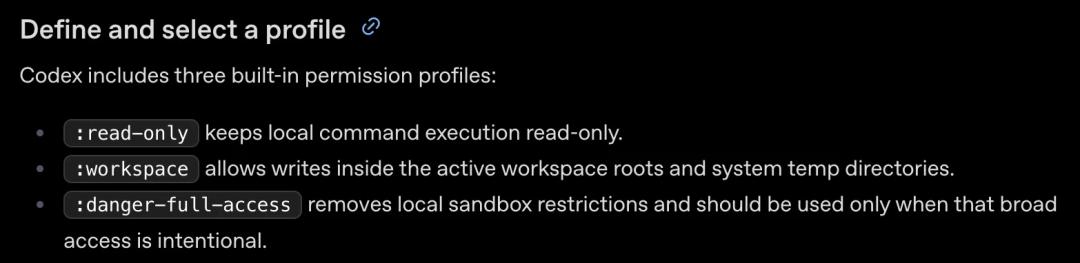
Codex only has three built-in permission configurations: read-only, workspace writable, and full access.
The second type is Hooks.
Claude Code's hook model is more feature-rich, with conditional grouping and asynchronous processing chains.
There is no equivalent counterpart on Codex.
Complex hook chains cannot be converted after migration, they have to be redesigned. The official documentation itself also reminds: The behavior of imported Hooks may be different from the original, please review them before use.
The third type is the model itself.
The first two types migrate your luggage, this type migrates the person who does the work for you.
Codex natively only uses OpenAI's Responses protocol, and does not recognize Anthropic's models. That means, even if you migrate CLAUDE.md, skills and MCP configurations to Codex, the one that takes over these configurations is GPT instead of Claude.
Those prompts are tuned for Claude's behavior, and now they are executed by a different model.
Unless you build a compatible gateway yourself, register it as a model provider, and create a separate profile to point to it. This is the only item in the entire migration list that does not have a native corresponding solution.
The fourth type is the boundary of chat history.
Only local sessions on your own machine can be migrated.
Conversations on claude.ai web page and Cursor web page cannot be migrated. The CLI side also has a hard limit: only the last 30 days, maximum 50 sessions.
Some developers counted the skill fields of Claude Code: there are 18 in total, only 6 of them are universal, and the remaining 12 are only recognized by Claude Code itself.
Only one third of the skills you wrote can be migrated.
The official also provides a post-import review list: permissions of skills and agents, MCP servers that need to re-login, Hooks with potentially changed behavior, plugins that require manual follow-up, and command templates with parameters and file paths.
One-click migration, then half an hour of manual checking.
This is the complete process.
The Competition Is Not For Users, But For Users' Core Assets
Model rankings change every six months. You may top the list today, but you could be overtaken by the rival's new version next month.
But configurations, memories, skills and historical sessions do not change: they are stored on developers' own machines, getting richer day by day.
These assets are not only developers' personal property, but also the moat for OpenAI and Anthropic to retain users.
OpenAI's move is aimed at draining the rival's moat.
However, when it drains others' moat, its own moat is also becoming shallower: to let the water from others flow out, you have to dig a canal first, but the canal is bidirectional.
SKILL.md, AGENTS.md, and the standard MCP definition are becoming de facto standards.
The more universal the format is, the harder it is for any vendor to lock users in.
What you can migrate to Codex with one command today, can theoretically be migrated to another vendor with one command tomorrow.
For developers, the solution is very simple: store your core assets in formats that can be migrated, instead of tying them to a single tool vendor.
This article is from the WeChat Official Account "AI Era", author: ASI Revelation, authorized for release by 36Kr.