With the RTX 3060 making a comeback and fierce competition breaking out between new and legacy hardware, 2026 has become the worst year in the PC industry.
To be honest, looking at the 2026 PC market, Xiao Lei really has a feeling of time disorder.
In June, AMD launched the Ryzen 7 5800X3D 10th Anniversary Edition. To be honest, I never expected this CPU to return to our vision in the form of an "anniversary commemoration", after all, it was first released back in 2022.
Of course, even from today's perspective four years later, the 5800X3D is still a pretty good gaming CPU. Considering the surprisingly low price of DDR5, this product also has quite high cost performance.
What's even more weird is that the RTX 3060 released in 2021 has resumed production and re-entered sales in some markets. When this product was released, some friends might still be high school sophomores, and now they have probably graduated from college. Then Xiao Lei found that, hey, after five years, the entry-level graphics card I can afford is still the 3060. Isn't that surprising and unexpected?
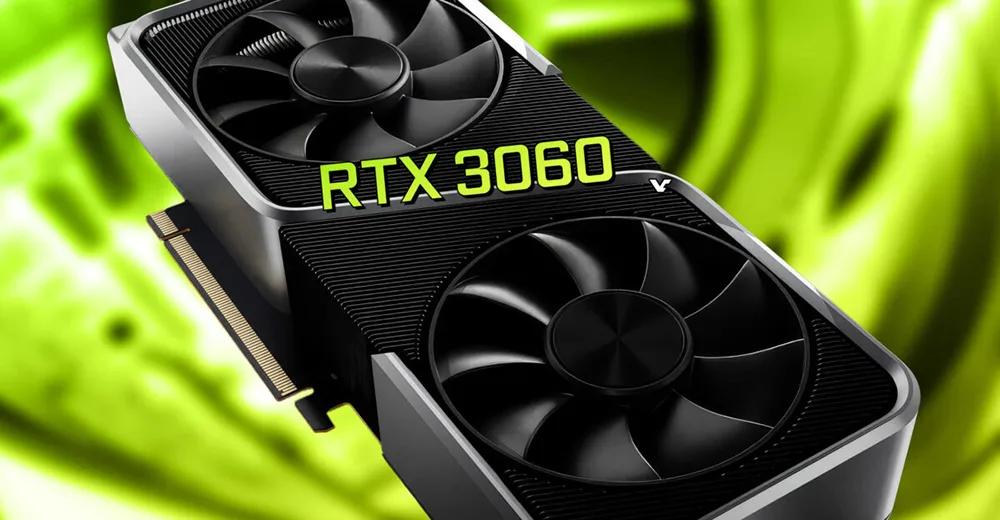
Image source: Lei Technology
We used to say that for digital products, you should buy the new one instead of the old one, but in 2026, this saying may not necessarily hold true. The models of various CPUs and GPUs on the market today are also messy, and most people are probably confused when looking at them. Take the most classic example: Which one has better performance, the RTX 5050 or the RTX 3060? Which one offers a better gaming experience?
If you really want to buy a computer in this "chaotic PC era" but don't want to spend too much time researching the performance comparison of chips of various models, just keep reading and let Lei Technology (ID: leitech) tell you the answer. Special note: This article is purely a product recommendation, and there is no promotional content of any form.
Desktop PCs Enter the Era of "Mixed Chaos"
Without further ado, let's start with the desktop side first.
In Xiao Lei's opinion, CPU is actually one of the most suitable PC hardware for "buying old models". For example, the Ryzen 7 5800X3D mentioned at the beginning is a very good example.
Although this product still uses the Zen 3 architecture and AM4 interface, with 96MB L3 cache, 8 cores and 16 threads, and a maximum main frequency of 4.5GHz, its performance in scenarios such as online games is still very good. AMD restarted the production of this CPU in 2026, which essentially values the large amount of second-hand stock of AM4 motherboards and DDR4 memory in the current PC market, which is a very good choice for most users with insufficient budget.
Of course, if someone tells you that there is little difference between the 5800X3D and the 9800X3D, he must be cheating you. After all, the 4 years of architecture updates and process upgrades are not for nothing. Although both have 8 cores and 16 threads, the maximum main frequency of the 9800X3D can reach 5.2GHz, and it supports overclocking. In addition, many improvements have been made to problems such as heat accumulation.
Theoretically, with the same graphics card, the game frame rates of the two may differ by more than 20% directly, and some games may even have a difference of more than 50% (mainly online games). However, this situation generally occurs when the graphics card performance is no longer the bottleneck. For example, if your monitor resolution is 1080P and the graphics card is at the 5090 or 5080 level, then the performance gap of the CPU will become obvious, but if your resolution is 2K or 4K, then the impact of the CPU on the frame rate will drop back.
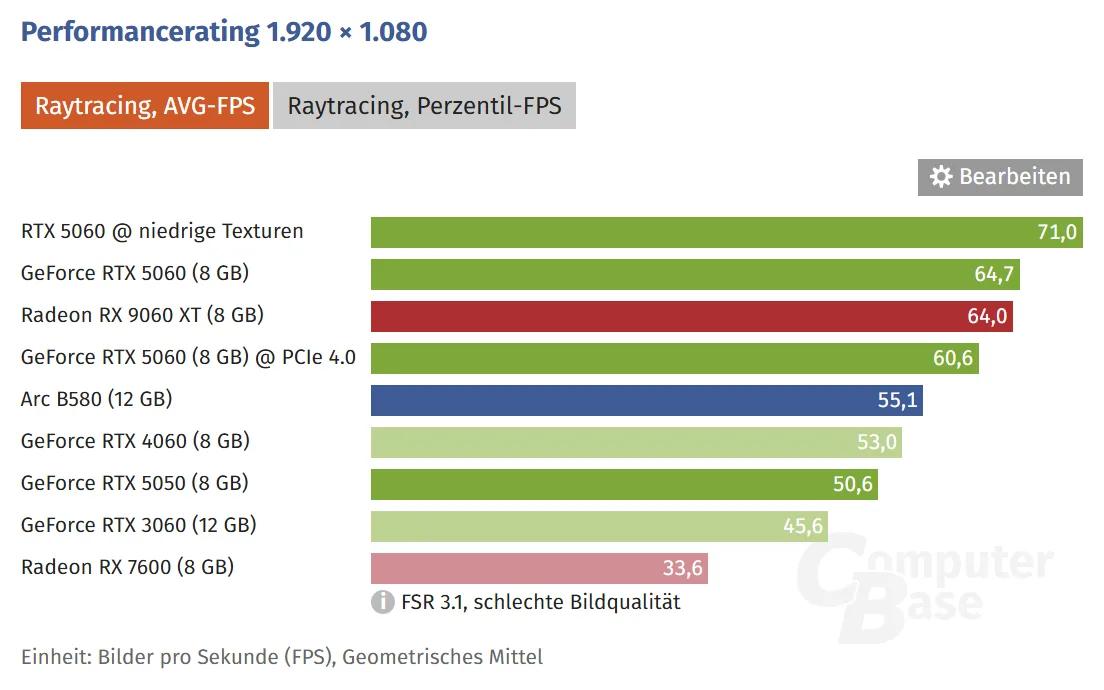
Image source: ComputerBase
Therefore, if you have a limited budget and are not a hardcore FPS online game player who insists on 1080P, you can consider buying a CPU from the previous generation or the generation before last, and invest more budget in the graphics card. Let's put it this way, even the 13th and 14th generation Core CPUs can meet the performance requirements of most current games without any problem.
But the GPU side is not so lucky. Although Lao Huang has always been complained about for his "exquisite knife work", some netizens said that the theoretical performance improvement of graphics cards in recent years is actually not high. However, DLSS can really "achieve miracles with great effort". Each generation of ray tracing cores and Tensor Core has a considerable performance improvement, so after actual experience, you will find that the frame rate gap is far larger than the gap on the paper parameters.
Take the RTX 3060 12GB that has returned to the market as an example. Its biggest advantage is 12GB of video memory. At 2K resolution, it does have certain advantages over 8GB models such as the 4060 and 5050, but this does not mean that it can have an obvious frame rate advantage.
In the actual test by ComputerBase, at 1080P resolution, the frame rate of RTX 3060 in *Alan Wake 2* is only about 50fps, while that of RTX 5060 is 77.1fps, the gap exceeds 50%. Even compared with the 4060, the frame rate is 10fps lower. The 5050, which is looked down upon by many netizens, also has a frame rate of 58fps, which is almost the same as the 4060.
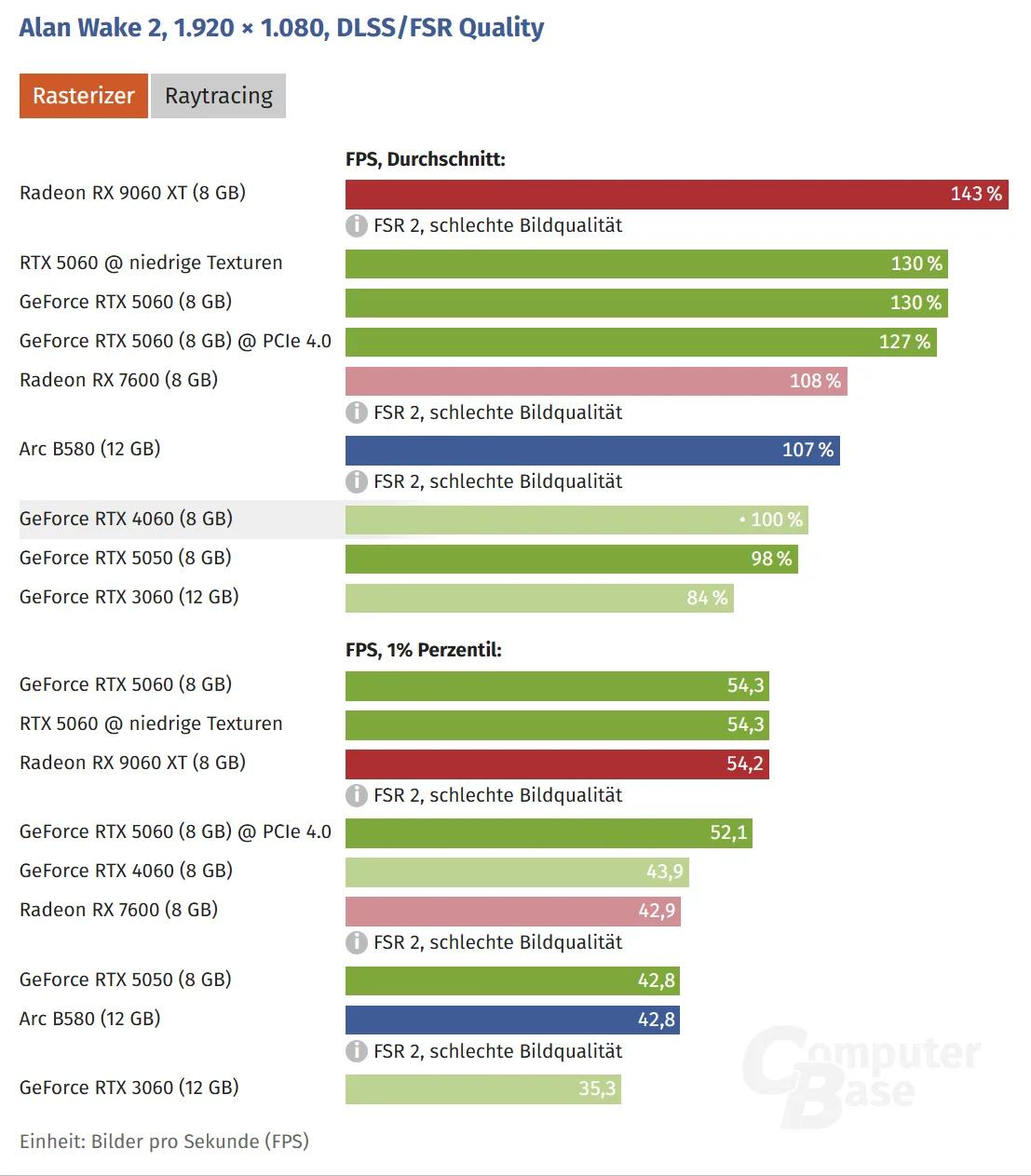
Image source: ComputerBase
More than a dozen games tested in practice basically cover the popular 3A masterpieces and online games in the past two years. We can basically draw a conclusion: Graphics cards still need to buy new ones, the newer the better. The improvement brought by DLSS is indeed very large, which cannot be made up for by configurations such as video memory.
Especially for friends with very limited budgets, I personally suggest that you grit your teeth and go directly for the RTX 5050 or 5060, instead of buying the 3060 just for the sake of cheapness (it is quite abstract that the new 3060 is not cheap because of its larger video memory capacity). As for mid-to-high-end graphics cards, it goes without saying that there are obvious differences between almost every generation. Everyone should try to buy the latest generation updated models according to their own budget.
Therefore, the matching of desktop PCs can be simply summarized as: Save money on CPU, spend more on GPU, it's okay to use CPUs from the previous two generations, but the GPU should be as new as possible. Of course, if you can accept second-hand products, you can also choose according to the logic of "the previous generation beats the current low-end models". For example, the second-hand price of 4070 is only 3200, and the 5060 also costs 3200, then the 4070 will be a better choice.
Do Old Chips Definitely Bring Poor Experience? It's Not Necessarily the Case When Buying Laptops
Considering that the school season is coming soon, laptops are a must-have for many people, and everyone is probably more confused about how to choose between CPU and GPU here. To be honest, the difference between the mobile end and the desktop end is very large. Unlike the desktop end where several generations of products can coexist harmoniously, the mobile end has the situation that different generations of products are very different from each other according to different demands.
Xiao Lei starts with the simplest gaming laptops. It's still the same logic: the newer the GPU, the better. Especially on the power-sensitive mobile end, the energy efficiency performance of the new generation of GPUs is often better. In actual use, whether it is long-term performance release or heat dissipation management, it will be better than the previous generation.
The selection logic of CPU is very similar to that of the desktop end. Even the 14th generation Core has enough performance to meet the gaming demands, and in most cases it will not become the bottleneck of the game frame rate. Therefore, when choosing a gaming laptop, you only need to focus on the graphics card model, and other configurations are secondary.
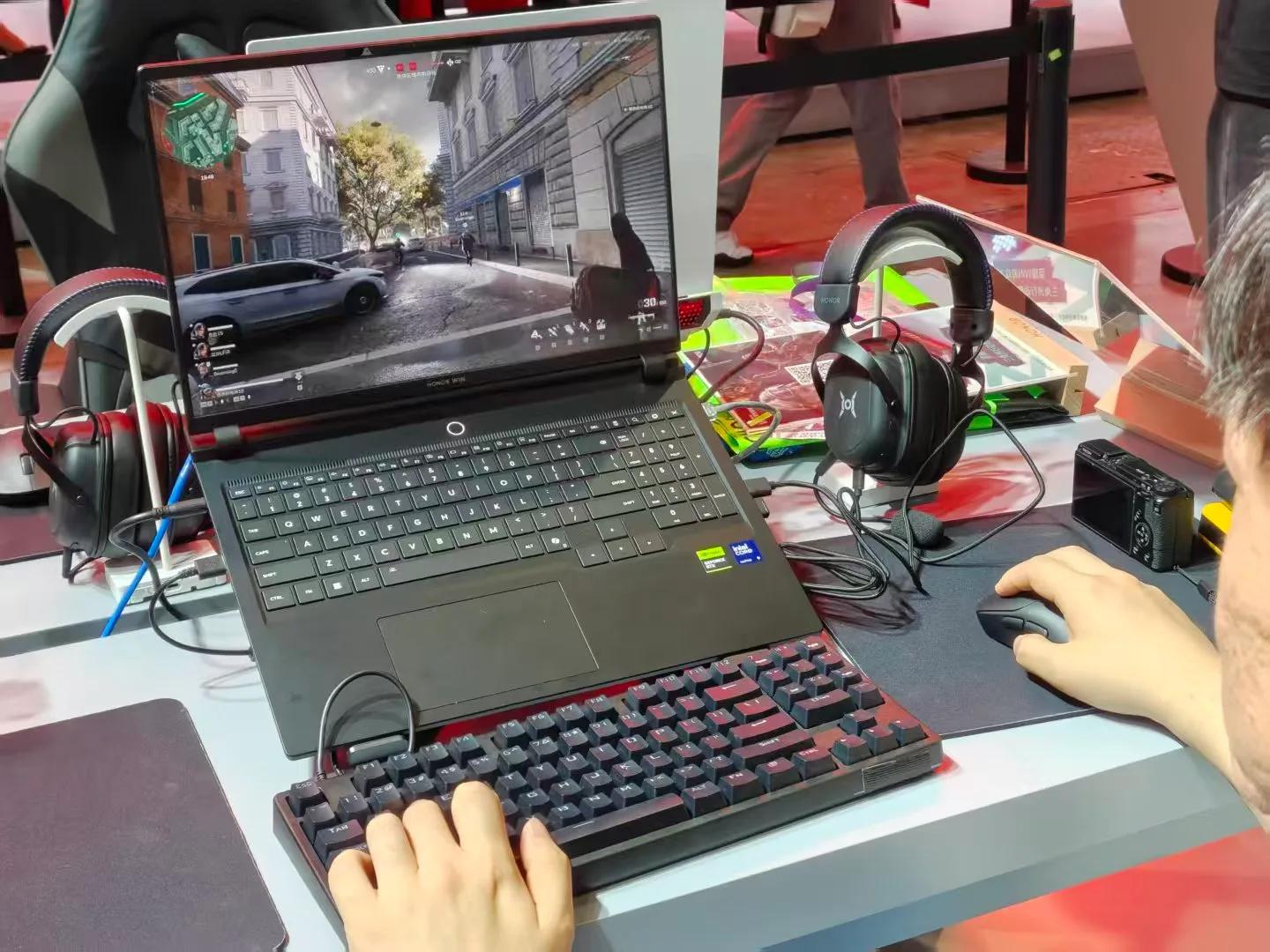
Image source: Lei Technology
However, if your demands are not just for games, you need to reconsider. Take mobile office as an example, from the 14th generation Core to the 3rd generation Core Ultra of Intel, the battery life of each generation has been greatly improved, and the performance gap in the unplugged state is very obvious. Moreover, the iGPU performance of the 3rd generation Core Ultra is also quite good, which can be said to be the most ideal CPU for thin and light laptops at present.
However, the models equipped with 3rd generation Core Ultra also have a problem, that is, they are too expensive. So Xiao Lei does not recommend student groups to choose them, but tends to recommend everyone to consider the configuration of Ryzen AI series + 5060 or Core Ultra 200 series + 5060 (if the budget is insufficient, 5050 is also acceptable).
According to past actual tests, as long as you switch to the iGPU + long battery life mode, the battery life can basically reach 6-8 hours, which can meet the daily class demands of students. There is no need to force to buy the latest model just for battery life.
In addition, the CPUs with dominant multi-core performance are mainly the HX series at present, which has little to do with the generation. According to the actual test results, the one with the best performance at present is the Ultra 9 290HX Plus, followed by the Ryzen 9 9955HX3D. The Ryzen 9 7945HX is also on the list. Although it belongs to the Ryzen 7000 series released two years ago in terms of naming, its multi-core performance is no worse than the latest AI series.
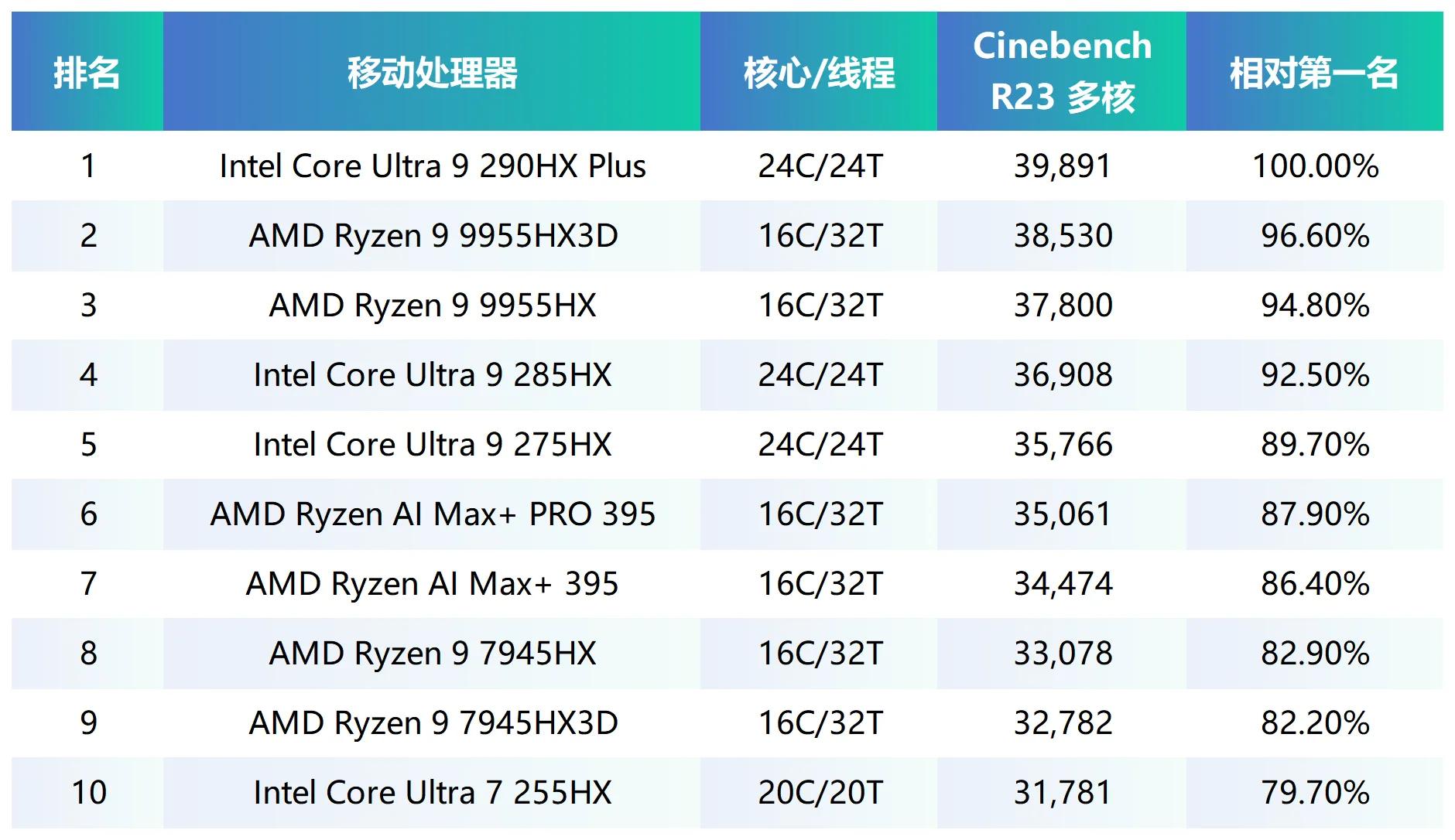
Image source: Lei Technology
Therefore, if you have creative demands, you can first lock the HX series CPUs, then select according to your own budget, and give priority to the Ryzen 9 7000 series and above and Core Ultra 7/9 200 series.
What about daily use, no games and no multi-core demands? That's easy. Except for CPUs before the 13th generation Core and before the Ryzen 7000 series, almost all can be selected. Daily office work such as making spreadsheets and PPTs can be done easily. Therefore, some thin and light laptops released a year or two ago are actually the best choice at present, with configurations that are not outdated but have good prices, much better than the new models.
In short, the selection of laptops is: For gaming laptops, look at the GPU; for creative laptops, check whether the CPU is with HX; for office laptops, if you value battery life, choose the 3rd generation Core Ultra, if you don't care about battery life, you can choose any one, just avoid the 13th generation Core, Core N and Ryzen 5000 series.
2026 Has Become the Worst Year for the PC Industry
I have to say that this year's PC market is really difficult. No matter for users or manufacturers, the impact of rising hardware prices is very huge. The former has to spend 30-50% more money than in previous years to buy almost the same configuration, while the latter has to face the situation that a large number of users switch to second-hand products or postpone purchasing computers, and the market shipment expectation has plummeted.
At least this year, the past logic of "buy new instead of old" can no longer be regarded as the truth. New hardware does have stronger performance, but the price increase is also quite exaggerated, which makes old products such as the 5800X3D, RTX 3060, and Ryzen 7000 series regain their competitiveness.
So when buying a computer now, Xiao Lei suggests that you don't pay too much attention to which year the chip was released, but see if it meets your own needs. As long as you don't blindly believe that "the newer the better", figure out your own demands and budget, you can still buy products with good cost performance in this market where new and old chips are fighting together.
This article is from "Lei Technology", authorized to be released by 36Kr.