Can Kimi K3 Run on 8GB RAM? Complete Guide to 2026 Local Deployment Large Model Configuration
A CPU with 8.24GB of memory can run Kimi K3, a large model with 2.78 trillion parameters, smoothly without even needing a dedicated graphics card.
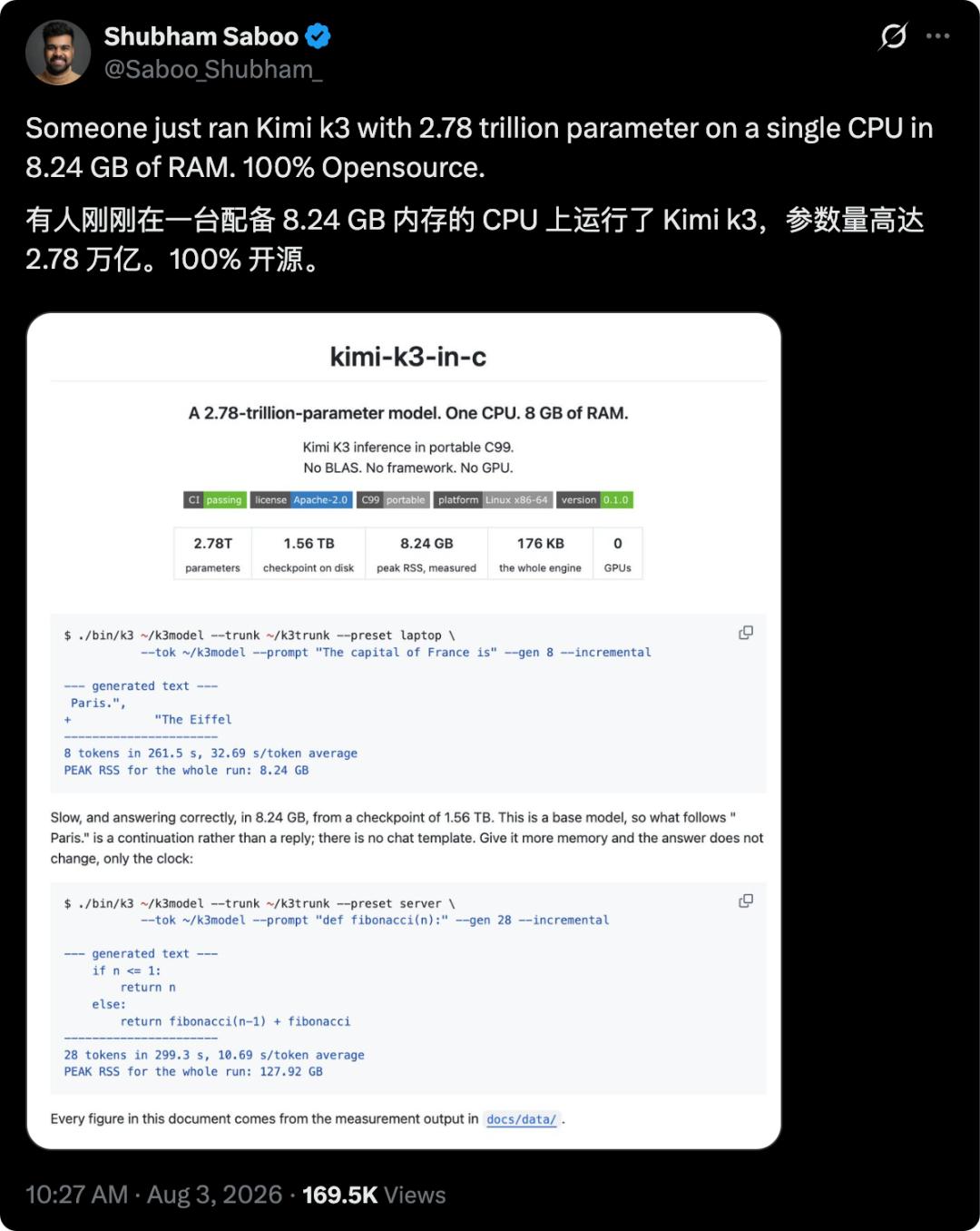
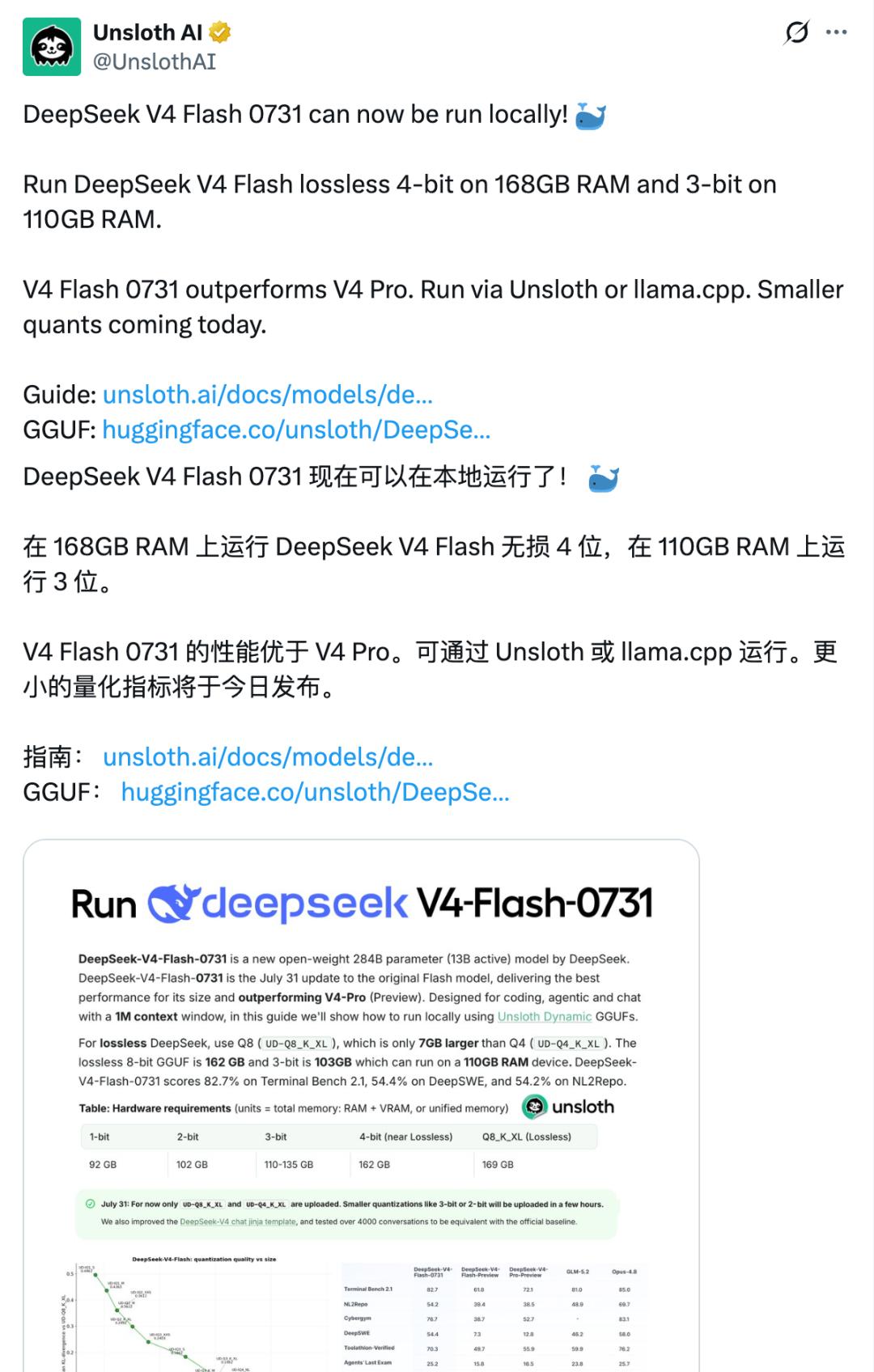
The full-performance version of DeepSeek V4 Flash can also run on NVIDIA's DGX Spark, or even a Mac computer equipped with 128GB of RAM.
DeepSeek R1, which made a stunning debut in early 2025, set off a massive wave of local deployment. A large number of detailed guides taught users how to avoid the "Server busy, please try again later" error of DeepSeek, and build an unrestricted DeepSeek R1 on their own with the computers at hand.
This year, the parameters of large models have almost grown from hundreds of billions to trillions. The 671B R1 looks completely out of place when compared with the current 2.78T Kimi K3 and 2.4T Qwen3.8-Max.
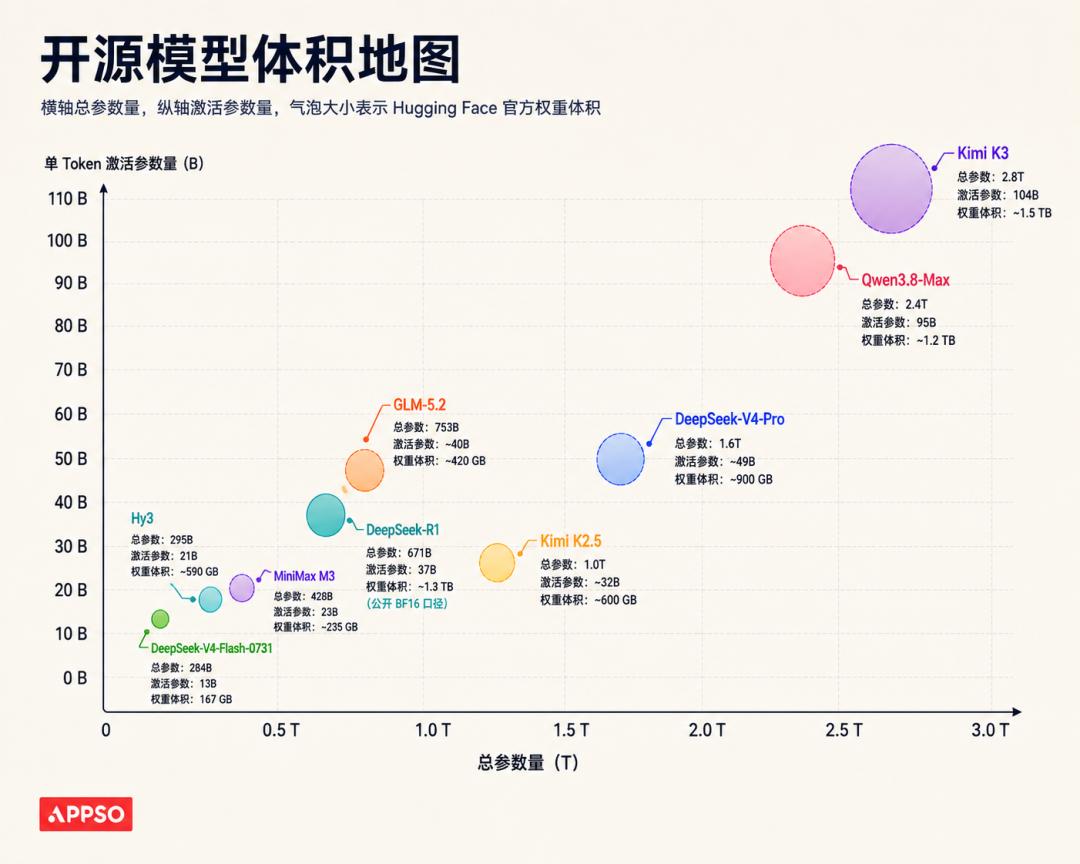
The fast-response version of DeepSeek V4 Flash stays at 284B, but the total parameters of the V4 Pro preview version have also reached 1.6T.
The same changes have taken place in hardware. Against the backdrop of a sharp rise in memory prices and the explosion of local Agent tools, products such as Mac Mini have been out of stock directly, and Apple has raised the starting price of product lines including Mac. The DGX Spark launched by Jensen Huang at the end of last year has also risen from the suggested retail price of $3999 to a starting price of $4699.
One day in the AI world equals one year in the human world. The local deployment tutorials from that time have seen new changes when applied to trillion-parameter large models today.
How to deploy a local large model in 2026? What configuration is required? What kind of workflow is suitable for self-deploying a large model? Which large model to deploy? This article will explain all these clearly for you.
TL;DR Summary Version
Kimi K3 can run on 8GB of memory, but it requires 1.7TB of SSD and takes half a minute to generate one Token.
For local deployment, check the video memory capacity first, then the memory bandwidth.
8GB of VRAM is suitable for 4B-7B models; 16GB can run 9B-14B models; 24GB supports 24B-27B models; 120B models usually require more than 80GB of VRAM or large-capacity unified memory.
DeepSeek V4 Flash is bringing cutting-edge models to personal desktops.
How Kimi K3 Runs on Such Low Memory
Input "The capital of France is", and the program outputs "Paris".
This GitHub project named kimi-k3-in-c completes the CPU inference of Kimi K3 with less than 200KB of C language code. There is no PyTorch, no CUDA, and the entire program only relies on the compiler, OpenMP and the system math library.
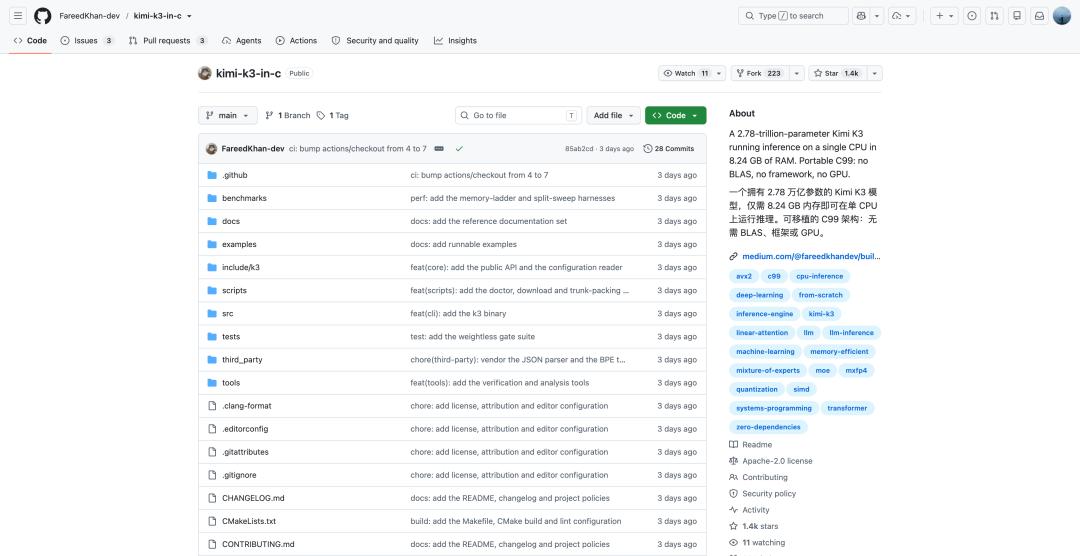
However, the 2.78 trillion parameters are not stuffed into this 8GB of memory. The complete weights still occupy about 1.56TB of hard disk space. What the project actually compresses is the part of the model that must stay in memory at any time.
Simply put, developers put all the other weights of the model on a solid-state drive. According to the official model card of Kimi K3, the model has a total of 2.8 trillion parameters, but each time it processes a Token, it only activates about 104 billion of them, accounting for 3.7% of the total.
Kimi K3 has a total of 93 layers, 92 of which use MoE. Each layer is equipped with 896 different experts, and the router will select 16 of them to participate in the calculation according to the content of the current Token.
The remaining 880 experts are completely not needed in this round.

Since each layer only uses 16 experts, the program only needs to read these 16 experts from the hard disk according to the routing result. But after the routing experts are left on the hard disk, there are still 113.49GB of unavoidable dense weights in the model.
This includes the attention layer, router, normalization, shared experts, Embedding and output layer. They need to participate in the calculation almost every time a Token is generated, and ordinary MoE offloading schemes usually put this part completely into memory.
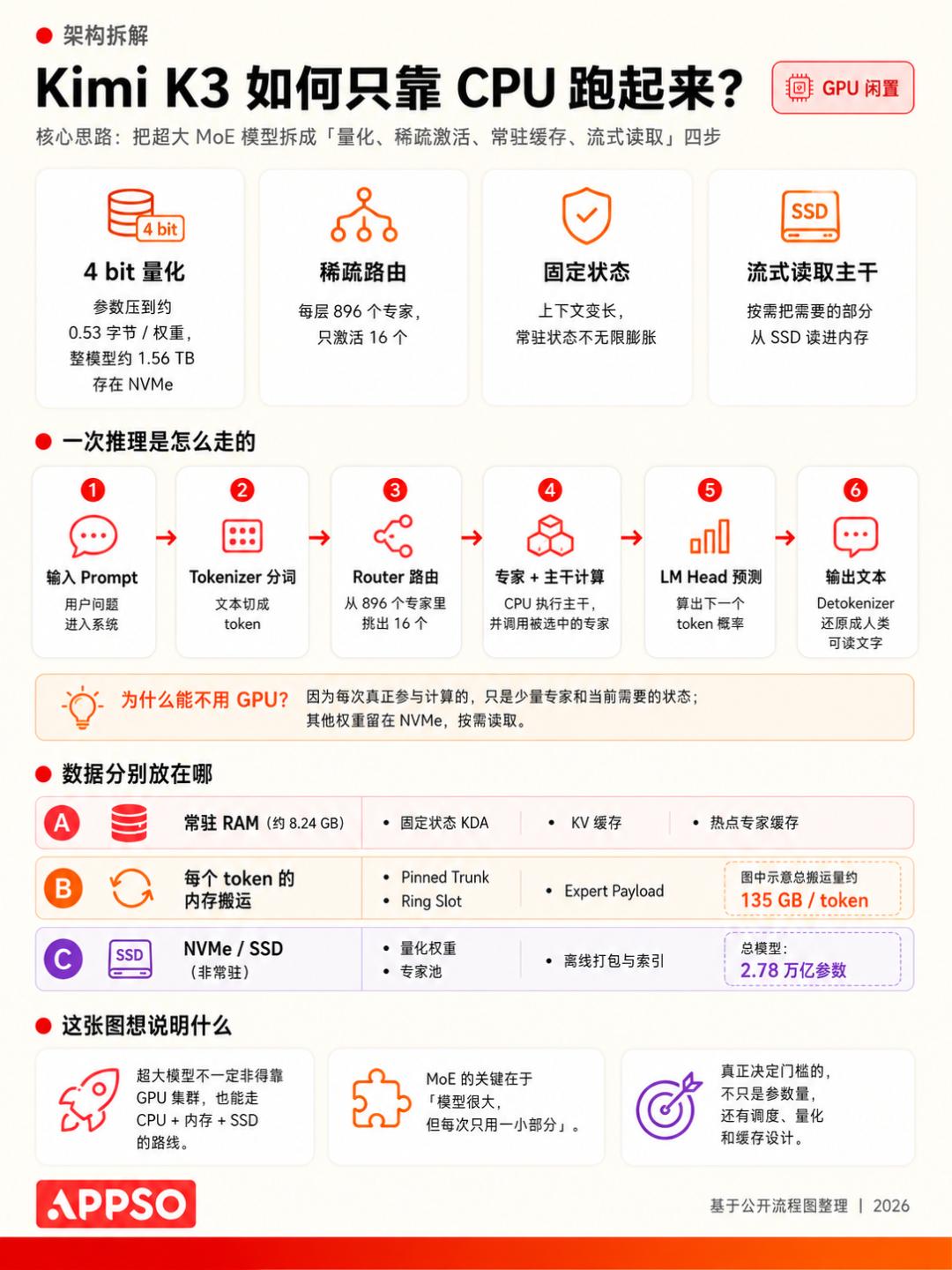
kimi-k3-in-c performs another stream processing. The original Kimi K3 weights are divided into 96 model weight files, and the weights in the same layer are scattered in huge shards. The project first runs a packaging script to reorganize the dense weights of 93 layers into a continuous file of about 109GB, and each layer corresponds to a fixed disk location.
After the inference starts, the program will fix as many layers as possible according to the memory budget. For the parts that cannot fit, a circular buffer is used to read layer by layer: the current layer comes in, completes the calculation, frees up the buffer, and the next layer continues to overwrite it.
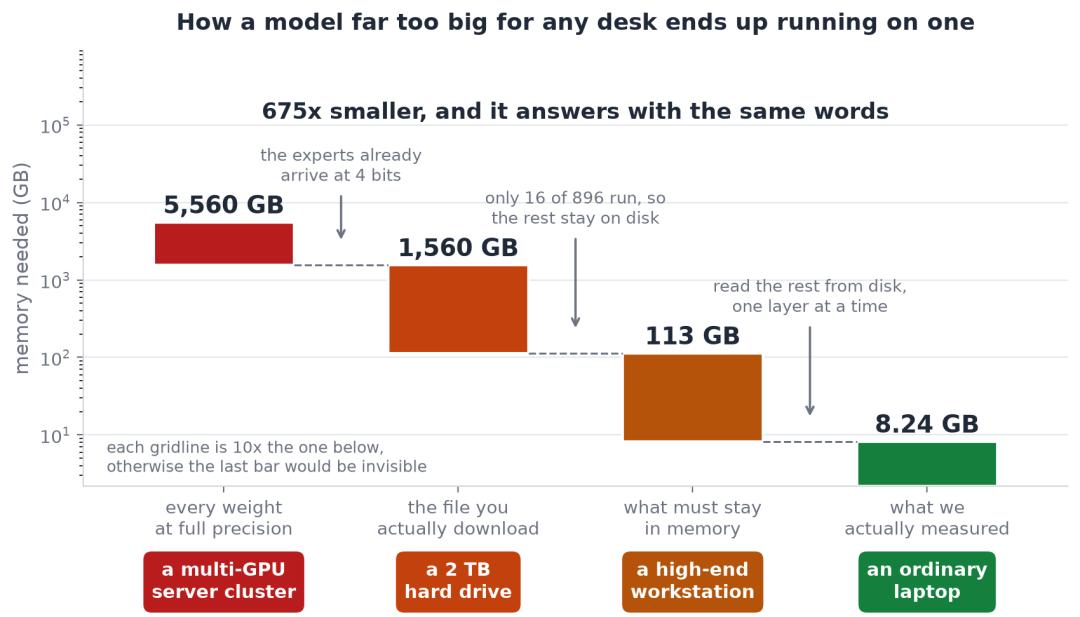
In the end, the entire memory reduction process boils down to four numbers:
- 5.56TB: The theoretical volume when all parameters use BF16;
- 1.56TB: The officially released MXFP4 weights;
- 113.49GB: The part that needs to continuously participate in the calculation after the expert weights are left on the disk;
- 8.24GB: The peak memory actually measured after even the dense backbone is modified to be read layer by layer.
The 69 KDA layers of Kimi K3 also provide great help. KDA does not need to save a complete KV Cache for each historical Token, and only maintains a recursive state of fixed size; the other 24 MLA layers compress the attention cache through low-dimensional representation.
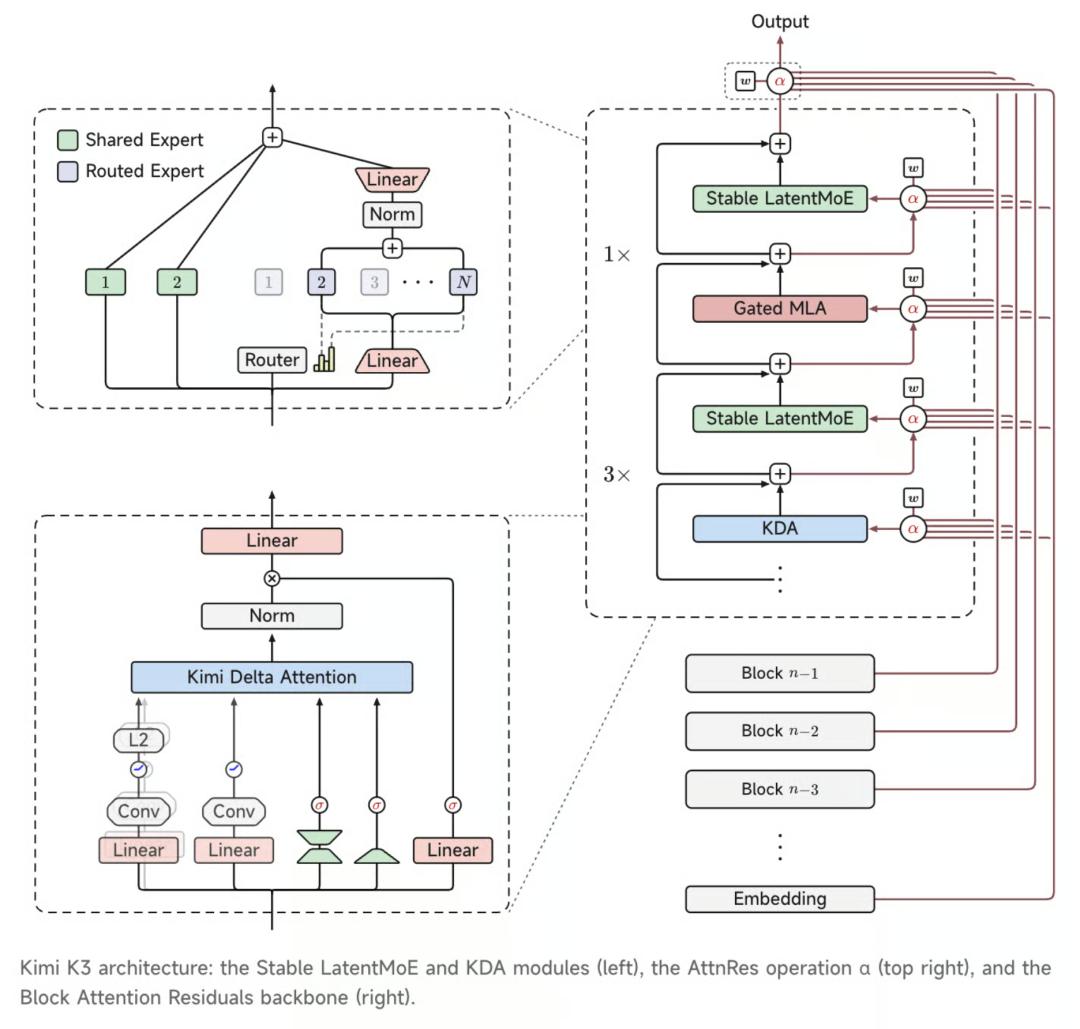
Kimi K3 framework. KDA stands for Kimi Delta Attention, which is an attention mechanism
Combined with incremental decoding, the first round processes the complete Prompt, and each subsequent round only needs to process the newly generated Token. The memory will not get out of control rapidly as the generation length increases, so the program has the opportunity to leave more space for weight scheduling.
The Cost of 8GB Memory: Half a Minute Per Token
Generating 8 Tokens takes a total of 261.5 seconds, and the memory usage drops to 8.24GB. The real cost is transferred to the hard disk and time.
Under the minimum memory configuration, Kimi K3 needs to read about 25.83GB of expert weights for each Token generated. Since there is no space to fix the dense layers, about 108.81GB of backbone weights will also be rescanned.
This means that behind one Token, there may be more than 130GB of disk data to be transferred.
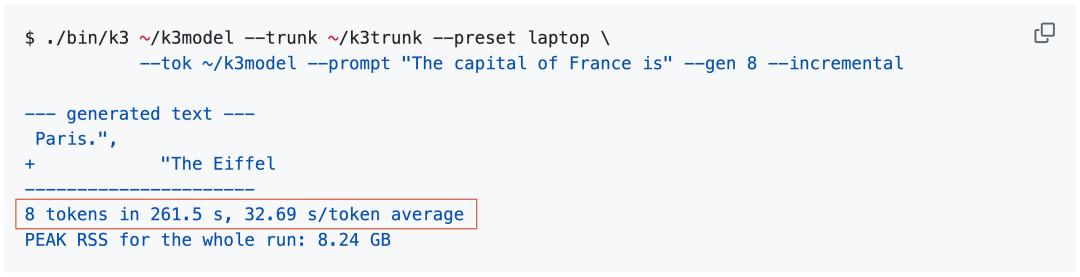
The author measured that the 8GB configuration takes an average of 32.69 seconds to generate one Token, with a speed of about 0.03 Token/s. The 8 Tokens following "The capital of France is" took more than four minutes in total.
In another set of memory ladder tests under unified conditions, the memory increased from 8GB to 224GB, which is 28 times larger, but the speed only increased by about 1.7 times. During the entire operation process, about 40% to 60% of the time is spent waiting for the hard disk.
Therefore, the key hardware of this solution has shifted from GPU to NVMe. Ordinary mechanical hard disks can hardly afford such random reading, and network storage will also significantly slow down the speed. The project requires at least about 1.7TB of space to place the 1.56TB original weights and the reorganized 109GB backbone file.
If the hard disk can only stably read 1GB per second, moving data alone may take more than two minutes to generate one Token.
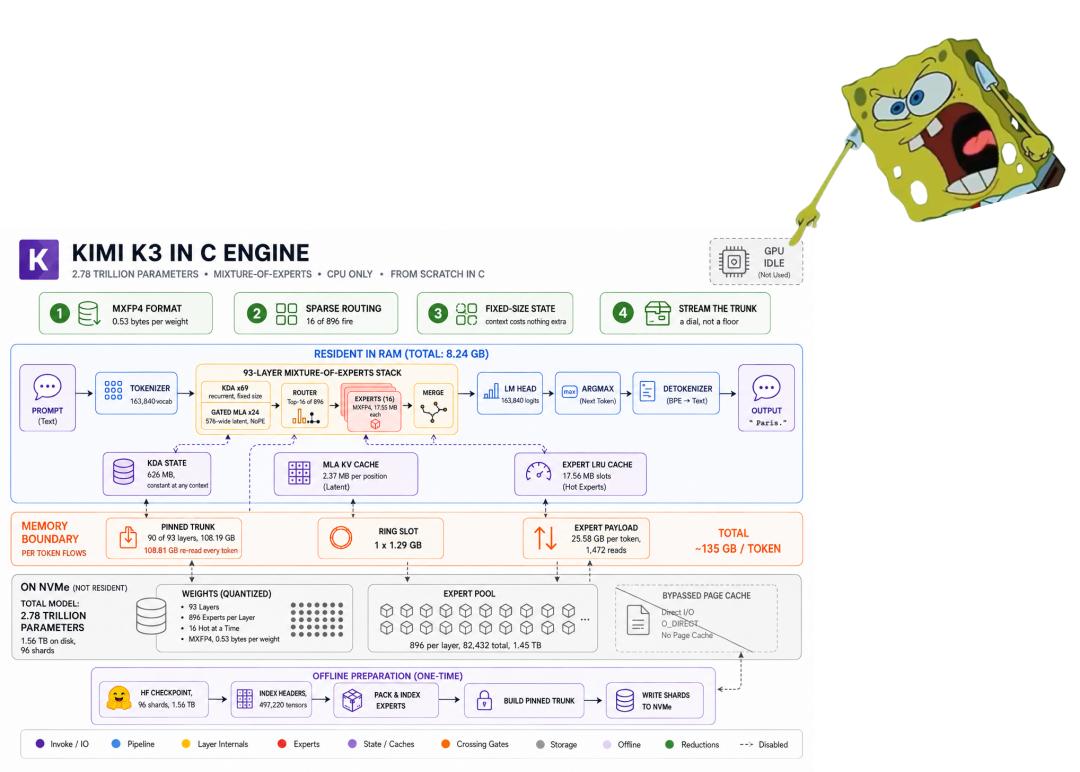
The most eye-catching description of the entire project is "One CPU, 8GB RAM" written on the homepage. But if you continue to check the test environment, you will find that this sentence needs to add some additional conditions.
All the author's data comes from a dual-socket AMD EPYC 7763 workstation, which has a total of 124 CPU cores, 228GB of memory and a 3.2TB NVMe SSD. The machine is also equipped with four NVIDIA L40 GPUs, but the entire test process does not use the GPU at all.
The so-called 8GB means that the author limited the process to 8GB of memory through Linux cgroup (a Linux resource management mechanism), and then measured a peak RSS (short for Resident Set Size, which refers to the actual physical memory occupied by the process) of 8.24GB.

It proves that the inference engine can complete the calculation under this memory budget, but it has not been actually tested on an ordinary 8GB laptop.
Perhaps the "One CPU" in the project is more appropriately understood as CPU-only. There is still a huge gap in computing power between 124 server cores and ordinary laptop processors.
Although the whole experiment looks like a gimmick, because it cannot make an old laptop get the complete Kimi K3 directly, and it is difficult to replace the existing API service; some netizens said that from the perspective of engineering verification, this project is done quite carefully.
And it also proves one thing: The total number of parameters of the model can no longer be directly equated with the memory threshold for deployment.
What Can a Computer with 8GB Memory Do
To choose the right hardware, you must first understand the two core bottlenecks of local deployment: video memory capacity and memory bandwidth.
For video memory, the video memory required for model operation not only includes the model weights themselves, but also reserves space for KV Cache (context cache) and activation values: Model weight (GB) ≈ Number of parameters (B) × Quantization bits ÷ 8 × 1.15. Then KV Cache needs to be added when the model is running, so the total memory requirement ≈ Model weight + KV Cache + 1~3GB running buffer.
