Hand-drawn sketches are directly transformed into posters, and the domestic open-source multimodal model has brought images to life.
Can a hand-drawn sketch with only simple lines, column frames and process arrows be directly turned into a high-precision poster of "Deep Diving Equipment Process" that meets commercial publishing standards after being input into AI?
In the case below, the model not only identifies equipment such as oxygen cylinders, masks, and diving computers in the sketch, but also retains the five-part structure of "Equipment Overview, Function Details, Pre-Dive Check, Safe Diving Process, Post-Dive Check", and supplements pictures, icons and descriptive text for different columns, turning the original rough concept into a complete design in a dark blue tech style.
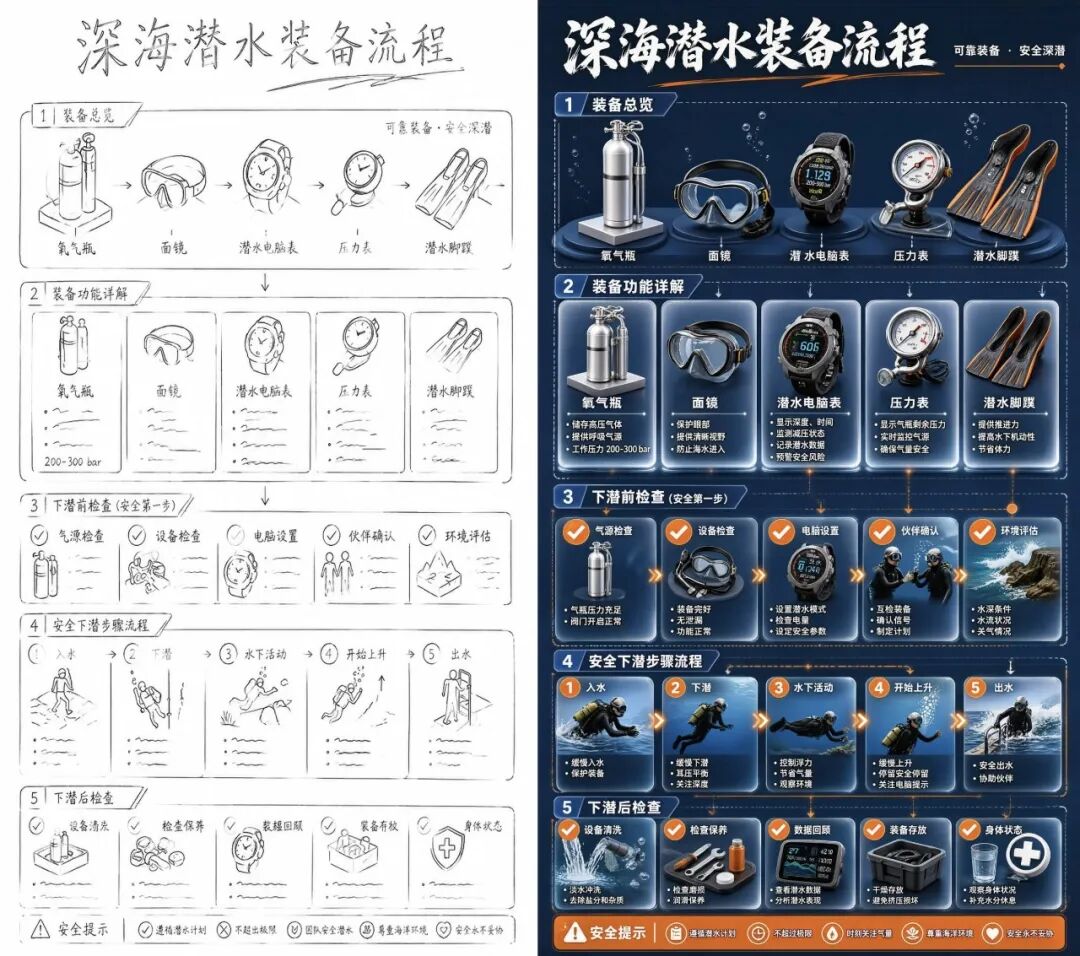
The model generates a colored poster based on the sketch
From sketch to colored poster, AI needs to understand the content and structure, complete the details as required, unify the style, and preserve the parts that cannot be modified.
The task is completed by SenseTime's latest open-source lightweight native unified multimodal model SenseNova U1.5-Lite-Preview.
01. 8B Lightweight Size Delivers Powerful Generation and Editing Performance
As an upgraded version of the SenseNova U1 open-source model, the biggest highlight of U1.5-Lite-Preview is: with a lightweight scale of only 8B-MoT, it integrates a full set of capabilities including image recognition, visual reasoning, 4K ultra-high-definition generation and high-precision editing.
It inherits SenseTime's self-developed NEO-Unify native unified multimodal architecture, abandons the inefficient model splicing mode in traditional solutions, and realizes unified representation and interaction of multimodal information within a single network.
Judging from the evaluation results, the Qwen-Image-Bench score of U1.5-Lite-Preview has jumped significantly from 47.14 points of U1 to 55.20 points. In the GEdit-Bench test that measures image editing capabilities, both the English item (8.17 points) and the Chinese item (8.05 points) outperform a large number of open-source and closed-source models with large parameter sizes.
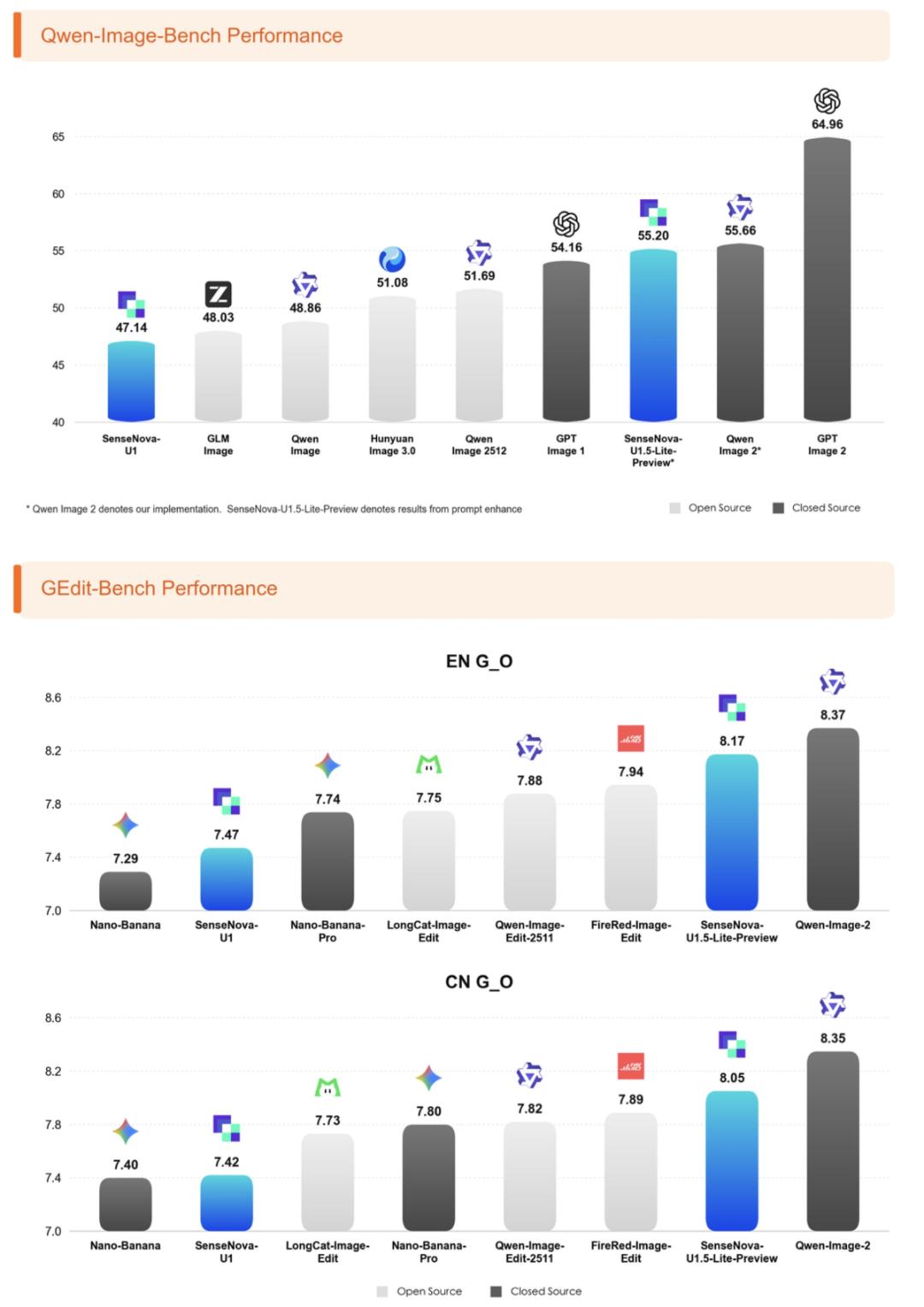
SenseNova U1.5-Lite-Preview evaluation results
In addition, the most intuitive change of SenseNova U1.5-Lite-Preview is reflected in capabilities such as 4K image quality, complex prompt execution, reference image creation and image editing.
At present, the model has been open-sourced globally, and developers can access and deploy it for free through Hugging Face, GitHub and ModelScope communities.
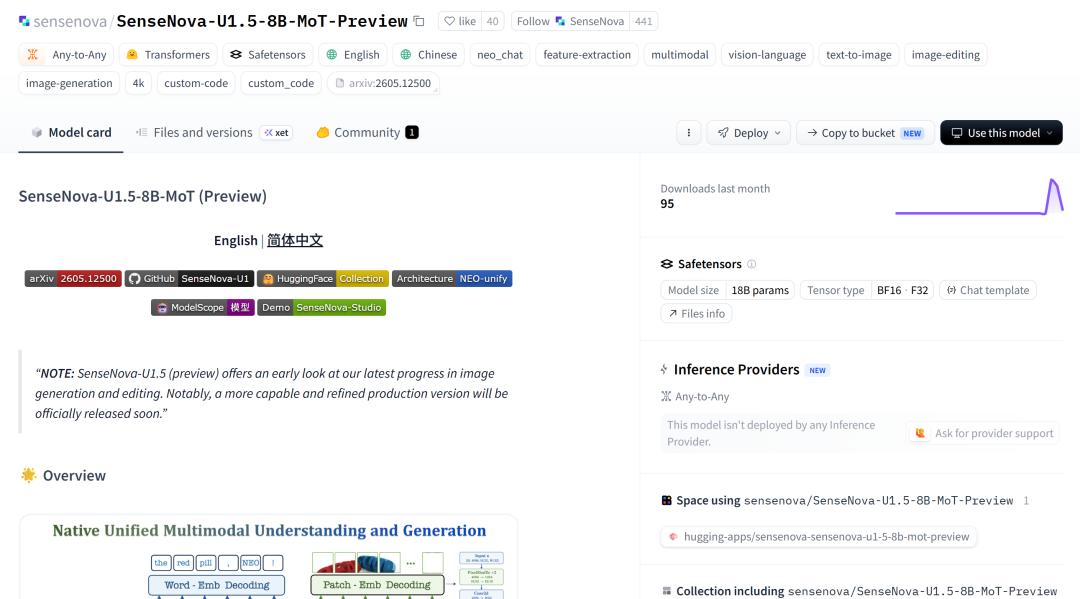
Open Source Address:
GitHub:
https://github.com/OpenSenseNova/SenseNova-U1/blob/main/docs/u1.5_preview.md
Hugging Face:
https://huggingface.co/sensenova/SenseNova-U1.5-8B-MoT-Preview
ModelScope Community:
https://modelscope.cn/models/SenseNova/SenseNova-U1.5-8B-MoT-Preview
02. It Can "Understand" Complex Prompts, with Simultaneously Upgraded 4K Image Quality
If users only want to generate pictures with clear subjects and simple compositions, a few natural language descriptions are usually enough. However, when creating infographics, commercial posters and brand visual content, users often need to specify the subject, layout, text, style, and content that needs to be retained or avoided at the same time, which is equivalent to submitting a complete creation plan to the model.
Based on U1, SenseNova U1.5-Lite-Preview improves prompt following ability and long-context visual control ability. Faced with long, multi-constraint prompts, the model can implement detailed requirements in the same picture.
The strong prompt following capability of U1.5-Lite-Preview does not rely on memorizing fixed templates. Even without highly dependent dedicated Prompt Enhance formatted data training, the model can stably execute long, multi-constraint and hierarchical visual instructions, which is one of the advantages brought by the native unified multimodal architecture.
This case requires the model to present the 24 solar terms in a horizontal long scroll, divided into multiple vertical columns in chronological order. Each column should contain the name of the solar term, the date and the corresponding natural landscape, while maintaining the Chinese painting style, and showing the transition of the four seasons through changes in plants, weather and colors.
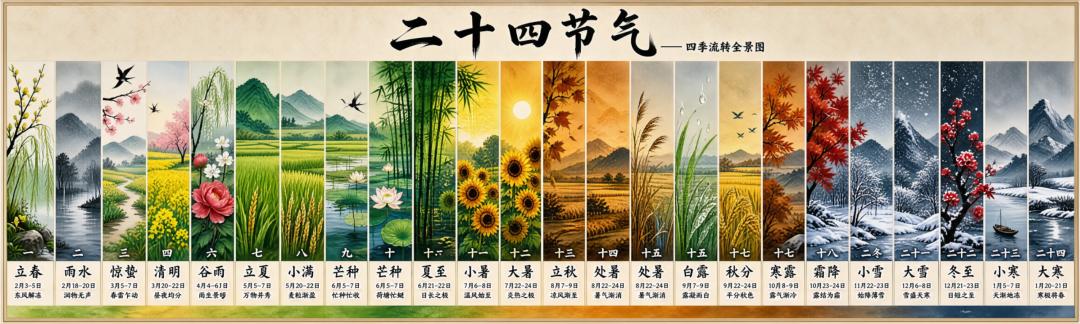
24 solar terms panorama generated by the model
Judging from the effect, the picture gradually transitions from willow trees and flower fields in spring to lotus and sunflowers in summer, then to autumn wheat fields, red leaves and winter snow mountains. The 24 columns are densely packed with content, but the names of solar terms, pictures and text information maintain a clear hierarchy, and the color changes between the four seasons are also natural and coherent.
Of course, complex creation does not mean that users have to write thousands of words of prompts by themselves. SenseTime has also designed an experimental Prompt Enhance Skill, which can supplement relatively short ideas into a structured creation plan including subject, layout, style, text and constraints. Simple tasks can be described directly, while complex tasks can use this tool to make requirements more complete.
After understanding complex requirements, the picture must also withstand zooming in. SenseNova U1.5-Lite-Preview natively supports 4K image generation, which puts forward higher requirements for details such as human skin, product materials, building textures and environmental light and shadow, as well as the consistency of the entire picture.
In this 4K picture of fishermen sorting fishing nets, the interlaced knots of the fishing nets, the mottled paint on the hull, and the rust on the mechanical equipment are all clearly visible. The water reflection in the distance, the houses on the shore and the power towers also retain the spatial hierarchy. The picture contains a large number of scattered objects, and the boundaries between people, fishing nets and cabin equipment remain relatively clear, and the overall light and shadow and colors are also relatively unified.
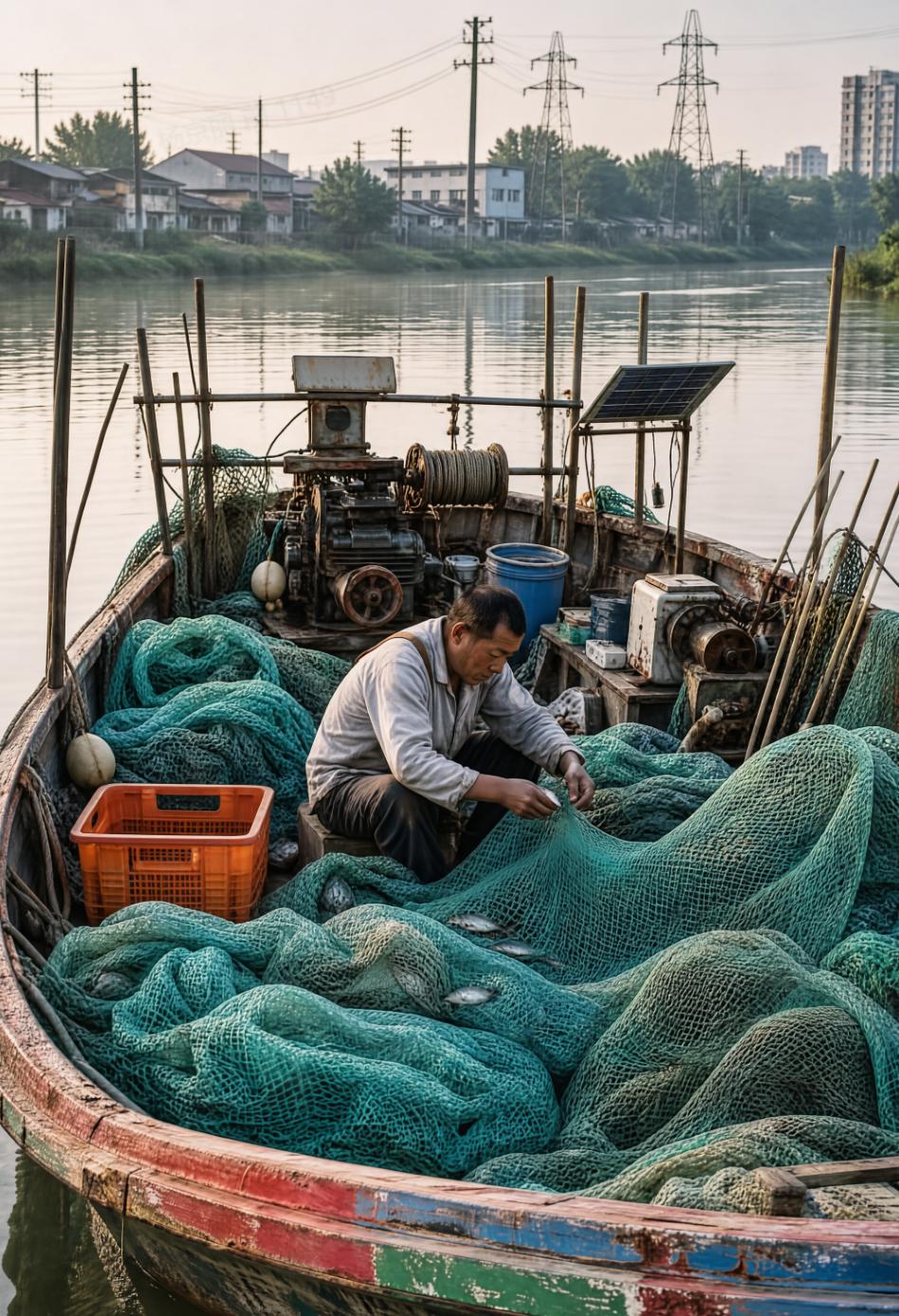
4K image of fishermen sorting fishing nets generated by the model
From complex prompts to 4K details, SenseNova U1.5-Lite-Preview can not only draw the required content, but also make the generated results withstand zooming in.
03. Understand Reference Images for Re-creation: Both Learn Styles and Combine Materials
In addition to text-to-image generation, SenseNova U1.5-Lite-Preview can also create based on reference images.
Sometimes users want to learn the color scheme, composition and design language of one image, and then replace the theme with their own content; sometimes they need to use characters, products, scenes or other elements from multiple images respectively to combine originally unrelated materials into a new image.
This type of task requires the model to understand the images, determine what to extract from each image, and how to reorganize them according to new requirements.
Relying on the native unified multimodal architecture, SenseNova U1.5-Lite-Preview can identify and understand images, and create according to user needs.
In the following case, the model takes the renewable energy themed poster as a reference, follows its sepia retro texture, large red-and-white text layout and silhouette composition, and regenerates a new poster with the theme of "Ancient Spice Trade".
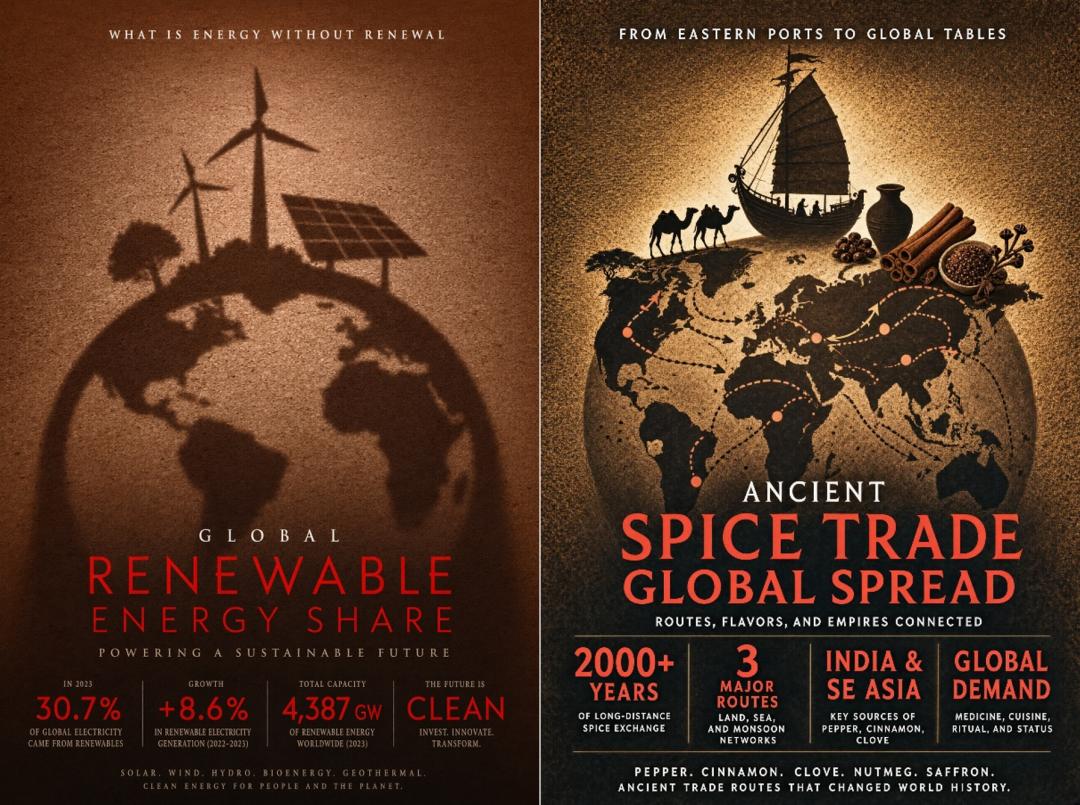
The model creates based on the style of a single reference image
Judging from the effect, the model replaces the wind turbines and solar panels in the original image with sailboats, camels, pottery jars and spices, and adds cross-regional trade routes on the globe. The theme and content of the new poster have been completely changed, but the picture composition, color, text hierarchy and retro grain texture are consistent with the reference image.
If the creation requires multiple materials, the model can also extract content from different images respectively.
Looking at this set of multi-reference image creation, the three character reference images respectively show a blonde girl in yellow clothes, a black-haired girl with fox ears in red clothes, and a girl in blue clothes. The model needs to extract their appearance, clothing and accessory features, and then put the three characters into the same scene.
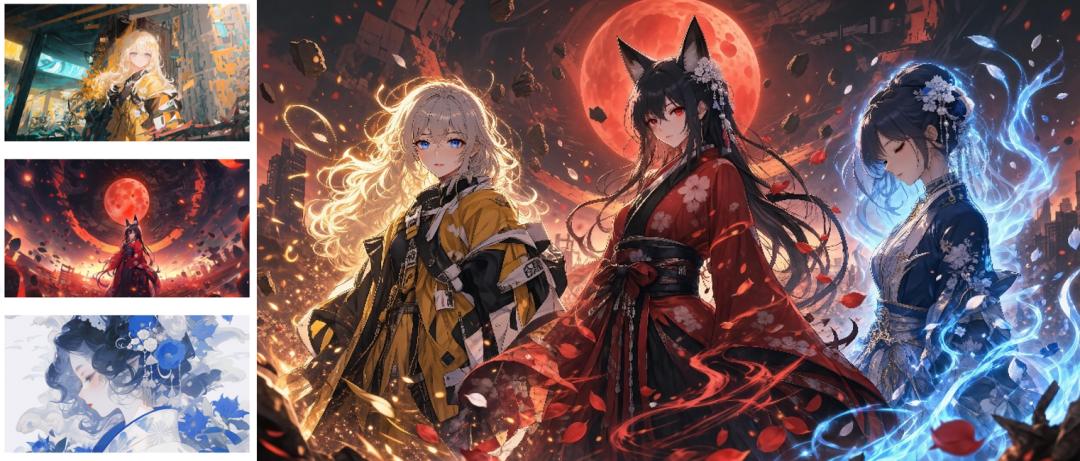
The model creates based on multiple reference images
Judging from the effect, the hair color, clothing color matching and iconic decorations of the three characters are well preserved. The picture also uses golden firelight, red petals and blue energy to echo different characters respectively. The character positions, light and shadow, and front-back hierarchy are reorganized to form a unified composition.
04. Modify Text and Replace Elements: AI Starts to Handle Fine Image Editing
Reference image creation focuses on "what to extract from the input image and how to reorganize it", but in many cases, users already have a good image and only want to modify one part of it.
For example, the product poster has been designed, but the launch date is temporarily adjusted. The user only wants to replace the date, but the AI regenerates the entire poster, and the original satisfactory composition, text layout and picture style also change accordingly.
This is exactly the key improvement of SenseNova U1.5-Lite-Preview this time. It can accurately judge "which part needs to be modified and which part cannot be changed". Relying on the unified architecture, it can complete the whole process of image viewing, positioning and image editing in the same model.
If you want to adjust the layout of picture elements, change an English poster to Chinese, or replace a certain product or a certain piece of text in the picture, the model can complete the modification according to the requirements without affecting other content.
In the layout adjustment of the bridge reinforcement poster, the model enlarges the comparison picture of "before and after renovation" and moves it to the center of the picture, adjusts the main title and four advantages to the lower part, while retaining the railway bridge in the background, the original text content and the aged industrial style. The modified information is more prominent, the picture hierarchy is clearer, and other parts that do not need adjustment remain basically unchanged.
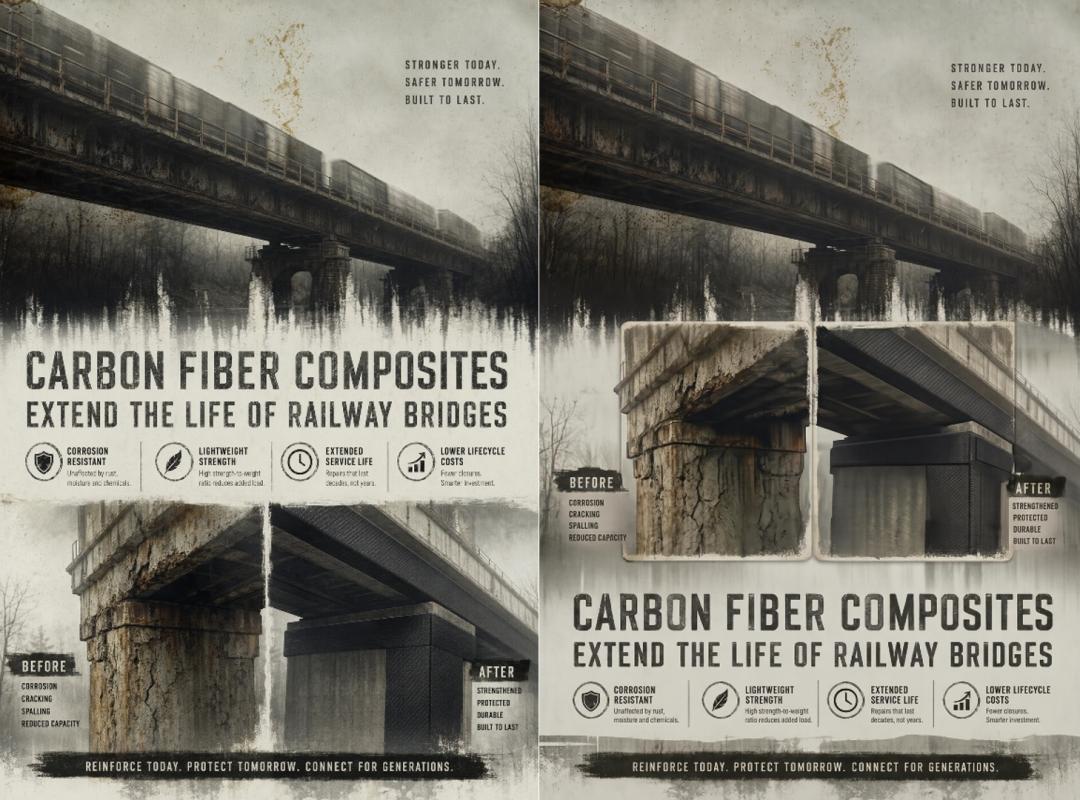
The model modifies the poster layout according to prompts
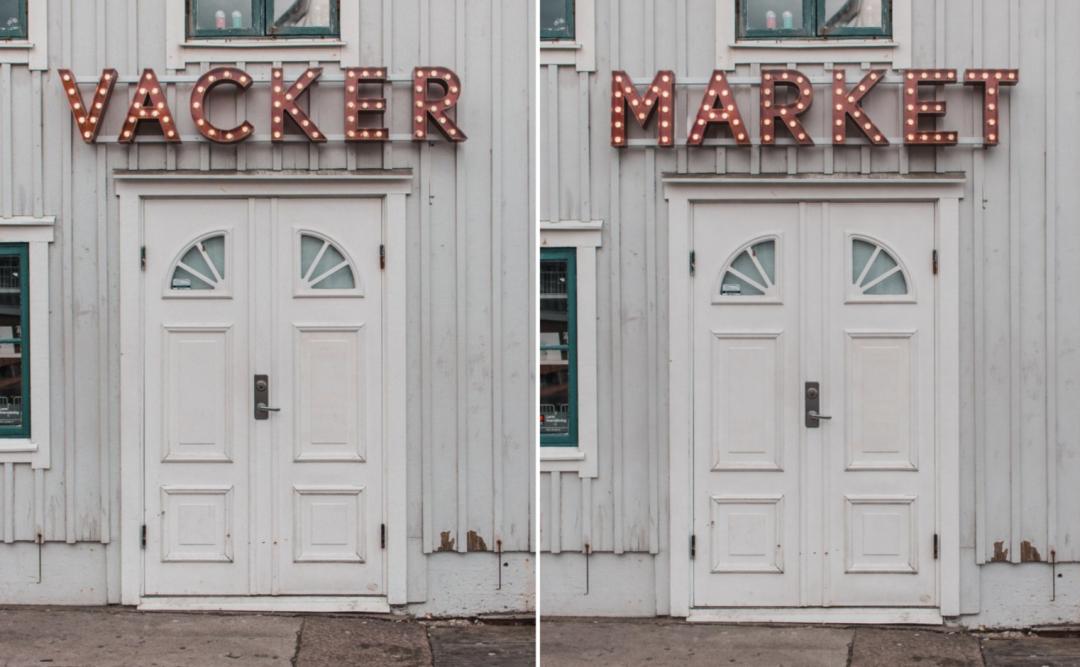
In addition to adjusting the layout of the entire poster, the model can also modify the text in the image separately. At this time, while replacing the content correctly, the model also needs to retain the original font, material, light and shadow, and perspective relationship, so that the new text still looks like part of the picture, and other parts cannot be changed.
Prompt: Please replace the current displayed "VACKER" in the bulb-formed sign above the door with "MARKET".
The model modifies the poster text according to the prompt
Judging from the results, the model accurately modified the text, while retaining the original 3D shape of the sign, bulb arrangement, metal texture and lighting effect, and other areas such as doors, windows and walls have not changed.
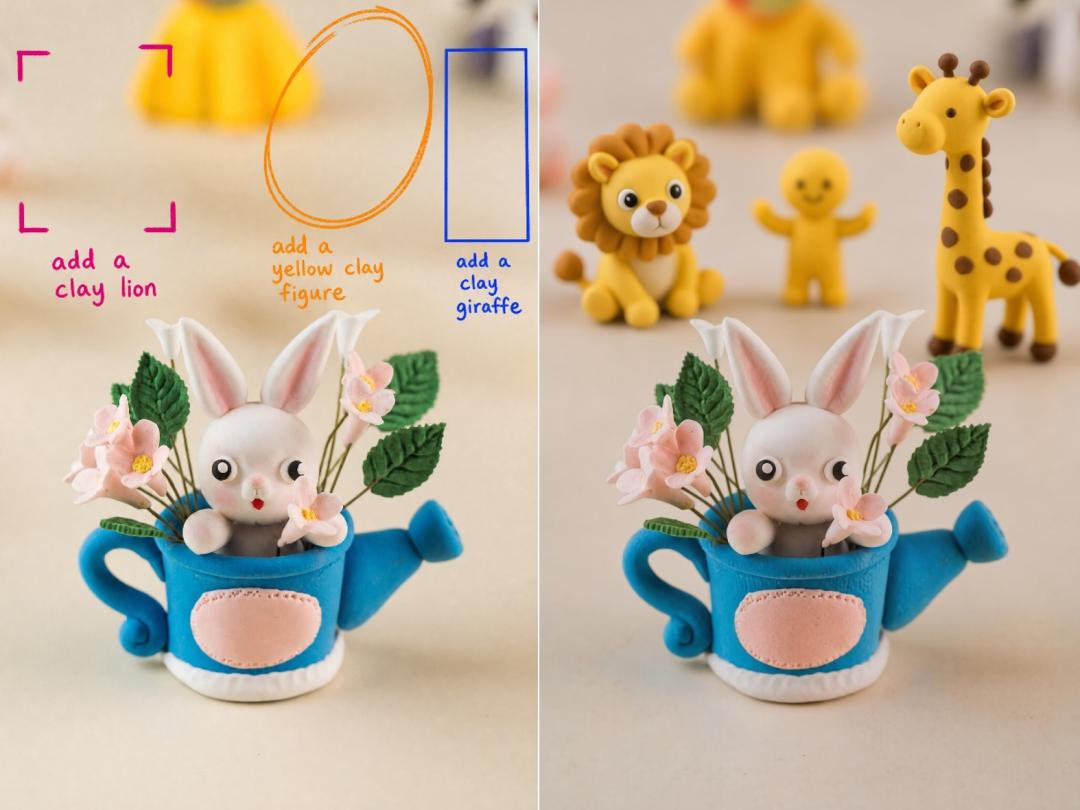
If it is not easy to clarify the modification position only by text, users can also directly circle the target area in the picture, and then specify what to replace, add or delete through prompts.
The model modifies the image according to the circled marks
In this case, three editing areas are specified through colored marks, with instructions "add clay lion", "add yellow clay figure" and "add clay giraffe" respectively. The model adds the corresponding characters according to the marked positions, and makes the clay texture, light and shadow and depth of field of the new elements consistent with the original image. The rabbit, flowers and blue kettle in the foreground remain basically unchanged, realizing simultaneous editing of multiple specified areas.
From local elements, picture text to specified areas, SenseNova U1.5-Lite-Preview brings a variety of editing methods of different granularities. The generated image is no longer just a one-time output result, but can become the basis for the next modification. Users can continue to adjust the copy, layout and picture elements, and gradually modify the result to be