Stop writing prompts. The official Claude team teaches you to automate tasks with 4 types of loops
The real threshold for loops isn't keeping the AI running nonstop, but whether it can hit the brakes on its own.
"No more writing prompts" — this phrase has been going viral in the AI community lately.
From Peter Steinberger, the father of OpenClaw who now leads next-gen personal agent development at OpenAI, to Boris Cherny, creator of Claude Code, these Silicon Valley leaders are collectively shifting their focus to "loops".
Addy Osmani, the Google engineer who coined the term "loop engineering", is also at the forefront of this trend.
Cherny says he barely writes manual prompts anymore.
An agent now writes prompts for Claude on his behalf, and he only converses with this new Claude that "coordinates everything".
He even made a bold statement: Ten years from now, loops and similar capabilities will be one of the professional achievements he is most proud of.
Steinberger goes even further: Stop writing prompts for coding agents. What you should be designing are the loops that feed them prompts.
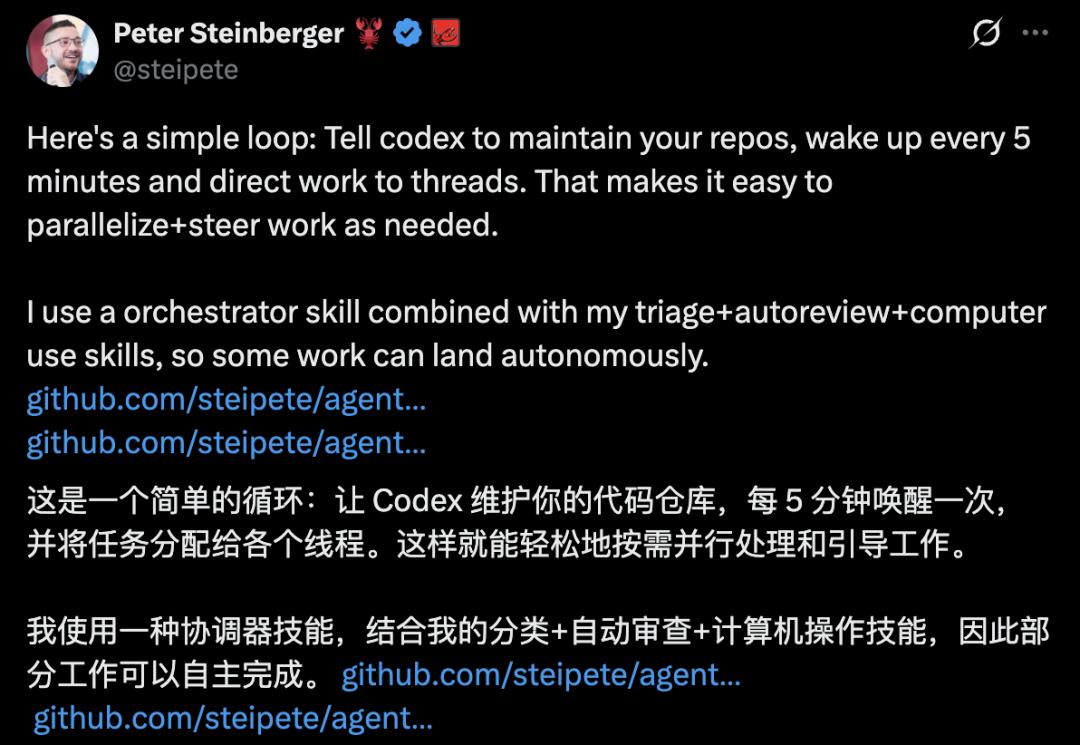
He also demonstrated his own loop on X: setting Codex to wake up every 5 minutes to automatically maintain code repositories and assign tasks, with some workflows running fully autonomously.
What exactly is this "loop" that industry leaders keep talking about?
Recently, the Claude Code team published an official blog post that clearly defines the concept, breaks it down into four distinct loop types, and establishes engineering standards for agents to operate autonomously.
The Claude Code team officially defines "loops" in their post, identifying four typical types: turn-based, goal-driven, time-triggered, and proactive.
At its core, AI programming is evolving from "writing a single instruction" to "designing a self-operating system".
One prompt yields a single response, but a loop creates a system that keeps working for you even after you close your laptop.
Programmers are thus transitioning from content creators to system designers.
Four Loop Types, Four "Stopping Conditions"
What exactly is a loop?
After prolonged debates on X with diverse answers, the Claude Code team offered a clear definition:
A loop is a process where an agent repeatedly executes rounds of work until a stopping condition is triggered.
The four loop types correspond to four distinct "stopping conditions" — this is the key to understanding Claude Code's technical blog on loops.
By analyzing dimensions such as "how it's triggered, how it stops, what primitives it uses, and what tasks it suits", Claude Code categorizes loops into four types.
The first type: turn-based loop.
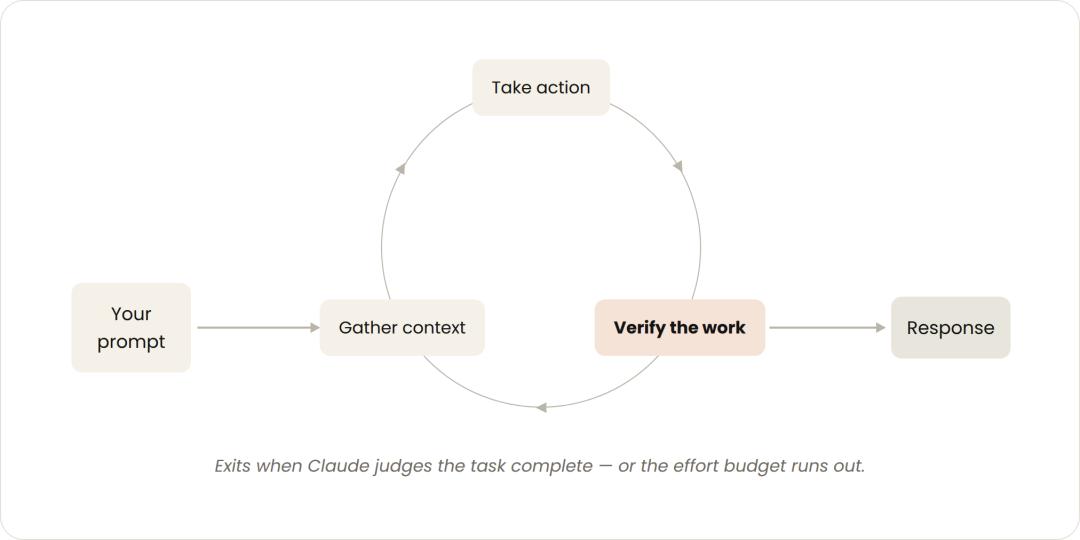
Turn-based loops are controlled manually by humans round by round, with each prompt initiating a new execution round. (Source: Claude Official Blog)
Humans maintain full control round by round: you write a prompt, the AI runs one round of work, you check the results before writing the next prompt, keeping the steering wheel in your hands the entire time. This type is ideal for scattered short tasks that don't require formal workflows or scheduling.
To reduce back-and-forth interactions, you can document your manual validation steps in a SKILL.md file, allowing the AI to perform self-checks.
The more quantifiable your checks are, the better the AI can independently verify correctness, and the less oversight you'll need to provide.
The second type: goal-driven loop (/goal).
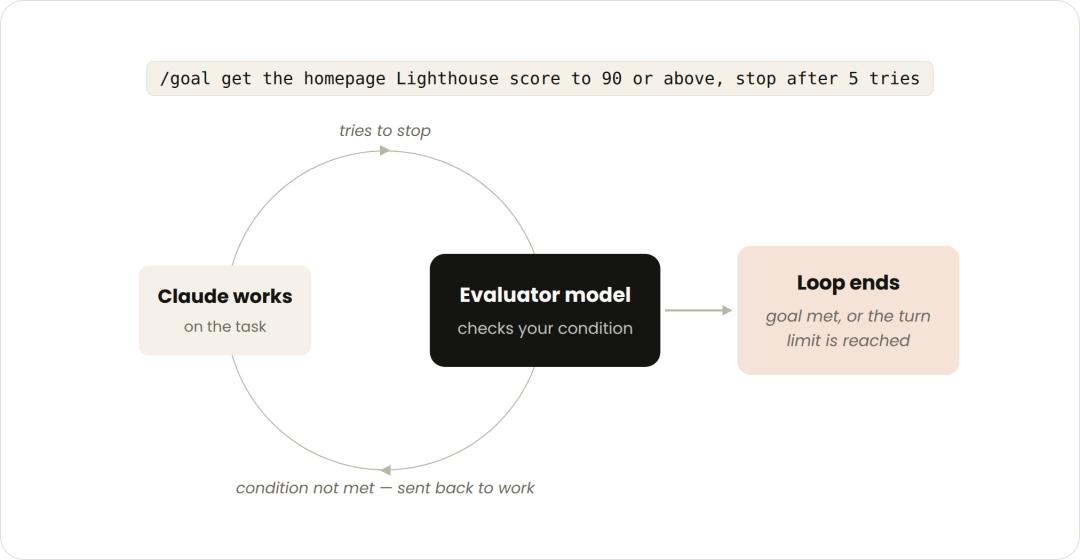
Goal-driven loops use an evaluator model to measure outputs against predefined standards, sending work back for rework if requirements aren't met. (Source: Claude Official Blog)
You first define a fixed goal, for example: "Get the homepage's Lighthouse score above 90, stop after 5 attempts".
Each time Claude tries to stop, an evaluator model compares its output against your standards. If the goal isn't met, the agent is directed to continue working until the objective is achieved or the maximum number of allowed rounds is exhausted.
Quantifiable metrics like passed test counts and score thresholds work so well because Claude doesn't need to subjectively judge "good enough" — the evaluator makes that call. This prevents the loop from ending prematurely when the agent thinks the work is "probably fine", allowing for clean, proper completion.
The third type: time-based loop (/loop and /schedule).
Triggered at set time intervals, just like an alarm clock. Some tasks are repetitive with fixed objectives but changing inputs, such as summarizing Slack messages every morning.
Other tasks require monitoring external systems, and the simplest approach is to check for changes at regular intervals before responding — for example, a PR that might receive review comments or encounter a CI failure.
Using /loop lets you re-run a prompt at specified intervals. To keep the loop running even after your device is off, use /schedule to deploy it to the cloud.
This logic is nearly identical to the familiar cron scheduled tasks used by programmers.
The fourth type: proactive loop.
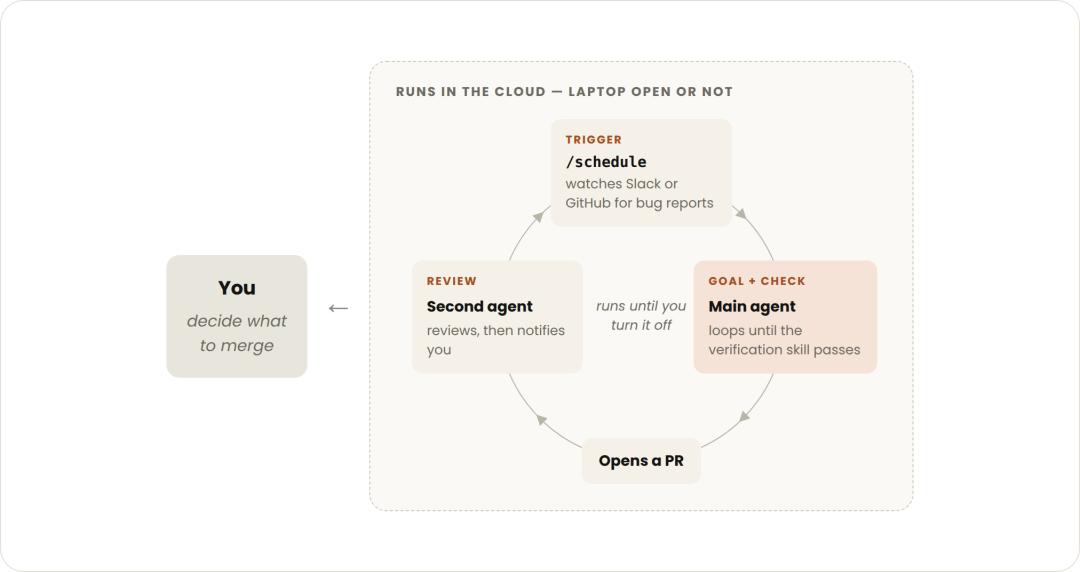
Proactive loops are triggered by events or time, run completely unattended, and continue operating until manually shut down. (Source: Claude Official Blog)
Triggered by events or time, with no human supervision required.
Combined with auto mode and dynamic workflows, long-running tasks can be fully automated: scan the feedback channel every hour, and when a bug report arrives, automatically triage, fix, and respond — completing the entire workflow without pausing to ask for your permission.
Each individual task exits once its goal is achieved, while the overall routine task keeps running until you manually stop it. This type is perfect for steady, well-defined streams of work: bug reports, issue classification, and dependency updates.
In essence, the four loop types represent four answers to "when should it stop": human judgment, evaluator judgment, time-based judgment, and event-based judgment.
Let's dig deeper into the underlying mechanics.
According to the official Agent SDK documentation, the core of this mechanism is very straightforward:
Claude evaluates your prompt, calls tools to perform actions, retrieves the results, and repeats the process — until a round occurs where it no longer calls any tools, at which point the loop terminates.
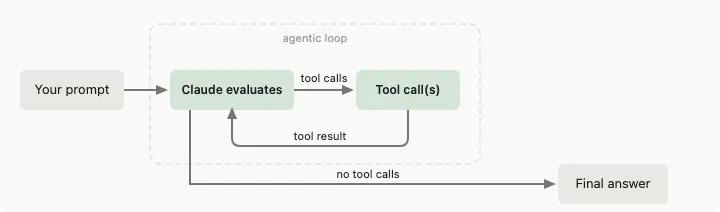
The agent loop defined in Claude Code's official Agent SDK documentation: after the prompt is input, Claude evaluates it, calls tools, feeds results back for re-evaluation, and only outputs the final answer when a round no longer invokes any tools. (Source: Claude Code Official Documentation)
At its core, an autonomous agent is essentially this very cycle.
The Real Change Isn't the Loop Itself
Of course, "designing loops" shouldn't be framed as a revolutionary zero-to-one breakthrough.
Scheduled tasks, orchestration, and feedback loops have existed for a long time. What Claude has done here is largely unify their naming and organize them into a standardized classification system.
So what exactly has changed? The key lies in the "stopping condition".
Among all the practical tips summarized by the Claude Code team, the one singled out as "the most valuable" is verification:
Provide Claude with a way to check its own outputs independently.
The logic is easy to understand.
For example, if you ask a developer to build a webpage but don't give them a browser, how can they make it look good? With a browser, they can see the effects of every change in real time, iterating repeatedly until they're satisfied with the result.
The power of model loops comes precisely from this ability to "close the loop on its own".
In this process, prompts haven't become obsolete — they've simply been reduced to one component within the loop.
The real core now becomes stopping condition design, verifier design, token budget control, and multi-round execution strategies.
Loops Without Gating Conditions Are Powerful Yet Dangerous
Do loops mean you can let the AI work autonomously for an entire day?
Certainly not.
The first major barrier is cost. An unbounded loop can burn through token expenses at an alarming rate.
As reported, Steinberger claims to be "the man with unlimited tokens" because free token access is one of the perks of working at OpenAI — a benefit most people don't have.
The second risk is more subtle. Agents can fall into endless loops that seem to make progress but actually spin their wheels: repeatedly modifying the same file without ever producing a new passing test.
They might even confidently make an incorrect solution more and more "complete" without realizing it's wrong.
The engineering community has a clear consensus on this: loops are powerful, but they become dangerous without proper gating conditions.
In engineering discussions on Reddit, users have summarized three essential gating conditions that must be designed before writing any loop:
Done Condition: Must be machine-verifiable, such as all tests passing or a specific specification requirement being marked as completed;
Hard Upper Limit: Includes maximum number of rounds and maximum allowed cost, specifically to prevent runaway expenses and infinite loops;
Stagnation Detection: Immediately force a stop if the agent is repeatedly modifying the same set of files without generating any new passing tests.
The official documentation also provides a full set of cost-saving best practices:
Don't use multi-agent setups for small tasks;
Use cheaper, faster small models whenever possible instead of always relying on the most powerful large models;
Test loops on a small subset of tasks before large-scale deployment;
Assign deterministic tasks to scripts — running scripts is far cheaper than making the model reason through every step;
Don't run routine tasks more frequently than necessary.
Thus, a loop is a complete system for "keeping AI under control", not a way to "let AI run wild".
This also means loops are currently best suited for well-defined, structured tasks, rather than open-ended, creative free-for-alls.
Previously It Was About Prompt Crafting, Now It's About System Design
In this wave of change, what's truly shifting is the focus of programming: moving from "content design" to "behavior system design".
Previously you designed the content of a single instruction; now you design an entire set of behaviors: how the system triggers work, how it verifies outputs, and how it stops.
Claude Code's official team offers a simple starting point for people who want to design their first loop:
Look at the tasks you perform every day, pick one bottleneck step, and ask yourself three questions:
Verification: Can I write the validation check logic for this task?
Goal: Is the goal description clear and unambiguous?
Rhythm: Does this task occur on a predictable, fixed schedule?
If even one answer is yes, you've found your first loop that can be delegated.
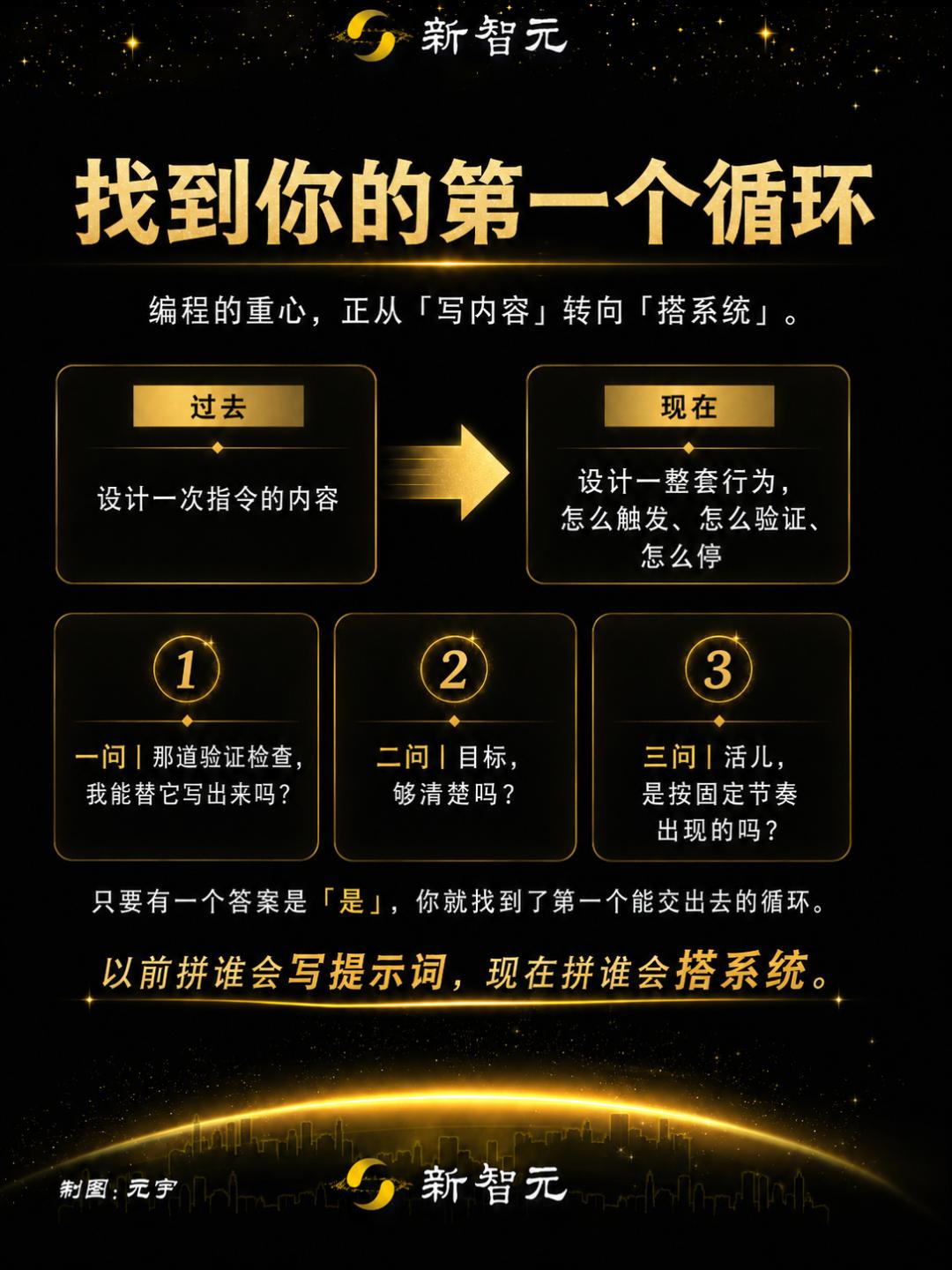
AI programming used to be a competition of prompt-writing skills, but now it's about who can build better systems: who can design a loop that verifies itself and knows when to stop.
The era of prompt engineering won't disappear overnight, but its spotlight is shifting to loop design.
And the true loop designers are just getting started.
References:
https://claude.com/blog/getting-started-with-loops
https://code.claude.com/docs/en/agent-sdk/agent-loop
https://support.claude.com/en/articles/14554000-claude-code-power-user-tips?utm_source=chatgpt.com https://www.reddit.com/r/ClaudeWorkflows/comments/1ujy4wq/workflow_designing_robust_claude_agent_loops/
This article is from WeChat public account "AI Era", author Yuan Yu, republished with authorization from 36Kr.