Claude Cowork limited-time doubling, Anthropic is losing money to treat all office workers
The quota of Claude Cowork has doubled!
Recently, Boris Cherny, the person in charge of Claude Code at Anthropic, posted a message on X, stating that the 5 - hour usage limit for all paid Cowork users has been doubled for a month, ending at the beginning of July.
The quotas for Pro, Team, and Enterprise users have all doubled.
On the same day, Anthropic also released a 23 - page product guide, which provides step - by - step instructions for 7 work scenarios.
https://cdn.prod.website-files.com/6889473510b50328dbb70ae6/6a2313fa599bd2e2270fda75_Claude-eBook-Claude-Cowork-product-guide-06052026.pdf
The quota doubling and the complete operation manual were released on the same day.
There's no need to guess what Anthropic is up to.
How is it different from chat AIs?
As we all know, Cowork is completely different from chat AIs like ChatGPT and Gemini.
With those chat AIs, you provide the materials and they give the results, and you are the one doing the middle - man work. Cowork works the other way around.
It runs on the Claude desktop application, which is available on both macOS and Windows. You authorize a local folder, and it will search through the files on its own, connect to Slack and Gmail on its own, and save the completed work back on its own.
You describe the result, and it executes the process.

Next, let's break down the six scenarios in the product guide to see what capabilities are being utilized and why it's completely different from doing the work manually.
1. 90 minutes for the weekly report, 80 minutes spent on searching
Every Friday, you need to compile a weekly report from three sources: the Asana kanban, data CSV, and the Slack channel.
If you do it manually, you have to switch between three tab pages, copy and paste, and format the report, which will take at least an hour.
Now, you just need to give Cowork one sentence.
Draft this week's engineering weekly report in the format of ~/Reports/weekly-template.md. Pull the delivered items from the "Completed this week" section of Asana, pull the key metrics from ~/Reports/metrics.csv, and pull the blockers since Monday from the #eng - blockers channel. Save it as weekly - update - 2026 - 06 - 06.md.
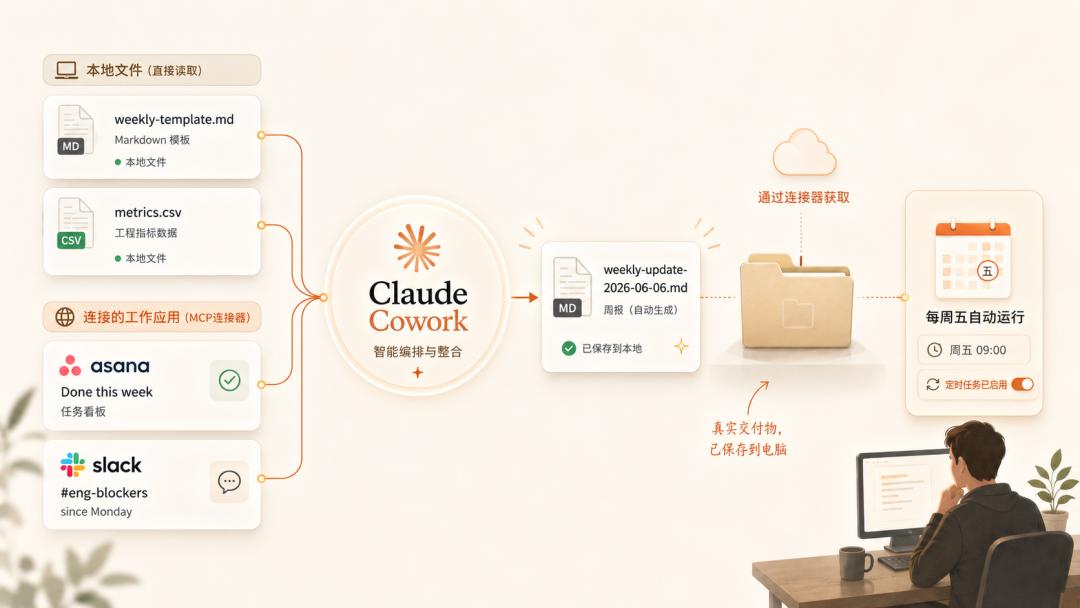
One prompt activates at least three layers of capabilities.
The first layer is local file reading and writing. It searches for the template and CSV on your hard drive without you having to upload anything. This is the fundamental difference between Cowork and all web - based AIs.
The second layer is the MCP connector. Asana and Slack are not on your hard drive. Cowork connects to them via the MCP protocol and reads from three data sources simultaneously with one prompt.
The third layer is the scheduled task, which is the real killer feature.
Save this prompt as a template and set it to run automatically every Friday morning. By the time you get to your desk, the weekly report will already be in the folder.
2. 120 unread emails, automatically sorted and waiting for you to send
After a long weekend, you have 120 unread emails. If you do it manually, you have to go through each email one by one and categorize them in your mind, which will take at least half a day.
Go through my unread Gmail emails from the past 72 hours. Divide each thread into four categories: "Must reply today", "Can wait for a week", "For reference only", and "Forward to [boss's name] for handling". For each email in the "Must reply today" category, write a two - sentence reply draft in a separate file. Don't send it, just draft it.
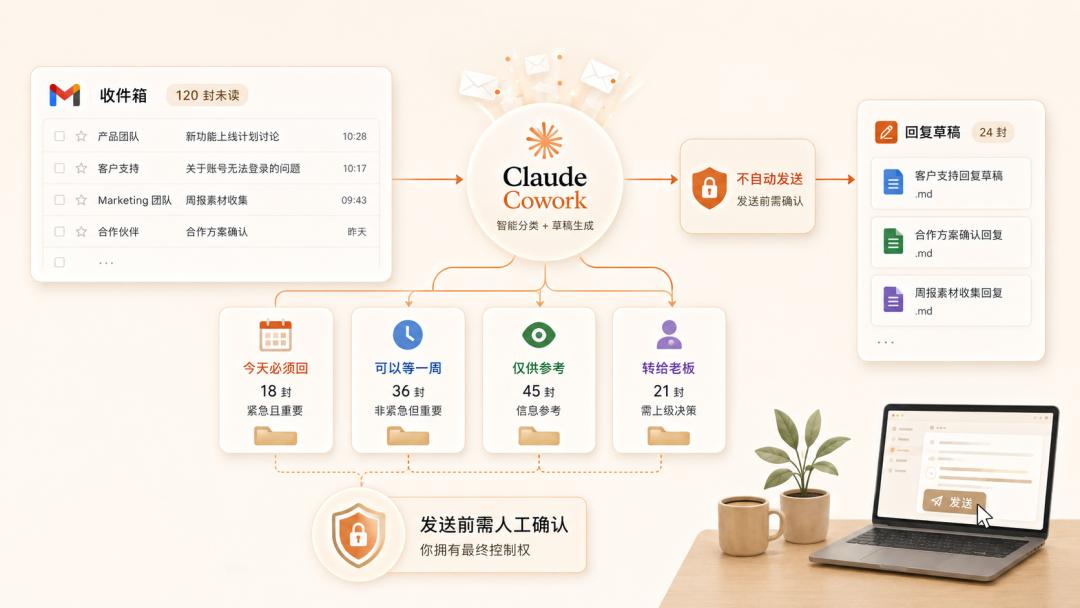
The interesting part of this scenario is not that it can sort emails, but its permission design.
Cowork won't send any email without your approval. The drafts are saved there. You can go through them one by one, make some changes, and confirm to send. The same goes for deleting files; it will pop up a confirmation message.
This is a line drawn by Anthropic from a security perspective. The agent can help you make judgments, but it can't make decisions for you.
The product guide calls this a "safeguard", which essentially means you retain the ultimate control.
However, there is a prerequisite. The product guide suggests that new users run the tool a few times with the default permission mode before considering loosening the restrictions.
Because there is also an "Act without asking" mode. Once this mode is enabled, Cowork will have much more autonomy, which is not suitable for beginners.
3. Pour a cup of coffee, and 5 agents will finish the job simultaneously
A financial analyst has five supplier proposals on the desk and needs to make a horizontal comparison and write a short recommendation.
If you do it manually, you have to open at least five windows, search for prices, SLAs, and deployment cycles in each proposal, and then gradually organize the information into a table...
There are five PDFs in ~/Vendors/proposals. Extract the price, deployment cycle, inclusions, additional charges, SLA, and reference cases from each one. Generate an xlsx comparison table and write a short recommendation, stating which two suppliers are recommended and the reasons.
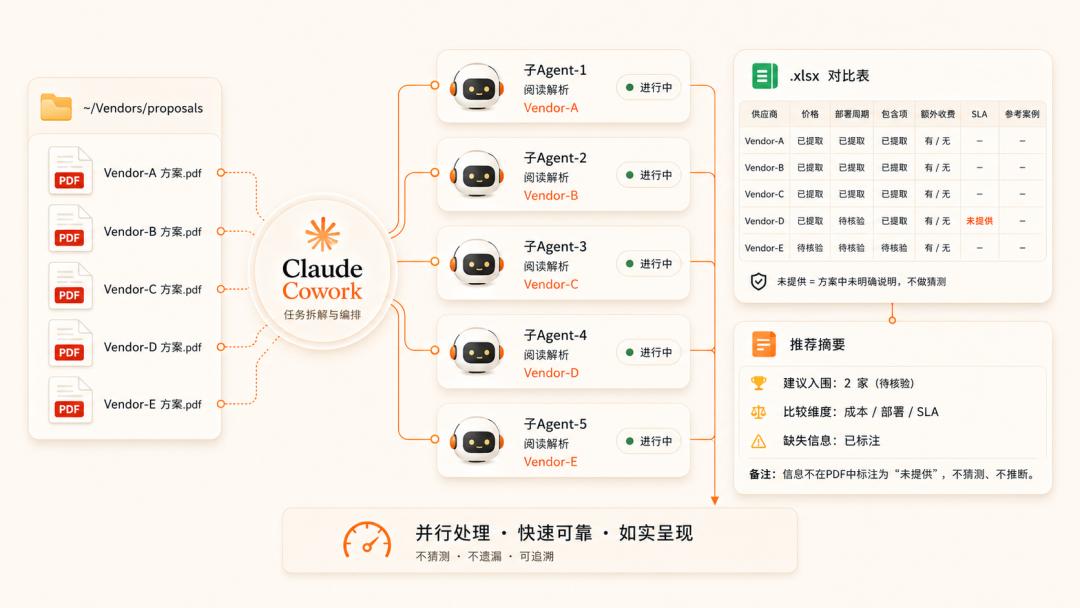
After receiving the prompt, Cowork will automatically activate "parallel sub - agents" to break down the task.
Then, it will assign the five PDFs to multiple sub - agents to read simultaneously, extract information respectively, and summarize it into a table.
By the time you pour a cup of coffee, the horizontal comparison is done.
There is a key detail here. If there is insufficient information, Cowork will mark it directly instead of making random guesses.
For example, if a supplier's proposal doesn't mention the SLA at all, it will mark "This supplier did not provide this information" in the table.
This ability to mark information honestly may seem insignificant, but it actually determines whether you can trust its output.
4. Three - week mess, finished in two pages
A competitive intelligence analyst has collected three weeks' worth of industry materials. PDFs, screenshots, and notes are everywhere. Tomorrow, they need to submit a two - page competitive briefing to the product VP.
I have connected the ~/Research/competitive - landscape folder. Read all the content in it and write a two - page briefing covering the three most important trends, what each competitor is doing, our biggest weakness, and two suggestions. Mark the source file for each conclusion. Save it as competitive - brief.md.
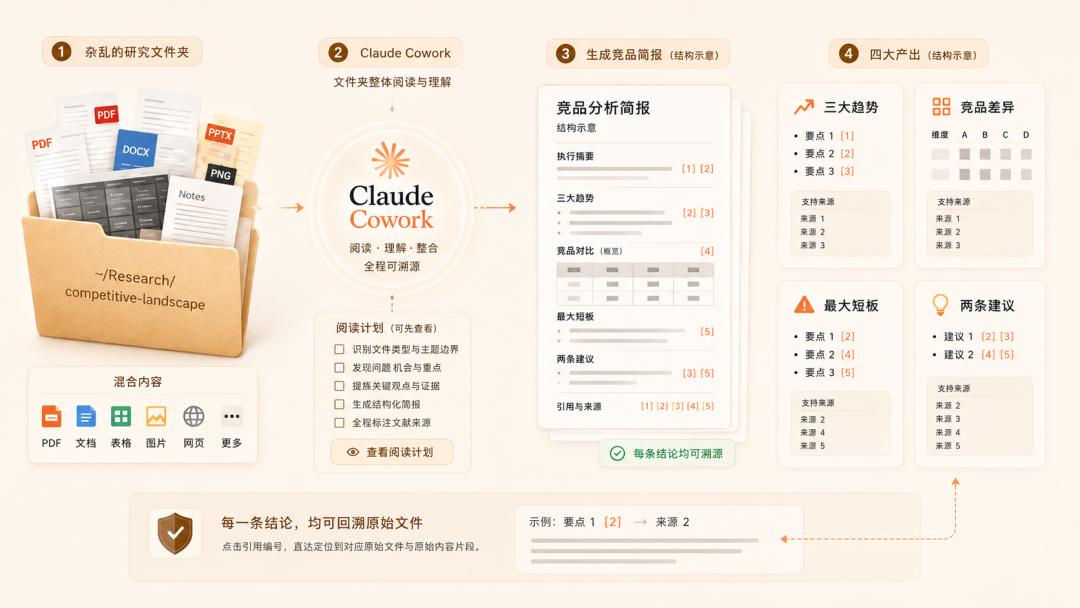
This scenario demonstrates the ability of folder - level batch reading.
Instead of you selecting a few files to feed it, you just point to a folder, and it will read all the files on its own and determine which information is important.
The most valuable ability in this scenario is "reference tracing".
That is, each conclusion given by Cowork can be traced back to the specific source file. If you are not sure about a certain judgment, just follow the reference back, and the original text will be there.
In addition, the product guide also mentions a practical tip. When the folder is very large, first let Cowork report how it plans to read the files, and then let it start after you review. Correcting the plan in advance is much easier than dealing with a failed result later.
5. Even if your notes are too messy to understand
The marketing operations team has just finished a kick - off meeting for the website redesign. The notes are so scribbled that even the writer can't understand them. Tomorrow morning, they need to submit a project plan.
Read ~/Projects/website - redesign/kickoff - notes.md. Turn it into a project plan, including milestones, task breakdowns under each milestone, assign the responsible persons according to the names mentioned in the notes, a rough timeline assuming a six - week delivery, and a risk list. Output both a markdown document and a CSV.
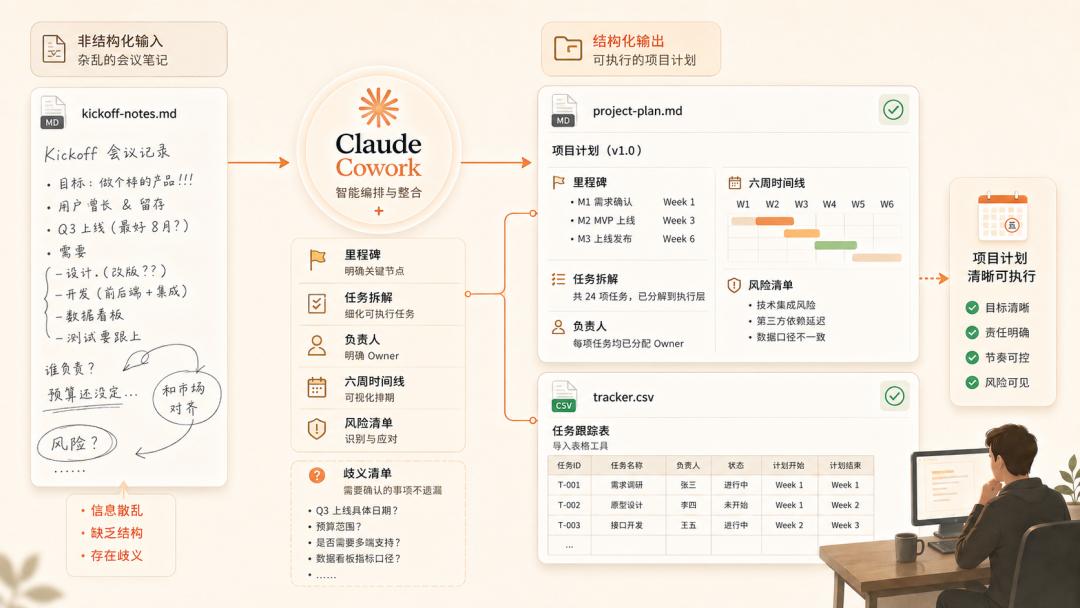
This scenario shows the ability to transform unstructured data into structured data.
A bunch of scribbled notes go in, and milestones, responsible persons, timelines, and risk lists come out. Two formats are output simultaneously: markdown for people to read and CSV to be imported into your project management tool.
Similar to the previous scenarios, Cowork will list a "list of ambiguities" for the unclear parts in the notes to tell you where it made guesses.
6. You just remembered there's a meeting soon
You have a quarterly review meeting with a client in 90 minutes. The context is in four places: Gmail, Slack, Google Doc, and calendar notes. If you prepare manually, you have to open four tools and search back and forth to piece together a general idea in your mind.
I have a Q3 cooperation review meeting with Sarah Chen from Acme at 2 pm. Summarize the latest email threads with her in Gmail, the last two private chats in Slack, the shared Doc titled "Acme partnership Q3", and the calendar notes from the last meeting. Give me a one - page prep doc listing three things I must know and two questions I should ask actively.
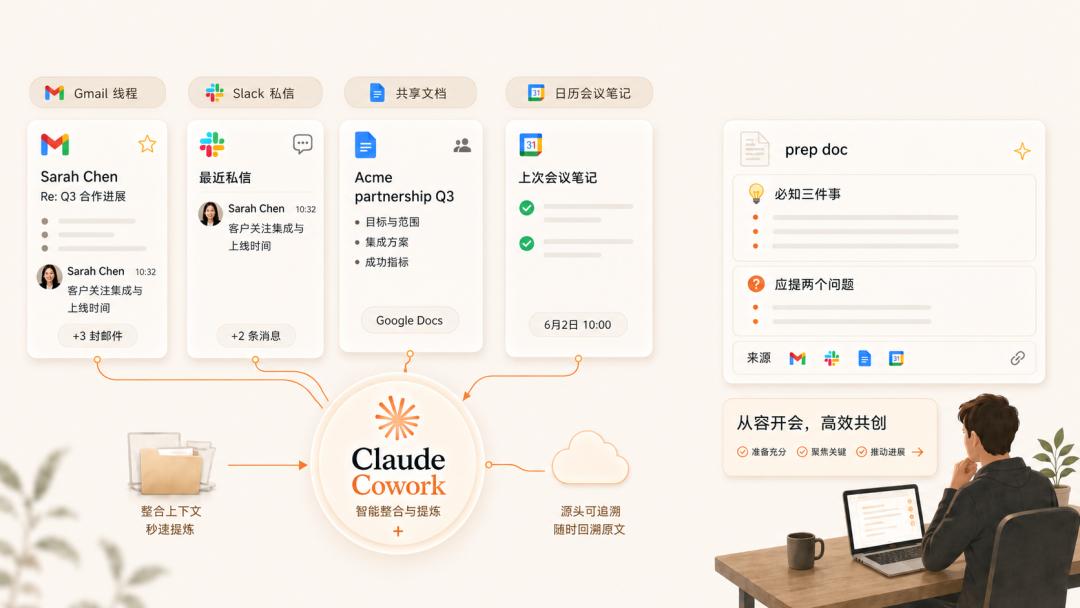
This scenario best reflects the fundamental difference between Cowork and chat AIs.
With ChatGPT, you copy and paste four materials into the dialogue window, and it helps you summarize. You are the one moving the materials manually.
With Cowork, you just tell it where to find the materials, and it will connect to Gmail, Slack, Drive, and the calendar on its own, get what it needs from each source, cross - reference, and finally write the conclusion into a one - page document and save it. You only need to say one sentence throughout the process.
It should be noted that the more specific the prompt is when using Cowork, the better.
"Help me prepare for the meeting" is a useless prompt. The more precise you are about the names, data sources, output formats, and the number of points, the more directly usable the result will be.
It's the plugins that make lawyers addicted
Logically, considering the history of database deletion and data leakage risks, cautious people should stay away.
However, Anthropic's own data shows that the group of people who use Cowork the most intensively are lawyers.
In the legal profession, a single - character difference can lead to a liability accident, so they are naturally wary of the word "automatic".
But their work, such as contract review, clause comparison, and reading stacks of endless case files, is exactly what Cowork is good at. Who wouldn't want to offload such expensive, time - consuming, and repetitive work?
However, Cowork alone is not enough. The legal profession has its own terms and processes, and it's too time - consuming to teach the AI from scratch every time.
What really makes them addicted are the plugins. It packages the tools, terms, and processes of a profession, and once installed, Claude acts like a veteran on the first day.
For example, for those doing client renewals, after installing the plugin and typing /prep - renewal, it will automatically pull accounts from the CRM, review work orders, scan recordings, and write the briefing into a document, solving the entire process in one go.
