Skywork 3.1 Released: Launching Skywork Design and Dynamic Workflows, Equipping AI with a Canvas and an Army
The biggest illusion in the AI era is equating demos with products.
With a single prompt, you can generate a beautiful page, take a screenshot, and post it on your Moments to get over a hundred likes. But if you actually take it to meet a client, the client will ask: What about the other pages? Are the color schemes consistent? Is it compatible with mobile devices? Can you make a revised version?
The difference between a demo and a product lies in these questions.
One month after the launch of Skywork 3.0, the revenue of the Tiangong Super Intelligent Agent tripled. Behind this growth is the fact that more and more users are starting to use Tiangong as a productivity tool for delivering results.
This change is specifically reflected in the user behavior data. Among all the output capabilities of Tiangong, Websites is the scenario where users have the deepest engagement. Users are not satisfied with just generating one page and leaving. Instead, they continuously refine the same project: supplement requirements, adjust the structure, start over, and refine it again. The average number of interaction rounds of in - depth users on a single project exceeds 40 rounds, and many complex projects take shape gradually over multiple logins.
Most people stop using AI after three rounds.
We found that these in - depth users use Tiangong in a completely different way. They are not here for Q&A; they are here to build - to construct something long - term, complex, and their own. These requirements are extremely long - tailed and highly personalized, and cannot be achieved in a single generation. They can only be gradually finalized through repeated iterations.
From the 1st to the 3rd round, what comes out is a demo. From the 4th to the 40th round, what comes out is a product.
Today, Skywork proudly launches 3.1, which is a response to these users. We bring two new capabilities: Skywork Design, which uses a canvas to carry out design, and Dynamic Workflows, which schedules multiple Agents in parallel. Claude launched Design in mid - April and Dynamic Workflows at the end of May. Skywork 3.1 launches both at once, with simultaneous releases in the domestic and overseas markets.
Skywork Design: Spread out what doesn't fit in the dialog box on the canvas
When you've had 15 rounds of conversation with AI, you probably can't remember what was said in the 3rd round.
Dialogs are suitable for clarifying things, while canvases are suitable for seeing things clearly. When users' requirements are so complex that they need more than 30 rounds of iteration, the limitations of the dialog box become apparent: information is linearly stacked, making it difficult to get an overview at a glance. Managing the color schemes, fonts, and navigation logic of a dozen pages in a dialog box is like drawing architectural plans on sticky notes.
Skywork Design moves the design work from the dialog box to an infinitely expandable canvas.
The Agent works on the canvas, and what is ultimately precipitated is a complete UI project that can be continuously modified and grow with the business. When a user puts forward a requirement, such as "Create a health management app with fluorescent green as the main color", the Agent first aligns the direction with the user, and then lays out the entire set of pages including the home page, generation page, gallery, and personal center on the canvas. You can see the whole picture on the canvas instead of piecing together fragments from memory in the dialog box.
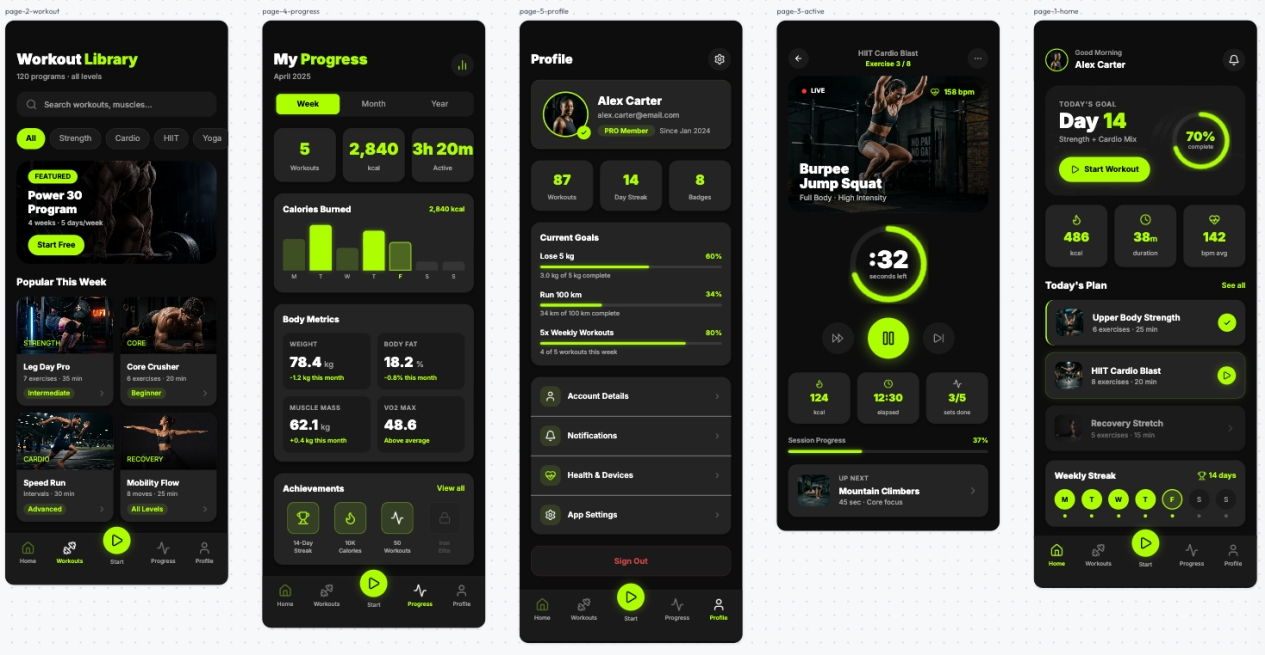
Health management app in "fluorescent green style"
Subsequently, the user puts forward modifications item by item: "Change the main color to warm colors", "This button is too small", "Add a collection page". One round of conversation corresponds to one round of iteration. At the 10th, 20th, and 40th rounds - the canvas won't forget, because all the history is precipitated in the visual space and won't disappear in the timeline.
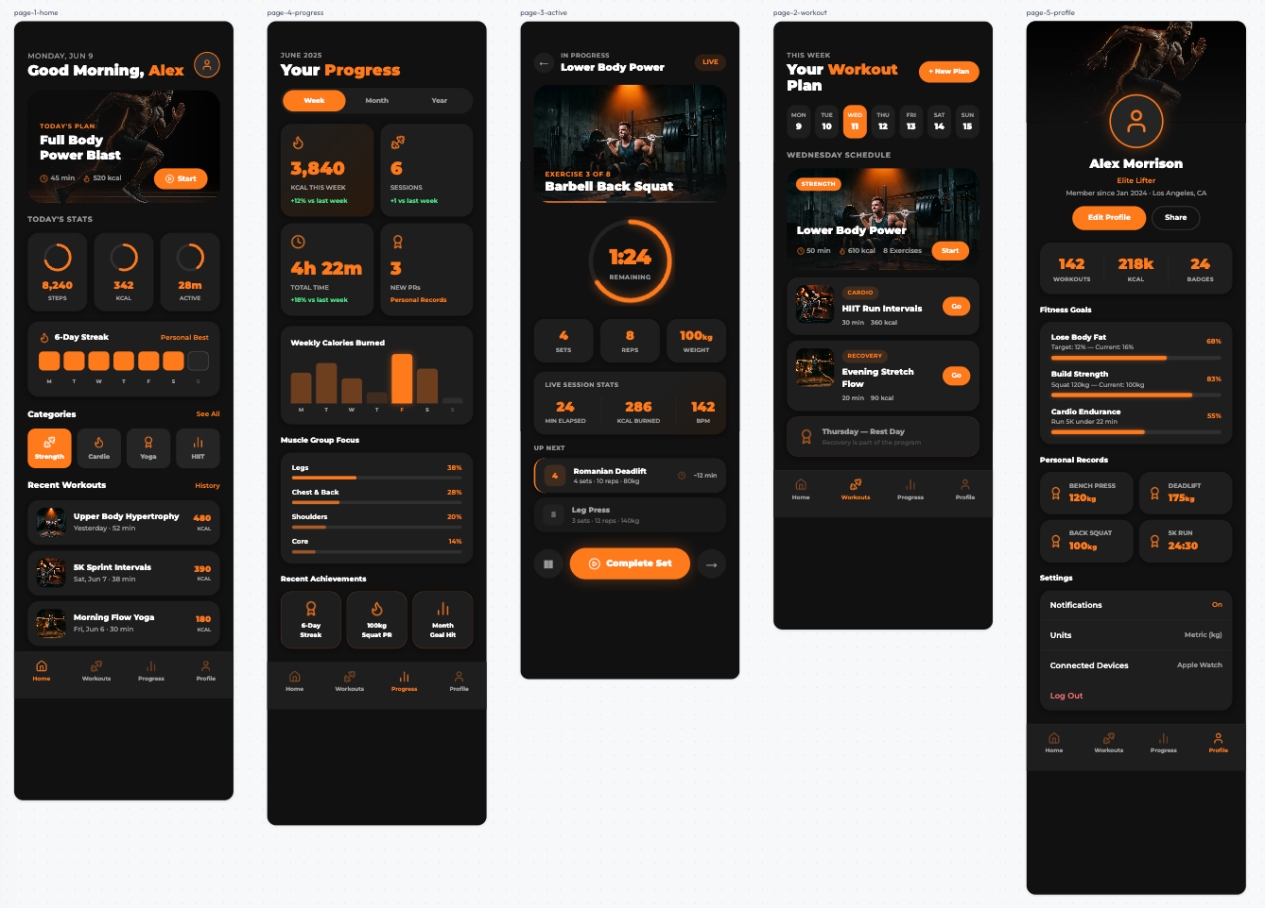
Health management app in "fluorescent orange style"
The dialog box is a scratch paper, and the canvas is the workbench.
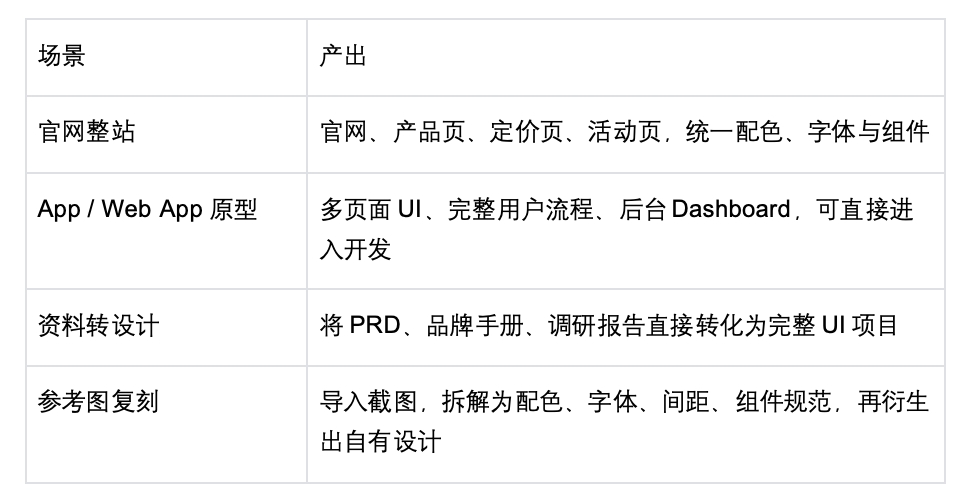
Four types of scenarios will benefit the most:
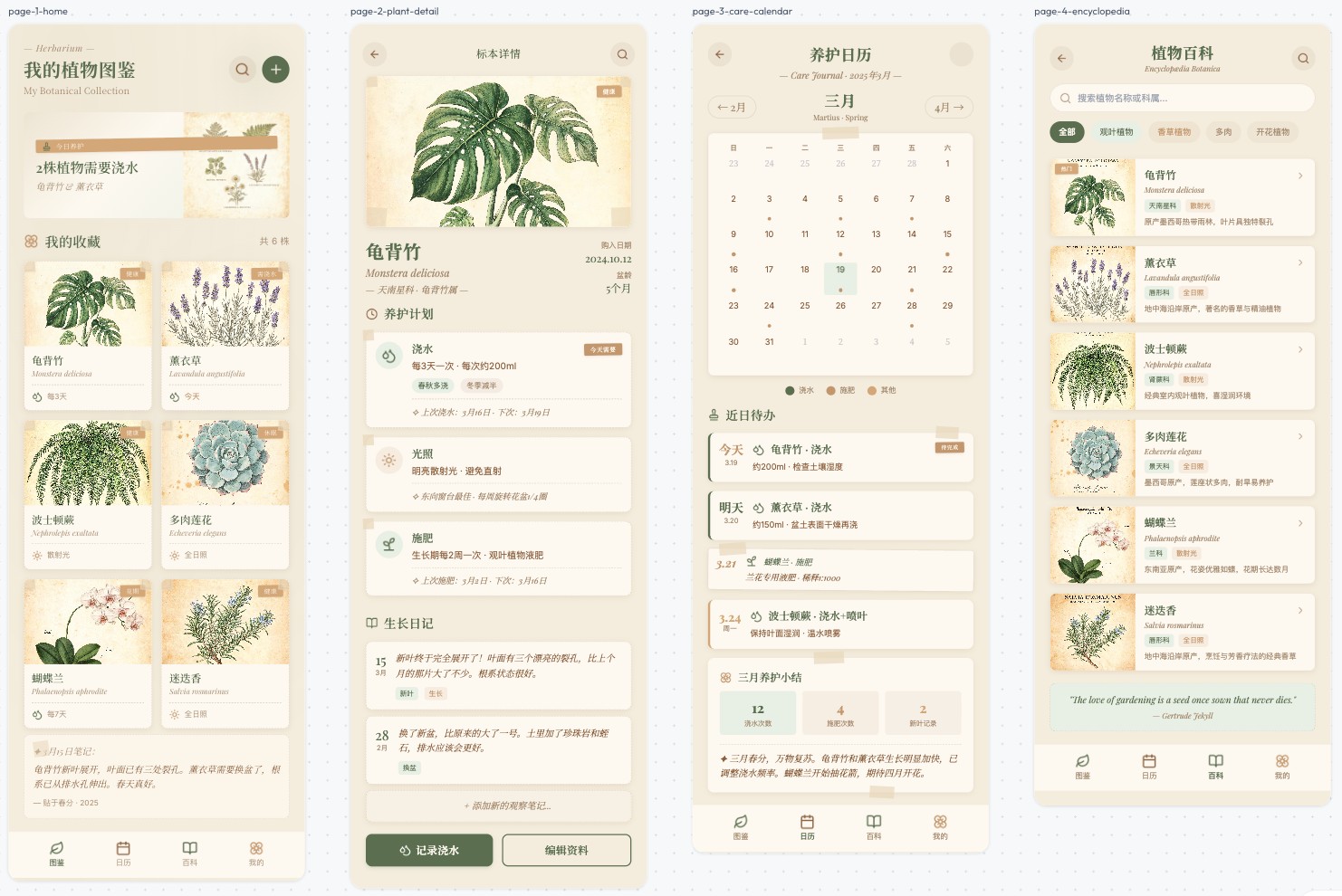
Design a home plant management app
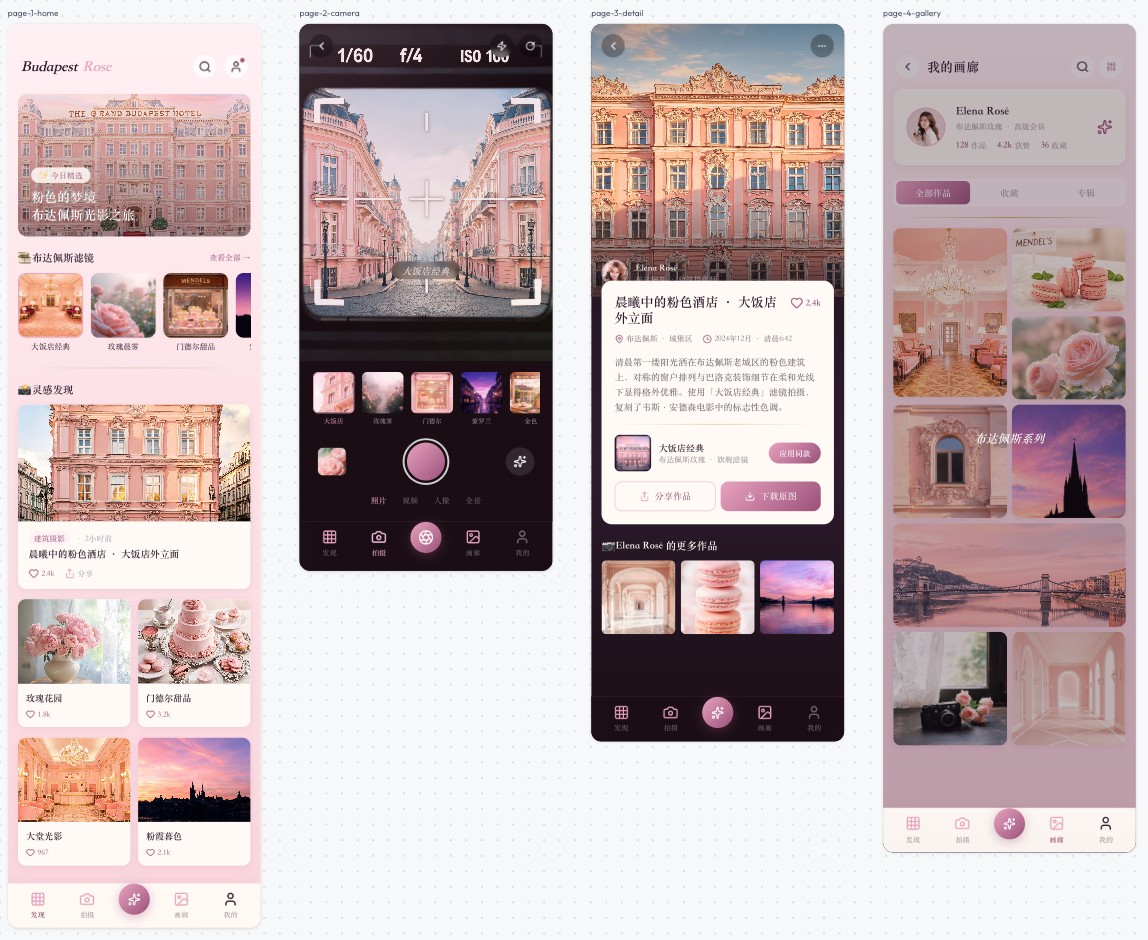
Create a photography - related app with a "Budapest style"
The core that supports long - term iteration is the design specification. Users can upload brand manuals and component library descriptions for the Agent to strictly follow, provide reference images for the Agent to extract, or directly select the official preset specifications. Once the specifications are established, each newly added page will automatically be consistent with the existing pages.
This solves the core threshold from a demo to a product. It's not rare to generate a beautiful page. The real skill is to make twenty pages look like they belong to the same product. By establishing specifications first and then generating pages, a project spanning dozens of rounds can always maintain brand consistency.
Dynamic Workflows: When one Agent can't finish the job, send a hundred Agents to do it
Another type of requirement of in - depth users is related to scale.
When a project needs to generate hundreds of product pages in batches or make a one - time revision to the entire site's copywriting, the efficiency of manual step - by - step progress can't keep up. You know what to do at each step, but step - by - step, there isn't enough time.
Dynamic Workflows is designed for such large - scale tasks. After receiving a task, the Agent first conducts dynamic planning and automatic decomposition, and then simultaneously schedules dozens to hundreds of parallel sub - Agents.
The key lies in two points.
First, division of labor and verification. Sub - Agents approach from different angles. Some are responsible for execution, and some are specifically responsible for verification and falsification. The results must be cross - checked before being adopted until the answer converges. The scariest thing about large - scale tasks is not knowing when there is an error. If one Agent does 100 things and there is a problem with the 37th one, it's hard to detect. With dedicated Agents for review, errors are intercepted before delivery.
Second, resumable running. The task progress is continuously saved, and it can continue from the breakpoint after interruption. For large - scale projects spanning multiple days, there's no need to start over.
The applicable scenarios are very clear: full - scale checks at the code library level, batch migration of thousands of files, key decisions that require independent verification, batch generation of dozens of landing pages, and one - time revision of the entire site's copywriting.
One person puts forward requirements, and an army executes. Work that used to be scheduled quarterly can now be completed in a few days.
Two capabilities are integrated into the same workflow
Skywork Design is fully integrated with the main Tiangong website, sharing the same system for accounts, points, membership rights, Memory, and knowledge base.
After the design is completed, users can:
• Select pages on the canvas, package and upload them back to Tiangong to generate accessible web pages, presentation PPTs, and complete product documents;
• Export as images and send them to colleagues and clients;
• Export as a layered file editable in Figma for professional designers to further refine;
• Package as a zip file and deliver it to the development team for online deployment.
This forms a complete chain: Tiangong conducts research, Design generates the interface, Workflows executes in batches, and uploads back to Tiangong for direct web deployment and post - roadshow PPT generation. Research, design, implementation, and reporting are integrated into the same process.
Those in - depth users who used to iterate dozens of rounds in Websites now have a larger canvas and an army on standby.
The user usage data of Skywork shows one thing: users are willing to invest dozens of rounds and multiple days in a project, provided that the tool can handle it.
Skywork 3.1 pushes the upper limit of what the tool can handle even higher: complex requirements can be laid out on the canvas, and large - scale tasks can be scheduled by an army of Agents.
The forty - round journey from a demo to a product is now paved for you.
Experience entrance
Domestic: https://www.tiangong.cn/design
Overseas: https://skywork.ai/design