Is the crayfish industry completely doomed? A Tsinghua University team open-sourced an Agent tool overnight, slashing Token costs by 70%.
Is the lobster trend fading?
OpenClaw, which was extremely popular across the country in early 2026, has lost its heat.
Friends who used to stay up all night modifying OpenClaw have quietly put it aside. This project, which became popular on GitHub at the fastest speed in history, now has almost no buzz.
The "little lobster" may have completed its historical mission. Like a hurricane, it was the first to truly introduce the Agent paradigm to the public, making everyone understand that AI is not just a chatbot for chatting; it can actively do work for you.
However, it failed to become the "Linux" of the AI world. Running too fast, it didn't have time to build a deep enough code barrier and ecosystem before being left behind.
So, what trendy new tools are those who really need to boost productivity with Agents using now?
Recently, an intelligent agent operating system called PilotDeck was quietly launched within the industry.
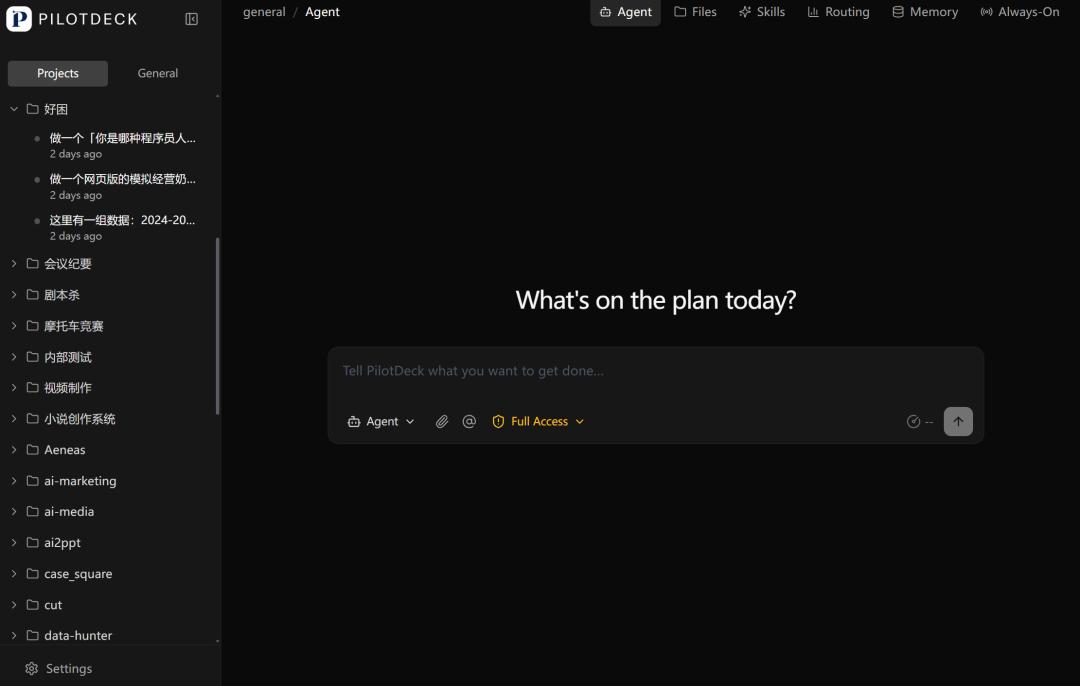
This technology was jointly developed and open - sourced by the THUNLP Laboratory of Tsinghua University, Mianbi Intelligence, OpenBMB, and AI9stars.
If OpenClaw is a "big toy" of geek romanticism, then this "elite from Tsinghua" is a real "intelligent agent collaboration cabin" for pure productivity that can outperform the "little lobster" next door.
From a milk tea shop to a data dashboard, an incredibly large leap
Let's look at some very intuitive tests to see how it differs from those superficial first - generation Agents.
We opened two WorkSpaces simultaneously, one for game development and the other for data visualization. Let's see if it can handle both at the same time.
In the first WorkSpace, we input a sentence:
"Create a simulation game for running a milk tea shop. It should have a purchasing system, a pricing system, and a queuing system. Customers will decide whether to buy based on the price and reputation."
After inputting the prompt, it generated a very detailed plan for the milk tea shop simulation game.
PilotDeck dissected the core loop of the game design, designed a product line of 5 types of milk tea, and also designed its own purchasing system, pricing system, customer and queuing system, financial system, etc.
In terms of technical implementation, it pre - conceived a fresh card - style UI layout and wrote the key JS modules and implementation steps.
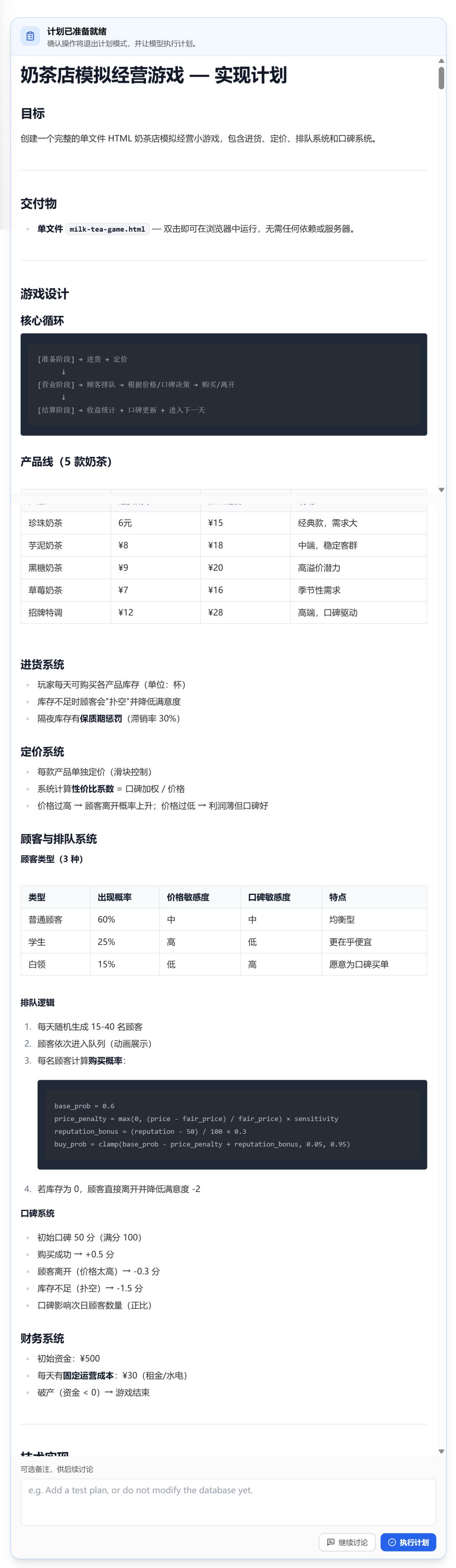
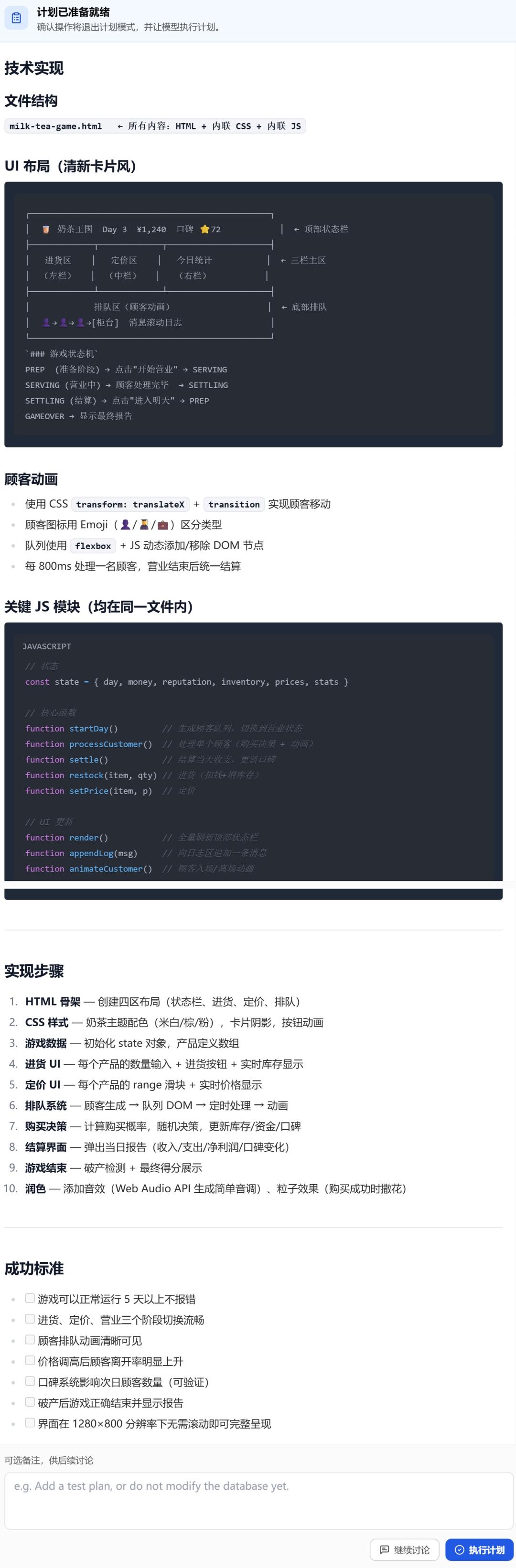
Finally, a milk tea game was available for online trial!
The second WorkSpace was in a completely different direction.
"Here is a set of global AI company financing data. Help me create an interactive data visualization dashboard with animation effects. Users can view details when hovering the mouse over it."
In this task, PilotDeck used four charts to show the top 10 in total financing, the financing proportion in North America, Europe, and Asia, and the distribution of general AI, enterprise AI, and generative AI tracks, etc.
The final generated visualization dashboard clearly showed the financing data of AI companies in each region.
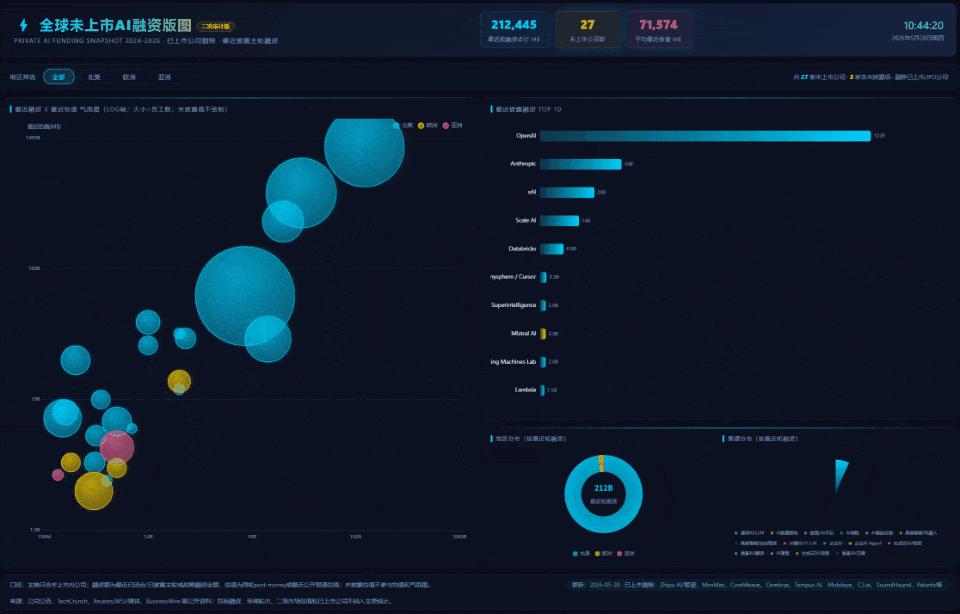
The two tasks ran simultaneously. One was writing game logic, and the other was drawing charts, without interfering with each other.
After that, we added a fun task.
"Create a programmer personality test with 10 questions to determine what kind of programmer personality you are. It should have a result page and a sharing card."
PilotDeck generated 10 multiple - choice questions very close to real development scenarios and classified them into 6 personalities: Architect 🏛️, Bricklayer 🧱, Perfectionist ✨, Magician 🧙, Preacher 📣, and Philosopher 🤔.
The visual style was the GitHub dark theme and the JetBrains Mono monospaced font, full of a sense of technology.
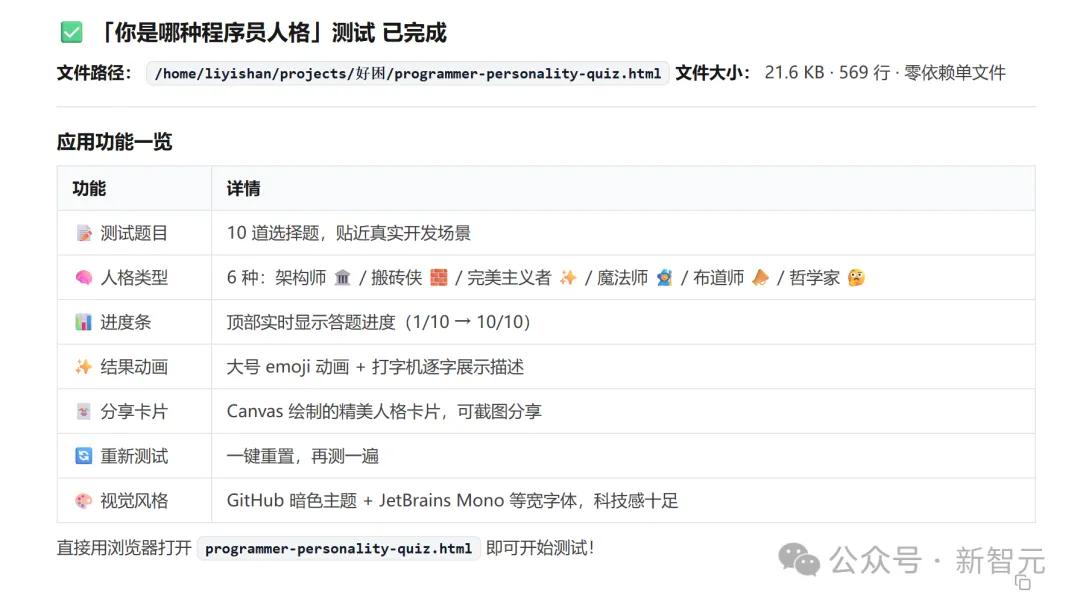
After answering the 10 questions, the result showed that I was definitely a "Bricklayer".

The leap from an operating game to a data dashboard to a social mini - application is incredibly large.
But in PilotDeck, each is an independent WorkSpace, running independently.
While others isolate folders, it isolates the whole world
After running the tasks, we did something more interesting: we opened the Memory panels of the two projects respectively.
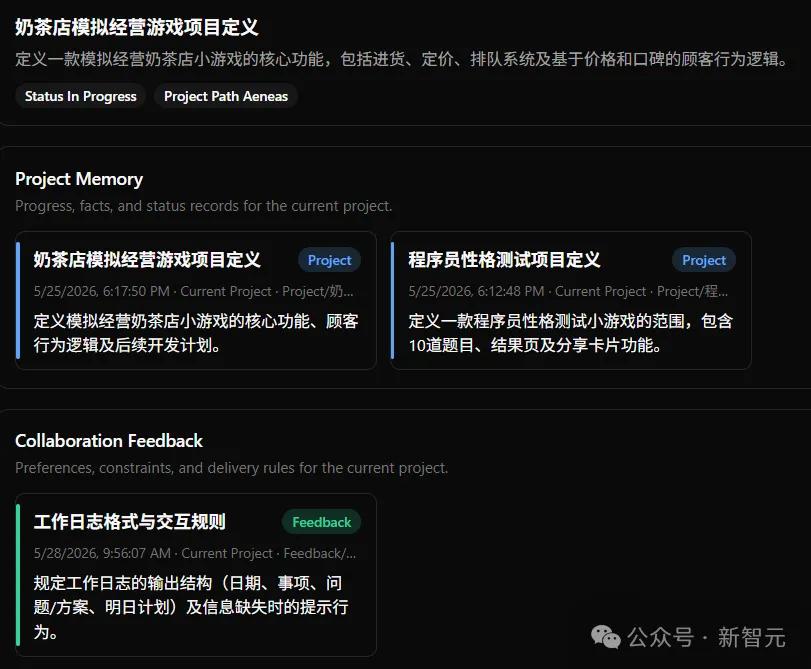
In the memory of the milk tea shop project, game logic, UI style, and gameplay parameters are stored.
In the memory of the data dashboard project, chart types, color - matching schemes, and data processing logic are stored.
There is no cross - memory between the two.
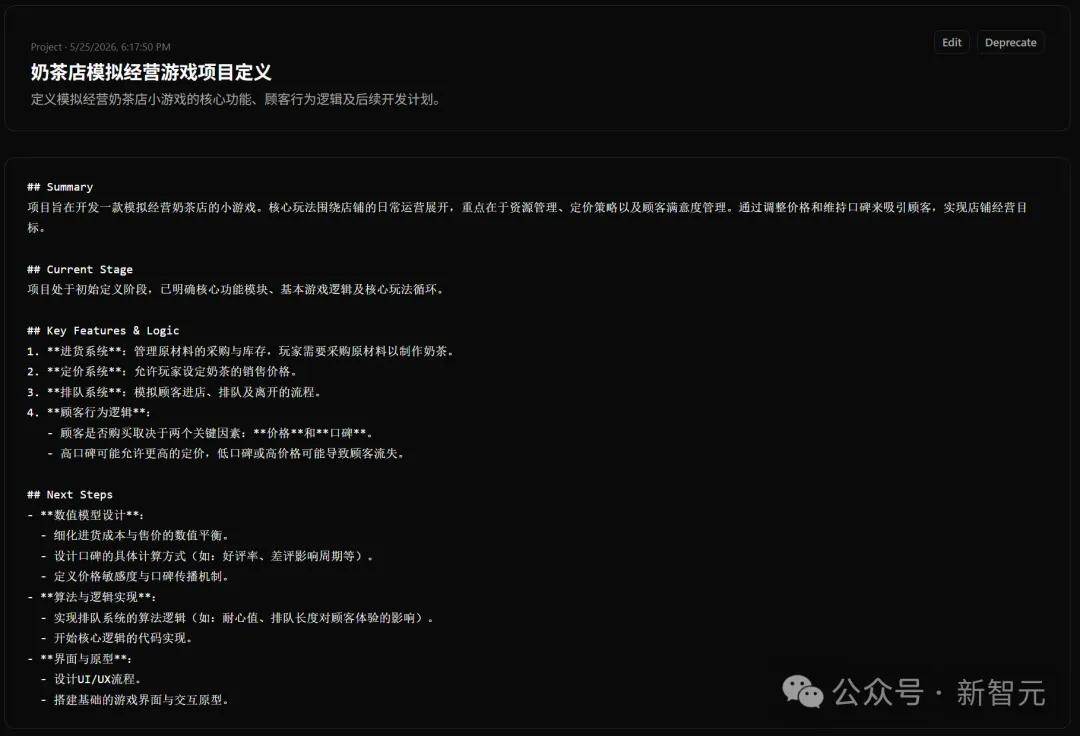

This is the most fundamental difference between PilotDeck's WorkSpace and others'.
Although Claude Cowork introduced Projects for project isolation, and Cursor also has Workspace, their isolation is essentially "folders + rules". Memories are invisible and unchangeable, skills don't evolve with more use, and it's hard to tell which project costs how much.
PilotDeck builds a complete "work cabin" for each project, with three layers inside.
· Dedicated file system: It's clear which files belong to this project and what the AI has generated.
· Dedicated memory: Project Memory records project definitions and progress, and Collaboration Feedback records your preferences. All are visible, modifiable, and traceable.
· Dedicated skills: You can install Skill applications from the app store to the corresponding WorkSpace with one click. For example, install game - asset - finder for the game - making cabin and minimax - pdf for the document - writing cabin.
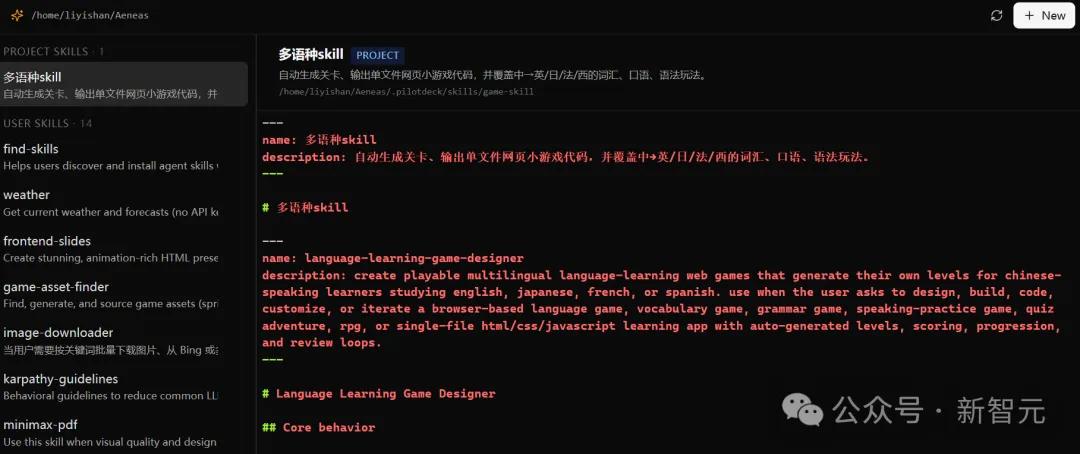
Others' WorkSpaces are folders with static rules. PilotDeck's WorkSpace is a complete living environment for AI.
The Token bill is cut in half, but the effect remains
There is an open secret about Agent tools: although they are very useful, the bills can be quite scary.
Running tasks with the most powerful models throughout the process burns Tokens faster and more expensively than taking a taxi.
Many people's coping strategy is to manually switch models, using cheaper models for simple problems and more expensive ones for complex problems. But this switching cost is quite annoying.
PilotDeck has developed a set of intelligent routing, and its approach is different from the existing solutions on the market.
Let's start with the most crucial design decision.
Most routing solutions switch at the request level, making a separate decision for each request on which model to use.
The problem with this approach is that frequent model switching interrupts the KV - cache, which means that each time the model is changed, it has to "re - load the game", reducing the inference efficiency.
PilotDeck's routing is done at the sub - Agent level.
After a complex task is split into multiple sub - tasks, the entire sub - Agent is assigned to a single model to run through. The context cache within this sub - Agent is continuous.
This not only saves money on Tokens but also reduces the performance loss caused by frequent switching.
Next, let's talk about the scheduling rules.
Compared with fixed routing schemes like "using expensive models for difficult problems and cheap models for simple problems", PilotDeck is much more flexible.
It supports adjusting the routing strategy using rules and prompts. You can define which type of tasks should use which models yourself, or even tell it in natural language, such as "All code - related sub - tasks should use Claude Opus, and text processing should use a cheaper model".
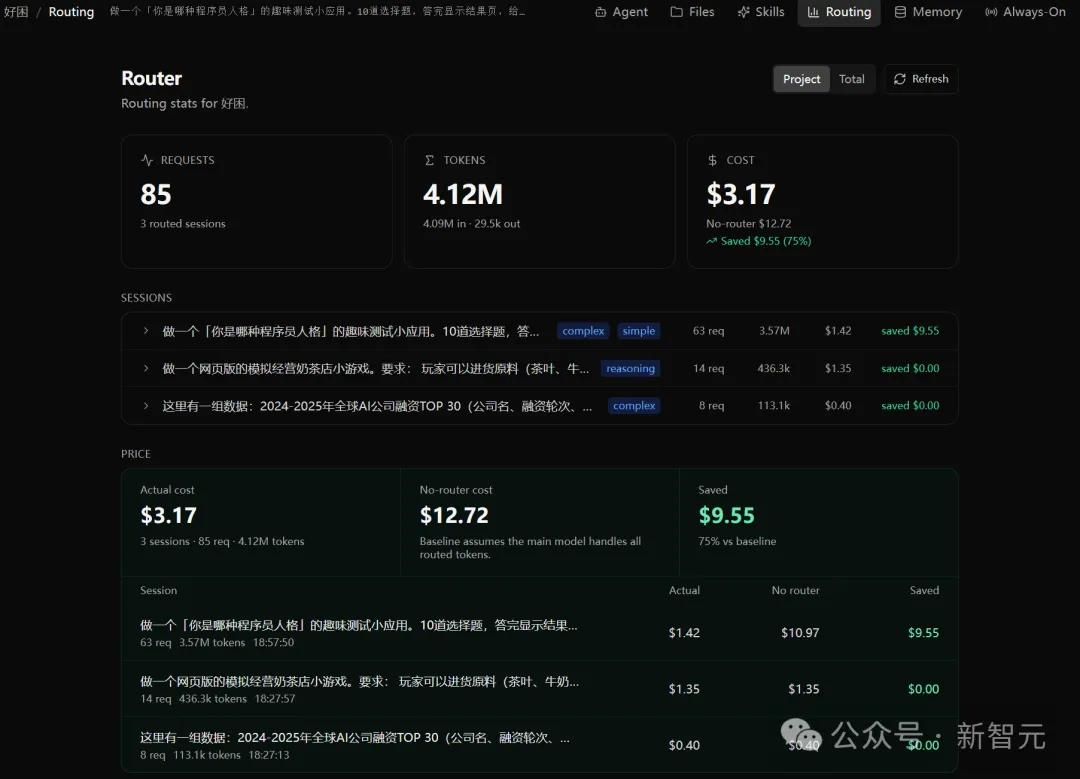
Open the Routing panel, and you can see what difficulty level (complex / simple / medium) each session is judged to be, how much it actually costs, and how much it would cost without routing.
For example, in several tasks we ran, in the programmer personality test application, it would cost $10.97 without routing, but only $1.42 with routing, saving 75% ($9.55) at once.
The research team also verified this effect in larger - scale tests.
In the social media scenario (generating Xiaohongshu content), it cost $2.83 with routing and $12.58 without routing, saving about 70%.
In the complex task scenario (podcast multilingual processing, financial analysis, code documentation, etc.), using the main Sonnet 4.6 + sub - MiniMax - M2.7 cost $3.15 and scored 70.6, while using the single Sonnet 4.6 cost $18.36 and scored 69.1. Although it only costs 1/6 of the price, the effect is slightly better.
If you only want the best effect, you can completely turn off the routing and run the most powerful model throughout the process. The choice is in your hands.
Moreover, the routing ability is not limited to this.
PilotDeck can connect to locally deployed models as sub - Agents, keeping sensitive data on the local machine.
For some tasks, it can even determine what tools are needed by itself and automatically deploy a local - side model to do the work. For example, when processing podcast multilingual content, it will install a VoxCPM to generate voice by itself.
It can also let the cloud model handle thinking and the local model handle execution, thus solving both cost - saving and privacy issues.
Open the AI's brain and modify it item by item
Nowadays, the memory of Agents is no longer a black box.
However, in many cases, it is still not clear what the AI remembers, when it remembers, and whether it remembers correctly.
In response to this problem, PilotDeck's WorkSpace provides a brand - new answer. It is not just opening a folder but a complete living environment for the intelligent agent.
Open the Memory panel, and each memory is marked with a timestamp, source path, and type.
Project Memory records the core definitions of the project, and Collaboration Feedback records your delivery preferences.
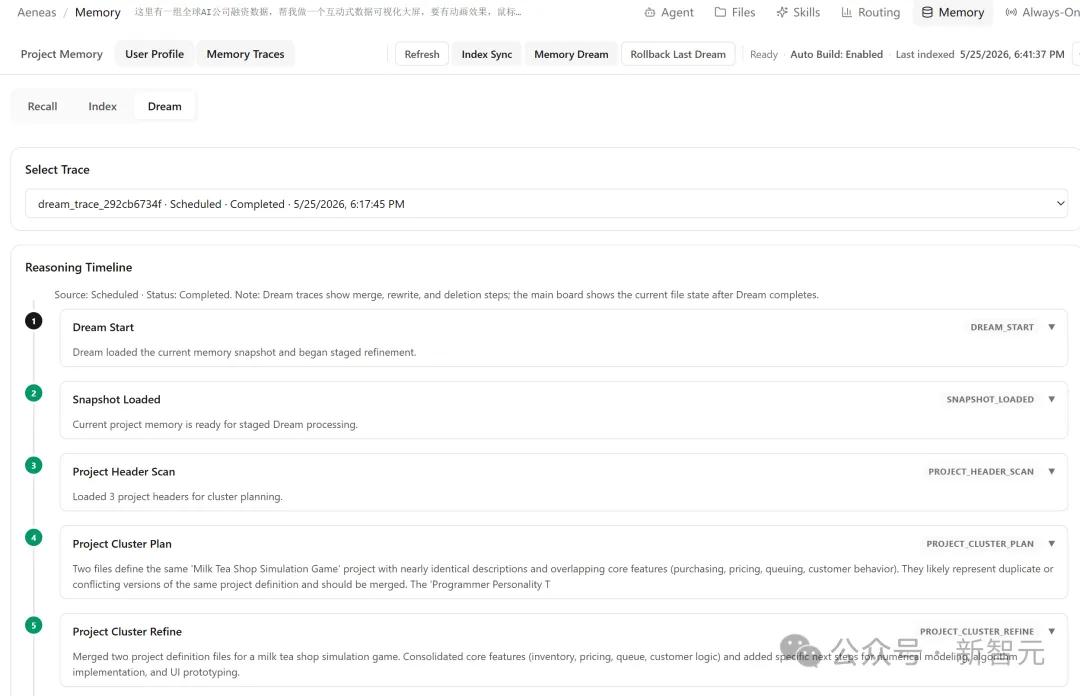
If there is a memory error, you can click in to modify it. If there is a memory conflict, you can directly delete the wrong memory. There is no need to restart the dialogue or re - input your preferences.
PilotDeck also has a mechanism called Dream. During idle periods, the AI automatically reviews and organizes its memory in the background, working during the day and digesting at night.
On the Memory panel, you can see the Memory Dream button and the Rollback Last Dream button. If there is an error in the Dream organization, you can roll back to the state before the organization with one click.
The ultimate effect of making the memory a white - box is that the AI becomes more "obedient" with more use.
Your preferences are stored in the Feedback Memory, visible and adjustable. It's not about the AI guessing what you want, but you telling it, and it recording it clearly to follow next time.
The all - rounder, open - source and free
Looking back