Can Codex optimize the network speed to soar to 900Mbps? After actual testing, I discovered new hidden gameplay.
Yesterday, Codex reset the quota again. Our account's remaining quota went from 10% back to 87%.

Tibo, the person in charge of Codex, posted on X,
Some users noticed that the cache limit in Codex was consumed faster. We found that the root cause was an optimization measure. This measure affected the cache hit rate when compressing in long-running sessions, and we have rolled it back.
We have fixed this issue and reset the usage limits for all accounts. Have a great weekend.
Then I thought about what else I could do with Codex. Just then, I saw a post on X saying, "I used Codex to improve my computer's internet speed from 400Mbps to 900Mbps."
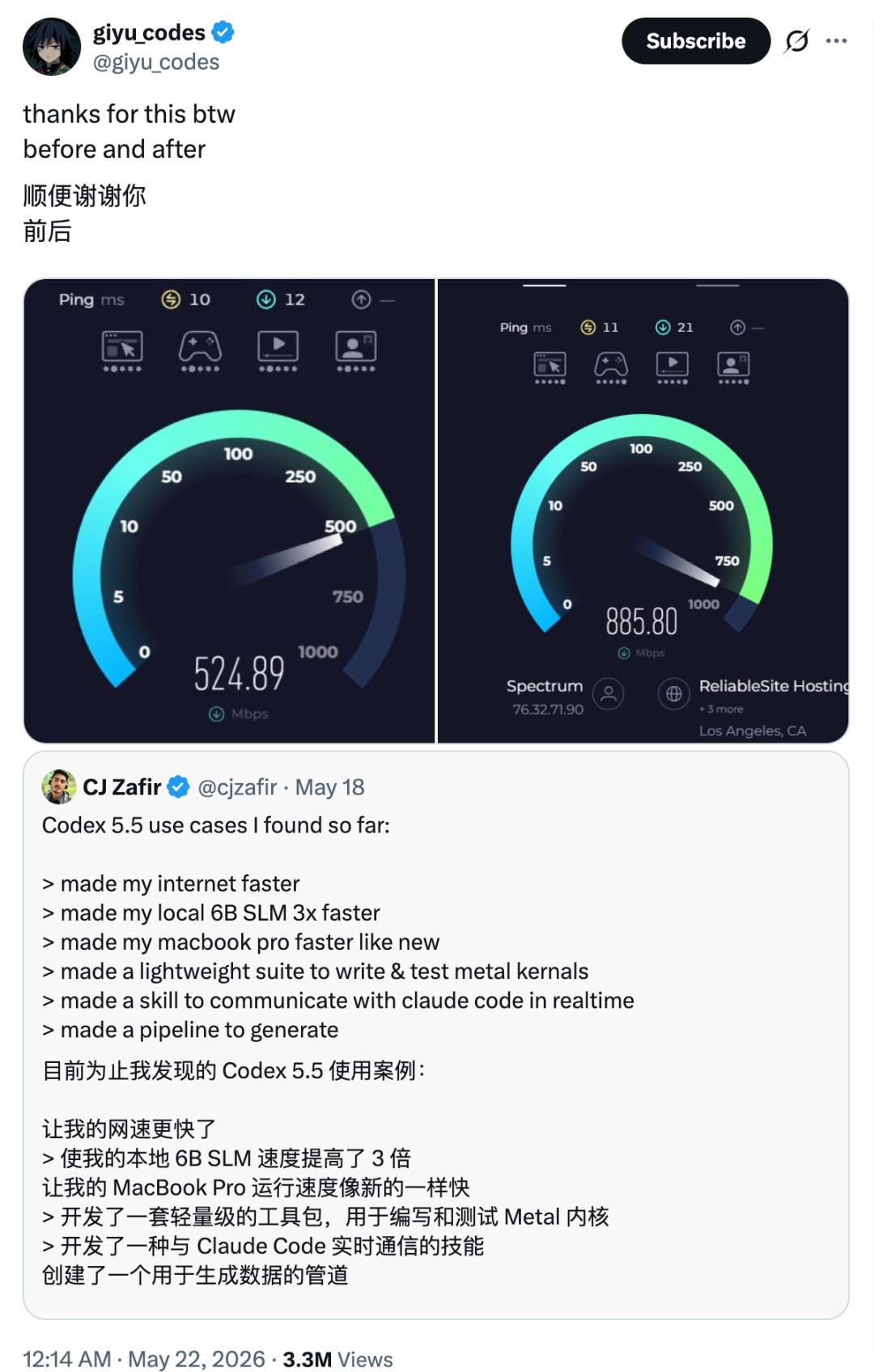
The content is really eye-catching. Can Codex really optimize the local network? Shouldn't the internet speed be limited by upper-level devices such as routers or Internet Service Providers (ISPs)?
Many netizens in the comment section of this tweet also raised questions, such as "So what configuration on the computer did Codex ultimately change?" and "Given the powerful technology of AI today, I really can't tell if this is a bait."
The blogger explained, Codex helped him change the auto tuning level on his computer from off to normal. The auto tuning level means that the system will dynamically determine how much data can be received at one time based on network latency, bandwidth, and congestion, thereby improving the network speed.
He also provided the prompt he used.
Hey, my friend said his internet speed improved. Here's the situation. Can you help me see what can be improved in our home network? My internet service provider says they provide a bandwidth of 1.2k Gbps, but my actual internet speed is a hardware problem. I only have 55Mbps now. Please help me solve this problem without making mistakes.
My goal is simple, which is to make my internet speed faster.
Problem diagnosed: First, ran speedtest-cli.
Checked the DNS resolution time,
Checked the MTU, packet loss rate, Wi-Fi signal/interference situation.
Found 3 problems.
Deleted outdated network locations/profiles.
Terminated or restricted background processes that consume a large amount of bandwidth.
Optimized mDNS.
Conducted speed tests and latency checks before and after the test.
This set of prompts comes from another X blogger @cjzafir. He shared his actual case of using Codex + GPT 5.5, which mentioned that Codex 5.5 made his internet speed faster, the small 6B language model running locally ran faster, and his Macbook Pro also ran as fast as new.

We also sent this set of prompts to Codex. Before asking Codex to handle the internet speed problem, we checked the approximate speed on the speed test website of the University of Science and Technology of China at https://test.ustc.edu.cn/. Basically, the download speed was around 100Mbps, and the upload speed was around 200Mbps.
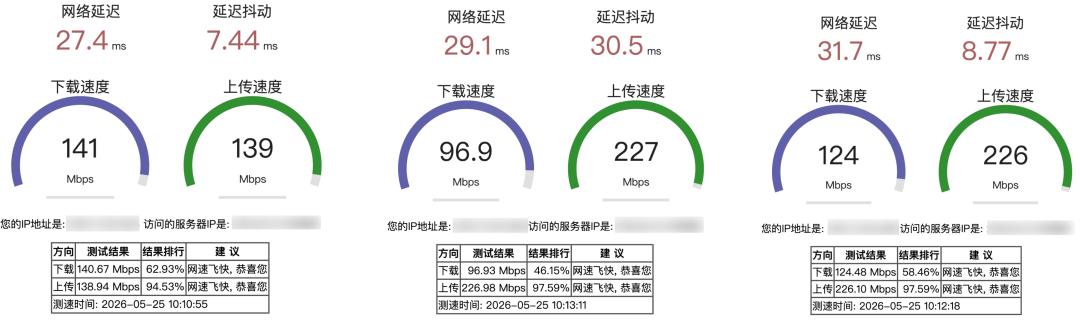
Codex did detect and fix the corresponding problems in terms of DNS resolution time, data packets, network configuration, etc., according to these diagnoses. The total processing time exceeded five minutes.

Finally, Codex concluded that "I checked and made the repairs that could be safely completed." It found 3 existing problems, namely abnormal DNS/cache, high load latency, and the wired gigabit network card not being used. Wi-Fi cannot be used as the acceptance basis for 1Gbps.
After testing again, it seems that there is not a very obvious improvement in the internet speed.
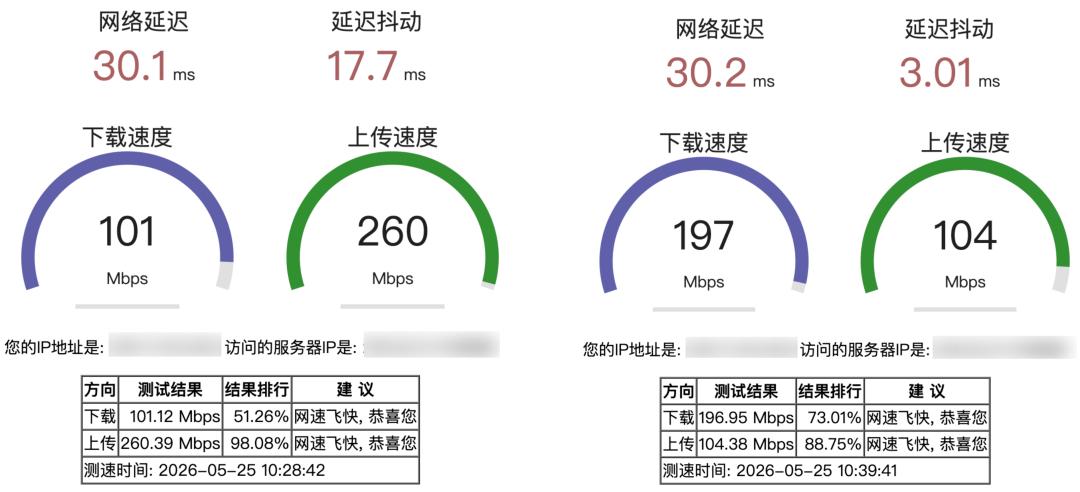
Someone asked the blogger if he was using a Mac computer. He replied that he was using Windows. Some netizens also popularized the knowledge below, The network configuration of Mac is fixed, and Codex is generally helpless.

So is it the turn of Windows users to enjoy the internet speed improvement service of Codex? And Linux users too.
Some comments said, "I thought it was using Codex to invade the internet service provider and then increase the traffic limit." In the end, it was just Codex helping to clear the DNS cache.

But some netizens also shared that they successfully reproduced the result according to this method. Codex did make their internet speed faster.

If you are interested, you can also try it. However, there is still a certain risk for Codex to modify the network configuration. Some people in the comment section also mentioned that Codex deleted all the original network configurations of their computers, and then Codex told them that it was to make the internet speed faster.
These use cases related to Computer Use probably have similar problems. In addition to carefully understanding what commands Codex is allowed to execute each time, you can also ask it to explain clearly each step it is going to take when assigning a task.
If you don't make any modifications and just let Codex diagnose some possible network configuration problems, I think it is better than the built-in Windows diagnosis that always gets stuck at the progress bar.
Here comes Codexmaxxing
While everyone is discussing whether Codex can really improve the internet speed, some netizens also mentioned that this usage is actually an inspiration.

He said that the core value of this approach lies in being driven by cases. It allows AI to directly refer to successful experiences and then conduct precise diagnosis and optimization based on its own specific situation. Similar prompt skills will be very effective in Agent products.
This is very similar to the /goal command in Codex. Give it a goal. This goal can be set by ourselves or be a successful case from other users. Codex will figure out the achievable path by itself according to this goal.
On social media, many people have also started to share templates for writing goals. OpenAI engineers have also written a special article to explain what a goal is and how to use goals to maximize the value of Codex.
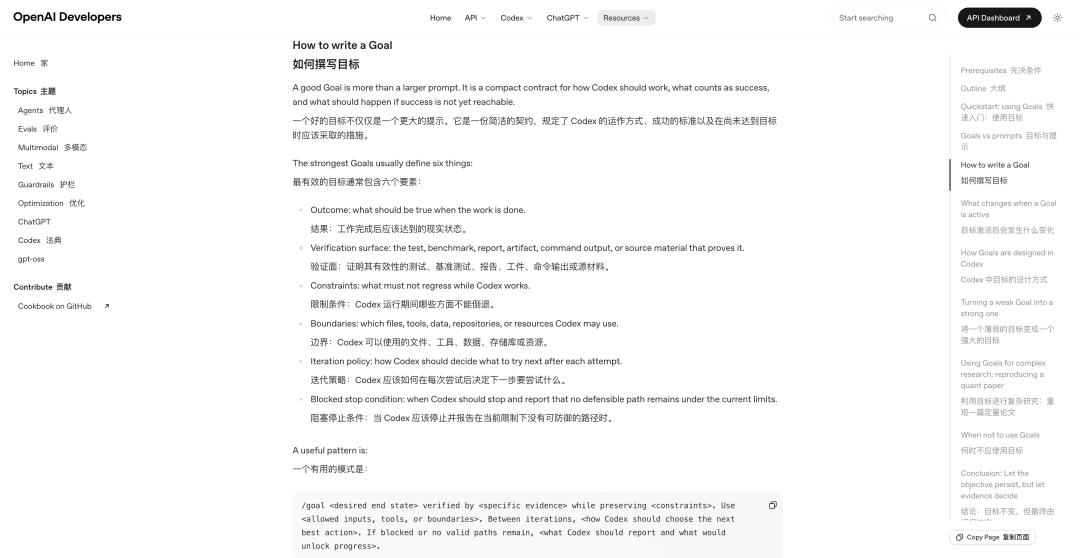
/goal <Expected final state>, verified by <Specific evidence>, while retaining <Constraints>. Use <Allowed inputs, tools, or boundaries>. If blocked or there are no remaining valid paths between iterations.
Some people also think that this is just the early stage of Codex, so we need to learn so many prompt skills. Whether it is using case-driven methods or the /goal command, the essence is to let AI better understand human needs.
Just like when Midjourney and Nano Banana were first launched, we were all keen on finding various public prompts. Now, when using GPT Image 2 in most image generation scenarios, we basically don't need a special prompt format to get good results.
When Codex becomes more and more user-friendly, we may no longer need these official usage templates. But from another perspective, perhaps it is in the process of imitating the usage that we will better understand how AI can improve our life and work efficiency.
Therefore, in addition to improving the internet speed, we have also seen some other ways to use Codex.
For example, using Codex's scheduled tasks to automatically generate a daily industry report every morning; enabling Codex to self-evolve and extract useful skills from past conversations; directly building a macOS application; connecting DeepSeek to the Codex client, etc.
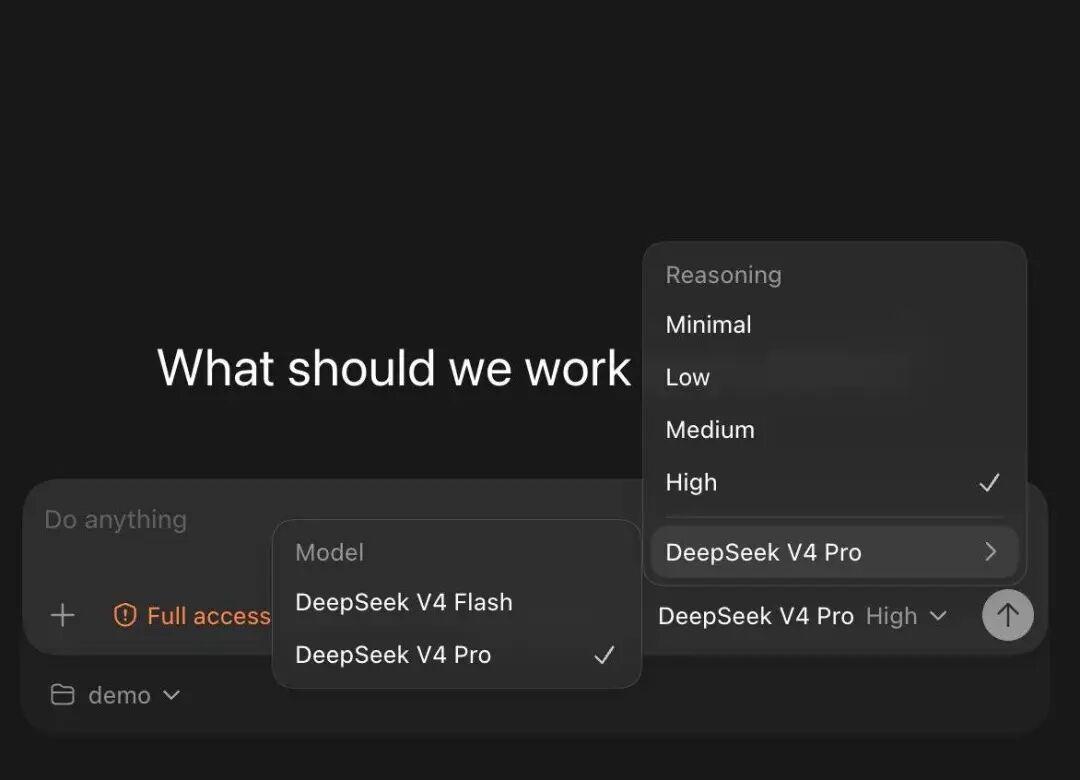
Image source: X@hqmank
We also tried the set of prompts for Codex to self-evolve. It took 7 minutes and helped us create 3 Skills.
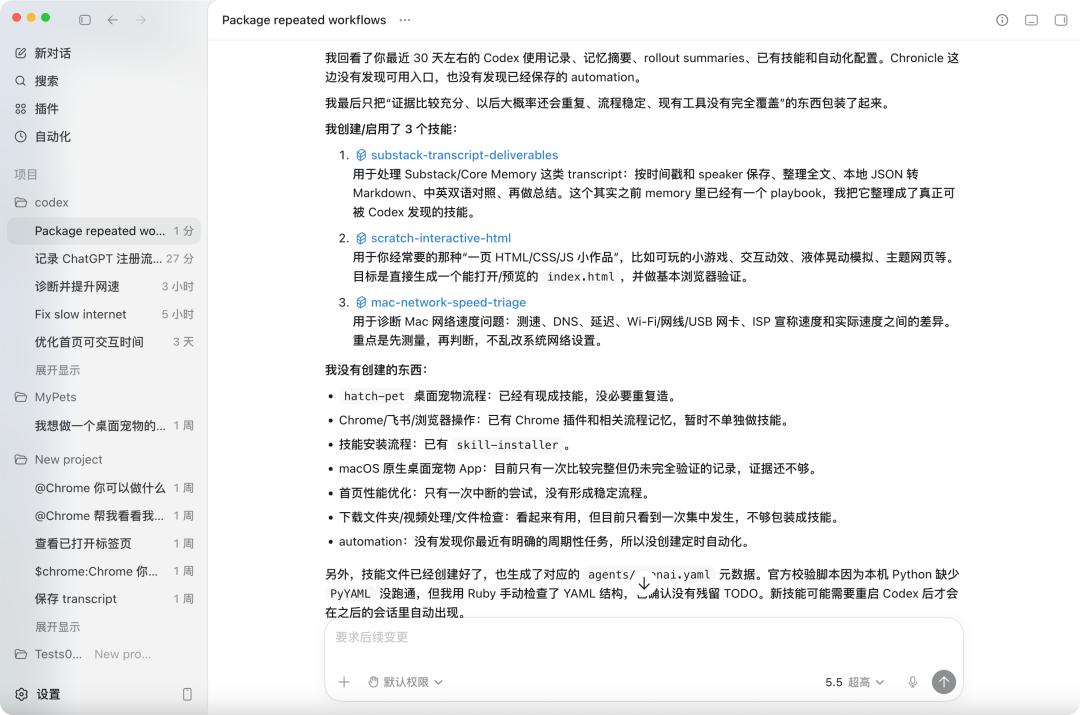
Prompt source: https://x.com/reach_vb/status/2058538305872949490
It seems that this set of prompts can be used not only in Codex. Almost all Agent products can use it to summarize some reusable processes and rearrange them in the form of sub-Agents, Skills, or automation.
Review my work in the past 30 days. If the historical records are insufficient, check all available historical records and identify repetitive manual workflows worth packaging.
Use the available evidence in the following order:
- Recent Codex conversations and task summaries.
- Codex Memories and rollout summaries to find patterns that appear repeatedly across sessions.
- If Chronicle is enabled, use it to discover repetitive work outside of Codex. Chronicle is only used for discovery; try to confirm important details back to the relevant source systems.
- Existing skills, custom agents, and automation. Prioritize reusing or expanding existing content to avoid redundant construction.
Broadly look for work that is repetitive, time-consuming, error-prone, context-dependent, or suitable for standardized processes. The scope includes coding, research, writing, planning, communication, operations, analysis, and personal affairs management.
Only include candidates when the following conditions are met:
- Appear at least twice, or obviously will appear repeatedly with a high cost of repetition;
- Have stable inputs, repeatable steps, and clear outputs or end conditions;
- Can significantly improve speed, quality, consistency, or reliability;
- Are not currently fully covered.
Choose the smallest and appropriate form:
- Skill: A reusable workflow or operation manual.
- Custom sub-agent: A specialized role or investigation task suitable for delegation with clear boundaries.
- Automation: Regular or periodic checks, reports, reminders, or monitoring.
- Skip: Too one-time, vague, sensitive, or with insufficient evidence, not suitable for packaging.
First, output a concise candidate list, including:
- Repetitive workflows
- Supporting evidence and dates
- Frequency/Confidence
- Recommended form: skill, subagent, automation, expanding existing content, or skip
- Why it is worth or not worth creating