15 OpenClaw application cases: Which ones are truly effective in 2026?
Recently, a viral post on the X forum showcased an open - source artificial intelligence agent that automatically processed thousands of support tickets overnight. It can mark tickets by priority, write context - appropriate responses, and update project dashboards without human intervention. This demonstration quickly spread in the developer community, sparking discussions on how autonomous agents can evolve from experimental projects to practical workflow tools. Video clips of similar systems managing inboxes, triggering scripts, and monitoring logs further piqued people's curiosity about the capabilities of these systems in real - world environments.
This momentum reflects a broader trend. According to a report by McKinsey, 65% of organizations are currently using generative AI in at least one business function, almost twice as many as the previous year. As the adoption rate increases, automation experiments based on agents are accelerating, especially among teams seeking to streamline repetitive tasks and reduce operational risks. The open - source foundation and flexible integration of OpenClaw make it highly attractive to users who want transparent control over the behavior of their AI agents.
OpenClaw: How Self - Hosted AI Agents Are Transforming Automation in 2026
Learn what OpenClaw is. It is a self - hosted autonomous AI agent that can perform actions, automate tasks, and integrate with local applications.
1. Personalized Morning Briefing
One of the first setups people build is to send a timed morning summary to their mobile phones and push it via Telegram or WhatsApp. OpenClaw extracts information from your Google Calendar, weather API, RSS feeds, GitHub activities, or any data sources you configure, and then formats it into a concise and readable message using a cron task at a set time. Most users set it for 6:30 a.m.
What makes OpenClaw more useful than widgets or applications is its ability to provide context. OpenClaw understands your schedule, work priorities, and what you did yesterday. Therefore, the briefing it provides is not just raw data but is filtered based on what you really care about. A common practice is that it grabs popular AI tweets from the X platform, top news from Hacker News, and personalized suggestions generated by OpenClaw based on your stored goals. The entire summary is no more than 150 words. You no longer need to open four applications; just read one message.
2. Email Inbox Management
OpenClaw connects to Gmail, scans received emails, classifies them by urgency, automatically generates reply drafts for review, and automatically unsubscribes from promotional email lists. Some users report that just letting the agent run overnight for a few days can clear thousands of unread emails.
The agent identifies patterns in email subjects, sender histories, and email content to find urgent emails, mark those that need a reply, and archive those that don't require a response. A typical summary might show: three emails need to be replied to today, seven are for reference only, and twelve promotional emails can be safely archived.
The most aggressive configuration combines Gmail access with credential management, allowing the agent to log in to services and handle daily account operations without user intervention. For anyone who sees "zero inbox" as a real productivity goal, this is one of the most profitable automation setups you can configure. Teams that expand this workflow usually deploy hosted OpenClaw first to ensure the security and reliability of credentials and strengthen the agent environment before connecting to sensitive integrations like Gmail.
3. Private Document Assistant
When used in conjunction with a local language model like Ollama, OpenClaw can read, summarize, and answer questions about files stored on your computer without sending anything to external services. You can upload contracts, financial records, internal research reports, or any sensitive documents, ask questions in simple language, and get answers directly in the chat. All content remains on the hardware you control.
This is especially important for legal professionals, finance teams, and anyone who needs to handle proprietary research because sending documents to external APIs is not a viable option. OpenClaw is responsible for the chat interface and document parsing, while the local model is responsible for inference. The end result is a private document assistant that functions similarly to hosted AI tools but without the need to access external servers. The setup requires running Ollama on your VPS or local computer, but once it's running, the workflow is exactly the same as using any other AI assistant.
4. Developer Workflow Automation
Developers can use OpenClaw to manage the entire coding process from anywhere. It can start a Claude Code or Codex session, run tests remotely, capture errors via Sentry Webhook, automatically resolve these errors, and create a pull request on GitHub, all triggered by a text message.
Some developers described how they can review and merge PRs through the chat interface while away from their desks. The agent can also build new monitoring skills autonomously. A widely - circulated example is that the agent wrote its own Spotify release tracker to monitor new songs from followed artists and then installed the skill without the user having to write any code. For teams that want to conduct continuous testing without constant supervision, OpenClaw is like a senior developer on standby. It can also help write specifications; users described brainstorming about features while on a walk and coming home to find a draft specification file generated based on the conversation.
5. Content Production Process
Creators run a multi - agent process inside Discord, with each channel acting as a specialized agent. One agent is responsible for researching popular topics and competitors' performance, the second agent turns the best ideas into a complete script, and the third agent generates images or thumbnails. This process can run on a schedule or on demand.
This approach eliminates friction because the agents can pass work to each other without coordination. The research results are directly used for script - writing prompts. The script then moves on to the visual generation step. Each stage uses the context of the previous stage. Users say they can generate a content calendar and social media posts by running this process weekly without having to brief anyone manually. The output can be directly used for review and scheduling without having to rewrite from scratch.
6. Second Brain via Text Message
OpenClaw can serve as your memory bank, and you can fill it with information by sending text messages. Whether you're on the go, you can send book recommendations, links, transcribed voice notes, or inspiration, and OpenClaw will save them to local storage and record context information such as the time and reason for sending. Later, you can search, retrieve, or ask about any stored content in plain text language.
Some users combine it with a custom Next.js control panel to display all stored memories through semantic search. Others use it entirely through chat, typing "Find what I mentioned before about negotiation strategies" and immediately getting the correct notes. The core advantage compared to tools like Notion or Apple Notes is the convenience of the recording process. You just send information like texting a friend, and the background will automatically organize it.
7. Calendar and Task Management
OpenClaw can directly integrate with project management tools like Google Calendar and Linear to manage events, create tasks based on chat messages, and present daily priorities. You can ask it to schedule meetings, view the next three events, or generate a task list that aligns with your established goals. One documented setup is that the agent can automatically generate daily tasks based on your long - term goals and post them on the kanban it manages without manual triggering. Organizations that deploy these workflows on a large scale usually work with OpenClaw workflow automation experts to handle environment configuration, tool integration, and production - level reliability.
The agent also tracks the work it has completed. So, when you check the kanban at the end of the day, you can see not only what you've done but also what the agent has done on your behalf. For those who use calendars and task managers but spend too much time maintaining them, this completely eliminates the maintenance work. You can focus on the work itself; OpenClaw will handle the rest.
8. Smart Home and Environment Control
Users have connected OpenClaw to Philips Hue and other smart home APIs to manage the home environment through chat commands or automation rules. One user even handed over air quality management entirely to the OpenClaw smart assistant, which automatically adjusts settings in the background based on readings from WHOOP and other wearable sensors. Another user set up voice commands on an iOS device to trigger smart home scenarios through the native voice support of OpenClaw on macOS and iOS.
OpenClaw can operate successfully because it already has access to your schedule, health data, and preferences. It can make decisions based on context, such as dimming the lights when your schedule shows a focus period or adjusting the temperature after detecting poor sleep quality, rather than just executing simple on - off commands. The setup process requires access to the API of your smart home system, but once connected, the smart agent will handle your physical environment just like any other integration.
9. Health and Fitness Tracking
OpenClaw connects to health APIs like WHOOP to get daily sleep, recovery, and activity profiles and pushes them to the place where you view other information. Without opening a separate application, you can get a clear and concise overview of your health status in the same chat window where you manage your schedule and tasks.
More advanced setups cross - reference health data with the schedule. If your recovery score is low and you have a high - intensity training session scheduled for the day, the system will flag the conflict and suggest adjustments. One user created a routine that makes OpenClaw generate a short daily health report at 7 a.m., including sleep quality, heart rate variability (HRV) trends, and recommended training intensity for the day, all from WHOOP data without manual input. For those who wear trackers but don't consistently use the data, automatically integrating the data into the daily workflow can make up for this shortcoming.
10. Financial Monitoring and Alerts
Users have built various systems to track earnings reports, calculate position sizes, execute stop - loss rules, and send push notifications when preset thresholds are reached. These systems run continuously without human intervention. The system agent connects to financial data APIs, runs calculations, and records all operations.
More complex cryptocurrency - specific systems monitor social media sentiment and price data, connect to exchange APIs, and notify each step of the trading process in real - time. For non - cryptocurrency uses, the most common setup is a weekly earnings report tracker that prepares a briefing before important earnings reports are released and alerts when positions need to be re - evaluated. These setups require careful configuration and in - depth understanding of the underlying logic, but users who have used these systems say they completely replace daily manual monitoring.
11. Shared Home Automation
OpenClaw can monitor family group chats on WhatsApp or Telegram, identify mentions of groceries, appointments, or tasks, and automatically perform corresponding actions. For example, if someone sends a message saying "We need milk", OpenClaw will add it to the shared list. If a family member mentions a dentist appointment, OpenClaw will add it to the shared calendar. In addition, OpenClaw can parse and track delivery confirmation information.
The smart assistant can also aggregate the calendars of multiple family members into a shared morning briefing, allowing everyone to know the day's schedule without having a separate meeting. For families that already communicate through group chats, this can turn passive information into actionable items without changing anyone's behavior. The person sending the message doesn't need to do anything different, and the entire automation process runs automatically in the background.
12. Web Crawling and Form Automation
OpenClaw has built native browser control functions based on the Chrome DevTools protocol. It can browse websites, fill out forms, extract structured data, take screenshots, and handle authentication processes through a dedicated Chromium instance completely isolated from your personal browser.
Practical applications include querying flight status and automatically checking in, filling out medical reimbursement forms, regularly scraping competitors' price information, and extracting data from websites that don't provide APIs. Since it communicates directly with the browser engine rather than relying on visual UI inference, it is faster and more reliable than screenshot - based tools. For weekly repetitive browser tasks, building an automation process and letting it run automatically is a straightforward choice.
13. SEO Content and Research Process
OpenClaw can research a topic, extract information from search results, write structured content, and format it for review, all triggered by a single message. Combined with web - crawling technology, it can monitor competitors' content, identify keyword gaps, and discover potential opportunities before you manually search for them.
A typical workflow starts with a weekly prompt telling the agent which topics to research. The system automatically extracts data, organizes the research results, and generates a content briefing or draft for editing. Users who run this process on a large scale report a significant increase in traffic within a few months, mainly because the bottleneck has shifted from "having enough time for research" to "having enough time for review". The agent handles a large amount of work, while you make the judgments.
14. Autonomous Skill Creation
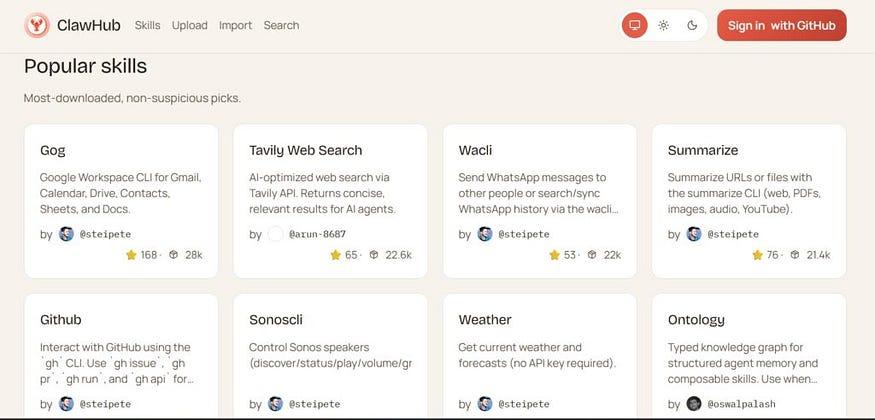
OpenClaw can expand its functions without you writing code. Just describe your needs or provide relevant tutorials, and it can generate new skills, install them, and make them effective immediately. For this reason, users say it has self - improvement capabilities: each new function it builds is based on the previous one, and the agent can also browse the ClawdHub library containing more than 1,700 community skills to find existing skills before building new ones.
As a practical example: a user wanted to track new song releases of followed artists on Spotify. They asked the agent to develop this function. The agent wrote the relevant skill, tested it, and set up a weekly scheduled task, all done through chat messages. There's no need to clone GitHub code, install npm packages, or manually edit any configuration files. For developers, this means OpenClaw can adapt to the specific needs of a project in minutes. For non - developers, it means the tool can expand as your needs grow without technical intervention every time you need a new function.
15. Multi - Agent Coordination
OpenClaw's function has thus evolved from a "personal assistant" to something closer to an efficient team. Instead of having one agent handle all tasks, multiple specialized agents are deployed. Each agent has its own identity, memory, workspace, and timed heartbeat. They coordinate tasks, share context, and report results through a central system.
How Do Multi - Agent Workflows on OpenClaw Operate?
Clawe (github.com/getclawe/clawe) is the clearest implementation of this model. It is an open - source multi - agent coordination system built on OpenClaw. It comes with four pre - configured agents running in Docker containers:
Clawe (Squad Leader): Responsible for coordinating all other agents, breaking down goals into tasks, monitoring progress, and reporting results.
Inky (Content Editor): Reviews and edits blog posts, polishes copy, optimizes email marketing campaigns, and reviews landing page content.
Pixel (Visual Auditor): Reviews social media images, ensures brand consistency, and reviews advertising creatives.
Scout (SEO Specialist): Responsible for keyword research, page optimization, content strategy, and competitor analysis.
Each agent wakes up every 15 minutes according to a scheduled task (cron) and staggers the wake - up times to avoid API rate limits. After waking up, the agent checks for new tasks, views the progress of team members, picks up the assigned work, and sends updated information back to the shared Convex backend.
Coordination Layer
All four agents work through a shared backend system (Convex), which stores tasks, notifications, activity dynamics, and agent status. When an agent finishes work, it uses the clawe deliver command - line interface (CLI) command to submit a deliverable. This notifies the team leader and all agents waiting for the deliverable. Agents communicate with each other through @mentions, triggering instant notifications without polling. After the content editor finishes a blog draft, they can notify the SEO agent for review in the same workflow. The entire process doesn't require manual arrangement for hand - over.
The web control panel at localhost:3000 displays all tasks, task statuses, and the responsible agents in the form of a kanban. It also shows the complete activity dynamics. You can also chat directly with any agent through the control panel to give specific instructions.
Preset Programs
Clawe provides real - world workflows out of the box, not just templates. The weekly content review and polishing process conducts SEO analysis on draft articles through Scout, copy - edits through Inky, and visual review through Pixel. All ready - to - use content is automatically presented. The structured data review uses Scout to check each page on the website for broken schemas and missing rich media search result markers. The daily stand - up runs a cron task every morning, summarizes the activities of all agents in the past 24 hours, and sends it to your Telegram group.
Why Do Teams Adopt This Model?
Most teams using OpenClaw don't have dedicated SEO, content, and design personnel to review all content weekly. Work either piles up or is simply ignored. OpenClaw's multi - agent collaboration feature can handle these often - postponed routine review cycles: weekly content reviews, structured data checks, and brand consistency reviews. No one needs to arrange or manage them. If the task trigger time is 3 a.m