Microsoft starts to build an image of "listening to advice", and Windows 11 fully shifts to native development.
After entering 2026, Microsoft suddenly changed its style, shifting from being "self - willed" to "open to advice". It promised to refocus Windows 11 on performance, reliability, and user control, and users will be able to feel "tangible improvements" in the coming months.
Just after Microsoft announced to streamline the redundant Copilot entry and promised not to load AI into unreasonable scenarios, there is another piece of good news that cheers up Windows users. Recently, Rudy Huyn, the partner architect of Microsoft Store and File Explorer, confirmed on a social platform that the company is assembling a new team to be responsible for Windows 11 application development. He also clearly stated that the new applications will be 100% built with native technologies and will no longer rely on components based on WebView.
01
So, what's the use of this change?
In fact, shifting from WebView to pure native means that problems such as slow desktop response, soaring disk usage, and high background memory usage of Windows 11 are expected to be solved, thus making the system no longer laggy.

Previously, the reputation of Windows 11 took a nosedive. Besides the ubiquitous Copilot and pervasive system ads, lag was undoubtedly the most unbearable problem for a large number of users. On social platforms such as Douyin, Zhihu, and Xiaohongshu, tutorials like "These few simple operations can boost Windows 11 performance by 30%!" are everywhere, and they usually receive a high number of likes, which shows that people have really suffered from Windows 11 for a long time.
Although Windows 11 has been criticized since its launch, the content of the criticism has obvious "characteristics of the times". For example, in 2021 and 2022, the early days of Windows 11's release, it was attacked for having numerous bugs and being like a half - finished product. Moreover, Microsoft removed a large number of well - received designs from Windows 10, such as the Start menu tiles, right - click menu, and taskbar, without any reason. During this period, the pain points of Windows 11 were poor reliability and "inhuman" operation methods.
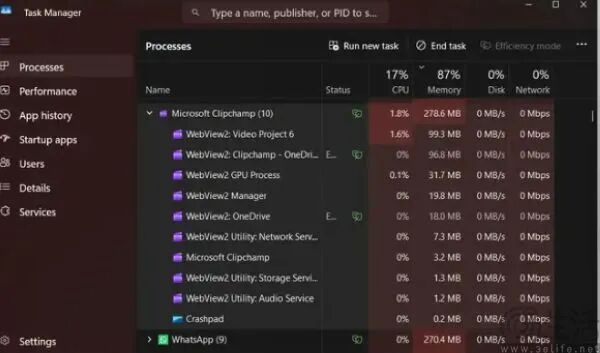
Since 2023, complaints about Windows 11 lagging have started to appear and became widespread after October 2025. Since the official support for Windows 10 ended, a large number of old PCs were forced to upgrade to Windows 11. After these PCs with a maximum of 8GB of memory were upgraded to Windows 11, it would take 2 seconds to open "This PC", and it would take half a minute to update settings. At this time, if you open the Task Manager, you will find that the background processes related to WebView directly occupy a large amount of memory.
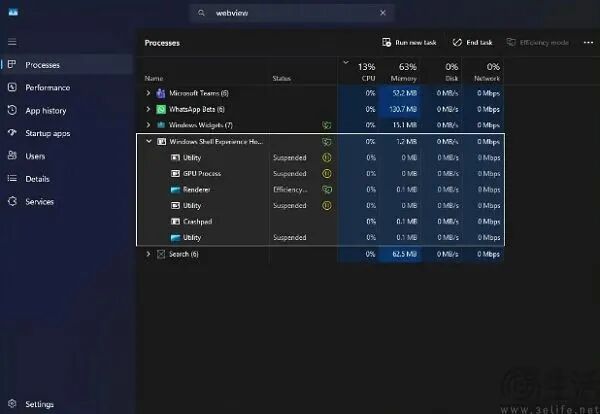
Take the "Agenda" function launched by Microsoft in December last year as an example. When users click on the notification center and try to open the agenda view, the "Windows Shell Experience Host" process shown in the Task Manager will soar from an idle state to nearly 20% of the CPU usage, and the memory usage will skyrocket from 1MB to 130MB. If you expand the subsets of this process, you can see that there are a large number of WebView subprocesses inside.
02
By now, I'm sure you understand that the apps based on WebView are to blame for the lag of Windows 11. What's more frightening is that, not only the agenda view, but in the current Windows 11, most of the official apps such as the Microsoft Store, calculator, photo viewer, search, and virtual keyboard are implemented through WebView. They will quietly consume hardware resources in the background. Once the PC configuration is not high, lag will naturally occur.
So, is Microsoft deliberately making things difficult for users to support the "Andy - Bill Law"? Not really. Microsoft's extensive use of WebView - wrapped programs in Windows 11 is actually just the price it pays to get a ticket to the AI era. There is actually a reason why Windows 11 started to be criticized for lagging after 2023, as mentioned earlier.
At the end of this year, ChatGPT became a huge success. Microsoft, which had successfully bet on OpenAI, took advantage of its proximity and was the first among technology giants to "go all in on AI". However, when the concept of intelligent agents had not yet emerged, Microsoft's idea was that as long as enough AI was integrated, users would surely be attracted. So, they began to be obsessed with adding AI functions to every built - in software of Windows.
Transforming Windows apps into AI apps is no small project. With tight time and heavy tasks, Microsoft engineers naturally chose WebView. After all, the advantage of the web - wrapping technology lies in its utilization of the agility of web technology, which is very suitable for "rapid development". However, taking shortcuts also comes at a price, that is, users have to bear higher performance overhead.

Since opening a web - wrapped app is equivalent to opening an Edge tab, anyone who has used a Chromium - based browser knows that once too many tabs are opened, the computer will become extremely laggy. Measured data shows that the memory usage of WebView - wrapped apps is 30% - 50% higher than that of native apps, the startup speed is 2 - 3 times slower, and there will even be bugs such as the pointer not responding during basic operations like dragging files.
03
Microsoft's "laziness" has led third - party developers to also start to abandon native frameworks in large numbers and switch to web - wrapping. Moreover, the negative optimization of Windows 11 actually hides Microsoft's ulterior motives. After all, the web - wrapping strategy has higher requirements for the hardware performance of users' devices, which will drive the demand of users, especially enterprise - level customers, to replace their devices, thus contributing to its AI PC strategy.
If Windows 11 had the foundation of Windows 10, Microsoft's plan might really work. Unfortunately, Windows 11 has a lot of problems. It lacks reliability, performance, and functional innovation. So, the lag caused by web - wrapping has become the last straw that breaks the camel's back. If Microsoft continues to be negligent, many users will really switch to macOS, after all, the MacBook Neo is not really expensive.
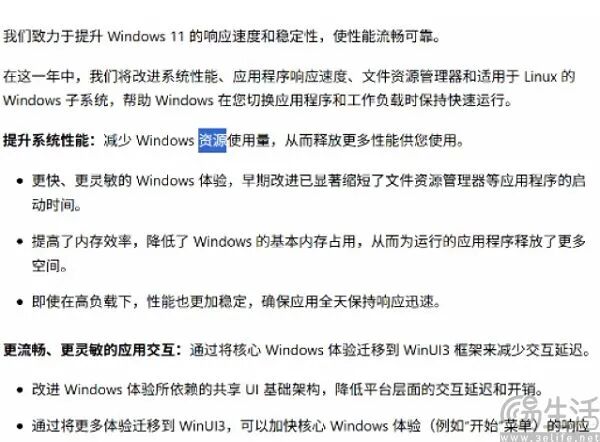
So, Microsoft has made a very sincere promise this time. Native apps will be completely built based on the WinUI 3 framework and will not load any interface elements through WebView. According to the demo released by Microsoft, the File Explorer and System Settings have been migrated from WebView to WinUI 3, with the startup speed increased by 30% and the loading time of large folders reduced by 60%.
Although there may still be many bugs in Windows 11 in the future, the situation of a large number of system apps consuming hardware resources is expected to improve significantly.
This article is from the WeChat official account "3eLife" (ID: IT - 3eLife), written by 3eLife. It is published by 36Kr with authorization.