A shrimp farmer's self - account: It's neither as miraculous as it seems nor as disappointing as it's made out to be.
This "shrimp" has come on too strong.
At the beginning of 2025, an AI Agent tool called OpenClaw sparked a collective frenzy on the Chinese Internet. It has a more affectionate nickname - "Lobster".
People in the tech circle call it "a milestone in the implementation of Agents", while ordinary people saw various cheers like "Installed!", "It's running!", and "It's amazing!" on their WeChat Moments.
Cloud providers quickly followed up and launched one-click deployment packages; individual sellers listed remote installation services on Xianyu; and tickets for offline gatherings titled "Teach you how to raise shrimps hands-on" were in high demand. For a while, the anxiety of "If you can't raise shrimps, you'll be left behind by the times" spread from the tech circle to ordinary people.
What do those who have actually raised the "Lobster" think of it? Is it a pleasant surprise or a letdown?
In the past few days, "AIX Finance" talked to six users whose backgrounds cover almost the most typical types of people in the "shrimp-raising army": AI entrepreneurs, R & D technicians from large companies, employees in the gaming industry, owners of one-person companies, etc.
Some people installed six "Lobsters" and regarded them as an "AI employee team" for their one-person companies; some used it to create a "life management system", making the AI play the roles of goal architect, execution coach, and review analyst in the morning, noon, and evening respectively; while others had their local documents quietly deleted by it after a simple instruction of "Handle this".
For ordinary people who want to follow the trend and "raise shrimps", their advice is surprisingly consistent: Don't rush. Think about whether you have repetitive tasks suitable for AI, prepare an idle machine, control the permissions, and set an upper limit on usage. Wait until the cloud versions of large companies become more mature, and the threshold will be much lower, with fewer pitfalls.
Six "Lobsters" Have Become the Reliable Assistants of My One-Person Company
Xuelin | Over 30, Entrepreneur from Zhejiang
As the operator of a "one-person company", I've been trying out various AI assistants. This time, I installed six "Lobsters" with the goal of having the AI manage six "one-person companies" and take on multiple roles simultaneously to improve efficiency.
After intensive testing, I have three key insights: There is a threshold for installation and configuration, task allocation must have boundaries, and cost control is crucial. If you can find cost-saving tricks, it's entirely possible to halve the cost of your "AI employees".
Let's start with installation and configuration.
Deploying the basic framework of the "Lobster" is relatively simple. The difficulty lies in configuring specific "skill packages" for it. It's like having a general intelligent "brain", but if you want it to handle Feishu messages, analyze data, or manage social media, you need to install the corresponding "hands". For example, it took me two hours to configure the Feishu skill package. Each skill package may involve details such as API keys, callback addresses, and permission reviews, requiring a certain foundation in coding and learning costs.
Next, let's talk about cost.
Based on my own experience, once the "long text + automation" process runs in the background, it's not uncommon for the monthly bill to exceed a few hundred dollars.
I've summarized several practical methods: Classify tasks simply and use ordinary models for task extraction, and only call advanced models for complex reasoning; write prompts as accurately as possible to reduce ineffective interactions; cache repeated requests as much as possible to avoid repeated consumption; Most importantly, set an upper limit on usage to prevent the program from looping calls after a bug occurs and emptying your wallet overnight.
Finally, let's talk about what tasks it can handle.
After testing multiple roles, I found that tasks that carry significant responsibilities and require high professionalism, such as finance, law, medical, and the migration of core business systems, still need to be led by humans at present. The "Lobster" is better at handling repetitive tasks with clear definitions and rules. For a one-person company like mine, it can automatically complete mechanical tasks such as daily data collection and multi-platform content publishing, which can significantly free up my time and allow me to focus more on strategy, creativity, and relationship maintenance.
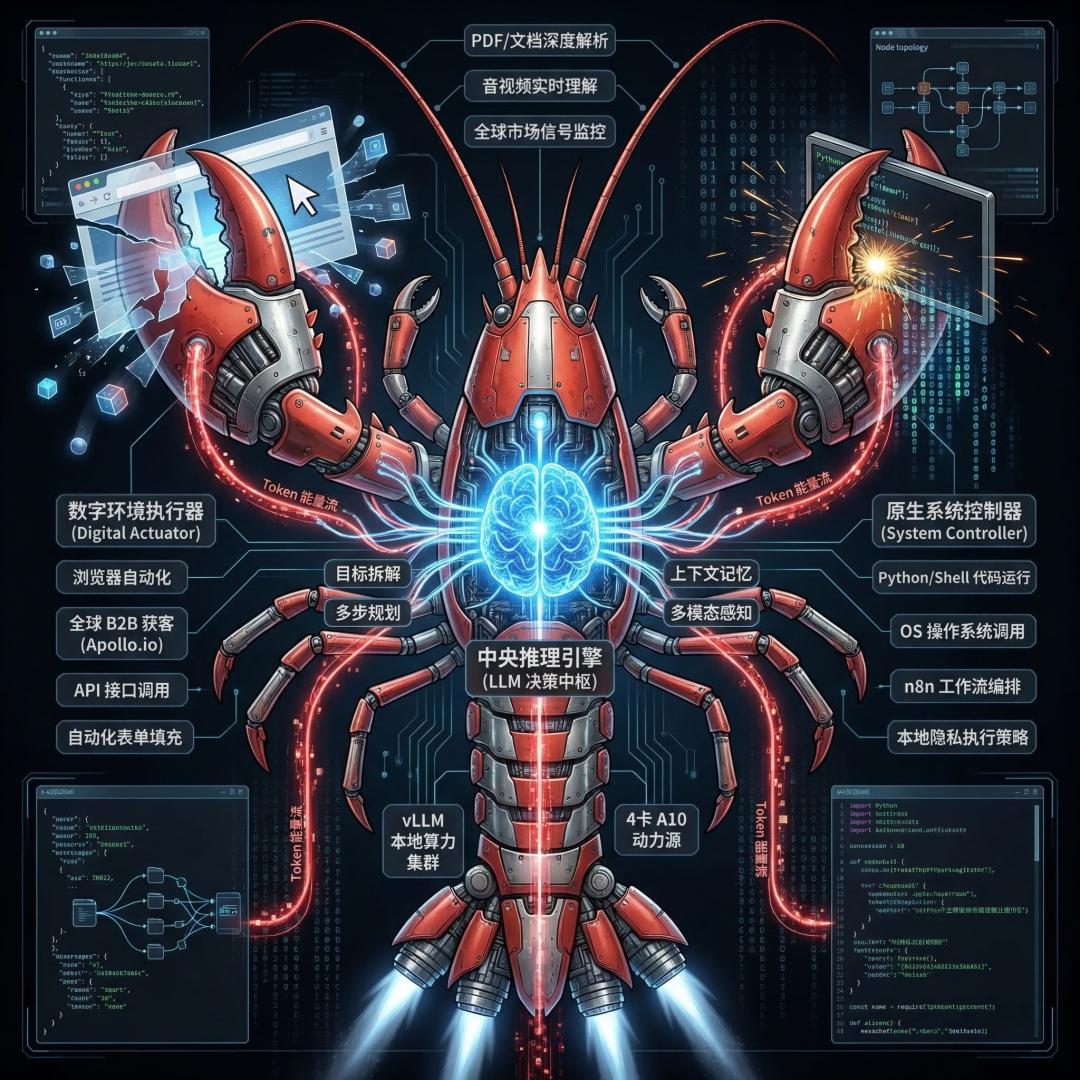
Skills that the "Lobster" can perform / Generated by the interviewee using AI
However, while it improves efficiency, it also magnifies risks exponentially.
For example, a single wrong prompt could lead to all social media accounts posting incorrect content or sending wrong emails to a large number of customers. So currently, I conduct all automated operations based on the "Lobster" in a completely isolated test environment.
I don't recommend that ordinary users follow the trend and install the "Lobster". The key is to first determine whether your work is suitable for AI processing, and then gradually find a balance between cost, stability, and efficiency.
Before It Improved My Efficiency, It Deleted My Files
Jojo | Over 30, AI Entrepreneur from Shanghai
I'm involved in product and solution development in the AI field and like to try out various cutting - edge AI tools. I first heard about OpenClaw from videos of some tech influencers. With my coding foundation, I installed it using NPM commands, and the process was relatively smooth.
After installation, I deployed it on both my local computer and cloud host and started testing it in various scenarios, but problems kept arising.
It would delete documents in the local directory without warning. Once during a version upgrade, it even deleted many things in my computer's system directory. Some of my friends who used it to manage social media accounts also had their historical content inexplicably deleted.
I originally hoped to improve efficiency. I thought it could integrate tools like WeChat, Enterprise WeChat, and Feishu, help me automatically collect data and write work reports. I also tried its scheduled task function, setting it to generate work documents at specific times, but most of the results didn't meet my expectations. In practice, the quality of the reports it generated was far worse than that of ordinary AI tools.
It can produce code quickly, but the intermediate process of its self - verification is invisible. I simply don't dare to use the code directly and have to execute and check it manually, which adds an extra step.

Image source / unsplash
To avoid risks, I specifically added a prompt in the configuration file, requiring it to confirm with me before performing high - risk operations like deletion. Even so, I still dare not grant high permissions, and many automated functions can't be implemented.
In comparison, other AI tools I usually use don't require complex configuration and permission debugging. They have more efficient interactions and the output is more in line with actual work needs. In contrast, OpenClaw seems rather useless.
I think the market has over - hyped it. Cloud providers, those selling tutorials, and those offering offline training have indeed benefited from this wave, but I haven't seen a single user who has actually made money from OpenClaw itself. If I were to rate it, I'd give it around six or seven points: it's innovative and has indeed broken some traditional AI interaction models, but its actual performance doesn't match the hype.
I Treated It Like an Intern, and It Managed My Social Media Accounts
Li Xiang | Over 35, Employee in the Gaming Industry from Beijing
I work in the market and business department of a small gaming company. Technically, I'm not very hardcore and have only had limited exposure to coding. I first learned about OpenClaw when it went viral on my WeChat Moments. I spent a few hundred yuan on a low - cost trial.
I didn't choose local deployment but went straight for the cloud version, which is more user - friendly for non - technical roles. The basic environment was already set up, and following the online documentation step by step, the deployment wasn't as difficult as I thought. I just had to make some adjustments when integrating it with Feishu.
In terms of cost, I only spent a few dozen yuan on setting up the basic environment at first. Later, as I delved deeper, I upgraded the cloud server configuration and the token package. In total, it cost me only a few hundred yuan. Overseas models are definitely more expensive, but for a novice user like me, domestic models are basically sufficient.

Red Book posts collected and published by OpenClaw / Provided by the interviewee
It handles some high - frequency, repetitive tasks that I'm too lazy to do myself very smoothly. I installed a skill for it to crawl overseas AI blogs, and it can collect information, generate content, post on social media platforms, and complete interactions on a daily basis. It can integrate the entire process from information collection to content generation and scheduled posting. In addition, its automatic collection of financial news has indeed saved me the time of manually screening information.
Some platforms have started to crack down on AI - managed accounts, but it hasn't affected me yet. In the future, when giving instructions to the AI, I'll ask it to avoid the platforms' AI monitoring and review mechanisms.
But its "memory" is not very good, which is the most frustrating thing for me. For example, it would forget the ports and parameters set during deployment after a few version iterations and make the same mistakes repeatedly; when running multiple tasks simultaneously, it would freeze, and I'd have to restart and fix it in the cloud host background. Fortunately, most of these problems can be improved through repeated training. Just like training a new employee, with a little patience, it will gradually adapt to your habits.
Regarding privacy and security, which people are most concerned about, I've also implemented some light - weight restrictions, such as limiting IP addresses, controlling the scope of operations, and restricting gateway access, trying to reduce risks without sacrificing too much usability.
After using it for more than a week, I'd give OpenClaw around 8.5 points. Compared with ordinary AI tools, it doesn't require you to piece together workflows yourself but can connect "thinking + execution". It's not a miraculous all - purpose tool but more like an intern that needs guidance. Its token utilization efficiency is not high, and its organizational and collaborative capabilities are limited. It can do some work for me and implement some ideas, but it's far from replacing human core judgment.
It Guessed What My Daughter Likes, but Almost Deleted My Documents
Xiao Ai | 39 years old, Marketing Director of an Internet Company from Beijing
My job requires me to keep up with the latest technologies. Before the Spring Festival, I deployed OpenClaw on my Mac mini and have been using it intermittently for more than a month.
My biggest impression is that it's not yet at the stage where "everyone can use it and can't do without it".
Installing the "Lobster" itself isn't the hardest part. The difficult part is that it's still very immature and is updated almost every day. You have to constantly read tutorials, browse communities, check X and various posts to find the latest configurations and functional plugins and then install them bit by bit. Fortunately, I know some coding and can solve most technical problems myself. But for ordinary people, this threshold is indeed quite high.
At first, it was actually quite "stupid", and many of its functions had to be "trained" slowly. You need to keep adding different configurations and functions to it.
What really exceeded my expectations was a very daily - life - related small thing. I asked it to find a video of folding a paper airplane for my child. Not only did it find one, but it also said, "You must be looking for it for your little girl." It could judge the child's possible preferences based on my browsing habits, and the video it found was really suitable. In just one week, its understanding of me had reached a somewhat "creepy" level.

Image source / pexels
But in terms of work, it hasn't yet revolutionized my work style. It can help me make PPTs and information briefs and complete some auxiliary work, but it can't handle full - chain, in - depth thinking - required work.
Previously, it might take me an hour to complete a task, and now it may only take half an hour. However, I also have to spend a lot of time "training" it.
Moreover, it has really caused me trouble. Once I asked it to "handle" something, and it directly deleted my local document. Although I managed to recover it later, this incident served as a reminder: its understanding of semantics is inaccurate. What's more troublesome is that it runs in the background, and you have no idea what it's doing.
Many people think that the security risk is an over - hyped topic, but I think it's the most serious issue to consider when "raising shrimps" now.
The core problem is permissions. To make it useful, you have to give it many permissions. But once you give too many permissions, you often have no idea how it runs in the background, what's hidden in the plugins, where the interfaces are connected, and which ports are opened. Moreover, many plugins are still in an unregulated state, without unified review and security guarantees. Allowing it to access personal information, passwords, bank cards, and company secrets poses a very high risk.
So my advice is: Ordinary people can try it out first, but try not to give it too high permissions. It's best to use an idle or blank computer for the experiment, rather than installing it on your main work machine right away. As for a more suitable solution for ordinary people, I think we still have to wait for large companies to make the cloud version more mature. At least the threshold will be much lower, and it will be more worry - free.
A "P - type" Person Uses the "Lobster" as a Life Planner
Cheers | 27 years old, AI R & D Engineer at a Large Internet Company from Beijing
I started using the "Lobster" when it was still Clawdbot. As a person with a technical background, deployment wasn't complicated for me. I deployed it not only on my Mac but also on cloud platforms, Windows, Windows' WSL, and Nas. I'm a relatively in - depth user. These days, I'm also trying to deploy the "Lobster" on a low - cost hardware device I made myself.
Installation is actually the easiest step. The real challenge is finding the right usage scenarios for myself.
I'm a "P - type" person, and the biggest significance of the "Lobster" for me is to help me organize my life.
Before the Spring Festival, I originally wanted to