From prototype to code: How AI is reshaping the workflow of product managers
When the traditional development process collapses under tight deadlines, how can the AI workflow become a lifesaver for product managers? This article reveals the full - link AI practice from prototype to code. Through the tool combination of Pixso, Stitch, and AI Studio, the front - end development that originally took weeks can be compressed to just 1 hour.
"This feature needs to be launched next Friday. When can I get the prototype?"
At 9:07 am last Monday, this message from my leader instantly took the joy out of my coffee.
According to the traditional process, developing this user management backend of medium complexity, from prototype design, UI design to front - end development, would take at least a month. However, the deadline has now been abruptly shortened to two weeks. At this moment, the prototype hasn't even been started, the UI designers' schedules are fully booked, and the front - end developers are already occupied with three higher - priority tasks.
The panic at that moment was real. Staring at the blank prototype file on the screen, my mind raced. Even if I stayed up all night to finish the prototype, it would still take at least three days for the UI designers, and one to two weeks for the front - end developers... Simple math told me that it was impossible to complete the task through the traditional path.
It was in this desperate countdown that I seriously considered the "AI workflow" that I had only heard of occasionally before. When the conventional path was blocked, the only option was to find an unconventional one. If AI could really generate code directly from a prototype as rumored, there might still be a glimmer of hope.
Thus, a race against time began - not through working overtime, but by completely restructuring the workflow. Starting from that Monday, I embarked on the journey of transforming from a traditional product manager to an "AI - assisted product builder."
The Traditional Workflow: A Long Relay Race
Let's first review the traditional product development process:
1. The product team outputs a prototype → 2. The UI designers create the visual design → 3. The front - end engineers slice the design and start development → 4. The back - end engineers conduct interface joint debugging
Each step results in a loss of information, an increase in communication costs, and an extension of the timeline. I once calculated that it takes an average of two to three weeks to launch a feature of medium complexity from the prototype stage, and pure front - end development alone accounts for five to seven working days.
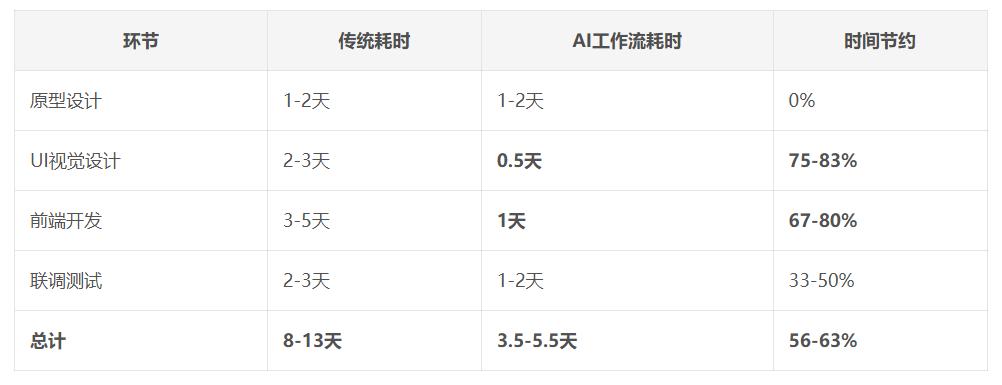
The AI Workflow: A One - Stop Journey from Prototype to Code
Facing an impossible schedule, I knew I had to adopt unconventional means. After evaluating multiple AI tools, I chose the following combination:
The selection logic was very practical:
What I needed was not "coolness" but "usability" - the tools must be able to produce code that can be directly connected to development.
The learning cost must be extremely low - there was no time to read tutorials, and they needed to be ready to use immediately.
They must be compatible with the existing workflow - able to seamlessly integrate with tools like Figma and GitHub.
The output quality must be reliable - the generated code couldn't be of a toy - level quality.
Based on these criteria, I determined this toolchain: Pixso (prototype) → Stitch (design generation) → AI Studio (code generation). The core advantage of this combination lies in that they respectively solve three key problems: prototype visualization, design systematization, and code engineering.
Step 1: Establish the Design Tone (15 minutes)
I selected a page that best represented the product style as the "tone prototype" and imported it into Stitch. This tool understands my design intent through visual recognition and intelligent analysis. Selecting the color system, font hierarchy, and spacing specifications is like having a conversation with a highly perceptive UI designer.
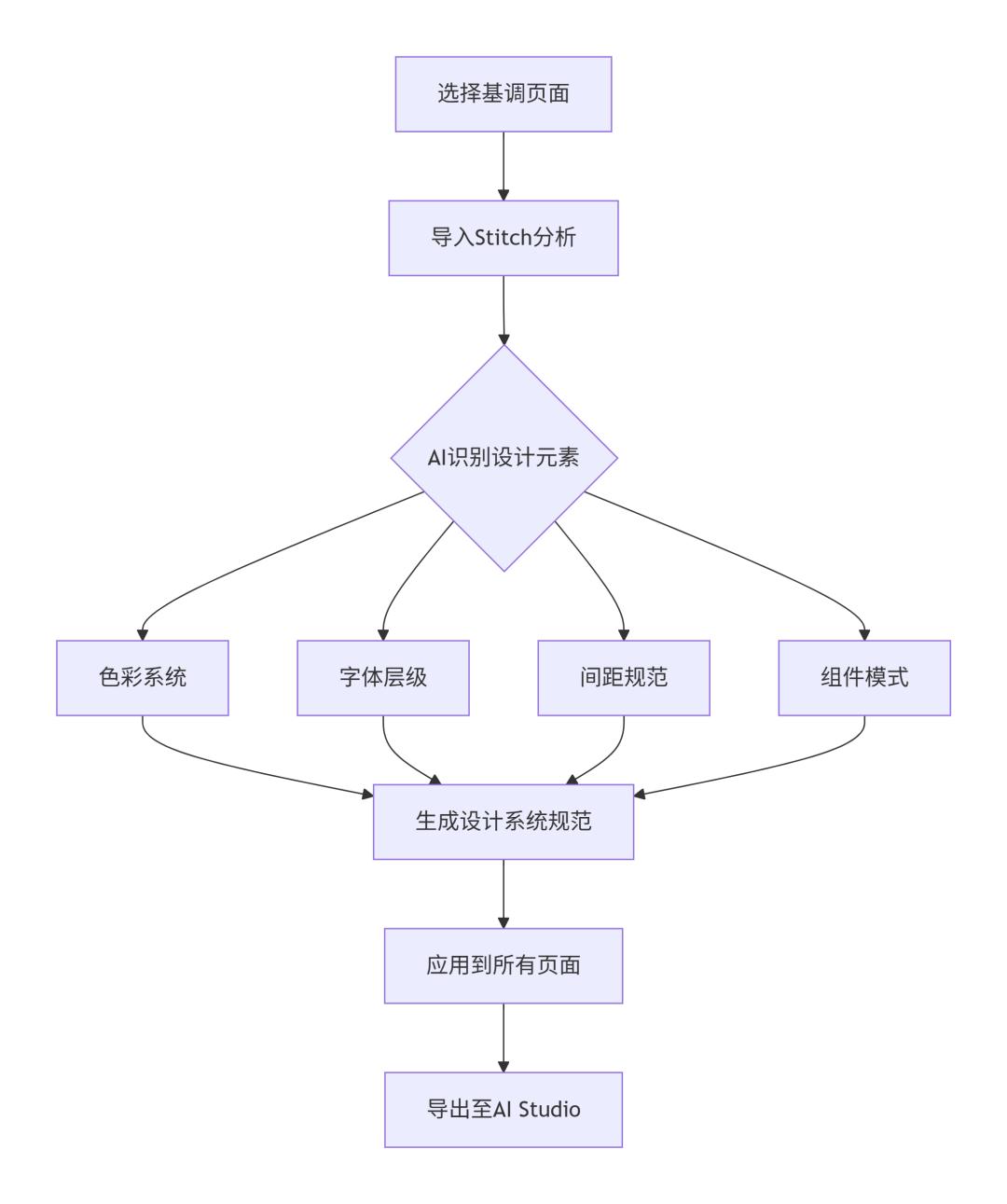
Here, I'll use a case to demonstrate.
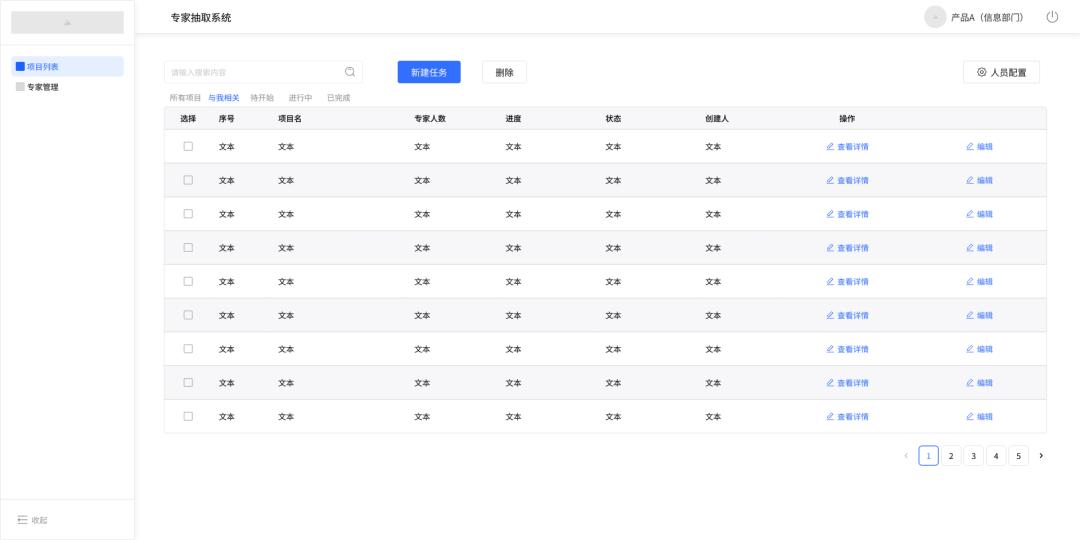
I want to implement a system for randomly selecting experts from an expert database based on some screening conditions to ensure fairness.
Here, I first used a prototype design software to draw the prototype of the main interface, including the basic structure, specific fields, and general styles.
The prototype software allows you to complete this page in just a few minutes after having a basic idea through drag - and - drop operations.
1) Create a Definitive Prototype
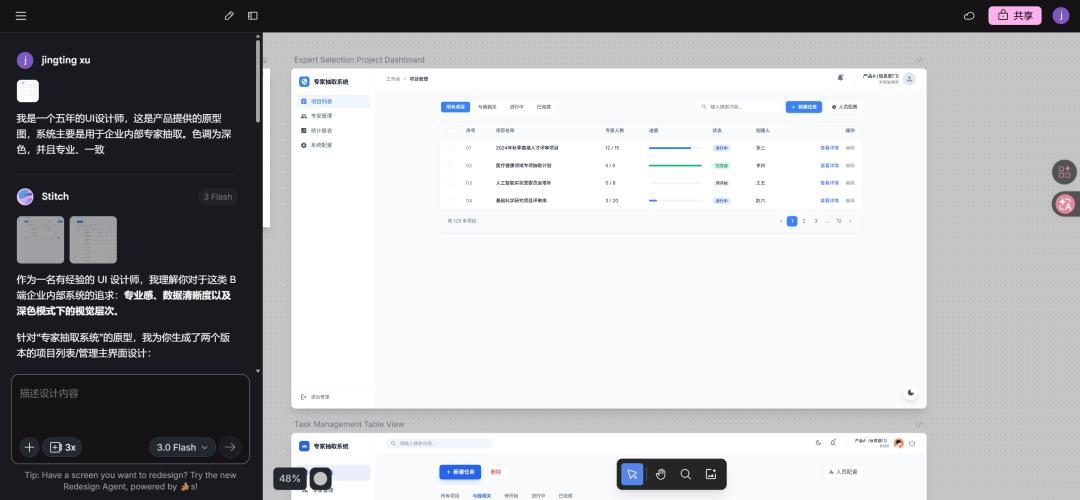
2) Configure Stitch Commands
Since UI styles usually follow a certain format, I entered some UI requirements this time. You can describe and adjust them multiple times to achieve the desired UI style.
Step 2: Apply the Style in Bulk (30 minutes)
Once the tone is established, Stitch can apply this design language to the entire prototype. I found that it can identify which elements are "cards", which are "list items", and which are "button states" and maintain consistency. What originally required the UI designers to make page - by - page adjustments has now become a batch - processing task.
1) Export the Definitive Prototype to AI Studio
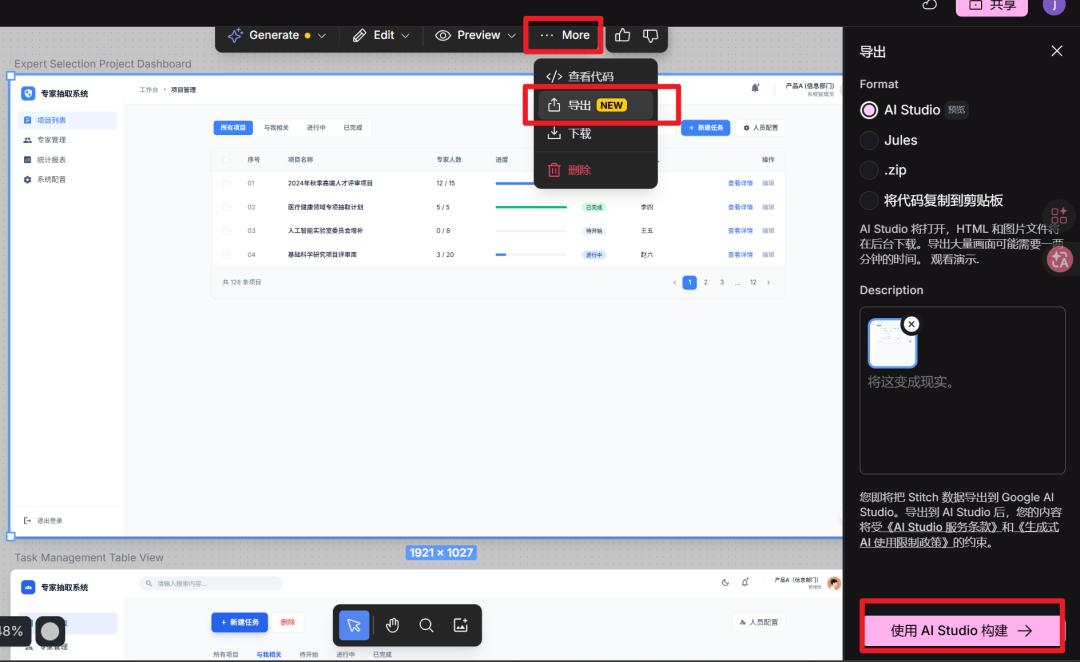
Step 3: AI - Generate Front - End Code (An Amazing 1 Hour)
After importing the design into AI Studio, the real magic begins:
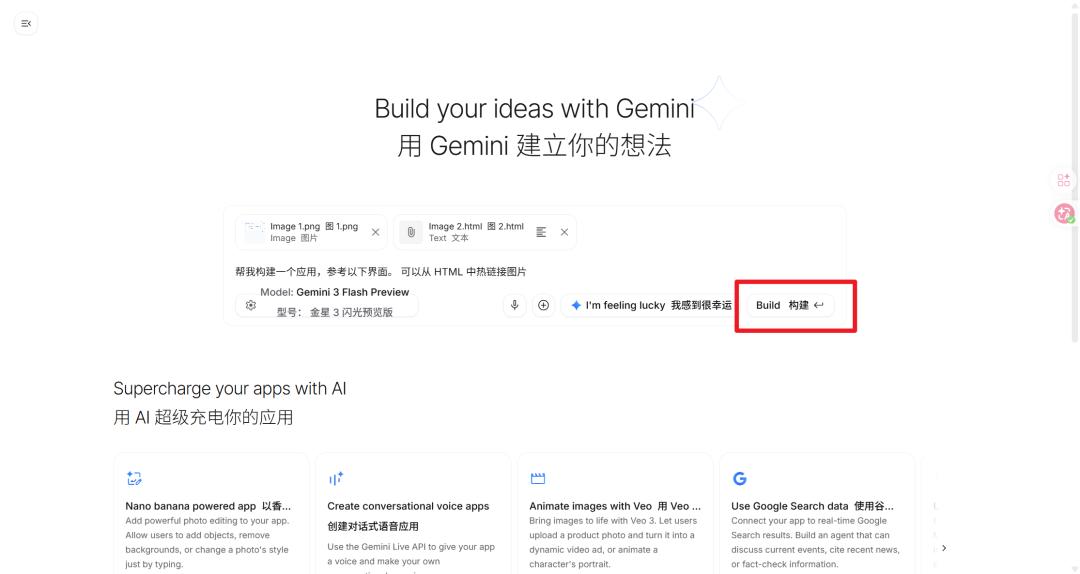
Intelligent Component Recognition: The AI identifies reusable components and establishes corresponding relationships.
Interaction Logic Conversion: The interaction instructions in my prototype are converted into actual JS logic.
Responsive Adaptation: The generated code is simultaneously adapted to both mobile and desktop structures.
Code Optimization Suggestions: The AI also points out potential performance issues and better implementation solutions.
1) The AI Studio Operation Interface
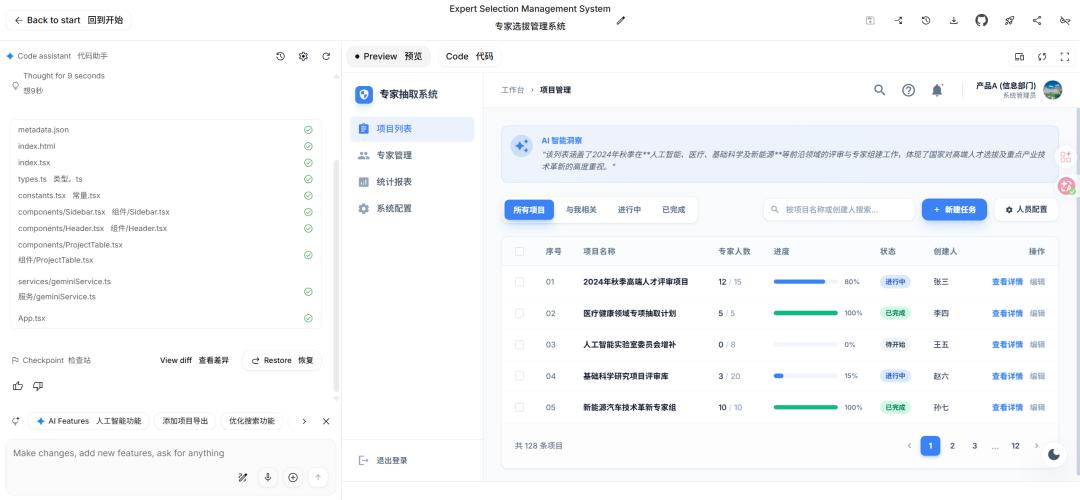
What surprised me the most was that AI Studio allows me to describe complex functions using natural language. For example, saying "This table needs pagination, sorting, and filtering functions" can make it generate the corresponding React components and state - management code.
2) Complete the Remaining Pages
Prompt:
For the expert management page, please follow the same style as before. Generate the pages for creating, editing, and deleting the expert list.
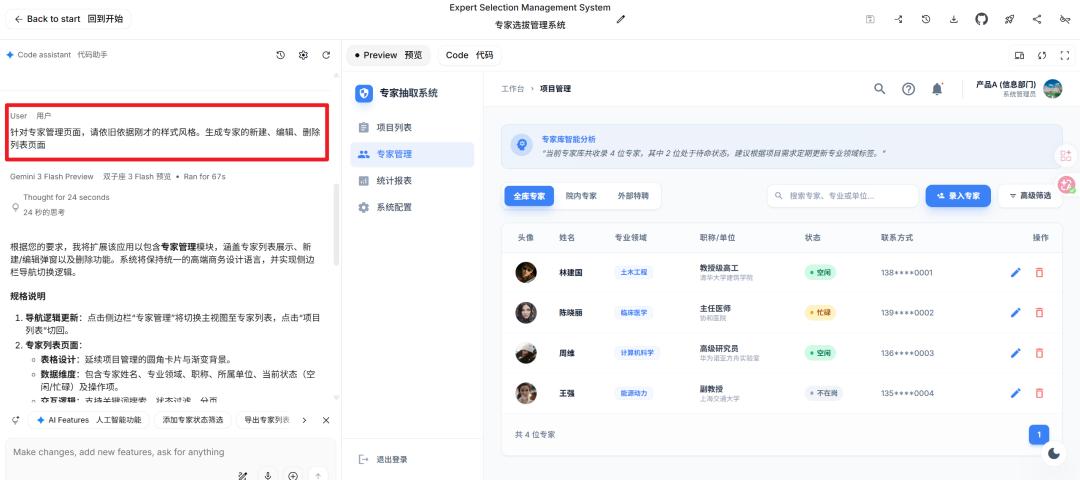
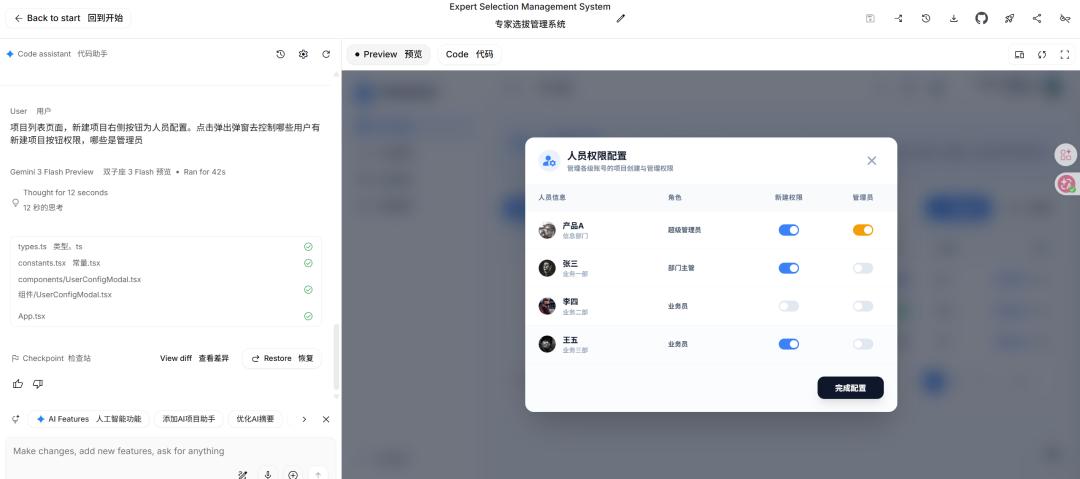
Considering more precise instructions, I'm used to describing things page by page. Describing the functions on the page can also be easily achieved. Here, I found that the original "Personnel Configuration" button was changed to "Advanced Filtering" by the AI, so I need to change it back according to my needs.
3) Optimize Function Points
Prompt:
On the project list page, the button on the right side of the "New Project" button is for "Personnel Configuration". Clicking it should pop up a window to control which users have the permission to create new projects and who are the administrators.
4) Batch Operations for Small Functions
If the whole system basically meets the requirements but there are many small function points that need to be adjusted, we can input them point - by - point at once.
Prompt:
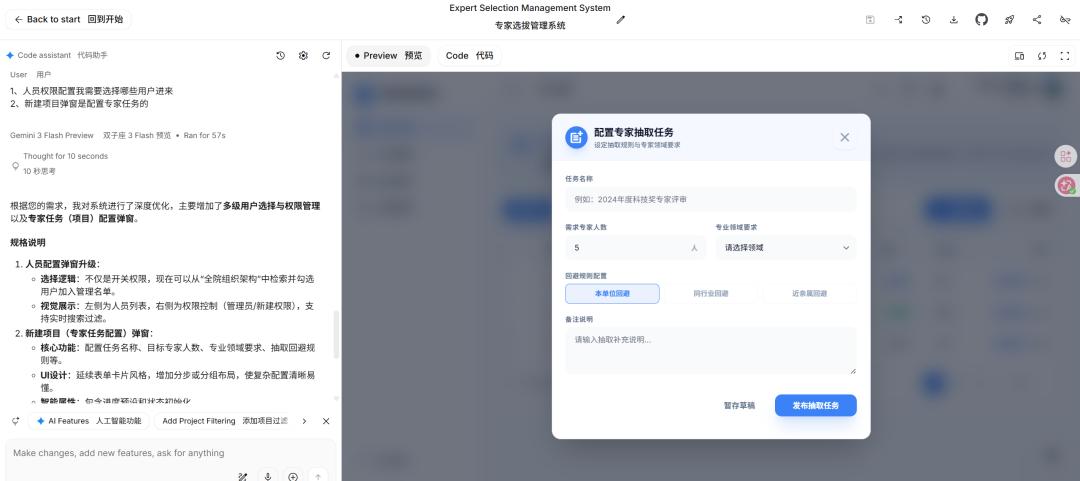
1. For the personnel permission configuration, I need to select which users to include.
2. The "New Project" pop - up window is for configuring expert tasks.
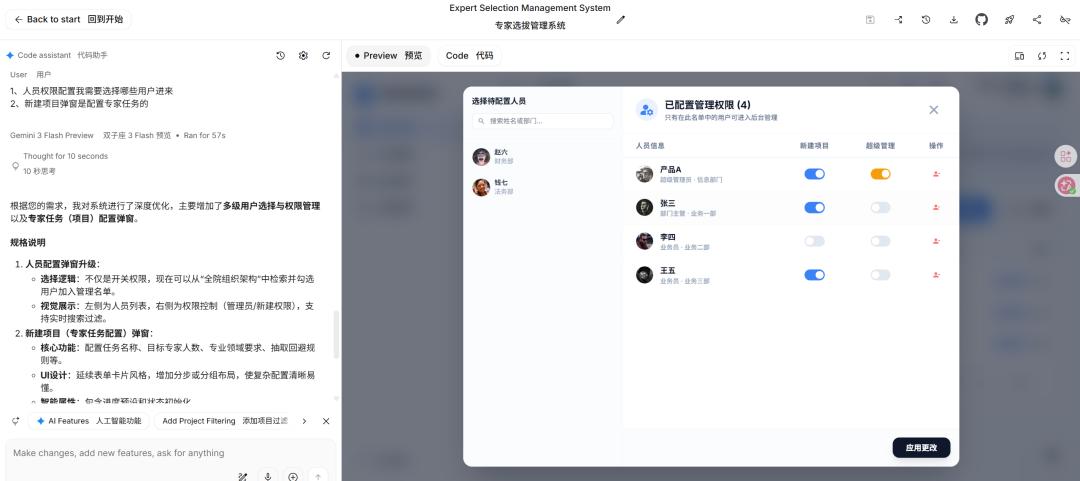
Here, I'd like to provide an idea. When you're not sure about a function or want more ideas, you can describe it roughly. It will provide you with some logical and conceptual references based on the whole system. Of course, if you have very specific requirements, just tell it clearly, and it will accurately implement your ideas.
5) Download the Zip Archive
Once you're basically satisfied with the whole system, you can download the zip archive for subsequent development. I think the product has basically completed the preliminary work at this point, and the subsequent adjustments can be handed over to the development team. Of course, if you want to implement the whole system, you can run it through programming software and make subsequent modifications in the code.
The Ripple Effect of Workflow Transformation
Upgrading the Collaboration Model between Product and Development Teams
Earlier Verification of Technical Feasibility: I can obtain a "rough code implementation" during the requirement - gathering stage to identify technical difficulties in advance.
More Precise Requirement Communication: Instead of the abstract "I want such an effect", it becomes the specific "This component should have such props interfaces".
A Tighter Iteration Cycle: The process changes from "Design → Review → Development → Testing" to "Prototype → Code → Fine - Tuning → Launch".
Advancing the Definition of Back - End Interfaces
Interestingly, when I can quickly generate front - end pages, the definition of back - end interfaces must also be advanced. Now, I work with back - end engineers to:
Define API Specifications Based on Front - End Requirements: Since the front - end "already exists", the interfaces must match.
Conduct Parallel Development: While the back - end is developing the interfaces, the front - end "placeholder" can already display the real data structure.
Perform Contract Testing: The front - end and back - end teams develop based on a clear interface contract, reducing joint - debugging issues.
Challenges and Countermeasures of the New Workflow
Changes in the Competency Requirements for Product Managers
I now need to:
Have a More Structured Logical Thinking: AI requires clear and unambiguous instructions.
Have a Basic Understanding of Technology: Understand the generated code structure and potential limitations.
Have Systematized Design Abilities: Think not only about individual pages but also about the entire product system.
Future Outlook: AI - Native Workflows
I predict that in the next 18 months, we will see:
A Smarter Iteration Cycle: AI can not only generate code from prototypes but also infer prototype modifications from the code.
Full - Stack Product Prototypes: Product managers can describe complete functions and obtain integrated front - end and back - end solutions.
Real - Time Collaboration Platforms: Product, design, and development teams collaborate in the same AI - enhanced environment.
Personalized Workflow Adaptation: AI learns the work habits of the team and provides customized process optimization.
Conclusion: Redefining Product Value
I still don't claim to be a "developer", but I have indeed become a better "product builder". AI hasn't replaced anyone, but it has redistributed the value - creation process.
The core value of product managers is shifting from "communicating requirements" to "direct creation". We are no longer just standing on the shore describing the scenery on the other side. Instead, we are starting to learn the technology of building a ship - although the ship is built by AI, we still control the course and the destination.
What excites me most about this transformation is not the numbers of efficiency improvement but the possibilities brought by this new workflow. When the barriers between product thinking and implementation capabilities are lowered, what can we build? Perhaps, it's those innovative ideas that were once shelved due to "complex technical implementation".
The tools are changing, and the processes are changing, but what remains unchanged is our original intention to create excellent products. And AI is making this intention a more direct reality.
Author's Thoughts: If you're also exploring the AI workflow, I suggest starting with a small internal tool. Don't strive for perfection; the most important thing is to start this experiment. In this process, you may find that what changes is not only your work style but also your imagination of the possibilities of products.
This article is based on the author's real - life practice