With so many AI programming tools available, how exactly should ordinary people choose?

The era has quietly shifted. By 2026, Vibe Coding is no longer just a trendy novelty in tech circles — it has become a critical skill for ordinary people to launch real-world projects and build self-developed products.
But as AI tools compete fiercely, a flood of offerings like Claude Design, Codex, and Antigravity have hit the market. Faced with so many diverse options, how exactly should regular users choose and use them effectively?
Let's cut straight to the conclusions based on real use cases:
If you want to build polished web pages, landing pages, product prototypes, or visual mockups, prioritize: Claude Design + Claude Code.
If you're working on long-term iterable products, SaaS platforms, utility systems, admin dashboards, or automated workflows, prioritize: Codex.
If you want to experience futuristic development where AI autonomously plans, codes, launches browsers for validation, and generates screenshots and recordings, prioritize: Google Antigravity.
If you're already using Codex but want to leverage Google's models for frontend redesign, code reviews, and solution planning: Codex + Gemini CLI is a highly rewarding multi-model workflow to explore.
Behind all these tool choices lies a universal pain point shared by countless ordinary people: great ideas, but no technical skills to execute them.
Have you ever had that moment: a brilliant product idea pops into your head, and you're full of excitement to turn that creativity into a practical tool — until you think about learning programming, setting up environments, and debugging bugs... and your enthusiasm cools off instantly.
Technical capability used to be the hardest barrier for individual entrepreneurs. For the vast majority of solo builders, there has long been an insurmountable wall: endless creative ideas, but almost impossible to bring them to life.
But in 2026, that wall is being completely torn down. A new paradigm called Vibe Coding is sweeping across the globe. Its core is refreshingly straightforward: you don't need to write code. You just describe what you want in natural language, and AI handles all the rest of the work.
We believe 2026 is destined to be the first year of the Vibe Coding creator economy. AI capabilities are fully awakening and iterating at high speed, breaking down boundaries completely — turning the "next big trend" from a buzzword into a tangible, unfolding reality.

What Is Vibe Coding?
It redefines how ordinary people approach development
Vibe Coding, roughly translated as "ambient programming" or "intuitive development", was first coined by Andrej Karpathy, former Tesla AI lead and co-founder of OpenAI. He described this brand-new programming experience as: "It's not exactly coding. I just see things, say things, run things, then copy and paste things — and it mostly works."
Comparison between Vibe Coding and traditional programming:
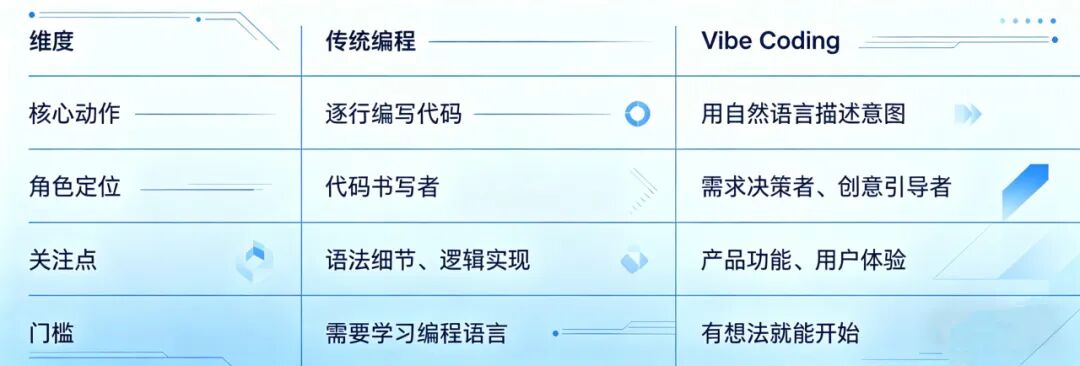
In 2026, Vibe Coding has evolved from a "new gimmick" in programmer circles to a fundamental capability for non-technical people to build products.
In the past, turning a product idea into reality meant hiring outsourced developers, recruiting programmers, learning full-stack development, configuring environments, and fixing bugs. Now, you just need to clearly describe your requirements, and AI will help you plan, write code, modify pages, run tests, and even open browsers to verify results on its own.
But here's the problem: with more and more tools available — Claude Design, Codex, Google Antigravity, Gemini CLI — how do you choose the right one?
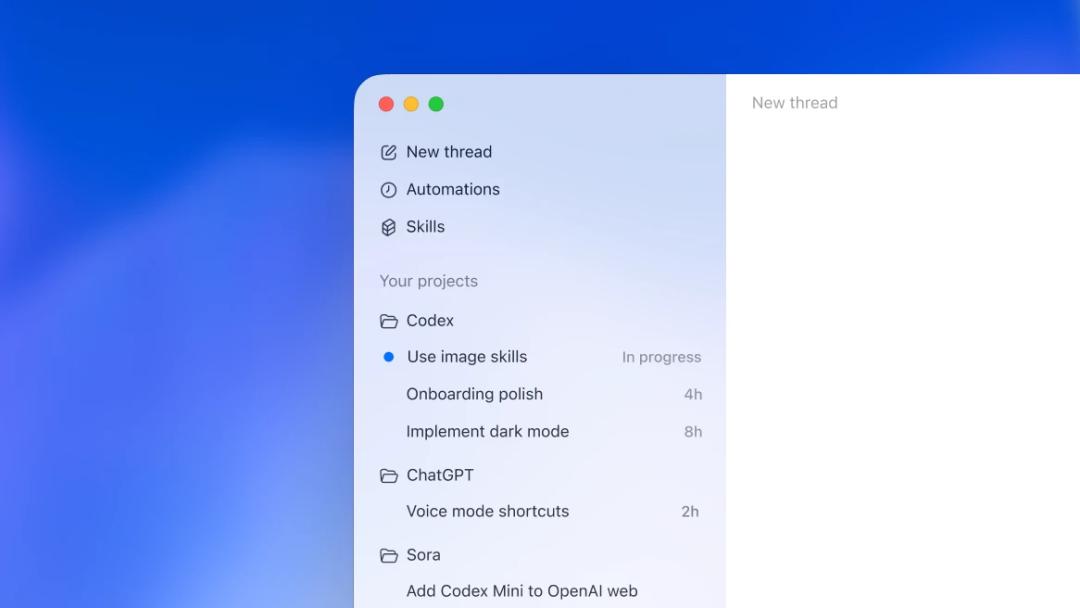
Figure: Official Codex product showcase. It is unifying task threads, projects, skills, and automations into a single workspace.

With so many tools available
How do you pick the right one?
1. Is Antigravity Gemini's programming tool?
To be precise: Antigravity is an agent-first programming platform launched by Google, deeply optimized for the Gemini model family — but it is not the same as Gemini CLI.
Gemini 3.1 Pro: The "brain", responsible for complex reasoning, visual understanding, interactive frontend work, and code generation.
Gemini CLI: The terminal entry point, ideal for project analysis, coding, and script execution directly from the command line.
Antigravity: A full development workspace featuring Agent Manager, Editor, Terminal, Browser, and Artifacts modules.
Google's official Codelab documentation clearly states that Antigravity is not a traditional code completion tool — it is a Mission Control center designed to manage autonomous agents that can plan, code, browse the web, and validate results.
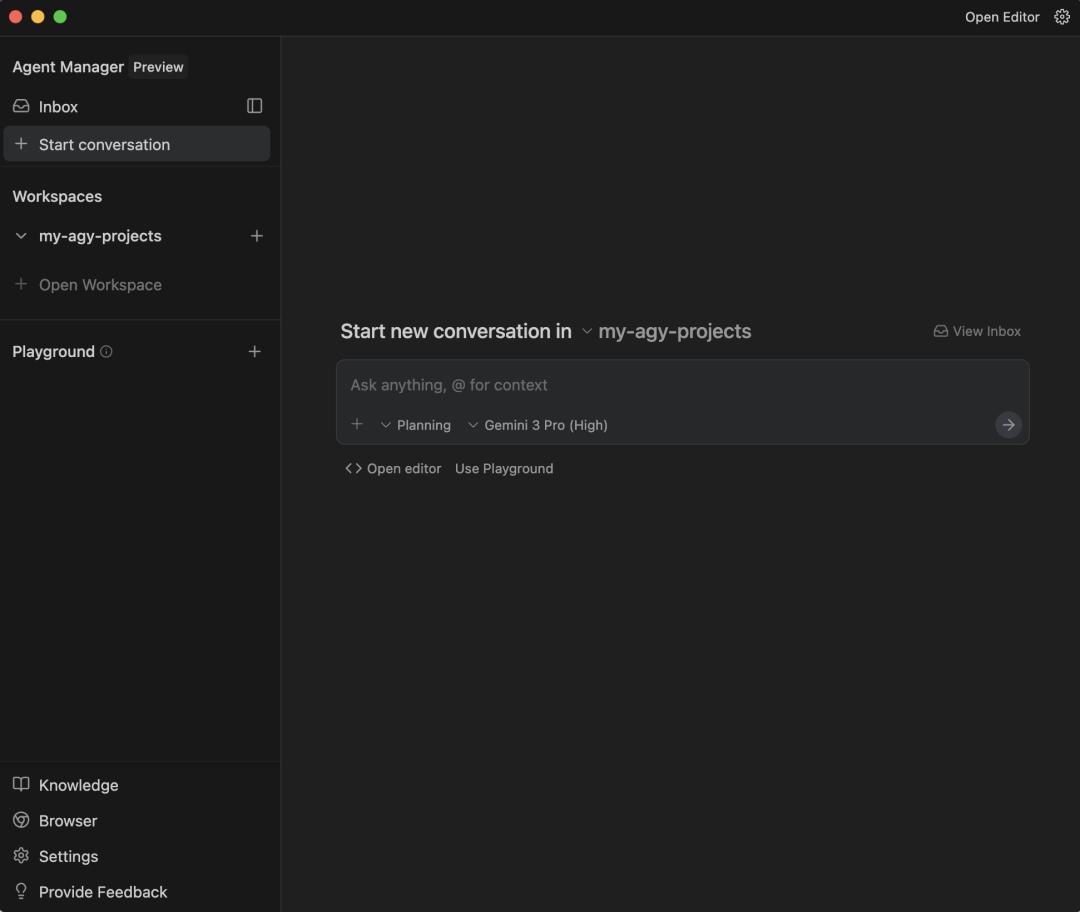
Figure: Google Antigravity Agent Manager. It functions more like a mission control dashboard for managing AI agent tasks.
More interestingly, Antigravity is not limited to Gemini models. Official screenshots show support for other model options including Claude Sonnet and GPT-OSS. This confirms its product positioning is far more than a "single-model chat box" — it is a full agent-first IDE.
2. Codex: The super app approach, unifying the entire development pipeline into one workspace
Codex's strongest advantage now is not just writing code — it is evolving into an AI engineering super app.
In OpenAI's latest updates, Codex has integrated capabilities like multi-agent parallel processing, multi-file code modification, multi-terminal support, PR review, GitHub comment handling, in-app browser access, page screenshots, frontend feedback, image generation, plugins, skills, automations, memory systems, and document previews all into a single interface.
In other words, Codex's philosophy is: don't force users to jump between ten different tools — let them complete design, development, validation, and deployment all in one unified workspace.
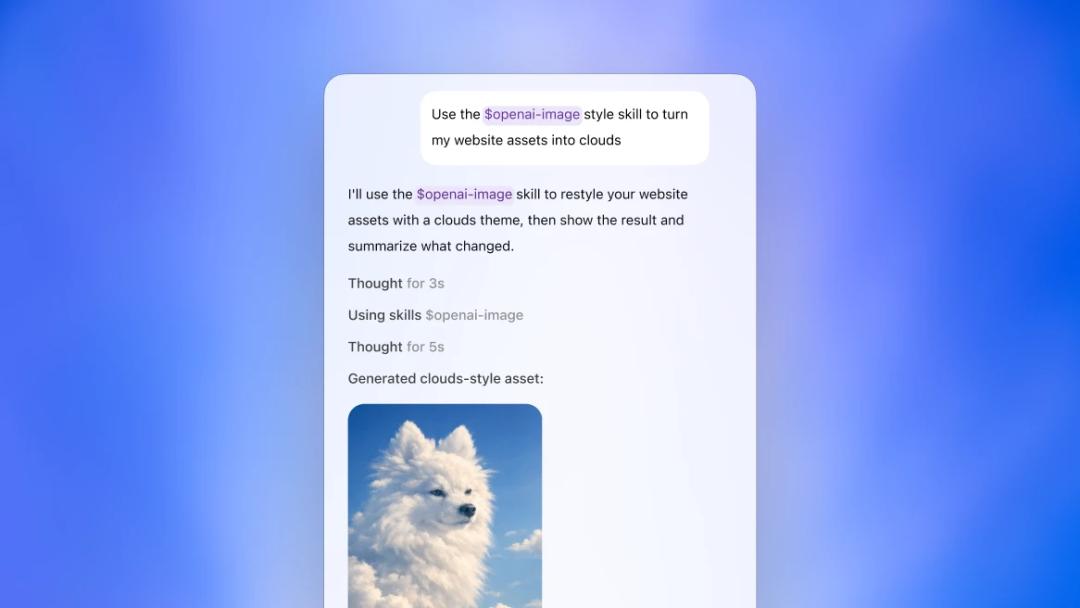
Figure: Codex Skills workflow. Codex's direction is not just writing code — it uses modular skills to complete far more comprehensive end-to-end workflows.
This is especially critical for OPC (One Person Company) operations. Solo founders don't lack tools — they lack contextual continuity. If you ask AI to modify the frontend today, fix APIs tomorrow, and write PR documentation the next day, having all these steps scattered across different platforms will destroy efficiency through constant context switching.
Codex's core value is transforming AI development from a "chat window" into a "production-grade workspace".
3. Claude Design: The strongest for frontend and visual expression, but with a more fragmented product line
Claude Design's advantage is crystal clear: it understands design better than alternatives.
You can prompt it to generate visual mockups, product prototypes, web pages, presentations, and one-pager documents. You can also adjust spacing, colors, and layouts through inline comments, direct editing, and interactive sliders. It can even read codebases and design files to help teams build consistent design systems.
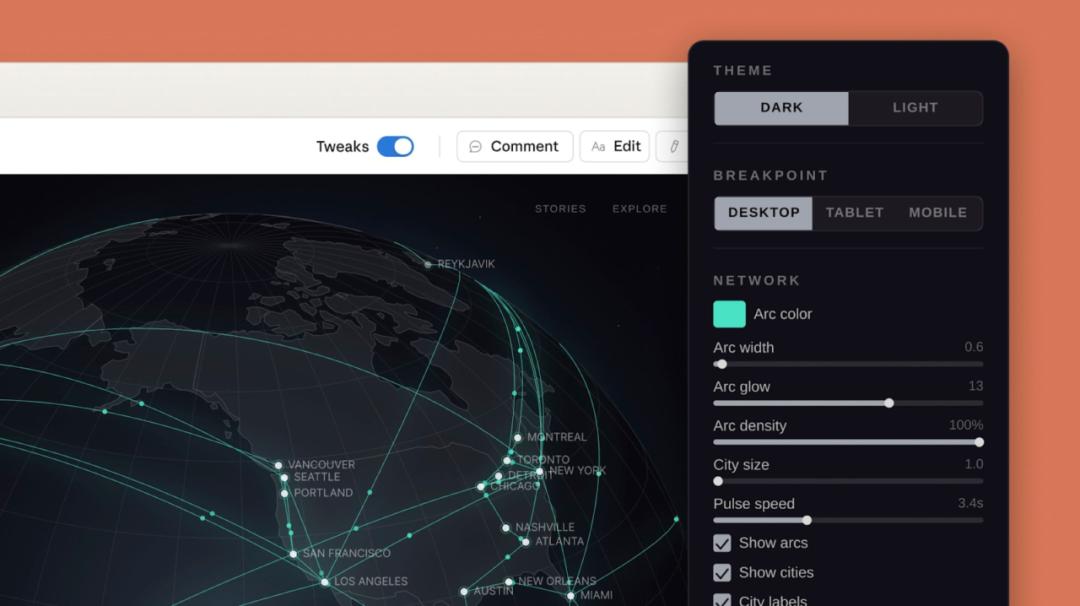
Figure: Claude Design's granular visual adjustment capabilities. Inline comments, direct editing, and slider-based parameter tuning are its key differentiators from ordinary code tools.
This is extremely user-friendly for non-technical founders. Many people don't lack product ideas — they just struggle to make their creations feel like "real, polished products". Claude Design solves exactly this gap: turning rough, vague requirements into professional, presentable visual outputs.
But it has a clear drawback: Claude Design and Claude Code operate in a segmented collaborative workflow. You first complete the design in Claude Design, then hand it off to Claude Code for implementation. This pipeline is professional, but it doesn't offer the same all-in-one integration as Codex, where code, browser, terminal, documents, and PR workflows all live in a single super workspace.
So Claude is ideal for: design-first workflows where polished product presentation is top priority. Codex is ideal for: engineering-closed-loop workflows where continuous iteration is top priority.
4. Gemini 3.1 Pro: A powerful model for frontend software design, not a standalone tool
Gemini 3.1 Pro's focus isn't on "what kind of interface it has" — it's about the model's inherent capabilities.
Google's official documentation emphasizes that it excels at complex tasks, visual explanations, code animations, interactive design, 3D experiences, and full website-level frontend generation. For example, it can produce website-ready animated SVGs, build real-time dashboards, and develop 3D interactive interfaces.
So its optimal role in Vibe Coding isn't necessarily as a standalone IDE — it works best as a powerful orchestrated model: powering agentic coding in Antigravity, handling terminal planning and code generation in Gemini CLI, acting as a frontend redesign consultant when called via Gemini CLI in Codex, and building complex interactive prototypes in AI Studio / API.
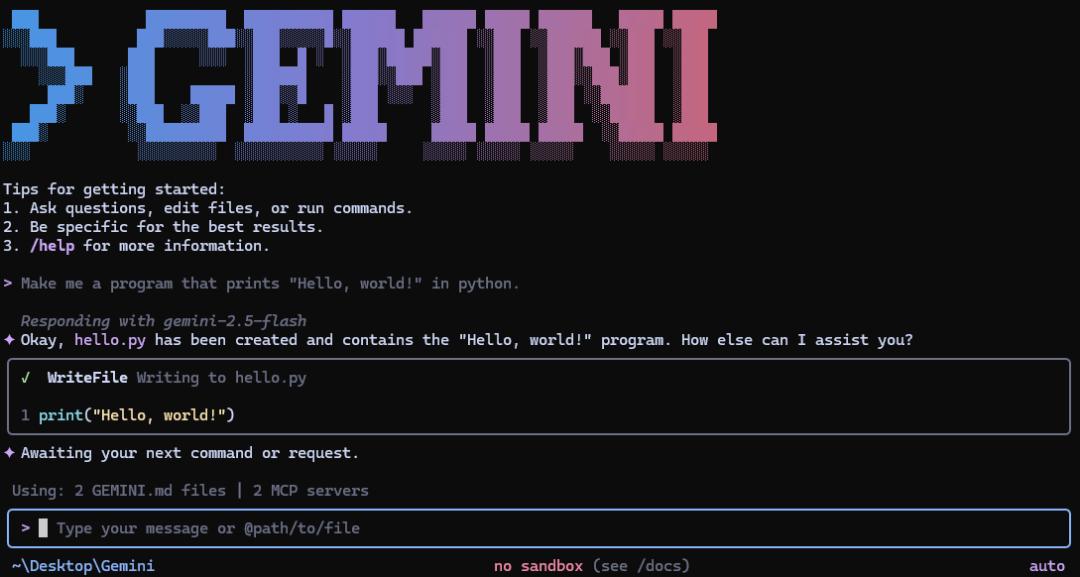
Figure 5: Official Gemini CLI screenshot. It is the entry point for Google's Gemini model family into the terminal environment, and is also designed to be easily invoked by Codex.
Calling Gemini CLI from within the Codex super app isn't just switching tools — it lets you treat Codex as your primary workspace while using Gemini as an external specialized expert model.
Codex handles reading projects, modifying files, running tests, and previewing in-browser results
Gemini CLI delivers professional frontend redesign solutions
Gemini 3.1 Pro handles complex visual, interaction, and animation conceptualization
Codex then translates those finalized designs into production-ready code
This represents advanced Vibe Coding: not just asking a single AI for help, but intelligently orchestrating different AIs for their strengths.
5. Antigravity: The most futuristic form of an "AI technical team"
Antigravity's product logic is fundamentally different from both Codex and Claude. From the very beginning, it was not designed to treat AI as a "co-pilot" — it was built to treat AI as a full agent team. You define the goal, and it plans; it writes code; it launches a browser; it captures screenshots; it generates deliverable artifacts. You then review and provide feedback based on those artifacts.
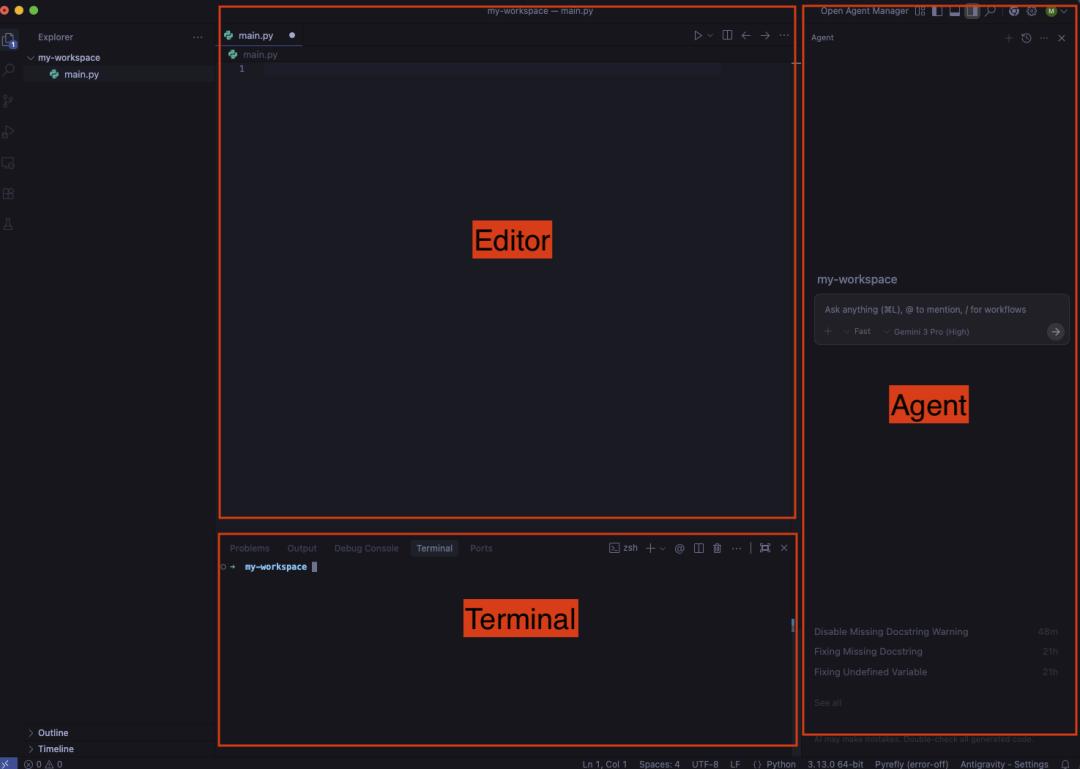
Figure: Antigravity's three-panel Editor + Terminal + Agent layout. It reimagines the traditional IDE as an agent-first workspace.
Its most notable capability isn't "code generation" — it's verification. The biggest pain point of regular Vibe Coding is: AI says it's fixed, but you have no way to confirm it actually works. Antigravity solves this trust problem with Artifacts: task checklists, implementation plans, screenshots, browser recordings, and code diffs are all available for you to inspect.
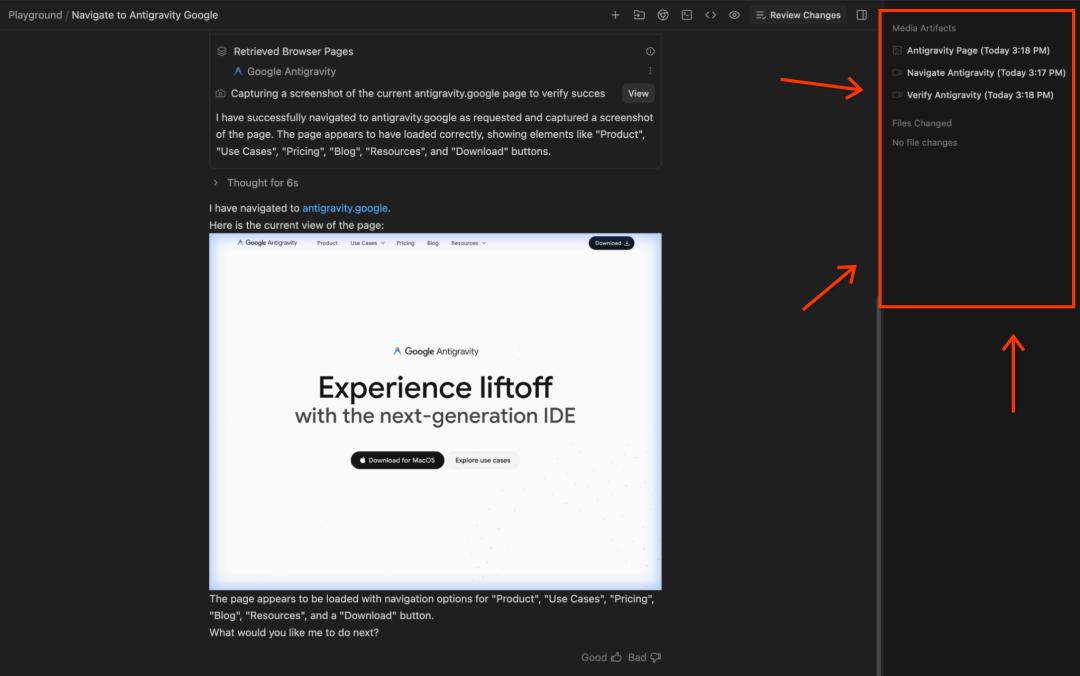
Figure: Antigravity Artifacts and browser validation. Screenshots, recordings, and implementation plans solve the trust issues inherent in AI development.
This perfectly embodies the future of the one-person technical team: you are not a programmer — you are the product lead. AI is not a chatbot — it is your execution team. You don't write code line by line — you review plans, examine screenshots, provide feedback, and make critical decisions.
