A father built an AI tool by hand, helping his autistic child utter the words "I love you"
Autism is not a niche issue.
According to the World Health Organization, in 2021, approximately 1 in 127 people worldwide were on the autism spectrum.
For many families, the challenges posed by autism do not exist solely on a diagnosis document. What the child wants to eat, what they want to play with, what makes them uncomfortable, what they fear, and what they like—very often, none of these can be expressed accurately.
Multiple studies and reviews note that approximately 25% to 30% of autistic children remain in a minimally verbal state after the age of 5, struggling to develop functional spoken language.
The protagonist of this article is the father of an autistic child.
His son is not entirely unable to make sounds, but he can say very few words and has great difficulty expressing his needs consistently.
They tried traditional augmentative and alternative communication tools, underwent speech therapy, and explored every possible approach they could access. However, the generic icons, abstract symbols, and unfamiliar sounds on those traditional tools failed to truly capture the child's attention.
So the father decided to build a tool by himself.
A Father Built a Custom Communication Tool for His Son
Traditional AAC, or Augmentative and Alternative Communication tools, are usually tablets filled with words and icons. Children tap the icons, combine words into sentences, and the device then reads the sentences out loud.
It's somewhat like the early education touch panels for kids to learn pinyin sold in supermarkets, or (forgive me for using this analogy) like the pet communication buttons you might see in cute pet videos online.
They all follow a similar basic logic: break down needs into individual buttons, and pressing them makes a corresponding sound play.
For some people who have difficulty speaking, these tools are very valuable. Especially for those who can understand language but struggle physically to produce words, AAC can become an extremely important way of expression.
But it does not necessarily suit every child.
The father found that the problem with traditional AAC is that it relies too heavily on an established symbol system: a red octagon means "stop", a small arrow means "next", a stick figure represents a certain action... For adults, this system is a bit like traffic signs—you see them often enough and you understand what they mean.
But for his son, these symbols were too abstract. The child could barely see his own life reflected in those unfamiliar icons.
They tried using it for about a year. The child would pick it up and play for a few minutes, then put it down to look for the next toy. Both the therapist and the teacher believed he was not interested in the tool and could not be forced to engage with it.
The father later realized that the tool was too distant from his son. What his son needed was not a generic icon library, but a set of things he could recognize at a glance.
So he started building it himself.
He is not a complete technical novice. In his own words, if he had to be given a title, he could probably be described as a "frontline deployment AI engineer", though he rarely uses that term to define himself. He has long been familiar with AI tools and knows well how to apply them to real-world tasks.
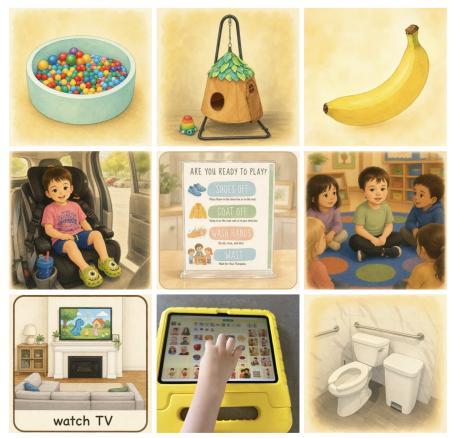
This time, he first spent two hours vibe-coding a low-cost website prototype to set up the basic navigation, then used ChatGPT Images to generate hundreds of vocabulary pictures.
These pictures are not standard icons from stock libraries. The bagel is the cheese bagel his son is familiar with, the toy is the exact one his son actually owns, and the action icons look just like his son performing those actions.
The father also designed all the images in his son's favorite animation style, making the tool look more like a picture book about his own life, or an episode of a cartoon he knows well.
The voice was also customized.
The father cloned his own voice. Because out of all people, his son listens to his voice the most and responds to it most easily. He hoped that when the child pressed a button, the device would not play a strange robotic voice, but his father's voice.
He also rearranged the words and interface based on his understanding of his child. This tool does not require the child to adapt to a generic system; instead, it lets the system get as close as possible to the world the child is already familiar with.
After finishing it, he loaded the website onto a touchscreen laptop and gave it to his son to try.
The child was immediately captivated. He no longer needed to struggle to figure out "what this icon stands for"—he could recognize at first glance that this was his food, that was his toy, and those were his family members.
The child kept tapping the photo of his grandfather on the screen over and over, and then he said the longest sentence he had ever spoken in his life:
"I really love you a lot."
I truly love you so much.
At that moment, everyone looked up at the ceiling (to hold back their tears), not knowing how to react.
That was a sentence his grandfather often said to him, which the child had memorized and now spoken out with his own voice.
After that, the changes started to become part of daily life.
The parents took photos of his favorite foods, showed him that the picture of an outstretched hand meant "I want", and taught him how to navigate to the food list. Over the past four years, his parents had struggled to figure out exactly what he wanted to eat; now, he could tap to say "I want an orange", "I want a peanut butter cookie", and "I want French toast sticks".
However, not all the changes brought by this tool were warm, tender moments. After using it for a while, the child became very unhappy instead.
The reason was simple: he now had a "voice", but he was not used to having it yet.
In the past, when he was hungry, uncomfortable, or in a bad mood, his parents would hover over him guessing. They would guess if he wanted food, if he was tired, or if something was hurting him.
But things were different now. His parents would point at the tablet and say to him over and over: "Tap to Talk"—press the button, and say it out loud.
Understanding brings new responsibility. A child suddenly gaining an expression tool also means he has to start learning to use it, and can no longer rely entirely on adults to guess his needs. This naturally frustrated him.
But at the same time, he truly started to speak more.
According to the father's observation, the number of times the child speaks is about five times higher than before.
He doesn't just press the "pretzel" button, he adds on his own: "I like that."
He doesn't just press the "orange" button, he uses his own voice to say the orange is "yummy".
Once at a hardware store, the cashier gave him a piece of candy, and he thanked the clerk: "thank you so much."
This is perhaps the most genuine change the tool has brought about: it moved the entry point of self-expression one step forward, making the child realize that his needs can be voiced, and that they deserve to be voiced.
From One Child to Many More, the Father Accidentally Built a Business
The father did not plan to start a business at first.
He only wanted to make a more usable communication tool for his own son. In his own words, the tool was "built entirely around his son": his son's food, his son's toys, the people his son knows well, the animation style his son likes, and his father's voice.
But when he first brought this tool to a speech therapy clinic, things began to take a different turn.
In the waiting room, several other mothers saw the tool. Their children, just like his son, struggled to express their needs consistently through speech—so they immediately understood the significance of this tool.
The father said those mothers cried when they saw it. In that moment, he realized he could not stop at "this is a tool for my son alone".
Many children are stuck in a similar dilemma as his son. They do not lack needs; the problem is that traditional tools are too standardized and too abstract, failing to present the familiar world right in front of them.
His son's speech therapy clinic wanted to use this tool for other children, and local schools also wanted to adopt it. As the father put it, he never actively marketed it—he just "accidentally built a small business".
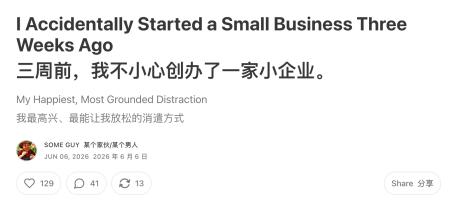
He already had his hands full, but he still decided to make time to develop a version of the tool that could be used by more children. However, there was a long gap between "building a tool for my son" and "making it usable for other families".
It would be meaningless to simply copy the existing setup for others. The reason this tool works so well is precisely because it is not generic. For a different child, the food icons need to change, the toy icons need to change, the family member photos need to change, the voice needs to change, and even the animation style may need to be adjusted.
The question became: how to let every family quickly create a tool that "belongs only to their own child"?
The father began to take on all the complexity himself. He knew that the parents who would actually use this tool were often already exhausted. They might have to work during the day, take care of their child at night, and possibly look after other children in the family.
So the product he envisioned could not be "giving parents a blank panel and asking them to fill everything in". It had to be as simple as possible.
Parents only need to tell the system their child's favorite color, select the animation style the child prefers, maybe read a 30-second script, and upload a few photos. The system will handle the rest.
The system automatically generates an initial vocabulary list, creates corresponding images, places them in appropriate positions, and reads them out with a familiar voice. Parents can then make gradual additions: this is the food the child eats often, that is the child's favorite toy, this person is grandpa, and that person is the teacher.
To achieve this, he also had to reorganize the way words and phrases are categorized. Because if the vocabulary does not stay in fixed positions, the child will struggle to form memories; if every family starts from scratch and arranges things randomly, subsequent teaching patterns, data recording, and automatic adjustments will not work properly.
He even envisioned that in the future, parents could tell the system about their child's situation just like chatting: which words the child already knows, which words they are still unfamiliar with, what they have been obsessed with lately, and which buttons they always fail to find. The system will then adjust the interface and training content in real time based on this information.
As a result, this tool began to evolve from a personal family webpage into a real product prototype.
At this stage, pricing, costs, and boundaries also had to be clearly defined.
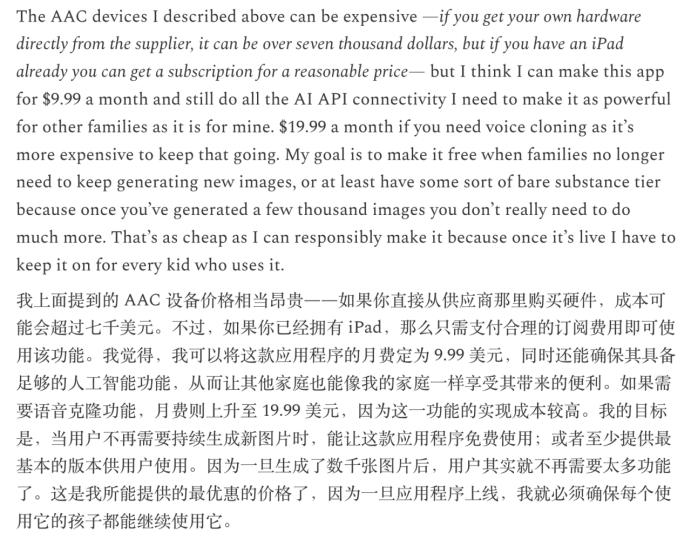
The father mentioned in his original post that he cannot classify it as a medical device, nor can he directly call it an AAC. It is still in the very early stages and involves many compliance issues. He can only describe its functions in a simple, straightforward way before he can sell it on the market.
The AAC devices mentioned earlier are quite expensive. If you purchase the hardware directly from suppliers, the cost can exceed seven thousand dollars. But as long as there is a tablet available, his program can be accessed and used.
In terms of pricing, his initial plan was $9.99 per month; if continuous voice cloning features are needed, it might cost $19.99 per month.
His goal is to offer a free or lower-cost basic version when a family no longer needs to generate new images continuously.
All the content above was shared by the father on June 6. At the end of his post, he wrote: "In a few weeks, I think other families will be able to give it a try. In any case, I hope to bring everyone good news."
We followed up on the story. On July 4, the father published another post documenting the progress of the tool.

A month later, the uses of this tool have become much more specific.
For example, the child started using it to "report": once, his little brother secretly took off his diaper, so he kept tapping his brother's icon and the button for "I need help with going to the bathroom" until his mom noticed.
He also began to express more complex wishes. After his grandparents left, he would tap the icons of his grandparents, then press "again" and "more" to tell his family he wanted them to visit again.
At a restaurant, he could even "negotiate" with his parents: he would eat two more French fries, then he could get an ice cream cone. When his parents say these words, the device converts them into flashcards in the word block translation mode, letting the child see the corresponding meaning of each word. According to the father, this kind of back-and-forth communication was almost impossible just a few weeks earlier.
More importantly, the tool began to help the child express his emotions and physical pain.
Once, he had a meltdown at Costco. When his father asked him why he was so upset, he navigated to the emotion panel by himself and tapped "nervous". After calming down in the car, his father asked him how he felt again, and he opened the emotion panel on his own and tapped "embarrassed".
Another time, the strap on his car seat was hurting him. He kept tapping "hurt