Recently, developers have recommended 3 useful plugins on their own initiative.
Editor's Note: We are always in pursuit of a more comfortable web browsing experience. Practical and interesting browser extensions can add an extra touch to your online surfing journey. In this article, we've gathered 3 browser extensions that have been recently recommended by developers for their usefulness and fun factor.

Table of Contents for This Issue
⭐E·Claw: An intelligent material organizing plugin specially developed for Eagle
🎼song2radio: An AI playlist radio
📁Aura Tab: Redefining the aesthetics of new tab pages

E·Claw
🧑💻 johnnyimm | 📱 Web version | Download from GitHub
▍Is your Eagle a "paradise of inspiration" or a "graveyard of materials"?
I've accumulated over 50,000 materials in my Eagle. As a brand planner, a graphic designer, and also into 3D printing, the materials I collect range from design references, industry reports, UI icons, 3D models... you name it. For me, Eagle has long been "half of a Finder".
Its tagging system and smart folders have made me develop the habit of "saving everything good" - whenever I see good materials, I save them first, just in case I might need them in the future.
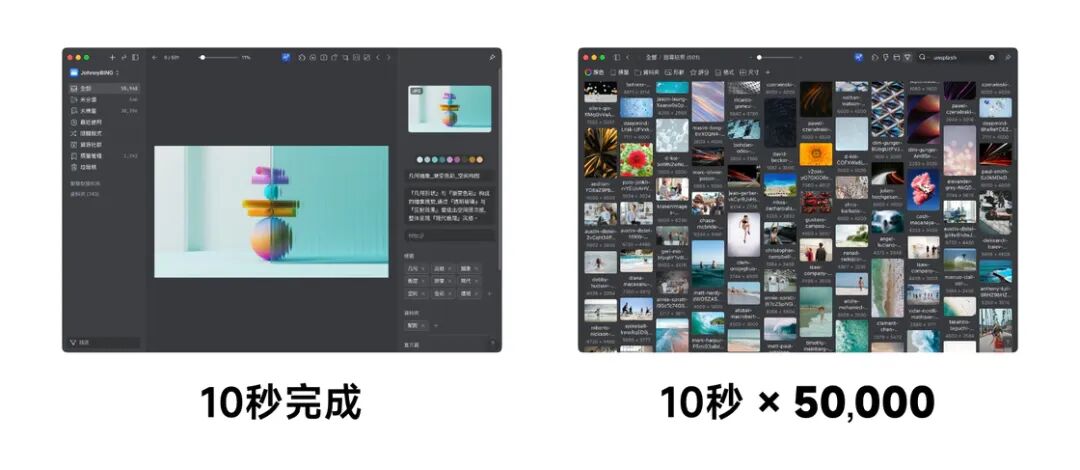
It only takes one second to save a material casually, but it takes more than ten seconds to organize one. This wasn't a big deal when I only had a few hundred materials, but when the number reached tens of thousands, it became a chronic source of anxiety. "Organize it another day" has been postponed to "too lazy to organize anymore".
Tens of thousands of pieces of inspiration are lying dormant on the hard drive. When I'm really in a hurry to use something, it's easier to just open Pinterest and search again.
I've tried the official AI workflow. It's powerful, but there's a threshold for configuration, similar to Apple's "Shortcuts". In terms of the efficiency of batch processing, it lacks the "mowing" feeling.
In this era of Vibe Coding, I can finally live up to the saying: "If you can't find a satisfactory tool, build one yourself."

Thus, E・Claw (Eagle Claw) was born.
Just by its name, you can tell that it's fast, precise, and has a pure goal: Use AI to automatically and batch process the naming, tagging, and description of materials.
▍From K8ZPTCB.jpg to "Golden Melody Awards_2018_Poster"
It's fun to save pictures casually, but it's like solving a mystery when you try to find them later - these materials with strange and messy names are the main culprits that slow down our retrieval efficiency.
Let me give you a real example. This is a picture dragged in from Pinterest. Its file name was K8ZPTCB.jpg. After being processed by E・Claw, it became:
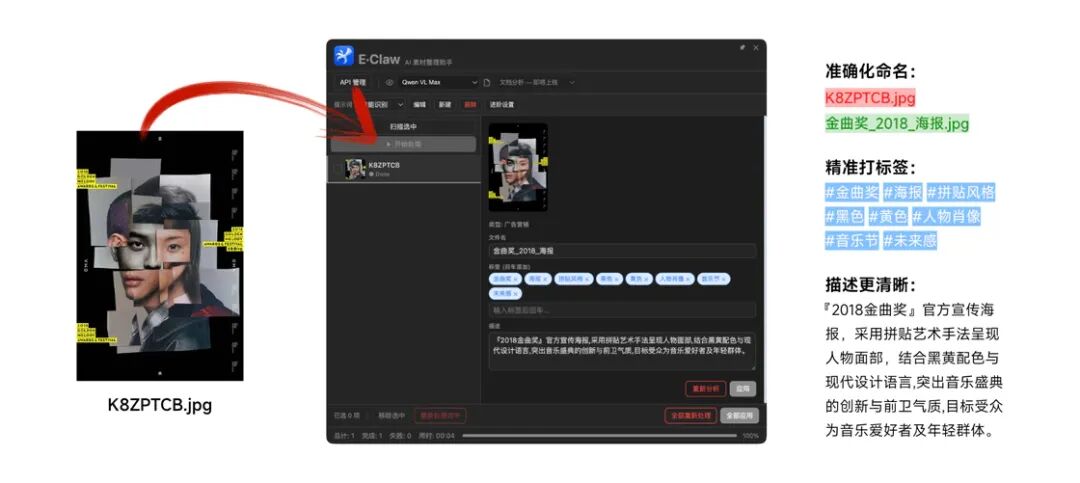
Code block 👇
Golden Melody Awards_2018_Poster.jpg Tags: #Golden Melody Awards #Poster #Collage Style #Black #Yellow #Portrait #Music Festival #Future Sense
The same process applies to hundreds of materials with messy names: Select → Process → Check → Apply.
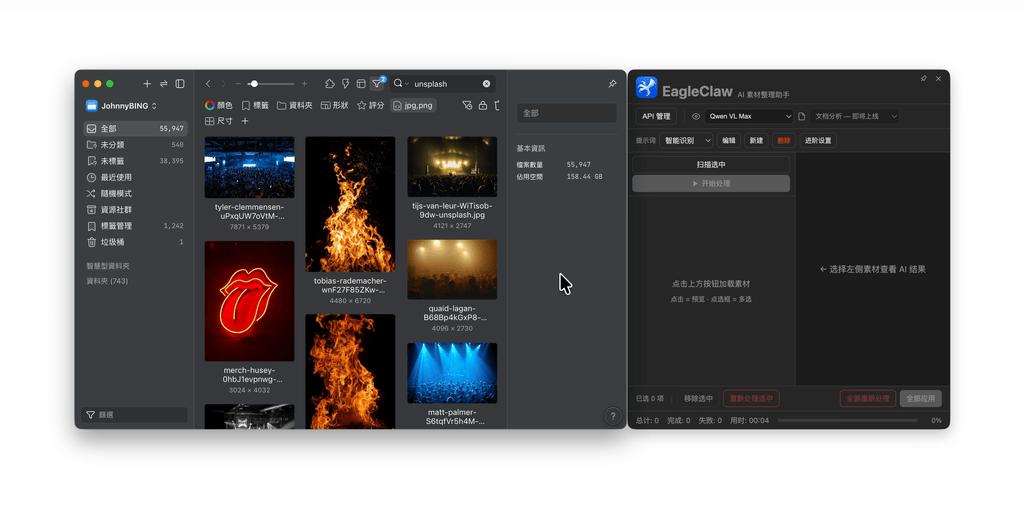
If you want the ultimate lazy experience, you can trust the AI's judgment completely, just like me, and click "Apply All".
Trust me, the feeling of "clearing the wilderness" is really addictive.
▍E・Claw makes organizing materials as easy as collecting them
In order to completely free up my brainpower and time, I've condensed all the "resentment" I've accumulated from organizing materials over the years into these five core highlights:
1. Batch processing: Sort out a large number of materials with one click
In actual tests, when paired with the multimodal model of Qianwen (Qwen VL Max), 500 pictures can be processed in just 3 minutes. Since E・Claw currently supports up to 10 concurrent tasks with no upper limit, the efficiency naturally skyrockets.
2. Model freedom: Extremely low cost and absolute privacy
Extreme cost - effectiveness: Before starting the test, I was worried about the token consumption. Sure enough, the bill from Alibaba Cloud's Bailian really surprised me - it only cost 0.15 yuan to process 500 pictures using Qianwen (Qwen VL Max).

Superb privacy: If you've installed Ollama and configured a local model, E・Claw can directly call it - It costs nothing, the data stays local, and you'll have a full sense of security.
3. Intelligent recognition: Automatically classify and focus on the key points
Although it's affordable, we can't waste it. I've added "intelligent recognition" to E・Claw - let the AI first determine the type of the material (is it an advertising poster or a photography work?), and then extract the information that users care about most according to the corresponding rules, ensuring that every token is used precisely.
4. Customizable prompts: Take full control of your materials
If you're not satisfied with the results, it's probably because the prompts don't suit your needs. In addition to the 5 preset templates, E・Claw also supports fully customizable prompts. You can keep adjusting until you find your "perfect prompt" and achieve ultimate control over your materials.

5. Easy to use: Low threshold and intuitive operation
In terms of UI logic, I've followed the "top - down" operation steps. You can complete the configuration and start the task just by intuition.

▍Give it a try. It's really comfortable
E・Claw is currently being reviewed in the Eagle plugin center and is expected to pass the review soon.
- Installation: Open Eagle → Plugin Center → Search for E·Claw
- System: Supports both Windows and Mac. No need to configure a complex environment. Just enter the Key and you're good to go.
If you want to try it out right away, you can quickly have a taste through my GitHub project!
Currently, this is only the 1.0 version. I'll continue to update it in the future. Deep analysis of document materials such as PDFs is also in the development plan.
The tool is free, but what gives me the most sense of achievement is to help more users who are buried in materials. Whether you're a designer suffering from the torture of organization or a developer with ideas about AI Workflow, you're welcome to leave a message in the comments section or contact me directly. Let's sharpen this "eagle claw" together.
Download link 🔗: https://github.com/johnnyimm/E - Claw

song2radio
🧑💻 blench_ice | 📱 Web version | Download from GitHub
Recalling the nights in the high - school dormitory, after the lights were out and everything quieted down, the only sounds in the room were the fan and the sound of people turning over. At that time, the most pleasant thing was to take out the mp3 and listen to the midnight music radio. I can't really remember which program it was. It might have been MusicRadio, a local city music station, or just a few songs interspersed in a midnight emotional program. It wasn't about a particular song itself, but the host gently saying a few words between songs: introducing the singer and sharing a bit of background. You didn't need to stare at the screen or search actively. You just lay there and the music would unfold slowly on its own.
Later, it became too convenient to listen to music. Once you opened a playlist, the next song would automatically play after the previous one. It was efficient, but the feeling of "someone accompanying you into a song" was lessened.
If you also like this radio - style way of listening to music, I'd like to recommend a podcast: "Wild Sound Treasury". It's a music - sharing podcast. By the way, I'd like to share this episode I've been enjoying recently, "Special Episode for the 100th Issue | 30 Years of Chinese Love Songs (Part 2) 2006 - 2020".

It was this feeling that made me want to create a small plugin: Can we add a bit more radio flavor to an ordinary playlist?
I've always thought that when you're listening to an album or a playlist attentively, the most likely interruption isn't the music itself, but the moment of "switching songs".
As soon as the previous song ends, the next one starts suddenly. You might not have gotten out of the previous mood yet, and you don't know who's singing the next song, which album it's from, or why it's worth listening to. So the playlist becomes background music, and the music goes from "being heard" back to "being played".
So I created a browser plugin: Before each song plays, it will be like a radio host, using a short voice - over to introduce the song that's about to be played, and then naturally start the music.
It currently supports the web versions of NetEase Cloud Music and QQ Music. You can think of it as a very light - weight radio DJ: It won't choose songs for you, but only adds a few more words between songs to make it easier for you to enter the next song.
▍What can it do?
The plugin is temporarily named "Playlist Radio".
After installation, when you play a playlist on the web version of NetEase Cloud Music or QQ Music, it will pause before each song starts, read the information of the current song, such as the song title, singer, and album, and then generate a Chinese introduction suitable for reading:

The next song you're about to hear is from xxx, which is included in the album xxx. The mood of this song is quite restrained, and the melody is also very suitable for listening slowly at night. Now let's listen to it together.
Currently, it supports several usage methods:
Don't fill in the API Key: Use simple broadcast copy and the browser or system - built - in voice reading.
Fill in the Bailian API Key: Use Tongyi Qianwen to generate more natural radio copy and also use Bailian's cloud voice.
Fill in the DeepSeek API Key: The copy can be generated by DeepSeek, but if you want to use the cloud voice, you still need the Bailian Key.
Choose the system voice: It doesn't use cloud TTS, is free, has low latency, and is more suitable for long - term use.