Smart TVs are driving the elderly crazy, here's one simple trick to solve the problem, this time I'm thanking AI on behalf of my grandma.
When I went home for the National Day holiday, my grandma shakily held my hand and said, "My dear grandson, I can't find the TV series I was watching last time, help me look for it, please."
I asked her, "Grandma, what's the name of that show?"
My grandma replied, "I can't remember the name, it's just a drama about the Chinese People's War of Resistance Against Japanese Aggression."
I hopped between all kinds of well-known and obscure apps, and some of them forced me to watch 30-second ads for health footwear, blood glucose meters, liver-protecting tablets... as soon as I opened them.
Eventually, I found that poorly produced anti-Japanese war drama on a little-known "xxTV" app. My grandma's eyes lit up at once, "Yes yes yes! That's it!"
When I clicked to play the episode, another 90-second ad popped up. Every 10 or 20 minutes of playback, another ad segment would be inserted. During the ad breaks, my grandma could go to the toilet, pour a glass of water, and even wash rice for cooking (as an ADHDer, I was totally impressed).
Apart from the incompatible payment systems, the dazzling screen interfaces, the wide range of pre-installed apps (that gradually make the TV lag), the cumbersome operations, and the ads specifically designed to exploit elderly users are even more infuriating.
People have long suffered from the mess of "smart TVs"!
It wasn't until I recently tried several AI applications that I had to sigh with emotion: this is the truly useful "elderly-friendly" design, and those manufacturers who keep talking about elderly-friendly technology really should come and learn from it.
Fighting Poison with Poison
A foreign netizen posted a complaint, saying that the TV in his parents' home would play an ad before entering the Netflix interface, which was completely unbearable.
Having had enough, he sent the TV model to Claude Code, asked the AI to connect to the TV via local network, deleted 25 pre-installed apps, and even wrote a clean launcher for it.
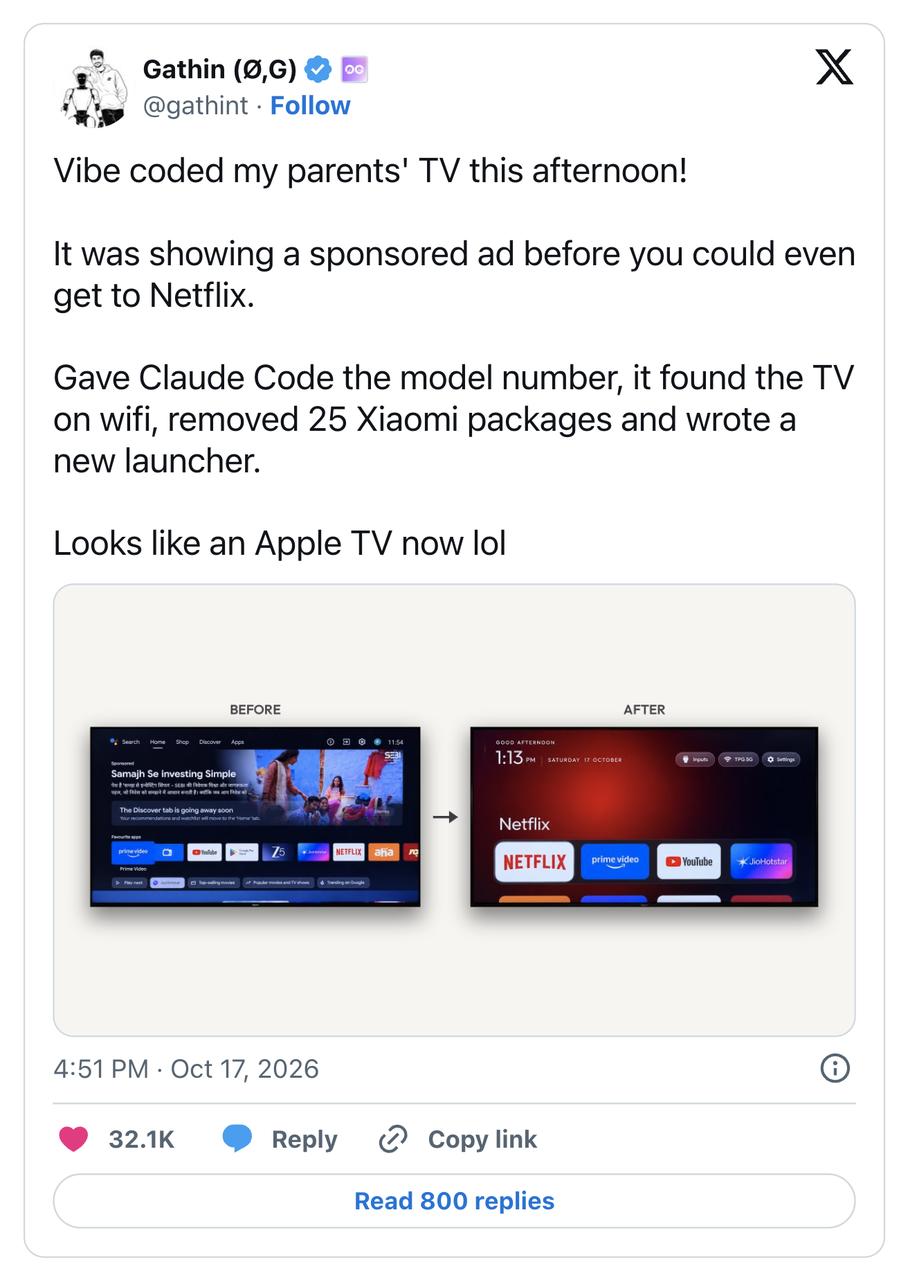
Soon, a series of related projects appeared on Github, including dumbtv, cleanyourtv and many others. AI has finally been put to a decent new use: turning "smart TVs" back into "dumb TVs".
While I really wanted to modify the TV at home in the same way, my first thought was that domestic TVs might not be that easy to deal with.
Even though they all run on Android, domestic TVs use systems customized by different manufacturers. I tried to replace the system's default launcher before. Installing a new launcher is not difficult, but the hard part is making it the default system launcher.
Without root access, I could never disable the pre-installed system launcher. It would pop up as soon as I pressed the Home button, sticking to the screen like a stubborn band-aid.
I started searching online to see if any kind domestic developers had built similar projects.
And I actually found one.
There is a tool called Aerial. Once installed on the TV, its launcher is as clean and minimalist as Apple TV, with only wallpaper, clock and apps. Although this clean interface can't block the ads that come with the TV on boot, at least the random pop-up ads on the home screen are gone.
The problem I cared most about, replacing the system launcher without root access, was perfectly solved.
The implementation is very clever. After Aerial is installed on the TV, if the TV allows users to change the default launcher app, you can just set it normally.
For those stubborn TV models that do not allow launcher replacement (most of the mainstream brands), Aerial will run a "launcher guard" program in the background. As soon as the original system launcher is woken up, Aerial will be pulled to the foreground to directly cover the system launcher.
Brilliant!
When the TV is in standby mode, some TV models will forcibly clear third-party apps from the background. I checked how Aerial solves this problem: it uses a system-level Android feature called "Notification Listener" that was launched back in July 2013.
When the TV enters standby mode and clears Aerial from memory, the notification listener connection is disconnected. The Android system will automatically rebind the notification listener, which wakes up the Aerial app. It can be back up and running within 0.5 seconds, continuing to run the launcher guard, and this mechanism works even after the TV is restarted.
In other words, the developer used the underlying capabilities of the Android system to bypass the manually written standby background clearing rules, and implemented a self-starting mechanism similar to that of "rogue software".
For some TV models that block third-party app self-start by default, the Aerial installation script also clearly states how to let the TV allow it, no manual setup is required.
Released for less than a day, it got more than 200 stars on GitHub. The latest update now supports features like hiding icons, adding signal input sources to the home page, and custom interfaces. The developer community is also very active: in just two days, a large number of bugs have been reported and fixed, and the app has been adapted to many TV models.
Let TV Be Just TV
It is very friendly for new users: the developer has made an automated Agent deployment. You can copy the prompt provided by Aerial's official website into agents like Doubao and WorkBuddy, and just follow the instructions to operate.
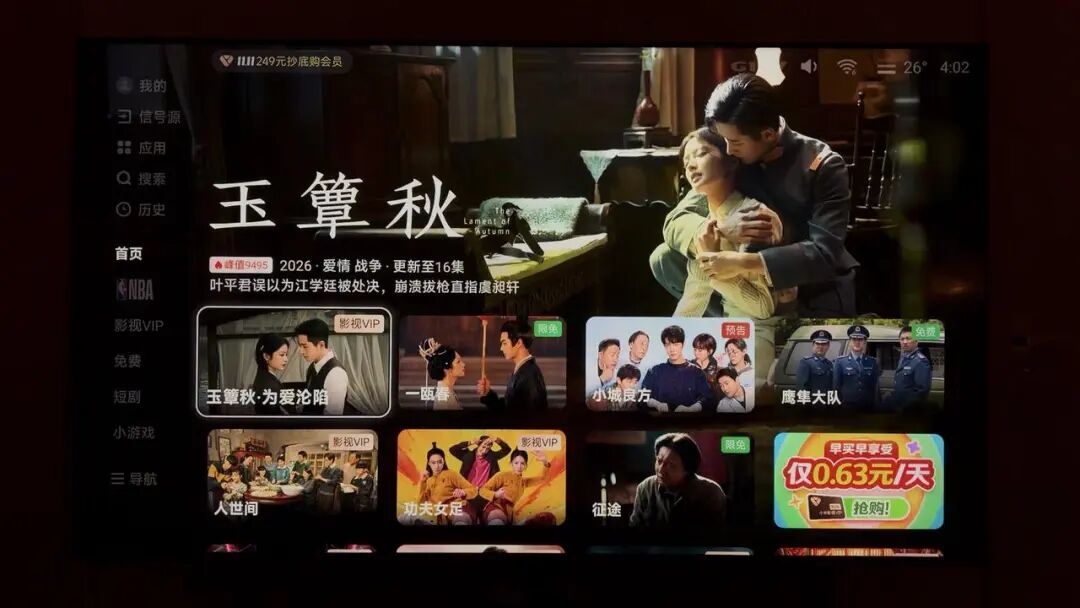
The whole process takes less than five minutes, and my TV went from the old look like this:
To this new look:
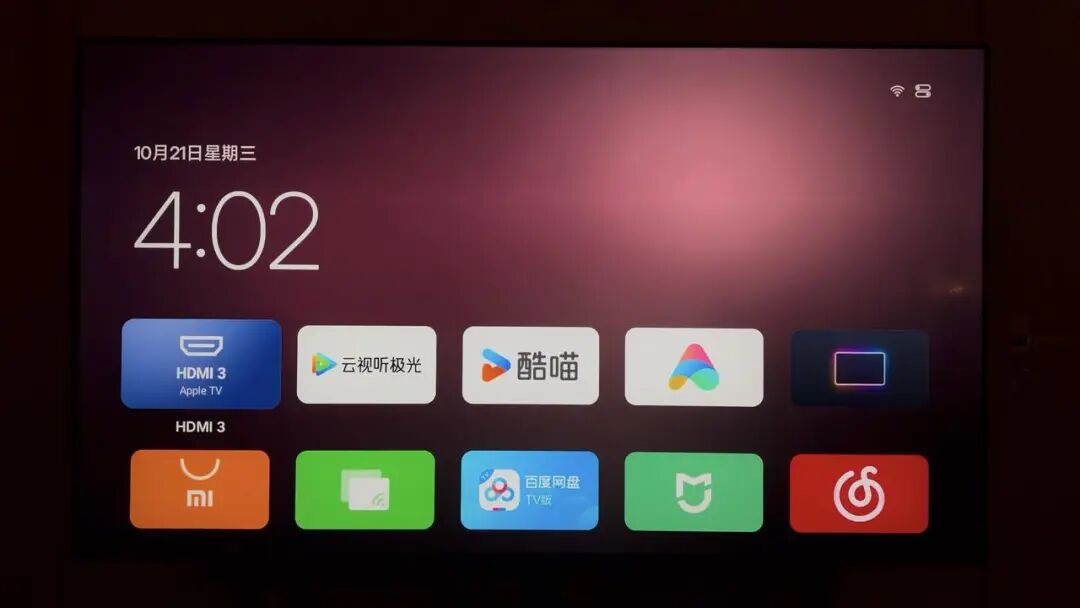
The method is very simple.
First, connect your computer and TV to the same WiFi network.
Then the second step, turn on ADB debugging on your TV, which is like the key that allows your computer to send commands to the TV.
Don't be intimidated by the technical term, this step is not difficult. The developer has posted operation guides for several mainstream TV brands on the official website, just find the guide for your TV brand and follow the tutorial step by step.
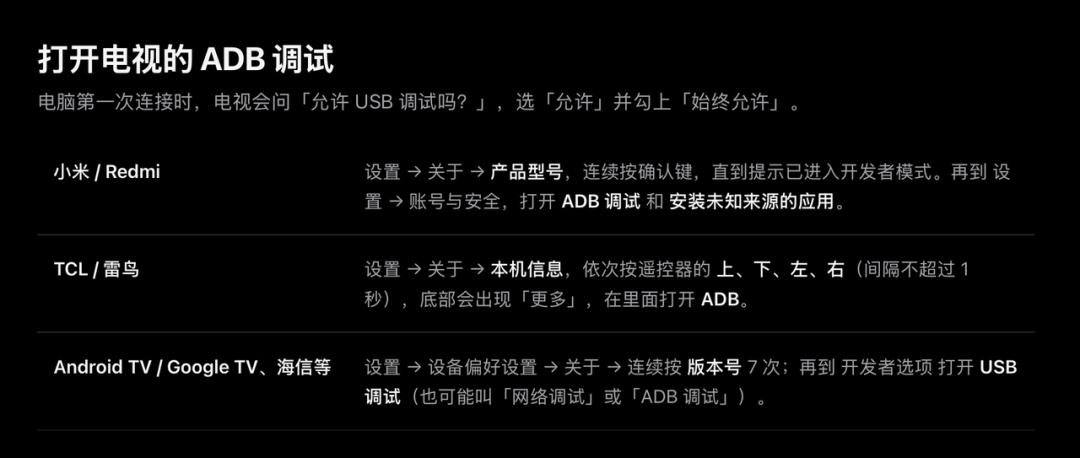
If your TV brand is not listed, just ask an AI and you will find the method to turn on ADB debugging.
The third step, go to the network settings of your TV and find the TV's IP address. You can usually find it in the WiFi details page (for example, my TV's IP is 192.168.1.131).

After you note down this address, open Aerial's official website (aerial.qust.me) on your computer, click the "Install" button in the upper right corner, and fill the IP address you just found into the "TV IP" field.
Then select "Let Agent Install" below, click "Copy" at the top right of the text box, and copy the entire content in the box.
You don't need to understand all the commands in it, just send the whole content to your AI Agent and press Enter.

At this point, the AI will automatically pull the relevant required code and try to connect to your TV. All you need to do is keep an eye on the TV, and when the pop-up window asks "Allow USB debugging?", select "Allow" with the remote control.
That's almost all the steps, the AI will handle the rest for you. When the new launcher appears on the TV, you can add your frequently used apps and TV channel signal sources to the home screen.
Congratulations! You now get a "good old-fashioned" TV.
Keep Breaking the Walls!
For a very long time in the past, I thought the word "smart" in "smart home" was a derogatory term.
Take TV manufacturers as an example: they try to stuff as many recommendations and ads as possible into the screen, thinking that any blank space is a waste.
Not to mention that elderly users at home can't even find the entry to watch their favorite anti-Japanese war dramas, even young people like me have to aim carefully before pressing the remote control, for fear that a lag will make me click the wrong button and be redirected to ads or paid subscription pages.
What impressed me more than experiencing the project itself is that AI has lowered the technical threshold to an unprecedented level.
The developer said that everything from the code, APK, the self-revival mechanism, and even the official website was built with AI Vibe Coding (what on earth has AI been distilled to learn!?).
I thought of Apple's famous 1984 ad: a hammer flies towards the big screen, smashing the established order.
The cost of "fixing a badly designed feature" has been reduced to just a few lines of prompts, and the walls built by manufacturers with technical barriers are now being torn down.
I have a strong feeling that the speed at which users are tearing down these walls is catching up, and may even exceed the speed at which manufacturers are building them.
At the very beginning, only a few people were making efforts. But soon, even people who originally just wanted to watch the show were handed a hammer, and they found that "Hey? I can do this too."
This article is from WeChat Official Account "Guokr" (ID: Guokr42), written by Wan Tong, edited by Shen Zhihan, and republished with authorization from 36Kr.