ChatGPT teaches me how to play mahjong, hands-on test of OpenAI's intelligent interface: Redefining AI Interaction
Iterating on model capabilities alone can no longer satisfy OpenAI. On October 7, OpenAI announced that it will further roll out GPT-6 to all ChatGPT users, and at the same time, it has taken the lead in launching a new feature for paid users — Intelligent UI.
Compared with the conventional upgrades of GPT-6 in reasoning, programming and other aspects, I am far more interested in this "small feature". The reason is simple: it has been almost four years since ChatGPT was launched, and the capabilities of large models have long been vastly improved, but the way we interact with AI has barely changed.
The industry has long realized that pure text chatbots cannot be the optimal solution for AI interaction. Last year, Google explored generative UI on Gemini 3, and Ant Lingguang also tried to allow AI to generate interactive interfaces and applications in real time.
Now, OpenAI has also given its own answer.
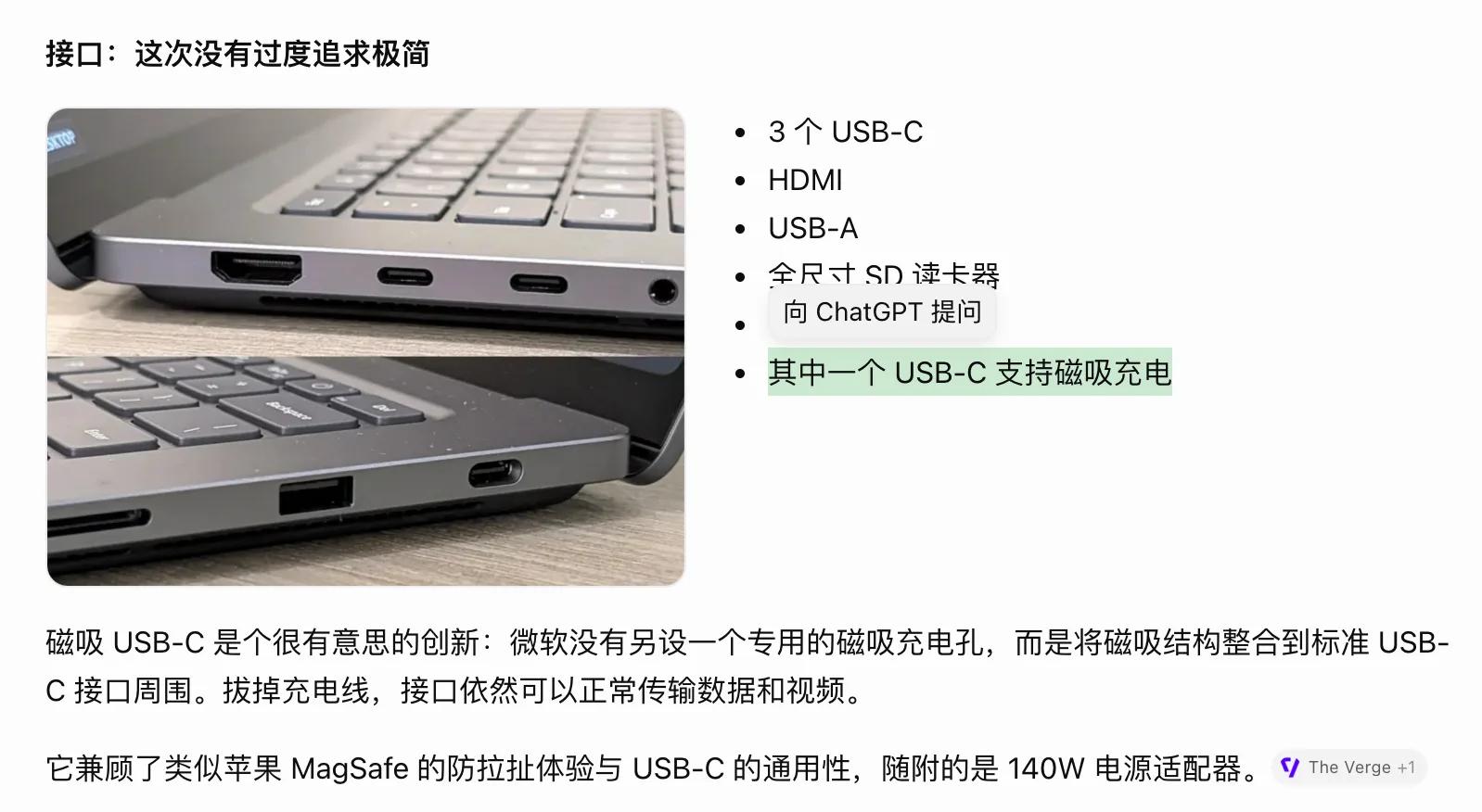
Image source: Lei Technology @ChatGPT
In simple terms, in the new version of ChatGPT, GPT-6 not only generates content in various forms such as text, pictures or tables according to questions, but also actively determines what kind of interface users need, and even directly generates operable interactive tools in responses. Users do not need to learn new operation methods, nor do they have to specifically request to generate an interface.
It sounds like it just makes the presentation form of ChatGPT's responses richer, but according to the actual experience of Lei Technology, the truly interesting part of Intelligent UI lies in the interaction.
AI teaching me to play Mahjong? ChatGPT directly lays out a set of tiles
"Teach me Guangdong Mahjong." At the beginning, I gave ChatGPT a very simple request.
The basic rules of Mahjong are not hard to find, but there is still a clear gap between memorizing "four sets of tiles plus one pair" and knowing which tile to discard when facing a hand of tiles. Explaining only with text requires users to read the rules, arrange the tiles in their minds, and then imagine what happens after drawing and discarding tiles.
ChatGPT first stated that it adopts the teaching version of Guangdong Tuidu Hu, and then uses matching pictures to introduce the wan, tong, tiao and honor tiles respectively. When explaining the winning rules, it directly groups and arranges the four sets of tiles and one pair.
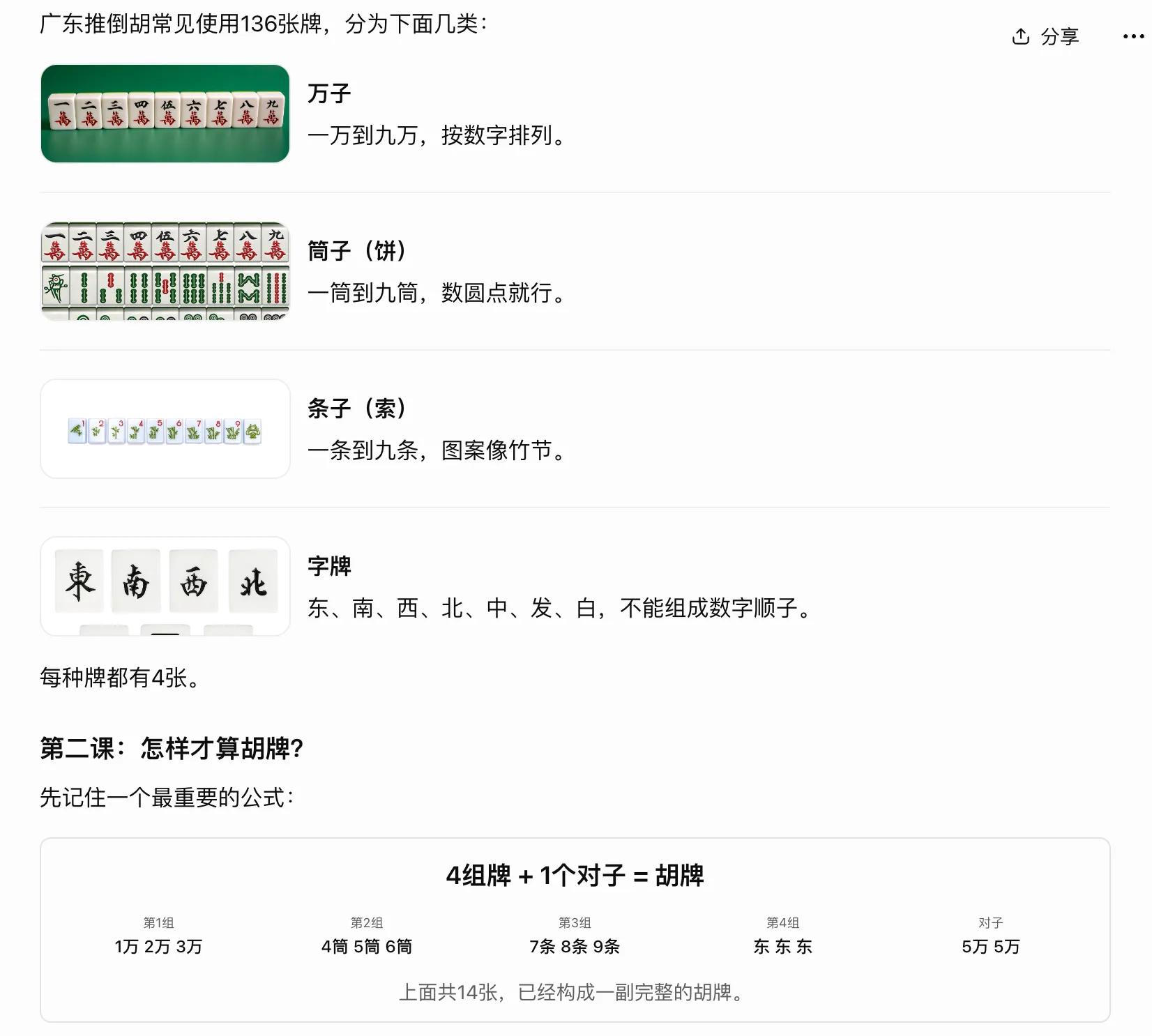
Image source: Lei Technology @ChatGPT
When it comes to the practice session, a hand tile area appears on the page, with 14 small grids representing 14 tiles, and below are the discard options and the "Confirm discard, continue practice" button.
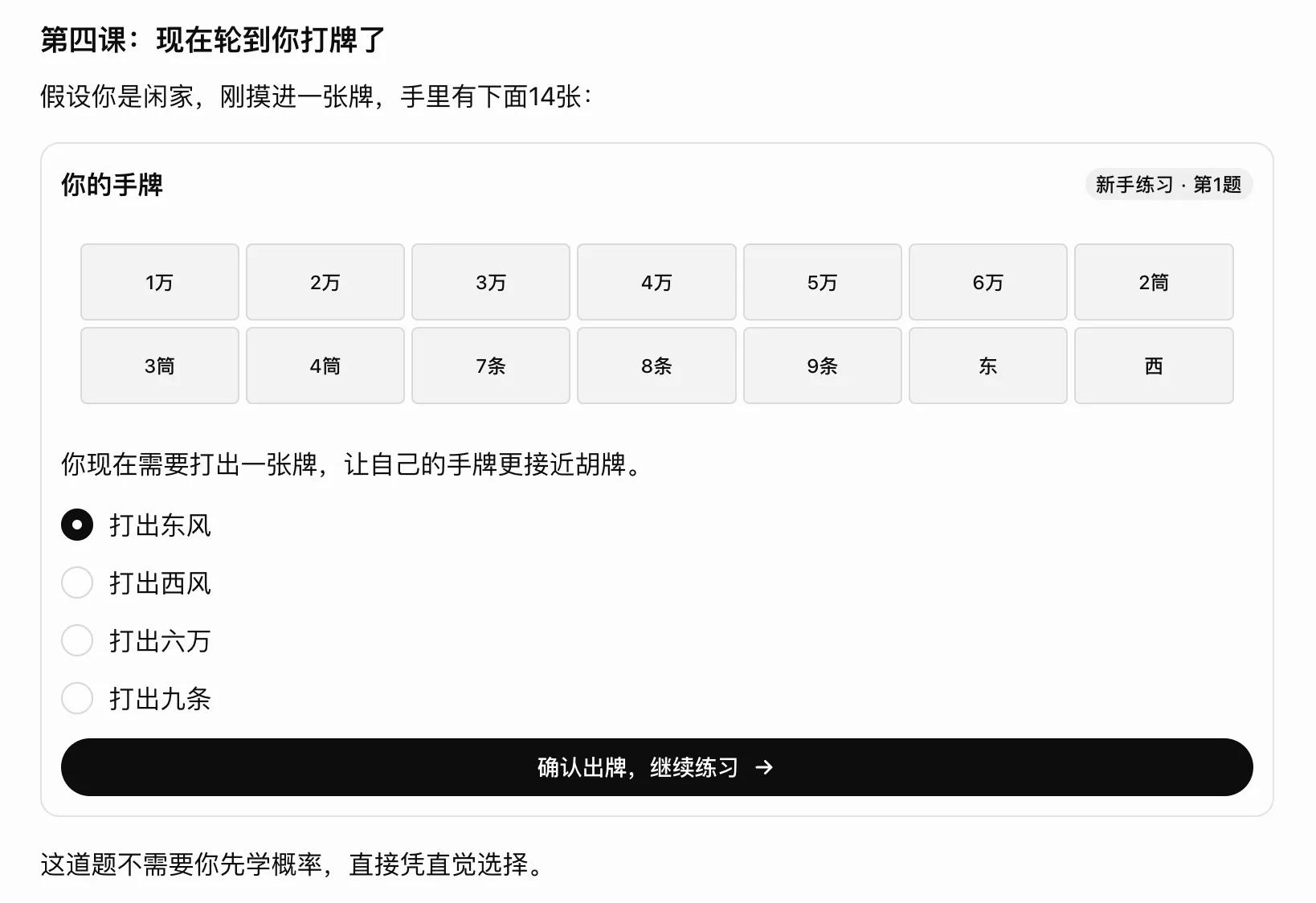
Image source: Lei Technology @ChatGPT
There is no mahjong table, no animation of shuffling or drawing tiles, and the tile faces are even mainly presented in text as "1 wan" and "2 tong". But with positions and groups between tiles, the rules have reference objects. I can first see which tiles have formed a sequence, then look at the remaining east wind and west wind, and finally decide which tile to discard.
In the response, ChatGPT also conveniently asked me to do a practice question.
In the first round, I chose to discard the east wind. While affirming my discard, ChatGPT also pointed out that discarding the west wind is also valid, and demonstrated how to form a pair after keeping the west wind. Then it let me draw a six tong, marked the new tile with a golden border, and asked me to decide whether to continue waiting for the west wind or change to another waiting pattern.
To be fair, this presentation and interaction method is of course easier for me to follow than explaining all the rules, playing methods and probabilities at one go. The knowledge I just learned earlier can be put into use in the next step, and my choice becomes the basis for subsequent explanations.
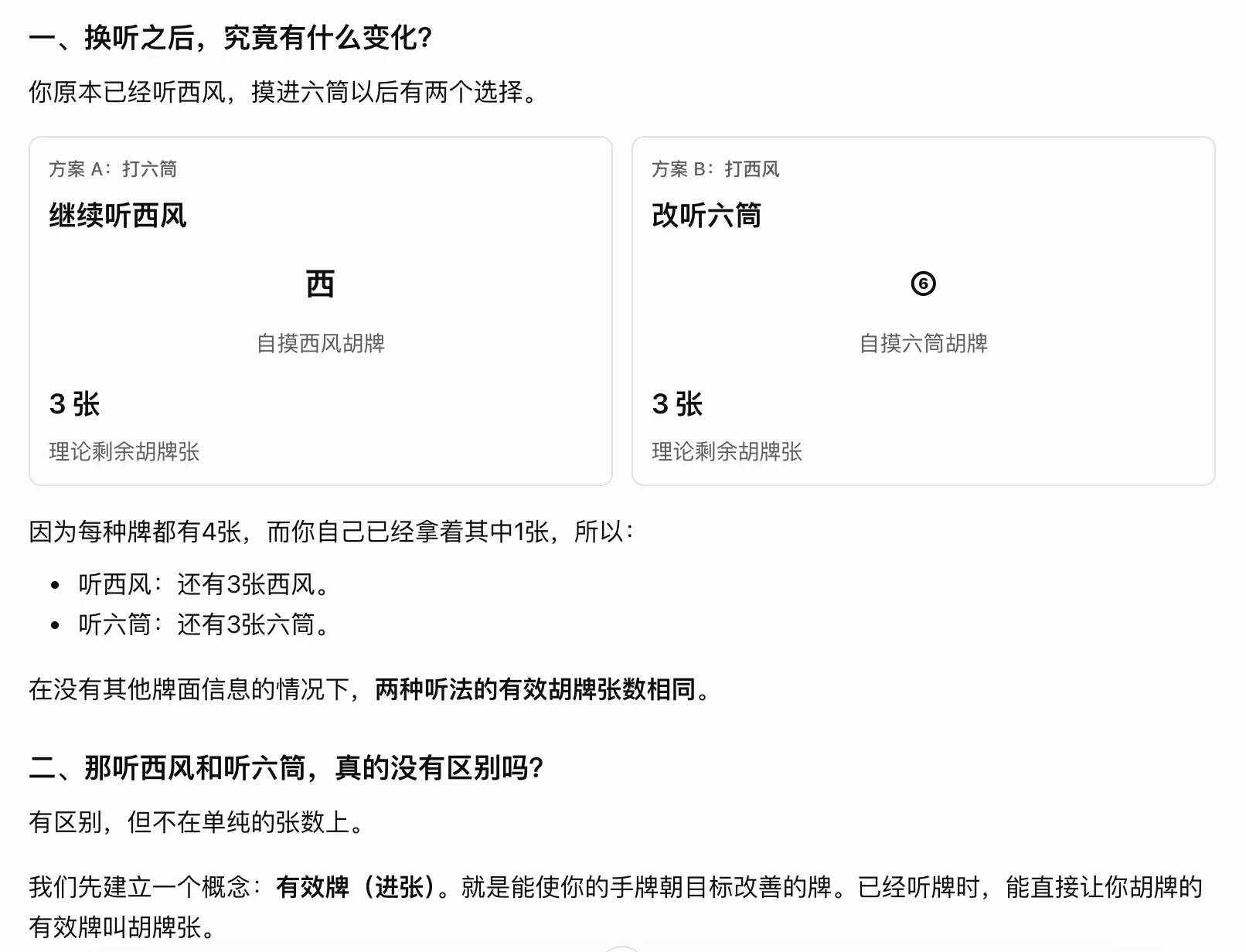
Image source: Lei Technology @ChatGPT
Of course, previous versions of ChatGPT could also generate multiple-choice questions and simulate mahjong games. The difference is that now the options have become clickable controls, and the hand of tiles is always in front of me. I only need to focus on how to play this step, instead of re-describing the tile faces and choices every time.
When I got to the third question, the tong tiles formed 2, 3, 4, 5, 6 tong. I chose to discard the 6 tong and asked it to explain the four playing methods in detail. The response immediately listed the different choices in a table, and then broke down and displayed how to form winning tiles when drawing 2 tong and 5 tong respectively after keeping 2, 3, 4, 5 tong.
Assuming there are sixty unknown tiles, it also uses a bar chart to compare the probability of winning on the next draw under different choices.
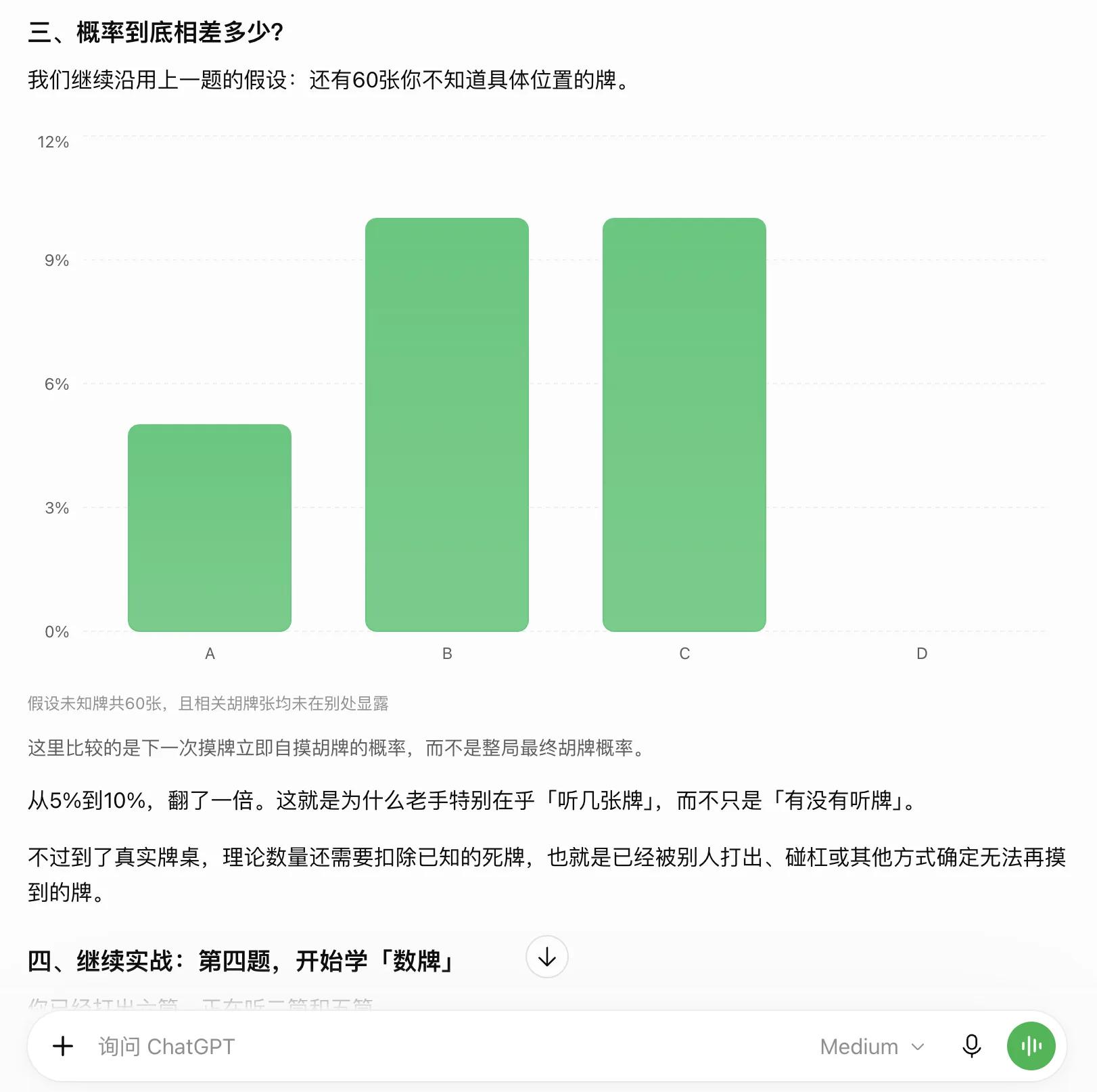
Image source: Lei Technology @ChatGPT
Tables are suitable for item-by-item checking, tile groups are suitable for viewing combinations, and charts are suitable for viewing gaps, so there is no need to describe all relationships through text. More importantly, you can ask "freely": the options make it easier for me to keep learning, and the chat box allows me to insert a new question at any time to change the subsequent content.
For this kind of task where questions arise while learning, the GPT-6 dialogue based on intelligent interface is very natural, and it is almost imaginable how useful it will be for more types of learning tasks.
More intuitive responses that are easier to understand
Of course, it is not just learning-oriented dialogues. The "intelligent interface" has also greatly improved ChatGPT's dialogue experience. For example, in the past, when we asked AI to introduce a product or an event, we could basically only get a longer or shorter introduction.
But under GPT-6, I asked ChatGPT to help me get a comprehensive and intuitive understanding of the Microsoft Surface Laptop Ultra. ChatGPT still gave a very long response, but different information had different presentation methods: product appearance with pictures, specifications with cards, comparison between products with tables, and it directly drew a relationship diagram when explaining the computing architecture.
The benefits of specification cards are very direct. Information such as price, processor, memory, and screen each have their own positions, with descriptions under large numbers, so I can find the items I care about at a glance. It retains the reading order of the main text, and also gives me a way to quickly get key information.
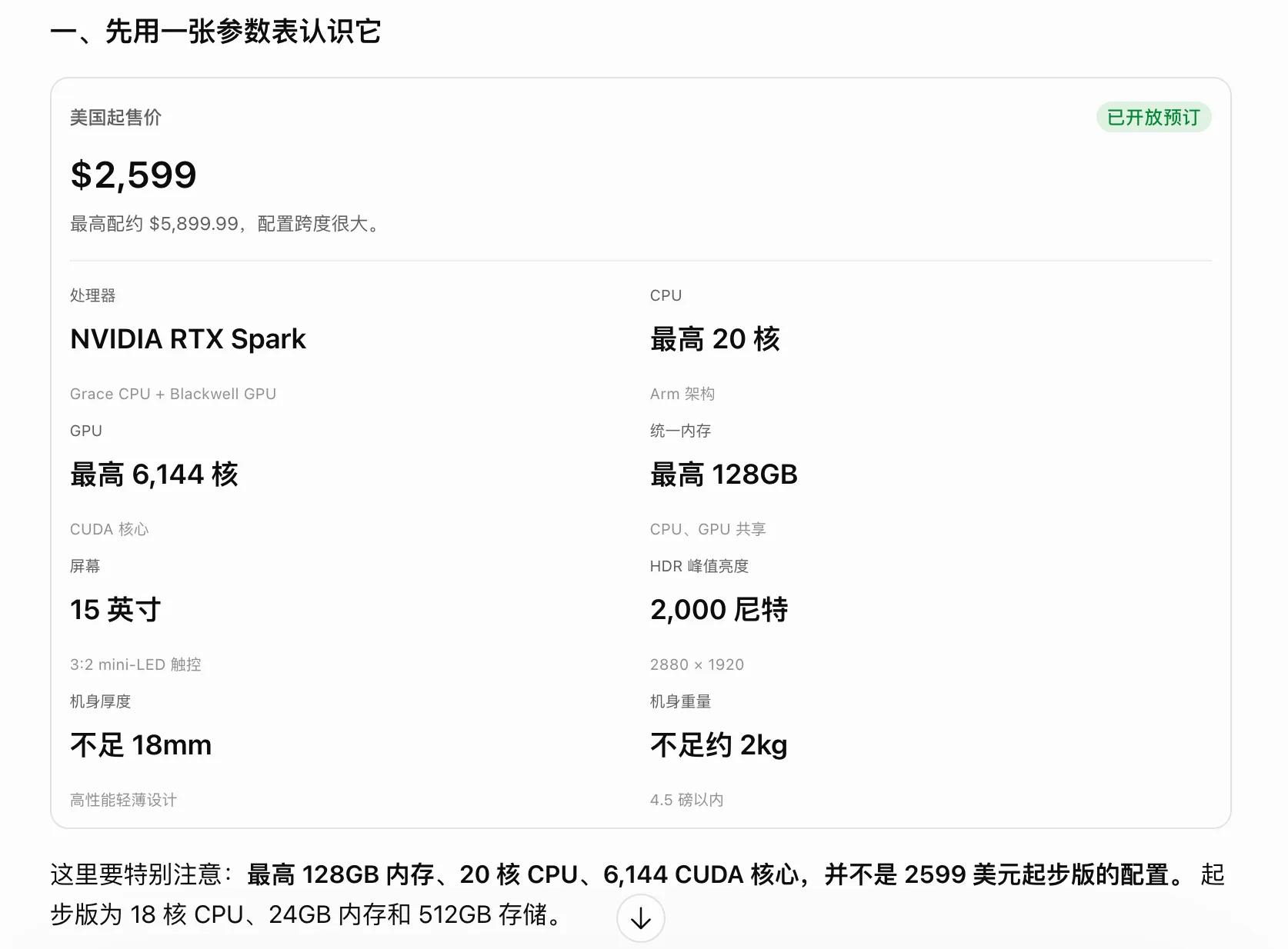
Image source: Lei Technology @ChatGPT
What is more useful is the architecture diagram. When explaining the relationship between the RTX Spark CPU, GPU and memory, the response draws different computing architectures as boxes and connections, showing the difference between independent memory and shared memory pools. When later discussing the relationship between hardware, local and cloud computing, and the Agent execution environment, it switches to layered diagrams and flowcharts.
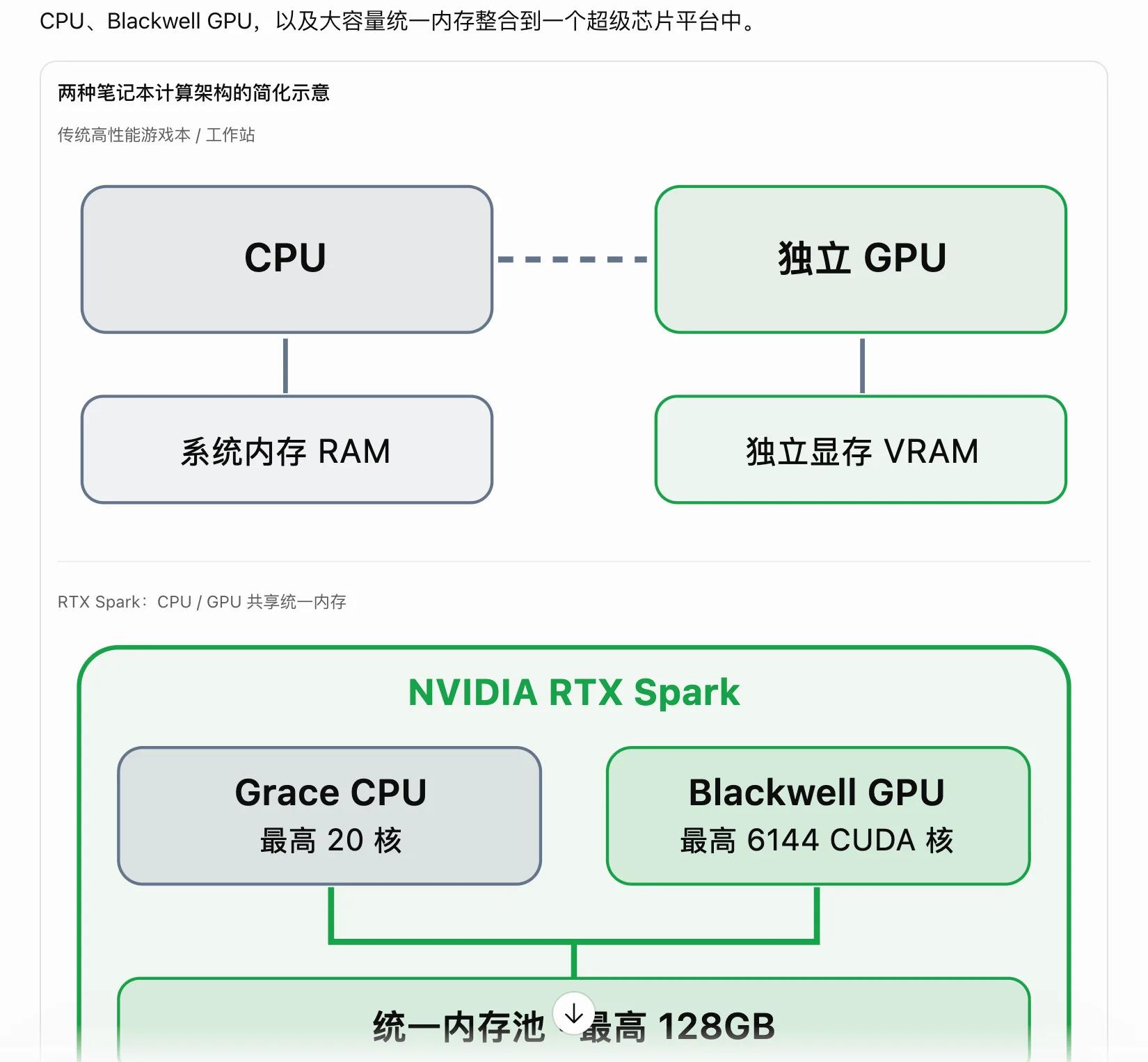
Image source: Lei Technology @ChatGPT
When I continued to ask what kind of personal computer Microsoft wants to redefine, GPT-6 not only gave a view, but also "summarized" Microsoft's new generation of AI PC through a four-layer relationship structure diagram, and intuitively demonstrated the workflow under Microsoft's Hybrid Intelligence concept with a flowchart.
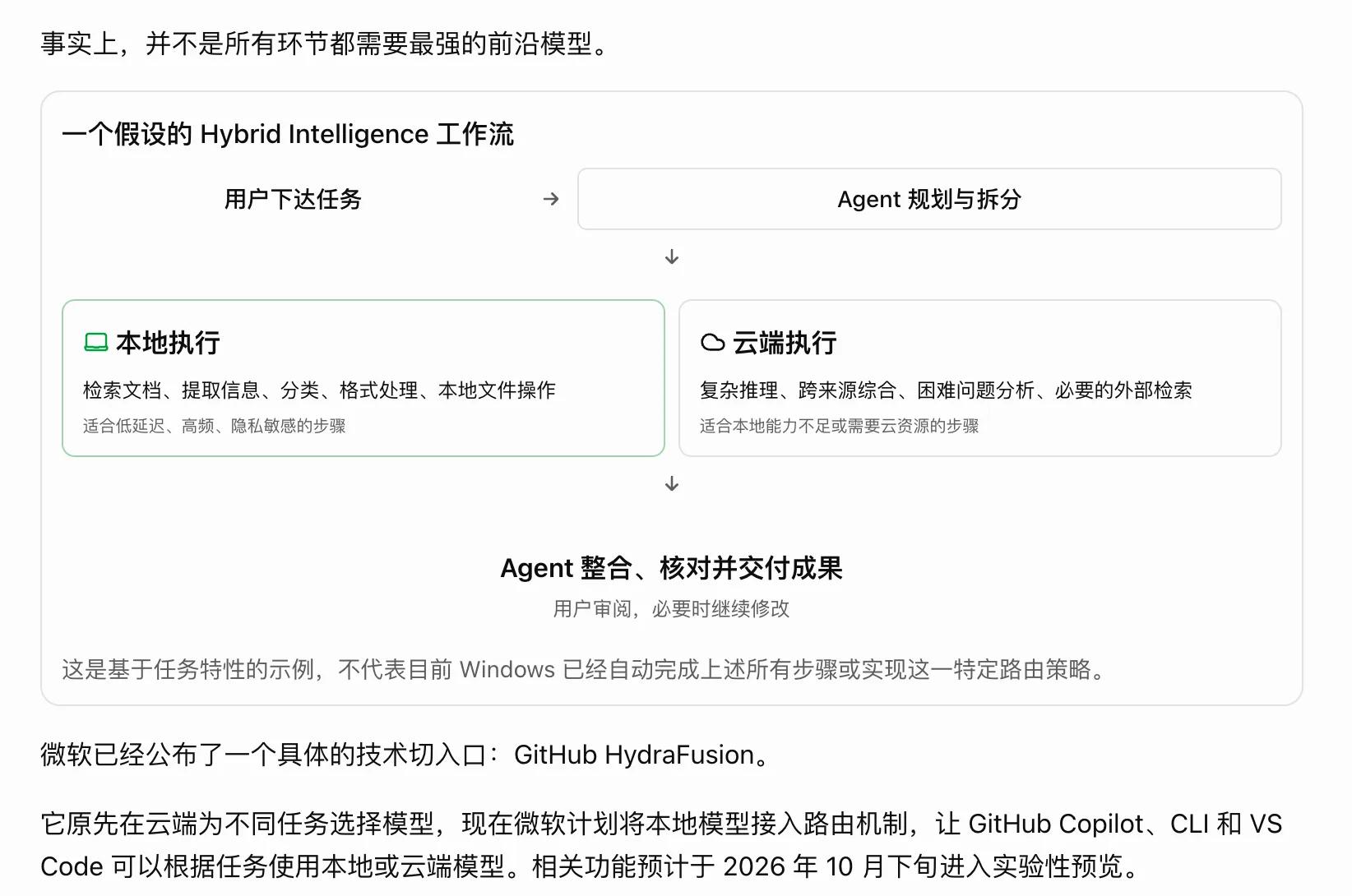
Image source: Lei Technology @ChatGPT
This kind of information can also be explained clearly with text, but the problem is that the reading threshold and cost are very high: users have to memorize the previous concepts and connect them in their minds. The diagram directly puts the relationships in front of you, and the subsequent text can continue to explain what problems each layer solves and what limitations there are.
Especially in a long response, these diagrams also serve as references when reading. If you forget the position of a certain concept later in the text, you can go back to the diagram to check instead of re-reading the previous content.
However, graphic and text typesetting is only part of the reading experience. For example, when asking how to fold a paper airplane to fly the farthest, GPT-6 will call GPT Images 2.5 to generate step-by-step diagrams. If you further ask about the principle, it will flexibly present the content through drawings, formulas, detail displays and other methods.
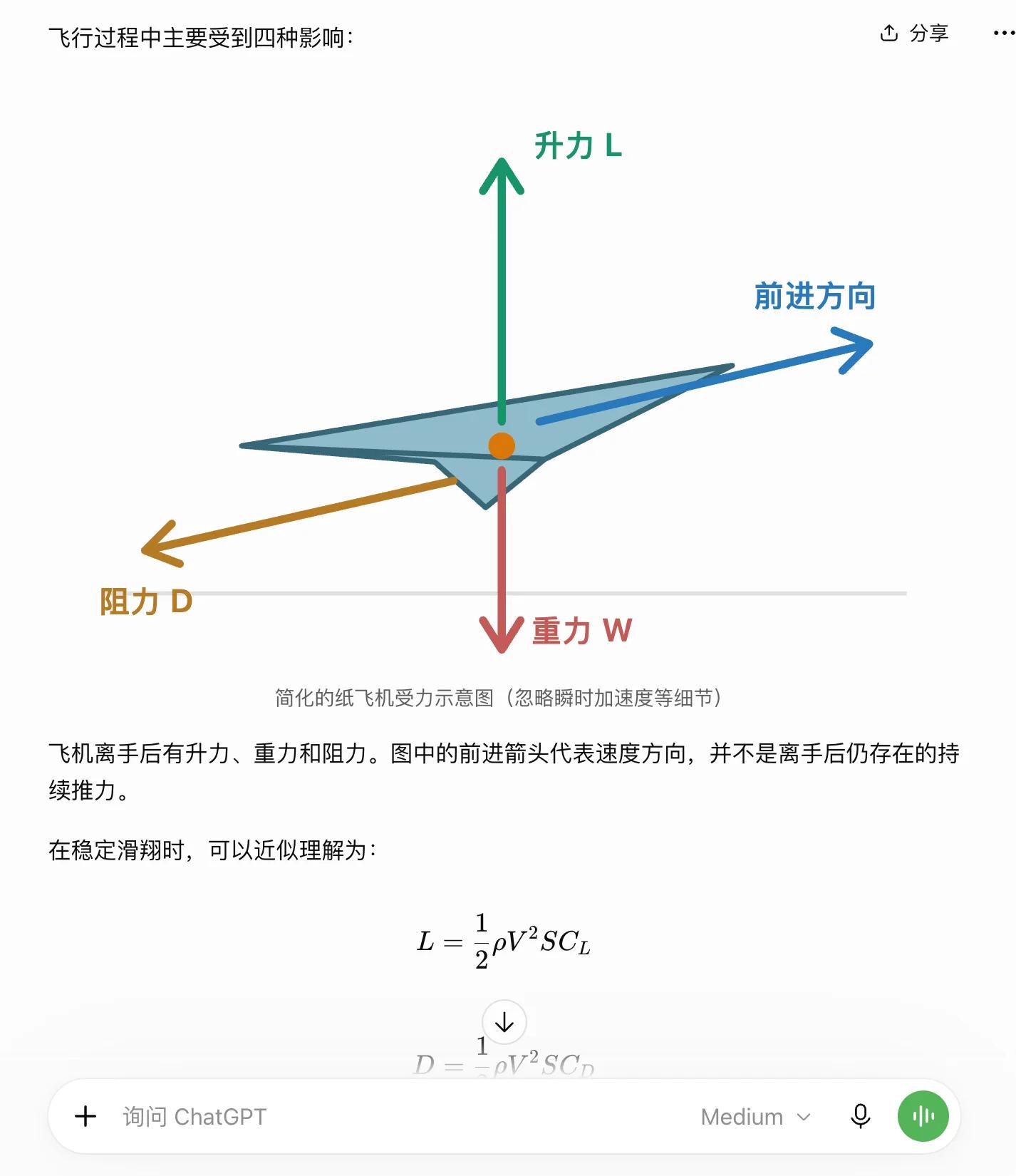
Image source: Lei Technology @ChatGPT
This is not only a more full use of the capabilities of large models, but also a better information presentation for users.
It is more noteworthy that OpenAI did not let AI "generate everything completely", but prepared a relatively unified interface foundation for AI.
According to the official introduction, Intelligent UI uses a native component library, and the compiler gradually presents the interface while the model generates content. The training the model receives also includes how to organize content, arrange layouts, when to add interactions, and when text is already sufficient.
This shows different engineering priorities from Google's publicly researched method of generating HTML, CSS and JavaScript to build custom pages. Freely writing pages has more design space, while using unified components makes it easier to retain familiar buttons, forms and reading habits.
As of today, the approach of Intelligent UI is actually more worthy of reference.
Will Intelligent UI become the new AI interaction standard?
Last year, Google demonstrated the exploration of generative UI in Gemini 3.0. Facing different questions, Gemini is no longer limited to text and pictures, and can directly generate web pages with interactive functions, even allowing users to understand knowledge and solve problems by operating the interface.
Domestic Ant Lingguang has also taken very aggressive steps. Users only need to put forward demands in natural language, and Lingguang can generate various interactive small tools, from travel planning, data calculation to small games. Users do not need to know programming, nor do they need to find dedicated Apps anymore.
These explorations point to the same direction: since AI can already understand the user's intention, why should we let users adapt to pre-designed software interfaces instead of letting AI generate interfaces directly according to demands?
However, generating a usable small tool and allowing users to use these tools stably and naturally in daily conversations are actually two different things. Especially for general AI assistants like ChatGPT and Gemini that cover a large number of different tasks, users do not necessarily need a brand new interface every time, and they do not want to re-understand a set of operation logic every time they ask a question.
This is also why I think Intelligent UI is more worthy of reference.
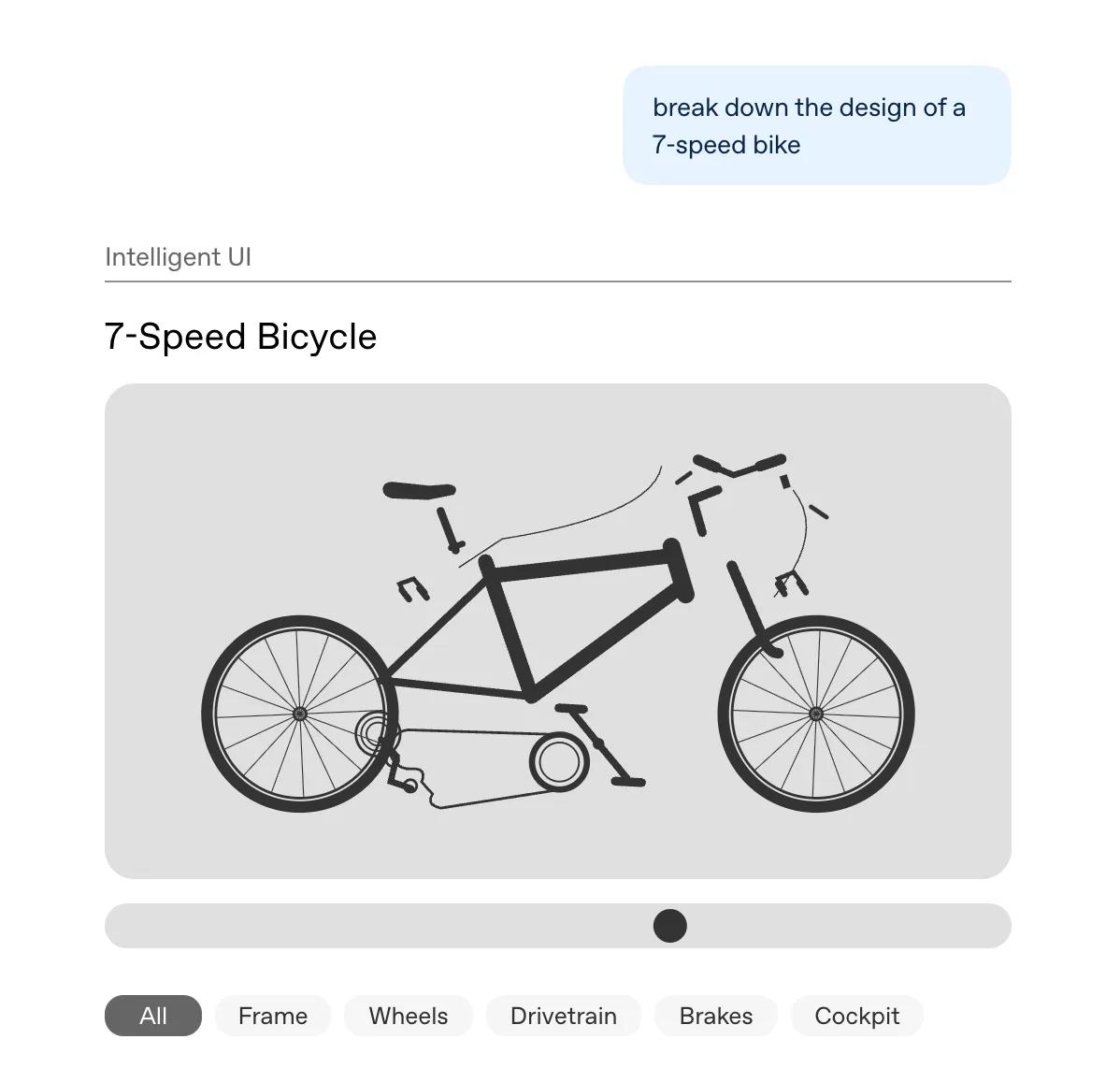
Image source: OpenAI
OpenAI did not blindly pursue the freedom of interface generation. Instead, it first established a unified set of components and interaction rules, and then let GPT-6 decide when to use them and how to combine them. It can still generate dedicated interactive content according to demands, but more often, it only needs to add a picture, a set of cards, or several clickable options to the original response.
It does not look as amazing as directly generating a complete web page, but it is more in line with the way users use AI in daily life.
Going back to the mahjong teaching example mentioned earlier, I do not need ChatGPT to develop a mahjong game for me. I only need it to lay out the hand of tiles when explaining the rules, provide discard buttons during practice, and show the probabilities when comparing different playing methods. As for learning about Surface Laptop Ultra, there is no need to generate a complete product website. As long as the pictures, parameters and architecture diagrams are placed in the right positions, the reading experience can already be improved.
A good interface does not lie in how many things are generated, but in whether it reduces the cost of user understanding and operation.
More importantly, this approach is also easier to integrate into today's