Just now, ByteDance's most powerful image generation model is back: In-depth practical testing of 17 cases for Seedream 5.0 Pro
Reported by Zhidx on July 9, on the evening of July 8, ByteDance's Seed team officially released the multimodal image creation model Seedream 5.0 Pro. It has been nearly 5 months since the Seedream 5.0 preview version was launched on February 10 this year.
Compared with previous versions, Seedream 5.0 Pro has upgraded its basic capabilities such as text-image matching, structural rationality, text rendering, and visual aesthetics, and has focused on strengthening four core capabilities: complex information visualization, interactive precise editing, realistic imagery and portrait texture, and native multilingual input and generation.
In terms of pricing, the Seedream 5.0 Pro API is billed based on input and output images. When the output image does not exceed 2.36 million pixels, the first input image is free, subsequent input images cost ¥0.02 each, and the output image costs ¥0.3 each; when the output image exceeds 2.36 million pixels, the first input image is free, subsequent input images cost ¥0.02 each, and the output image costs ¥0.6 each.
Currently, Seedream 5.0 Pro has been launched on the Volcano Ark Experience Center, and will also be rolled out sequentially on Doubao and Jimeng. Zhidx experienced it as soon as possible.
From this actual test, Seedream 5.0 Pro performs relatively stably in scenarios such as commercial posters, realistic photography, and precise editing, and can also replicate some of the "hard to distinguish between real and fake" cases that became popular with ChatGPT Images 2.0. However, complex Chinese text, interface details, and character consistency are still the model's shortcomings.
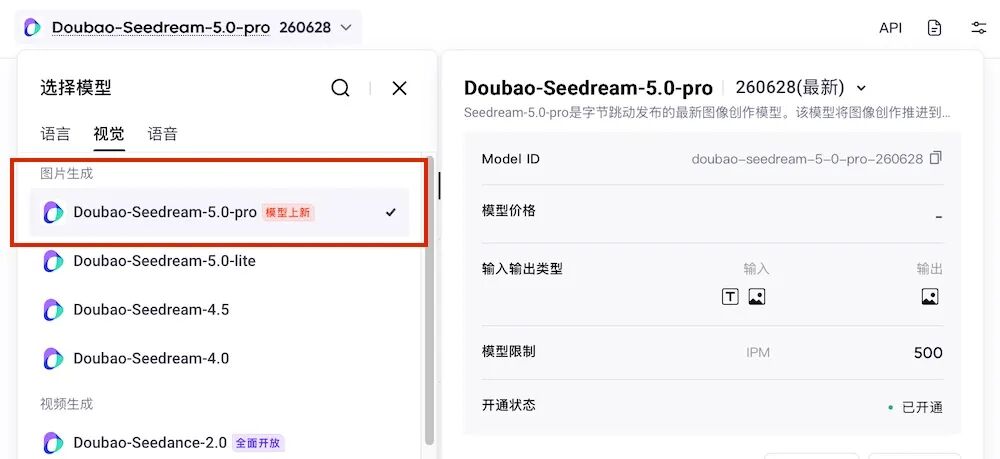
▲ Volcano Ark Experience Center
01.
Full Coverage of Infographics, Posters, and Precise Editing
Design Capabilities Significantly Enhanced
The upgrades of Seedream 5.0 Pro focus on more complex professional creation needs, including high-density infographics, commercial posters, web UI, partial editing, sketch rendering, layer separation, multilingual text generation, and realistic photographic texture.
Zhidx conducted multiple rounds of experience around its core capabilities. Overall, Seedream 5.0 Pro performs well in scenarios such as commercial posters, realistic photography, partial precise editing, and multilingual posters; in scenarios such as complex infographics, grid guides, e-commerce UI, and sketch rendering, the design is basically valid, but there are still issues such as text errors and insufficient visual completion.
1. Complex Infographics: High-Density Chinese Text, Chart Organization, and Information Partitioning
Instruction: Generate an infographic titled "Implementation Cost Breakdown of Embodied Intelligent Robots" in a horizontal 16:9 layout. The left section shows robot hardware costs, including the main body, sensors, actuators, and batteries; the middle section shows software costs, including model training, data collection, scenario adaptation, and operation maintenance; the right section shows commercial implementation indicators, including unit price, deployment cycle, task success rate, and maintenance cost. Require clear Chinese text, unified charts and icons, and an overall style suitable for in-depth reports by technology media.
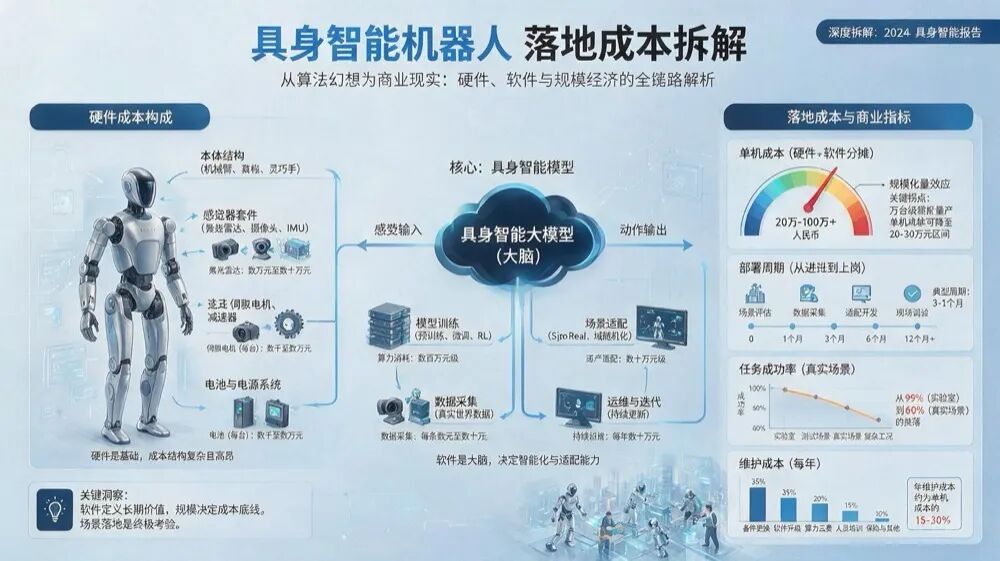
From the generation results, Seedream 5.0 Pro can understand the theme, divide the picture into three areas: hardware cost, software cost, and commercial implementation indicators, and add elements such as icons, charts, and section titles. However, the problem mainly lies in text rendering. Although the entire image combines text, illustrations, and charts, Chinese text rendering is still unstable. For example, there are obvious typos in the "servo motor" section.
2. Educational Popularization: Structural Diagrams, Popularization Logic, and Chinese Annotations
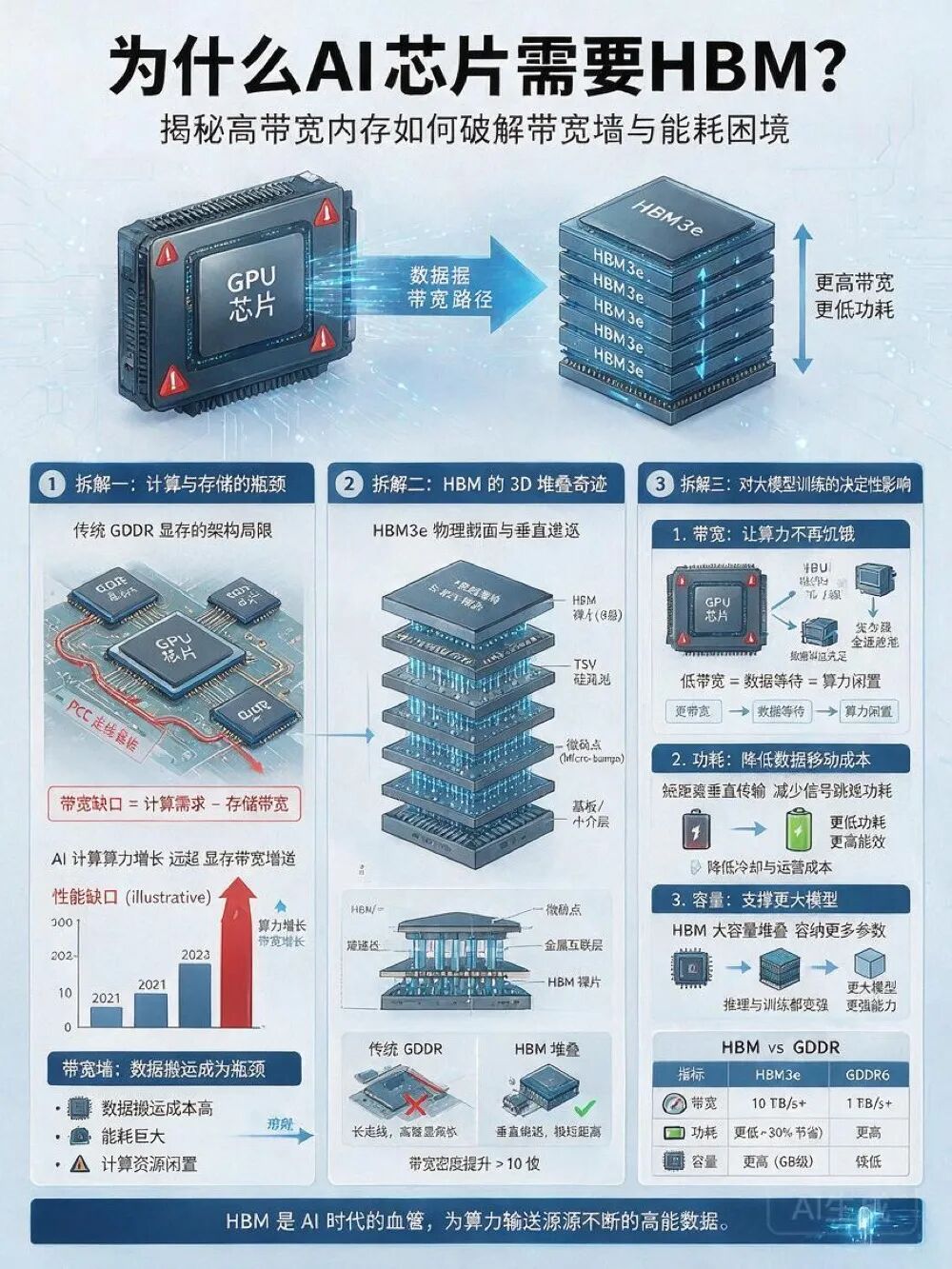
Instruction: Generate a popular science infographic titled "Why Do AI Chips Need HBM?" with a clear three-column layout: the left explains GPU computing bottlenecks, the middle shows a schematic diagram of the HBM stacking structure, and the right explains the impact of bandwidth, power consumption, and capacity on large model training. Add concise Chinese annotations, data flow arrows, and comparison tables, with an overall professional and easy-to-understand style.
The performance of this image is significantly better than that of complex infographics. The model completed the three-column layout well, and the HBM stacking structure diagram is relatively complete, showing the relationship between chip stacking, data flow arrows, and comparative explanations. Similar to the above case, there are also obvious errors in text rendering.
3. Grid Guide: Multi-Card Layout and Concept Classification
Instruction: Generate an infographic titled "Beginner's Guide to AI Models" with a grid card layout, showing 8 types of AI models: large language models, vision-language models, text-to-image models, speech models, video generation models, world models, VLA models, and code models. Each card contains the Chinese name, English abbreviation, core capabilities, and typical applications. The overall style is concise and professional.
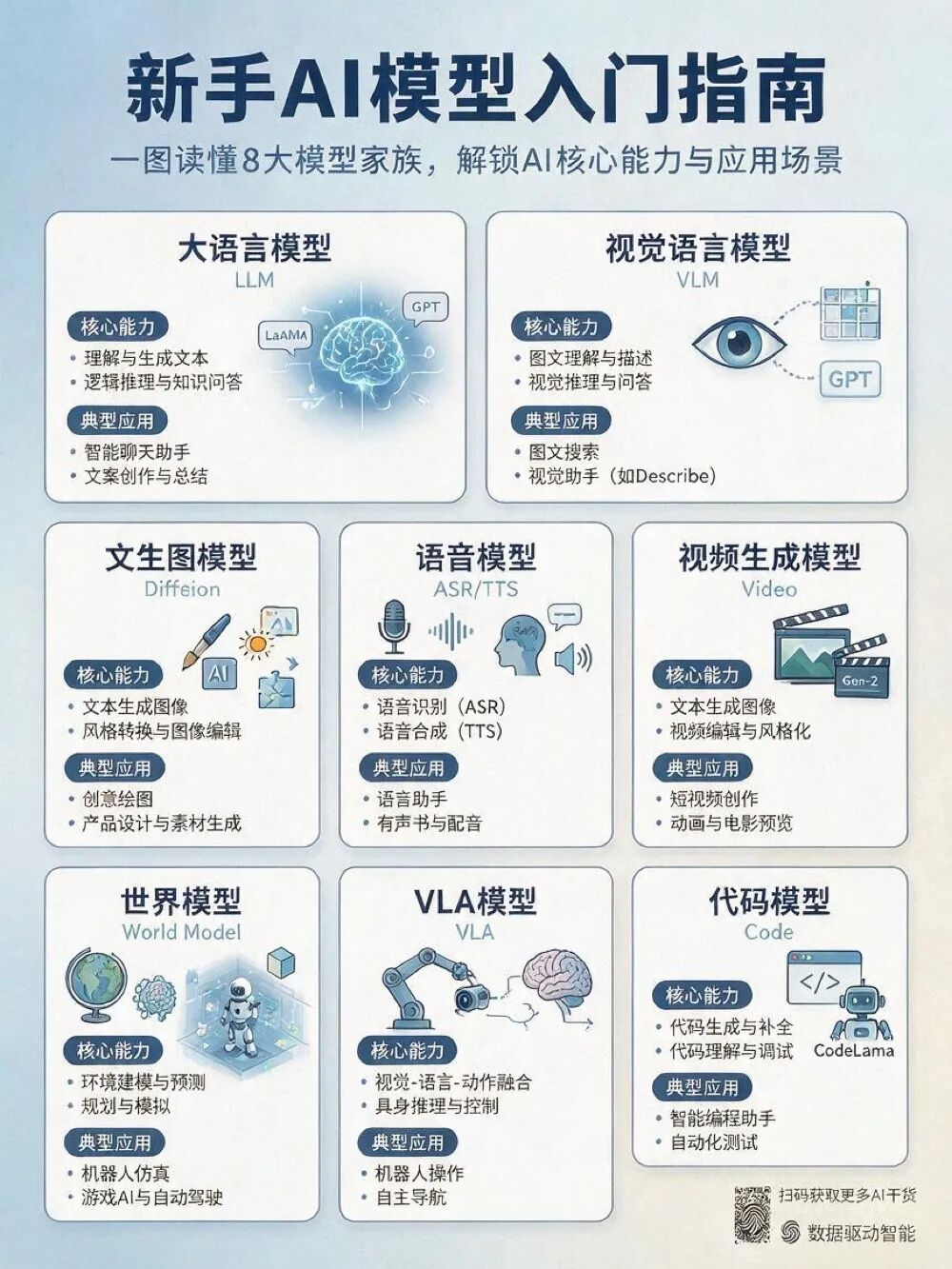
This type of grid card infographic has high requirements for structural design. Seedream 5.0 Pro basically completed the partitioned presentation of 8 types of models, the grid form is not obviously disordered, and each card can correspond to the model type, capability description, and application scenario. However, there are still 5 text rendering errors in the entire image.
It is worth noting that from the above three sets of actual test cases, if the user does not explicitly limit the image style in the prompt, the model will default to light, light blue or Morandi color schemes, which is closer to the general PPT style, and will not actively move towards commercial posters or realistic visual effects.
4. Commercial Posters: Style Replication and Hierarchical Information Layout
Instruction: Generate a winter Christmas promotion poster in a retro parchment scroll style. The main title is "Winter Gift Season", and the subtitle is "Up to 50% Off Sitewide". Add the event time "December 15 - December 25" and discount details "¥50 off when spending over ¥299", "Extra 10% off for members", "Free shipping when spending over ¥99". The picture contains snowflakes, ribbons, candles, gift boxes, and warm golden lights. The Chinese text is clear without typos, and the hierarchy of titles, discounts, time, and rules is distinct.

After the style is clearly set, Seedream 5.0 Pro performs more stably. The snowflakes, ribbons, candles, gift boxes, and warm golden lights in the poster are accurately presented, and the retro parchment scroll style is also restored relatively completely. In terms of text, there are no obvious problems in this image.
"Winter Gift Season" as the main title has been designed, and the entire poster does not mechanically use the same font. There is a clear hierarchy between promotional information, time, and discount rules. Compared with infographics, commercial posters are more usable.
5. E-commerce UI: Web Design, Cross-Layer Element Interaction
Instruction: 16:9 smart home e-commerce first-screen UI, soft morning light tone, layered card shadows. The top navigation bar includes "Home, Products, Solutions, Pricing, Contact Us". The left side has a light gray-blue background, including the main copy "Make your home understand you better", a smart speaker product card, and a blue capsule button "Experience Now". The right side is a realistic smart speaker and living room scene, with 3D special effects: the light wave emitted by the speaker passes through the boundary of the right picture and extends to the vicinity of the left button. The overall look is like the real homepage of a product official website.

In this round of testing, Seedream 5.0 Pro's e-commerce UI design is relatively simple. It understands the basic structure of "first-screen UI", but the overall completion is not yet qualified.
There is still a gap between the page hierarchy, product texture, sense of interaction, and the visual standards of a real official website. The effect of 3D light waves penetrating the picture boundary is not prominent enough. This model is still far from a design draft that can be directly used for a product official website.
6. Precise Editing: Partial Recognition, Material Replacement, and Environmental Consistency
Instruction: Please replace the chair in the red boxed area of the picture with dark green velvet material, refer to the color #1F4D3A, and keep the original perspective, shadow, and ambient light unchanged. Do not modify other areas.
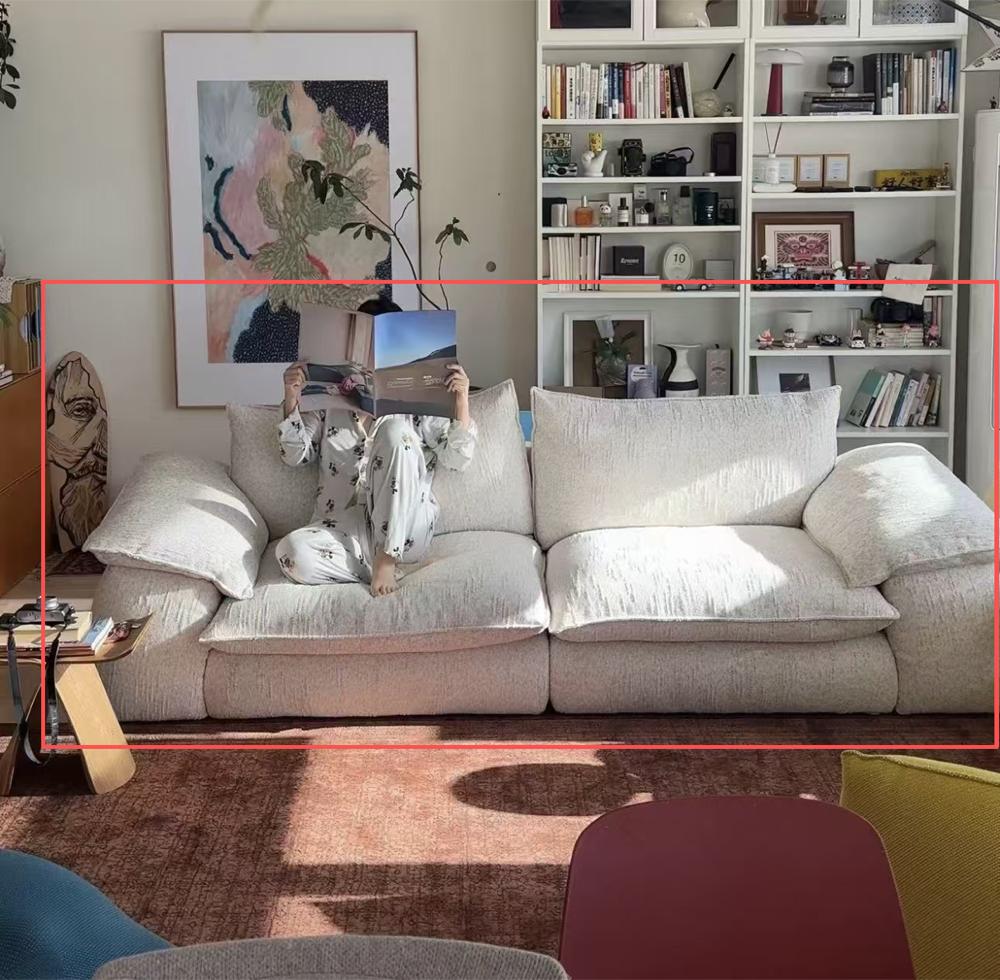
▲ Input Image
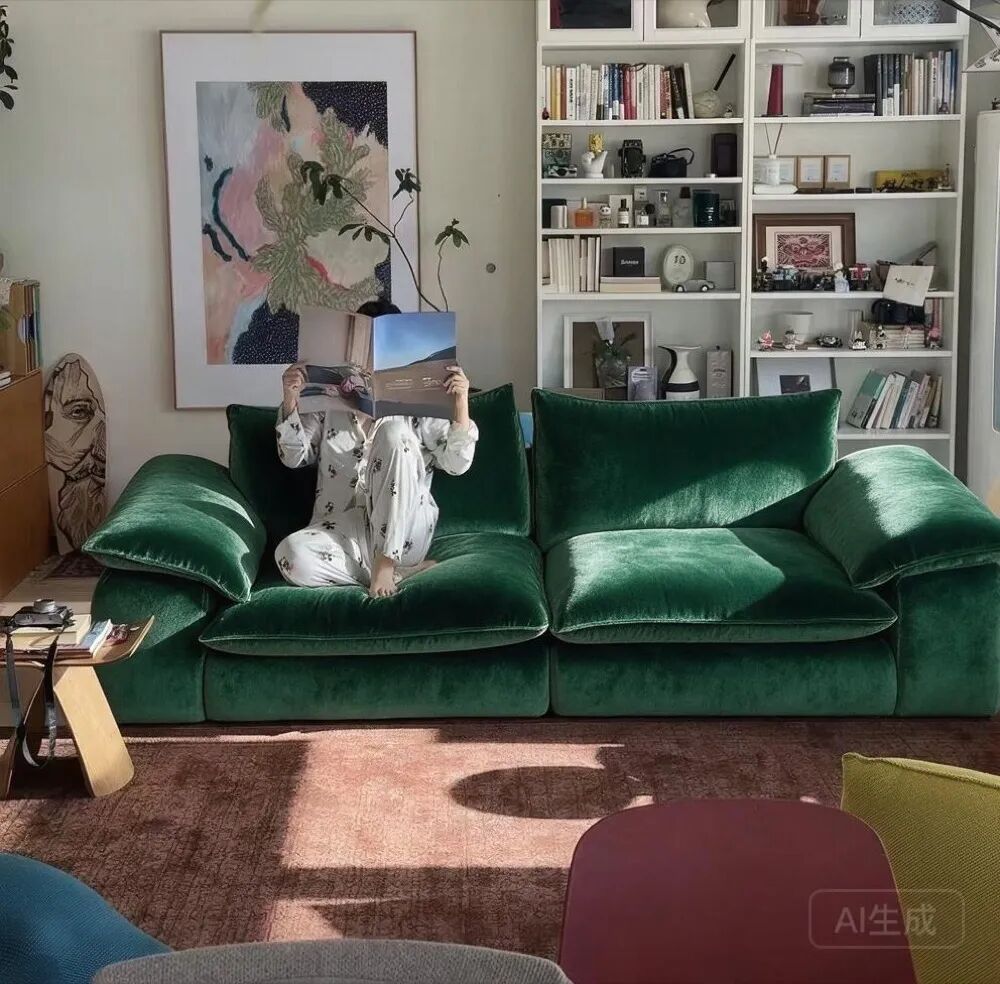
▲ Output Image
Precise editing is one of the more valuable capabilities in this upgrade of Seedream 5.0 Pro. In actual experience, the model can accurately identify the red boxed area and replace the chair with dark green velvet material.
After careful comparison, it can be seen that the color and material in the prompt are satisfied, while the original perspective, shadow, and ambient light remain basically unchanged. Other areas are not significantly modified, and the area isolation capability performs well.
7. Sketch Rendering: Wireframe Understanding, Layout Restoration, and Visual Completion
Instruction: Generate an event poster for the "AI Developer Conference" based on this rough wireframe. The top is the conference title, the middle is the main visual robot and city background, the right is the agenda card, and the bottom is the time, location, and registration button. The style is a tech blue-purple gradient, with added light beams, grids, and chip textures. The text includes: "AI Developer Conference 2026", "July 18, Beijing", "Models, Agents, Robots, AI Infrastructure". Keep the sketch layout and make the text clear.
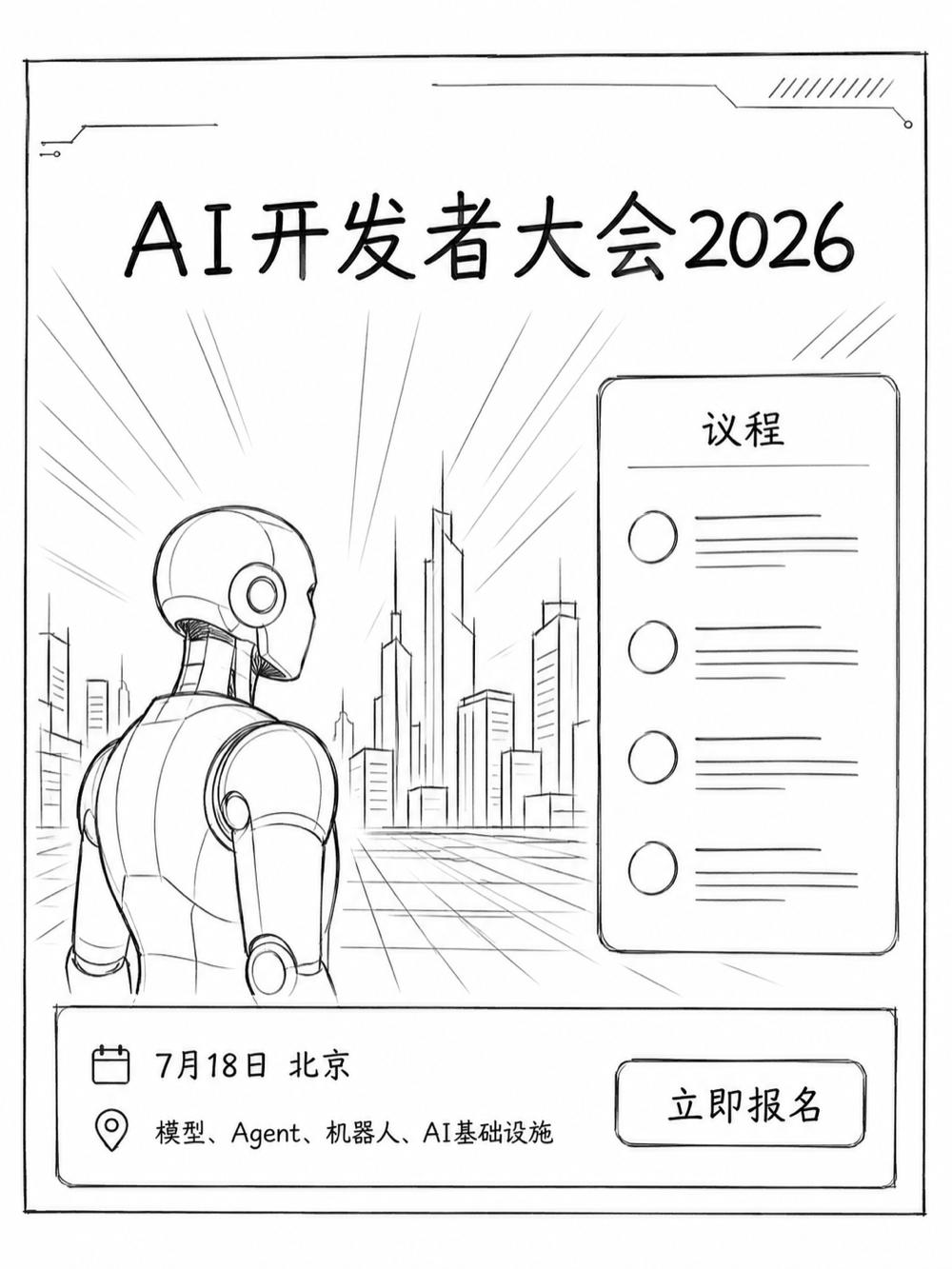
▲ Input Rough Wireframe

▲ Output Image
In the sketch rendering test, the model can read the general layout of the original wireframe and supplement the conference title, robot main visual, city background, agenda card, and bottom information according to the prompt.
However, the style of the event poster is not accurately grasped, the overall is still relatively simple, and the original wireframe is only supplemented to a limited extent. Elements such as tech blue-purple gradients, light beams, grids, and chip textures do not form a strong enough visual impact.
8. Layer Separation: Material Decomposition and Complete Workflow
Instruction: Please split this product poster into independent layers: product main body, product shadow, background gradient, decorative lines, title text, selling point text, price tag, and button. Require each layer to have clean edges and a complete transparent background, which is convenient for subsequent dragging and replacement.
Seedream 5.0 Pro supports intelligent layer splitting, which can split a complete poster into independent layers such as text, main body, background, and environmental decorations. Zhidx sent the previously generated winter Christmas promotion poster to the model again to test the layer separation effect.
However, the Volcano Ark experience platform currently does not support viewing layers, so this capability cannot be fully verified. Next, Seedream 5.0 Pro may launch a more complete design workflow on platforms such as Doubao and Jimeng.
9. Multilingual Generation: Multilingual Text Rendering and Unified Layout
Instruction: Generate a set of International Coffee Festival posters, with the same layout divided into four areas, using Chinese, English, Spanish, and Arabic respectively.
