OpenAI Codex Product Manager: AI doesn't make you do things faster, it makes you do things you never dared to do before
If you walk from point A to point B in OpenAI's offices, it's nearly impossible not to hear the word "Codex" mentioned. This is no exaggeration — Rohan Varma says that if Codex went down, OpenAI's operations would face significant difficulties. And he is one of the people who made this tool indispensable.
Rohan Varma's career path is quite remarkable. As the co-founder of Cursor, he built the AI programming tool that became addictive to developers worldwide. In February 2026, he was recruited by OpenAI, shifting his identity from "founder" to "product manager." Yet he says this transition felt completely natural — because the internal way OpenAI Codex operates is almost identical to Cursor: tiny teams, extremely fast iteration speeds, and everyone using the same product to build the product.
Peter Yang's Behind the Craft podcast invited Rohan for a hands-on, in-depth interview. During the session, Rohan delivered multiple live demos — from triggering automations automatically via Slack, to rapidly generating design variants with Image Gen, to turning any conversation thread into a reusable skill. This is not a theoretical lesson on "how a PM should work in the AI era"; it is a product manager from a real AI-native team opening up his daily workflow for you to see.

This article is adapted from Peter Yang's Behind the Craft Podcast Episode 138, "OpenAI PM Reveals How He Uses Codex to Do Product Work | Rohan Varma," published on YouTube on July 5, 2026. Below is the full adapted content.
1
Two Levers: The PM's Work Methods Have Changed, and So Has the Role
Rohan breaks down Codex's impact on product management into two dimensions. The first dimension is easy to understand — the "how" of getting things done has changed. Information synthesis, context gathering, document writing, cross-tool coordination — tasks that once took up huge chunks of a PM's time can now be delegated to Codex at scale.
"We receive hundreds of data points and issues every day from enterprise customers, Twitter feedback, and various channels," he explains. "I can get fully up to speed on a brand-new project in just 20 minutes. Codex automatically accesses all our tools — Notion, Linear, Gmail, Google Drive — and compiles everything that happened before I joined."
But the second dimension is far more critical: the role itself has been redefined. When engineers, designers, and product managers on a team all use Codex, the topology of collaboration shifts. The typical setup for the OpenAI Codex team is that a product line may have only one or two engineers, and the PM's role shifts from being a "middleman" to a "two-end calibrator": setting guardrails for strategic direction on the front end and delivering the final push to market on the back end, while the middle execution layer can be fully delegated to engineers and Codex to advance independently.
"In the past, product development meant spending a huge amount of upfront time planning to ensure engineers only worked on the most critical tasks," he says. "Now it's completely reversed — build everything first, then decide what's actually worth releasing."
2
No PRDs, Just "Build First, Talk Later"
This "inversion" has permeated daily life at OpenAI. Rohan gives a very specific example: Codex recently rolled out a product update that added a built-in browser to the app. How did this feature come about? One morning, an engineer on the team named Adam came into work, said to Rohan "Check this out," and showed him what he'd built — fed up with switching windows back and forth during frontend iteration, he'd built the tool himself using Codex.
"He didn't write a requirements document, didn't hold an alignment meeting — he was just annoyed by the friction and built it. I looked at it and said, 'This is amazing, let's figure out how to ship it.'" A feature ready to merge into the product's mainline didn't even have a single line of PRD on its "birth certificate."
Rohan also mentions a meme circulating in Silicon Valley — "Plans are written for agents, not for humans." If you use Codex's goal feature, it will iterate on its own, complete the goal, and fine-tune itself. The time humans spend reading plans is better spent looking at what's actually built.
Underlying this is a deeper organizational logic: collaboration between humans has become the bottleneck. In the traditional model, when a project piled up five or six engineers, coordination costs began eating away at speed. But when everyone — especially engineers — uses Codex to drastically boost their individual capabilities, product decisions become a collection of countless micro-decisions. "The ideal state is that engineers can make those micro-decisions on their own, without waiting for me."
So Rohan's daily priorities have also shifted. He spends more time with enterprise customers and his team, and less time on "information synthesis" and "document maintenance." "Codex handles the manual parts, and PMs can spend more time with users — which is what product managers should have been doing all along."
3
Do It Once, Then Let It Automate Itself
The most impactful part of the entire interview is the several workflows Rohan demonstrates live. The core pattern can be summed up in one sentence: do the task manually once, then let Codex automate that process on its own.
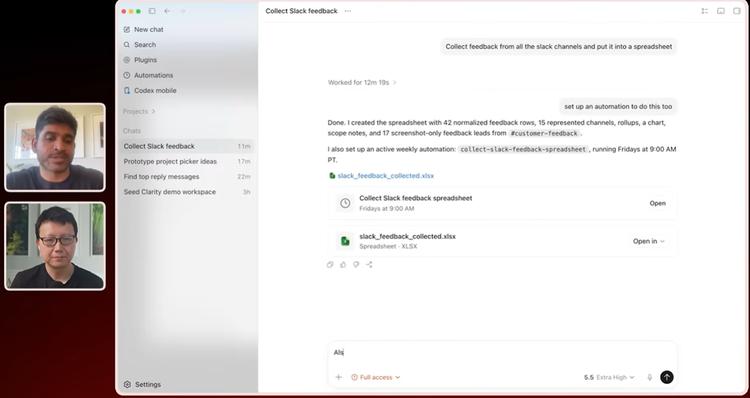
He shows how he handles user feedback. OpenAI makes heavy use of Slack, with a huge amount of feedback scattered across various channels. Rohan's approach is to start a thread in Codex, and manually walk through the process of "collect feedback from Slack → categorize it → log it to the Linear board." Once that works, he simply says: "Now set this to automate once a week."
Codex can not only set up automations, but also modify the automations it has created by itself. "I might add a line — send me a Slack message after you finish. Codex will go update that automation's configuration." Rohan says he has about five or six of these automations running, covering recurring tasks like information gathering, feedback categorization, and status updates.
Even more mind-blowing is the "one-shot trigger automation." He demos a scenario where he sends a message to his colleague Alex, then sets in Codex: "When Alex replies to my last direct message, draft an email to our customer." Codex will monitor that Slack direct message in the background, and once the trigger condition is met, automatically draft the email, then delete the automation itself.
"Codex knows how to use itself," Rohan says. "You don't need to break requirements down into tiny steps. You just say 'When Alex replies, send an email,' and it will use its underlying capabilities — check Slack every few minutes, set up the right trigger conditions, and clean itself up after finishing. You don't have to think about how it does it."
Peter Yang half-jokes: "So you could set up an automation to make Codex pretend to be Rohan replying in long Slack threads?" Rohan laughs: "Yeah, some people on our team use the @Codex tag to trigger automations that reply on their behalf."
4
Image Gen Isn't For Dyeing Your Hair Blue
"Image Gen gives me a feeling that's almost like an AGI moment." Rohan isn't joking when he says this.
His argument is that people generally see image generation as a consumer-grade tool for things like "dye my hair blue" or "generate a picture of a cat." But in product work, its real power is in rapid prototyping exploration.
He demos this live — taking a screenshot of Codex's "Select Project" interface, then telling Image Gen: "Based on this UI, generate four or five different design variations." In seconds, Codex spits out five completely distinct interaction schemes. Not text descriptions, but mockups that you can visually discuss directly.
"This is so much faster than writing five dummy React pages to explore ideas," he says. "I increasingly feel that the first iteration of product creativity shouldn't be done with code — it should be done directly with Image Gen."
He usually runs a round of visual exploration first with Image Gen, picks one or two directions, then gives the next instruction: "Turn the first option into a real prototype, put it on Codex Sites so I can share it with the team."
There's another magic trick repeatedly used in this workflow: the skill creator. In Codex, after finishing any conversation thread, you can call the skill creator and tell it: "Turn this entire interaction into a reusable skill, so that when I ask for similar things later, you know my preferences." Rohan uses this to solidify design language: "You interact with Codex for twenty minutes to get a design you're happy with, then tell it 'Turn this thread into a skill, make sure all future designs stay consistent' — and it actually remembers your aesthetic preferences."
Peter Yang brings up a concern: if you let AI update skills repeatedly without review, won't the skill files get "slopified"? Rohan admits this is a problem to solve. The current approach is very primitive — "run it, see how it looks, and if it's good enough, keep using it." But he reveals the team is exploring how to automatically evaluate the quality of skill outputs across different iterations.
5
"Disposable Software" and Self-Updating Documents
Rohan proposes a concept — disposable software. When the marginal cost of creating software with Codex approaches zero, you start building things that once "weren't worth the effort."
"I often ask Codex to build a disposable small app on the fly," he says. A common example: when Slack is backed up with too many messages, he tells Codex "Scan all my unread Slack messages, find the most important ones that need replies, and generate a local web page to show them to me sorted by priority" — the whole process takes no more than a minute, and you discard it after use.
If a disposable tool ends up being used repeatedly, he adds another automation — "Update this page every two hours." That temporary little tool then turns into a dynamic dashboard with zero maintenance cost.
This idea scales up to something even more interesting at the team level. Every project on the OpenAI team has its own dedicated Slack channel. Rohan started building a Codex Site for each channel — a full project panorama page that automatically extracts context from Slack conversations and keeps updating itself continuously.
"Everyone used to know an iron rule: any document is outdated the second you send it out," he says. "But now we can make documents that truly stay up to date in real time. When a new teammate joins, they open that Site and see the full current state of the project. I also use it myself to catch up quickly."
Documents are no longer written by humans — they're "distilled" by AI from real workflows.
6
Thread Orchestrator: Letting Codex Manage Codex
Throughout the interview, Peter Yang repeatedly asks Rohan a boundary question: how many Codex threads can you actually run at the same time? Have you reached a level like Peter Steinberger (founder of OpenClaw), where Codex truly enters the "system of systems managing systems" layer?
Rohan admits he's not quite there yet. But he reveals a recent major feature update: Codex can now control other Codex threads. "You can have a high-level 'orchestrator thread' that spawns, manages, and waits for results from other child threads." This is a new programming paradigm — instead of humans writing code to coordinate multiple agents, agents self-organize among themselves.
He usually runs five or six Codex threads in his daily work, but his mindset is "delegation-based." "I don't sit there waiting for Codex to finish. I drop a task to it right before a meeting — like preparing a slide deck for a meeting with a certain team tomorrow — then go to the meeting. When I get back, I open Codex and the results are already there."
He uses Codex's "PR babysitter" feature as a more vivid analogy: in the past, when a pull request went from submission to merge, you had to check on it ten times — fix it when CI broke, reply to a teammate's comment, fix it again when it broke. Now you just say "Watch this PR for me, ping me on Slack once CI passes, human comments are addressed, and everything's ready." Then you only intervene at the final step — "Okay, it's good to merge."
"If you can manage a small team of people, you wouldn't demand to track every single action of that person in real time," Rohan says. "It's the same with Codex — the best kind of delegation is that it comes back to you when it's done, and you don't need to think about what it's doing in between."
7
It's Not About Being a PM — It's About "Leverage Sense"
At the end of the interview, Peter Yang asks an easy question: will the PM profession become more fun?
Rohan's answer is far more universal than expected. "Not just PMs — every role. What AI brings isn't just 'doing the same thing faster,' it's doing far more completely different things in the same amount of time." At both OpenAI and Cursor, he's seen the same phenomenon — it's not "productivity went up 50%," it's "we built things we never would have even attempted before."
He uses a word to describe his feeling — "unconstrained." Codex connects all his tools: Slack, Linear, Notion, Gmail, Drive, Figma plugins, and internal custom plugins. At this level of information and tool density, "I can't remember the last time I said 'that's impossible.' Now the question isn't 'can we do it' — it's 'which one should we build.'"
The most specific piece of advice he gives is simple: every time you face a problem, first ask yourself — can Codex do this? If it doesn't work the first time, ask the second question: "What information do I have that Codex doesn't?" Then find a way to give that information to it. "Once this process closes the loop, you're continuously pushing more tasks to Codex, while Codex is also continuously getting better at understanding your context."
Peter Yang ends with a blunt truth: "Model capabilities have long outstripped most people's ambitions."
Rohan replies quickly: "Yeah. You should set your goals 10 times more absurd than what seems reasonable. It'll probably hit 90% of that. Then you reset — make the new goal 10 times more absurd again."
Original link: https://www.youtube.com/watch?v=fAdFE7y6K2o
This article is from the WeChat public account "SiliconStar GenAI", authored by the Large Model Mobile Team, and republished with authorization from 36Kr.