Why has the oldest form of interaction made a comeback in the AI era?
Between 2025 and 2026, top AI companies successively released a type of product: CLI-based Agent tools.
Anthropic released Claude Code, an AI programming assistant that runs in the terminal. OpenAI released Codex CLI, and Google released Gemini CLI. In this wave, almost every notable AI company has placed bets on the command line.
This is counterintuitive. The command line dates back to the 1970s. The emergence of GUI brought computers to the general public, and now the mobile Internet has made touchscreen operation the default. According to the usual logic, the direction of technology should be more and more "visualized" and "user-friendly". Why, in the AI era, has the oldest form of interaction made a comeback?
The answer is not sentiment but engineering logic.
GUI is not friendly to AI
GUI is designed for human visual navigation. Buttons, pop-ups, drag-and-drop, and hover effects - these interaction paradigms are based on human visual intuition. Humans look at the interface, scan the button positions, and intuitively judge the next operation. This mechanism is extremely natural for humans and requires almost no learning cost.
However, the way large language models (LLMs) work is completely different. The input and output of an LLM are both tokens. Its "thinking" occurs in the language space, not in the pixel space.
Letting AI manipulate the GUI means crossing a huge gap:
High understanding cost. AI needs to rely on computer vision or the Accessibility Tree to "understand" the interface - which buttons are clickable, where the input boxes are, and what the current pop-up window means. This is not an AI's strong suit but an additional burden.
Implicit and unpredictable state. The same button may be clickable today but grayed out tomorrow due to certain conditions. This implicit state is "context" for humans but uncertainty for AI - it cannot reliably reason about "under what conditions this operation is available".
Non-combinable operations. There is no way to connect two GUI operations with a pipeline. "Search results → Filter → Export" involves three clicks in the GUI and cannot be passed, reused, or automated as a whole.
Difficult to test and verify. After an AI executes a GUI operation, how can you confirm its success? You need to take a screenshot and parse the interface state. The entire feedback loop is slow and fragile.
In contrast, every feature of the CLI seems to be specifically designed for AI.
Three major advantages of CLI for AI Agents
Composability
The core of the Unix philosophy is: "Do one thing and do it well; let programs work together."
This design principle from decades ago has taken on new meaning in the AI era.
CLI tools are connected through standard input and output. For example, linkly search "React performance optimization" | head -5 can pass the search results to the next command. linkly search "Architecture design" --json | jq '.results[].doc_id' can extract all document IDs for subsequent processing.
For an AI Agent, composability means that multiple commands can be chained into a complex multi-step workflow. The output of each step is structured text that can be consumed by the next step. There is no "Click → Wait → Screenshot → Parse" loop in the GUI, only clean input and output.
Predictability
The behavior of each command is completely determined by its parameters. If you run linkly search "Database" --limit 10 today, you'll get the same result tomorrow (assuming the database remains unchanged). There is no implicit state and no confusion like "Why did this function work last time but not now".
This is extremely important for AI. When an AI reasons about a tool, it needs to build a mental model: what the input of this tool is, what the output is, and what the side effects are. The implicit state of the GUI fills this mental model with uncertainty. The explicit parameters of the CLI make this mental model reliable and precise.
linkly read 42 --offset 80 --limit 100 - the meaning of this command is completely determined by its parameters. AI can precisely reason about its behavior without having to guess any implicit context.
Auditability
All CLI operations are recordable text sequences. What commands an AI executes and what output it gets are all human-readable text.
This transparency has two benefits.
For the AI itself: it can perform self-checks. "The previous step, linkly search 'Contract template', returned 0 results, indicating that the keyword is incorrect. Try 'Contract model' instead." This text-based self-correction is the basis for an AI Agent to work reliably.
For humans: it allows for post-hoc review. You can check which commands the AI ran and what the input and output of each step were. The entire reasoning chain is clear at a glance. It's difficult to trace what was clicked in GUI operations, but the logs of CLI operations are naturally audit records.
Design practice of Linkly AI CLI
LinklyAI is a local search engine and knowledge base creation software developed by us. When designing the CLI tool for Linkly AI, we considered AI Agents as one of the main users from the very beginning.
Four carefully designed core commands
There are only four core commands in Linkly AI CLI:

These four commands fully conform to the Unix philosophy: each does only one thing and has a clear input-output contract. AI Agents can combine them arbitrarily into complex retrieval processes.
A typical Agent workflow is as follows:
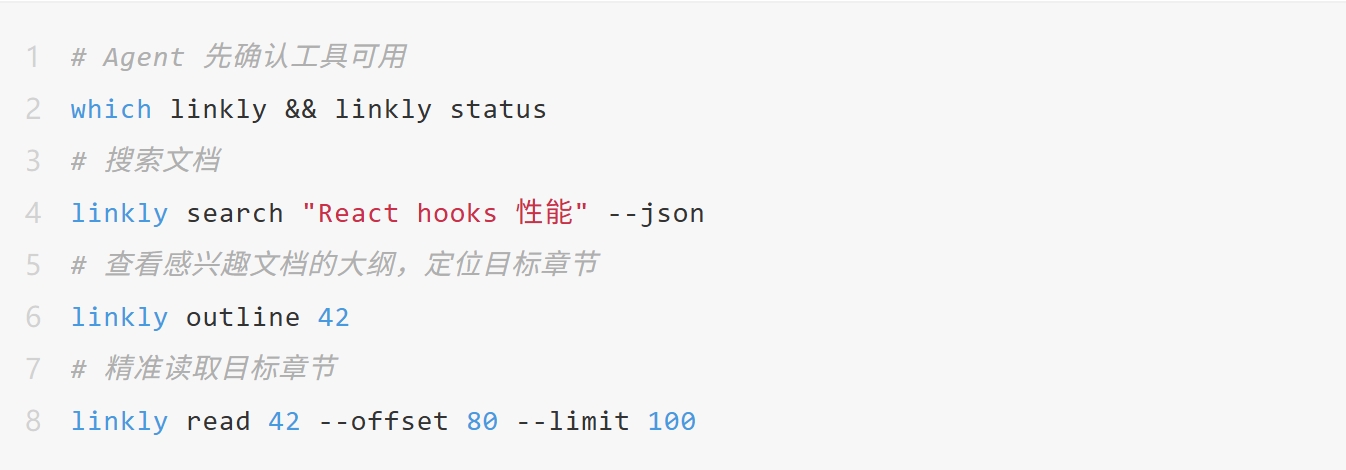
The output of each step is structured text that can be directly consumed and reasoned about by the AI. There are no GUI operations and no burden of visual parsing.
Combination with pipes, etc.
Another advantage of the CLI is that it can be freely combined with other commands in the system, bringing new capabilities beyond the boundaries of a single tool.
Filtering and extraction: The --json output can be directly connected to jq to extract fields, and the results can then be passed to the next tool:
- # Search for documents, take only the list of doc_ids, and then batch retrieve outlines
- linkly search "Database design" --json | jq -r '.results[].doc_id' | xargs -I{} linkly outline {}
Combination with grep for secondary filtering: First, use semantic search to narrow down the scope, and then filter with precise keywords:
- linkly search "Architecture design" | grep -i "Microservices|Distributed"
Statistics and analysis: Combine with wc, sort, uniq, etc. to perform document statistics:
- # Count how many PDFs are in the knowledge base
- linkly search "" --json | jq '.results[].type' | sort | uniq -c
Combination with scripts: Batch process in shell scripts to automate repetitive tasks:
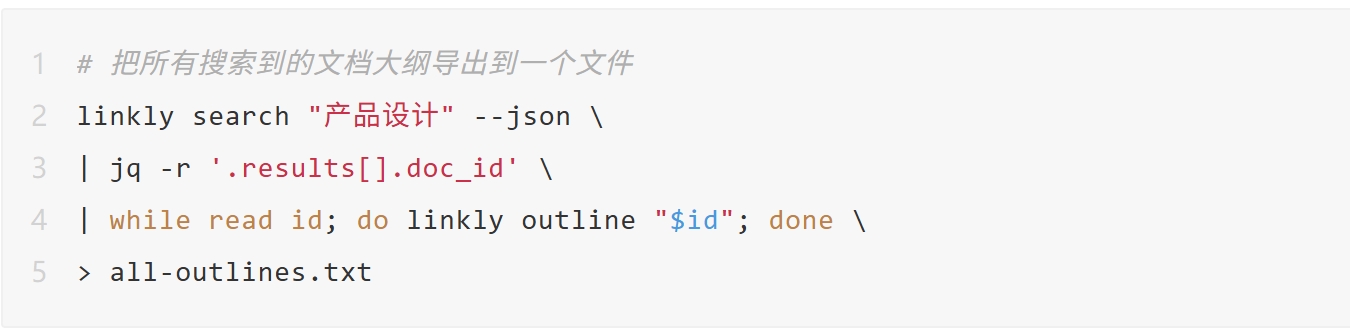
GUI tools cannot participate in these combinations. The output of CLI tools is a text stream that can be naturally consumed by any other tool, making the capabilities of the entire system far greater than the simple sum of individual tools.
CLI is also the simplest way to bridge MCP
CLI and MCP are not opposed. The command linkly mcp can turn the CLI into a stdio MCP server for any AI client that supports MCP:
Json:
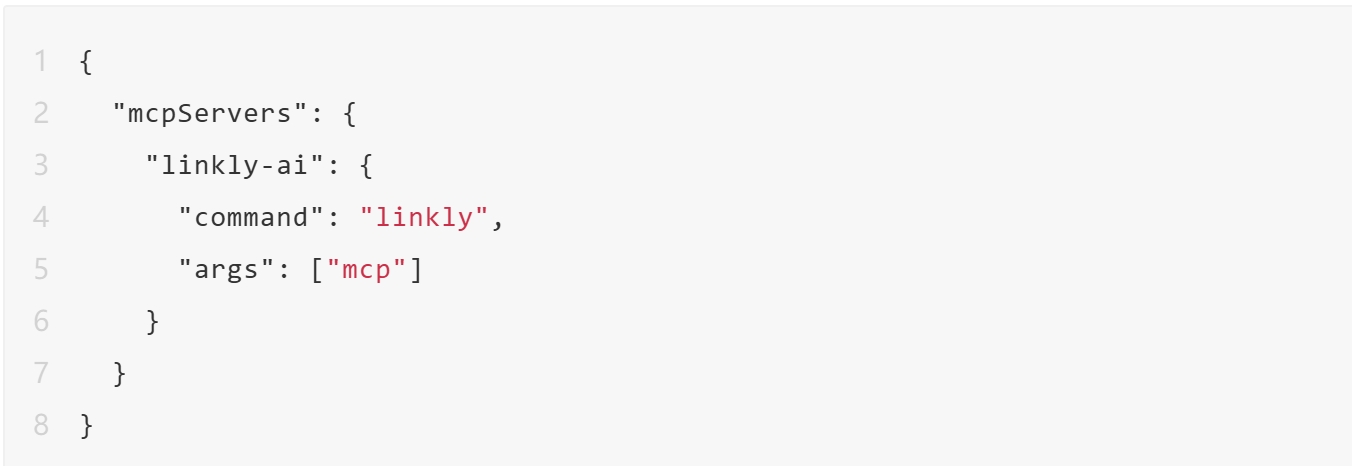
This is much simpler than directly configuring an HTTP MCP Server - users don't need to know the port number or write the URL in JSON by hand. They only need to tell the AI client to "run this command".
The CLI has become the entry ticket to the MCP ecosystem with almost zero configuration friction for users.
A more macroscopic trend
Claude Code chose to release the CLI version first rather than an IDE plugin. There is a clear engineering logic behind this decision: IDE plugins are limited by the host environment, while CLI tools can run anywhere with a terminal, can be called by any Agent, and can be combined with any other tool.
This reveals a more fundamental law: the essence of an AI Agent calling a tool is to execute a command. Tool invocation (function call / tool use) is semantically equivalent to the CLI - given a name and parameters, it returns a result. CLI tools are naturally functions that an Agent can call without any conversion layer.
The saying "Terminal as the new IDE" was proposed long before the rise of AI, but it has taken on a brand-new meaning in the AI era. It's not just about "writing code in the terminal", but about "Agents interacting with the world through the terminal".
In the past, the CLI was an exclusive tool for technical personnel. In the future, the CLI may become the universal language for Agents - humans communicate with Agents through natural language, and Agents interact with the system through the CLI.
Summary
The status of the GUI will not be significantly affected. It remains the best interface for humans to directly operate computers. However, when your AI tool needs to call another tool, the CLI is the most natural bridge. More software will launch more CLI tools to adapt to the habits of Agents.
Want to try searching your documents in the terminal? Check out these two articles: Search Your Documents with AI without Leaving the Terminal and Let 30+ AI Tools Read Local Files with One Command.
Original link:
https://sspai.com/post/107173?utm_source=wechat&utm_medium=social
This article is from the WeChat official account "Minority" (ID: sspaime), written by Blueeon and published by 36Kr with authorization.