The drawing app with the lowest AI content generates $3 million in monthly revenue and ranks first in its category.
Buy an iPad, open Procreate, and learn the basic knowledge of digital drawing such as layers, brushes, and light and shadow. This is the starting point for most people to teach themselves painting today. Not only Procreate, but also the current mainstream painting learning apps skip the basic knowledge and focus on gamified check-ins, real-time stroke correction, and intelligent color matching suggestions. Users only need to follow the guidance to draw beautiful paintings.
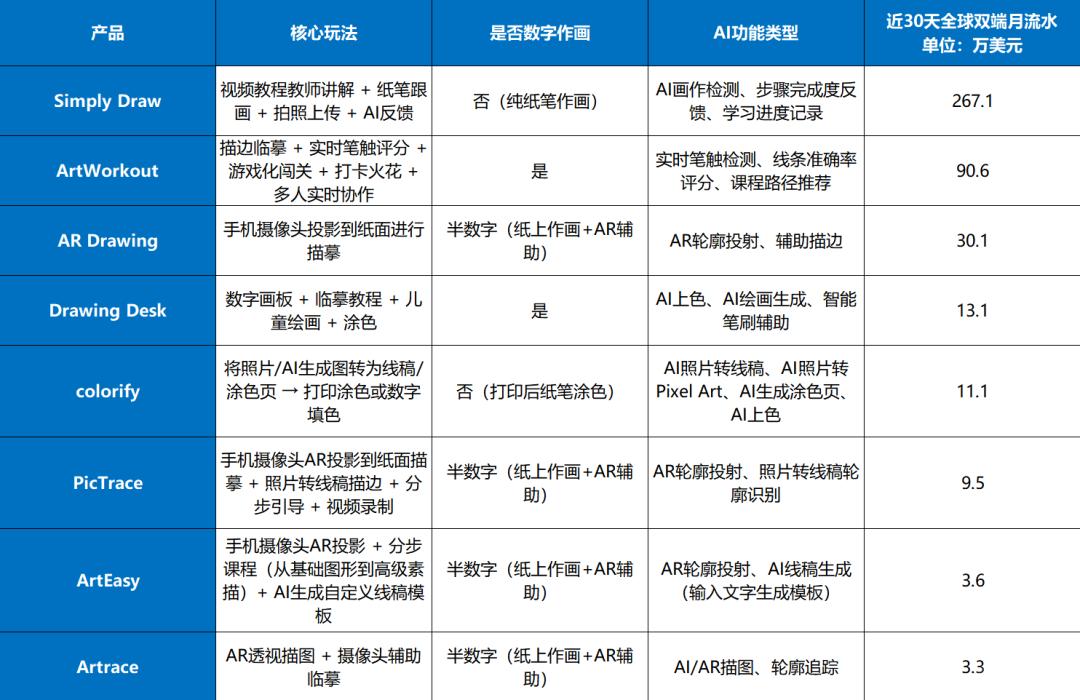
Function comparison of several painting learning apps ranked high in the global double - ended best - selling list of graphics and design apps in May and their post - split revenue in the last 30 days | Data source: App Magic
AI is accelerating everything. It's not just about painting; it can speed up the output of results in whatever you do. However, among the above - mentioned apps, "Simply Draw", the only one that doesn't follow the digital painting route and uses AI technology most conservatively, has achieved the best results. Recently, its highest post - split monthly revenue reached over $3.3 million (more than 20 million RMB).
I. Paper and pen are not for nostalgia; they are what parents really want
As a painting teaching app, "Simply Draw" doesn't support digital creation and has no real - time guidance function. The app's interaction is very simple. The product provides painting patterns. After users select a pattern, they prepare paper and pen, follow the video steps provided by the product to paint, and then take a photo of the painting and upload it. The only part where AI is used in the whole process is that after uploading, AI detects and evaluates the user's painting.
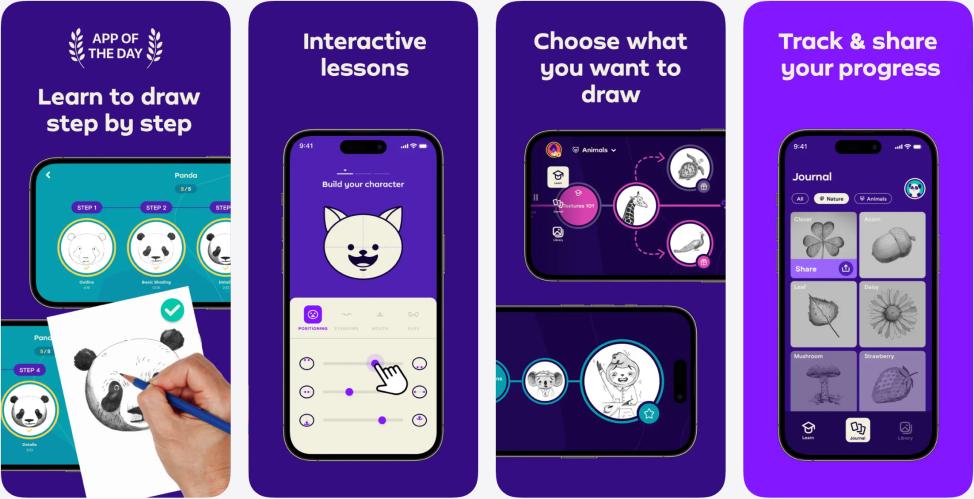
Product promotion page of "Simply Draw" | Image source: App Store
The revenue of this very simple product increased rapidly in the second half of 2025. The highest post - split monthly revenue once exceeded $3 million, and its monthly revenue still remains above $2 million to this day.
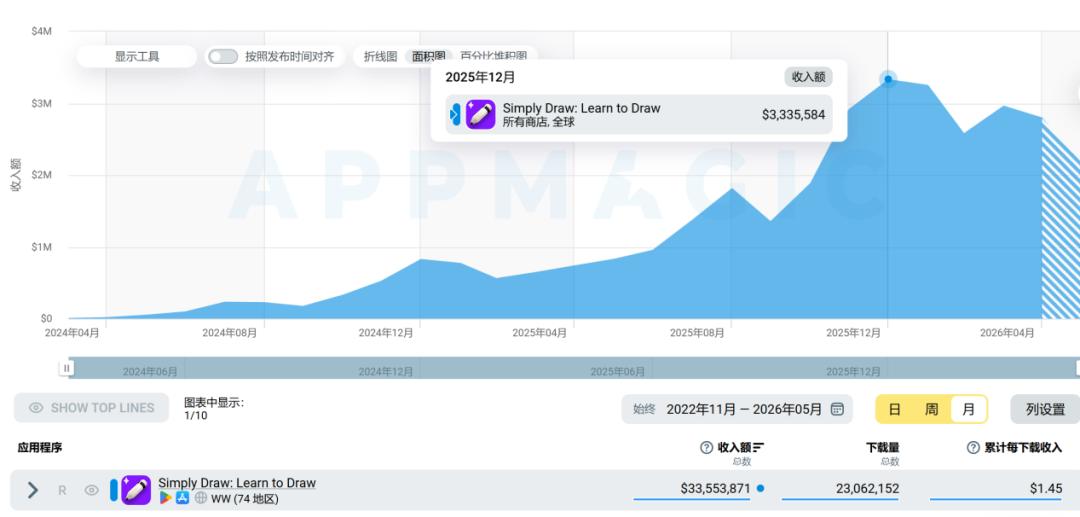
In December 2025, the monthly revenue of "Simply Draw" reached $3.33 million | Image source: App Magic
After analyzing the advertising and product design, we found that the revenue of this product is significantly higher than that of similar apps. This is because it has built a stronger purchasing framework for parents.
By looking at the advertising materials of "Simply Draw", we can find that the content of the materials is almost all themed around children learning to paint. It can be basically summarized as follows: following "Simply Draw", children independently complete beautiful paintings and are driven by a sense of achievement to continue learning to paint.
Focusing on child audiences, "Simply Draw" is not only a painting learning app but also a children's education product, with the typical characteristics that the users are children and the payment decision - makers are parents.
This is why "paper and pen" have become its advantage rather than a disadvantage.
Most parents of children aged 3 - 12 were born between the late 1980s and the early 1990s. Drawing with paper and pen was the formal way of "learning to draw" in their growth memories. Coupled with the current prevalence of electronic devices, parents are more worried about their children's use of electronic products. Therefore, no matter how attractive and low - threshold the mainstream painting learning apps on the market are, it is still difficult for them to get the order from parents who are willing to pay for their children.
Offline paper - and - pen painting classes go to the other extreme: they are expensive, have long courses, and require parents to pick up and drop off their children. Their goal is more inclined to professional training. For most parents who "just want their children to have a decent hobby or skill", the input - output ratio is not cost - effective.
"Simply Draw" fits right in between the two. Children learn to draw with real paper and pen, but they don't need to make high financial and time investments.
II. "Simply Draw"
Is selling "learning results that parents can check"
However, drawing with paper and pen is not enough to explain all the reasons why parents are willing to pay. "Simply Draw" fully understands the psychology of parents at the product design level.
First of all, after downloading and registering for "Simply Draw", if the registered age is set within the child range (the author set the age to 10. Considering the common age stratification of educational products, a reminder should pop up if the age is set below 13), the app will remind the user that they need to be accompanied by a parent and ask if the user is using the app with the permission of their parent.
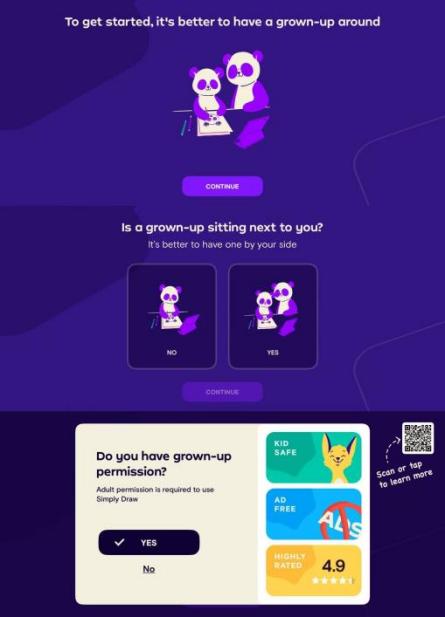
"Simply Draw" suggests that users use the app with the accompaniment of a parent | Image source: Product screenshot
This seemingly ordinary detail sends a clear signal: this is a learning product that requires parental participation, not a game for children to play casually.
After that, almost every interaction node of "Simply Draw" is designed around one thing: to let parents have something to check.
After the app's reminder, users are asked to make preference selections among several groups of pictures, which facilitates the subsequent personalized recommendation of painting patterns and generates personalized painting recommendations for users. This lays a hook for promoting payment later.

It can be seen that the painting style of the patterns provided is very child - like, which meets the preferences of children | Image source: Product screenshot
After understanding the child's interests, users will directly enter the "first lesson". They need to follow the tutorial and draw a fish step by step.
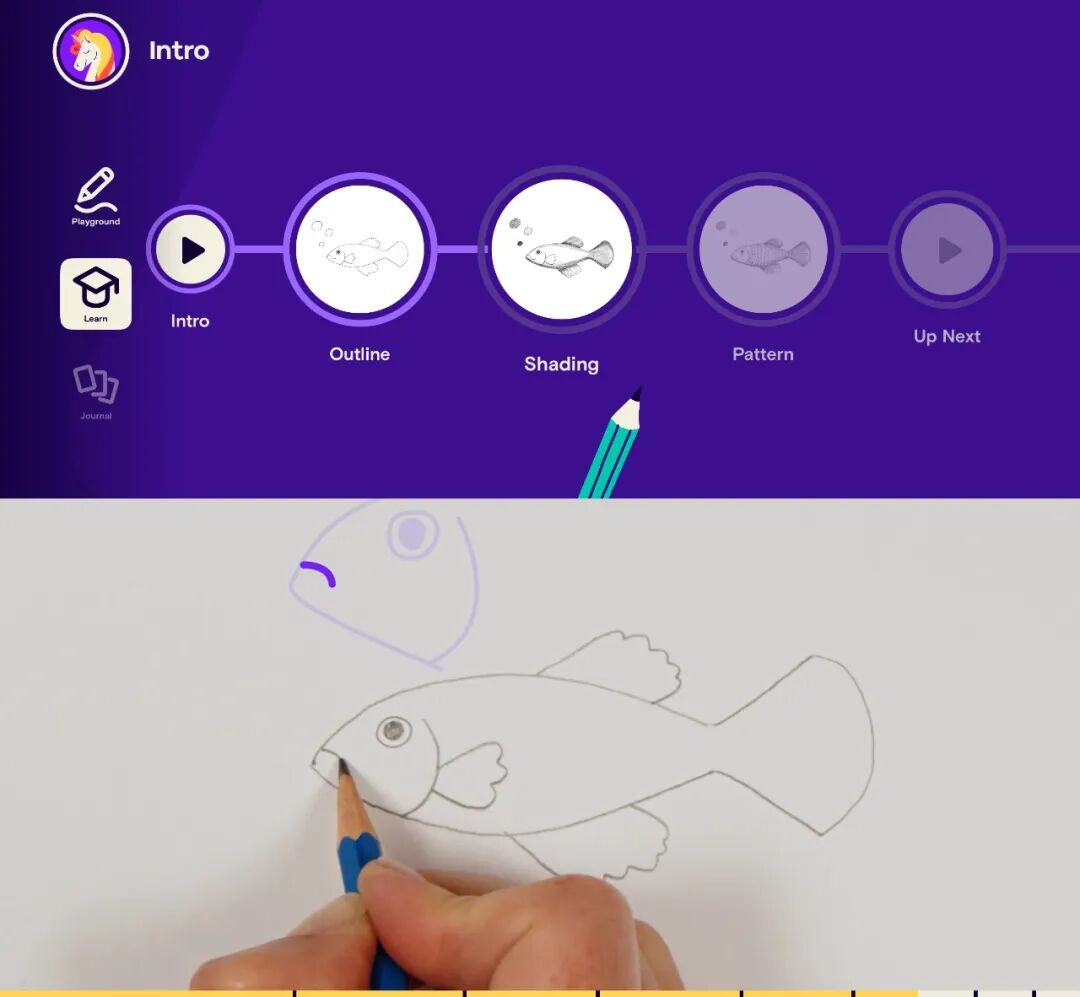
The steps are disassembled in great detail. The teacher will guide in the video at each step and encourage the user throughout the process | Image source: Product screenshot
The teaching process in the app is very well - designed. The painting steps are disassembled very carefully. The teacher will demonstrate and guide in the video at each step, patiently explain, and encourage the user throughout. Although this design incurs content costs, it sends a signal to parents that the child is not just "tracing lines according to the prompts" but is having a complete lesson with a clear teacher present. This further strengthens its positioning as a substitute for offline courses.
After completing the painting, users can choose to take a photo and upload it. AI will detect whether the painting is completed according to the teaching content and give feedback. This is also the main place where AI technology is applied in the product.
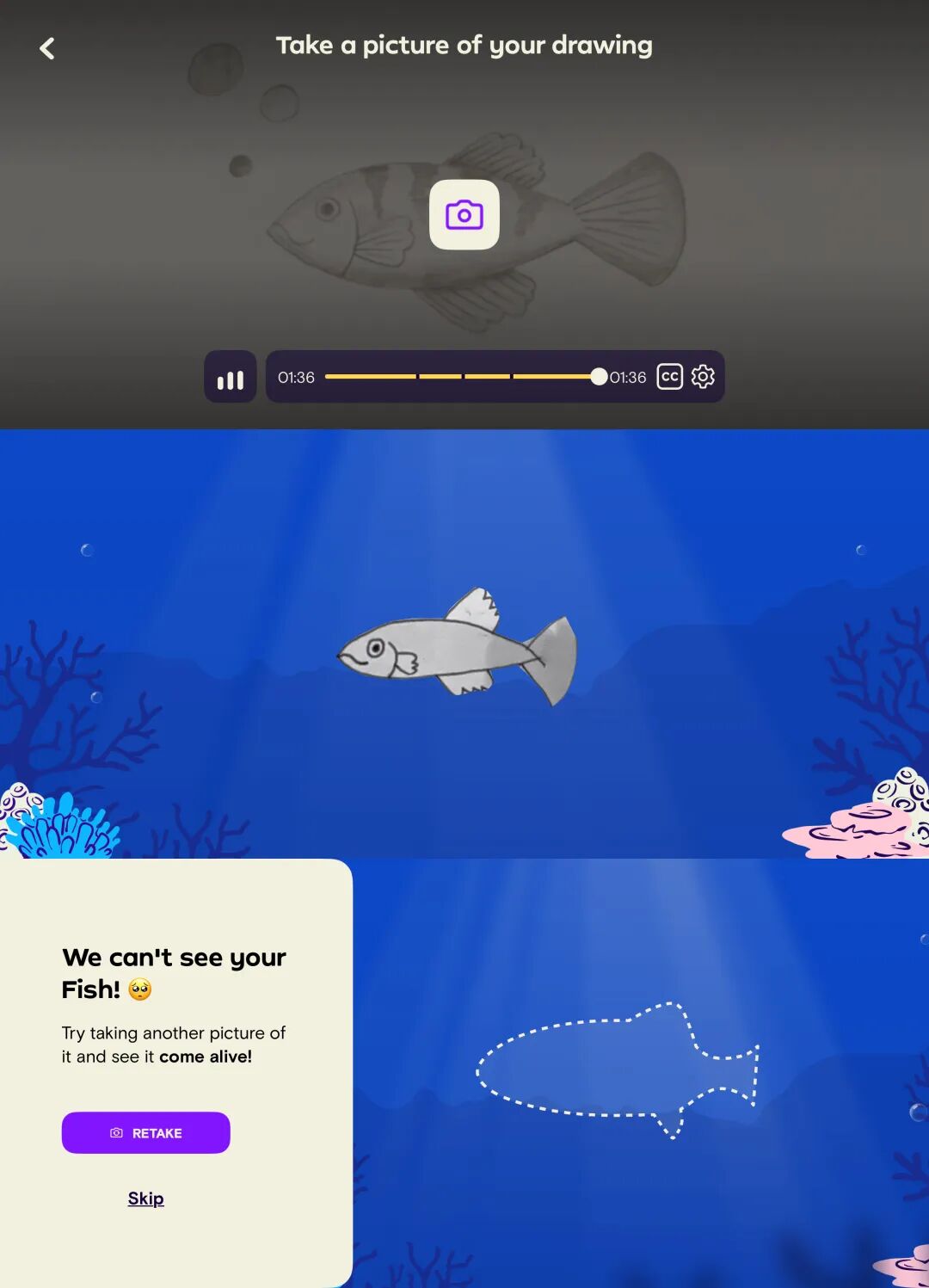
After choosing to upload, the fish will "swim". AI will check the completion of the shadows in the painting and praise the parts that are drawn well; if users choose not to upload, they can skip this step | Image source: Product screenshot
According to our evaluation, AI doesn't evaluate "how good the painting looks". It only detects whether the key steps are completed, such as whether the shadows are covered properly and whether the outline proportion is correct. It gives a clear completion signal and praises the parts with a high degree of completion.
This seemingly conservative design choice is the basis for parents to check. Parents don't need to understand painting to immediately judge whether their children have completed the task according to the teaching. AI provides a quantifiable learning feedback.
After finishing the painting, users can take a photo of the painting and save it in the "Journal" gallery to record the growth progress of painting, forming a complete growth trajectory, which is similar to the painting wall that some parents set up for their children offline.
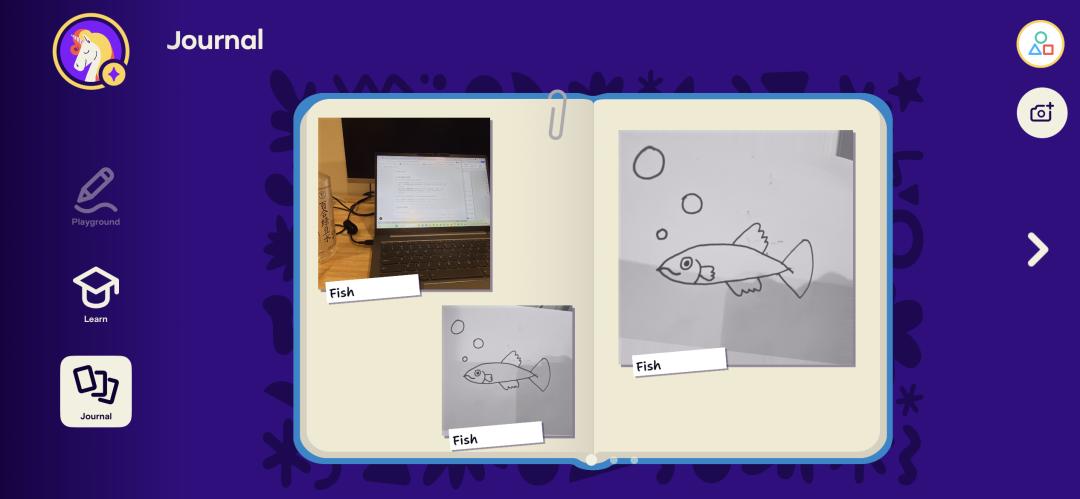
The "Journal" supports displaying all the user's paintings. Users can also choose to upload their paintings drawn outside the app to show their painting journey | Image source: Product screenshot
Through the three - layer design of video tutorials + AI result feedback + learning gallery, "Simply Draw" builds a path for parents to continuously obtain feedback on their children's learning and growth. It escapes the tool positioning and packages itself as an "online substitute for offline art classes". This is why, in the eyes of some parents, "Simply Draw" provides "lessons from an art teacher" rather than a tool app.
This transformation of positioning is one of the main reasons for its high revenue.
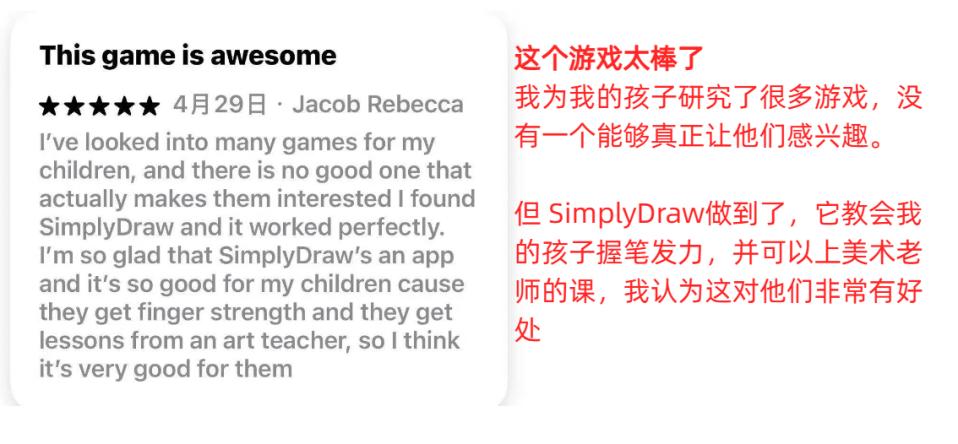
A review from an American parent, from the App Store

For the real users of the product, after each painting session, when they take a photo and upload the painting, the painting can "come to life"; after having more paintings, children can combine and assemble their paintings, which also maintains a certain degree of fun | Image source: Product screenshot
III. The paywall after drawing a fish
The paywall of "Simply Draw" is set at the peak of the emotional curve. After completing the "first lesson of drawing a fish", children have to follow the whole tutorial for about 30 minutes and experience a complete sense of achievement before they will encounter the subscription prompt.
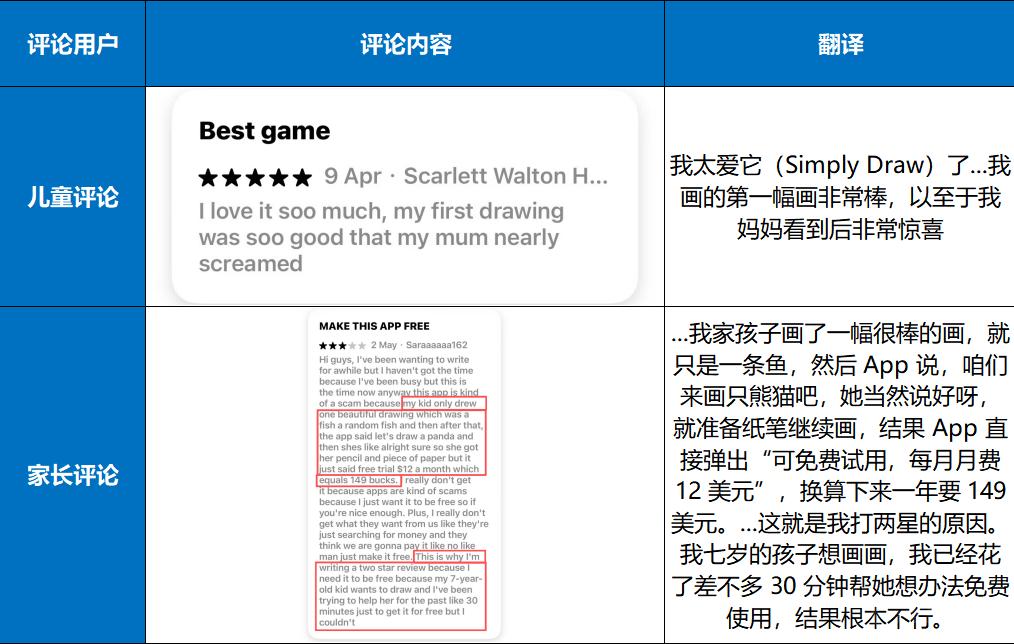
In the comment section, most child users show great love for the app, such as: "...My first painting is so great...". However, parents' comments mainly accuse "Simply Draw" of charging fees or having high prices. After arousing the children's interest, it doesn't allow children to use it for free. It can be concluded that "Simply Draw" has won the recognition of both children and parents, and only a payment decision is needed | Comments from the App Store
Children have invested time and gained a sense of achievement, and parents have seen the results. When they encounter the paywall at this time, even though the price is much higher than that of similar painting apps, because of its course positioning and the verifiable results, many parents will choose to open their wallets.
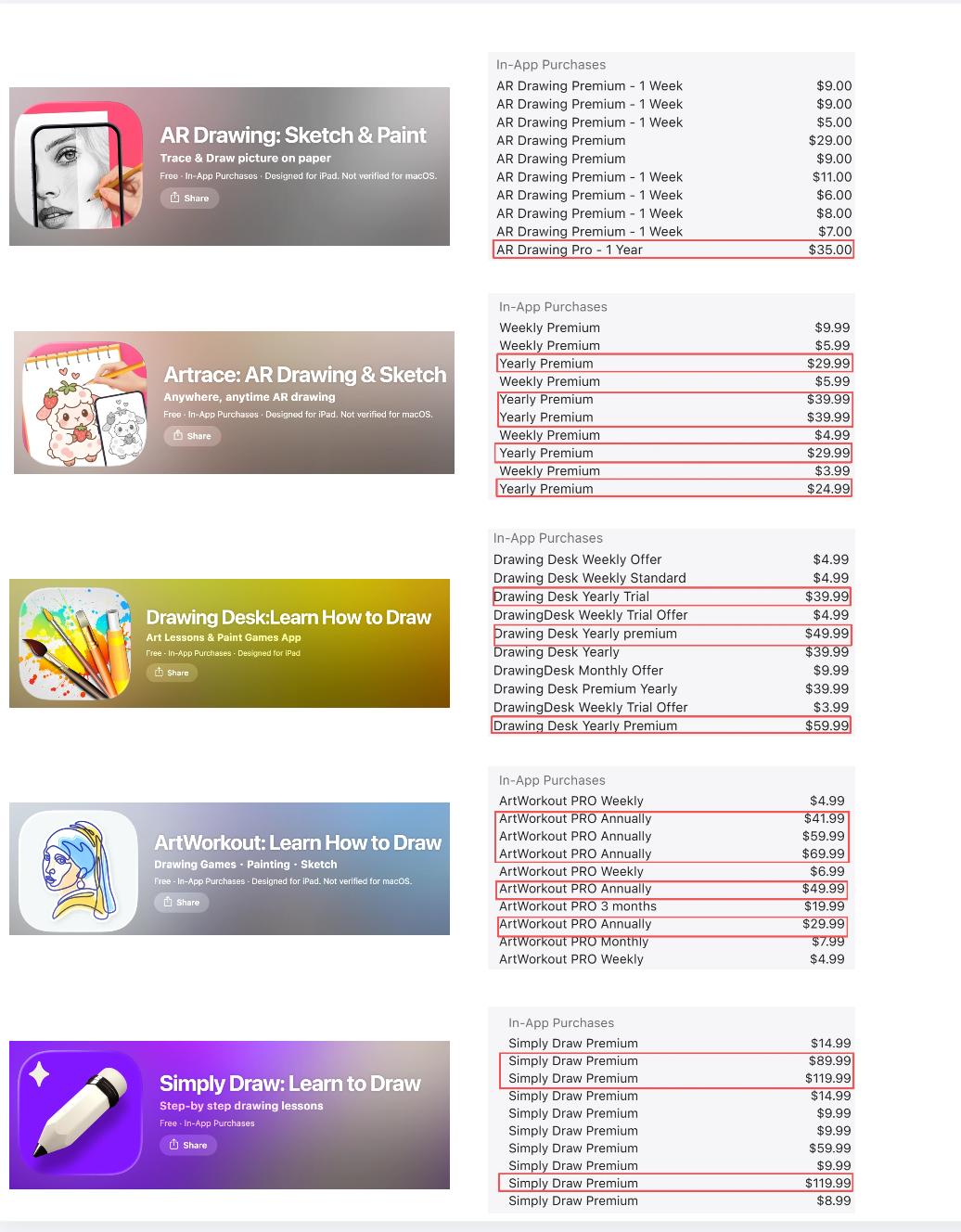
Comparison of the annual fees of high - revenue painting learning apps in the US App Store. It can be seen that the annual fees of such apps are mostly between $29 and $59. The annual fee of "Simply Draw" is $89 | Image source: App Store
In addition, "Simply Draw" also provides registration for 5 account levels. Family members can customize their own learning plans, which further alleviates the concerns of families with multiple children and improves the cost - effectiveness of payment.
Conclusion
Looking back at the revenue curve of "Simply Draw", it overlaps with paid advertising and the holiday traffic support/editorial endorsement from the Apple App Store. By putting a strong emotional aha moment in the subscription process, it achieves high revenue.
The misleading free - use information in the advertising, combined with the contrast of forced payment when users are at the emotional peak, poses a short - term problem.
