Transforming completely, the new Siri turns iPhone into a Doubao smartphone
Is Siri finally going to become an AI assistant?
The situation is as follows. At Apple's 2026 WWDC, a series of updates to Siri were announced, all centered around AI capabilities, including context awareness, screen perception, and cross - app task execution.
In addition, Apple unveiled more features of Apple Intelligence, including photo editing, passwords, text messages, Safari, and so on.
It can be said that now, as long as it is an Apple native app, there must be more or less some connection with Apple Intelligence behind it.
Moreover, this WWDC is also the last developer conference for Cook as CEO.
Surprisingly, John Ternus, the next - in - line Apple CEO, did not give a speech on stage.
Well, next, let's take a look at what updates Apple brought at this WWDC.
01
Siri
Siri was the star of the entire WWDC 2026.
Craig Federighi, the senior vice - president of software engineering, referred to Siri AI as an "entirely new version," a brand - new version powered by Apple Intelligence.
Apple's official press release describes it like this: The current Siri is a more capable and conversational assistant, with the ability to understand personal context, possess extensive world knowledge, and perceive the screen.
In plain language, the previous Siri was like a voice remote control that could only execute commands. This time, Apple wants to turn it into a system - level agent that truly understands you.
The specific updates are divided into three levels.
The first level is personal context.
Siri AI can now extract information from your emails, text messages, photos, notes, and calendars.
If you ask it "What's the name of the restaurant my friend recommended last week?", it will search your Messages history, find that conversation, and tell you the restaurant's name. If you ask it "What's my hotel confirmation number?", it will look for the reservation confirmation email in Mail and extract the number. If you ask it "Photos taken during last month's vacation", it will understand the time range and photo content and directly bring up the photo album.
Siri's search is not just upgraded. It can also connect these isolated data to form a complete memory.
The second level is screen perception.
Siri AI can see what you're currently looking at, understand the information on the screen, and take actions based on that information.
If you receive a text in Messages saying "There's a dinner on Saturday. Can you bring a dish?", you can directly tell Siri "Help me think of a dish to bring and add the recipe to Notes".
Siri will understand the context of the text, give you suggestions, and then actually create a new note in Notes.
If you see an address in Safari, you can say "Add this address to the contact card", and Siri will recognize the text on the screen, find the corresponding contact, and complete the update.
The third level is execution ability.
Siri AI can now execute tasks across apps.
You can tell it "Brighten this photo a bit and then send it to Pedro". It will open the photo - editing tool, adjust the exposure, save the photo, then open Messages, find Pedro's conversation, and send the photo. You don't need to manually switch apps or click any buttons during the whole process.
You can tell it "Remind me to call Vicki at 3 pm tomorrow", and it will create a reminder, set the time, and associate the contact. Based on this, you can tell it "Add this event to the calendar", and it will start parsing the event information, create a schedule, and fill in the location and time.
The combination of these three levels of capabilities turns Siri from a tool that can only answer single - time questions into an AI Agent.
The most vivid scenario is the Siri mode in the iPhone camera.
Apple moved Visual Intelligence from last year's Camera Control button to the camera app, making it an independent mode, alongside photo, video, portrait, and panorama modes.
When you switch to Siri mode and point the camera at the food in front of you, you can directly ask "How many calories are in this dish?"
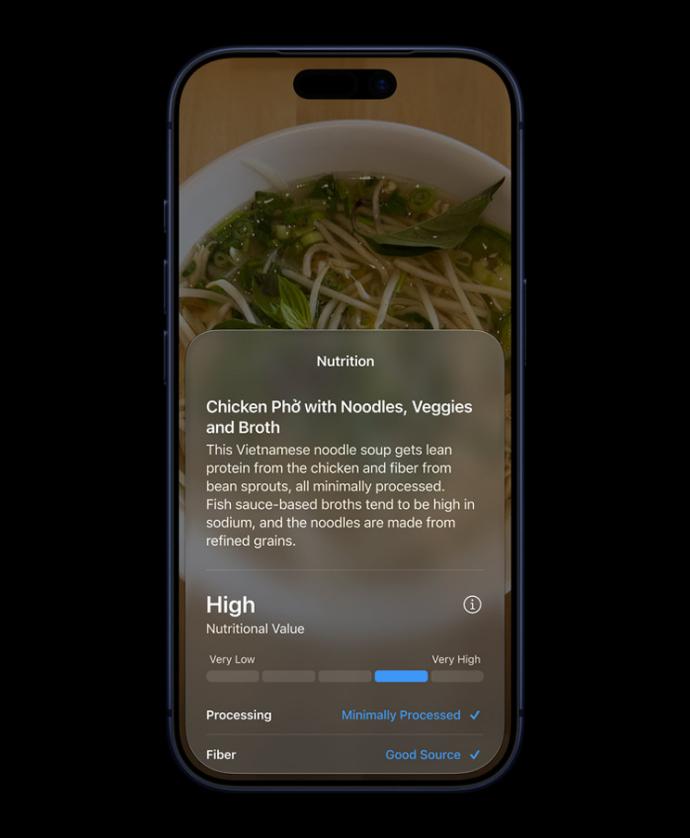
Siri will recognize the food, query the nutritional information, and give you detailed ingredient and calorie data.
If you point at a plant and ask "What kind of flower is this?", it will tell you the variety, care methods, and flowering period. If you point at a poster and ask "When does this event start?", it will recognize the text, extract the date, and even add it to the calendar for you.
Moreover, on Mac and iPad, there are more entry points for Siri. You can evoke it directly from Spotlight, select "Ask Siri" in the right - click menu, or enter questions in any text box.
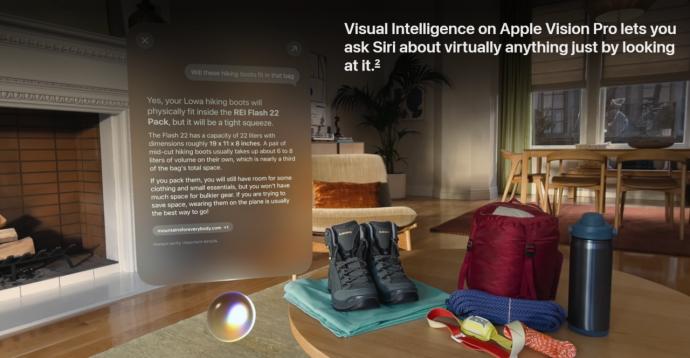
In the Vision Pro, Siri can even appear as a 3D virtual object in space. When you talk to it while looking at it, it will understand your line of sight focus, know which object you're looking at, and then provide relevant information.
Moreover, Apple has launched an independent Siri app.
This app can save and synchronize your conversation history. You can look through the questions you've asked before, continue previous topics, and let Siri remember what you've talked about.
As early as 2011, Siri made its debut with the iPhone 4S, and its demonstration was very impressive.
You could ask about the weather, set alarms, and send text messages. Voice interaction was a sci - fi - level experience at that time.
But soon, users found that Siri could understand commands but couldn't understand the context. If you asked it "What are some good restaurants nearby?", it could give you a list of restaurants. But if you then asked "Which one has the highest rating?", it wouldn't know you were referring to the previous list. You had to repeat the full question.
In 2016, Apple announced at WWDC that it would open SiriKit to third - party developers, allowing them to integrate their apps with Siri.
However, the results were underwhelming. The capabilities of SiriKit were strictly limited to a few categories, such as messaging, payment, ride - hailing, fitness, and photo search. Developers had little to do.
More importantly, Siri's own understanding ability didn't change fundamentally. Third - party integration only gave it a few more app names to call. In essence, it was still a voice assistant that couldn't truly understand your intentions.
At the 2024 WWDC, Apple promised to rebuild Siri with Apple Intelligence, enabling it to understand personal context, perceive the screen, and perform cross - app actions.
However, this promise was postponed in 2025. Throughout the whole year, Siri itself hardly changed. Therefore, people in the industry kept questioning, saying "Is Apple falling behind in the AI era?"
In the past 15 years, Siri has experienced many "this time it's really different" moments, but every time users got their hands on it, they found it was still a voice assistant that couldn't understand complex questions.
So, this WWDC in 2026 actually puts a lot of pressure on Apple. They need to prove that they can not only develop AI but also integrate it into Siri, a product that has been around for 15 years, and truly turn it into a useful intelligent assistant.
02
Apple Intelligence
The key reason why Siri can have such a significant upgrade lies in Apple Intelligence.
As early as the 2024 WWDC, Apple Intelligence made its debut.
Apple told developers and users that it had its own AI framework, which could be used for writing tools, generate images, and summarize emails. But at that time, Apple Intelligence mainly existed as an independent function. You needed to actively call it, click the button, or open the menu.
We've waited until now.
Craig repeatedly emphasized a term on stage: deeply integrated.
He said that Apple Intelligence is no longer a separate chat box. Instead, it's integrated into daily scenarios such as photos, Safari, passwords, text messages, calls, calendars, and home. Users don't need to "turn on AI"; AI will automatically appear in what you're doing.
A common problem with AI products in the past two years is that users need to change their usage habits to adapt to AI.
You have to remember to open a specific app, enter the question you want to ask, and then copy the answer it gives you.
However, Apple wants to do the opposite, making AI adapt to users' existing usage habits and let it naturally appear in the apps you already use.
The photo app is one of the focuses of this update.
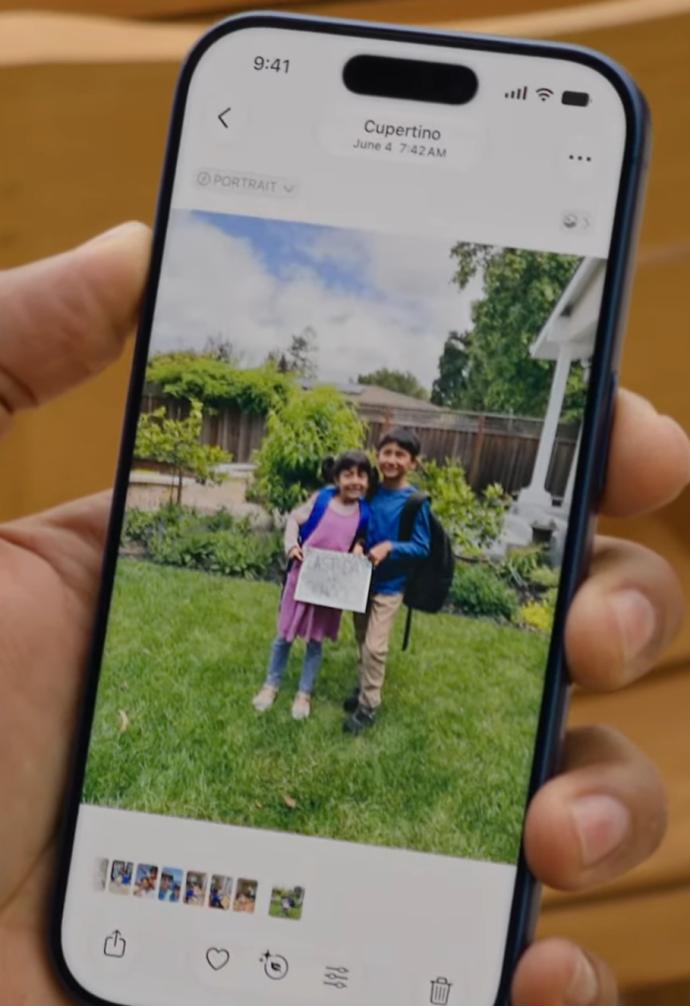
Apple has launched the Spatial Reframing function, which can use AI and 3D modeling technology to generate new perspectives from existing photos.
During the demonstration, Apple's engineer showed a group photo with a somewhat tight composition. After using Spatial Reframing, the perspective of the photo changed, as if you took a step back and took another photo, making the composition more comfortable. The engineer said "It's like I was able to go back in time and adjust my camera in the moment", just like going back in time to adjust the camera position.
Original photo
Reframing

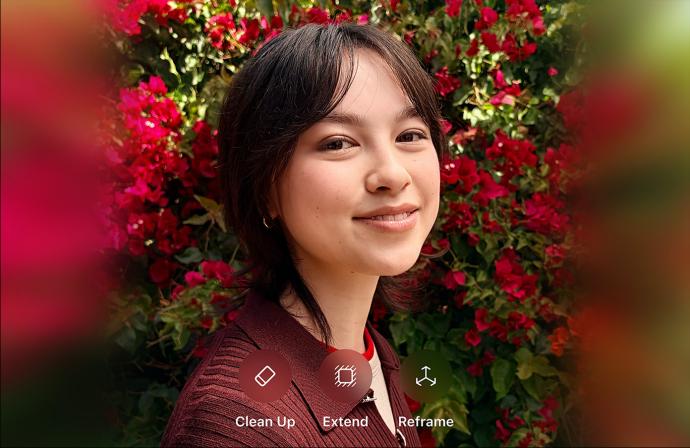
The Extend function can extend the photo border, adjust the ratio, and straighten the horizon. If you take a seaside photo with a crooked horizon and part of the sky cropped out, Extend can complete the sky, straighten the horizon, making the photo look like it was taken with a better composition.
The Clean Up function has been upgraded and can now handle more complex scenarios. If you take a portrait photo with passers - by, trash cans, and utility poles in the background, Clean Up can remove these distractions naturally, without leaving obvious traces of AI photo - editing.
Image Playground now supports generating photo - realistic images. In the past, Image Playground could only generate illustrations or animations. This time, Apple added a photorealistic style, which can generate images that look like real photos. You can use it to generate lock - screen wallpapers, contact avatars, and even modify existing photos.
Moreover, Apple also stated at WWDC that all photos edited with AI will have a hidden SynthID watermark.
This is a technology developed in cooperation with Google, which can embed an invisible mark at the pixel level without affecting the image quality, proving that the photo has been processed by AI. This is Apple's response to the "AI photo authenticity problem".
In an era when AI can generate realistic photos, Apple chooses to mark each AI - edited photo so that users and platforms can identify which photos are original and which have been modified by AI.
In addition to photo functions, the updates of Apple Intelligence are also reflected in Safari.
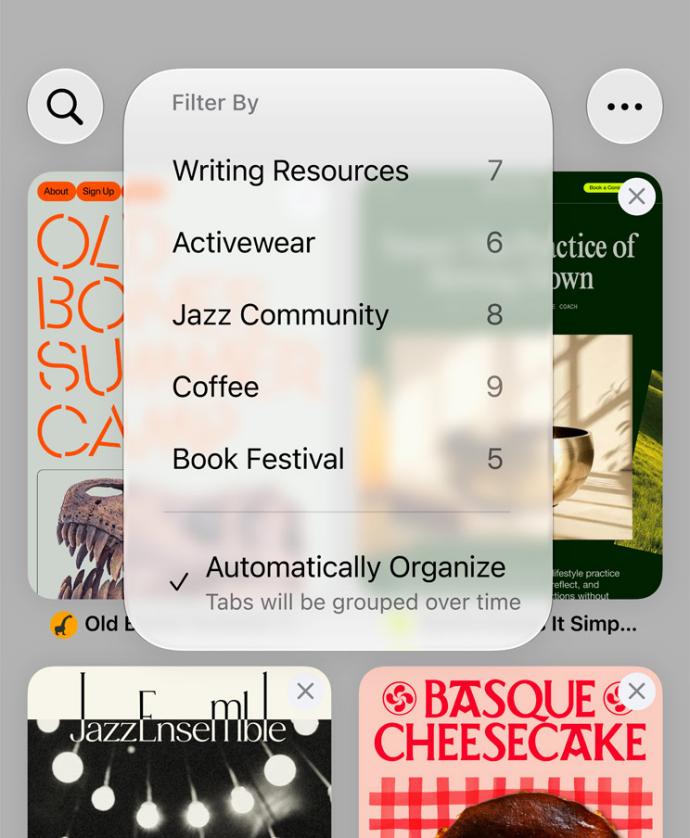
Safari can now automatically organize tabs.
You open dozens of web pages, including shopping, information - searching, and work - related ones, all piled up in the tab bar.
Safari's AI can recognize the content of these web pages, automatically group them by category, group shopping websites together, work documents together, and news articles together. You can also use natural language to describe how you want to categorize, such as "Group all web pages about coffee together", and Safari will understand your intention and complete the categorization.
The Notify Me function can monitor web page changes. You're waiting for a product to restock, a price to drop to your target, or a website's terms to be updated.
You can let Safari monitor this web page, and when the content changes, Safari will send you a notification.
Although this function may seem a bit "rudimentary", it solves a real user need. Especially when you're buying tickets or grabbing seats, you don't need to refresh the web page repeatedly or set up third - party monitoring tools. Safari will keep an eye on it for you.
You can even use natural language to describe the Safari extension you want, and the AI will help you generate it.
However, this function is still in its early stage.
The Passwords app has also been upgraded thanks to Apple Intelligence.
Passwords can now not only tell you which passwords are too weak or have been compromised but also automatically fix them for you.
When you click "Fix", Passwords will call Safari, automatically access the website, log in to your account, find the password - change page, generate a strong password, complete the change, and then save the new password.
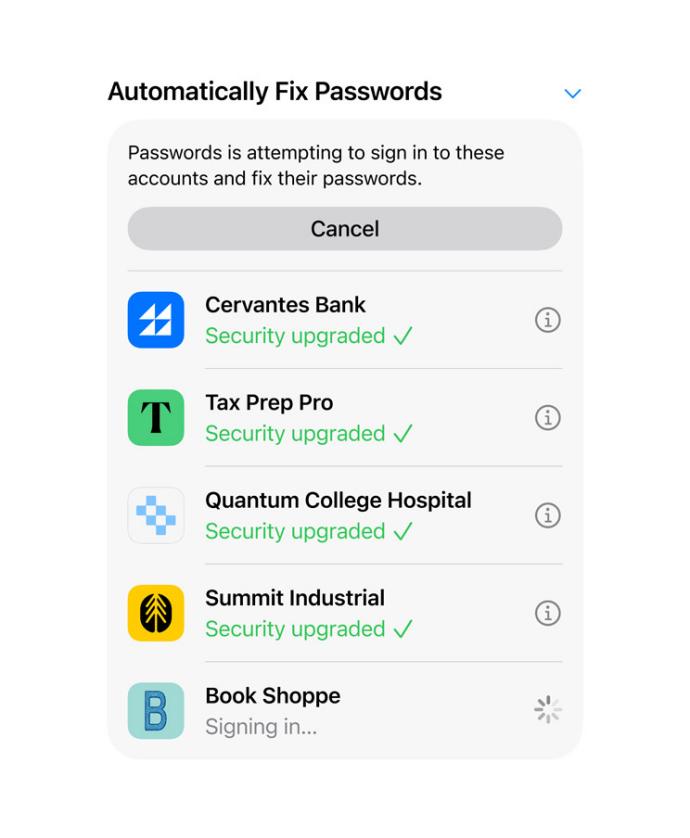
You don't need to operate manually during the whole process. Passwords will "agentically take action on your behalf".
Messages can now give one - click suggestions based on the conversation content. If you receive a text saying "Don't forget the meeting at 2 pm tomorrow", Messages will show a button "Add to Reminders" below. When you click it, the reminder will be created, with the time and content automatically filled in. If you receive a text saying "This is my new home address", Messages will suggest "Add to Notes" or "Update Contact".
The Smart Reply function in Mail and Messages can now learn your personal writing style. In the past, smart replies were all general templates, like "Okay", "Received", "Thank you".
The new Smart Reply will analyze how you usually write emails and reply to messages, and then generate reply suggestions that match your tone. If you usually write formal emails, it will give you formal suggestions. If you usually use a lot of emojis, it will also add emojis to the suggestions