Is a million Tokens wasted in vain? Claude's official response: 5 ways to fix context decay
Did Anthropic burst the million-context myth?
https://claude.com/blog/using-claude-code-session-management-and-1m-context
Recently, in a blog post by Anthropic about "how to manage a million-context", the issue of "context rot" was mentioned again. Simply put:
The longer the context, the dumber the model.
Anthropic explains that the context window refers to all the content that the model can "see" when generating the next response. It includes your system prompts, the conversation content so far, each tool call and its output, and all the files that have been read.
Currently, the context window of Claude Code is one million tokens.
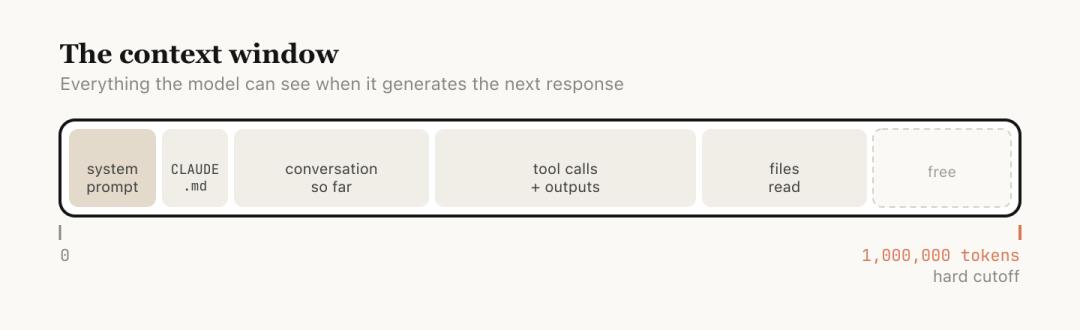
However, a longer context is not always better. The model's attention is spread across more tokens, and earlier, irrelevant content will start to interfere with the current task, leading to a decline in performance. This is "context rot".
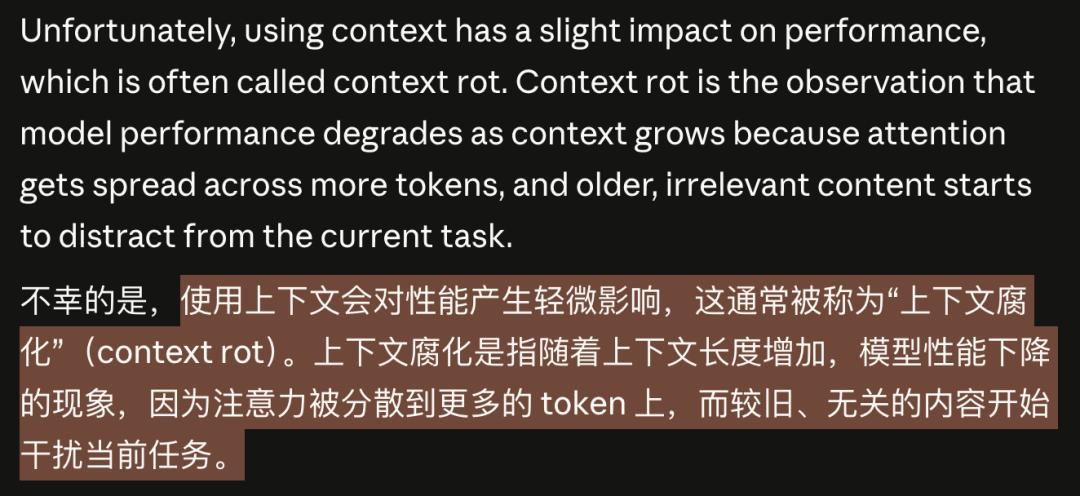
This is not a concept created by the community but comes from Anthropic's official blog.
As early as February this year, when Sonnet 4.6 was released, the announcement stated that Sonnet 4.6 provided a beta version of a million-token context window.
But a million tokens does not equal a million effective tokens.
Every message you send in the conversation, every file read, and every tool call dilutes the model's attention.
The early, irrelevant content will not disappear automatically. They will continue to interfere with the current task like noise.
After raising the issue, Anthropic provided a complete set of management methods in this blog post.
First, it tells you that "your conversation is rotting", and then it teaches you how to fix it step by step.
The longer the context, the dumber the AI
Let's first break down the mechanism of "context rot".
One million tokens sounds like a lot.
A medium-sized codebase, including documentation and source code, may only have a few hundred thousand tokens. Theoretically, you can put the entire project in and ask any questions.
However, the model's attention is a limited resource.
The configuration file you read two hours ago, the log of a failed debugging session an hour ago, and a dead end you explored half an hour ago are all still in the window, competing for the model's attention.
This is the mechanism of context rot: the model is forced to "remember" too many irrelevant things at the same time and cannot concentrate on the current task.
Maybe you think this is the same as humans losing focus during a long meeting.
Indeed.
Information overload leads to diluted attention. This has nothing to do with ability but is a bandwidth issue.
What's even more troublesome is that when the context is about to reach the one-million-token limit, the system will automatically trigger "compaction":
That is, summarize the entire conversation into a shorter abstract and then continue working in a new window.
This sounds smart, but the moment when automatic compaction occurs is precisely when the context is the longest and the model's performance is the worst.
Doing the most critical summary in the dumbest state is hardly reliable.
Each round of conversation is a fork in the road
Anthropic defined each conversation interaction as a decision node in the blog post.
After each round of interaction, you are actually at a fork in the road. There is not only one way to "continue chatting".
Option 1: Continue. Send another message in the same session and continue chatting directly. The context is still relevant, so there is no need to make a fuss. This is the most natural choice and is usually sufficient.
Option 2: /rewind. Press the Esc key twice to jump back to a previous message and start over from there.
The official blog has a very accurate judgment: It's better to rewind than to correct.
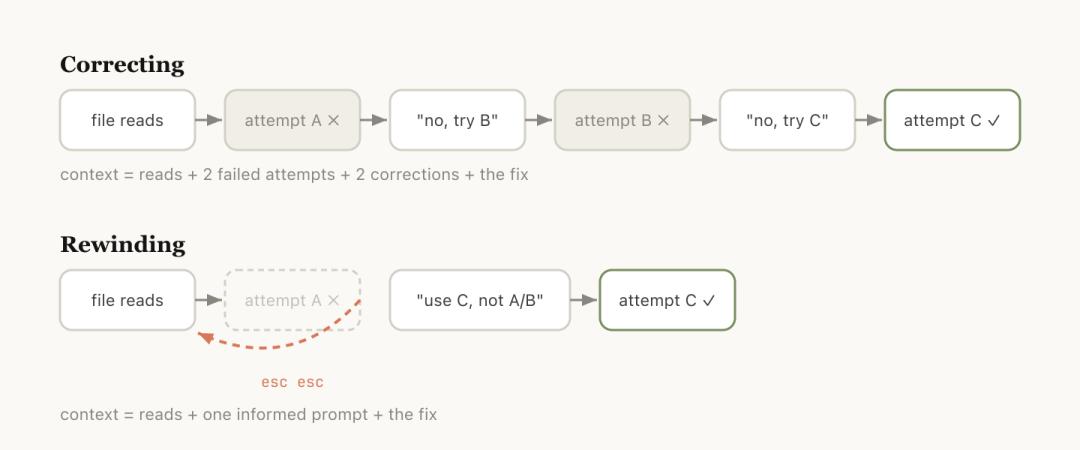
Rewinding is usually a better way to correct mistakes.
For example, if Claude reads five files and tries a method without success, your instinct might be to say, "This doesn't work. Try another method."
However, the problem with this approach is that all the intermediate processes of the failed attempt remain in the context, continuing to contaminate subsequent judgments.
A smarter approach is to rewind to the node after reading the files and send a more precise instruction with new information: Don't use Plan A. The foo module doesn't expose that interface. Go directly to Plan B.
The useful file reads are retained, and the failed attempts are discarded. The context is clean.
You can also ask Claude to summarize what it has learned and create a handover message. This is a bit like future Claude leaving a letter for past Claude: I've tried this way, and it doesn't work.
Option 3: /clear. Start a new session with a brief description of what you've done before, what you're going to do now, and which files are relevant.
The advantage is zero rot, and you have full control over the context. The disadvantage is that it's time-consuming, and you have to write all the background information yourself.
Option 4: /compact. Ask the model to summarize the current conversation and replace the original history with the summary.
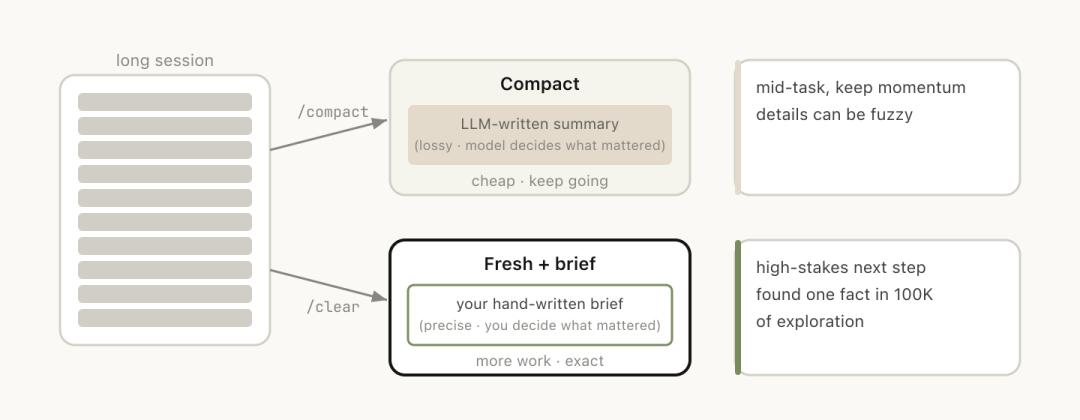
It's convenient but has some losses.
You can attach a guiding instruction: /compact focus on the auth refactor, drop the test debugging (Focus on the authentication refactoring and delete the test debugging).
Let it know what to keep and what to discard instead of guessing.
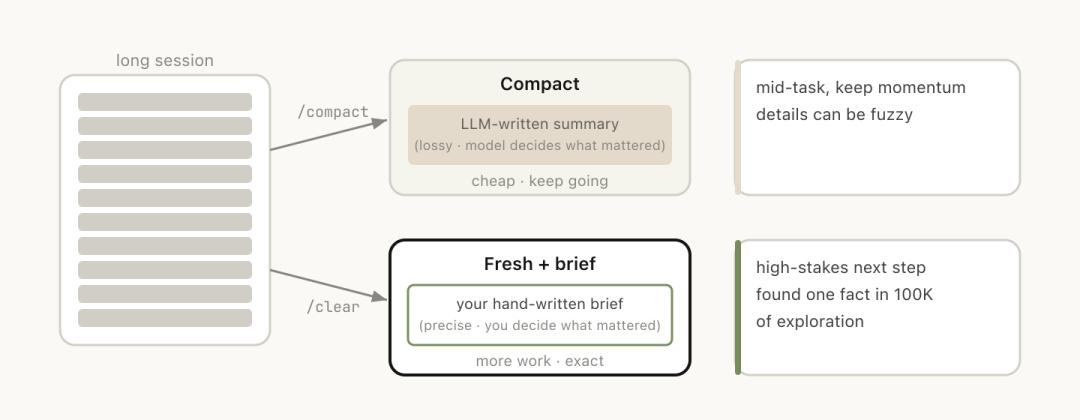
/clear and /compact seem similar but behave very differently:
/compact lets the model decide what's important. You save effort but may lose key information, while /clear requires you to write down the key content yourself. It's time-consuming but precise.
Option 5, Subagents.
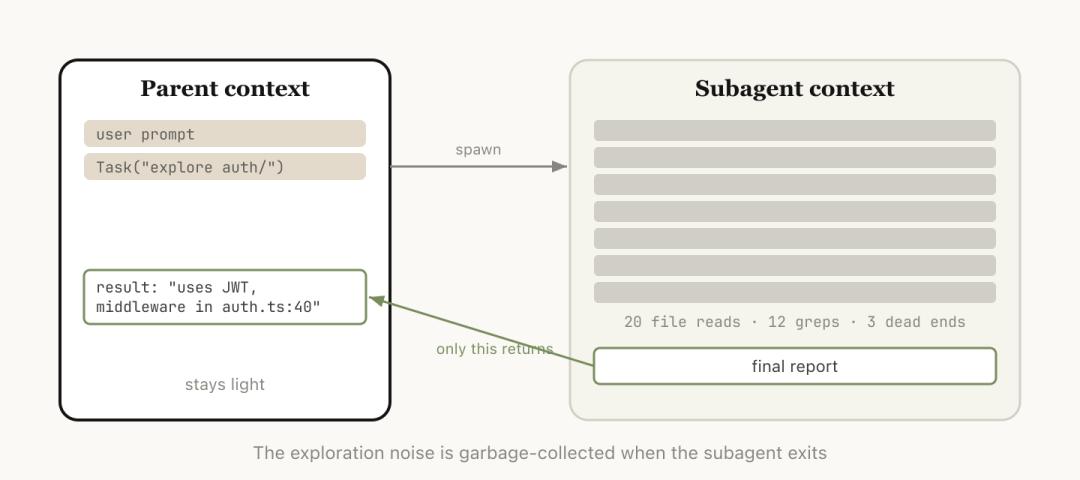
Assign a piece of work to a sub - agent with an independent context and only bring back the conclusion after the work is done.
When you know that the next task will generate a large amount of intermediate output but you only need the final conclusion, subagent is the cleanest solution.
It gets a brand - new, independent context window, completes all the dirty work in it, leaves all the intermediate processes in the sub - window, and only brings back a conclusion to the main session.
Subagents: Your one - time investigators
Among these five actions, subagents are the most easily misunderstood.
Many people associate "sub - agents" with "multi - agent collaboration" as soon as they hear the term: team division of labor, parallel processing, and AI employees having meetings to discuss.
However, the core value of subagents in Anthropic's blog post is only one: context isolation.
The official documentation clearly states that each subagent runs in its own context window.
It can read a large number of files, conduct a large number of searches, and complete the entire investigation process. But in the end, only the summary and a small amount of metadata will be passed back to the main session.
All those massive intermediate processes are left in the one - time context of the subagent. Your main session will not be polluted by this noise.
Anthropic's internal judgment criterion is also very simple:
Do I still need the tool outputs themselves later, or do I only need the final conclusion?
If the answer is the latter, assign it to the subagent.
The blog post gives three typical scenarios:
Ask the subagent to verify the work results based on the specification file; ask the subagent to read another codebase, summarize its authentication process, and then you implement it yourself; ask the subagent to write documentation based on your git changes.
These three scenarios have one thing in common: The process is heavy, but the conclusion is light.
So, in essence, the subagent is not your colleague working with you but more like your "one - time investigator".
Its workbook can be discarded after the task is completed, and you only need to take the last page of the report.
Although Claude Code will automatically call Subagents, you can also give it more specific execution instructions, such as:
Start a Subagent to verify the results of this work based on the following specification file;
Derive a Subagent to read another codebase and summarize the implementation method of its authentication process, and then you implement it in the same way;
Derive a Subagent to write documentation for this feature based on my Git changes.
Beware of the moment when automatic compaction fails
Anthropic admitted in the blog post a pitfall that many developers have already encountered: automatic compaction failure.
When does it fail? When the model cannot predict what you are going to do next.
The blog gave an example:
You had a long debugging session, and automatic compaction was triggered. The model summarized the entire troubleshooting process. Then you suddenly said, "Now fix the warning in bar.ts."
But since the entire session was mainly about debugging, that warning was just a passing glance and was discarded during compaction.
What makes this tricky? The moment when automatic compaction is triggered is precisely when the context is the longest and the model's performance is the most compromised.
You let a model that has "lost focus" decide what information is important and what can be discarded.
Fortunately, the one - million - token window provides a buffer.
You don't have to wait for it to be triggered automatically. You can take the initiative to /compact in advance and attach a note about what you are going to do next and which information must be retained.
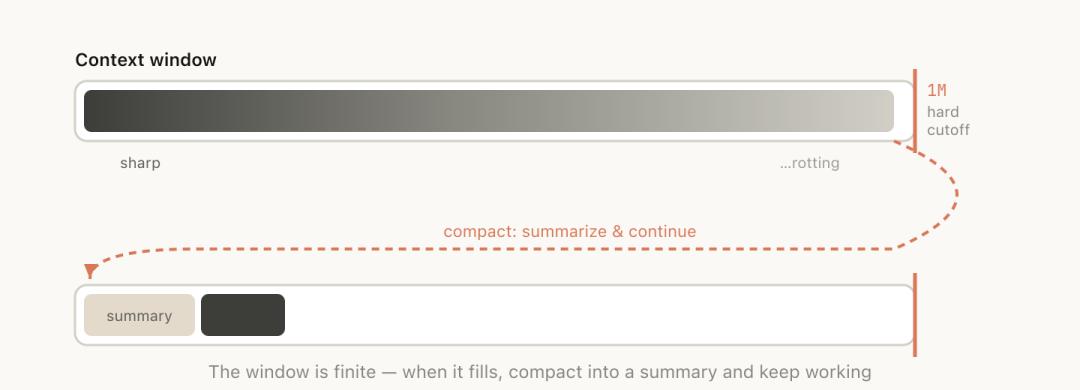
Do the compaction when you are the most clear - headed instead of waiting to be passive when you are the most confused.
After all, automatic compaction is not unusable, but you can't blindly trust it.
Five paths, a first - aid kit
Although the most natural thing to do is to continue, the other four options can help you manage the context.
These five paths together essentially form a first - aid kit for preventing and treating "context rot".
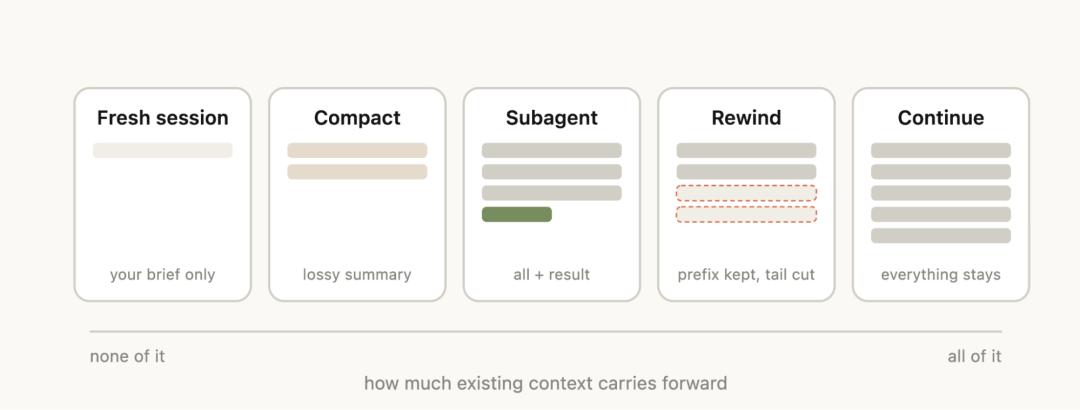
Anthropic's official schematic diagram: Five context management actions. From left to right, more and more old context is retained.
The official blog put a decision - making table at the end of the post, matching tools to scenarios:
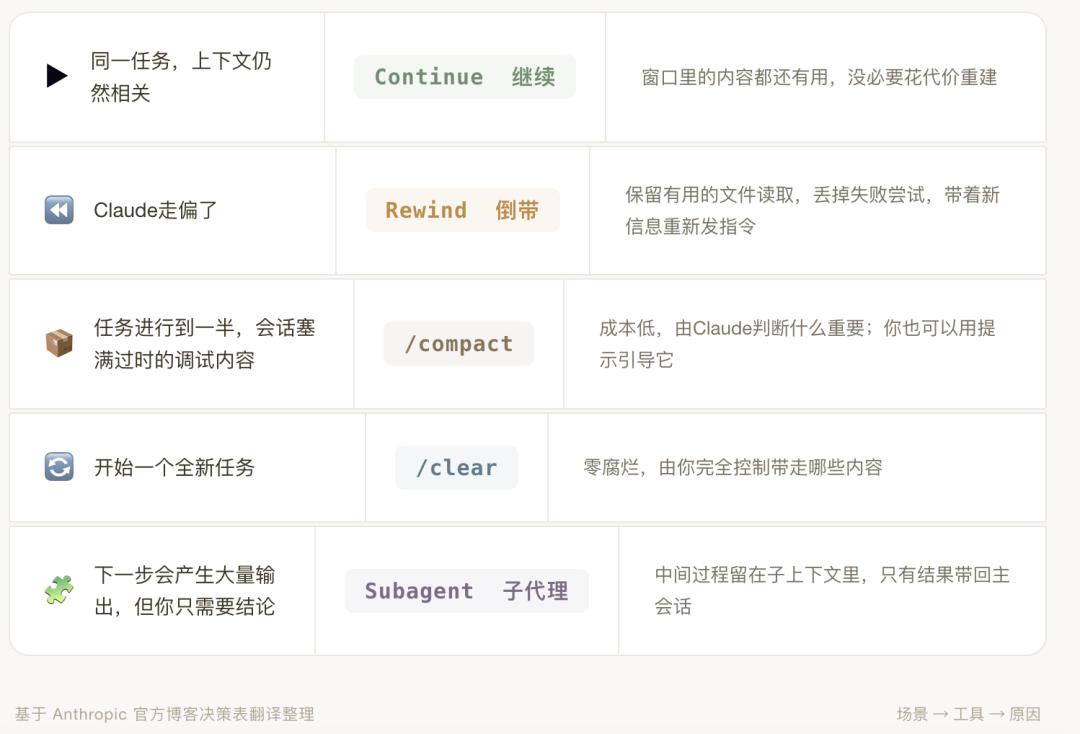
Every time you press Enter, it's a context decision.
For five scenarios and five tools, choosing the right one keeps the context clean, while choosing the wrong one makes the model dumb.
Therefore, after each round of interaction, you should take a second to think: Is my context still clean? Which path should I take next?
On the other side of a million - context is a million - token bill
In addition to managing the quality of the context, Anthropic also did another thing this time:
Let developers see their consumption.
At the beginning of the blog post, it was said that the launch of the new command /usage "came from multiple exchanges with our customers".
What does /usage do?
According to the official command documentation of Claude Code, its function is to "display the package usage limit and rate - limit status".
Note that this is not a context management tool.
It doesn't compact, rewind, or clean. It only does one thing: let you see how much you've