It only takes 16 hours and costs less than 7 yuan to transform a Mac into a "touch screen". Without using AI or modifying the hardware, they solve everything with a mirror.
In the Windows PC camp, touchscreens are nothing new, but Apple has always insisted on "not doing it." Even though iPad and iPhone have taken the touch experience to the extreme, MacBook still remains in the interaction paradigm of "keyboard + trackpad."
In 2010, Steve Jobs pointed out at the MacBook Pro launch event that installing a touchscreen on a laptop was "ergonomically incorrect" and "absolutely unworkable." In 2012, Tim Cook, who had just succeeded as Apple's CEO, also mocked Microsoft's Surface, saying it was like "combining a toaster and a refrigerator."
However, a developer named Anish Athalye and several of his partners did something quite "outrageous":
They didn't modify the system or the hardware structure. With just $1 (about 6.9 RMB) in cost and a small mirror, they turned a MacBook into a "touchscreen computer." Moreover, they only spent 16 hours creating a usable prototype.
Anish Athalye named this project: Project Sistine. This name wasn't chosen randomly. "Sistine" comes from the famous Sistine Chapel ceiling fresco - in Michelangelo's classic "The Creation of Adam," there is a scene where God's and Adam's fingers are almost touching.
The core of this project also revolves around the judgment of "whether the finger touches."
An observation by a junior high school student planted the seed for this project
The inspiration for this project didn't come out of thin air.
As early as when team member Kevin was in junior high school, he noticed a very common but easily overlooked phenomenon: When you look at the screen from an oblique angle, the surface will present a mirror-like reflective effect. When your finger approaches the screen, you can see both the finger itself and its "reflection" on the screen.
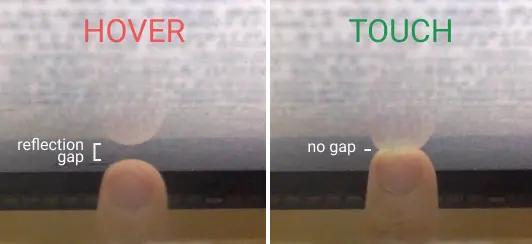
Then a key question emerged: If we can determine "whether the finger touches its reflection," can we know whether it touches the screen?
Back then, based on this idea, Kevin worked on a project called ShinyTouch - implementing an almost configuration - free touch system through an external camera. This time, the Anish Athalye team wanted to take it a step further:
Compress the entire solution into the MacBook itself without relying on any external devices.
$1 hardware: A mirror solves everything
Basically, their design scheme can be summarized in one sentence: Make the built - in camera of the MacBook "see" the screen.
However, the problem is that the laptop camera is defaulted to face the user, not the screen. So, they used an extremely simple but ingenious method: Add a small mirror in front of the camera to "refract" the camera's view to the screen. In this way, the camera can "look down" at the screen and capture both the finger and its reflection without any additional cameras.
The entire hardware structure is incredibly simple: a small mirror, cardboard, door hinges, and hot - melt glue. The cost is almost negligible.
After several rounds of adjustments, they created a small device that can be assembled in a few minutes: A micro - reflective structure "hanging" on the camera - this is the entire hardware basis of the system.
Without AI, only using classic CV: Recognize "finger + reflection"
Compared with the simplicity of the hardware, the real core of this project lies in the software. They didn't use deep - learning models but completely based on traditional computer vision (CV) to build a clear processing flow.
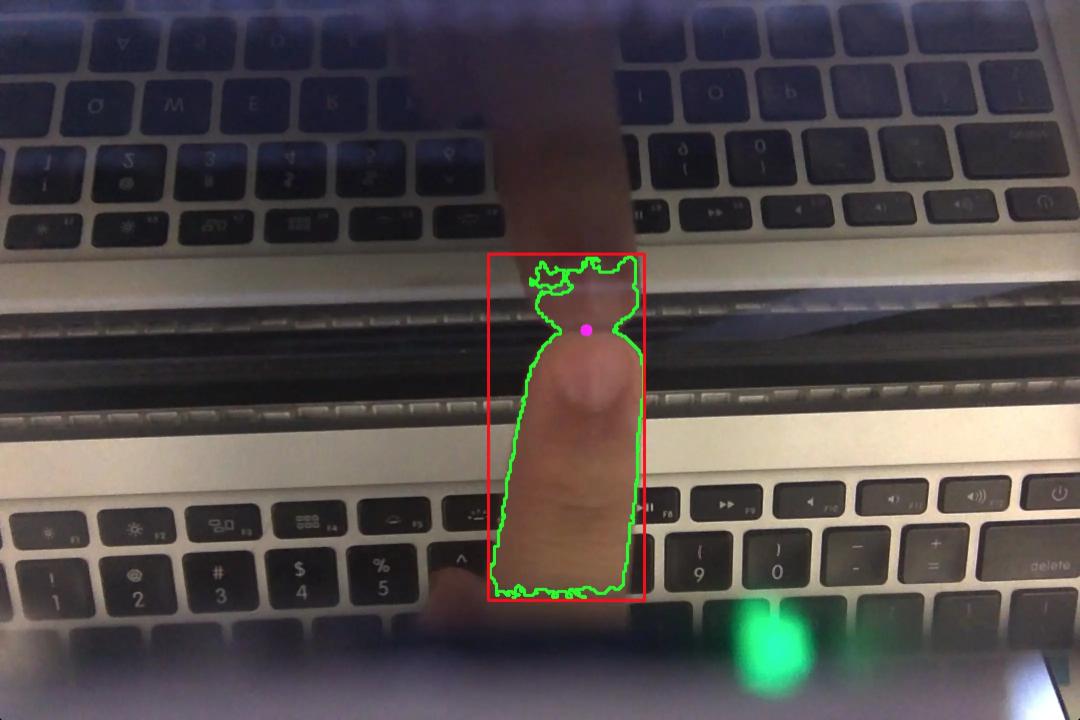
First, the system processes the camera image. Through skin - color filtering and binarization, it extracts the areas that might be fingers. Then it looks for contours in the image and filters out two important pieces of information: one is the finger itself, and the other is its reflection on the screen.
Next, the system makes a very crucial judgment: Whether these two contours overlap horizontally and are "small at the top and large at the bottom" - the one above is the finger, and the one below is the finger's reflection.
Once these two contours are found, the contact point position can be calculated: Take the mid - point of the line between the "bottom of the finger" and the "top of the reflection" as the touch point. Theoretically, according to the vertical distance between the two contours, two states can be distinguished:
● If the distance is small → the finger has touched the screen
● If the distance is large → the finger is just hovering
The processed effect is as follows: Green: finger + reflection contour; Red: bounding box; Purple: touch point.
Coordinate mapping: From the camera to the screen
After identifying the contact point, there is one last key question: How does this point correspond to the screen coordinates?
After all, the camera sees an oblique view, which is completely different from the screen's coordinate system. To solve this problem, they introduced a classic computer - vision method - Homography. Simply put, it is a projection transformation matrix that can map points in the camera's view to the screen's coordinate system.
To calculate this transformation matrix, Anish Athalye and his team designed an interactive calibration process:
(1) A moving green dot will appear on the screen, and the user needs to click on it with a finger;
(2) The system will record the contact - point position detected by the camera and the real position on the screen.
After collecting enough data, use the RANSAC algorithm for robust estimation to obtain a stable mapping relationship. After calibration is completed - Any contact point in the camera can be accurately mapped to the screen coordinates.
The above video shows the calibration process: The user needs to move their finger following the green dot on the screen. The picture overlays the camera's real - time video and debugging information. The touch points in the camera's coordinate system are shown in red. After calibration is completed, the projection matrix will be visualized with a red line, and the software will then switch to the formal mode, with the estimated touch points shown as blue dots.
In addition, in the current prototype, the Anish Athalye team directly converts "touch/hover" into mouse events - that is, All existing software doesn't need to be adapted and can immediately become a "touch - enabled application." Anish Athalye also added that if further developing dedicated touch - enabled applications, more data can be utilized, such as hovering height, gesture trajectories, and multi - point interactions.
(Project prototype result display)
A toy or a direction?
Strictly speaking, currently, Project Sistine is just a proof - of - concept (PoC).
According to Anish Athalye, it still has many limitations:
● The camera resolution is low (only 480p);
● The visible range is limited and cannot cover the entire screen;
● It may also have a certain dependence on light and skin color.
But at least, it has proven a feasible solution: With just $1 in hardware, a laptop can be turned into a touchscreen - As a prototype, its performance is quite good. If the camera resolution can be improved or a curved mirror can be used to expand the field of view, Project Sistine could potentially become a practical low - cost touchscreen retrofit solution.
However, if you want a better touchscreen experience on a Mac, you might want to wait: According to well - known analyst Ming - Chi Kuo, Bloomberg, and other media reports, Apple is likely to break the 16 - year - old concept of "laptops don't need touch" that has persisted since the Steve Jobs era this year - There are reports that Apple will launch its first MacBook Pro model with a touchscreen by the end of 2026.
Finally, Project Sistine is open - source and released under the MIT license. Interested developers can visit: https://github.com/bijection/sistine.
Reference link: https://anishathalye.com/macbook - touchscreen/
This article is from the WeChat official account "CSDN." Compiled by Zheng Liyuan. 36Kr is authorized to publish it.