After disassembling 2,500 cases on GitHub: We've summarized the "Six Commandments" for writing AI Agent specifications.
God Translation Bureau is a compilation team under 36Kr, focusing on technology, business, workplace, life and other fields, and mainly introducing new technologies, new ideas and new trends abroad.
Editor's note: Stop stuffing long documents into the Agent! Mastering this "Digital Intern" management framework is the key to transforming AI from a toy into a productive force.
The goal is to write a clear specification that covers just the right amount of details (including structure, style, testing, and boundaries) to guide the AI while avoiding information overload. Break down large tasks into smaller ones instead of cramming all the content into one huge prompt. Plan in "read-only mode" first, and then execute and iterate continuously.
"I've heard a lot of advice on how to write good specifications for AI Agents, but I've never found a mature framework. I can also write detailed specifications comparable to RFCs (Requests for Comments), but once the context is too long, the model will start to 'go on strike'."
Many developers have this sense of frustration. Simply throwing a long specification at an AI Agent won't work - the limitations of the context window and the model's "attention budget" will be obstacles. The key lies in writing "smart" specifications: these documents can clearly guide the Agent, stay within the actual context capacity, and evolve synchronously with the project. This guide summarizes my best practices in the process of developing Agents using tools like Claude Code and Gemini CLI, and refines a specification writing framework to keep your AI Agent focused and efficient.
We will introduce five principles for writing excellent AI Agent specifications, with each principle starting with a bolded point.
1. Start with the top-level vision and let the AI work out the details
Launch the project with a concise summary specification and leave the details to the AI.
Rather than over-designing in advance, start with a clear goal statement and a few core requirements. Think of it as a "product brief" and let the Agent generate a more detailed specification based on it. This can leverage the AI's strength in supplementing details while allowing you to control the big picture. Unless you have very specific technical requirements that must be met from the start, this method is very effective.
The principle is that Agents based on large language models (LLMs) are very good at filling in details after receiving clear summary instructions; however, they need a clear task goal to prevent them from going off track. By providing a short outline or goal description and asking the AI to generate a complete specification (such as `spec.md`), you establish a lasting reference standard for the Agent. When collaborating with the Agent, pre-planning is particularly important - you can iterate on the plan first and then let the Agent write the code. This specification becomes the first product jointly built by you and the AI.
Practical method: Start a new programming session and enter the following prompt:
"You are an AI software engineer. Please draft a detailed specification for [Project X], covering goals, functions, constraints, and a step-by-step implementation plan."
The initial prompt should remain at a high level - for example: "Build a web application that allows users to track tasks (to-do lists). The application should have user accounts, a database, and a simple UI."
The Agent may reply with a structured specification draft, including an overview, a list of functions, technology stack suggestions, data models, etc. Subsequently, this specification becomes the "single source of truth" that you and the Agent refer to. GitHub's AI team strongly advocates for spec-driven development, that is, "the specification becomes the shared source of truth... a living, executable product that evolves with the project." Before writing any code, be sure to check and improve the specification generated by the AI to ensure that it aligns with your vision and correct any hallucinations or details that deviate from the goal.
Use the "Plan Mode" to enforce planning first: Tools like Claude Code provide a "Plan Mode" that restricts the Agent to read-only operations - it can analyze your codebase and create a detailed plan, but it won't write any code until you're ready. This is very suitable for the planning stage: start in Plan Mode, describe what you want to build, and let the Agent draft a specification while exploring the existing code. Ask it to ask you questions about the plan to eliminate ambiguity. Have it review the plan in terms of architecture, best practices, security risks, and testing strategies. The goal is to refine the plan until there is no room for misunderstanding. Only then should you exit Plan Mode and let the Agent start execution. This workflow can avoid the common pitfall of "rushing to generate code before the specification is finalized."
Use the specification as context: Once approved, save the specification (for example, as `SPEC.md`) and provide relevant sections to the Agent as needed. Many developers using powerful models do exactly this - the specification file persists across different sessions and provides support for the AI whenever the project resumes. This alleviates the "forgetfulness" problem that may occur due to a long conversation history or restarting the Agent. This is similar to using a product requirement document (PRD) in a team: it is a reference that everyone (human or AI) can consult to stay on the same page. As an engineer observed, experienced people often "write the documentation first, and the model may build a matching implementation based on just these inputs." This specification is that documentation.
Stay goal-oriented: The summary specification of an AI Agent should focus more on "what to do" and "why" rather than getting bogged down in the trivial details of "how to do it" (at least in the early stages). You can think of it as user stories and acceptance criteria: Who are the users? What do they need? What are the success criteria? (For example: "Users can add, edit, and complete tasks; data is persistently saved; the application is responsive and secure.") This allows the detailed specification generated by the AI to be based on user needs and results, rather than just technical to-do lists. As the GitHub Spec Kit documentation states, provide a summary description of what to build and why, and let the programming Agent generate a detailed specification focused on the user experience and success criteria. Starting from the big-picture vision can prevent the Agent from "missing the forest for the trees" when it enters the coding stage later.
2. Build the specification like a professional PRD (or SRS)
Treat your AI specification as a structured document (PRD) with clear sections, rather than a bunch of scattered notes.
Many developers treat Agent specifications in a similar way to traditional product requirement documents (PRDs) or system design documents - comprehensively, well-organized, and easy for a "single-minded" AI to parse. This formal approach provides the Agent with a blueprint to follow and reduces ambiguity.
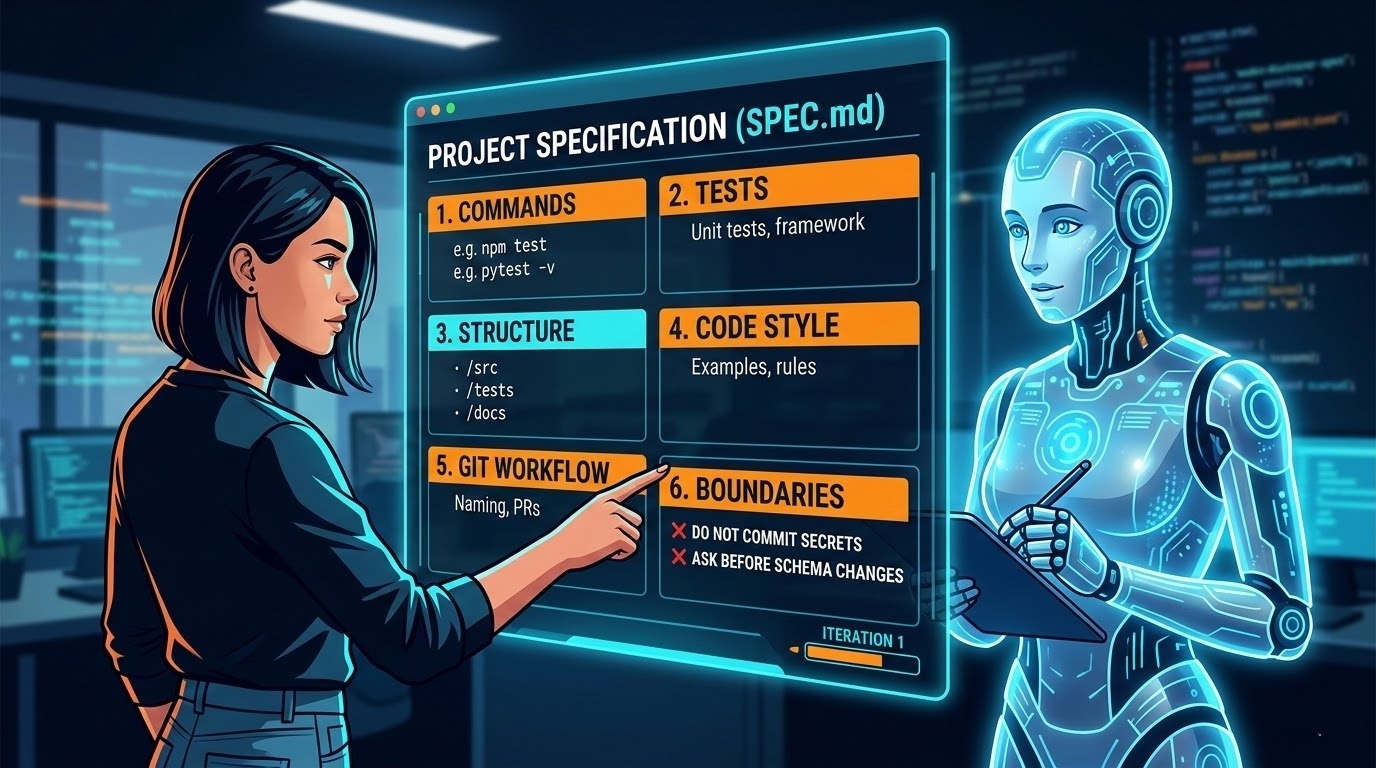
Six core areas: An analysis of over 2,500 Agent configuration files by GitHub reveals a clear pattern: the most effective specifications cover six areas. Use this as a checklist for completeness:
Commands: Put the executable commands at the front - not just the tool names, but the full commands with parameters: `npm test`, `pytest -v`, `npm run build`. The Agent will refer to these commands frequently.
Testing: How to run tests, what framework to use, where the test files are located, and the expected code coverage.
Project structure: Where the source code is, where the tests are, and where the documentation is. Be explicit: "`src/` stores the application code, `tests/` stores the unit tests, and `docs/` stores the documentation."
Code style: A real code snippet showing your style is better than three paragraphs of text description. Include naming conventions, formatting rules, and good output examples.
Git workflow: Branch naming, commit message format, and PR requirements. As long as you write it clearly, the Agent can follow it.
Boundaries: Things that the Agent must never touch - keys, third-party library directories, production environment configurations, specific folders. "Never commit keys" is the most beneficial single constraint that appears in GitHub's research.
Specify your technology stack: Say "React 18 with TypeScript, Vite, and Tailwind CSS" instead of just "a React project." Include version numbers and core dependencies. A vague specification will result in vague code.
Use a consistent format: Clarity is paramount. Many developers use Markdown headings or even XML-like tags to divide sections in the specification because AI models are better at processing structured text than random prose. For example, you can structure the specification like this:
# Project Spec: My team's tasks app
## Objective
* Build a web app for small teams to manage tasks...
## Tech Stack
* React 18+, TypeScript, Vite, Tailwind CSS
* Node.js/Express backend, PostgreSQL, Prisma ORM
## Commands
* Build: `npm run build` (compiles TypeScript, outputs to dist/)
* Test: `npm test` (runs Jest, must pass before commits)
* Lint: `npm run lint --fix` (auto-fixes ESLint errors)
## Project Structure
* `src/` – Application source code
* `tests/` – Unit and integration tests
* `docs/` – Documentation
## Boundaries
* ✅ Always: Run tests before commits, follow naming conventions
* ⚠️ Ask first: Database schema changes, adding dependencies
* 🚫 Never: Commit secrets, edit node_modules/, modify CI config
Organizing to this level not only helps you clarify your thoughts but also helps the AI quickly locate information. Engineers at Anthropic suggest organizing prompts into different sections (such as `
Integrate the specification into your toolchain: Treat the specification as an "executable product" bound to version control and CI/CD. The GitHub Spec Kit adopts a four-stage gated workflow, making the specification the core of the engineering process. Instead of putting the specification aside after writing it, let it drive implementation, checklists, and task decomposition. Your core role is to steer; the programming Agent is responsible for most of the writing work. Each stage has specific tasks, and don't move on to the next stage until the current task is fully verified:
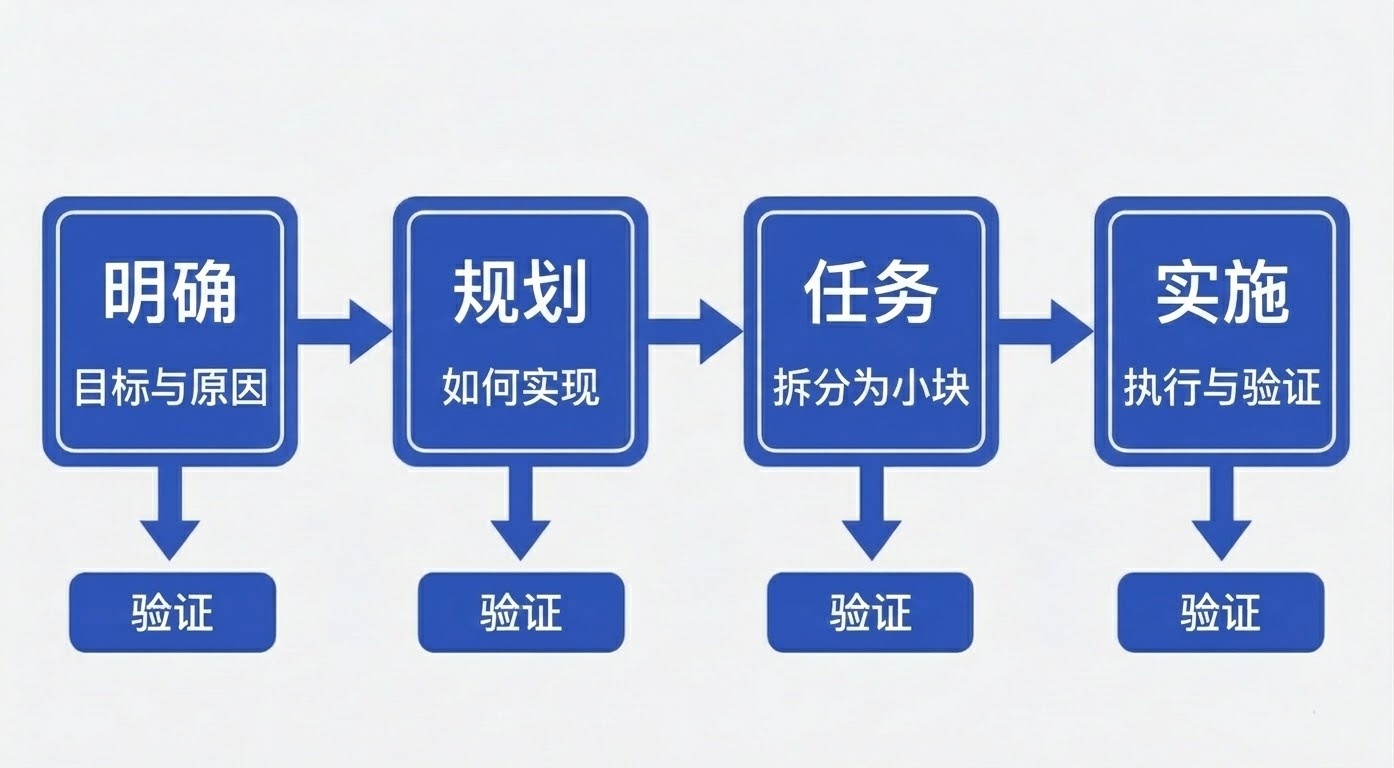
Specify: You provide a summary description of what to build and why, and the programming Agent generates a detailed specification. This is not about the technology stack or application design, but about the user journey, experience, and the definition of success. Who will use it? What problem does it solve? How do users interact with it? Think of it as drawing a blueprint for the user experience you want to create and let the programming Agent fill in the details. This will be a dynamic product that evolves as your understanding deepens.
Plan: Now, get into the technical aspects. You provide the desired technology stack, architecture, and constraints, and the programming Agent generates a comprehensive technical plan. If your company has standardized requirements for certain technologies, state them here. If you need to integrate with legacy systems or have compliance requirements, write them all here. You can ask for multiple options to compare different approaches. If you provide internal documentation, the Agent can even integrate your architectural patterns directly into the plan.
Tasks: The programming Agent breaks down the specification and plan into actual work - small, reviewable modules, each solving a specific problem. Each task should be independently implementable and testable, which is almost like test-driven development for your AI Agent. Instead of getting a vague instruction like "build authentication," you'll get a specific task like "create a user registration interface that validates email formats."
Implement: Your programming Agent processes the tasks one by one (or in parallel). You no longer need to review thousands of lines of code at once but review specific changes for specific problems. The Agent knows what to build (specification), how to build it (plan), and what to do currently (tasks). The key is that your role is to verify in stages: Does the specification understand your intention? Does the plan consider the constraints? Has the AI missed any edge cases? This process has multiple checkpoints built-in, allowing you to evaluate, find loopholes, and correct the direction before moving forward.
This gated workflow prevents what Willison calls "house-of-cards code" - that is, fragile AI output that can't withstand scrutiny. Anthropic's Skills system also provides a similar pattern, allowing you to define reusable Markdown-based behaviors for the Agent to call. By embedding the specification into these workflows, you can ensure that the Agent cannot proceed until the specification is verified, and any changes will be automatically synchronized to task decomposition and testing.
Consider creating `agents.md` for specific roles: For tools like GitHub Copilot, you can create an `agents.md` file to define professional Agent roles - for example, `@docs-agent` for technical writing, `@test-agent` for quality assurance, and `@security-agent` for code review. Each file serves as a specific specification for the behavior, commands, and boundaries of that role. This is very useful when you need multiple Agents to perform different tasks instead of a single jack-of-all-trades assistant.
Design for Agent experience (AX): Just as we design APIs with developer experience (DX) in mind, we should also consider the "Agent experience" when designing specifications. This means using clean, parsable formats: provide OpenAPI schemas for any APIs the Agent will call, a `llms.txt` file for the LLM to call summary documents, and clear type definitions. The Agentic AI Foundation (AAIF) is standardizing tool integration protocols like MCP (Model Context Protocol) - specifications following these patterns are easier for the Agent to understand and execute reliably.
PRD vs SRS mindset: It's helpful to draw on mature documentation practices. For AI Agent specifications, you usually integrate everything into one document (as described above), but considering both perspectives will benefit you greatly. Writing like a PRD ensures that user-centered background ("the reason behind each feature") is included so that the AI doesn't optimize for the wrong goals. Expanding like an SRS ensures that the details required for the AI to actually generate correct code are solidified (for example, which database or API to use). Developers have found that the return on this upfront investment is a significant reduction in communication misunderstandings with the Agent later.
Make the specification a "living document": Don't just write it and forget it. When you and the Agent make decisions or discover new information, update the specification in a timely manner. If the AI has to change the data model or you decide to cut a feature, reflect it in the specification to keep it as the single source of truth. Treat it as a version-controlled document. In a spec-driven workflow, the specification drives implementation, testing, and task decomposition, and the coding stage won't start until the specification is verified. This habit maintains project consistency, especially when you or the Agent takes a break and then comes back to work. Remember, the specification is not just for the AI - it also helps you as a developer maintain an overall view and ensures that the AI's work meets the real requirements.
3. Break tasks into modular prompts and context instead of a single large prompt
Divide and conquer: Give the AI a focused task each time instead of a single all-inclusive prompt.
Experienced AI engineers know that trying to cram an entire project (all requirements, code, instructions) into a single prompt or Agent message is a recipe for chaos. You not only risk hitting the token limit but also may cause the model to lose focus due to the "instruction curse" - too many instructions will make it perform poorly on all of them. The solution is to design the specification and workflow in a modular way, tackling one aspect at a time and only introducing the context required for