Leak of Ultraman's Small Account: OpenAI Entrusts 100% of Code Work to Codex. Engineers Reveal the Operating Logic of Codex's "Brain". Does It Outperform the Claude Architecture?
With one PostgreSQL primary database and 50 read-only replicas, it can handle 800 million users on ChatGPT!
Recently, OpenAI's engineers not only broke this astonishing news but also completely exposed the "brain" of Codex. On the official OpenAI engineering blog homepage, Michael Bolin, an OpenAI engineer and a member of the Technical Staff, published an article titled "Unrolling the Codex Agent Loop", which in - depth revealed the core framework of Codex CLI: the Agent Loop. It also detailed how Codex constructs and manages its context when querying the model, as well as practical notes and best practices applicable to all agent loops built on the Responses API.
After these news spread, they received high attention on technical forums such as Hacker News and social platforms. "The seemingly ordinary technology will ultimately prevail. OpenAI is proving that an excellent architecture is far better than fancy tools."
It's worth mentioning that some netizens revealed that not long ago, an engineer from Anthropic said that "the architecture they used for Claude Code UI is poor and inefficient." And just now, there was a revelation on X: Codex has taken over 100% of OpenAI's code - writing work.
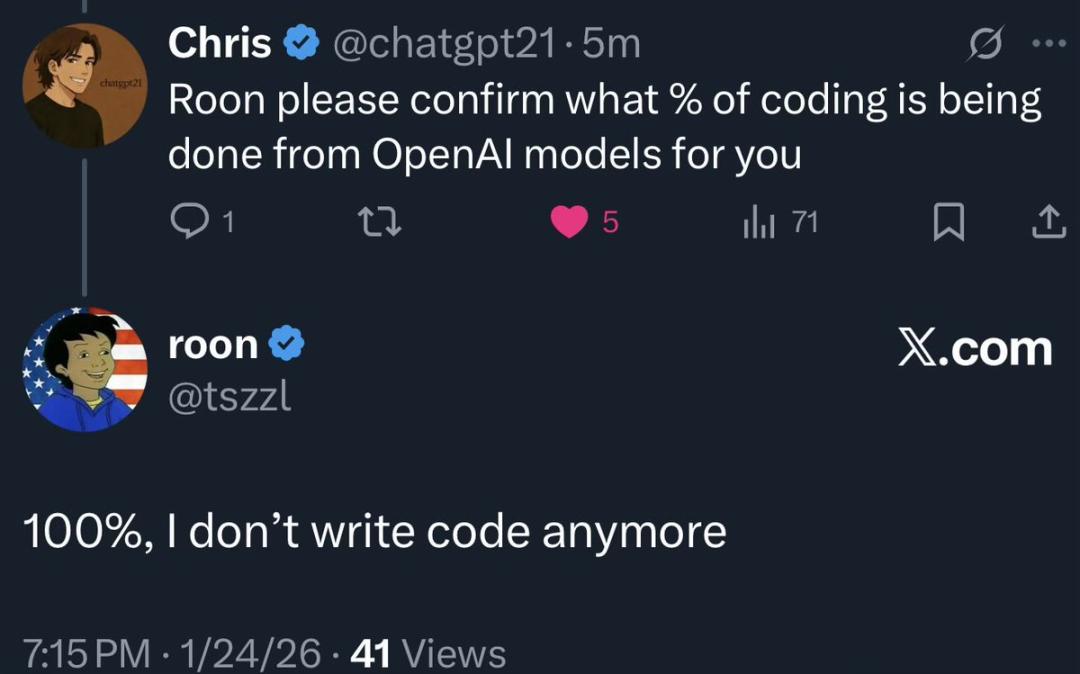
When asked "What percentage of your coding work is based on the OpenAI model?", roon said, "100%. I don't write code anymore." Previously, Sam Altman publicly posted that "roon is my alt account."

Unveiling the "Brain" of Codex
"The core of every AI agent is the Agent Loop, which is responsible for coordinating the interaction between the user, the model, and the tools for model invocation to perform meaningful software work."
It is reported that within OpenAI, "Codex" encompasses a series of software agent products, including Codex CLI, Codex Cloud, and the Codex VS Code plugin, and they are supported by the same framework and execution logic.
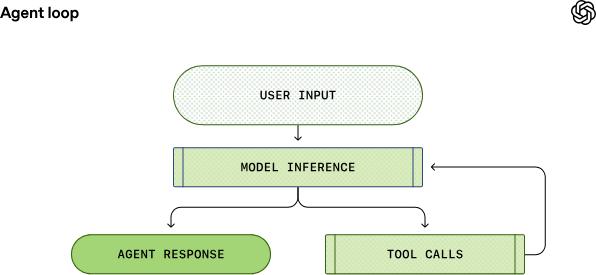
Simplified schematic diagram of the Agent Loop
First, the agent receives input from the user and incorporates it into a set of text instructions prepared for the model, which is called the prompt. The next step is to query the model by sending instructions to it and asking it to generate a response, a process called inference. During the inference process, the text prompt is first converted into a series of input tokens, which are then used to sample the model and generate a new sequence of output tokens. The output tokens are restored to text, which becomes the model's reply. Since tokens are generated step - by - step, this restoration process can be synchronized with the model's operation, which is why many applications based on large language models support streaming output. In practical applications, the inference function is usually encapsulated behind the text API, thus abstracting the details of tokenization.
After the inference step is completed, the model produces two results: (1) Generate a final reply to the user's original input; (2) Require the agent to perform a certain tool invocation operation. In the second case, the agent will perform the tool invocation and append the tool output result to the original prompt. This output result will be used to generate new input content for querying the model again; the agent will then combine this new information and try to complete the task again. This process will repeat until the model stops issuing tool invocation instructions and instead generates a message for the user (in OpenAI's model, this message is called the assistant message). In most cases, this message will directly answer the user's original request or may be a follow - up question to the user.
Since the agent can perform tool invocations that can modify the local environment, its "output" is not limited to the assistant message. In many scenarios, the core output of the software agent is the code written or edited on the user's device. But in any case, each round of interaction will ultimately end with an assistant message, which is a signal for the agent loop to enter the termination state. From the agent's perspective, its task is completed, and the operation control will be returned to the user.
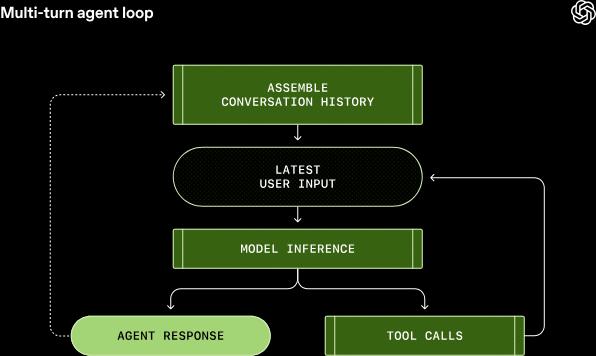
Multi - round agent loop
This means that the richer the conversation content, the longer the prompt for model sampling will be. All models have a context window limit, which is the maximum number of tokens that can be processed in a single inference call. The agent may initiate hundreds of tool invocations in a single conversation round, which may exhaust the capacity of the context window. Therefore, context window management is one of the agent's many responsibilities.
How Does This Agent Loop Work?
It is reported that Codex drives this agent loop through the Responses API. The blog post reveals many actual operating details behind it, including:
Codex does not directly use the user's words for the large model. Instead, it actively "stitches" together a well - designed prompt structure, which covers instructions from multiple roles, and the user's input sentence appears at the end.
There may be multiple rounds of iteration between model inference and tool invocation, and the content of the prompt will continue to increase.
Building the Initial Prompt
As an end - user, when invoking the Responses API, there is no need to specify the prompt for model sampling word - by - word. Just specify various input types in the query, and the Responses API server will decide how to organize this information into a prompt format that the model can process. In the initial prompt, each item in the list is associated with a role. This role determines the weight of the corresponding content, and the priorities from high to low are as follows: system, developer, user, assistant.
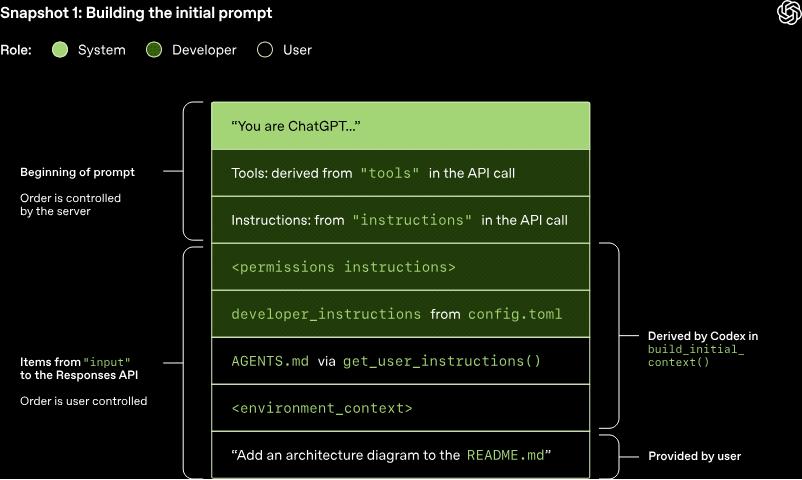
The Responses API receives a JSON payload containing multiple parameters, and three core parameters are:
- Instructions: System (or developer) messages inserted into the model context
- Tools: A list of tools that the model can invoke during the response generation process
- Input: A list of text, image, or file inputs passed to the model
In Codex, if configured, the content of the instructions field will be read from the model instructions file in the ~/.codex/config.toml configuration file; if not configured, the basic instructions associated with the model will be used. The model - specific instructions are stored in the Codex code repository and packaged into the command - line tool. The tools field is a list of tool definitions that conform to the pattern defined by the Responses API. For Codex, this list includes three parts of tools: tools included in the Codex command - line tool, tools provided by the Responses API and open for Codex to use, and custom tools usually provided by the user through the MCP server. The input field of the JSON payload is a list of items. Before adding the user message, Codex will first insert the following items into this input:
A message with the role of developer (role = developer) is used to describe the sandbox environment only applicable to the Codex built - in Shell tool defined in the tools section. That is, other tools (such as those provided by the MCP server) are not restricted by Codex's sandbox and need to implement their own protection rules. This message is built based on a template, and the core content comes from the Markdown code snippets packaged in the Codex command - line tool.
A message with the role of developer, whose content is the value of the developer_instructions configuration read from the user's config.toml configuration file.
A message with the role of user, whose content is the user's instructions; this content does not come from a single file but is aggregated from multiple data sources. Generally speaking, the more specific the instructions, the later they are sorted:
Load the contents of the AGENTS.override.md and AGENTS.md files in the $CODEX_HOME directory
Within the default size limit of 32 kilobytes, traverse from the Git/project root directory corresponding to the current working directory (if it exists) up to the current working directory itself, load the contents of any AGENTS.override.md, AGENTS.md files, or load the contents of any files specified by the project_doc_fallback_filenames parameter in the config.toml configuration file
If relevant skills are configured, the following content will be added: a brief introduction to the skills, the skill metadata corresponding to each skill, and the section on how to use the skills.
A message with the role of user is used to describe the current local operating environment of the agent, which will specify the current working directory and the information of the terminal Shell used by the user.
After Codex completes all the above calculations and initializes the input, it will append the user's message to start the conversation. It should be noted that each element in the input is a JSON object containing three fields: type, role, and content. After Codex constructs the complete JSON payload to be sent to the Responses API, it will initiate an HTTP POST request with an authorization request header according to the configuration method of the Responses API endpoint in ~/.codex/config.toml (if specified, additional HTTP request headers and query parameters will also be added). When the OpenAI Responses API server receives this request, it will use the JSON data to derive the model's prompt information (it should be noted that the custom implementation of the Responses API may use different methods).
It can be seen that the order of the first three items in the prompt is determined by the server, not the client. That is, only the content of the system message in these three items is also controlled by the server, while the tools and instructions are determined by the client. Followed by the input content in the JSON payload, and then the prompt stitching is completed.
Model Sampling
After the prompt is ready, the model starts sampling.
First - round interaction: The HTTP request sent to the Responses API this time will start the first - round interaction of the conversation in Codex. The server will respond in the form of a Server - Sent Events (SSE) stream, and the data of each event is a JSON payload whose type field starts with response. Codex receives this event stream and republishes it as an internal event object that can be called by the client. Events such as response.output_text.delta are used to implement the streaming output function for the user interface, while other events such as response.output_item.added will be converted into objects and appended to the input content for subsequent Responses API calls.
If the first request sent to the Responses API returns two response.output_item.done events, one of type reasoning and one of type function_call, then when querying the model again with the return result of the tool invocation, these events must be reflected in the input field of the JSON. The structure of the final prompt for model sampling in subsequent queries is as follows:
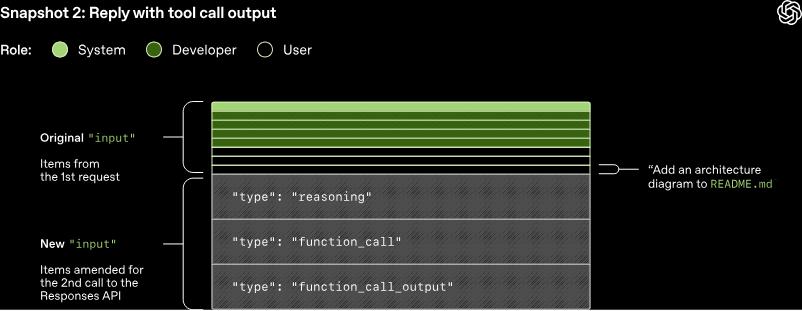
It should be noted that the old prompt is a complete prefix of the new prompt. This design is intentional because it allows users to improve the efficiency of subsequent requests through prompt caching. When the cache hits, the time complexity of model sampling will be reduced from quadratic to linear. The relevant prompt caching documentation of OpenAI has a more detailed description of this mechanism: only when there is a completely matching prefix in the prompt can the cache hit be achieved. To fully utilize the advantages of the cache, static content such as instructions and examples should be placed at the beginning of the prompt, while variable content such as user - specific information should be placed at the end. This principle also applies to pictures and tools, and their content must remain exactly the same in each request.
Based on this principle, the following operations in Codex may cause cache misses:
- Modify the list of tools that the model can invoke during the conversation;
- Change the target model of the Responses API request (in practical scenarios, this will change the third item in the original prompt because this part contains model - specific instructions);
- Modify the sandbox configuration, approval mode, or the current working directory.
Therefore, when developing new features for the command - line tool, the Codex team must carefully consider to avoid new features from destroying the prompt caching mechanism. For example, their initial support for the MCP tool had a bug: the enumeration order of the tools could not be kept consistent, which led to cache misses. It should be noted that the handling of MCP tools is particularly difficult because the MCP server can dynamically modify the list of tools it provides through the notifications/tools/list_changed notification. If this notification is responded to during a long conversation, it is very likely to cause a high - cost cache miss problem.
When possible, for configuration changes that occur during the conversation, they will reflect the changes by appending new messages to the input instead of modifying the existing early messages:
- If the sandbox configuration or approval mode changes, we will insert a new role = developer message in the same format as the original entry;
- If the current working directory changes, we will insert a new role = user message in the same format as the original entry.
It is reported that to ensure performance, OpenAI has invested a lot of effort in achieving cache hits. In addition, they have also focused on managing a core resource: the context window.
The general strategy to avoid exhausting the context window is to compress the conversation once the number of tokens exceeds a certain threshold. Specifically, the original input will be replaced with a new list of items that is more concise and can represent the core content of the conversation, so that the agent can still understand the previous conversation process when continuing to perform the task. The early implementation of the compression function required the user to manually call the /compact command, which would query the Responses API by combining the existing conversation content and custom summary - generation instructions; Codex would then use the returned assistant message containing the conversation summary as the new input for subsequent conversation rounds.
After that, the Responses API was continuously iterated, and a dedicated /responses/compact endpoint was added, which can complete the compression operation more efficiently. This endpoint will return a list of items that can replace the original input to continue the conversation while freeing up more context window space. This list contains a special type = compaction item, and its attached encrypted_content encrypted field is transparently designed to retain the model's potential understanding of the original conversation.
Now, when the number of tokens exceeds the auto_compact_limit automatic compression threshold, Codex will automatically call this endpoint to compress the conversation content.
Extreme Expansion: One Database Handles 800 Million Users
In another technical blog post, OpenAI engineer Bohan Zhang introduced that OpenAI has deeply expanded a single PostgreSQL database through strict technical optimization and solid engineering practices, enabling a single system to support 800 million users and millions of queries per second.
It is reported that for many years, PostgreSQL has been one of the core underlying data systems supporting core products such as ChatGPT and the OpenAI API. In the past year